moca
Learning Management System
working on Cloud, Windows Azure


    e-learning
   in schools
    and enterprises
e-learning on Cloud

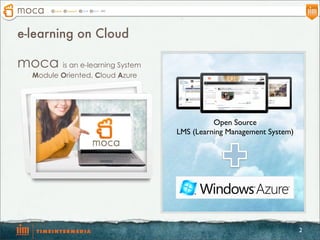
moca is an e-learning System
   Module Oriented, Cloud Azure


                                            Open Source
                                  LMS (Learning Management System)


                                                                     2
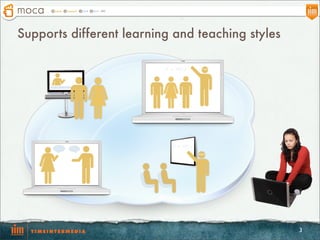
Supports different learning and teaching styles


                                                  3
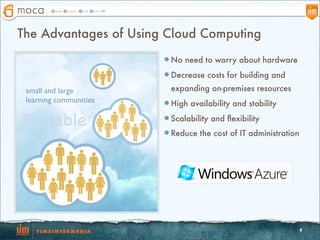
The Advantages of Using Cloud Computing
                        l No need to worry about hardware

                        l Decrease costs for building and

 small and large          expanding on-premises resources
 learning communities   l High availability and stability

Scalable                l Scalability and flexibility

                        l Reduce the cost of IT administration


                                                              4
System Structure Diagram
                           SQL Azure


           Application
                              Storage


                                        5
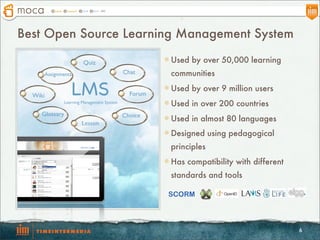
Best Open Source Learning Management System

                         Quiz                          l Used by over 50,000 learning
         Assignments                         Chat        communities

  Wiki             LMS                         Forum
                                                       l Used by over 9 million users
                Learning Management System             l Used in over 200 countries
     Glossary                                Choice    l Used in almost 80 languages
                        Lesson
                                                       l Designed using pedagogical
                                                         principles
                                                       l Has compatibility with different
                                                         standards and tools

                                                        SCORM


                                                                                             6
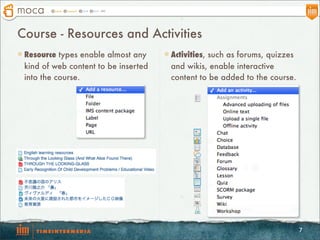
Course - Resources and Activities
l Resource types enable almost any   l Activities, such as forums, quizzes
 kind of web content to be inserted     and wikis, enable interactive
 into the course.                       content to be added to the course.


                                                                               7
Resource - Page
                      The robust Text editor
                        allows the page to
                      display many different
                      kinds of content such
                       as plain text, images,
                            audio, video,
                       embedded code or a
                        combination of all
                               these.


A page resource
creates a link to a
   screen that
   displays the
 content created
  by the teacher.


                                                8
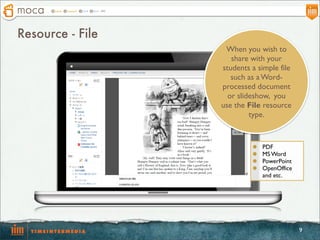
Resource - File
                   When you wish to
                     share with your
                  students a simple file
                     such as a Word-
                  processed document
                    or slideshow, you
                  use the File resource
                           type.


                           l   PDF
                           l   MS Word
                           l   PowerPoint
                           l   OpenOffice
                                and etc.


                                             9
Activity – Assignment (1)


                             The assignment
                              module allows
                            teachers to collect
                                work from
                                 students.


                                                  10
Activity – Assignment (2)
                               Teachers can
                            review work from
                               students and
                             provide feedback
                             including grades.


                                                 11
Activity – Quiz (1)

      The Quiz
    activity module
      allows the
      teacher to
    design and build
        quizzes.


l Multiple choice           Questions are
l True-false
l Short answer questions      kept in the
   and etc.                  Question bank
                             and can be re-
                            used in different
                                quizzes.


                                                12
Activity – Quiz (2)


                      Students might see
                       missed question
                         and correctly
                           answered
                           question.


                                           13
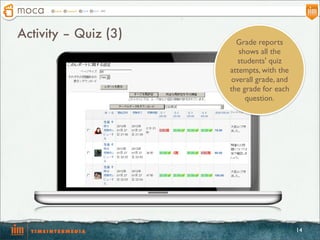
Activity – Quiz (3)
                        Grade reports
                         shows all the
                        students' quiz
                      attempts, with the
                      overall grade, and
                      the grade for each
                           question.


                                           14
Activity – Forum


                       The forum
                      module is an
                     activity where
                      students and
                      teachers can
                   exchange ideas by
                   posting comments.


                                       15
Activity - Chat

 The chat activity
   module allows
   participants to
  have a real-time
    synchronous
   discussion in a
       course.


                     16
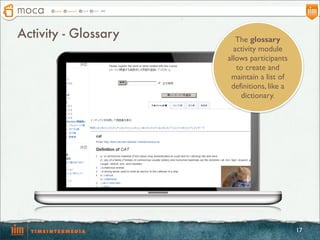
Activity - Glossary      The glossary
                        activity module
                      allows participants
                         to create and
                       maintain a list of
                       definitions, like a
                          dictionary.


                                             17
Activity - Wiki


                     A wiki is a
                    collection of
                   collaboratively
                   authored web
                     documents,
                  without needing
                  to know HTML.


                                     18
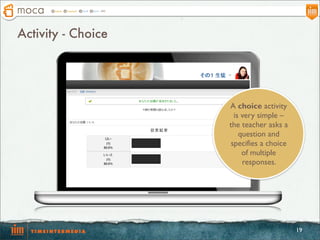
Activity - Choice


                    A choice activity
                      is very simple –
                    the teacher asks a
                        question and
                     specifies a choice
                         of multiple
                         responses.


                                          19
Contact Us

                              productall@timedia.co.jp
                                 TEL +81-3-5362-9009


Company Info
Company Name   Time Intermedia co, ltd.
Address        26-27, Saka-machi, Shinjyuku-ku, Tokyo, 160-0002, Japan
Web Site       http://www.timedia.co.jp/

                                                                         20

Moca

  • 1.
    moca Learning Management System workingon Cloud, Windows Azure e-learning in schools and enterprises
  • 2.
    e-learning on Cloud mocais an e-learning System Module Oriented, Cloud Azure Open Source LMS (Learning Management System) 2
  • 3.
    Supports different learningand teaching styles 3
  • 4.
    The Advantages ofUsing Cloud Computing l No need to worry about hardware l Decrease costs for building and small and large expanding on-premises resources learning communities l High availability and stability Scalable l Scalability and flexibility l Reduce the cost of IT administration 4
  • 5.
    System Structure Diagram SQL Azure Application Storage 5
  • 6.
    Best Open SourceLearning Management System Quiz l Used by over 50,000 learning Assignments Chat communities Wiki LMS Forum l Used by over 9 million users Learning Management System l Used in over 200 countries Glossary Choice l Used in almost 80 languages Lesson l Designed using pedagogical principles l Has compatibility with different standards and tools SCORM 6
  • 7.
    Course - Resourcesand Activities l Resource types enable almost any l Activities, such as forums, quizzes kind of web content to be inserted and wikis, enable interactive into the course. content to be added to the course. 7
  • 8.
    Resource - Page The robust Text editor allows the page to display many different kinds of content such as plain text, images, audio, video, embedded code or a combination of all these. A page resource creates a link to a screen that displays the content created by the teacher. 8
  • 9.
    Resource - File When you wish to share with your students a simple file such as a Word- processed document or slideshow, you use the File resource type. l PDF l MS Word l PowerPoint l OpenOffice and etc. 9
  • 10.
    Activity – Assignment(1) The assignment module allows teachers to collect work from students. 10
  • 11.
    Activity – Assignment(2) Teachers can review work from students and provide feedback including grades. 11
  • 12.
    Activity – Quiz(1) The Quiz activity module allows the teacher to design and build quizzes. l Multiple choice Questions are l True-false l Short answer questions kept in the and etc. Question bank and can be re- used in different quizzes. 12
  • 13.
    Activity – Quiz(2) Students might see missed question and correctly answered question. 13
  • 14.
    Activity – Quiz(3) Grade reports shows all the students' quiz attempts, with the overall grade, and the grade for each question. 14
  • 15.
    Activity – Forum The forum module is an activity where students and teachers can exchange ideas by posting comments. 15
  • 16.
    Activity - Chat The chat activity module allows participants to have a real-time synchronous discussion in a course. 16
  • 17.
    Activity - Glossary The glossary activity module allows participants to create and maintain a list of definitions, like a dictionary. 17
  • 18.
    Activity - Wiki A wiki is a collection of collaboratively authored web documents, without needing to know HTML. 18
  • 19.
    Activity - Choice A choice activity is very simple – the teacher asks a question and specifies a choice of multiple responses. 19
  • 20.
    Contact Us productall@timedia.co.jp TEL +81-3-5362-9009 Company Info Company Name Time Intermedia co, ltd. Address 26-27, Saka-machi, Shinjyuku-ku, Tokyo, 160-0002, Japan Web Site http://www.timedia.co.jp/ 20