@rfelipesilva @mvbitt
RDS
Windows Azure
Dev
Ops
SQL
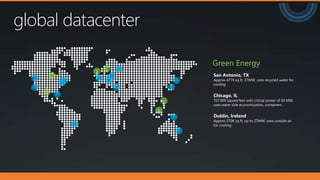
global datacenter
San Antonio, TX
Approx 477K sq ft, 27MW, uses recycled water for
cooling
Chicago, IL
707,000 square feet with critical power of 60 MW,
uses water side economization, containers
Dublin, Ireland
Approx 570K sq ft, up to 27MW, uses outside air
for cooling.
Green Energy
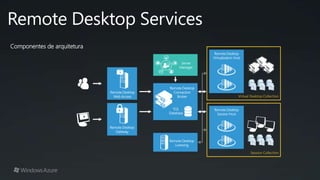
Remote Desktop
Web Access
Remote Desktop
Gateway
Remote Desktop
Licensing
Remote Desktop
Session Host
Componentes de arquitetura
Server
Manager
SQL
Database
Remote Desktop
Connection
Broker
Remote Desktop
Virtualization Host
Criando um ambiente
RDS no Azure
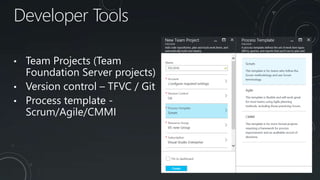
Developer Tools
• Team Projects (Team
Foundation Server projects)
• Version control – TFVC / Git
• Process template -
Scrum/Agile/CMMI
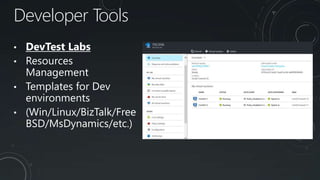
Developer Tools
• DevTest Labs
• Resources
Management
• Templates for Dev
environments
• (Win/Linux/BizTalk/Free
BSD/MsDynamics/etc.)
MARCUS VINÍCIUS BITTENCOURT
• MVP Data Plataform
• PASS Regional Mentor – Cordenador Grupos de Usuários Brasil
• Chapter Leader do Grupo de usuários SQL Server RS
• Idealizador do programa [Além do SQL] e do canal do youtube SQL8K
• @mvbitt
• iSQLServer.wordpress.com
• youtube.com/sql8k
www.sqlserverRS.com.br
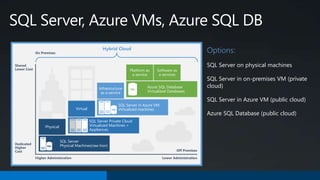
Options:
SQL Server on physical machines
SQL Server in on-premises VM (private
cloud)
SQL Server in Azure VM (public cloud)
Azure SQL Database (public cloud)
SQL Server, Azure VMs, Azure SQL DB
Shared
Lower Cost
Dedicated
Higher
Cost
Higher Administration Lower Administration
Off Premises
Hybrid Cloud
Physical
SQL Server
Physical Machines(raw Iron)SQL
Virtual
SQL Server Private Cloud
Virtualized Machines +
Appliances
Infrastructure
as a service
SQL Server in Azure VM
Virtualized machinesSQL
Platform as
a service
Software as
a services
Azure SQL Database
Virtualized Databases
SQL
On Premises
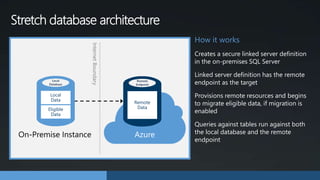
Stretch database architecture
How it works
Creates a secure linked server definition
in the on-premises SQL Server
Linked server definition has the remote
endpoint as the target
Provisions remote resources and begins
to migrate eligible data, if migration is
enabled
Queries against tables run against both
the local database and the remote
endpoint
Remote
Endpoint
Remote
Data
Azure
InternetBoundary
Local
Database
Local
Data
Eligible
Data
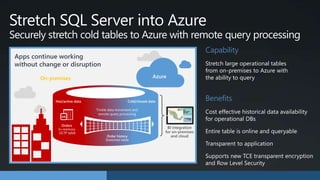
Capability
Stretch large operational tables
from on-premises to Azure with
the ability to query
Benefits
BI integration
for on-premises
and cloud
Cold/closed data
Orders
In-memory
OLTP table
Hot/active data
Order history
Stretched table
Trickle data movement and
remote query processing
On-premises Azure
Stretch SQL Server into Azure
Securely stretch cold tables to Azure with remote query processing
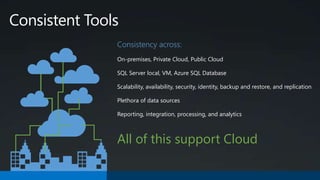
Consistent Tools
Consistency across:
On-premises, Private Cloud, Public Cloud
SQL Server local, VM, Azure SQL Database
Scalability, availability, security, identity, backup and restore, and replication
Plethora of data sources
Reporting, integration, processing, and analytics
All of this support Cloud
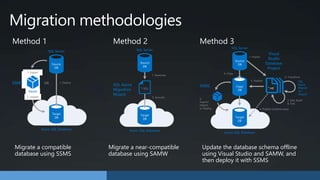
Method 1 Method 2 Method 3
Target
DB
Azure SQL Database
SQL Server
SSMS
2. Import
1. DeployOR
.bacpac
1. Export
Source
DB
Target
DB
Azure SQL Database
SQL Server
SQL Azure
Migration
Wizard
2. Execute
1. Generate
T-SQL
Source
DB
Target
DB
Azure SQL Database
SQL Server
SSMS
6.
Export/
Import
or Deploy
SQL
Azure
Migrati
on
Wizard
4. Copy
Copy
DB
Source
DB
5. Publish
1. Import
Visual
Studio
Database
Project
2. Transform
3. Edit, Build
& Test
*.sql
4. Publish (schema only)
Migrate a compatible
database using SSMS
Migrate a near-compatible
database using SAMW
Update the database schema offline
using Visual Studio and SAMW, and
then deploy it with SSMS
Migration methodologies
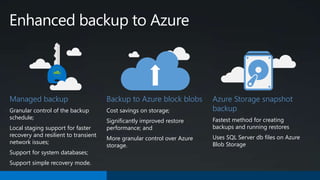
Managed backup
Granular control of the backup
schedule;
Local staging support for faster
recovery and resilient to transient
network issues;
Support for system databases;
Support simple recovery mode.
Backup to Azure block blobs
Cost savings on storage;
Significantly improved restore
performance; and
More granular control over Azure
storage.
Azure Storage snapshot
backup
Fastest method for creating
backups and running restores
Uses SQL Server db files on Azure
Blob Storage
Enhanced backup to Azure
Criando um ambiente
SQL DB no Azure
Get started.
http://WindowsAzure.com
@ Inc
Rafael@RafaelFelipe.com
Rafael_Felipe@Dell.com
Obrigado!
@ Inc
Luiz_miranda@Dell.com

TDC2016POA | Trilha Cloud Computing - Microsoft Azure ? From Zero To Hero!

  • 1.
  • 2.
  • 4.
    global datacenter San Antonio,TX Approx 477K sq ft, 27MW, uses recycled water for cooling Chicago, IL 707,000 square feet with critical power of 60 MW, uses water side economization, containers Dublin, Ireland Approx 570K sq ft, up to 27MW, uses outside air for cooling. Green Energy
  • 6.
    Remote Desktop Web Access RemoteDesktop Gateway Remote Desktop Licensing Remote Desktop Session Host Componentes de arquitetura Server Manager SQL Database Remote Desktop Connection Broker Remote Desktop Virtualization Host
  • 7.
  • 9.
    Developer Tools • TeamProjects (Team Foundation Server projects) • Version control – TFVC / Git • Process template - Scrum/Agile/CMMI
  • 10.
    Developer Tools • DevTestLabs • Resources Management • Templates for Dev environments • (Win/Linux/BizTalk/Free BSD/MsDynamics/etc.)
  • 12.
    MARCUS VINÍCIUS BITTENCOURT •MVP Data Plataform • PASS Regional Mentor – Cordenador Grupos de Usuários Brasil • Chapter Leader do Grupo de usuários SQL Server RS • Idealizador do programa [Além do SQL] e do canal do youtube SQL8K • @mvbitt • iSQLServer.wordpress.com • youtube.com/sql8k www.sqlserverRS.com.br
  • 13.
    Options: SQL Server onphysical machines SQL Server in on-premises VM (private cloud) SQL Server in Azure VM (public cloud) Azure SQL Database (public cloud) SQL Server, Azure VMs, Azure SQL DB Shared Lower Cost Dedicated Higher Cost Higher Administration Lower Administration Off Premises Hybrid Cloud Physical SQL Server Physical Machines(raw Iron)SQL Virtual SQL Server Private Cloud Virtualized Machines + Appliances Infrastructure as a service SQL Server in Azure VM Virtualized machinesSQL Platform as a service Software as a services Azure SQL Database Virtualized Databases SQL On Premises
  • 14.
    Stretch database architecture Howit works Creates a secure linked server definition in the on-premises SQL Server Linked server definition has the remote endpoint as the target Provisions remote resources and begins to migrate eligible data, if migration is enabled Queries against tables run against both the local database and the remote endpoint Remote Endpoint Remote Data Azure InternetBoundary Local Database Local Data Eligible Data
  • 15.
    Capability Stretch large operationaltables from on-premises to Azure with the ability to query Benefits BI integration for on-premises and cloud Cold/closed data Orders In-memory OLTP table Hot/active data Order history Stretched table Trickle data movement and remote query processing On-premises Azure Stretch SQL Server into Azure Securely stretch cold tables to Azure with remote query processing
  • 16.
    Consistent Tools Consistency across: On-premises,Private Cloud, Public Cloud SQL Server local, VM, Azure SQL Database Scalability, availability, security, identity, backup and restore, and replication Plethora of data sources Reporting, integration, processing, and analytics All of this support Cloud
  • 17.
    Method 1 Method2 Method 3 Target DB Azure SQL Database SQL Server SSMS 2. Import 1. DeployOR .bacpac 1. Export Source DB Target DB Azure SQL Database SQL Server SQL Azure Migration Wizard 2. Execute 1. Generate T-SQL Source DB Target DB Azure SQL Database SQL Server SSMS 6. Export/ Import or Deploy SQL Azure Migrati on Wizard 4. Copy Copy DB Source DB 5. Publish 1. Import Visual Studio Database Project 2. Transform 3. Edit, Build & Test *.sql 4. Publish (schema only) Migrate a compatible database using SSMS Migrate a near-compatible database using SAMW Update the database schema offline using Visual Studio and SAMW, and then deploy it with SSMS Migration methodologies
  • 18.
    Managed backup Granular controlof the backup schedule; Local staging support for faster recovery and resilient to transient network issues; Support for system databases; Support simple recovery mode. Backup to Azure block blobs Cost savings on storage; Significantly improved restore performance; and More granular control over Azure storage. Azure Storage snapshot backup Fastest method for creating backups and running restores Uses SQL Server db files on Azure Blob Storage Enhanced backup to Azure
  • 19.
  • 20.
  • 21.

Editor's Notes

  • #16 Source: https://msdn.microsoft.com/en-us/library/mt169378(v=sql.130).aspx Concepts and architecture for Stretch Database Terms Local database. The on-premises SQL Server 2016 Community Technology Preview 2 (CTP2) database. Remote endpoint. The location in Microsoft Azure that contains the database’s remote data. In SQL Server 2016 Community Technology Preview 2 (CTP2), this is an Azure SQL Database server. This is subject to change in the future. Local data. Data in a database with Stretch Database enabled that will not be moved to Azure based on the Stretch Database configuration of the tables in the database. Eligible data. Data in a database with Stretch Database enabled that has not yet been moved, but will be moved to Azure based on the Stretch Database configuration of the tables in the database. Remote data. Data in a database with Stretch Database enabled that has already been moved to Azure. Architecture Stretch Database leverages the resources in Microsoft Azure to offload archival data storage and query processing. When you enable Stretch Database on a database, it creates a secure linked server definition in the on-premises SQL Server. This linked server definition has the remote endpoint as the target. When you enable Stretch Database on a table in the database, it provisions remote resources and begins to migrate eligible data, if migration is enabled. Queries against tables with Stretch Database enabled automatically run against both the local database and the remote endpoint. Stretch Database leverages processing power in Azure to run queries against remote data by rewriting the query. You can see this rewriting as a "remote query" operator in the new query plan.
  • #17 Source: https://msdn.microsoft.com/en-us/library/dn935011(v=sql.130).aspx Stretch Database lets you archive your historical data transparently and securely. In SQL Server 2016 Community Technology Preview 2 (CTP2), Stretch Database stores your historical data in the Microsoft Azure cloud. After you enable Stretch Database, it silently migrates your historical data to an Azure SQL Database. You don't have to change existing queries and client apps. You continue to have seamless access to both local and remote data. Your local queries and database operations against current data typically run faster. You typically enjoy reduced cost and complexity.
  • #19 Deciding which method to use If you anticipate that a database can be migrated without change you should use recipe 1 which is quick and easy. If you are uncertain, start by exporting a schema-only BACPAC from the database, as described in method 1. If the export succeeds with no errors then you can use method 1 to migrate the database with its data. If you encounter errors during the export use the SQL Azure Migration Wizard (SAMW) to process the database in schema-only mode as described in method 2. If SAMW reports no errors then method 2 can be used. If SAMW reports that the schema needs additional work then, unless it needs only simple fixes, it is best to use method 3 and correct the database schema offline in Visual Studio using a combination of SAMW and manually applied schema changes. A copy of the source database is then updated in situ and then migrated to Azure using method 1.