Data Virtualization & SQL Server 2019
presented by: Matthew Bowers | Director – Data & Analytics
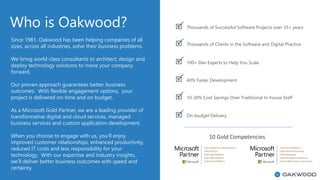
Who is Oakwood?
10 Gold Competencies
Since 1981, Oakwood has been helping companies of all
sizes, across all industries, solve their business problems.
We bring world-class consultants to architect, design and
deploy technology solutions to move your company
forward.
Our proven approach guarantees better business
outcomes. With flexible engagement options, your
project is delivered on-time and on budget.
As a Microsoft Gold Partner, we are a leading provider of
transformative digital and cloud services, managed
business services and custom application development.
When you choose to engage with us, you’ll enjoy
improved customer relationships, enhanced productivity,
reduced IT costs and less responsibility for your
technology. With our expertise and industry insights,
we’ll deliver better business outcomes with speed and
certainty.
Thousands of Successful Software Projects over 35+ years
100+ Dev Experts to Help You Scale
40% Faster Development
10-30% Cost Savings Over Traditional In-house Staff
On-budget Delivery
Thousands of Clients in the Software and Digital Practice
Microsoft Cloud Solution Provider
With Microsoft’s Cloud Solutions Partner (CSP) Program,
Oakwood can provide and help manage your Azure and
Office 365 licenses, giving you the flexibility and scalability
your enterprise needs. Also, when used with our Managed
Services, you’ll have the peace of mind knowing that your
Azure usage will be monitored and optimized by our team
of in-house experts.
Microsoft Cloud Solutions Provider strengths
Tier 1 Cloud Solution Provider
• Access to additional advisory services
Provision Any O365 or Azure Resources
• Work with you to select the appropriate SKU for every
situation
Microsoft Gold Partner
• More impactful Microsoft communications
• Premium Support
• Deeper understanding of the Microsoft ecosystem
Actively manage spend to optimize service without overpaying
• More impactful Microsoft communications
• Premium Support
• Deeper understanding of the Microsoft ecosystem
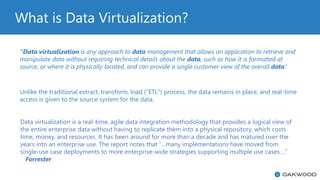
What is Data Virtualization?
“Data virtualization is any approach to data management that allows an application to retrieve and
manipulate data without requiring technical details about the data, such as how it is formatted at
source, or where it is physically located, and can provide a single customer view of the overall data.”
Unlike the traditional extract, transform, load ("ETL") process, the data remains in place, and real-time
access is given to the source system for the data.
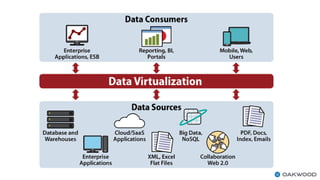
Data virtualization is a real-time, agile data integration methodology that provides a logical view of
the entire enterprise data without having to replicate them into a physical repository, which costs
time, money, and resources. It has been around for more than a decade and has matured over the
years into an enterprise use. The report notes that “…many implementations have moved from
single-use case deployments to more enterprise-wide strategies supporting multiple use cases….”
Forrester
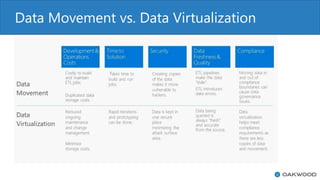
Data Movement vs. Data Virtualization
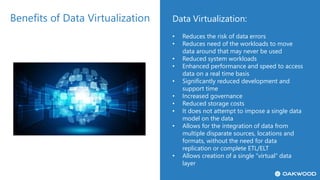
Benefits of Data Virtualization Data Virtualization:
• Reduces the risk of data errors
• Reduces need of the workloads to move
data around that may never be used
• Reduced system workloads
• Enhanced performance and speed to access
data on a real time basis
• Significantly reduced development and
support time
• Increased governance
• Reduced storage costs
• It does not attempt to impose a single data
model on the data
• Allows for the integration of data from
multiple disparate sources, locations and
formats, without the need for data
replication or complete ETL/ELT
• Allows creation of a single “virtual” data
layer
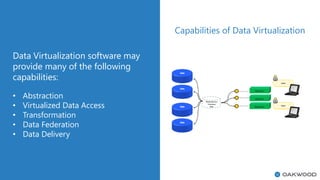
Capabilities of Data Virtualization
Data Virtualization software may
provide many of the following
capabilities:
• Abstraction
• Virtualized Data Access
• Transformation
• Data Federation
• Data Delivery
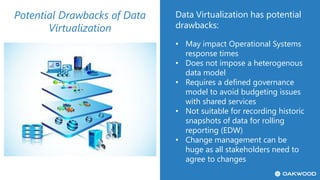
Potential Drawbacks of Data
Virtualization
Data Virtualization has potential
drawbacks:
• May impact Operational Systems
response times
• Does not impose a heterogenous
data model
• Requires a defined governance
model to avoid budgeting issues
with shared services
• Not suitable for recording historic
snapshots of data for rolling
reporting (EDW)
• Change management can be
huge as all stakeholders need to
agree to changes
Not Always the Best Option
Data Virtualization is not a “be all
to end all” and should not be
used in certain use cases:
• Operational Systems or data stores
where response times are key critical
success factors
• When a heterogenous data model is
required
• Use case requiring the need to build
historical data snapshots
• When there is need for significant
data transformation or cleansing
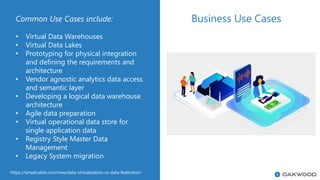
Common Use Cases include:
• Virtual Data Warehouses
• Virtual Data Lakes
• Prototyping for physical integration
and defining the requirements and
architecture
• Vendor agnostic analytics data access
and semantic layer
• Developing a logical data warehouse
architecture
• Agile data preparation
• Virtual operational data store for
single application data
• Registry Style Master Data
Management
• Legacy System migration
Business Use Cases
https://simplicable.com/new/data-virtualization-vs-data-federation
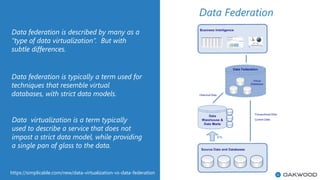
Data federation is described by many as a
“type of data virtualization”. But with
subtle differences.
Data federation is typically a term used for
techniques that resemble virtual
databases, with strict data models.
Data Federation
Data virtualization is a term typically
used to describe a service that does not
impost a strict data model, while providing
a single pan of glass to the data.
https://simplicable.com/new/data-virtualization-vs-data-federation
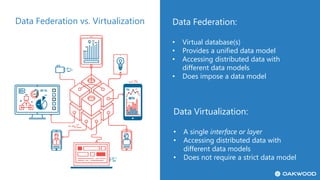
Data Federation vs. Virtualization Data Federation:
• Virtual database(s)
• Provides a unified data model
• Accessing distributed data with
different data models
• Does impose a data model
Data Virtualization:
• A single interface or layer
• Accessing distributed data with
different data models
• Does not require a strict data model
The Microsoft Story
• Arguably one of the most eagerlyanticipatednewfeaturesofMicrosoftSQLServerinthenewreleaseofSQLServer2019,
isdatavirtualization
• SQLServer2016addedPolyBasethatprovidessomelimiteddatavirtualizationcapabilitiesagainstdatastoredinHadoopand
AzureBlobStorageandAzureDataLake
• In2019,thisfunctionalityhasbeenexpandedtoincludeSQLServer,Oracle,TeradataandMongoDB
• DatavirtualizationinSQLServer2019isaccomplishedusingsomesignificantenhancementsmadetoPolyBase,andtheuseof
anexternaltable
• For more information: https://docs.microsoft.com/en-us/sql/relational-databases/polybase/polybase-
guide?view=sql-server-ver15
The Microsoft Story
• PolyBaseisusedtoconnecttonumerousdatasourcesandfileformats
• InadditiontoPolyBase,theotherfeaturesetrelatedtodatavirtualizationthatallowsforthecombinationoflargevolumesof
relationalandnon-relationaldata,isBigDataclusters
• SQLServer2019bigdataclusterswiththeenhancementstoPolyBaseactasavirtualdatalayertointegratestructuredand
unstructureddatafromacrosstheentiredataestate(SQLServer,AzureSQLDatabase,AzureSQLDataWarehouse,Azure
CosmosDB,MySQL,PostgreSQL,MongoDB,Oracle,Teradata,HDFS,BlobStorage,AzureDataLakeStore)usingfamiliar
programmingframeworksanddataanalysistools: (JamesSerra)
• YoucanvirtualizethedatainaSQLServerinstancesothatitcanbequeriedtherelikeanyothertableinSQLServer
➢ Install and Configure SQL 2019
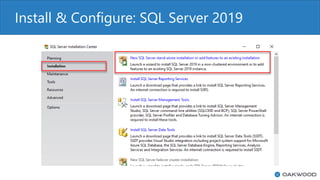
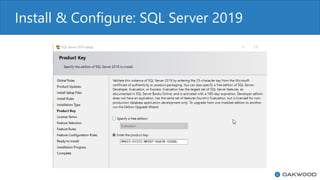
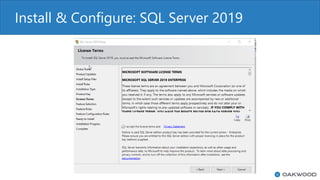
Install & Configure: SQL Server 2019
Install & Configure
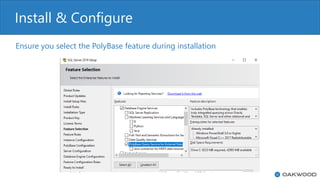
Ensure you select the PolyBase feature during installation
Install & Configure
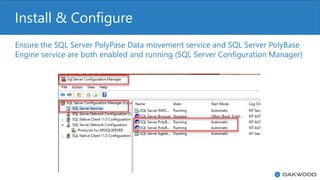
Ensure the SQL Server PolyPase Data movement service and SQL Server PolyBase
Engine service are both enabled and running (SQL Server Configuration Manager)
Install & Configure
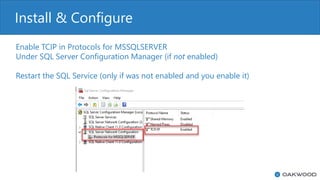
Enable TCIP in Protocols for MSSQLSERVER
Under SQL Server Configuration Manager (if not enabled)
Restart the SQL Service (only if was not enabled and you enable it)
Install & Configure
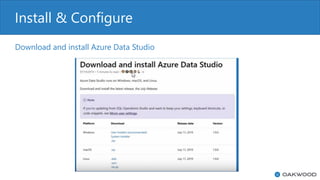
Download and install Azure Data Studio
Install & Configure
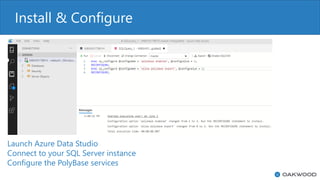
Launch Azure Data Studio
Connect to your SQL Server instance
Configure the PolyBase services
Install & Configure
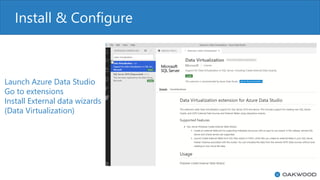
Launch Azure Data Studio
Go to extensions
Install External data wizards
(Data Virtualization)
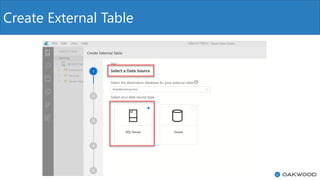
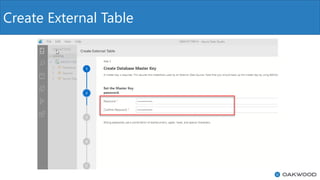
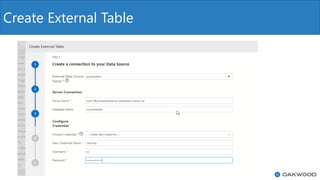
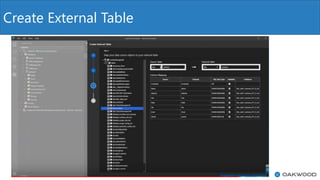
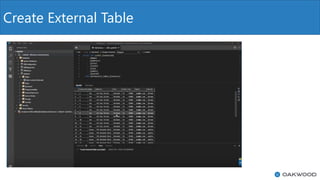
Create an External Table
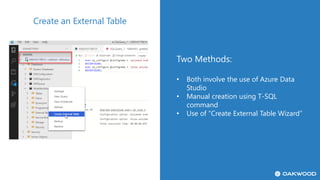
Two Methods:
• Both involve the use of Azure Data
Studio
• Manual creation using T-SQL
command
• Use of “Create External Table Wizard”
Create an External Table
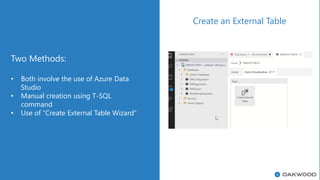
Two Methods:
• Both involve the use of Azure Data
Studio
• Manual creation using T-SQL
command
• Use of “Create External Table Wizard”
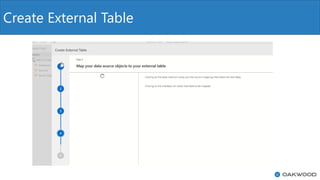
Create External Table
Questions
What’s Next?
• Onsite Lunch and Learn
• Demo Session
• MTC Architecture Design Session
• Proof of Concept
THANK YOU!
Matthew Bowers
Director–DataandAnalytics
618.972.2152
mbowers@oakwoodsys.com
OFFICE LOCATIONS
St. Louis: 1001 Craig Rd. Suite 305 | St. Louis, MO 63146
Kansas City: 1828 Walnut Street 3rd Floor | Kansas City, MO 64108
Phone: (314) 824-3000
Email: marketing@oakwoodsys.com
www.oakwoodsys.com

SQL Server 2019 Data Virtualization

  • 1.
    Data Virtualization &SQL Server 2019 presented by: Matthew Bowers | Director – Data & Analytics
  • 2.
    Who is Oakwood? 10Gold Competencies Since 1981, Oakwood has been helping companies of all sizes, across all industries, solve their business problems. We bring world-class consultants to architect, design and deploy technology solutions to move your company forward. Our proven approach guarantees better business outcomes. With flexible engagement options, your project is delivered on-time and on budget. As a Microsoft Gold Partner, we are a leading provider of transformative digital and cloud services, managed business services and custom application development. When you choose to engage with us, you’ll enjoy improved customer relationships, enhanced productivity, reduced IT costs and less responsibility for your technology. With our expertise and industry insights, we’ll deliver better business outcomes with speed and certainty. Thousands of Successful Software Projects over 35+ years 100+ Dev Experts to Help You Scale 40% Faster Development 10-30% Cost Savings Over Traditional In-house Staff On-budget Delivery Thousands of Clients in the Software and Digital Practice
  • 3.
    Microsoft Cloud SolutionProvider With Microsoft’s Cloud Solutions Partner (CSP) Program, Oakwood can provide and help manage your Azure and Office 365 licenses, giving you the flexibility and scalability your enterprise needs. Also, when used with our Managed Services, you’ll have the peace of mind knowing that your Azure usage will be monitored and optimized by our team of in-house experts. Microsoft Cloud Solutions Provider strengths Tier 1 Cloud Solution Provider • Access to additional advisory services Provision Any O365 or Azure Resources • Work with you to select the appropriate SKU for every situation Microsoft Gold Partner • More impactful Microsoft communications • Premium Support • Deeper understanding of the Microsoft ecosystem Actively manage spend to optimize service without overpaying • More impactful Microsoft communications • Premium Support • Deeper understanding of the Microsoft ecosystem
  • 4.
    What is DataVirtualization? “Data virtualization is any approach to data management that allows an application to retrieve and manipulate data without requiring technical details about the data, such as how it is formatted at source, or where it is physically located, and can provide a single customer view of the overall data.” Unlike the traditional extract, transform, load ("ETL") process, the data remains in place, and real-time access is given to the source system for the data. Data virtualization is a real-time, agile data integration methodology that provides a logical view of the entire enterprise data without having to replicate them into a physical repository, which costs time, money, and resources. It has been around for more than a decade and has matured over the years into an enterprise use. The report notes that “…many implementations have moved from single-use case deployments to more enterprise-wide strategies supporting multiple use cases….” Forrester
  • 6.
    Data Movement vs.Data Virtualization
  • 7.
    Benefits of DataVirtualization Data Virtualization: • Reduces the risk of data errors • Reduces need of the workloads to move data around that may never be used • Reduced system workloads • Enhanced performance and speed to access data on a real time basis • Significantly reduced development and support time • Increased governance • Reduced storage costs • It does not attempt to impose a single data model on the data • Allows for the integration of data from multiple disparate sources, locations and formats, without the need for data replication or complete ETL/ELT • Allows creation of a single “virtual” data layer
  • 8.
    Capabilities of DataVirtualization Data Virtualization software may provide many of the following capabilities: • Abstraction • Virtualized Data Access • Transformation • Data Federation • Data Delivery
  • 9.
    Potential Drawbacks ofData Virtualization Data Virtualization has potential drawbacks: • May impact Operational Systems response times • Does not impose a heterogenous data model • Requires a defined governance model to avoid budgeting issues with shared services • Not suitable for recording historic snapshots of data for rolling reporting (EDW) • Change management can be huge as all stakeholders need to agree to changes
  • 10.
    Not Always theBest Option Data Virtualization is not a “be all to end all” and should not be used in certain use cases: • Operational Systems or data stores where response times are key critical success factors • When a heterogenous data model is required • Use case requiring the need to build historical data snapshots • When there is need for significant data transformation or cleansing
  • 11.
    Common Use Casesinclude: • Virtual Data Warehouses • Virtual Data Lakes • Prototyping for physical integration and defining the requirements and architecture • Vendor agnostic analytics data access and semantic layer • Developing a logical data warehouse architecture • Agile data preparation • Virtual operational data store for single application data • Registry Style Master Data Management • Legacy System migration Business Use Cases https://simplicable.com/new/data-virtualization-vs-data-federation
  • 12.
    Data federation isdescribed by many as a “type of data virtualization”. But with subtle differences. Data federation is typically a term used for techniques that resemble virtual databases, with strict data models. Data Federation Data virtualization is a term typically used to describe a service that does not impost a strict data model, while providing a single pan of glass to the data. https://simplicable.com/new/data-virtualization-vs-data-federation
  • 13.
    Data Federation vs.Virtualization Data Federation: • Virtual database(s) • Provides a unified data model • Accessing distributed data with different data models • Does impose a data model Data Virtualization: • A single interface or layer • Accessing distributed data with different data models • Does not require a strict data model
  • 14.
    The Microsoft Story •Arguably one of the most eagerlyanticipatednewfeaturesofMicrosoftSQLServerinthenewreleaseofSQLServer2019, isdatavirtualization • SQLServer2016addedPolyBasethatprovidessomelimiteddatavirtualizationcapabilitiesagainstdatastoredinHadoopand AzureBlobStorageandAzureDataLake • In2019,thisfunctionalityhasbeenexpandedtoincludeSQLServer,Oracle,TeradataandMongoDB • DatavirtualizationinSQLServer2019isaccomplishedusingsomesignificantenhancementsmadetoPolyBase,andtheuseof anexternaltable • For more information: https://docs.microsoft.com/en-us/sql/relational-databases/polybase/polybase- guide?view=sql-server-ver15
  • 15.
    The Microsoft Story •PolyBaseisusedtoconnecttonumerousdatasourcesandfileformats • InadditiontoPolyBase,theotherfeaturesetrelatedtodatavirtualizationthatallowsforthecombinationoflargevolumesof relationalandnon-relationaldata,isBigDataclusters • SQLServer2019bigdataclusterswiththeenhancementstoPolyBaseactasavirtualdatalayertointegratestructuredand unstructureddatafromacrosstheentiredataestate(SQLServer,AzureSQLDatabase,AzureSQLDataWarehouse,Azure CosmosDB,MySQL,PostgreSQL,MongoDB,Oracle,Teradata,HDFS,BlobStorage,AzureDataLakeStore)usingfamiliar programmingframeworksanddataanalysistools: (JamesSerra) • YoucanvirtualizethedatainaSQLServerinstancesothatitcanbequeriedtherelikeanyothertableinSQLServer
  • 16.
    ➢ Install andConfigure SQL 2019
  • 17.
    Install & Configure:SQL Server 2019
  • 18.
    Install & Configure:SQL Server 2019
  • 19.
    Install & Configure:SQL Server 2019
  • 20.
    Install & Configure Ensureyou select the PolyBase feature during installation
  • 21.
    Install & Configure Ensurethe SQL Server PolyPase Data movement service and SQL Server PolyBase Engine service are both enabled and running (SQL Server Configuration Manager)
  • 22.
    Install & Configure EnableTCIP in Protocols for MSSQLSERVER Under SQL Server Configuration Manager (if not enabled) Restart the SQL Service (only if was not enabled and you enable it)
  • 23.
    Install & Configure Downloadand install Azure Data Studio
  • 24.
    Install & Configure LaunchAzure Data Studio Connect to your SQL Server instance Configure the PolyBase services
  • 25.
    Install & Configure LaunchAzure Data Studio Go to extensions Install External data wizards (Data Virtualization)
  • 26.
    Create an ExternalTable Two Methods: • Both involve the use of Azure Data Studio • Manual creation using T-SQL command • Use of “Create External Table Wizard”
  • 27.
    Create an ExternalTable Two Methods: • Both involve the use of Azure Data Studio • Manual creation using T-SQL command • Use of “Create External Table Wizard”
  • 28.
  • 29.
  • 30.
  • 31.
  • 32.
  • 33.
  • 34.
  • 35.
    What’s Next? • OnsiteLunch and Learn • Demo Session • MTC Architecture Design Session • Proof of Concept
  • 36.
    THANK YOU! Matthew Bowers Director–DataandAnalytics 618.972.2152 mbowers@oakwoodsys.com OFFICELOCATIONS St. Louis: 1001 Craig Rd. Suite 305 | St. Louis, MO 63146 Kansas City: 1828 Walnut Street 3rd Floor | Kansas City, MO 64108 Phone: (314) 824-3000 Email: marketing@oakwoodsys.com www.oakwoodsys.com