Storyboard & Narration Script Writing
An Introduction from the eLearning Network®
www.elearning.net
WORKSHOP AGENDA
05
Using the eLearning.net
Narration Script Template
01
Why storyboard?
03
Using the eLearning.net
Storyboard Template
02
What does a
storyboard include?
04
Preparing a script for
voice talent
www.elearning.net
About the eLearning Network
• Headquartered in Seattle, WA with employees and members around the world
• Full-service and a la carte custom eLearning development shop. All custom
eLearning is produced by ELN employees supported by dozens of experienced
freelance contractors based in the USA.
• Job aids, eLearning templates (Storyline, Captivate, Lectora, stock art, Training, and
more
• One-on-one training, consulting, custom branded templates and eLearning production
setup
No project is too big nor too small!
www.elearning.net
Why Storyboard?
eLearning Production Jobs & Responsibilities
www.elearning.net
Why Storyboard
• Serves as a production blueprint used
by instructional designers, content
writers, graphic artists, narrators, course
author, etc.
• Enjoy benefits including saving time,
controlling costs, improving quality, and
reducing stress
• Establishes the actual scope of work
effort
• Can be approved and signed by
whoever controls the budget
• Governs the media change request and
sign-off process
www.elearning.net
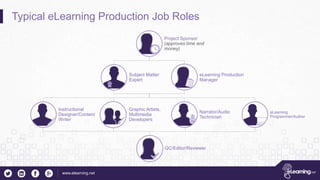
Typical eLearning Production Job Roles
Project Sponsor
(approves time and
money)
Subject Matter
Expert
eLearning Production
Manager
Instructional
Designer/Content
Writer
Graphic Artists,
Multimedia
Developers
Narrator/Audio
Technician
eLearning
Programmer/Author
QC/Editor/Reviewer
www.elearning.net
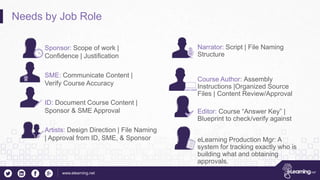
Needs by Job Role
Sponsor: Scope of work |
Confidence | Justification
SME: Communicate Content |
Verify Course Accuracy
ID: Document Course Content |
Sponsor & SME Approval
Artists: Design Direction | File Naming
| Approval from ID, SME, & Sponsor
Narrator: Script | File Naming
Structure
Course Author: Assembly
Instructions |Organized Source
Files | Content Review/Approval
Editor: Course “Answer Key” |
Blueprint to check/verify against
eLearning Production Mgr: A
system for tracking exactly who is
building what and obtaining
approvals.
www.elearning.net
Storyboard Elements
How does the storyboard satisfy the project needs?
www.elearning.net
Storyboard Elements: Project Organization
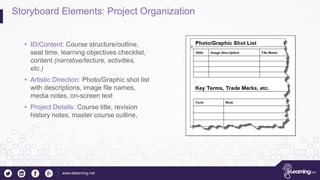
• ID/Content: Course structure/outline,
seat time, learning objectives checklist,
content (narrative/lecture, activities,
etc.)
• Artistic Direction: Photo/Graphic shot list
with descriptions, image file names,
media notes, on-screen text
• Project Details: Course title, revision
history notes, master course outline,
www.elearning.net
Storyboard Elements: Presentation
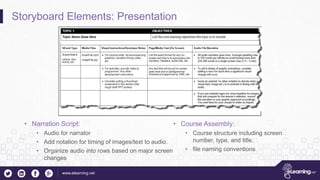
• Narration Script:
• Audio for narrator
• Add notation for timing of images/text to audio.
• Organize audio into rows based on major screen
changes
• Course Assembly:
• Course structure including screen
number, type, and title.
• file naming conventions
www.elearning.net
Storyboard Elements: Quiz Elements
• Question Details: Settings including
randomize, force answer, type of question,
etc.
• Question Text
• Answer choices and distractors: Include
the answer key
• Feedback: Perfect for adding more
context and additional information rather
than just “correct”.
www.elearning.net
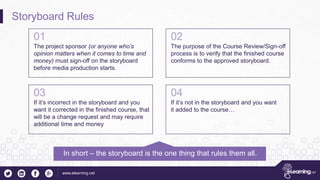
Storyboard Rules
01
The project sponsor (or anyone who’s
opinion matters when it comes to time and
money) must sign-off on the storyboard
before media production starts.
02
The purpose of the Course Review/Sign-off
process is to verify that the finished course
conforms to the approved storyboard.
03
If it’s incorrect in the storyboard and you
want it corrected in the finished course, that
will be a change request and may require
additional time and money
04
If it’s not in the storyboard and you want
it added to the course…
In short – the storyboard is the one thing that rules them all.
www.elearning.net
Preparing a script for the Voice Talent
eLearning.net
www.elearning.net
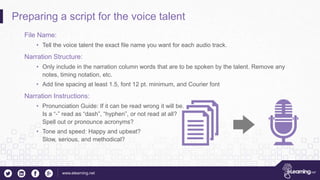
Preparing a script for the voice talent
File Name:
• Tell the voice talent the exact file name you want for each audio track.
Narration Structure:
• Only include in the narration column words that are to be spoken by the talent. Remove any
notes, timing notation, etc.
• Add line spacing at least 1.5, font 12 pt. minimum, and Courier font
Narration Instructions:
• Pronunciation Guide: If it can be read wrong it will be.
Is a “-” read as “dash”, “hyphen”, or not read at all?
Spell out or pronounce acronyms?
• Tone and speed: Happy and upbeat?
Slow, serious, and methodical?
www.elearning.net
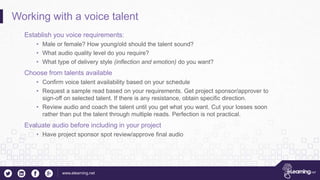
Working with a voice talent
Establish you voice requirements:
• Male or female? How young/old should the talent sound?
• What audio quality level do you require?
• What type of delivery style (inflection and emotion) do you want?
Choose from talents available
• Confirm voice talent availability based on your schedule
• Request a sample read based on your requirements. Get project sponsor/approver to
sign-off on selected talent. If there is any resistance, obtain specific direction.
• Review audio and coach the talent until you get what you want. Cut your losses soon
rather than put the talent through multiple reads. Perfection is not practical.
Evaluate audio before including in your project
• Have project sponsor spot review/approve final audio
www.elearning.net
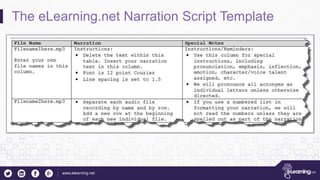
The eLearning.net Narration Script Template
www.elearning.net
Q&A
magic@elearning.net
866-771-4449

Storyboard & narration script writing cc

  • 1.
    Storyboard & NarrationScript Writing An Introduction from the eLearning Network®
  • 2.
    www.elearning.net WORKSHOP AGENDA 05 Using theeLearning.net Narration Script Template 01 Why storyboard? 03 Using the eLearning.net Storyboard Template 02 What does a storyboard include? 04 Preparing a script for voice talent
  • 3.
    www.elearning.net About the eLearningNetwork • Headquartered in Seattle, WA with employees and members around the world • Full-service and a la carte custom eLearning development shop. All custom eLearning is produced by ELN employees supported by dozens of experienced freelance contractors based in the USA. • Job aids, eLearning templates (Storyline, Captivate, Lectora, stock art, Training, and more • One-on-one training, consulting, custom branded templates and eLearning production setup No project is too big nor too small!
  • 4.
  • 5.
    www.elearning.net Why Storyboard • Servesas a production blueprint used by instructional designers, content writers, graphic artists, narrators, course author, etc. • Enjoy benefits including saving time, controlling costs, improving quality, and reducing stress • Establishes the actual scope of work effort • Can be approved and signed by whoever controls the budget • Governs the media change request and sign-off process
  • 6.
    www.elearning.net Typical eLearning ProductionJob Roles Project Sponsor (approves time and money) Subject Matter Expert eLearning Production Manager Instructional Designer/Content Writer Graphic Artists, Multimedia Developers Narrator/Audio Technician eLearning Programmer/Author QC/Editor/Reviewer
  • 7.
    www.elearning.net Needs by JobRole Sponsor: Scope of work | Confidence | Justification SME: Communicate Content | Verify Course Accuracy ID: Document Course Content | Sponsor & SME Approval Artists: Design Direction | File Naming | Approval from ID, SME, & Sponsor Narrator: Script | File Naming Structure Course Author: Assembly Instructions |Organized Source Files | Content Review/Approval Editor: Course “Answer Key” | Blueprint to check/verify against eLearning Production Mgr: A system for tracking exactly who is building what and obtaining approvals.
  • 8.
    www.elearning.net Storyboard Elements How doesthe storyboard satisfy the project needs?
  • 9.
    www.elearning.net Storyboard Elements: ProjectOrganization • ID/Content: Course structure/outline, seat time, learning objectives checklist, content (narrative/lecture, activities, etc.) • Artistic Direction: Photo/Graphic shot list with descriptions, image file names, media notes, on-screen text • Project Details: Course title, revision history notes, master course outline,
  • 10.
    www.elearning.net Storyboard Elements: Presentation •Narration Script: • Audio for narrator • Add notation for timing of images/text to audio. • Organize audio into rows based on major screen changes • Course Assembly: • Course structure including screen number, type, and title. • file naming conventions
  • 11.
    www.elearning.net Storyboard Elements: QuizElements • Question Details: Settings including randomize, force answer, type of question, etc. • Question Text • Answer choices and distractors: Include the answer key • Feedback: Perfect for adding more context and additional information rather than just “correct”.
  • 12.
    www.elearning.net Storyboard Rules 01 The projectsponsor (or anyone who’s opinion matters when it comes to time and money) must sign-off on the storyboard before media production starts. 02 The purpose of the Course Review/Sign-off process is to verify that the finished course conforms to the approved storyboard. 03 If it’s incorrect in the storyboard and you want it corrected in the finished course, that will be a change request and may require additional time and money 04 If it’s not in the storyboard and you want it added to the course… In short – the storyboard is the one thing that rules them all.
  • 13.
    www.elearning.net Preparing a scriptfor the Voice Talent eLearning.net
  • 14.
    www.elearning.net Preparing a scriptfor the voice talent File Name: • Tell the voice talent the exact file name you want for each audio track. Narration Structure: • Only include in the narration column words that are to be spoken by the talent. Remove any notes, timing notation, etc. • Add line spacing at least 1.5, font 12 pt. minimum, and Courier font Narration Instructions: • Pronunciation Guide: If it can be read wrong it will be. Is a “-” read as “dash”, “hyphen”, or not read at all? Spell out or pronounce acronyms? • Tone and speed: Happy and upbeat? Slow, serious, and methodical?
  • 15.
    www.elearning.net Working with avoice talent Establish you voice requirements: • Male or female? How young/old should the talent sound? • What audio quality level do you require? • What type of delivery style (inflection and emotion) do you want? Choose from talents available • Confirm voice talent availability based on your schedule • Request a sample read based on your requirements. Get project sponsor/approver to sign-off on selected talent. If there is any resistance, obtain specific direction. • Review audio and coach the talent until you get what you want. Cut your losses soon rather than put the talent through multiple reads. Perfection is not practical. Evaluate audio before including in your project • Have project sponsor spot review/approve final audio
  • 16.
  • 17.

Editor's Notes

  • #5 Poll question – Which eLearning job role best defines your current position
  • #6 Benefits: Save Time: The time invested in the storyboard is usually less than the time spent reworking courses that were done without a blueprint in place. Control Costs or Justify Requests for more Budget: Storyboards keep the course production process on track and accurate. Improve Quality: organize your course structure, visualize your course before you build it and edit/improve your content. Reduces stress and potential for conflict: Obtain input from all stakeholders, submit storyboard for final review/approval, go back to the storyboard when changes requests are made and point out that these changes should have been caught at the storyboard level. Over time teams that storyboard regularly will get better at it and better understand the implications of getting it “right” the first time at the storyboard level. If it’s not in the storyboard, it won’t be in the course. If it’s wrong in the storyboard, it will be wrong in the course, etc. Serves as a production blueprint used by instructional designers, content writers, graphic artists, narrators, course author, etc. If you are a one-man-band producing courses on your own from start to finish, you can get away without using a storyboard. If you have a team of people collaborating on a course, a storyboard is a blueprint document that you can share, multiple people can provide feedback, and everyone is literally on the same page. Establishes the actual scope of work effort Can be approved and signed by whoever controls the budget Governs the media change request and sign-off process
  • #7 Project Sponsor: Approves time and Money – you want to keep this person happy. Subject Matter Expert: Performs the research, compiles and delivers raw content, reviews course to confirm accuracy eLearning Production Manager: Assigns and monitors tasks – ensures projects are delivered on time, on budget, and accurately Instructional Designer/Content Writer: Creates the course flow, writes the lectures, activities, quizzes, etc. Graphic Artist: Finds stock images, creates new images, applies a graphical treatment. Delivers graphic files to the production manager Audio Narrator/Sound Tech: Records the narration and delivers audio files to the production manager eLearning Author / Programmer: Assembles all of the parts and puts them in to the authoring tool. Poll Question: How many people do you typically have working on a single project?
  • #9 The purpose of the storyboard is to satisfy the needs of everyone involved in the eLearning production, review, and approval process. Pole Question: How often do you use storyboards now?
  • #10 Notes go here
  • #18 If you have generic questions, feel free to ask now If you have company specific questions you wish to discuss outside of this session, please email them to magic@elearning.net