STORE PROCEDURES
FARZAN WADOOD (BSCS-12-F-23)
ASAD IQBAL (BSCS-12-F-02)
WAJEEH ASLAM (BSCS-12-F-03)
SYED UZAIR ALI (BSCS-12-F-36)
OBJECTIVES
• Learn about the features and benefits of stored procedures.
• Create useful stored procedures.
• Understand input and output parameters.
• Learn how to validate input and handle errors in stored procedures.
• Use the Transact-SQL Debugger to debug stored procedures.
• Use temp tables in your stored procedures.
• Understand the uses for triggers and learn how to write one.
• Use an INSTEAD OF trigger with a view.
WAJEEH ASLAM
INTRODUCTION
 What Is a Stored Procedure?
 Stored Procedure vs. SQL Statement
 Create, update and delete a procedure
 A stored procedure is a group of sql statements that has been created and
stored in the database.
 A stored procedure is a collection of T-SQL(Transact SQL) statements that
SQL Server compiles into a single execution plan.
 Stored procedure will accepts input parameters so that a single procedure
can be used over network by several clients using different input data.
 Procedure is stored in cache area of memory when the stored procedure is
first executed so that it can be used repeatedly. SQL Server does not have
to recompile it every time the stored procedure is run.
 It can accept input parameters, return output values as parameters, or
return success or failure status messages.
 Greater security as store procedures are always stored on the database
server
 SQL can be optimized by the DBMS compiler
 Code sharing resulting in:
 Less work
 Standardized processing
 Specialization among developers
 Stored procedure will reduce network traffic and increase the
performance.
 If we modify stored procedure all clients will get the updated stored
procedure.
 Reusability: do not need to write the code again and again
 Using stored procedures can increase the amount of server processing.
 Business Logic in SP: Do not put all of your business logic into stored
procedures.
 Maintenance and the agility (control)of your application becomes an
issue when you must modify business logic in T-SQL.
 The command is parsed for syntax. Any commands that are syntactically
incorrect are rejected.
 The command is then translated into an internal format known as a
sequence tree or query tree.
 The command is optimized based on estimated performance costs, and
an execution plan is generated from the sequence tree that contains all
the necessary steps to check constraints and carry out the command.
 The command is executed.
 Stored procedures reduce the complexity of client coding.
 Reduced utilization of network bandwidth.
 Stored procedures can optimize data access by returning limited result sets.
 Errors can be handled at the server, in the stored procedure, and not at the
client.
 A stored procedure is written once, and can be accessed from many client
applications.
SYED UZAIR ALI
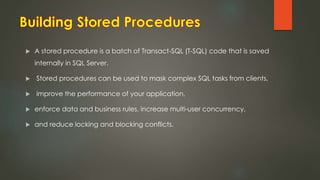
 A stored procedure is a batch of Transact-SQL (T-SQL) code that is saved
internally in SQL Server.
 Stored procedures can be used to mask complex SQL tasks from clients,
 improve the performance of your application,
 enforce data and business rules, increase multi-user concurrency,
 and reduce locking and blocking conflicts.
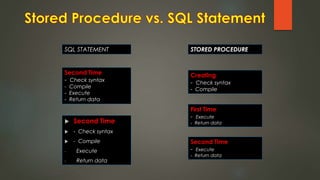
 Second Time
 - Check syntax
 - Compile
- Execute
- Return data
Second Time
- Check syntax
- Compile
- Execute
- Return data
Creating
- Check syntax
- Compile
First Time
- Execute
- Return data
Second Time
- Execute
- Return data
STORED PROCEDURESQL STATEMENT
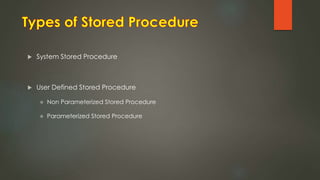
 System Stored Procedure
 User Defined Stored Procedure
 Non Parameterized Stored Procedure
 Parameterized Stored Procedure
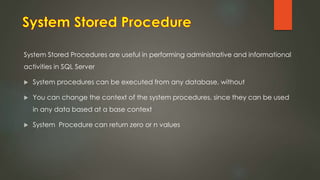
System Stored Procedures are useful in performing administrative and informational
activities in SQL Server
 System procedures can be executed from any database, without
 You can change the context of the system procedures, since they can be used
in any data based at a base context
 System Procedure can return zero or n values
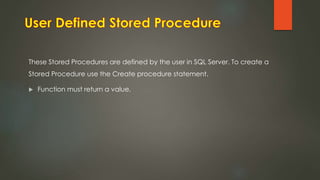
These Stored Procedures are defined by the user in SQL Server. To create a
Stored Procedure use the Create procedure statement.
 Function must return a value.
FARZAN WADOOD
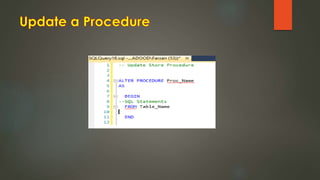
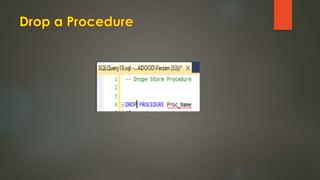
 Create a Procedure
 Update a Procedure
 Delete a Procedure
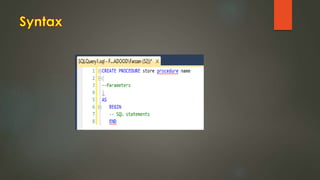
Syntax
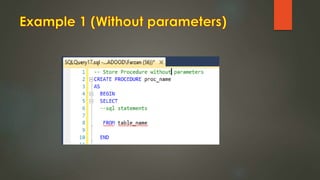
Example 1 (Without parameters)
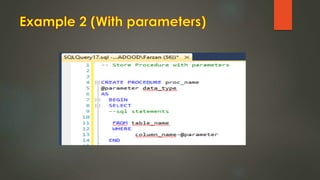
Example 2 (With parameters)
ASAD IQBAL
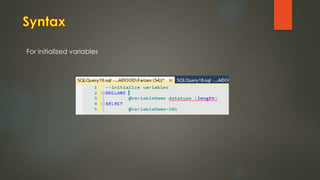
 Variables can be used in stored procedures the same way that you use
in other languages
 in any programming language. SQL Server requires that you explicitly
declare
 each variable with its corresponding data type by using the DECLARE
 statement. To declare multiple variables, separate the declarations by
commas:
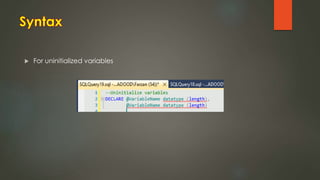
 For uninitialized variables
For initialize variables
 All uninitialized variables have a default value of NULL
 To assign a value, use the SELECT statement.
For initialized variables
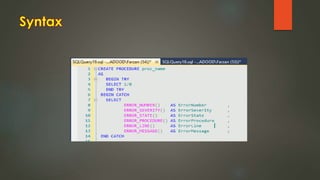
A great new option that was added in SQL Server 2005 was the ability to use
the Try..Catch paradigm that exists in other development languages. Doing
error handling in SQL Server has not always been the easiest thing, so this
option definitely makes it much easier to code for and handle errors.
 Stored procedures are a very powerful database component
 System-stored procedures are useful for database administration and maintenance
 User-defined stored procedures are useful for whatever you have designed them
for.
 They have advantages over views and queries in that they are precompiled
 After their first execution, their execution plan is stored in the procedure cache that
resides in random access memory (RAM).
 Another benefit of stored procedures is that you can assign permission to a user to
run a stored procedure even if that user does not have permissions on the
underlying tables.
Store procedures

Store procedures

  • 1.
  • 2.
    FARZAN WADOOD (BSCS-12-F-23) ASADIQBAL (BSCS-12-F-02) WAJEEH ASLAM (BSCS-12-F-03) SYED UZAIR ALI (BSCS-12-F-36)
  • 3.
    OBJECTIVES • Learn aboutthe features and benefits of stored procedures. • Create useful stored procedures. • Understand input and output parameters. • Learn how to validate input and handle errors in stored procedures. • Use the Transact-SQL Debugger to debug stored procedures. • Use temp tables in your stored procedures. • Understand the uses for triggers and learn how to write one. • Use an INSTEAD OF trigger with a view.
  • 4.
  • 5.
  • 6.
     What Isa Stored Procedure?  Stored Procedure vs. SQL Statement  Create, update and delete a procedure
  • 7.
     A storedprocedure is a group of sql statements that has been created and stored in the database.  A stored procedure is a collection of T-SQL(Transact SQL) statements that SQL Server compiles into a single execution plan.  Stored procedure will accepts input parameters so that a single procedure can be used over network by several clients using different input data.
  • 8.
     Procedure isstored in cache area of memory when the stored procedure is first executed so that it can be used repeatedly. SQL Server does not have to recompile it every time the stored procedure is run.  It can accept input parameters, return output values as parameters, or return success or failure status messages.
  • 9.
     Greater securityas store procedures are always stored on the database server  SQL can be optimized by the DBMS compiler  Code sharing resulting in:  Less work  Standardized processing  Specialization among developers
  • 10.
     Stored procedurewill reduce network traffic and increase the performance.  If we modify stored procedure all clients will get the updated stored procedure.  Reusability: do not need to write the code again and again
  • 11.
     Using storedprocedures can increase the amount of server processing.  Business Logic in SP: Do not put all of your business logic into stored procedures.  Maintenance and the agility (control)of your application becomes an issue when you must modify business logic in T-SQL.
  • 12.
     The commandis parsed for syntax. Any commands that are syntactically incorrect are rejected.  The command is then translated into an internal format known as a sequence tree or query tree.  The command is optimized based on estimated performance costs, and an execution plan is generated from the sequence tree that contains all the necessary steps to check constraints and carry out the command.  The command is executed.
  • 13.
     Stored proceduresreduce the complexity of client coding.  Reduced utilization of network bandwidth.  Stored procedures can optimize data access by returning limited result sets.  Errors can be handled at the server, in the stored procedure, and not at the client.  A stored procedure is written once, and can be accessed from many client applications.
  • 14.
  • 15.
     A storedprocedure is a batch of Transact-SQL (T-SQL) code that is saved internally in SQL Server.  Stored procedures can be used to mask complex SQL tasks from clients,  improve the performance of your application,  enforce data and business rules, increase multi-user concurrency,  and reduce locking and blocking conflicts.
  • 16.
     Second Time - Check syntax  - Compile - Execute - Return data Second Time - Check syntax - Compile - Execute - Return data Creating - Check syntax - Compile First Time - Execute - Return data Second Time - Execute - Return data STORED PROCEDURESQL STATEMENT
  • 17.
     System StoredProcedure  User Defined Stored Procedure  Non Parameterized Stored Procedure  Parameterized Stored Procedure
  • 18.
    System Stored Proceduresare useful in performing administrative and informational activities in SQL Server  System procedures can be executed from any database, without  You can change the context of the system procedures, since they can be used in any data based at a base context  System Procedure can return zero or n values
  • 19.
    These Stored Proceduresare defined by the user in SQL Server. To create a Stored Procedure use the Create procedure statement.  Function must return a value.
  • 20.
  • 21.
     Create aProcedure  Update a Procedure  Delete a Procedure
  • 23.
    Syntax Example 1 (Withoutparameters) Example 2 (With parameters)
  • 31.
  • 33.
     Variables canbe used in stored procedures the same way that you use in other languages  in any programming language. SQL Server requires that you explicitly declare  each variable with its corresponding data type by using the DECLARE  statement. To declare multiple variables, separate the declarations by commas:
  • 34.
  • 35.
    For initialize variables All uninitialized variables have a default value of NULL  To assign a value, use the SELECT statement.
  • 36.
  • 37.
    A great newoption that was added in SQL Server 2005 was the ability to use the Try..Catch paradigm that exists in other development languages. Doing error handling in SQL Server has not always been the easiest thing, so this option definitely makes it much easier to code for and handle errors.
  • 39.
     Stored proceduresare a very powerful database component  System-stored procedures are useful for database administration and maintenance  User-defined stored procedures are useful for whatever you have designed them for.  They have advantages over views and queries in that they are precompiled  After their first execution, their execution plan is stored in the procedure cache that resides in random access memory (RAM).  Another benefit of stored procedures is that you can assign permission to a user to run a stored procedure even if that user does not have permissions on the underlying tables.