Chapter – 9

Creating and Managing Tables

DDL
Database Objects


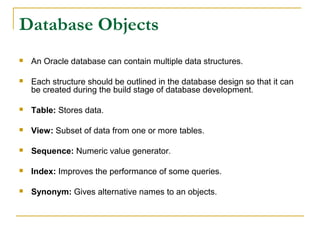
An Oracle database can contain multiple data structures.



Each structure should be outlined in the database design so that it can
be created during the build stage of database development.



Table: Stores data.



View: Subset of data from one or more tables.



Sequence: Numeric value generator.



Index: Improves the performance of some queries.



Synonym: Gives alternative names to an objects.
Oracle9i

Table Structures


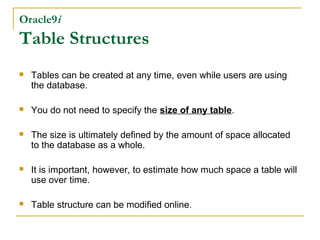
Tables can be created at any time, even while users are using
the database.



You do not need to specify the size of any table.



The size is ultimately defined by the amount of space allocated
to the database as a whole.



It is important, however, to estimate how much space a table will
use over time.



Table structure can be modified online.
Naming Rules
Table names and column names:


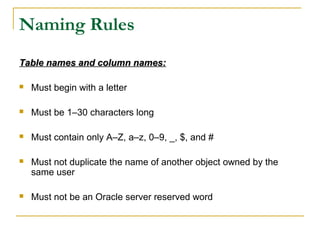
Must begin with a letter



Must be 1–30 characters long



Must contain only A–Z, a–z, 0–9, _, $, and #



Must not duplicate the name of another object owned by the
same user



Must not be an Oracle server reserved word
CREATE TABLE Statement
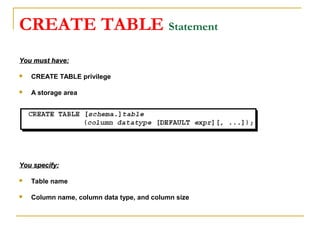
You must have:


CREATE TABLE privilege



A storage area

You specify:


Table name



Column name, column data type, and column size
Referencing Another User’s Tables


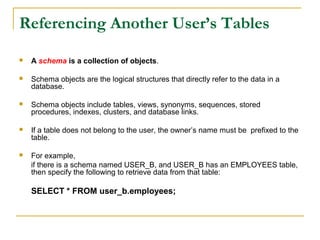
A schema is a collection of objects.



Schema objects are the logical structures that directly refer to the data in a
database.



Schema objects include tables, views, synonyms, sequences, stored
procedures, indexes, clusters, and database links.



If a table does not belong to the user, the owner’s name must be prefixed to the
table.



For example,
if there is a schema named USER_B, and USER_B has an EMPLOYEES table,
then specify the following to retrieve data from that table:

SELECT * FROM user_b.employees;
The DEFAULT Option


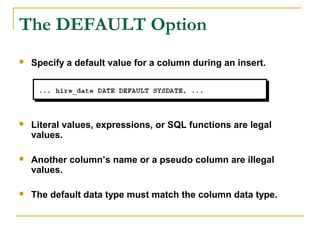
Specify a default value for a column during an insert.



Literal values, expressions, or SQL functions are legal
values.



Another column’s name or a pseudo column are illegal
values.



The default data type must match the column data type.
Creating Tables


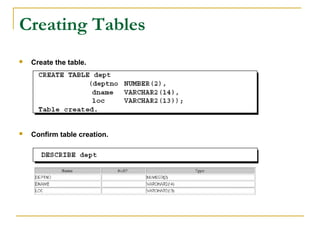
Create the table.



Confirm table creation.
Tables in the Oracle Database
User Tables:


Are a collection of tables created and maintained by the user



Contain user information

Data Dictionary:


Is a collection of tables created and maintained by the Oracle
Server



Contain database information
Data Dictionary views


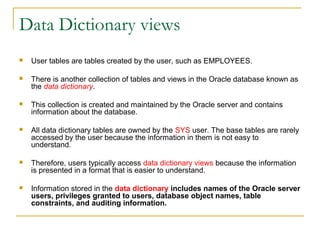
User tables are tables created by the user, such as EMPLOYEES.



There is another collection of tables and views in the Oracle database known as
the data dictionary.



This collection is created and maintained by the Oracle server and contains
information about the database.



All data dictionary tables are owned by the SYS user. The base tables are rarely
accessed by the user because the information in them is not easy to
understand.



Therefore, users typically access data dictionary views because the information
is presented in a format that is easier to understand.



Information stored in the data dictionary includes names of the Oracle server
users, privileges granted to users, database object names, table
constraints, and auditing information.
Data Dictionary views


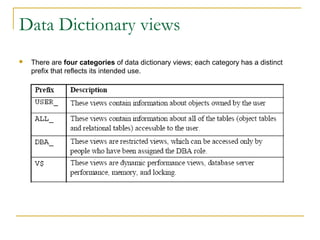
There are four categories of data dictionary views; each category has a distinct
prefix that reflects its intended use.
Querying the Data Dictionary


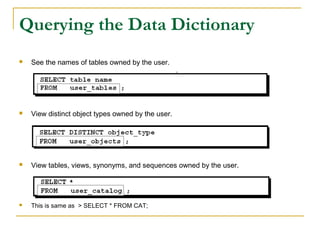
See the names of tables owned by the user.



View distinct object types owned by the user.



View tables, views, synonyms, and sequences owned by the user.



This is same as > SELECT * FROM CAT;
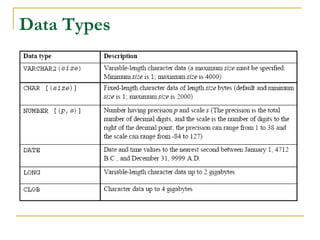
Data Types
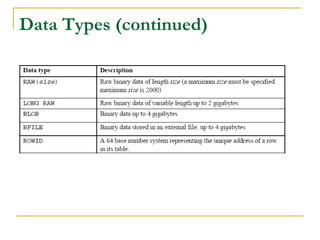
Data Types (continued)
DateTime Data Types
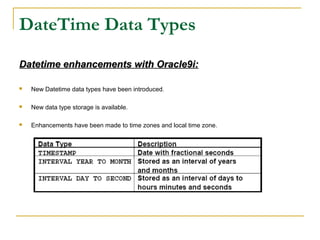
Datetime enhancements with Oracle9i:


New Datetime data types have been introduced.



New data type storage is available.



Enhancements have been made to time zones and local time zone.
Creating a Table by Using a

Subquery Syntax


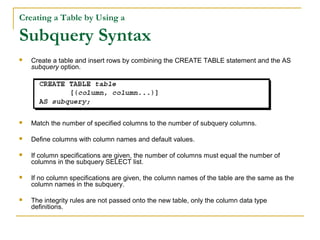
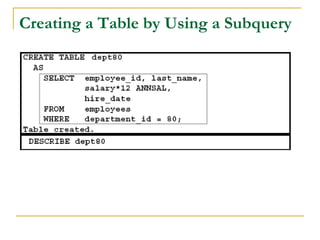
Create a table and insert rows by combining the CREATE TABLE statement and the AS
subquery option.



Match the number of specified columns to the number of subquery columns.



Define columns with column names and default values.



If column specifications are given, the number of columns must equal the number of
columns in the subquery SELECT list.



If no column specifications are given, the column names of the table are the same as the
column names in the subquery.



The integrity rules are not passed onto the new table, only the column data type
definitions.
Creating a Table by Using a Subquery
The ALTER TABLE Statement
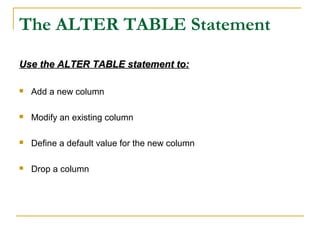
Use the ALTER TABLE statement to:


Add a new column



Modify an existing column



Define a default value for the new column



Drop a column
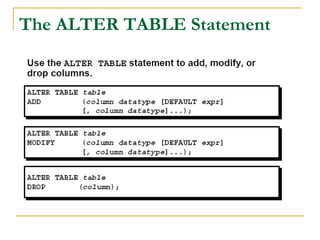
The ALTER TABLE Statement
Adding a Column


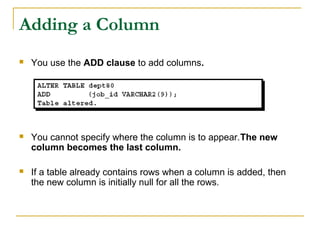
You use the ADD clause to add columns.



You cannot specify where the column is to appear.The new
column becomes the last column.



If a table already contains rows when a column is added, then
the new column is initially null for all the rows.
Modifying a Column


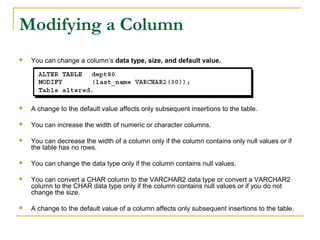
You can change a column’s data type, size, and default value.



A change to the default value affects only subsequent insertions to the table.



You can increase the width of numeric or character columns.



You can decrease the width of a column only if the column contains only null values or if
the table has no rows.



You can change the data type only if the column contains null values.



You can convert a CHAR column to the VARCHAR2 data type or convert a VARCHAR2
column to the CHAR data type only if the column contains null values or if you do not
change the size.



A change to the default value of a column affects only subsequent insertions to the table.
Dropping a Column


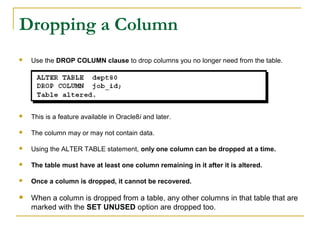
Use the DROP COLUMN clause to drop columns you no longer need from the table.



This is a feature available in Oracle8i and later.



The column may or may not contain data.



Using the ALTER TABLE statement, only one column can be dropped at a time.



The table must have at least one column remaining in it after it is altered.



Once a column is dropped, it cannot be recovered.



When a column is dropped from a table, any other columns in that table that are
marked with the SET UNUSED option are dropped too.
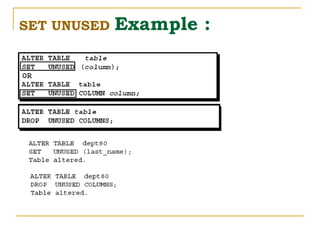
The SET UNUSED Option


You use the SET UNUSED option to mark one or more columns as unused, so that they
can be dropped when the demand on system resources is lower.



You use the DROP UNUSED COLUMNS option to remove the columns that are marked as
unused.



Unused columns are treated as if they were dropped, even though their column data
remains in the table’s rows.



After a column has been marked as unused, you have no access to that column. A
SELECT * query will not retrieve data from unused columns.



In addition, the names and types of columns marked unused will not be displayed
during a DESCRIBE, and you can add to the table a new column with the same name
as an unused column.



SET UNUSED information is stored in the USER_UNUSED_COL_TABS dictionary view.
SET UNUSED

Example :
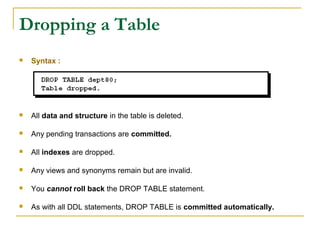
Dropping a Table


Syntax :



All data and structure in the table is deleted.



Any pending transactions are committed.



All indexes are dropped.



Any views and synonyms remain but are invalid.



You cannot roll back the DROP TABLE statement.



As with all DDL statements, DROP TABLE is committed automatically.
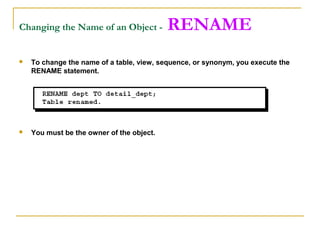
Changing the Name of an Object -

RENAME



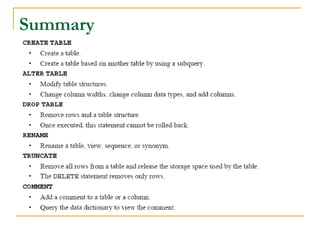
To change the name of a table, view, sequence, or synonym, you execute the
RENAME statement.



You must be the owner of the object.
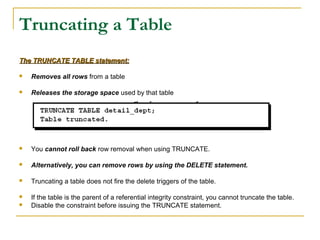
Truncating a Table
The TRUNCATE TABLE statement:


Removes all rows from a table



Releases the storage space used by that table



You cannot roll back row removal when using TRUNCATE.



Alternatively, you can remove rows by using the DELETE statement.



Truncating a table does not fire the delete triggers of the table.



If the table is the parent of a referential integrity constraint, you cannot truncate the table.
Disable the constraint before issuing the TRUNCATE statement.


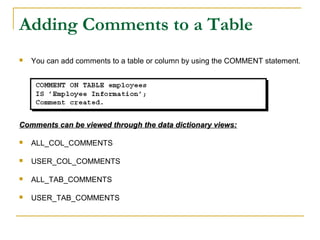
Adding Comments to a Table


You can add comments to a table or column by using the COMMENT statement.

Comments can be viewed through the data dictionary views:


ALL_COL_COMMENTS



USER_COL_COMMENTS



ALL_TAB_COMMENTS



USER_TAB_COMMENTS
Summary

SQL DDL

  • 1.
    Chapter – 9 Creatingand Managing Tables DDL
  • 2.
    Database Objects  An Oracledatabase can contain multiple data structures.  Each structure should be outlined in the database design so that it can be created during the build stage of database development.  Table: Stores data.  View: Subset of data from one or more tables.  Sequence: Numeric value generator.  Index: Improves the performance of some queries.  Synonym: Gives alternative names to an objects.
  • 3.
    Oracle9i Table Structures  Tables canbe created at any time, even while users are using the database.  You do not need to specify the size of any table.  The size is ultimately defined by the amount of space allocated to the database as a whole.  It is important, however, to estimate how much space a table will use over time.  Table structure can be modified online.
  • 4.
    Naming Rules Table namesand column names:  Must begin with a letter  Must be 1–30 characters long  Must contain only A–Z, a–z, 0–9, _, $, and #  Must not duplicate the name of another object owned by the same user  Must not be an Oracle server reserved word
  • 5.
    CREATE TABLE Statement Youmust have:  CREATE TABLE privilege  A storage area You specify:  Table name  Column name, column data type, and column size
  • 6.
    Referencing Another User’sTables  A schema is a collection of objects.  Schema objects are the logical structures that directly refer to the data in a database.  Schema objects include tables, views, synonyms, sequences, stored procedures, indexes, clusters, and database links.  If a table does not belong to the user, the owner’s name must be prefixed to the table.  For example, if there is a schema named USER_B, and USER_B has an EMPLOYEES table, then specify the following to retrieve data from that table: SELECT * FROM user_b.employees;
  • 7.
    The DEFAULT Option  Specifya default value for a column during an insert.  Literal values, expressions, or SQL functions are legal values.  Another column’s name or a pseudo column are illegal values.  The default data type must match the column data type.
  • 8.
    Creating Tables  Create thetable.  Confirm table creation.
  • 9.
    Tables in theOracle Database User Tables:  Are a collection of tables created and maintained by the user  Contain user information Data Dictionary:  Is a collection of tables created and maintained by the Oracle Server  Contain database information
  • 10.
    Data Dictionary views  Usertables are tables created by the user, such as EMPLOYEES.  There is another collection of tables and views in the Oracle database known as the data dictionary.  This collection is created and maintained by the Oracle server and contains information about the database.  All data dictionary tables are owned by the SYS user. The base tables are rarely accessed by the user because the information in them is not easy to understand.  Therefore, users typically access data dictionary views because the information is presented in a format that is easier to understand.  Information stored in the data dictionary includes names of the Oracle server users, privileges granted to users, database object names, table constraints, and auditing information.
  • 11.
    Data Dictionary views  Thereare four categories of data dictionary views; each category has a distinct prefix that reflects its intended use.
  • 12.
    Querying the DataDictionary  See the names of tables owned by the user.  View distinct object types owned by the user.  View tables, views, synonyms, and sequences owned by the user.  This is same as > SELECT * FROM CAT;
  • 13.
  • 14.
  • 15.
    DateTime Data Types Datetimeenhancements with Oracle9i:  New Datetime data types have been introduced.  New data type storage is available.  Enhancements have been made to time zones and local time zone.
  • 17.
    Creating a Tableby Using a Subquery Syntax  Create a table and insert rows by combining the CREATE TABLE statement and the AS subquery option.  Match the number of specified columns to the number of subquery columns.  Define columns with column names and default values.  If column specifications are given, the number of columns must equal the number of columns in the subquery SELECT list.  If no column specifications are given, the column names of the table are the same as the column names in the subquery.  The integrity rules are not passed onto the new table, only the column data type definitions.
  • 18.
    Creating a Tableby Using a Subquery
  • 19.
    The ALTER TABLEStatement Use the ALTER TABLE statement to:  Add a new column  Modify an existing column  Define a default value for the new column  Drop a column
  • 20.
    The ALTER TABLEStatement
  • 21.
    Adding a Column  Youuse the ADD clause to add columns.  You cannot specify where the column is to appear.The new column becomes the last column.  If a table already contains rows when a column is added, then the new column is initially null for all the rows.
  • 22.
    Modifying a Column  Youcan change a column’s data type, size, and default value.  A change to the default value affects only subsequent insertions to the table.  You can increase the width of numeric or character columns.  You can decrease the width of a column only if the column contains only null values or if the table has no rows.  You can change the data type only if the column contains null values.  You can convert a CHAR column to the VARCHAR2 data type or convert a VARCHAR2 column to the CHAR data type only if the column contains null values or if you do not change the size.  A change to the default value of a column affects only subsequent insertions to the table.
  • 23.
    Dropping a Column  Usethe DROP COLUMN clause to drop columns you no longer need from the table.  This is a feature available in Oracle8i and later.  The column may or may not contain data.  Using the ALTER TABLE statement, only one column can be dropped at a time.  The table must have at least one column remaining in it after it is altered.  Once a column is dropped, it cannot be recovered.  When a column is dropped from a table, any other columns in that table that are marked with the SET UNUSED option are dropped too.
  • 24.
    The SET UNUSEDOption  You use the SET UNUSED option to mark one or more columns as unused, so that they can be dropped when the demand on system resources is lower.  You use the DROP UNUSED COLUMNS option to remove the columns that are marked as unused.  Unused columns are treated as if they were dropped, even though their column data remains in the table’s rows.  After a column has been marked as unused, you have no access to that column. A SELECT * query will not retrieve data from unused columns.  In addition, the names and types of columns marked unused will not be displayed during a DESCRIBE, and you can add to the table a new column with the same name as an unused column.  SET UNUSED information is stored in the USER_UNUSED_COL_TABS dictionary view.
  • 25.
  • 26.
    Dropping a Table  Syntax:  All data and structure in the table is deleted.  Any pending transactions are committed.  All indexes are dropped.  Any views and synonyms remain but are invalid.  You cannot roll back the DROP TABLE statement.  As with all DDL statements, DROP TABLE is committed automatically.
  • 27.
    Changing the Nameof an Object - RENAME  To change the name of a table, view, sequence, or synonym, you execute the RENAME statement.  You must be the owner of the object.
  • 28.
    Truncating a Table TheTRUNCATE TABLE statement:  Removes all rows from a table  Releases the storage space used by that table  You cannot roll back row removal when using TRUNCATE.  Alternatively, you can remove rows by using the DELETE statement.  Truncating a table does not fire the delete triggers of the table.  If the table is the parent of a referential integrity constraint, you cannot truncate the table. Disable the constraint before issuing the TRUNCATE statement. 
  • 29.
    Adding Comments toa Table  You can add comments to a table or column by using the COMMENT statement. Comments can be viewed through the data dictionary views:  ALL_COL_COMMENTS  USER_COL_COMMENTS  ALL_TAB_COMMENTS  USER_TAB_COMMENTS
  • 30.