Lecture # 5


11/21/2012       Designed by Prof. Anosha Khan   1
 Storage devices hold data, even when the computer
    is turned off.
   The physical material that actually holds data is
    called a storage medium. The surface of a floppy
    disk is a storage medium.
   The hardware that writes data to or reads data from
    a storage medium is called a storage device. A
    floppy disk drive is a storage device.
   The two primary storage technologies are magnetic
    and optical.
11/21/2012     Designed by Prof. Anosha Khan              2
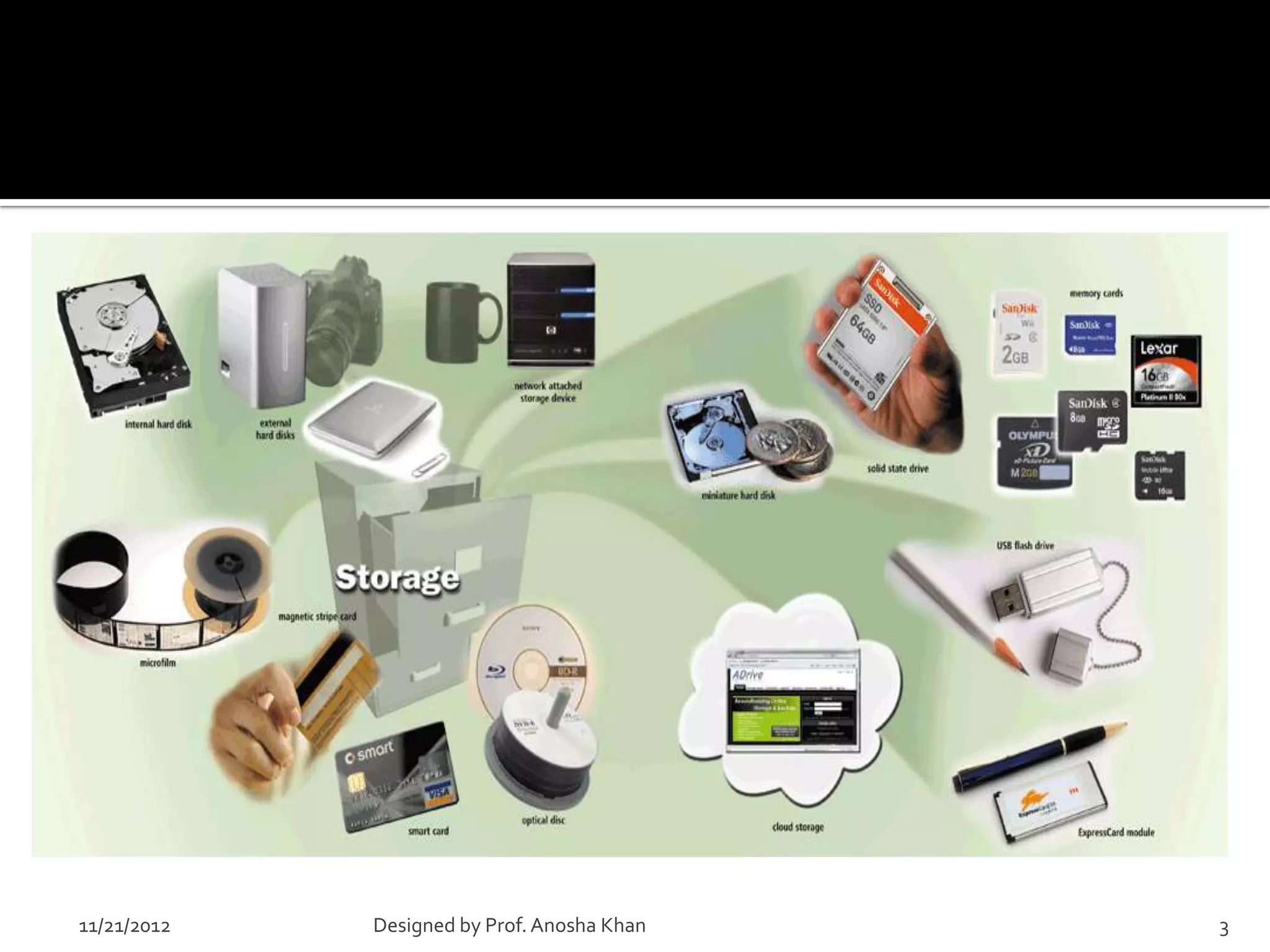
11/21/2012   Designed by Prof. Anosha Khan   3
    Surface of magnetic Disks and tapes are
     coated with millions of tiny iron particles so
     that data can be stored on them
    Read/Write heads of a magnetic disk or tape
     drive contains electromagnets that generate
     magnetic fields in the iron on the storage
     medium as the head passes over the disk


11/21/2012     Designed by Prof. Anosha Khan          4
    A storage device is the computer hardware
     that records and/or retrieves items to and
     from storage media
                            Reading is the process
                            of transferring items
                            from a storage medium
                            into memory

                                     Writing is the process of
                                     transferring items from
                                     memory to a storage
                                     medium

11/21/2012     Designed by Prof. Anosha Khan                     5
   Access time measures:
     The amount of time it
      takes a storage device
      to locate an item on a
      storage medium
     The time required to
      deliver an item from
      memory to the
      processor

    11/21/2012    Designed by Prof. Anosha Khan   6
 Formatting is the process of dividing the disk into tracks
  and sectors so that the operating system can store and
  locate data and information on the disk
 Before a magnetic disk can be used, it must be formatted—
  a process that maps the disk's surface and determines how
  data will be stored.
 During formatting, the drive creates circular tracks around
  the disk's surface, then divides each track into sectors.
 The OS organizes sectors into groups, called clusters, then
  tracks each file's location according to the clusters it
  occupies.
    11/21/2012   Designed by Prof. Anosha Khan             7
    Boot sector
    File allocation Table (FAT)
    Root folder
    Data Area


11/21/2012      Designed by Prof. Anosha Khan   8
 Tracks-
   circular areas of the disk
   Length of a track one circumference of disk
   Over 1000 on a hard disk
   Data first written to outer most track
 Sectors-
   Divides tracks sections
   On a floppy 9 sectors exits


11/21/2012   Designed by Prof. Anosha Khan        9
    Cylinders-
      Logical groupings of the the same track on
       each disk surface in a disk unit
    Clusters-
      Groups of sectors used by operating system
      64 sectors in one cluster
    Partitioning: divide hard disk into separate areas
     called partitions; each partition functions as if it
     were a separate hard disk drive.
11/21/2012      Designed by Prof. Anosha Khan               10
    File Allocation Table(FAT)
    FAT32
    New Technology file system (NTFS)
    NTFS 5
    High performance File System (HPFS)


11/21/2012    Designed by Prof. Anosha Khan   11
    Uses magnetic storage technology
    Has read / write heads
    Includes a motor that rotates the disk on a
     spindle and read/ write head that can move to
     any spot on the disk’s surface as the disk spins
    Disk Density- the amount of data that a disk can
     hold
    To determine disk density multiply its total
     number of sectors by the number of bytes each
     sector can hold

11/21/2012      Designed by Prof. Anosha Khan           12
 Hard disks can store data
  using longitudinal recording
  or perpendicular recording
 Includes one or more platters
  mounted on a central spindle
 Each platter is covered with a
  magnetic coating
 It includes motor to spin
  platters and read/write heads

11/21/2012   Designed by Prof. Anosha Khan   13
11/21/2012   Designed by Prof. Anosha Khan   14
    An external hard disk is a separate free-
     standing hard disk that connects to your
     computer with a cable or wirelessly
    A removable hard disk is a hard disk that you
     insert and remove from a drive


11/21/2012     Designed by Prof. Anosha Khan         15
    Tape is a magnetically coated ribbon of
     plastic capable of storing large amounts of
     data and information
    A tape drive reads and writes data and
     information on a tape


11/21/2012     Designed by Prof. Anosha Khan       16
    An optical disc consists of a flat, round, portable disc
     made of metal, plastic, and lacquer that is written and
     read by a laser
    An optical disk is a high-capacity storage medium. An
     optical drive uses reflected light to read data.
    To store data, the disk's metal surface is covered with
     tiny dents (pits) and flat spots (lands), which cause
     light to be reflected differently.
    When an optical drive shines light into a pit, the light
     cannot be reflected back. This represents a bit value of
     0 (off). A land reflects light back to its source,
     representing a bit value of 1 (on).
11/21/2012       Designed by Prof. Anosha Khan                  17
    A magnetic stripe card contains a magnetic
     stripe that stores information
    A smart card stores data on a thin
     microprocessor embedded in the card


11/21/2012    Designed by Prof. Anosha Khan       18
        A CD-Recordable (CD-R) drive lets you record
         your own CDs, but data cannot be overwritten
         once it is recorded to the disk.
        A CD-Rewritable (CD-RW) drive lets you
         record a CD, then write new data over the
         already recorded data.
        PhotoCD technology is used to store digital
         photographs.
        DVD recordable
11/21/2012        Designed by Prof. Anosha Khan         19
    Flash memory
    Smart Cards


11/21/2012   Designed by Prof. Anosha Khan   20
11/21/2012   Designed by Prof. Anosha Khan   21

Storage devices

  • 1.
    Lecture # 5 11/21/2012 Designed by Prof. Anosha Khan 1
  • 2.
     Storage deviceshold data, even when the computer is turned off.  The physical material that actually holds data is called a storage medium. The surface of a floppy disk is a storage medium.  The hardware that writes data to or reads data from a storage medium is called a storage device. A floppy disk drive is a storage device.  The two primary storage technologies are magnetic and optical. 11/21/2012 Designed by Prof. Anosha Khan 2
  • 3.
    11/21/2012 Designed by Prof. Anosha Khan 3
  • 4.
    Surface of magnetic Disks and tapes are coated with millions of tiny iron particles so that data can be stored on them  Read/Write heads of a magnetic disk or tape drive contains electromagnets that generate magnetic fields in the iron on the storage medium as the head passes over the disk 11/21/2012 Designed by Prof. Anosha Khan 4
  • 5.
    A storage device is the computer hardware that records and/or retrieves items to and from storage media Reading is the process of transferring items from a storage medium into memory Writing is the process of transferring items from memory to a storage medium 11/21/2012 Designed by Prof. Anosha Khan 5
  • 6.
    Access time measures:  The amount of time it takes a storage device to locate an item on a storage medium  The time required to deliver an item from memory to the processor 11/21/2012 Designed by Prof. Anosha Khan 6
  • 7.
     Formatting isthe process of dividing the disk into tracks and sectors so that the operating system can store and locate data and information on the disk  Before a magnetic disk can be used, it must be formatted— a process that maps the disk's surface and determines how data will be stored.  During formatting, the drive creates circular tracks around the disk's surface, then divides each track into sectors.  The OS organizes sectors into groups, called clusters, then tracks each file's location according to the clusters it occupies. 11/21/2012 Designed by Prof. Anosha Khan 7
  • 8.
    Boot sector  File allocation Table (FAT)  Root folder  Data Area 11/21/2012 Designed by Prof. Anosha Khan 8
  • 9.
     Tracks-  circular areas of the disk  Length of a track one circumference of disk  Over 1000 on a hard disk  Data first written to outer most track  Sectors-  Divides tracks sections  On a floppy 9 sectors exits 11/21/2012 Designed by Prof. Anosha Khan 9
  • 10.
    Cylinders-  Logical groupings of the the same track on each disk surface in a disk unit  Clusters-  Groups of sectors used by operating system  64 sectors in one cluster  Partitioning: divide hard disk into separate areas called partitions; each partition functions as if it were a separate hard disk drive. 11/21/2012 Designed by Prof. Anosha Khan 10
  • 11.
    File Allocation Table(FAT)  FAT32  New Technology file system (NTFS)  NTFS 5  High performance File System (HPFS) 11/21/2012 Designed by Prof. Anosha Khan 11
  • 12.
    Uses magnetic storage technology  Has read / write heads  Includes a motor that rotates the disk on a spindle and read/ write head that can move to any spot on the disk’s surface as the disk spins  Disk Density- the amount of data that a disk can hold  To determine disk density multiply its total number of sectors by the number of bytes each sector can hold 11/21/2012 Designed by Prof. Anosha Khan 12
  • 13.
     Hard diskscan store data using longitudinal recording or perpendicular recording  Includes one or more platters mounted on a central spindle  Each platter is covered with a magnetic coating  It includes motor to spin platters and read/write heads 11/21/2012 Designed by Prof. Anosha Khan 13
  • 14.
    11/21/2012 Designed by Prof. Anosha Khan 14
  • 15.
    An external hard disk is a separate free- standing hard disk that connects to your computer with a cable or wirelessly  A removable hard disk is a hard disk that you insert and remove from a drive 11/21/2012 Designed by Prof. Anosha Khan 15
  • 16.
    Tape is a magnetically coated ribbon of plastic capable of storing large amounts of data and information  A tape drive reads and writes data and information on a tape 11/21/2012 Designed by Prof. Anosha Khan 16
  • 17.
    An optical disc consists of a flat, round, portable disc made of metal, plastic, and lacquer that is written and read by a laser  An optical disk is a high-capacity storage medium. An optical drive uses reflected light to read data.  To store data, the disk's metal surface is covered with tiny dents (pits) and flat spots (lands), which cause light to be reflected differently.  When an optical drive shines light into a pit, the light cannot be reflected back. This represents a bit value of 0 (off). A land reflects light back to its source, representing a bit value of 1 (on). 11/21/2012 Designed by Prof. Anosha Khan 17
  • 18.
    A magnetic stripe card contains a magnetic stripe that stores information  A smart card stores data on a thin microprocessor embedded in the card 11/21/2012 Designed by Prof. Anosha Khan 18
  • 19.
    A CD-Recordable (CD-R) drive lets you record your own CDs, but data cannot be overwritten once it is recorded to the disk.  A CD-Rewritable (CD-RW) drive lets you record a CD, then write new data over the already recorded data.  PhotoCD technology is used to store digital photographs.  DVD recordable 11/21/2012 Designed by Prof. Anosha Khan 19
  • 20.
    Flash memory  Smart Cards 11/21/2012 Designed by Prof. Anosha Khan 20
  • 21.
    11/21/2012 Designed by Prof. Anosha Khan 21