BY,
A.Amalajoylet
Storage classes
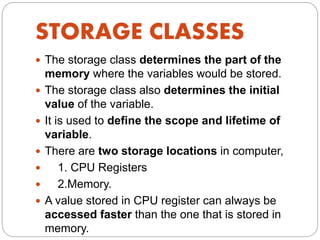
STORAGE CLASSES
 The storage class determines the part of the
memory where the variables would be stored.
 The storage class also determines the initial
value of the variable.
 It is used to define the scope and lifetime of
variable.
 There are two storage locations in computer,
 1. CPU Registers
 2.Memory.
 A value stored in CPU register can always be
accessed faster than the one that is stored in
memory.
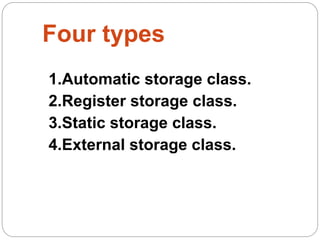
Four types
1.Automatic storage class.
2.Register storage class.
3.Static storage class.
4.External storage class.
Automatic
 Keywords : Auto
 Storage : Memory
 Default initial value : Garbage value
 Scope : Local/Block scope
 Life : Exists as long as
the control
remains in the
block
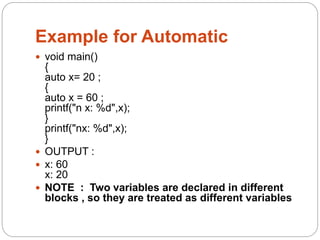
Example for Automatic
 void main()
{
auto x= 20 ;
{
auto x = 60 ;
printf("n x: %d",x);
}
printf("nx: %d",x);
}
 OUTPUT :
 x: 60
x: 20
 NOTE : Two variables are declared in different
blocks , so they are treated as different variables
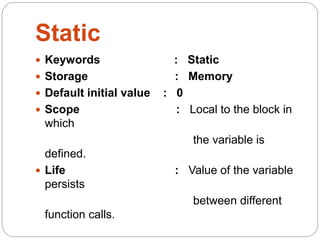
Static
 Keywords : Static
 Storage : Memory
 Default initial value : 0
 Scope : Local to the block in
which
the variable is
defined.
 Life : Value of the variable
persists
between different
function calls.
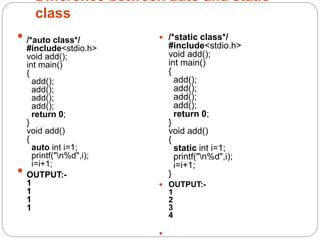
Difference between auto and static
class
 /*auto class*/
#include<stdio.h>
void add();
int main()
{
add();
add();
add();
add();
return 0;
}
void add()
{
auto int i=1;
printf("n%d",i);
i=i+1;
 OUTPUT:-
1
1
1
1
 /*static class*/
#include<stdio.h>
void add();
int main()
{
add();
add();
add();
add();
return 0;
}
void add()
{
static int i=1;
printf("n%d",i);
i=i+1;
}
 OUTPUT:-
1
2
3
4

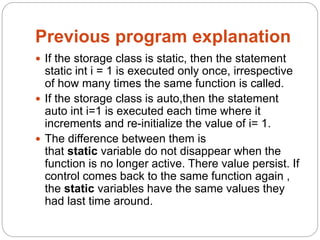
Previous program explanation
 If the storage class is static, then the statement
static int i = 1 is executed only once, irrespective
of how many times the same function is called.
 If the storage class is auto,then the statement
auto int i=1 is executed each time where it
increments and re-initialize the value of i= 1.
 The difference between them is
that static variable do not disappear when the
function is no longer active. There value persist. If
control comes back to the same function again ,
the static variables have the same values they
had last time around.
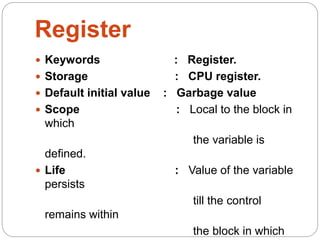
Register
 Keywords : Register.
 Storage : CPU register.
 Default initial value : Garbage value
 Scope : Local to the block in
which
the variable is
defined.
 Life : Value of the variable
persists
till the control
remains within
the block in which
Why we need Register Variable
?
 Whenever we declare any variable inside C Program
then memory will be randomly allocated at particular
memory location.
 We have to keep track of that memory location. We
need to access value at that memory location using
ampersand operator/Address Operator i.e (&).
 If we store same variable in the register memory then
we can access that memory location directly without
using the Address operator.
 Register variable will be accessed faster than the
normal variable thus increasing the operation and
program execution. Generally we use register variable
as Counter.
 Note : It is not applicable for arrays, structures or
pointers.
External
 Keywords : Extern.
 Storage : Memory.
 Default initial value : 0
 Scope : Global
 Life : Exists as long as
variable is
running
Retains value within
the function
Example for Extern
 int num = 75 ;
void display();
void main()
{
extern int num ;
printf("nNum : %d",num);
display();
}
void display()
{
extern int num ;
printf("nNum : %d",num);
}
 OUTPUT:
 Num : 75
Num : 75
Extern contd…
Note :Declaration within the function indicates
that the function uses external variable
Functions belonging to same source code ,
does not require declaration (no need to write
extern)
If variable is defined outside the source code ,
then declaration using extern keyword is
required
 THANK YOU

Storage class

  • 1.
  • 2.
    STORAGE CLASSES  Thestorage class determines the part of the memory where the variables would be stored.  The storage class also determines the initial value of the variable.  It is used to define the scope and lifetime of variable.  There are two storage locations in computer,  1. CPU Registers  2.Memory.  A value stored in CPU register can always be accessed faster than the one that is stored in memory.
  • 3.
    Four types 1.Automatic storageclass. 2.Register storage class. 3.Static storage class. 4.External storage class.
  • 4.
    Automatic  Keywords :Auto  Storage : Memory  Default initial value : Garbage value  Scope : Local/Block scope  Life : Exists as long as the control remains in the block
  • 5.
    Example for Automatic void main() { auto x= 20 ; { auto x = 60 ; printf("n x: %d",x); } printf("nx: %d",x); }  OUTPUT :  x: 60 x: 20  NOTE : Two variables are declared in different blocks , so they are treated as different variables
  • 6.
    Static  Keywords :Static  Storage : Memory  Default initial value : 0  Scope : Local to the block in which the variable is defined.  Life : Value of the variable persists between different function calls.
  • 7.
    Difference between autoand static class  /*auto class*/ #include<stdio.h> void add(); int main() { add(); add(); add(); add(); return 0; } void add() { auto int i=1; printf("n%d",i); i=i+1;  OUTPUT:- 1 1 1 1  /*static class*/ #include<stdio.h> void add(); int main() { add(); add(); add(); add(); return 0; } void add() { static int i=1; printf("n%d",i); i=i+1; }  OUTPUT:- 1 2 3 4 
  • 8.
    Previous program explanation If the storage class is static, then the statement static int i = 1 is executed only once, irrespective of how many times the same function is called.  If the storage class is auto,then the statement auto int i=1 is executed each time where it increments and re-initialize the value of i= 1.  The difference between them is that static variable do not disappear when the function is no longer active. There value persist. If control comes back to the same function again , the static variables have the same values they had last time around.
  • 9.
    Register  Keywords :Register.  Storage : CPU register.  Default initial value : Garbage value  Scope : Local to the block in which the variable is defined.  Life : Value of the variable persists till the control remains within the block in which
  • 10.
    Why we needRegister Variable ?  Whenever we declare any variable inside C Program then memory will be randomly allocated at particular memory location.  We have to keep track of that memory location. We need to access value at that memory location using ampersand operator/Address Operator i.e (&).  If we store same variable in the register memory then we can access that memory location directly without using the Address operator.  Register variable will be accessed faster than the normal variable thus increasing the operation and program execution. Generally we use register variable as Counter.  Note : It is not applicable for arrays, structures or pointers.
  • 11.
    External  Keywords :Extern.  Storage : Memory.  Default initial value : 0  Scope : Global  Life : Exists as long as variable is running Retains value within the function
  • 12.
    Example for Extern int num = 75 ; void display(); void main() { extern int num ; printf("nNum : %d",num); display(); } void display() { extern int num ; printf("nNum : %d",num); }  OUTPUT:  Num : 75 Num : 75
  • 13.
    Extern contd… Note :Declarationwithin the function indicates that the function uses external variable Functions belonging to same source code , does not require declaration (no need to write extern) If variable is defined outside the source code , then declaration using extern keyword is required
  • 14.