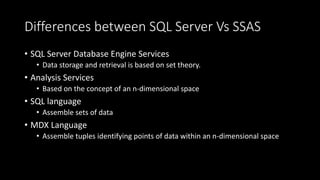
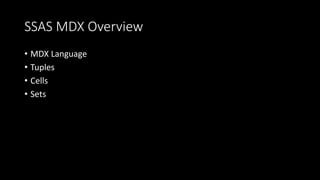
This document provides an overview of the MDX (Multidimensional Expressions) language used with SQL Server Analysis Services (SSAS). It discusses key MDX concepts like tuples, cells, and sets which are used to access and retrieve data from multidimensional cube structures. The document explains how MDX differs from SQL and covers important MDX clauses like SELECT, WITH, and NON EMPTY. It also demonstrates how to use sets, functions like CrossJoin and Members, and calculated members in MDX queries.


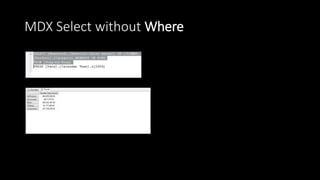
![MDX Select
• SELECT FROM [Adventure Works]
• SELECT FROM [Adventure Works] WHERE [Date].[Calendar
Year].&[2004]](https://image.slidesharecdn.com/ssasmdxlanguage-170930084500/85/Ssas-mdx-language-6-320.jpg)
![MDX Select
• SELECT [Measures].[Reseller Sales Amount] ON COLUMNS
FROM [Adventure Works]
WHERE [Date].[Calendar Year].&[2004]](https://image.slidesharecdn.com/ssasmdxlanguage-170930084500/85/Ssas-mdx-language-7-320.jpg)
![MDX Select
• SELECT [Measures].[Reseller Sales Amount] ON COLUMNS,
[Product].[Category].MEMBERS ON ROWS
FROM [Step-by-Step]
WHERE [Date].[Calendar Year].&[2004]](https://image.slidesharecdn.com/ssasmdxlanguage-170930084500/85/Ssas-mdx-language-8-320.jpg)

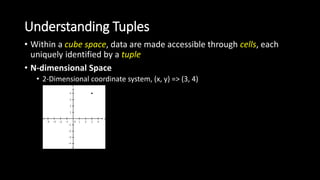
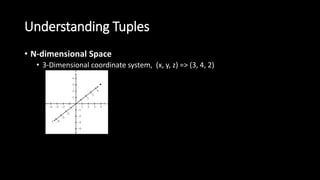

![Accessing Data with Tuples
• SELECT FROM [Adventure Works]
WHERE (
[Date].[Calendar Year].[All Periods],
[Date].[Fiscal Year].[All Periods],
[Product].[Category].[Bikes],
[Product].[Subcategory].[Mountain Bikes],
[Measures].[Measures].[Reseller Sales Amount]
) => Tuple](https://image.slidesharecdn.com/ssasmdxlanguage-170930084500/85/Ssas-mdx-language-14-320.jpg)
![Understanding Cells
• Points within cube spaces are occupied by cells
• Cells are objects and as such have a number of properties
• The default properties returned are VALUE and FORMATTED_VALUE.
• The VALUE property contains an aggregated measure value
SELECT
FROM [Adventure Works]
WHERE (
[Date].[Calendar Year].[All Periods],
[Date].[Fiscal Year].[All Periods],
[Product].[Category].[Bikes],
[Product].[Subcategory].[Mountain Bikes],
[Measures].[Measures].[Reseller Sales Amount]
)
aggregated value for the Reseller Sales Amount measure
limited to =>
• Calendar Year,
• Fiscal Year attribute-hierarchies’ All Periods members,
• the Category attribute-hierarchy’s Bikes member,
• the Subcategory attribute-hierarchy’s Mountain Bikes
member:](https://image.slidesharecdn.com/ssasmdxlanguage-170930084500/85/Ssas-mdx-language-15-320.jpg)
![Understanding Cells
SELECT
FROM [Chapter 3 Cube]
WHERE (
[Product].[Subcategory].[Mountain Bikes],
[Date].[Calendar Year].[All Periods],
[Date].[Fiscal Year].[All Periods],
[Product].[Category].[Bikes],
[Measures].[Measures].[Reseller Sales Amount]
)
CELL PROPERTIES FORMATTED_VALUE, FORMAT_STRING](https://image.slidesharecdn.com/ssasmdxlanguage-170930084500/85/Ssas-mdx-language-16-320.jpg)
![Partial Tuples
SELECT
FROM [Chapter 3 Cube]
WHERE (
[Date].[Calendar Year].[All Periods],
[Date].[Fiscal Year].[All Periods],
[Product].[Category].[Bikes],
[Product].[Subcategory].[Mountain Bikes],
[Measures].[Measures].[Reseller Sales Amount]
)](https://image.slidesharecdn.com/ssasmdxlanguage-170930084500/85/Ssas-mdx-language-17-320.jpg)
![Set Basics
Using collections of tuples, known as sets, to retrieve multiple cells
{
([Product].[Category].[Accessories]),
([Product].[Category].[Bikes]),
([Product].[Category].[Clothing]),
([Product].[Category].[Components])
}
SET](https://image.slidesharecdn.com/ssasmdxlanguage-170930084500/85/Ssas-mdx-language-19-320.jpg)
![Set Constraints
• Shared hierarchality
{
([Product].[Category].[Accessories]),
([Product].[Category].[Bikes]),
([Product].[Category].[Clothing]),
([Product].[Category].[Components])
}
SELECT
{
([Date].[Calendar].[CY 2002],
[Geography].[Country].[United States]),
([Date].[Calendar].[CY 2003],
[Geography].[Country].[United States]),
([Date].[Calendar].[CY 2004],
[Geography].[Country].[United States])
} ON COLUMNS,
{
([Product].[Category].[Accessories]),
([Product].[Category].[Bikes]),
([Product].[Category].[Clothing]),
([Product].[Category].[Components]),
([Product].[Subcategory].[Mountain Bikes])
} ON ROWS
FROM [Step-by-Step]
Incorrect Hierarchy in the Set](https://image.slidesharecdn.com/ssasmdxlanguage-170930084500/85/Ssas-mdx-language-20-320.jpg)
![Set Results
SELECT
{
([Date].[Calendar].[CY 2002], [Geography].[Country].[United States]),
([Date].[Calendar].[CY 2003], [Geography].[Country].[United States]),
([Date].[Calendar].[CY 2004], [Geography].[Country].[United States])
} ON COLUMNS,
{
([Product].[Category].[Accessories]),
([Product].[Category].[Bikes]),
([Product].[Category].[Clothing]),
([Product].[Category].[Components])
} ON ROWS
FROM [Step-by-Step]](https://image.slidesharecdn.com/ssasmdxlanguage-170930084500/85/Ssas-mdx-language-21-320.jpg)
![Set Constraints
SELECT
{
([Geography].[Country].[United States],
[Date].[Calendar].[CY 2002]),
([Date].[Calendar].[CY 2003],
[Geography].[Country].[United States]),
([Date].[Calendar].[CY 2004],
[Geography].[Country].[United States])
} ON COLUMNS,
{
([Product].[Product Categories].[Accessories]),
([Product].[Product Categories].[Bikes]),
([Product].[Product Categories].[Clothing]),
([Product].[Product Categories].[Components]),
([Product].[Product Categories].[Mountain Bikes])
} ON ROWS
FROM [Step-by-Step]
SELECT
{
([Geography].[Country].[United States],
[Date].[Calendar].[CY 2002]),
([Geography].[Country].[United States],
[Date].[Calendar].[CY 2003]),
([Geography].[Country].[United States],
[Date].[Calendar].[CY 2004])
} ON COLUMNS,
{
([Product].[Product Categories].[Accessories]),
([Product].[Product Categories].[Bikes]),
([Product].[Product Categories].[Clothing]),
([Product].[Product Categories].[Components]),
([Product].[Product Categories].[Mountain Bikes])
} ON ROWS
FROM [Step-by-Step]
Incorrect Correct](https://image.slidesharecdn.com/ssasmdxlanguage-170930084500/85/Ssas-mdx-language-22-320.jpg)
![Sets with Functions
• The Members Function
[Dimension].[Hierarchy].Members
[Dimension].[Hierarchy].[Level].Members
SELECT
{
([Date].[Calendar].[CY 2002]),
([Date].[Calendar].[CY 2003]),
([Date].[Calendar].[CY 2004])
} ON COLUMNS,
{
([Product].[Category].[Accessories]),
([Product].[Category].[Bikes]),
([Product].[Category].[Clothing]),
([Product].[Category].[Components])
} ON ROWS
FROM [Step-by-Step]
WHERE ([Geography].[Country].[United States])
SELECT
{
([Date].[Calendar].[CY 2002]),
([Date].[Calendar].[CY 2003]),
([Date].[Calendar].[CY 2004])
} ON COLUMNS,
{[Product].[Category].[Category].Members} ON ROWS
FROM [Step-by-Step]
WHERE ([Geography].[Country].[United States])](https://image.slidesharecdn.com/ssasmdxlanguage-170930084500/85/Ssas-mdx-language-24-320.jpg)
![The Crossjoin Function
Crossjoin( {Set1}, {Set2} [, . . . {Setn} )
SELECT
{
([Date].[Calendar].[CY 2002]),
([Date].[Calendar].[CY 2003]),
([Date].[Calendar].[CY 2004])
} ON COLUMNS,
Crossjoin(
{[Product].[Category].[Category].Members},
{
([Measures].[Reseller Sales Amount]),
([Measures].[Reseller Order Quantity])
}
) ON ROWS
FROM [Step-by-Step]
WHERE ([Geography].[Country].[United States])](https://image.slidesharecdn.com/ssasmdxlanguage-170930084500/85/Ssas-mdx-language-25-320.jpg)
![The Crossjoin Function
SELECT
{
([Date].[Calendar].[CY 2002]),
([Date].[Calendar].[CY 2003]),
([Date].[Calendar].[CY 2004])
} ON COLUMNS,
{[Product].[Category].[Category].Members} *
{
([Measures].[Reseller Sales Amount]),
([Measures].[Reseller Order Quantity])
} ON ROWS
FROM [Step-by-Step]
WHERE ([Geography].[Country].[United States])](https://image.slidesharecdn.com/ssasmdxlanguage-170930084500/85/Ssas-mdx-language-26-320.jpg)
![Calculated Members
WITH
MEMBER [Product].[Category].[All Products].[X] AS
1+1
SELECT
{
([Date].[Calendar Year].[CY 2003]),
([Date].[Calendar Year].[CY 2004])
} ON COLUMNS,
{
([Product].[Category].[Accessories]) ,
([Product].[Category].[Bikes]),
([Product].[Category].[Clothing]),
([Product].[Category].[Components]),
([Product].[Category].[X])
} ON ROWS
FROM [Step-by-Step]](https://image.slidesharecdn.com/ssasmdxlanguage-170930084500/85/Ssas-mdx-language-27-320.jpg)
![NON EMPTY function
SELECT
{[Measures].[Reseller Sales Amount]} ON COLUMNS,
NON EMPTY {[Date].[Month].[May 2002]} *
{[Employee].[Employee].Members} ON ROWS
FROM [Step-by-Step]](https://image.slidesharecdn.com/ssasmdxlanguage-170930084500/85/Ssas-mdx-language-28-320.jpg)