Unit Testing
By Vinod (Architect) – Crestron Electronics
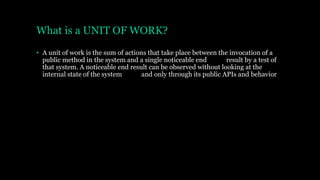
What is a UNIT OF WORK?
• A unit of work is the sum of actions that take place between the invocation of a
public method in the system and a single noticeable end result by a test of
that system. A noticeable end result can be observed without looking at the
internal state of the system and only through its public APIs and behavior
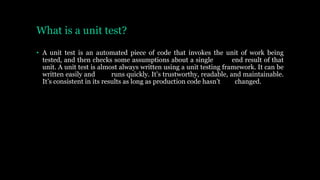
What is a unit test?
• A unit test is an automated piece of code that invokes the unit of work being
tested, and then checks some assumptions about a single end result of that
unit. A unit test is almost always written using a unit testing framework. It can be
written easily and runs quickly. It’s trustworthy, readable, and maintainable.
It’s consistent in its results as long as production code hasn’t changed.
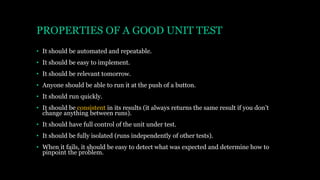
PROPERTIES OF A GOOD UNIT TEST
• It should be automated and repeatable.
• It should be easy to implement.
• It should be relevant tomorrow.
• Anyone should be able to run it at the push of a button.
• It should run quickly.
• It should be consistent in its results (it always returns the same result if you don’t
change anything between runs).
• It should have full control of the unit under test.
• It should be fully isolated (runs independently of other tests).
• When it fails, it should be easy to detect what was expected and determine how to
pinpoint the problem.
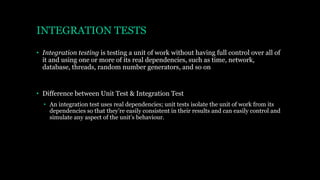
INTEGRATION TESTS
• Integration testing is testing a unit of work without having full control over all of
it and using one or more of its real dependencies, such as time, network,
database, threads, random number generators, and so on
• Difference between Unit Test & Integration Test
• An integration test uses real dependencies; unit tests isolate the unit of work from its
dependencies so that they’re easily consistent in their results and can easily control and
simulate any aspect of the unit’s behaviour.
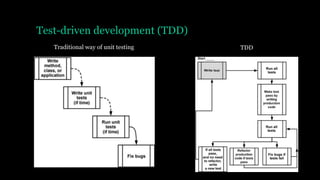
Test-driven development (TDD)
Traditional way of unit testing TDD
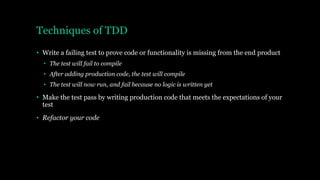
Techniques of TDD
• Write a failing test to prove code or functionality is missing from the end product
• The test will fail to compile
• After adding production code, the test will compile
• The test will now run, and fail because no logic is written yet
• Make the test pass by writing production code that meets the expectations of your
test
• Refactor your code
Benefits of TDD
• One of the biggest benefits of TDD nobody tells you about is that by seeing a test
fail, and then seeing it pass without changing the test, you’re basically testing
the test itself
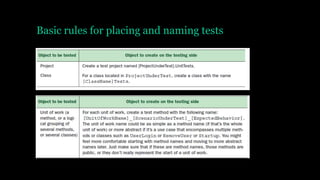
Basic rules for placing and naming tests
NUnit attributes
[TestFixture]
public class LogAnalyzerTests
{
[Test]
public void
IsValidFileName_BadExtension_ReturnsFalse()
{
LogAnalyzer analyzer = new LogAnalyzer();
bool result =
analyzer.IsValidLogFileName("filewithbadextension
.foo");
Assert.False(result);
}
}
A unit test usually
comprises three main
actions
1. Arrange objects,
creating and setting
them up as necessary
2. Act on an object
3. Assert that something is
as expected
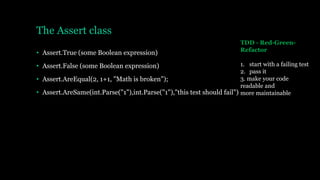
The Assert class
• Assert.True (some Boolean expression)
• Assert.False (some Boolean expression)
• Assert.AreEqual(2, 1+1, "Math is broken");
• Assert.AreSame(int.Parse("1"),int.Parse("1"),"this test should fail")
TDD - Red-Green-
Refactor
1. start with a failing test
2. pass it
3. make your code
readable and
more maintainable
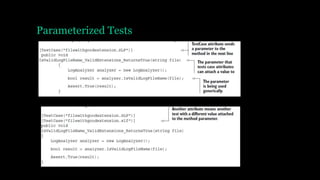
Parameterized Tests
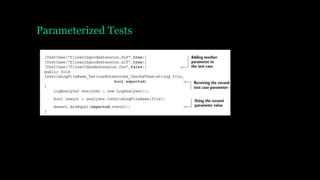
Parameterized Tests
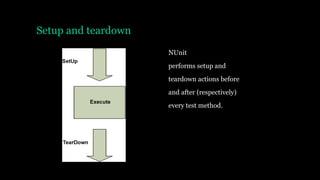
Setup and teardown
NUnit
performs setup and
teardown actions before
and after (respectively)
every test method.
Setup and teardown
[TestFixtureSetUp] and
[TestFixtureTearDown] allow setting up
state
once before all the tests in a specific class
run and once after all the tests have been
run (once per test fixture)
You almost never, ever use TearDown or
TestFixture methods in unit test projects
If you do, you’re very likely writing an
integration test, where you’re touching the
filesystem or a database, and you need to clean
up the disk or the DB after the tests.
Use it only to “reset” the state of a static variable
or singleton in memory
between tests
Checking for expected exceptions
public class LogAnalyzer
{
public bool IsValidLogFileName(string
fileName)
{
…
if (string.IsNullOrEmpty(fileName))
{
throw new ArgumentException(
"filename has to be provided");
}
…
}
}
[Test]
[ExpectedException(typeof(ArgumentException),
ExpectedMessage ="filename has to be
provided")]
public void
IsValidFileName_EmptyFileName_ThrowsException
()
{
m_analyzer.IsValidLogFileName(string.Empty);
}
private LogAnalyzer MakeAnalyzer()
{
return new LogAnalyzer();
}
Factory Method
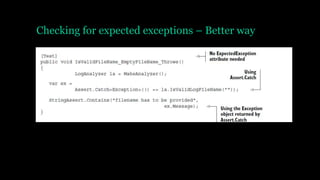
Checking for expected exceptions – Better way
Ignoring tests
[Test]
[Ignore("there is a problem with this
test")]
public void
IsValidFileName_ValidFile_ReturnsTrue()
{
/// ...
}
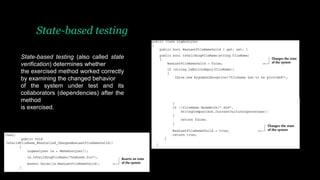
State-based testing
State-based testing (also called state
verification) determines whether
the exercised method worked correctly
by examining the changed behavior
of the system under test and its
collaborators (dependencies) after the
method
is exercised.
Stubs
• External Dependency
• An external dependency is an object in your system that your code under test interacts
with and over which you have no control. (Common examples are filesystems, threads,
memory, time, and so on.)
• Stub
• A stub is a controllable replacement for an existing dependency (or collaborator) in the
system. By using a stub, you can test your code without dealing with the dependency
directly
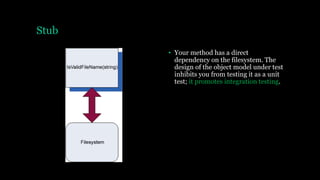
Stub
• Your method has a direct
dependency on the filesystem. The
design of the object model under test
inhibits you from testing it as a unit
test; it promotes integration testing.
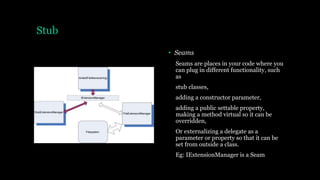
Stub
• Seams
Seams are places in your code where you
can plug in different functionality, such
as
stub classes,
adding a constructor parameter,
adding a public settable property,
making a method virtual so it can be
overridden,
Or externalizing a delegate as a
parameter or property so that it can be
set from outside a class.
Eg: IExtensionManager is a Seam
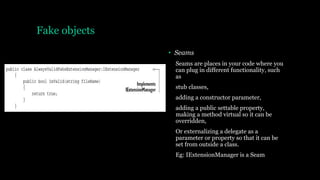
Fake objects
• Seams
Seams are places in your code where you
can plug in different functionality, such
as
stub classes,
adding a constructor parameter,
adding a public settable property,
making a method virtual so it can be
overridden,
Or externalizing a delegate as a
parameter or property so that it can be
set from outside a class.
Eg: IExtensionManager is a Seam
Thank You

Unit testing

  • 1.
    Unit Testing By Vinod(Architect) – Crestron Electronics
  • 2.
    What is aUNIT OF WORK? • A unit of work is the sum of actions that take place between the invocation of a public method in the system and a single noticeable end result by a test of that system. A noticeable end result can be observed without looking at the internal state of the system and only through its public APIs and behavior
  • 3.
    What is aunit test? • A unit test is an automated piece of code that invokes the unit of work being tested, and then checks some assumptions about a single end result of that unit. A unit test is almost always written using a unit testing framework. It can be written easily and runs quickly. It’s trustworthy, readable, and maintainable. It’s consistent in its results as long as production code hasn’t changed.
  • 4.
    PROPERTIES OF AGOOD UNIT TEST • It should be automated and repeatable. • It should be easy to implement. • It should be relevant tomorrow. • Anyone should be able to run it at the push of a button. • It should run quickly. • It should be consistent in its results (it always returns the same result if you don’t change anything between runs). • It should have full control of the unit under test. • It should be fully isolated (runs independently of other tests). • When it fails, it should be easy to detect what was expected and determine how to pinpoint the problem.
  • 5.
    INTEGRATION TESTS • Integrationtesting is testing a unit of work without having full control over all of it and using one or more of its real dependencies, such as time, network, database, threads, random number generators, and so on • Difference between Unit Test & Integration Test • An integration test uses real dependencies; unit tests isolate the unit of work from its dependencies so that they’re easily consistent in their results and can easily control and simulate any aspect of the unit’s behaviour.
  • 6.
  • 7.
    Techniques of TDD •Write a failing test to prove code or functionality is missing from the end product • The test will fail to compile • After adding production code, the test will compile • The test will now run, and fail because no logic is written yet • Make the test pass by writing production code that meets the expectations of your test • Refactor your code
  • 8.
    Benefits of TDD •One of the biggest benefits of TDD nobody tells you about is that by seeing a test fail, and then seeing it pass without changing the test, you’re basically testing the test itself
  • 9.
    Basic rules forplacing and naming tests
  • 10.
    NUnit attributes [TestFixture] public classLogAnalyzerTests { [Test] public void IsValidFileName_BadExtension_ReturnsFalse() { LogAnalyzer analyzer = new LogAnalyzer(); bool result = analyzer.IsValidLogFileName("filewithbadextension .foo"); Assert.False(result); } } A unit test usually comprises three main actions 1. Arrange objects, creating and setting them up as necessary 2. Act on an object 3. Assert that something is as expected
  • 11.
    The Assert class •Assert.True (some Boolean expression) • Assert.False (some Boolean expression) • Assert.AreEqual(2, 1+1, "Math is broken"); • Assert.AreSame(int.Parse("1"),int.Parse("1"),"this test should fail") TDD - Red-Green- Refactor 1. start with a failing test 2. pass it 3. make your code readable and more maintainable
  • 12.
  • 13.
  • 14.
    Setup and teardown NUnit performssetup and teardown actions before and after (respectively) every test method.
  • 15.
    Setup and teardown [TestFixtureSetUp]and [TestFixtureTearDown] allow setting up state once before all the tests in a specific class run and once after all the tests have been run (once per test fixture) You almost never, ever use TearDown or TestFixture methods in unit test projects If you do, you’re very likely writing an integration test, where you’re touching the filesystem or a database, and you need to clean up the disk or the DB after the tests. Use it only to “reset” the state of a static variable or singleton in memory between tests
  • 16.
    Checking for expectedexceptions public class LogAnalyzer { public bool IsValidLogFileName(string fileName) { … if (string.IsNullOrEmpty(fileName)) { throw new ArgumentException( "filename has to be provided"); } … } } [Test] [ExpectedException(typeof(ArgumentException), ExpectedMessage ="filename has to be provided")] public void IsValidFileName_EmptyFileName_ThrowsException () { m_analyzer.IsValidLogFileName(string.Empty); } private LogAnalyzer MakeAnalyzer() { return new LogAnalyzer(); } Factory Method
  • 17.
    Checking for expectedexceptions – Better way
  • 18.
    Ignoring tests [Test] [Ignore("there isa problem with this test")] public void IsValidFileName_ValidFile_ReturnsTrue() { /// ... }
  • 19.
    State-based testing State-based testing(also called state verification) determines whether the exercised method worked correctly by examining the changed behavior of the system under test and its collaborators (dependencies) after the method is exercised.
  • 20.
    Stubs • External Dependency •An external dependency is an object in your system that your code under test interacts with and over which you have no control. (Common examples are filesystems, threads, memory, time, and so on.) • Stub • A stub is a controllable replacement for an existing dependency (or collaborator) in the system. By using a stub, you can test your code without dealing with the dependency directly
  • 21.
    Stub • Your methodhas a direct dependency on the filesystem. The design of the object model under test inhibits you from testing it as a unit test; it promotes integration testing.
  • 22.
    Stub • Seams Seams areplaces in your code where you can plug in different functionality, such as stub classes, adding a constructor parameter, adding a public settable property, making a method virtual so it can be overridden, Or externalizing a delegate as a parameter or property so that it can be set from outside a class. Eg: IExtensionManager is a Seam
  • 23.
    Fake objects • Seams Seamsare places in your code where you can plug in different functionality, such as stub classes, adding a constructor parameter, adding a public settable property, making a method virtual so it can be overridden, Or externalizing a delegate as a parameter or property so that it can be set from outside a class. Eg: IExtensionManager is a Seam
  • 24.