How and why to use line
numbers in SSMS
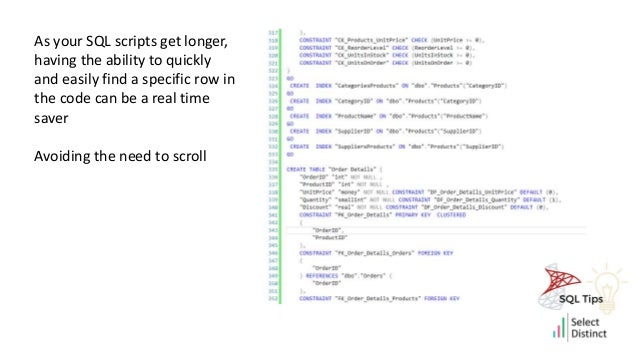
As your SQL scripts get longer,
having the ability to quickly
and easily find a specific row in
the code can be a real time
saver
Avoiding the need to scroll
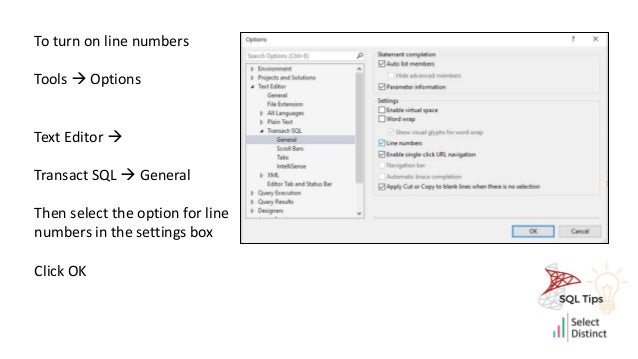
To turn on line numbers
Tools  Options
Text Editor 
Transact SQL  General
Then select the option for line
numbers in the settings box
Click OK
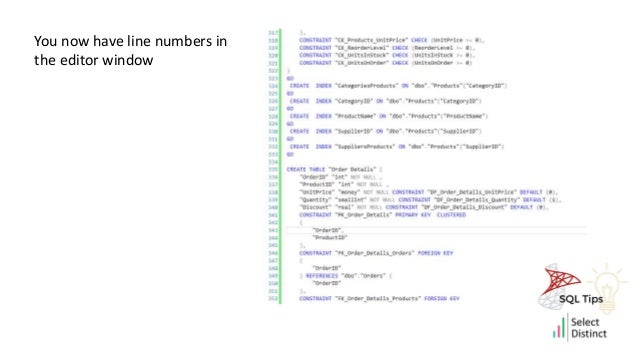
You now have line numbers in
the editor window
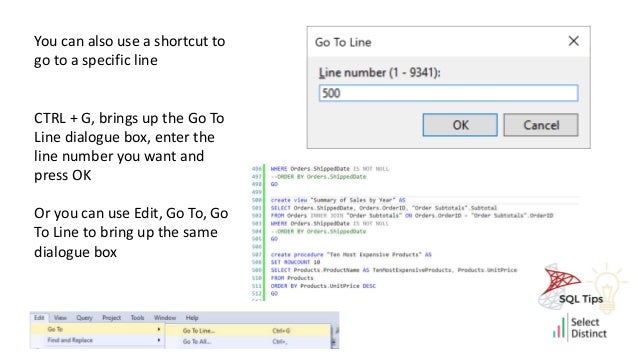
You can also use a shortcut to
go to a specific line
CTRL + G, brings up the Go To
Line dialogue box, enter the
line number you want and
press OK
Or you can use Edit, Go To, Go
To Line to bring up the same
dialogue box
Hope you found this useful
For more Tips, Tricks and
Timesavers, visit our website
Tips and Timesavers | Select Distinct Limited
Credit: simon.harrison@selectdistinct.co.uk

SQL tips use line numbers

  • 2.
    How and whyto use line numbers in SSMS
  • 3.
    As your SQLscripts get longer, having the ability to quickly and easily find a specific row in the code can be a real time saver Avoiding the need to scroll
  • 4.
    To turn online numbers Tools  Options Text Editor  Transact SQL  General Then select the option for line numbers in the settings box Click OK
  • 5.
    You now haveline numbers in the editor window
  • 6.
    You can alsouse a shortcut to go to a specific line CTRL + G, brings up the Go To Line dialogue box, enter the line number you want and press OK Or you can use Edit, Go To, Go To Line to bring up the same dialogue box
  • 7.
    Hope you foundthis useful
  • 8.
    For more Tips,Tricks and Timesavers, visit our website Tips and Timesavers | Select Distinct Limited Credit: simon.harrison@selectdistinct.co.uk