Genesis Omo
              1
 an acronym for Structured Query
  Language
 forms the backbone of most modern
  database systems
 the language of databases
 a standard programming language for
  querying and modifying data and
  managing databases.
 a standard computer language for
  accessing and manipulating databases.
                                          2
 SQL  allows you to access a database
 SQL is an ANSI standard computer
  language
 SQL can execute queries against a
  database
 SQL can retrieve data from a database
 SQL can insert new records in a database
 SQL can delete records from a database
 SQL can update records

                                             3
   The first version of SQL, initially called SEQUEL, was
    developed at IBM by Chamberlin and Boyce in the early
    1970s.
   later formally standardized by the American National
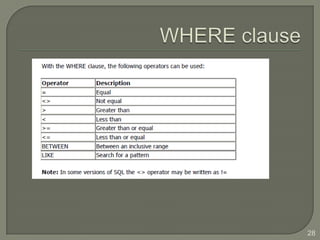
    Standards Institute (ANSI) in 1986.
   The first non-commercial non-SQL RDBMS, INGRES,
    was developed in 1974 at the U.C. Berkely. Ingres
    implemented a query language known as QUEL, which
    was later supplanted in the marketplace by SQL.
   In the late 1970s, Relational Software, Inc. (now Oracle
    Corp.) saw the potential of the concepts described by
    Codd, Chamberlin, and Boyce and developed their own
    SQL-based RDBMS.


                                                               4
   Statements which may have a persistent effect on
    schemas and data, or which may control transactions,
    program flow, connections, sessions, or diagnostics.
   Queries which retrieve data based on specific criteria.
   Expressions which can produce either scalar values or
    tables consisting of columns and rows of data.
   Predicates which specify conditions that can be
    evaluated to SQL three-valued logic (3VL).


                                                              5
   Clauses which are (in some cases optional) constituent
    components of statements and queries.
   Whitespace is generally ignored in SQL statements and
    queries, making it easier to format SQL code for
    readability.
   SQL statements also include the semicolon (";")
    statement terminator. Though not required on every
    platform, it is defined as a standard part of the SQL
    grammar.


                                                             6
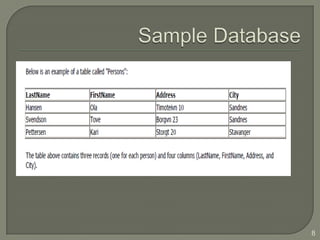
• A database most often contains one or
  more tables.
• Each table is identified by a name (e.g.
  "Customers" or "Orders").

Tables contain records (rows) with data.


                                             7
8
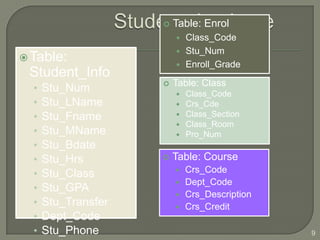
   Table: Enrol
                          Class_Code
                          Stu_Num
 Table:
                          Enroll_Grade
 Student_Info
                        Table: Class
  •   Stu_Num               Class_Code
  •   Stu_LName             Crs_Cde
  •   Stu_Fname             Class_Section
                            Class_Room
  •   Stu_MName             Pro_Num
  •   Stu_Bdate
  •   Stu_Hrs           Table: Course
  •   Stu_Class           Crs_Code
                          Dept_Code
  •   Stu_GPA
                          Crs_Description
  •   Stu_Transfer        Crs_Credit
  •   Dept_Code
  •   Stu_Phone                              9
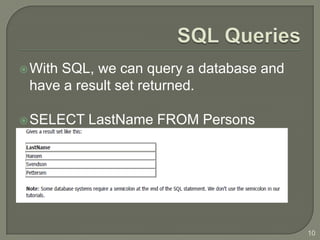
 With
     SQL, we can query a database and
 have a result set returned.

 SELECT   LastName FROM Persons


                                        10
 SQL  (Structured Query Language) is a
  syntax for executing queries.
 SQL language also includes a syntax to
  update, insert, and delete records.


                                           11
•   SELECT - extracts data from a database table
•   UPDATE - updates data in a database table
•   DELETE - deletes data from a database table
•   INSERT INTO - inserts new data into a
    database table


                                                   12
 Data  Definition Language (DDL) part of SQL
  permits database tables to be created or deleted.
 Define indexes (keys), specify links between
  tables, and impose constraints between
  database tables.


                                                      13
• CREATE TABLE - creates a new database table
• ALTER TABLE - alters (changes) a database table
• DROP TABLE - deletes a database table
• CREATE INDEX - creates an index (search key)
• DROP INDEX - deletes an index


                                                    14
 SELECT    statement is used to select data
  from a table.
 The tabular result is stored in a result table
  (called the resultset).

 Syntax
  SELECT column_name(s)
  FROM table_name


                                                   15
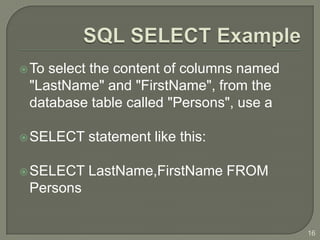
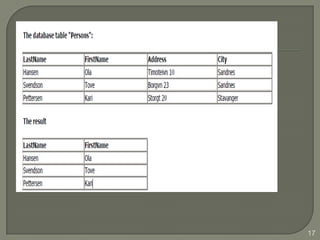
 Toselect the content of columns named
 "LastName" and "FirstName", from the
 database table called "Persons", use a

 SELECT   statement like this:

 SELECT   LastName,FirstName FROM
 Persons


                                          16
17
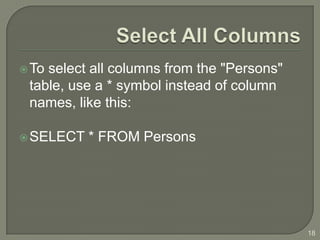
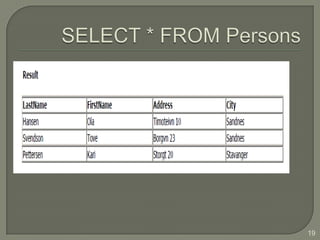
 Toselect all columns from the "Persons"
 table, use a * symbol instead of column
 names, like this:

 SELECT   * FROM Persons


                                            18
19
 The  DISTINCT keyword is used to return
  only distinct (different) values.
 The SELECT statement returns
  information from table columns. But what
  if we only want to select distinct
  elements?
 With SQL, all we need to do is to add a
  DISTINCT keyword to the SELECT
  statement:
Syntax :
SELECT DISTINCT column_name(s)
FROM table_name
                                             20
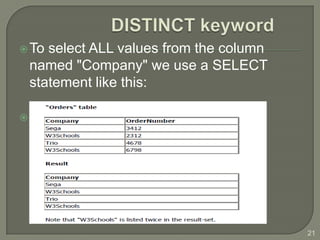
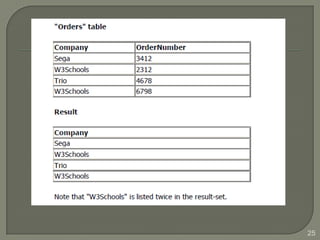
 Toselect ALL values from the column
 named "Company" we use a SELECT
 statement like this:

 SELECT   Company FROM Orders


                                        21
 Semicolon   is the standard way to separate
  each SQL statement in database systems
  that allow more than one SQL
 statement to be executed in the same call
  to the server.


                                                22
 DISTINCT     keyword is used to return only
  distinct (different) values.
 SELECT statement returns information
  from table columns. But what if we only
  want to select distinct elements?

 Syntax
 SELECT DISTINCT column_name(s)
 FROM table_name
                                                23
 Toselect ALL values from the column
 named "Company" we use a SELECT
 statement like this:

 SELECT   Company FROM Orders


                                        24
25
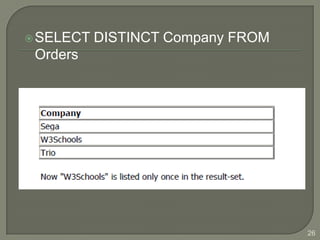
 SELECT   DISTINCT Company FROM
 Orders


                                   26
 To
   conditionally select data from a table, a
 WHERE clause can be added to the
 SELECT statement.

 Syntax


 SELECT column FROM table
 WHERE column operator value


                                               27
28
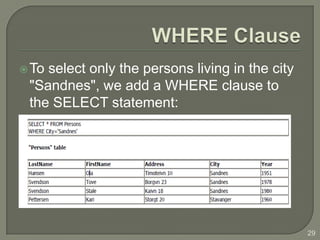
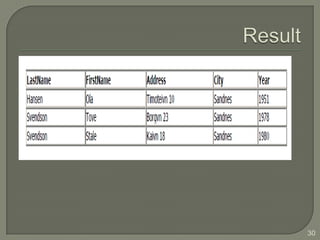
 Toselect only the persons living in the city
 "Sandnes", we add a WHERE clause to
 the SELECT statement:


                                                 29
30
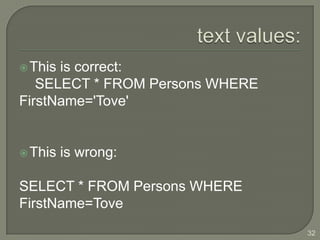
 Note that we have used single quotes
  around the conditional values in the
  examples.
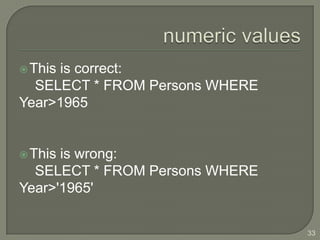
 SQL uses single quotes around text values
  (most database systems will also accept
  double quotes). Numeric values
 should not be enclosed in quotes.


                                              31
 Thisis correct:
   SELECT * FROM Persons WHERE
FirstName='Tove'


 This   is wrong:

SELECT * FROM Persons WHERE
FirstName=Tove
                                 32
 This
     is correct:
  SELECT * FROM Persons WHERE
Year>1965


 Thisis wrong:
  SELECT * FROM Persons WHERE
Year>'1965'


                                33
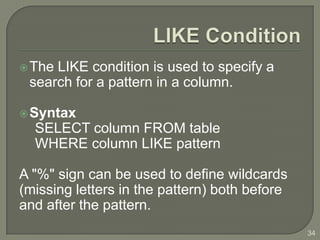
 TheLIKE condition is used to specify a
 search for a pattern in a column.

 Syntax
  SELECT column FROM table
  WHERE column LIKE pattern

A "%" sign can be used to define wildcards
(missing letters in the pattern) both before
and after the pattern.
                                               34
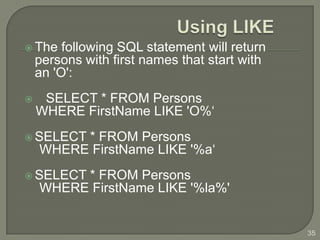
 The    following SQL statement will return
    persons with first names that start with
    an 'O':
    SELECT * FROM Persons
    WHERE FirstName LIKE 'O%‘
 SELECT * FROM Persons
    WHERE FirstName LIKE '%a‘
 SELECT * FROM Persons
    WHERE FirstName LIKE '%la%'


                                               35
 INSERTINTO statement is used to insert
 new rows into a table.

 Syntax
 INSERT INTO table_name
 VALUES (value1, value2,....)

  INSERT INTO table_name (column1,
column2,...)
  VALUES (value1, value2,....)
                                           36
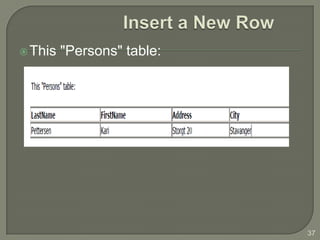
 This   "Persons" table:


                            37
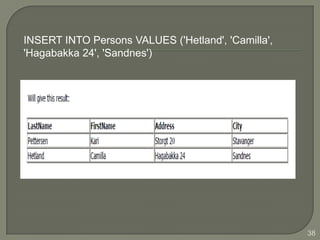
INSERT INTO Persons VALUES ('Hetland', 'Camilla',
'Hagabakka 24', 'Sandnes')


                                                    38
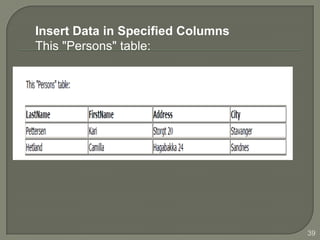
Insert Data in Specified Columns
This "Persons" table:


                                   39
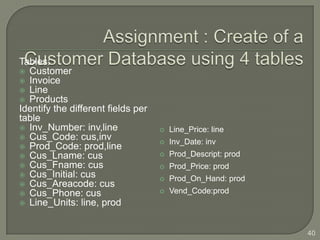
Tables:
 Customer
 Invoice
 Line
 Products
Identify the different fields per
table
 Inv_Number: inv,line                 Line_Price: line
 Cus_Code: cus,inv
                                       Inv_Date: inv
 Prod_Code: prod,line
 Cus_Lname: cus                       Prod_Descript: prod
 Cus_Fname: cus                       Prod_Price: prod
 Cus_Initial: cus
                                       Prod_On_Hand: prod
 Cus_Areacode: cus
 Cus_Phone: cus                       Vend_Code:prod
 Line_Units: line, prod


                                                              40

Sql basics

  • 1.
  • 2.
     an acronymfor Structured Query Language  forms the backbone of most modern database systems  the language of databases  a standard programming language for querying and modifying data and managing databases.  a standard computer language for accessing and manipulating databases. 2
  • 3.
     SQL allows you to access a database  SQL is an ANSI standard computer language  SQL can execute queries against a database  SQL can retrieve data from a database  SQL can insert new records in a database  SQL can delete records from a database  SQL can update records 3
  • 4.
    The first version of SQL, initially called SEQUEL, was developed at IBM by Chamberlin and Boyce in the early 1970s.  later formally standardized by the American National Standards Institute (ANSI) in 1986.  The first non-commercial non-SQL RDBMS, INGRES, was developed in 1974 at the U.C. Berkely. Ingres implemented a query language known as QUEL, which was later supplanted in the marketplace by SQL.  In the late 1970s, Relational Software, Inc. (now Oracle Corp.) saw the potential of the concepts described by Codd, Chamberlin, and Boyce and developed their own SQL-based RDBMS. 4
  • 5.
    Statements which may have a persistent effect on schemas and data, or which may control transactions, program flow, connections, sessions, or diagnostics.  Queries which retrieve data based on specific criteria.  Expressions which can produce either scalar values or tables consisting of columns and rows of data.  Predicates which specify conditions that can be evaluated to SQL three-valued logic (3VL). 5
  • 6.
    Clauses which are (in some cases optional) constituent components of statements and queries.  Whitespace is generally ignored in SQL statements and queries, making it easier to format SQL code for readability.  SQL statements also include the semicolon (";") statement terminator. Though not required on every platform, it is defined as a standard part of the SQL grammar. 6
  • 7.
    • A databasemost often contains one or more tables. • Each table is identified by a name (e.g. "Customers" or "Orders"). Tables contain records (rows) with data. 7
  • 8.
  • 9.
    Table: Enrol  Class_Code  Stu_Num  Table:  Enroll_Grade Student_Info  Table: Class • Stu_Num  Class_Code • Stu_LName  Crs_Cde • Stu_Fname  Class_Section  Class_Room • Stu_MName  Pro_Num • Stu_Bdate • Stu_Hrs  Table: Course • Stu_Class  Crs_Code  Dept_Code • Stu_GPA  Crs_Description • Stu_Transfer  Crs_Credit • Dept_Code • Stu_Phone 9
  • 10.
     With SQL, we can query a database and have a result set returned.  SELECT LastName FROM Persons 10
  • 11.
     SQL (Structured Query Language) is a syntax for executing queries.  SQL language also includes a syntax to update, insert, and delete records. 11
  • 12.
    SELECT - extracts data from a database table • UPDATE - updates data in a database table • DELETE - deletes data from a database table • INSERT INTO - inserts new data into a database table 12
  • 13.
     Data Definition Language (DDL) part of SQL permits database tables to be created or deleted.  Define indexes (keys), specify links between tables, and impose constraints between database tables. 13
  • 14.
    • CREATE TABLE- creates a new database table • ALTER TABLE - alters (changes) a database table • DROP TABLE - deletes a database table • CREATE INDEX - creates an index (search key) • DROP INDEX - deletes an index 14
  • 15.
     SELECT statement is used to select data from a table.  The tabular result is stored in a result table (called the resultset).  Syntax SELECT column_name(s) FROM table_name 15
  • 16.
     Toselect thecontent of columns named "LastName" and "FirstName", from the database table called "Persons", use a  SELECT statement like this:  SELECT LastName,FirstName FROM Persons 16
  • 17.
  • 18.
     Toselect allcolumns from the "Persons" table, use a * symbol instead of column names, like this:  SELECT * FROM Persons 18
  • 19.
  • 20.
     The DISTINCT keyword is used to return only distinct (different) values.  The SELECT statement returns information from table columns. But what if we only want to select distinct elements?  With SQL, all we need to do is to add a DISTINCT keyword to the SELECT statement: Syntax : SELECT DISTINCT column_name(s) FROM table_name 20
  • 21.
     Toselect ALLvalues from the column named "Company" we use a SELECT statement like this:  SELECT Company FROM Orders 21
  • 22.
     Semicolon is the standard way to separate each SQL statement in database systems that allow more than one SQL  statement to be executed in the same call to the server. 22
  • 23.
     DISTINCT keyword is used to return only distinct (different) values.  SELECT statement returns information from table columns. But what if we only want to select distinct elements?  Syntax SELECT DISTINCT column_name(s) FROM table_name 23
  • 24.
     Toselect ALLvalues from the column named "Company" we use a SELECT statement like this:  SELECT Company FROM Orders 24
  • 25.
  • 26.
     SELECT DISTINCT Company FROM Orders 26
  • 27.
     To conditionally select data from a table, a WHERE clause can be added to the SELECT statement.  Syntax SELECT column FROM table WHERE column operator value 27
  • 28.
  • 29.
     Toselect onlythe persons living in the city "Sandnes", we add a WHERE clause to the SELECT statement: 29
  • 30.
  • 31.
     Note thatwe have used single quotes around the conditional values in the examples.  SQL uses single quotes around text values (most database systems will also accept double quotes). Numeric values  should not be enclosed in quotes. 31
  • 32.
     Thisis correct: SELECT * FROM Persons WHERE FirstName='Tove'  This is wrong: SELECT * FROM Persons WHERE FirstName=Tove 32
  • 33.
     This is correct: SELECT * FROM Persons WHERE Year>1965  Thisis wrong: SELECT * FROM Persons WHERE Year>'1965' 33
  • 34.
     TheLIKE conditionis used to specify a search for a pattern in a column.  Syntax SELECT column FROM table WHERE column LIKE pattern A "%" sign can be used to define wildcards (missing letters in the pattern) both before and after the pattern. 34
  • 35.
     The following SQL statement will return persons with first names that start with an 'O':  SELECT * FROM Persons WHERE FirstName LIKE 'O%‘  SELECT * FROM Persons WHERE FirstName LIKE '%a‘  SELECT * FROM Persons WHERE FirstName LIKE '%la%' 35
  • 36.
     INSERTINTO statementis used to insert new rows into a table.  Syntax INSERT INTO table_name VALUES (value1, value2,....) INSERT INTO table_name (column1, column2,...) VALUES (value1, value2,....) 36
  • 37.
     This "Persons" table: 37
  • 38.
    INSERT INTO PersonsVALUES ('Hetland', 'Camilla', 'Hagabakka 24', 'Sandnes') 38
  • 39.
    Insert Data inSpecified Columns This "Persons" table: 39
  • 40.
    Tables:  Customer  Invoice Line  Products Identify the different fields per table  Inv_Number: inv,line  Line_Price: line  Cus_Code: cus,inv  Inv_Date: inv  Prod_Code: prod,line  Cus_Lname: cus  Prod_Descript: prod  Cus_Fname: cus  Prod_Price: prod  Cus_Initial: cus  Prod_On_Hand: prod  Cus_Areacode: cus  Cus_Phone: cus  Vend_Code:prod  Line_Units: line, prod 40