Database Planning, Design
and Management
Structured Query Language (SQL) Basics
Year II
2022/23
Structured Query Language (SQL)
 SQL is structured Query Language which is a
computer language for storing, manipulating
and retrieving data stored in relational database.
 SQL is the standard language for Relation
Database System.
 All relational database management systems like
MySQL, MS Access, Oracle, Sybase, Informix,
postgres and SQL Server uses SQL as standard
database language.
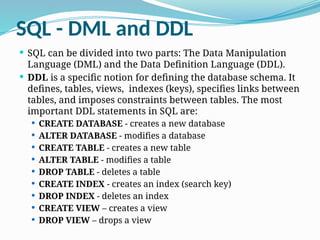
SQL - DML and DDL
 SQL can be divided into two parts: The Data Manipulation
Language (DML) and the Data Definition Language (DDL).
 DDL is a specific notion for defining the database schema. It
defines, tables, views, indexes (keys), specifies links between
tables, and imposes constraints between tables. The most
important DDL statements in SQL are:
 CREATE DATABASE - creates a new database
 ALTER DATABASE - modifies a database
 CREATE TABLE - creates a new table
 ALTER TABLE - modifies a table
 DROP TABLE - deletes a table
 CREATE INDEX - creates an index (search key)
 DROP INDEX - deletes an index
 CREATE VIEW – creates a view
 DROP VIEW – drops a view
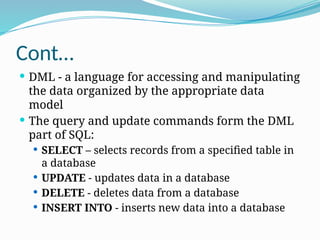
Cont…
 DML - a language for accessing and manipulating
the data organized by the appropriate data
model
 The query and update commands form the DML
part of SQL:
 SELECT – selects records from a specified table in
a database
 UPDATE - updates data in a database
 DELETE - deletes data from a database
 INSERT INTO - inserts new data into a database
Note:
 SQL Data types
 SQL operators (arithmetic, comparison, …)
SQL - DDL
CREATE Database
 The SQL CREATE DATABASE statement is used to create a
new SQL database.
Syntax:
 Basic syntax of CREATE DATABASE statement is as follows:
CREATE DATABASE DatabaseName;
 Always database name should be unique within the RDBMS.
Example:
 If you want to create a new database “night21”, then CREATE
DATABASE statement would be as follows:
CREATE DATABASE night21;
Using the Console (Xampp/wamp)
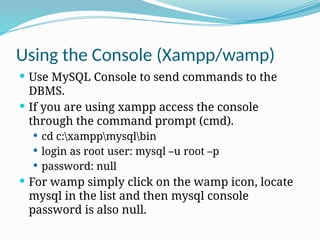
 Use MySQL Console to send commands to the
DBMS.
 If you are using xampp access the console
through the command prompt (cmd).
 cd c:xamppmysqlbin
 login as root user: mysql –u root –p
 password: null
 For wamp simply click on the wamp icon, locate
mysql in the list and then mysql console
password is also null.
SHOW DATABASES
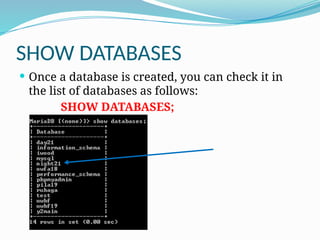
 Once a database is created, you can check it in
the list of databases as follows:
SHOW DATABASES;
SELECT Database
 The SQL USE statement is used to select any
existing database in SQL schema.
Syntax:
 Basic syntax of USE statement is as follows:
USE DatabaseName;
Eg. USE night21;
DROP or DELETE Database
 The SQL DROP DATABASE statement is used to drop any
existing database in SQL schema.
Syntax:
 Basic syntax of DROP DATABASE statement is as follows
DROP DATABASE DatabaseName;
Eg:
DROP DATABASE night21;
 NOTE: Be careful before using this operation because by
deleting an existing database would result in complete
loss of information stored in the database.
CREATE Table
 Creating a basic table involves naming the table and defining
its columns and each column's data type. The SQL CREATE
TABLE statement is used to create a new table.
Syntax:
 Basic syntax of CREATE TABLE statement is as follows:
CREATE TABLE table_name(
column1 datatype,
column2 datatype,
column3 datatype,
.....
columnN datatype,
PRIMARY KEY( one or more columns )
);
Cont …
 Example: Student (regno, fname, lname, cw, exam)
Sql statement for creating the above table:
CREATE TABLE Student(
regno VARCHAR(17),
fname VARCHAR(20),
lname VARCHAR(20),
cw INT,
exam INT,
c_code VARCHAR(7),
PRIMARY KEY(regno)
);
Cont …
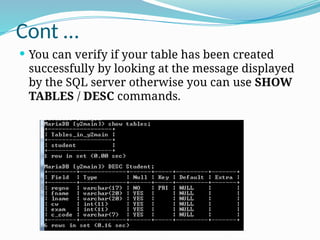
 You can verify if your table has been created
successfully by looking at the message displayed
by the SQL server otherwise you can use SHOW
TABLES / DESC commands.
ALTER TABLE Statement:
 The ALTER TABLE statement is used to modify characteristics of an existing
table.
General Syntax:
ALTER TABLE table_name {ADD|DROP|MODIFY} column_name {data_ype};
To add a column in a table, use the following syntax:
ALTER TABLE table_name
ADD column_name datatype;
To delete a column in a table, use the following syntax (notice that some
database systems don't allow deleting a column):
ALTER TABLE table_name
DROP COLUMN column_name;
Cont …
To change the data type of a column in a table, use
the following syntax:
My SQL / SQL Server / MS Access:
ALTER TABLE table_name
ALTER COLUMN column_name datatype;
Oracle:
ALTER TABLE table_name
MODIFY column_name datatype;
DROP or DELETE Table
 The SQL DROP TABLE statement is used to remove a table
definition and all data, indexes, triggers, constraints, and
permission specifications for that table.
 NOTE: You have to be careful while using this command
because once a table is deleted then all the information
available in the table would also be lost forever.
Syntax:
 Basic syntax of DROP TABLE statement is as follows:
DROP TABLE table_name;
Eg. DROP TABLE Student;
DML - INSERT, UPDATE, DELETE
INSERT Query
 The SQL INSERT INTO Statement is used to add
new rows of data to a table in the database.
Syntax:
There are two basic syntax of INSERT INTO
statement is as follows:
INSERT INTO TABLE_NAME (column1,
column2, column3,...columnN)]
VALUES (value1, value2, value3,...valueN);
Here column1, column2,...columnN are the names of the
columns in the table into which you want to insert data.
INSERT Query …
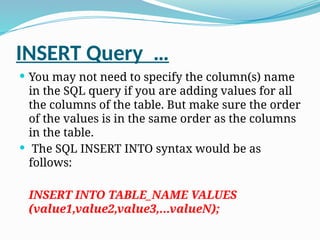
 You may not need to specify the column(s) name
in the SQL query if you are adding values for all
the columns of the table. But make sure the order
of the values is in the same order as the columns
in the table.
 The SQL INSERT INTO syntax would be as
follows:
INSERT INTO TABLE_NAME VALUES
(value1,value2,value3,...valueN);
INSERT INTO Cont …
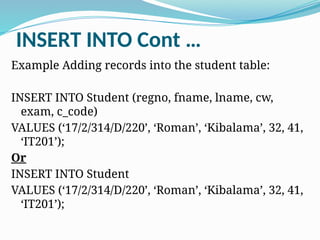
Example Adding records into the student table:
INSERT INTO Student (regno, fname, lname, cw,
exam, c_code)
VALUES (‘17/2/314/D/220’, ‘Roman’, ‘Kibalama’, 32, 41,
‘IT201’);
Or
INSERT INTO Student
VALUES (‘17/2/314/D/220’, ‘Roman’, ‘Kibalama’, 32, 41,
‘IT201’);
UPDATE Query
 The SQL UPDATE Query is used to modify the existing
records in a table.
 You can use WHERE clause with UPDATE query to
update selected rows otherwise all the rows would be
effected.
General Syntax:
 The basic syntax of UPDATE query with WHERE clause
is as follows:
UPDATE table_name
SET column1 = value1, column2 = value2...., columnN
= valueN
WHERE [condition];
Cont …
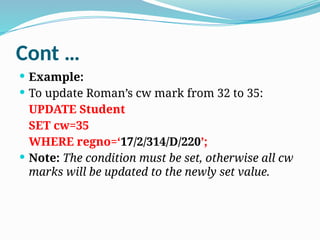
 Example:
 To update Roman’s cw mark from 32 to 35:
UPDATE Student
SET cw=35
WHERE regno=‘17/2/314/D/220’;
 Note: The condition must be set, otherwise all cw
marks will be updated to the newly set value.
DELETE Query
 The SQL DELETE Query is used to delete the
existing records from a table.
 You can use WHERE clause with DELETE query
to delete selected rows, otherwise all the records
would be deleted.
General Syntax:
 The basic syntax of DELETE query with WHERE
clause is as follows:
DELETE FROM table_name
WHERE [condition];
Cont …
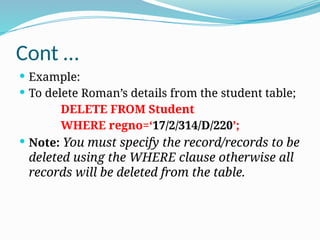
 Example:
 To delete Roman’s details from the student table;
DELETE FROM Student
WHERE regno=‘17/2/314/D/220’;
 Note: You must specify the record/records to be
deleted using the WHERE clause otherwise all
records will be deleted from the table.
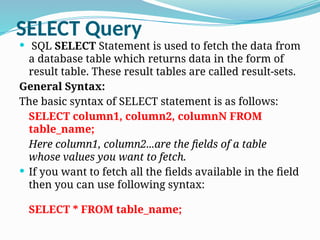
SELECT Query
 SQL SELECT Statement is used to fetch the data from
a database table which returns data in the form of
result table. These result tables are called result-sets.
General Syntax:
The basic syntax of SELECT statement is as follows:
SELECT column1, column2, columnN FROM
table_name;
Here column1, column2...are the fields of a table
whose values you want to fetch.
 If you want to fetch all the fields available in the field
then you can use following syntax:
SELECT * FROM table_name;
Cont …
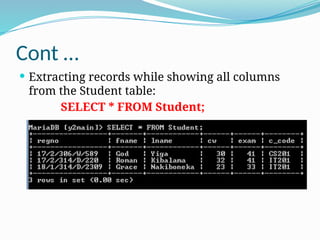
 Extracting records while showing all columns
from the Student table:
SELECT * FROM Student;
Cont …
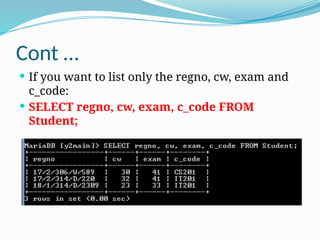
 If you want to list only the regno, cw, exam and
c_code:
 SELECT regno, cw, exam, c_code FROM
Student;
WHERE Clause
 The SQL WHERE clause is used to specify a condition while
fetching the data from single table or joining with multiple tables.
 If the given condition is satisfied then only it returns specific value
from the table. You would use WHERE clause to filter the records
and fetching only necessary records.
 The WHERE clause not only used in SELECT statement, but it is also
used in UPDATE, DELETE statements as presented in the earlier
slides.
General Syntax:
 The basic syntax of SELECT statement with WHERE clause is as
follows:
SELECT column1, column2, columnN
FROM table_name
WHERE [condition]
CONT …
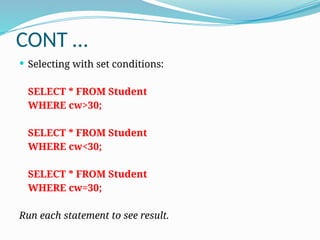
 Selecting with set conditions:
SELECT * FROM Student
WHERE cw>30;
SELECT * FROM Student
WHERE cw<30;
SELECT * FROM Student
WHERE cw=30;
Run each statement to see result.
ORDER BY clause
 The ORDER BY keyword is used to sort the result-
set by a specified column. It sorts the records in
ascending order by default.
 If you want to sort the records in a descending
order, you can use the DESC keyword.
Syntax:
SELECT column_name(s)
FROM table_name
ORDER BY column_name(s) ASC|DESC
Cont …
 Examples:
SELECT * FROM Student
ORDER BY cw;
 Using the DESC key word
SELECT * FROM Student
ORDER BY cw DESC;
HAVING Clause
 The HAVING clause was added to SQL because the
WHERE keyword could not be used with aggregate
functions.
General Syntax:
SELECT column_name,
aggregate_function(column_name)
FROM table_name
WHERE column_name operator value
GROUP BY column_name
HAVING aggregate_function(column_name)
operator value
AND and OR Conjunctive Operators
 The SQL AND and OR operators are used to combine multiple
conditions to narrow data in an SQL statement. These two operators
are called conjunctive operators.
 These operators provide a means to make multiple comparisons with
different operators in the same SQL statement.
The AND Operator:
The AND operator allows the existence of multiple conditions in an SQL
statement's WHERE clause.
General Syntax:
 The basic syntax of AND operator with WHERE clause is as follows:
SELECT column1, column2, columnN
FROM table_name
WHERE [condition1] AND [condition2]...AND [conditionN];
You can combine N number of conditions using AND operator. For an action to be
taken by the SQL statement, whether it be a transaction or query, all conditions
separated by the AND must be TRUE.
AND Cont …
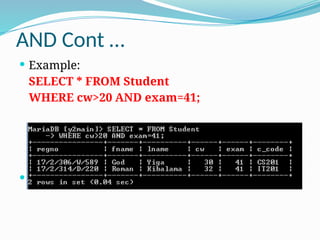
 Example:
SELECT * FROM Student
WHERE cw>20 AND exam=41;
 Note: Try our with multiple other conditions.
The OR Operator:
 The OR operator is used to combine multiple conditions in
an SQL statement's WHERE clause.
General Syntax:
 The basic syntax of OR operator with WHERE clause is as
follows:
SELECT column1, column2, columnN
FROM table_name
WHERE [condition1] OR [condition2]...OR [conditionN]
 You can combine N number of conditions using OR
operator. For an action to be taken by the SQL statement,
whether it be a transaction or query, only any ONE of the
conditions separated by the OR must be TRUE.
OR Cont …
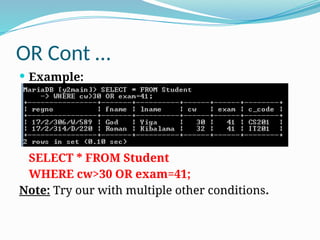
 Example:
SELECT * FROM Student
WHERE cw>30 OR exam=41;
Note: Try our with multiple other conditions.
SQL - JOIN
 The JOIN keyword is used in an SQL statement to
query data from two or more tables, based on a
relationship between certain columns in these tables.
 Tables in a database are often related to each other
with keys.
 A primary key is a column (or a combination of
columns) with a unique value for each row. Each
primary key value must be unique within the table.
The purpose is to bind data together, across tables,
without repeating all of the data in every table.
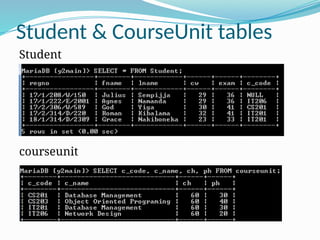
 Look at the “Student & CourseUnit" tables:
Student & CourseUnit tables
Student
courseunit
Cont …
 Note:
 regno is the primary key to the student table
 c_code is the primary key in the CourseUnit table
 The relationship between the two tables is
enforced by the c_code which is a foreign key in
the student table.
The Different SQL JOINs
 Before we continue with Examples, we will list the
types of JOIN you can use, and the differences
between them.
 INNER JOIN: Return rows when there is at least one
match in both tables
 LEFT JOIN: Return all rows from the left table, even
if there are no matches in the right table
 RIGHT JOIN: Return all rows from the right table,
even if there are no matches in the left table
 FULL JOIN: Return rows when there is a match in
one of the tables
INNER JOIN
 The INNER JOIN keyword return rows when
there is at least one match in both tables.
General Syntax:
SELECT column_name(s)
FROM table_name1
INNER JOIN table_name2
ON
table_name1.column_name=table_name2.colum
n_name
 Note: INNER JOIN is the same as JOIN.
Cont …
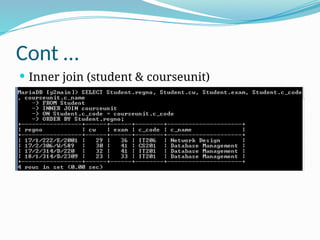
 Inner join (student & courseunit)
LEFT JOIN
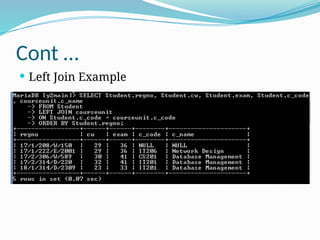
 The LEFT JOIN keyword returns all rows from the
left table (table_name1), even if there are no
matches in the right table (table_name2).
General Syntax:
SELECT column_name(s)
FROM table_name1
LEFT JOIN table_name2
ON
table_name1.column_name=table_name2.colum
n_name
Note: In some databases LEFT JOIN is called LEFT
OUTER JOIN.
Cont …
 Left Join Example
RIGHT JOIN
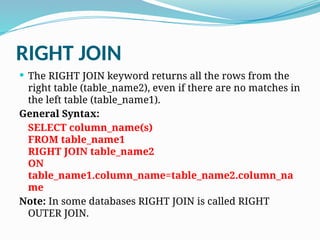
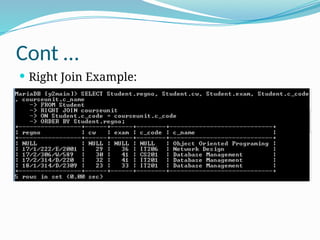
 The RIGHT JOIN keyword returns all the rows from the
right table (table_name2), even if there are no matches in
the left table (table_name1).
General Syntax:
SELECT column_name(s)
FROM table_name1
RIGHT JOIN table_name2
ON
table_name1.column_name=table_name2.column_na
me
Note: In some databases RIGHT JOIN is called RIGHT
OUTER JOIN.
Cont …
 Right Join Example:
FULL JOIN
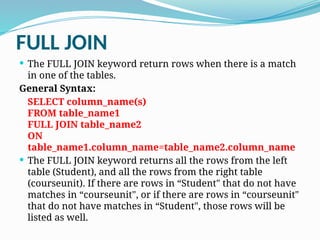
 The FULL JOIN keyword return rows when there is a match
in one of the tables.
General Syntax:
SELECT column_name(s)
FROM table_name1
FULL JOIN table_name2
ON
table_name1.column_name=table_name2.column_name
 The FULL JOIN keyword returns all the rows from the left
table (Student), and all the rows from the right table
(courseunit). If there are rows in “Student" that do not have
matches in “courseunit", or if there are rows in “courseunit"
that do not have matches in “Student", those rows will be
listed as well.
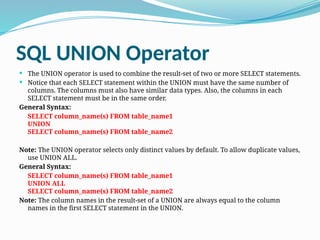
SQL UNION Operator
 The UNION operator is used to combine the result-set of two or more SELECT statements.
 Notice that each SELECT statement within the UNION must have the same number of
columns. The columns must also have similar data types. Also, the columns in each
SELECT statement must be in the same order.
General Syntax:
SELECT column_name(s) FROM table_name1
UNION
SELECT column_name(s) FROM table_name2
Note: The UNION operator selects only distinct values by default. To allow duplicate values,
use UNION ALL.
General Syntax:
SELECT column_name(s) FROM table_name1
UNION ALL
SELECT column_name(s) FROM table_name2
Note: The column names in the result-set of a UNION are always equal to the column
names in the first SELECT statement in the UNION.

SQl data base management and design

  • 1.
    Database Planning, Design andManagement Structured Query Language (SQL) Basics Year II 2022/23
  • 2.
    Structured Query Language(SQL)  SQL is structured Query Language which is a computer language for storing, manipulating and retrieving data stored in relational database.  SQL is the standard language for Relation Database System.  All relational database management systems like MySQL, MS Access, Oracle, Sybase, Informix, postgres and SQL Server uses SQL as standard database language.
  • 3.
    SQL - DMLand DDL  SQL can be divided into two parts: The Data Manipulation Language (DML) and the Data Definition Language (DDL).  DDL is a specific notion for defining the database schema. It defines, tables, views, indexes (keys), specifies links between tables, and imposes constraints between tables. The most important DDL statements in SQL are:  CREATE DATABASE - creates a new database  ALTER DATABASE - modifies a database  CREATE TABLE - creates a new table  ALTER TABLE - modifies a table  DROP TABLE - deletes a table  CREATE INDEX - creates an index (search key)  DROP INDEX - deletes an index  CREATE VIEW – creates a view  DROP VIEW – drops a view
  • 4.
    Cont…  DML -a language for accessing and manipulating the data organized by the appropriate data model  The query and update commands form the DML part of SQL:  SELECT – selects records from a specified table in a database  UPDATE - updates data in a database  DELETE - deletes data from a database  INSERT INTO - inserts new data into a database
  • 5.
    Note:  SQL Datatypes  SQL operators (arithmetic, comparison, …)
  • 6.
    SQL - DDL CREATEDatabase  The SQL CREATE DATABASE statement is used to create a new SQL database. Syntax:  Basic syntax of CREATE DATABASE statement is as follows: CREATE DATABASE DatabaseName;  Always database name should be unique within the RDBMS. Example:  If you want to create a new database “night21”, then CREATE DATABASE statement would be as follows: CREATE DATABASE night21;
  • 7.
    Using the Console(Xampp/wamp)  Use MySQL Console to send commands to the DBMS.  If you are using xampp access the console through the command prompt (cmd).  cd c:xamppmysqlbin  login as root user: mysql –u root –p  password: null  For wamp simply click on the wamp icon, locate mysql in the list and then mysql console password is also null.
  • 8.
    SHOW DATABASES  Oncea database is created, you can check it in the list of databases as follows: SHOW DATABASES;
  • 9.
    SELECT Database  TheSQL USE statement is used to select any existing database in SQL schema. Syntax:  Basic syntax of USE statement is as follows: USE DatabaseName; Eg. USE night21;
  • 10.
    DROP or DELETEDatabase  The SQL DROP DATABASE statement is used to drop any existing database in SQL schema. Syntax:  Basic syntax of DROP DATABASE statement is as follows DROP DATABASE DatabaseName; Eg: DROP DATABASE night21;  NOTE: Be careful before using this operation because by deleting an existing database would result in complete loss of information stored in the database.
  • 11.
    CREATE Table  Creatinga basic table involves naming the table and defining its columns and each column's data type. The SQL CREATE TABLE statement is used to create a new table. Syntax:  Basic syntax of CREATE TABLE statement is as follows: CREATE TABLE table_name( column1 datatype, column2 datatype, column3 datatype, ..... columnN datatype, PRIMARY KEY( one or more columns ) );
  • 12.
    Cont …  Example:Student (regno, fname, lname, cw, exam) Sql statement for creating the above table: CREATE TABLE Student( regno VARCHAR(17), fname VARCHAR(20), lname VARCHAR(20), cw INT, exam INT, c_code VARCHAR(7), PRIMARY KEY(regno) );
  • 13.
    Cont …  Youcan verify if your table has been created successfully by looking at the message displayed by the SQL server otherwise you can use SHOW TABLES / DESC commands.
  • 14.
    ALTER TABLE Statement: The ALTER TABLE statement is used to modify characteristics of an existing table. General Syntax: ALTER TABLE table_name {ADD|DROP|MODIFY} column_name {data_ype}; To add a column in a table, use the following syntax: ALTER TABLE table_name ADD column_name datatype; To delete a column in a table, use the following syntax (notice that some database systems don't allow deleting a column): ALTER TABLE table_name DROP COLUMN column_name;
  • 15.
    Cont … To changethe data type of a column in a table, use the following syntax: My SQL / SQL Server / MS Access: ALTER TABLE table_name ALTER COLUMN column_name datatype; Oracle: ALTER TABLE table_name MODIFY column_name datatype;
  • 16.
    DROP or DELETETable  The SQL DROP TABLE statement is used to remove a table definition and all data, indexes, triggers, constraints, and permission specifications for that table.  NOTE: You have to be careful while using this command because once a table is deleted then all the information available in the table would also be lost forever. Syntax:  Basic syntax of DROP TABLE statement is as follows: DROP TABLE table_name; Eg. DROP TABLE Student;
  • 17.
    DML - INSERT,UPDATE, DELETE INSERT Query  The SQL INSERT INTO Statement is used to add new rows of data to a table in the database. Syntax: There are two basic syntax of INSERT INTO statement is as follows: INSERT INTO TABLE_NAME (column1, column2, column3,...columnN)] VALUES (value1, value2, value3,...valueN); Here column1, column2,...columnN are the names of the columns in the table into which you want to insert data.
  • 18.
    INSERT Query … You may not need to specify the column(s) name in the SQL query if you are adding values for all the columns of the table. But make sure the order of the values is in the same order as the columns in the table.  The SQL INSERT INTO syntax would be as follows: INSERT INTO TABLE_NAME VALUES (value1,value2,value3,...valueN);
  • 19.
    INSERT INTO Cont… Example Adding records into the student table: INSERT INTO Student (regno, fname, lname, cw, exam, c_code) VALUES (‘17/2/314/D/220’, ‘Roman’, ‘Kibalama’, 32, 41, ‘IT201’); Or INSERT INTO Student VALUES (‘17/2/314/D/220’, ‘Roman’, ‘Kibalama’, 32, 41, ‘IT201’);
  • 20.
    UPDATE Query  TheSQL UPDATE Query is used to modify the existing records in a table.  You can use WHERE clause with UPDATE query to update selected rows otherwise all the rows would be effected. General Syntax:  The basic syntax of UPDATE query with WHERE clause is as follows: UPDATE table_name SET column1 = value1, column2 = value2...., columnN = valueN WHERE [condition];
  • 21.
    Cont …  Example: To update Roman’s cw mark from 32 to 35: UPDATE Student SET cw=35 WHERE regno=‘17/2/314/D/220’;  Note: The condition must be set, otherwise all cw marks will be updated to the newly set value.
  • 22.
    DELETE Query  TheSQL DELETE Query is used to delete the existing records from a table.  You can use WHERE clause with DELETE query to delete selected rows, otherwise all the records would be deleted. General Syntax:  The basic syntax of DELETE query with WHERE clause is as follows: DELETE FROM table_name WHERE [condition];
  • 23.
    Cont …  Example: To delete Roman’s details from the student table; DELETE FROM Student WHERE regno=‘17/2/314/D/220’;  Note: You must specify the record/records to be deleted using the WHERE clause otherwise all records will be deleted from the table.
  • 24.
    SELECT Query  SQLSELECT Statement is used to fetch the data from a database table which returns data in the form of result table. These result tables are called result-sets. General Syntax: The basic syntax of SELECT statement is as follows: SELECT column1, column2, columnN FROM table_name; Here column1, column2...are the fields of a table whose values you want to fetch.  If you want to fetch all the fields available in the field then you can use following syntax: SELECT * FROM table_name;
  • 25.
    Cont …  Extractingrecords while showing all columns from the Student table: SELECT * FROM Student;
  • 26.
    Cont …  Ifyou want to list only the regno, cw, exam and c_code:  SELECT regno, cw, exam, c_code FROM Student;
  • 27.
    WHERE Clause  TheSQL WHERE clause is used to specify a condition while fetching the data from single table or joining with multiple tables.  If the given condition is satisfied then only it returns specific value from the table. You would use WHERE clause to filter the records and fetching only necessary records.  The WHERE clause not only used in SELECT statement, but it is also used in UPDATE, DELETE statements as presented in the earlier slides. General Syntax:  The basic syntax of SELECT statement with WHERE clause is as follows: SELECT column1, column2, columnN FROM table_name WHERE [condition]
  • 28.
    CONT …  Selectingwith set conditions: SELECT * FROM Student WHERE cw>30; SELECT * FROM Student WHERE cw<30; SELECT * FROM Student WHERE cw=30; Run each statement to see result.
  • 29.
    ORDER BY clause The ORDER BY keyword is used to sort the result- set by a specified column. It sorts the records in ascending order by default.  If you want to sort the records in a descending order, you can use the DESC keyword. Syntax: SELECT column_name(s) FROM table_name ORDER BY column_name(s) ASC|DESC
  • 30.
    Cont …  Examples: SELECT* FROM Student ORDER BY cw;  Using the DESC key word SELECT * FROM Student ORDER BY cw DESC;
  • 31.
    HAVING Clause  TheHAVING clause was added to SQL because the WHERE keyword could not be used with aggregate functions. General Syntax: SELECT column_name, aggregate_function(column_name) FROM table_name WHERE column_name operator value GROUP BY column_name HAVING aggregate_function(column_name) operator value
  • 32.
    AND and ORConjunctive Operators  The SQL AND and OR operators are used to combine multiple conditions to narrow data in an SQL statement. These two operators are called conjunctive operators.  These operators provide a means to make multiple comparisons with different operators in the same SQL statement. The AND Operator: The AND operator allows the existence of multiple conditions in an SQL statement's WHERE clause. General Syntax:  The basic syntax of AND operator with WHERE clause is as follows: SELECT column1, column2, columnN FROM table_name WHERE [condition1] AND [condition2]...AND [conditionN]; You can combine N number of conditions using AND operator. For an action to be taken by the SQL statement, whether it be a transaction or query, all conditions separated by the AND must be TRUE.
  • 33.
    AND Cont … Example: SELECT * FROM Student WHERE cw>20 AND exam=41;  Note: Try our with multiple other conditions.
  • 34.
    The OR Operator: The OR operator is used to combine multiple conditions in an SQL statement's WHERE clause. General Syntax:  The basic syntax of OR operator with WHERE clause is as follows: SELECT column1, column2, columnN FROM table_name WHERE [condition1] OR [condition2]...OR [conditionN]  You can combine N number of conditions using OR operator. For an action to be taken by the SQL statement, whether it be a transaction or query, only any ONE of the conditions separated by the OR must be TRUE.
  • 35.
    OR Cont … Example: SELECT * FROM Student WHERE cw>30 OR exam=41; Note: Try our with multiple other conditions.
  • 36.
    SQL - JOIN The JOIN keyword is used in an SQL statement to query data from two or more tables, based on a relationship between certain columns in these tables.  Tables in a database are often related to each other with keys.  A primary key is a column (or a combination of columns) with a unique value for each row. Each primary key value must be unique within the table. The purpose is to bind data together, across tables, without repeating all of the data in every table.  Look at the “Student & CourseUnit" tables:
  • 37.
    Student & CourseUnittables Student courseunit
  • 38.
    Cont …  Note: regno is the primary key to the student table  c_code is the primary key in the CourseUnit table  The relationship between the two tables is enforced by the c_code which is a foreign key in the student table.
  • 39.
    The Different SQLJOINs  Before we continue with Examples, we will list the types of JOIN you can use, and the differences between them.  INNER JOIN: Return rows when there is at least one match in both tables  LEFT JOIN: Return all rows from the left table, even if there are no matches in the right table  RIGHT JOIN: Return all rows from the right table, even if there are no matches in the left table  FULL JOIN: Return rows when there is a match in one of the tables
  • 40.
    INNER JOIN  TheINNER JOIN keyword return rows when there is at least one match in both tables. General Syntax: SELECT column_name(s) FROM table_name1 INNER JOIN table_name2 ON table_name1.column_name=table_name2.colum n_name  Note: INNER JOIN is the same as JOIN.
  • 41.
    Cont …  Innerjoin (student & courseunit)
  • 42.
    LEFT JOIN  TheLEFT JOIN keyword returns all rows from the left table (table_name1), even if there are no matches in the right table (table_name2). General Syntax: SELECT column_name(s) FROM table_name1 LEFT JOIN table_name2 ON table_name1.column_name=table_name2.colum n_name Note: In some databases LEFT JOIN is called LEFT OUTER JOIN.
  • 43.
    Cont …  LeftJoin Example
  • 44.
    RIGHT JOIN  TheRIGHT JOIN keyword returns all the rows from the right table (table_name2), even if there are no matches in the left table (table_name1). General Syntax: SELECT column_name(s) FROM table_name1 RIGHT JOIN table_name2 ON table_name1.column_name=table_name2.column_na me Note: In some databases RIGHT JOIN is called RIGHT OUTER JOIN.
  • 45.
    Cont …  RightJoin Example:
  • 46.
    FULL JOIN  TheFULL JOIN keyword return rows when there is a match in one of the tables. General Syntax: SELECT column_name(s) FROM table_name1 FULL JOIN table_name2 ON table_name1.column_name=table_name2.column_name  The FULL JOIN keyword returns all the rows from the left table (Student), and all the rows from the right table (courseunit). If there are rows in “Student" that do not have matches in “courseunit", or if there are rows in “courseunit" that do not have matches in “Student", those rows will be listed as well.
  • 47.
    SQL UNION Operator The UNION operator is used to combine the result-set of two or more SELECT statements.  Notice that each SELECT statement within the UNION must have the same number of columns. The columns must also have similar data types. Also, the columns in each SELECT statement must be in the same order. General Syntax: SELECT column_name(s) FROM table_name1 UNION SELECT column_name(s) FROM table_name2 Note: The UNION operator selects only distinct values by default. To allow duplicate values, use UNION ALL. General Syntax: SELECT column_name(s) FROM table_name1 UNION ALL SELECT column_name(s) FROM table_name2 Note: The column names in the result-set of a UNION are always equal to the column names in the first SELECT statement in the UNION.