Introduction to  Windows SharePoint Services 3 and Office SharePoint Server 2007  for Developers Olaf Feldkamp Developer Platform Advisor Microsoft Schweiz GmbH
Agenda Introduction to 2007 Office system Windows SharePoint Services 3 Collaboration Solution Document Storage Web Development Platform Office SharePoint Server 2007 Portal Search ECM
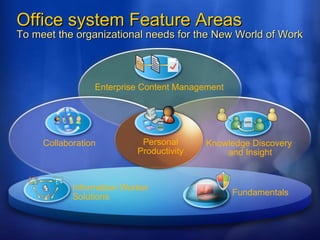
Office system Feature Areas To meet the organizational needs for the New World of Work Knowledge Discovery  and Insight Enterprise Content Management Collaboration Fundamentals  Information Worker Solutions Personal Productivity
Innovation in 2007 Office Clients    New Microsoft Office user interface    Powerful new application capabilities    Office open XML file formats    Integration w/ Office SharePoint Server 2007    Advances in deployment and management
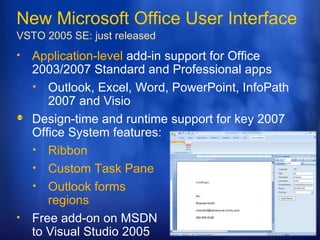
New Microsoft Office User Interface VSTO 2005 SE:  just released Application-level  add-in support for Office 2003/2007 Standard and Professional apps Outlook, Excel, Word, PowerPoint, InfoPath 2007 and Visio  Design-time and runtime support for key 2007 Office System features: Ribbon Custom Task Pane Outlook forms  regions Free add-on on MSDN to Visual Studio 2005
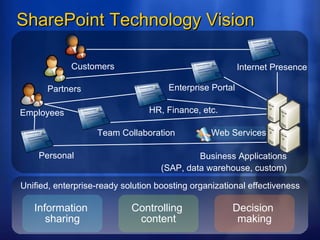
SharePoint Technology Vision Employees Customers Partners Information  sharing Controlling  content Decision  making Unified, enterprise-ready solution boosting organizational effectiveness Web Services HR, Finance, etc. Team Collaboration Personal Enterprise Portal Business Applications (SAP, data warehouse, custom) Internet Presence
Agenda Introduction to 2007 Office system Windows SharePoint Services 3 Collaboration Solution Document Storage Web Development Platform Office SharePoint Server 2007 Portal Search ECM
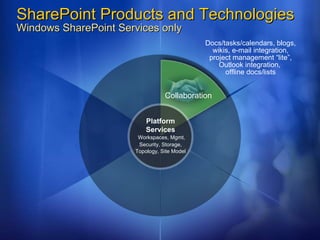
SharePoint Products and Technologies Windows SharePoint Services only Collaboration Docs/tasks/calendars, blogs, wikis, e-mail integration, project management “lite”, Outlook integration,  offline docs/lists Platform Services   Workspaces, Mgmt, Security, Storage, Topology, Site Model
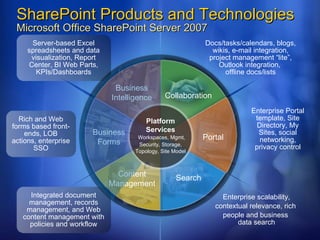
SharePoint Products and Technologies Microsoft Office SharePoint Server 2007 Business Intelligence Collaboration Search Portal Business Forms Content Management Server-based Excel spreadsheets and data visualization, Report Center, BI Web Parts, KPIs/Dashboards Integrated document management, records management, and Web content management with policies and workflow Rich and Web forms based front-ends, LOB actions, enterprise SSO Docs/tasks/calendars, blogs, wikis, e-mail integration, project management “lite”, Outlook integration,  offline docs/lists Enterprise scalability, contextual relevance, rich  people and business  data search Enterprise Portal template, Site Directory, My Sites, social networking, privacy control Platform Services   Workspaces, Mgmt, Security, Storage, Topology, Site Model
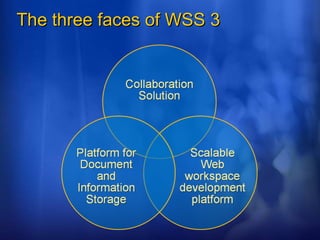
The three faces of WSS 3
Agenda Introduction to 2007 Office system Windows SharePoint Services 3 Collaboration Solution Document Storage Web Development Platform Office SharePoint Server 2007 Portal Search ECM
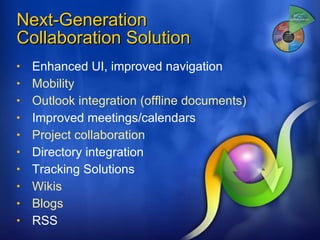
Next-Generation  Collaboration Solution Enhanced UI, improved navigation Mobility Outlook integration (offline documents) Improved meetings/calendars Project collaboration Directory integration Tracking Solutions Wikis Blogs RSS
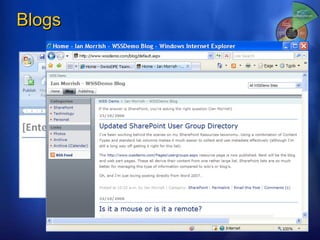
Blogs
Blogs, Wikis Project Management Mobility
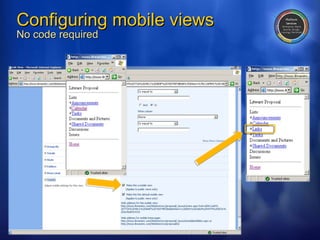
Configuring mobile views No code required
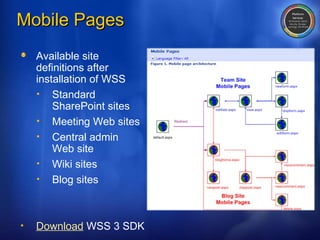
Mobile Pages Available site  definitions after  installation of WSS Standard SharePoint sites Meeting Web sites Central admin  Web site Wiki sites Blog sites Download  WSS 3 SDK
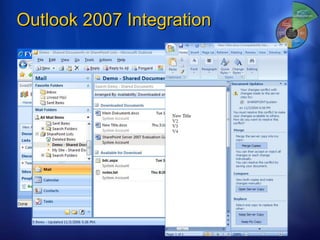
Outlook 2007 Integration
Agenda Introduction to 2007 Office system Windows SharePoint Services 3 Collaboration Solution Document Storage Web Development Platform Office SharePoint Server 2007 Portal Search ECM
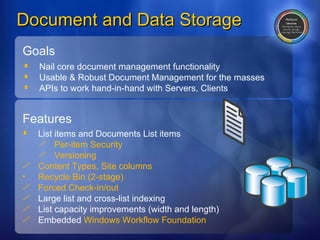
Document and Data Storage Goals Nail core document management functionality  Usable & Robust Document Management for the masses  APIs to work hand-in-hand with Servers, Clients Features List items and Documents List items Per-item Security Versioning Content Types, Site columns Recycle Bin (2-stage) Forced Check-in/out Large list and cross-list indexing List capacity improvements (width and length) Embedded  Windows Workflow Foundation
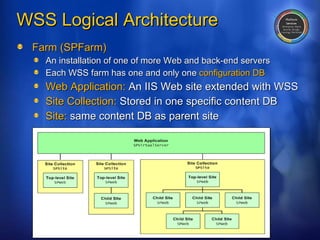
WSS Logical Architecture Farm (SPFarm) An installation of one of more Web and back-end servers Each WSS farm has one and only one  configuration DB Web Application:  An IIS Web site extended with WSS Site Collection:  Stored in one specific content DB Site:  same content DB as parent site
SharePoint API SharePoint Web Services
Agenda Introduction to 2007 Office system Windows SharePoint Services 3 Collaboration Solution Document Storage Web Development Platform Office SharePoint Server 2007 Portal Search ECM
Web Application Platform Platform for  portal/workspace applications Example: MOSS 2007    Partners and customers should do the same Consistent User experience across server family Environment for development and managemen Facilities for intranet, extranet, Internet deployments Clean upgrade process due to  features
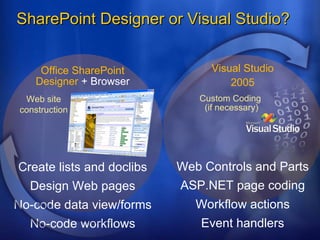
SharePoint Designer or Visual Studio? Custom Coding  (if necessary) Web Controls and Parts ASP.NET page coding Event handlers Workflow actions Visual Studio 2005 Web site construction Create lists and doclibs Design Web pages No-code data view/forms No-code workflows Office SharePoint Designer  + Browser
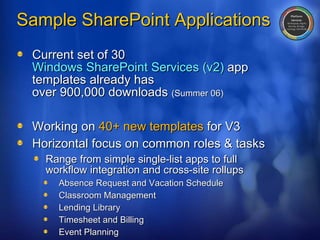
Sample SharePoint Applications Current set of 30  Windows SharePoint Services (v2)  app templates already has  over 900,000 downloads  (Summer 06) Working on  40+ new templates  for V3 Horizontal focus on common roles & tasks Range from simple single-list apps to full  workflow integration and cross-site rollups Absence Request and Vacation Schedule  Classroom Management Lending Library Timesheet and Billing Event Planning
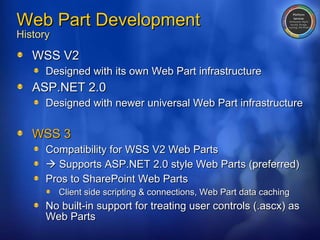
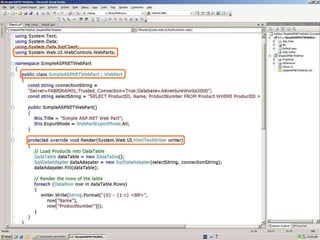
Web Part Development History WSS V2 Designed with its own Web Part infrastructure ASP.NET 2.0 Designed with newer universal Web Part infrastructure WSS 3 Compatibility for WSS V2 Web Parts    Supports ASP.NET 2.0 style Web Parts (preferred) Pros to SharePoint Web Parts Client side scripting & connections, Web Part data caching No built-in support for treating user controls (.ascx) as Web Parts
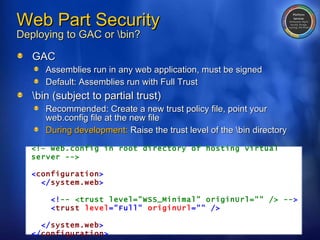
Web Part Security Deploying to GAC or \bin? GAC Assemblies run in any web application, must be signed Default: Assemblies run with Full Trust \bin (subject to partial trust) Recommended: Create a new trust policy file, point your web.config file at the new file During development:  Raise the trust level of the \bin directory <!– web.config in root directory of hosting virtual server --> < configuration > </ system.web > <! -- <trust level=&quot;WSS_Minimal&quot; originUrl=&quot;&quot; /> -- > < trust   level =&quot;Full&quot;   originUrl =&quot;&quot;   /> </ system.web > </ configuration >
 
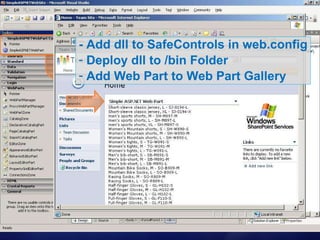
- Add dll to SafeControls in web.config Deploy dll to /bin Folder Add Web Part to Web Part Gallery
WSS 3 Enhancements Major Architectural improvements Better ASP.NET integration Support for forms-based authentication Much easier approaches to branding and customizing sites  Events architecture significantly improved Supported on regular lists as well as document libraries Multiple handlers on a list S ynchronous and asynchronous More events…
More Events… Item Events SPItemEventReceiver ItemAdded/ing ItemAttachmentAdd/ing ItemAttachmentDeleted/ing ItemChecked/ingIn ItemChecked/ingOut ItemDeleted/ing ItemFileConverted ItemFileMoved/ing ItemUnchecked/ingOut ItemUncheckingOut ItemUpdated/ing List/Web Events SPListEventReceiver FieldAdded/ing FieldDeleted/ing FieldUpdated/ing SPWebEventReceiver SiteDeleted/ing WebDeleted/ing WebMoved/ing
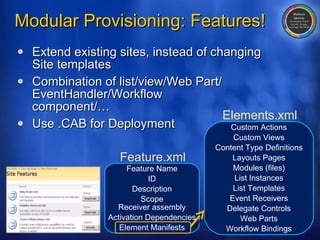
Modular Provisioning: Features! Extend existing sites, instead of changing Site templates Combination of list/view/Web Part/ EventHandler/Workflow component/… Use .CAB for Deployment Feature Name ID Description Scope Receiver assembly Activation Dependencies Element Manifests Feature.xml Elements.xml Custom Actions Custom Views Content Type Definitions Layouts Pages Modules (files) List Instances List Templates Event Receivers Delegate Controls Web Parts Workflow Bindings
Events Features
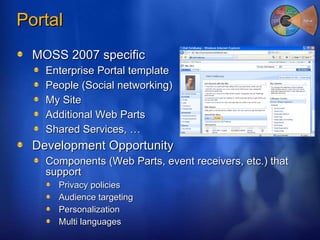
Portal MOSS 2007 specific Enterprise Portal template People (Social networking) My Site Additional Web Parts Shared Services, … Development Opportunity Components (Web Parts, event receivers, etc.) that support Privacy policies Audience targeting Personalization Multi languages
Agenda Introduction to 2007 Office system Windows SharePoint Services 3 Collaboration Solution Document Storage Web Development Platform Office SharePoint Server 2007 Portal Search ECM
Search What’s new Top results on first page Extensive collaboration with Microsoft Research  and Windows Live Enterprise Search different from Internet Search Less cross-linking being done Lots of non-Web content – Office docs,  line-of-business data, etc. Features Query hit highlighting “ Did you mean” query correction, Alerts, … Consistent search system across WSS and MOSS
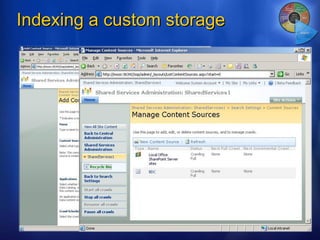
Search  MOSS specific Enterprise search MOSS 2007 for Search (standalone version) Development Opportunity Customize/extend Search Center Add tabs, Custom search Web Parts, .. Customize alerts Custom search Web service clients Index custom data Protocol handlers and IFilters Business Data Catalog
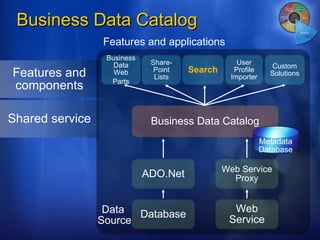
Business Data Catalog Business Data Web Parts Share-Point Lists Search User Profile Importer Custom Solutions Business Data Catalog ADO.Net Database Web Service Web Service Proxy Data  Source Features and applications Features and components Shared service Metadata Database
Business Data Search Search data, not just documents Scenario: Find an account manager in Siebel Today Vertical applications lack full-text search Many users can’t access vertical apps MOSS 2007: Search any database or Web service BDC integrated with  Search Center No need to write custom IFilters or protocol handlers No need to create HTML representations of data
Indexing a custom storage
Querying an external Database using SharePoint Search
Agenda Introduction to 2007 Office system Windows SharePoint Services 3 Collaboration Solution Document Storage Web Development Platform Office SharePoint Server 2007 Portal Search ECM
Enterprise Content Management MOSS 2007 specific Policies & Compliance Records Management Web Content Management Parts of Workflow Content types Development opportunity Workflows Web Parts for WCM Event Handlers Content types
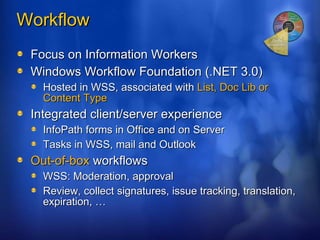
Workflow Focus on Information Workers Windows Workflow Foundation (.NET 3.0) Hosted in WSS, associated with  List, Doc Lib or Content Type Integrated client/server experience InfoPath forms in Office and on Server Tasks in WSS, mail and Outlook Out-of-box  workflows WSS: Moderation, approval Review, collect signatures, issue tracking, translation, expiration, …
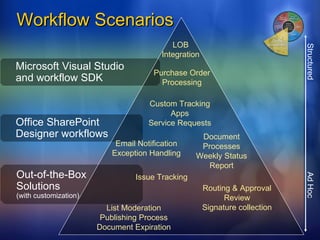
Workflow Scenarios Structured  Ad Hoc Microsoft Visual Studio and workflow SDK Office SharePoint Designer workflows Out-of-the-Box Solutions (with customization) Issue Tracking Routing & Approval Review Signature collection List Moderation Publishing Process Document Expiration Document Processes Weekly Status Report Custom Tracking Apps Service Requests Email Notification Exception Handling LOB  Integration  Purchase Order Processing
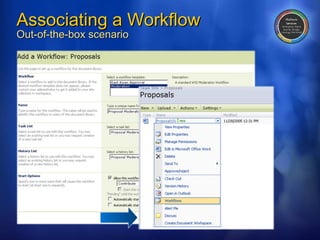
Associating a Workflow Out-of-the-box scenario
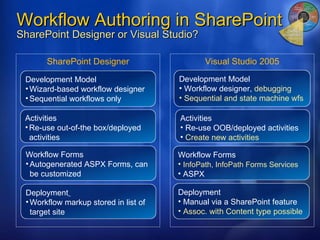
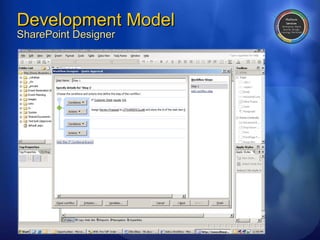
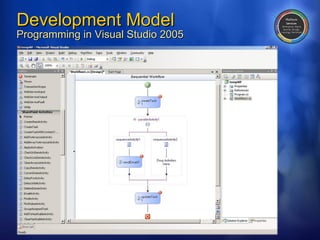
Workflow Authoring in SharePoint SharePoint Designer or Visual Studio? SharePoint Designer Visual Studio 2005 Activities Re-use out-of-the box/deployed activities Workflow Forms Autogenerated ASPX Forms, can be customized Deployment   Workflow markup stored in list of target site Development Model Wizard-based workflow designer  Sequential workflows only Activities Re-use OOB/deployed activities Create new activities Workflow Forms   InfoPath, InfoPath Forms Services ASPX Deployment Manual via a SharePoint feature Assoc. with Content type possible Development Model Workflow designer,  debugging Sequential and state machine wfs
Development Model SharePoint Designer
Development Model Programming in Visual Studio 2005
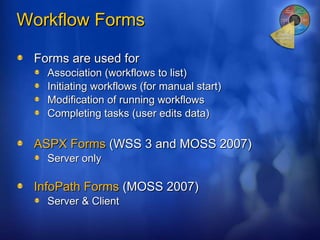
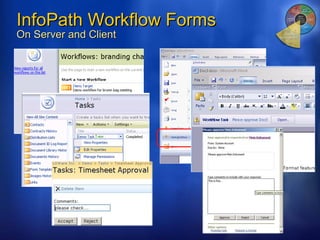
Workflow Forms Forms are used for Association (workflows to list) Initiating workflows (for manual start) Modification of running workflows Completing tasks (user edits data) ASPX Forms  (WSS 3 and MOSS 2007) Server only InfoPath Forms  (MOSS 2007) Server & Client
InfoPath Workflow Forms On Server and Client
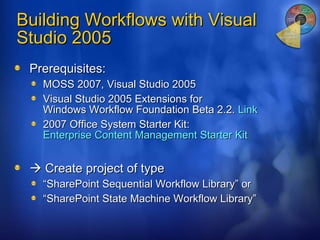
Building Workflows with Visual Studio 2005 Prerequisites: MOSS 2007, Visual Studio 2005 Visual Studio 2005 Extensions for  Windows Workflow Foundation Beta 2.2.  Link  2007 Office System Starter Kit:  Enterprise Content Management Starter Kit     Create project of type  “ SharePoint Sequential Workflow Library” or “ SharePoint State Machine Workflow Library”
Creating a workflow with  Visual Studio 2005
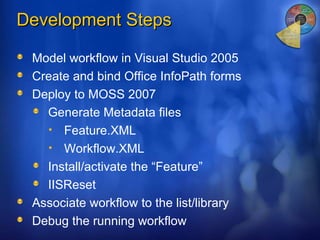
Development Steps Model workflow in Visual Studio 2005 Create and bind Office InfoPath forms Deploy to MOSS 2007 Generate Metadata files Feature.XML Workflow.XML Install/activate the “Feature” IISReset Associate workflow to the list/library  Debug the running workflow
Summary WSS 3 provides a very powerful Collaboration solution Storage platform Web development platform MOSS 2007: Solution and platform for  Portals Search Document Workflow Get more information http://www.microsoft.com/office/preview/technologies/   http://msdn.microsoft.com/sharepoint/
Goal Ensure success when developing with Microsoft Beta Software Advantages Free Online Support until February 2007 Hands-on labs at  Swiss Software Solution Center Involvement in Microsoft Marketing activities Next step Email to  [email_address]  (until end of November) ISV Touchdown Program 2007 Office system or Windows Vista (.NET 3.0)
© 2006 Microsoft Corporation. All rights reserved. Microsoft, Windows, Windows Vista and other product names are or may be registered trademarks and/or trademarks in the U.S. and/or other countries. The information herein is for informational purposes only and represents the current view of Microsoft Corporation as of the date of this presentation.  Because Microsoft must respond to changing market conditions, it should not be interpreted to be a commitment on the part of Microsoft, and Microsoft cannot guarantee the accuracy of any information provided after the date of this presentation.  MICROSOFT MAKES NO WARRANTIES, EXPRESS, IMPLIED OR STATUTORY, AS TO THE INFORMATION IN THIS PRESENTATION.
Introduction wss-3-and-moss-2007-12324

  • 1.
    Introduction to Windows SharePoint Services 3 and Office SharePoint Server 2007 for Developers Olaf Feldkamp Developer Platform Advisor Microsoft Schweiz GmbH
  • 2.
    Agenda Introduction to2007 Office system Windows SharePoint Services 3 Collaboration Solution Document Storage Web Development Platform Office SharePoint Server 2007 Portal Search ECM
  • 3.
    Office system FeatureAreas To meet the organizational needs for the New World of Work Knowledge Discovery and Insight Enterprise Content Management Collaboration Fundamentals Information Worker Solutions Personal Productivity
  • 4.
    Innovation in 2007Office Clients  New Microsoft Office user interface  Powerful new application capabilities  Office open XML file formats  Integration w/ Office SharePoint Server 2007  Advances in deployment and management
  • 5.
    New Microsoft OfficeUser Interface VSTO 2005 SE: just released Application-level add-in support for Office 2003/2007 Standard and Professional apps Outlook, Excel, Word, PowerPoint, InfoPath 2007 and Visio Design-time and runtime support for key 2007 Office System features: Ribbon Custom Task Pane Outlook forms regions Free add-on on MSDN to Visual Studio 2005
  • 6.
    SharePoint Technology VisionEmployees Customers Partners Information sharing Controlling content Decision making Unified, enterprise-ready solution boosting organizational effectiveness Web Services HR, Finance, etc. Team Collaboration Personal Enterprise Portal Business Applications (SAP, data warehouse, custom) Internet Presence
  • 7.
    Agenda Introduction to2007 Office system Windows SharePoint Services 3 Collaboration Solution Document Storage Web Development Platform Office SharePoint Server 2007 Portal Search ECM
  • 8.
    SharePoint Products andTechnologies Windows SharePoint Services only Collaboration Docs/tasks/calendars, blogs, wikis, e-mail integration, project management “lite”, Outlook integration, offline docs/lists Platform Services Workspaces, Mgmt, Security, Storage, Topology, Site Model
  • 9.
    SharePoint Products andTechnologies Microsoft Office SharePoint Server 2007 Business Intelligence Collaboration Search Portal Business Forms Content Management Server-based Excel spreadsheets and data visualization, Report Center, BI Web Parts, KPIs/Dashboards Integrated document management, records management, and Web content management with policies and workflow Rich and Web forms based front-ends, LOB actions, enterprise SSO Docs/tasks/calendars, blogs, wikis, e-mail integration, project management “lite”, Outlook integration, offline docs/lists Enterprise scalability, contextual relevance, rich people and business data search Enterprise Portal template, Site Directory, My Sites, social networking, privacy control Platform Services Workspaces, Mgmt, Security, Storage, Topology, Site Model
  • 10.
  • 11.
    Agenda Introduction to2007 Office system Windows SharePoint Services 3 Collaboration Solution Document Storage Web Development Platform Office SharePoint Server 2007 Portal Search ECM
  • 12.
    Next-Generation CollaborationSolution Enhanced UI, improved navigation Mobility Outlook integration (offline documents) Improved meetings/calendars Project collaboration Directory integration Tracking Solutions Wikis Blogs RSS
  • 13.
  • 14.
    Blogs, Wikis ProjectManagement Mobility
  • 15.
    Configuring mobile viewsNo code required
  • 16.
    Mobile Pages Availablesite definitions after installation of WSS Standard SharePoint sites Meeting Web sites Central admin Web site Wiki sites Blog sites Download WSS 3 SDK
  • 17.
  • 18.
    Agenda Introduction to2007 Office system Windows SharePoint Services 3 Collaboration Solution Document Storage Web Development Platform Office SharePoint Server 2007 Portal Search ECM
  • 19.
    Document and DataStorage Goals Nail core document management functionality Usable & Robust Document Management for the masses APIs to work hand-in-hand with Servers, Clients Features List items and Documents List items Per-item Security Versioning Content Types, Site columns Recycle Bin (2-stage) Forced Check-in/out Large list and cross-list indexing List capacity improvements (width and length) Embedded Windows Workflow Foundation
  • 20.
    WSS Logical ArchitectureFarm (SPFarm) An installation of one of more Web and back-end servers Each WSS farm has one and only one configuration DB Web Application: An IIS Web site extended with WSS Site Collection: Stored in one specific content DB Site: same content DB as parent site
  • 21.
  • 22.
    Agenda Introduction to2007 Office system Windows SharePoint Services 3 Collaboration Solution Document Storage Web Development Platform Office SharePoint Server 2007 Portal Search ECM
  • 23.
    Web Application PlatformPlatform for portal/workspace applications Example: MOSS 2007  Partners and customers should do the same Consistent User experience across server family Environment for development and managemen Facilities for intranet, extranet, Internet deployments Clean upgrade process due to features
  • 24.
    SharePoint Designer orVisual Studio? Custom Coding (if necessary) Web Controls and Parts ASP.NET page coding Event handlers Workflow actions Visual Studio 2005 Web site construction Create lists and doclibs Design Web pages No-code data view/forms No-code workflows Office SharePoint Designer + Browser
  • 25.
    Sample SharePoint ApplicationsCurrent set of 30 Windows SharePoint Services (v2) app templates already has over 900,000 downloads (Summer 06) Working on 40+ new templates for V3 Horizontal focus on common roles & tasks Range from simple single-list apps to full workflow integration and cross-site rollups Absence Request and Vacation Schedule Classroom Management Lending Library Timesheet and Billing Event Planning
  • 26.
    Web Part DevelopmentHistory WSS V2 Designed with its own Web Part infrastructure ASP.NET 2.0 Designed with newer universal Web Part infrastructure WSS 3 Compatibility for WSS V2 Web Parts  Supports ASP.NET 2.0 style Web Parts (preferred) Pros to SharePoint Web Parts Client side scripting & connections, Web Part data caching No built-in support for treating user controls (.ascx) as Web Parts
  • 27.
    Web Part SecurityDeploying to GAC or \bin? GAC Assemblies run in any web application, must be signed Default: Assemblies run with Full Trust \bin (subject to partial trust) Recommended: Create a new trust policy file, point your web.config file at the new file During development: Raise the trust level of the \bin directory <!– web.config in root directory of hosting virtual server --> < configuration > </ system.web > <! -- <trust level=&quot;WSS_Minimal&quot; originUrl=&quot;&quot; /> -- > < trust level =&quot;Full&quot; originUrl =&quot;&quot; /> </ system.web > </ configuration >
  • 28.
  • 29.
    - Add dllto SafeControls in web.config Deploy dll to /bin Folder Add Web Part to Web Part Gallery
  • 30.
    WSS 3 EnhancementsMajor Architectural improvements Better ASP.NET integration Support for forms-based authentication Much easier approaches to branding and customizing sites Events architecture significantly improved Supported on regular lists as well as document libraries Multiple handlers on a list S ynchronous and asynchronous More events…
  • 31.
    More Events… ItemEvents SPItemEventReceiver ItemAdded/ing ItemAttachmentAdd/ing ItemAttachmentDeleted/ing ItemChecked/ingIn ItemChecked/ingOut ItemDeleted/ing ItemFileConverted ItemFileMoved/ing ItemUnchecked/ingOut ItemUncheckingOut ItemUpdated/ing List/Web Events SPListEventReceiver FieldAdded/ing FieldDeleted/ing FieldUpdated/ing SPWebEventReceiver SiteDeleted/ing WebDeleted/ing WebMoved/ing
  • 32.
    Modular Provisioning: Features!Extend existing sites, instead of changing Site templates Combination of list/view/Web Part/ EventHandler/Workflow component/… Use .CAB for Deployment Feature Name ID Description Scope Receiver assembly Activation Dependencies Element Manifests Feature.xml Elements.xml Custom Actions Custom Views Content Type Definitions Layouts Pages Modules (files) List Instances List Templates Event Receivers Delegate Controls Web Parts Workflow Bindings
  • 33.
  • 34.
    Portal MOSS 2007specific Enterprise Portal template People (Social networking) My Site Additional Web Parts Shared Services, … Development Opportunity Components (Web Parts, event receivers, etc.) that support Privacy policies Audience targeting Personalization Multi languages
  • 35.
    Agenda Introduction to2007 Office system Windows SharePoint Services 3 Collaboration Solution Document Storage Web Development Platform Office SharePoint Server 2007 Portal Search ECM
  • 36.
    Search What’s newTop results on first page Extensive collaboration with Microsoft Research and Windows Live Enterprise Search different from Internet Search Less cross-linking being done Lots of non-Web content – Office docs, line-of-business data, etc. Features Query hit highlighting “ Did you mean” query correction, Alerts, … Consistent search system across WSS and MOSS
  • 37.
    Search MOSSspecific Enterprise search MOSS 2007 for Search (standalone version) Development Opportunity Customize/extend Search Center Add tabs, Custom search Web Parts, .. Customize alerts Custom search Web service clients Index custom data Protocol handlers and IFilters Business Data Catalog
  • 38.
    Business Data CatalogBusiness Data Web Parts Share-Point Lists Search User Profile Importer Custom Solutions Business Data Catalog ADO.Net Database Web Service Web Service Proxy Data Source Features and applications Features and components Shared service Metadata Database
  • 39.
    Business Data SearchSearch data, not just documents Scenario: Find an account manager in Siebel Today Vertical applications lack full-text search Many users can’t access vertical apps MOSS 2007: Search any database or Web service BDC integrated with Search Center No need to write custom IFilters or protocol handlers No need to create HTML representations of data
  • 40.
  • 41.
    Querying an externalDatabase using SharePoint Search
  • 42.
    Agenda Introduction to2007 Office system Windows SharePoint Services 3 Collaboration Solution Document Storage Web Development Platform Office SharePoint Server 2007 Portal Search ECM
  • 43.
    Enterprise Content ManagementMOSS 2007 specific Policies & Compliance Records Management Web Content Management Parts of Workflow Content types Development opportunity Workflows Web Parts for WCM Event Handlers Content types
  • 44.
    Workflow Focus onInformation Workers Windows Workflow Foundation (.NET 3.0) Hosted in WSS, associated with List, Doc Lib or Content Type Integrated client/server experience InfoPath forms in Office and on Server Tasks in WSS, mail and Outlook Out-of-box workflows WSS: Moderation, approval Review, collect signatures, issue tracking, translation, expiration, …
  • 45.
    Workflow Scenarios Structured Ad Hoc Microsoft Visual Studio and workflow SDK Office SharePoint Designer workflows Out-of-the-Box Solutions (with customization) Issue Tracking Routing & Approval Review Signature collection List Moderation Publishing Process Document Expiration Document Processes Weekly Status Report Custom Tracking Apps Service Requests Email Notification Exception Handling LOB Integration Purchase Order Processing
  • 46.
    Associating a WorkflowOut-of-the-box scenario
  • 47.
    Workflow Authoring inSharePoint SharePoint Designer or Visual Studio? SharePoint Designer Visual Studio 2005 Activities Re-use out-of-the box/deployed activities Workflow Forms Autogenerated ASPX Forms, can be customized Deployment Workflow markup stored in list of target site Development Model Wizard-based workflow designer Sequential workflows only Activities Re-use OOB/deployed activities Create new activities Workflow Forms InfoPath, InfoPath Forms Services ASPX Deployment Manual via a SharePoint feature Assoc. with Content type possible Development Model Workflow designer, debugging Sequential and state machine wfs
  • 48.
  • 49.
    Development Model Programmingin Visual Studio 2005
  • 50.
    Workflow Forms Formsare used for Association (workflows to list) Initiating workflows (for manual start) Modification of running workflows Completing tasks (user edits data) ASPX Forms (WSS 3 and MOSS 2007) Server only InfoPath Forms (MOSS 2007) Server & Client
  • 51.
    InfoPath Workflow FormsOn Server and Client
  • 52.
    Building Workflows withVisual Studio 2005 Prerequisites: MOSS 2007, Visual Studio 2005 Visual Studio 2005 Extensions for Windows Workflow Foundation Beta 2.2. Link 2007 Office System Starter Kit: Enterprise Content Management Starter Kit  Create project of type “ SharePoint Sequential Workflow Library” or “ SharePoint State Machine Workflow Library”
  • 53.
    Creating a workflowwith Visual Studio 2005
  • 54.
    Development Steps Modelworkflow in Visual Studio 2005 Create and bind Office InfoPath forms Deploy to MOSS 2007 Generate Metadata files Feature.XML Workflow.XML Install/activate the “Feature” IISReset Associate workflow to the list/library Debug the running workflow
  • 55.
    Summary WSS 3provides a very powerful Collaboration solution Storage platform Web development platform MOSS 2007: Solution and platform for Portals Search Document Workflow Get more information http://www.microsoft.com/office/preview/technologies/ http://msdn.microsoft.com/sharepoint/
  • 56.
    Goal Ensure successwhen developing with Microsoft Beta Software Advantages Free Online Support until February 2007 Hands-on labs at Swiss Software Solution Center Involvement in Microsoft Marketing activities Next step Email to [email_address] (until end of November) ISV Touchdown Program 2007 Office system or Windows Vista (.NET 3.0)
  • 57.
    © 2006 MicrosoftCorporation. All rights reserved. Microsoft, Windows, Windows Vista and other product names are or may be registered trademarks and/or trademarks in the U.S. and/or other countries. The information herein is for informational purposes only and represents the current view of Microsoft Corporation as of the date of this presentation. Because Microsoft must respond to changing market conditions, it should not be interpreted to be a commitment on the part of Microsoft, and Microsoft cannot guarantee the accuracy of any information provided after the date of this presentation. MICROSOFT MAKES NO WARRANTIES, EXPRESS, IMPLIED OR STATUTORY, AS TO THE INFORMATION IN THIS PRESENTATION.

Editor's Notes

  • #2 08/20/10 12:36 © 2006 Microsoft Corporation. All rights reserved. Microsoft, Windows, Windows Vista and other product names are or may be registered trademarks and/or trademarks in the U.S. and/or other countries. The information herein is for informational purposes only and represents the current view of Microsoft Corporation as of the date of this presentation. Because Microsoft must respond to changing market conditions, it should not be interpreted to be a commitment on the part of Microsoft, and Microsoft cannot guarantee the accuracy of any information provided after the date of this presentation. MICROSOFT MAKES NO WARRANTIES, EXPRESS, IMPLIED OR STATUTORY, AS TO THE INFORMATION IN THIS PRESENTATION.
  • #3 08/20/10 12:36 © 2006 Microsoft Corporation. All rights reserved. Microsoft, Windows, Windows Vista and other product names are or may be registered trademarks and/or trademarks in the U.S. and/or other countries. The information herein is for informational purposes only and represents the current view of Microsoft Corporation as of the date of this presentation. Because Microsoft must respond to changing market conditions, it should not be interpreted to be a commitment on the part of Microsoft, and Microsoft cannot guarantee the accuracy of any information provided after the date of this presentation. MICROSOFT MAKES NO WARRANTIES, EXPRESS, IMPLIED OR STATUTORY, AS TO THE INFORMATION IN THIS PRESENTATION.
  • #4 20/08/10 12:36 © 2004 Microsoft Corporation. All rights reserved. This presentation is for informational purposes only. Microsoft makes no warranties, express or implied, in this summary.
  • #7 08/20/10 12:36 © 2006 Microsoft Corporation. All rights reserved. Microsoft, Windows, Windows Vista and other product names are or may be registered trademarks and/or trademarks in the U.S. and/or other countries. The information herein is for informational purposes only and represents the current view of Microsoft Corporation as of the date of this presentation. Because Microsoft must respond to changing market conditions, it should not be interpreted to be a commitment on the part of Microsoft, and Microsoft cannot guarantee the accuracy of any information provided after the date of this presentation. MICROSOFT MAKES NO WARRANTIES, EXPRESS, IMPLIED OR STATUTORY, AS TO THE INFORMATION IN THIS PRESENTATION.
  • #8 08/20/10 12:36 © 2006 Microsoft Corporation. All rights reserved. Microsoft, Windows, Windows Vista and other product names are or may be registered trademarks and/or trademarks in the U.S. and/or other countries. The information herein is for informational purposes only and represents the current view of Microsoft Corporation as of the date of this presentation. Because Microsoft must respond to changing market conditions, it should not be interpreted to be a commitment on the part of Microsoft, and Microsoft cannot guarantee the accuracy of any information provided after the date of this presentation. MICROSOFT MAKES NO WARRANTIES, EXPRESS, IMPLIED OR STATUTORY, AS TO THE INFORMATION IN THIS PRESENTATION.
  • #9 08/20/10 12:36 © 2006 Microsoft Corporation. All rights reserved. Microsoft, Windows, Windows Vista and other product names are or may be registered trademarks and/or trademarks in the U.S. and/or other countries. The information herein is for informational purposes only and represents the current view of Microsoft Corporation as of the date of this presentation. Because Microsoft must respond to changing market conditions, it should not be interpreted to be a commitment on the part of Microsoft, and Microsoft cannot guarantee the accuracy of any information provided after the date of this presentation. MICROSOFT MAKES NO WARRANTIES, EXPRESS, IMPLIED OR STATUTORY, AS TO THE INFORMATION IN THIS PRESENTATION.
  • #10 08/20/10 12:36 © 2006 Microsoft Corporation. All rights reserved. Microsoft, Windows, Windows Vista and other product names are or may be registered trademarks and/or trademarks in the U.S. and/or other countries. The information herein is for informational purposes only and represents the current view of Microsoft Corporation as of the date of this presentation. Because Microsoft must respond to changing market conditions, it should not be interpreted to be a commitment on the part of Microsoft, and Microsoft cannot guarantee the accuracy of any information provided after the date of this presentation. MICROSOFT MAKES NO WARRANTIES, EXPRESS, IMPLIED OR STATUTORY, AS TO THE INFORMATION IN THIS PRESENTATION.
  • #12 08/20/10 12:36 © 2006 Microsoft Corporation. All rights reserved. Microsoft, Windows, Windows Vista and other product names are or may be registered trademarks and/or trademarks in the U.S. and/or other countries. The information herein is for informational purposes only and represents the current view of Microsoft Corporation as of the date of this presentation. Because Microsoft must respond to changing market conditions, it should not be interpreted to be a commitment on the part of Microsoft, and Microsoft cannot guarantee the accuracy of any information provided after the date of this presentation. MICROSOFT MAKES NO WARRANTIES, EXPRESS, IMPLIED OR STATUTORY, AS TO THE INFORMATION IN THIS PRESENTATION.
  • #13 08/20/10 12:36 © 2006 Microsoft Corporation. All rights reserved. Microsoft, Windows, Windows Vista and other product names are or may be registered trademarks and/or trademarks in the U.S. and/or other countries. The information herein is for informational purposes only and represents the current view of Microsoft Corporation as of the date of this presentation. Because Microsoft must respond to changing market conditions, it should not be interpreted to be a commitment on the part of Microsoft, and Microsoft cannot guarantee the accuracy of any information provided after the date of this presentation. MICROSOFT MAKES NO WARRANTIES, EXPRESS, IMPLIED OR STATUTORY, AS TO THE INFORMATION IN THIS PRESENTATION.
  • #15 08/20/10 12:36 © 2006 Microsoft Corporation. All rights reserved. Microsoft, Windows, Windows Vista and other product names are or may be registered trademarks and/or trademarks in the U.S. and/or other countries. The information herein is for informational purposes only and represents the current view of Microsoft Corporation as of the date of this presentation. Because Microsoft must respond to changing market conditions, it should not be interpreted to be a commitment on the part of Microsoft, and Microsoft cannot guarantee the accuracy of any information provided after the date of this presentation. MICROSOFT MAKES NO WARRANTIES, EXPRESS, IMPLIED OR STATUTORY, AS TO THE INFORMATION IN THIS PRESENTATION.
  • #16 08/20/10 12:36 © 2006 Microsoft Corporation. All rights reserved. Microsoft, Windows, Windows Vista and other product names are or may be registered trademarks and/or trademarks in the U.S. and/or other countries. The information herein is for informational purposes only and represents the current view of Microsoft Corporation as of the date of this presentation. Because Microsoft must respond to changing market conditions, it should not be interpreted to be a commitment on the part of Microsoft, and Microsoft cannot guarantee the accuracy of any information provided after the date of this presentation. MICROSOFT MAKES NO WARRANTIES, EXPRESS, IMPLIED OR STATUTORY, AS TO THE INFORMATION IN THIS PRESENTATION.
  • #19 08/20/10 12:36 © 2006 Microsoft Corporation. All rights reserved. Microsoft, Windows, Windows Vista and other product names are or may be registered trademarks and/or trademarks in the U.S. and/or other countries. The information herein is for informational purposes only and represents the current view of Microsoft Corporation as of the date of this presentation. Because Microsoft must respond to changing market conditions, it should not be interpreted to be a commitment on the part of Microsoft, and Microsoft cannot guarantee the accuracy of any information provided after the date of this presentation. MICROSOFT MAKES NO WARRANTIES, EXPRESS, IMPLIED OR STATUTORY, AS TO THE INFORMATION IN THIS PRESENTATION.
  • #20 08/20/10 12:36 © 2006 Microsoft Corporation. All rights reserved. Microsoft, Windows, Windows Vista and other product names are or may be registered trademarks and/or trademarks in the U.S. and/or other countries. The information herein is for informational purposes only and represents the current view of Microsoft Corporation as of the date of this presentation. Because Microsoft must respond to changing market conditions, it should not be interpreted to be a commitment on the part of Microsoft, and Microsoft cannot guarantee the accuracy of any information provided after the date of this presentation. MICROSOFT MAKES NO WARRANTIES, EXPRESS, IMPLIED OR STATUTORY, AS TO THE INFORMATION IN THIS PRESENTATION.
  • #21 08/20/10 12:36 © 2006 Microsoft Corporation. All rights reserved. Microsoft, Windows, Windows Vista and other product names are or may be registered trademarks and/or trademarks in the U.S. and/or other countries. The information herein is for informational purposes only and represents the current view of Microsoft Corporation as of the date of this presentation. Because Microsoft must respond to changing market conditions, it should not be interpreted to be a commitment on the part of Microsoft, and Microsoft cannot guarantee the accuracy of any information provided after the date of this presentation. MICROSOFT MAKES NO WARRANTIES, EXPRESS, IMPLIED OR STATUTORY, AS TO THE INFORMATION IN THIS PRESENTATION.
  • #22 08/20/10 12:36 © 2006 Microsoft Corporation. All rights reserved. Microsoft, Windows, Windows Vista and other product names are or may be registered trademarks and/or trademarks in the U.S. and/or other countries. The information herein is for informational purposes only and represents the current view of Microsoft Corporation as of the date of this presentation. Because Microsoft must respond to changing market conditions, it should not be interpreted to be a commitment on the part of Microsoft, and Microsoft cannot guarantee the accuracy of any information provided after the date of this presentation. MICROSOFT MAKES NO WARRANTIES, EXPRESS, IMPLIED OR STATUTORY, AS TO THE INFORMATION IN THIS PRESENTATION.
  • #23 08/20/10 12:36 © 2006 Microsoft Corporation. All rights reserved. Microsoft, Windows, Windows Vista and other product names are or may be registered trademarks and/or trademarks in the U.S. and/or other countries. The information herein is for informational purposes only and represents the current view of Microsoft Corporation as of the date of this presentation. Because Microsoft must respond to changing market conditions, it should not be interpreted to be a commitment on the part of Microsoft, and Microsoft cannot guarantee the accuracy of any information provided after the date of this presentation. MICROSOFT MAKES NO WARRANTIES, EXPRESS, IMPLIED OR STATUTORY, AS TO THE INFORMATION IN THIS PRESENTATION.
  • #24 08/20/10 12:36 © 2006 Microsoft Corporation. All rights reserved. Microsoft, Windows, Windows Vista and other product names are or may be registered trademarks and/or trademarks in the U.S. and/or other countries. The information herein is for informational purposes only and represents the current view of Microsoft Corporation as of the date of this presentation. Because Microsoft must respond to changing market conditions, it should not be interpreted to be a commitment on the part of Microsoft, and Microsoft cannot guarantee the accuracy of any information provided after the date of this presentation. MICROSOFT MAKES NO WARRANTIES, EXPRESS, IMPLIED OR STATUTORY, AS TO THE INFORMATION IN THIS PRESENTATION.
  • #25 08/20/10 12:36 © 2006 Microsoft Corporation. All rights reserved. Microsoft, Windows, Windows Vista and other product names are or may be registered trademarks and/or trademarks in the U.S. and/or other countries. The information herein is for informational purposes only and represents the current view of Microsoft Corporation as of the date of this presentation. Because Microsoft must respond to changing market conditions, it should not be interpreted to be a commitment on the part of Microsoft, and Microsoft cannot guarantee the accuracy of any information provided after the date of this presentation. MICROSOFT MAKES NO WARRANTIES, EXPRESS, IMPLIED OR STATUTORY, AS TO THE INFORMATION IN THIS PRESENTATION. 08/20/10 12:36 © 2003-2005 Microsoft Corporation. All rights reserved. This presentation is for informational purposes only. Microsoft makes no warranties, express or implied, in this summary.
  • #26 08/20/10 12:36 © 2006 Microsoft Corporation. All rights reserved. Microsoft, Windows, Windows Vista and other product names are or may be registered trademarks and/or trademarks in the U.S. and/or other countries. The information herein is for informational purposes only and represents the current view of Microsoft Corporation as of the date of this presentation. Because Microsoft must respond to changing market conditions, it should not be interpreted to be a commitment on the part of Microsoft, and Microsoft cannot guarantee the accuracy of any information provided after the date of this presentation. MICROSOFT MAKES NO WARRANTIES, EXPRESS, IMPLIED OR STATUTORY, AS TO THE INFORMATION IN THIS PRESENTATION. 08/20/10 12:36 © 2006 Microsoft Corporation. All rights reserved. This presentation is for informational purposes only. Microsoft makes no warranties, express or implied, in this summary.
  • #27 08/20/10 12:36 © 2006 Microsoft Corporation. All rights reserved. Microsoft, Windows, Windows Vista and other product names are or may be registered trademarks and/or trademarks in the U.S. and/or other countries. The information herein is for informational purposes only and represents the current view of Microsoft Corporation as of the date of this presentation. Because Microsoft must respond to changing market conditions, it should not be interpreted to be a commitment on the part of Microsoft, and Microsoft cannot guarantee the accuracy of any information provided after the date of this presentation. MICROSOFT MAKES NO WARRANTIES, EXPRESS, IMPLIED OR STATUTORY, AS TO THE INFORMATION IN THIS PRESENTATION.
  • #28 08/20/10 12:36 © 2006 Microsoft Corporation. All rights reserved. Microsoft, Windows, Windows Vista and other product names are or may be registered trademarks and/or trademarks in the U.S. and/or other countries. The information herein is for informational purposes only and represents the current view of Microsoft Corporation as of the date of this presentation. Because Microsoft must respond to changing market conditions, it should not be interpreted to be a commitment on the part of Microsoft, and Microsoft cannot guarantee the accuracy of any information provided after the date of this presentation. MICROSOFT MAKES NO WARRANTIES, EXPRESS, IMPLIED OR STATUTORY, AS TO THE INFORMATION IN THIS PRESENTATION.
  • #29 20/08/10 12:36 © 2004 Microsoft Corporation. All rights reserved. This presentation is for informational purposes only. Microsoft makes no warranties, express or implied, in this summary.
  • #31 20/08/10 12:36 © 2004 Microsoft Corporation. All rights reserved. This presentation is for informational purposes only. Microsoft makes no warranties, express or implied, in this summary.
  • #34 08/20/10 12:36 © 2006 Microsoft Corporation. All rights reserved. Microsoft, Windows, Windows Vista and other product names are or may be registered trademarks and/or trademarks in the U.S. and/or other countries. The information herein is for informational purposes only and represents the current view of Microsoft Corporation as of the date of this presentation. Because Microsoft must respond to changing market conditions, it should not be interpreted to be a commitment on the part of Microsoft, and Microsoft cannot guarantee the accuracy of any information provided after the date of this presentation. MICROSOFT MAKES NO WARRANTIES, EXPRESS, IMPLIED OR STATUTORY, AS TO THE INFORMATION IN THIS PRESENTATION.
  • #35 08/20/10 12:36 © 2006 Microsoft Corporation. All rights reserved. Microsoft, Windows, Windows Vista and other product names are or may be registered trademarks and/or trademarks in the U.S. and/or other countries. The information herein is for informational purposes only and represents the current view of Microsoft Corporation as of the date of this presentation. Because Microsoft must respond to changing market conditions, it should not be interpreted to be a commitment on the part of Microsoft, and Microsoft cannot guarantee the accuracy of any information provided after the date of this presentation. MICROSOFT MAKES NO WARRANTIES, EXPRESS, IMPLIED OR STATUTORY, AS TO THE INFORMATION IN THIS PRESENTATION.
  • #36 08/20/10 12:36 © 2006 Microsoft Corporation. All rights reserved. Microsoft, Windows, Windows Vista and other product names are or may be registered trademarks and/or trademarks in the U.S. and/or other countries. The information herein is for informational purposes only and represents the current view of Microsoft Corporation as of the date of this presentation. Because Microsoft must respond to changing market conditions, it should not be interpreted to be a commitment on the part of Microsoft, and Microsoft cannot guarantee the accuracy of any information provided after the date of this presentation. MICROSOFT MAKES NO WARRANTIES, EXPRESS, IMPLIED OR STATUTORY, AS TO THE INFORMATION IN THIS PRESENTATION.
  • #37 08/20/10 12:36 © 2006 Microsoft Corporation. All rights reserved. Microsoft, Windows, Windows Vista and other product names are or may be registered trademarks and/or trademarks in the U.S. and/or other countries. The information herein is for informational purposes only and represents the current view of Microsoft Corporation as of the date of this presentation. Because Microsoft must respond to changing market conditions, it should not be interpreted to be a commitment on the part of Microsoft, and Microsoft cannot guarantee the accuracy of any information provided after the date of this presentation. MICROSOFT MAKES NO WARRANTIES, EXPRESS, IMPLIED OR STATUTORY, AS TO THE INFORMATION IN THIS PRESENTATION.
  • #38 08/20/10 12:36 © 2006 Microsoft Corporation. All rights reserved. Microsoft, Windows, Windows Vista and other product names are or may be registered trademarks and/or trademarks in the U.S. and/or other countries. The information herein is for informational purposes only and represents the current view of Microsoft Corporation as of the date of this presentation. Because Microsoft must respond to changing market conditions, it should not be interpreted to be a commitment on the part of Microsoft, and Microsoft cannot guarantee the accuracy of any information provided after the date of this presentation. MICROSOFT MAKES NO WARRANTIES, EXPRESS, IMPLIED OR STATUTORY, AS TO THE INFORMATION IN THIS PRESENTATION.
  • #39 08/20/10 12:36 © 2006 Microsoft Corporation. All rights reserved. Microsoft, Windows, Windows Vista and other product names are or may be registered trademarks and/or trademarks in the U.S. and/or other countries. The information herein is for informational purposes only and represents the current view of Microsoft Corporation as of the date of this presentation. Because Microsoft must respond to changing market conditions, it should not be interpreted to be a commitment on the part of Microsoft, and Microsoft cannot guarantee the accuracy of any information provided after the date of this presentation. MICROSOFT MAKES NO WARRANTIES, EXPRESS, IMPLIED OR STATUTORY, AS TO THE INFORMATION IN THIS PRESENTATION.
  • #40 08/20/10 12:36 © 2006 Microsoft Corporation. All rights reserved. Microsoft, Windows, Windows Vista and other product names are or may be registered trademarks and/or trademarks in the U.S. and/or other countries. The information herein is for informational purposes only and represents the current view of Microsoft Corporation as of the date of this presentation. Because Microsoft must respond to changing market conditions, it should not be interpreted to be a commitment on the part of Microsoft, and Microsoft cannot guarantee the accuracy of any information provided after the date of this presentation. MICROSOFT MAKES NO WARRANTIES, EXPRESS, IMPLIED OR STATUTORY, AS TO THE INFORMATION IN THIS PRESENTATION. 08/20/10 12:36 © 2005 Microsoft Corporation. All rights reserved. This presentation is for informational purposes only. Microsoft makes no warranties, express or implied, in this summary.
  • #42 08/20/10 12:36 © 2006 Microsoft Corporation. All rights reserved. Microsoft, Windows, Windows Vista and other product names are or may be registered trademarks and/or trademarks in the U.S. and/or other countries. The information herein is for informational purposes only and represents the current view of Microsoft Corporation as of the date of this presentation. Because Microsoft must respond to changing market conditions, it should not be interpreted to be a commitment on the part of Microsoft, and Microsoft cannot guarantee the accuracy of any information provided after the date of this presentation. MICROSOFT MAKES NO WARRANTIES, EXPRESS, IMPLIED OR STATUTORY, AS TO THE INFORMATION IN THIS PRESENTATION.
  • #43 08/20/10 12:36 © 2006 Microsoft Corporation. All rights reserved. Microsoft, Windows, Windows Vista and other product names are or may be registered trademarks and/or trademarks in the U.S. and/or other countries. The information herein is for informational purposes only and represents the current view of Microsoft Corporation as of the date of this presentation. Because Microsoft must respond to changing market conditions, it should not be interpreted to be a commitment on the part of Microsoft, and Microsoft cannot guarantee the accuracy of any information provided after the date of this presentation. MICROSOFT MAKES NO WARRANTIES, EXPRESS, IMPLIED OR STATUTORY, AS TO THE INFORMATION IN THIS PRESENTATION.
  • #44 08/20/10 12:36 © 2006 Microsoft Corporation. All rights reserved. Microsoft, Windows, Windows Vista and other product names are or may be registered trademarks and/or trademarks in the U.S. and/or other countries. The information herein is for informational purposes only and represents the current view of Microsoft Corporation as of the date of this presentation. Because Microsoft must respond to changing market conditions, it should not be interpreted to be a commitment on the part of Microsoft, and Microsoft cannot guarantee the accuracy of any information provided after the date of this presentation. MICROSOFT MAKES NO WARRANTIES, EXPRESS, IMPLIED OR STATUTORY, AS TO THE INFORMATION IN THIS PRESENTATION.
  • #46 08/20/10 12:36 © 2006 Microsoft Corporation. All rights reserved. Microsoft, Windows, Windows Vista and other product names are or may be registered trademarks and/or trademarks in the U.S. and/or other countries. The information herein is for informational purposes only and represents the current view of Microsoft Corporation as of the date of this presentation. Because Microsoft must respond to changing market conditions, it should not be interpreted to be a commitment on the part of Microsoft, and Microsoft cannot guarantee the accuracy of any information provided after the date of this presentation. MICROSOFT MAKES NO WARRANTIES, EXPRESS, IMPLIED OR STATUTORY, AS TO THE INFORMATION IN THIS PRESENTATION. 08/20/10 12:36 © 2006 Microsoft Corporation. All rights reserved. Microsoft, Windows, Windows Vista and other product names are or may be registered trademarks and/or trademarks in the U.S. and/or other countries. The information herein is for informational purposes only and represents the current view of Microsoft Corporation as of the date of this presentation. Because Microsoft must respond to changing market conditions, it should not be interpreted to be a commitment on the part of Microsoft, and Microsoft cannot guarantee the accuracy of any information provided after the date of this presentation. MICROSOFT MAKES NO WARRANTIES, EXPRESS, IMPLIED OR STATUTORY, AS TO THE INFORMATION IN THIS PRESENTATION. 08/20/10 12:36 © 2006 Microsoft Corporation. All rights reserved. This presentation is for informational purposes only. Microsoft makes no warranties, express or implied, in this summary.
  • #49 08/20/10 12:36 © 2006 Microsoft Corporation. All rights reserved. Microsoft, Windows, Windows Vista and other product names are or may be registered trademarks and/or trademarks in the U.S. and/or other countries. The information herein is for informational purposes only and represents the current view of Microsoft Corporation as of the date of this presentation. Because Microsoft must respond to changing market conditions, it should not be interpreted to be a commitment on the part of Microsoft, and Microsoft cannot guarantee the accuracy of any information provided after the date of this presentation. MICROSOFT MAKES NO WARRANTIES, EXPRESS, IMPLIED OR STATUTORY, AS TO THE INFORMATION IN THIS PRESENTATION. 08/20/10 12:36 © 2006 Microsoft Corporation. All rights reserved. This presentation is for informational purposes only. Microsoft makes no warranties, express or implied, in this summary.
  • #52 08/20/10 12:36 © 2006 Microsoft Corporation. All rights reserved. Microsoft, Windows, Windows Vista and other product names are or may be registered trademarks and/or trademarks in the U.S. and/or other countries. The information herein is for informational purposes only and represents the current view of Microsoft Corporation as of the date of this presentation. Because Microsoft must respond to changing market conditions, it should not be interpreted to be a commitment on the part of Microsoft, and Microsoft cannot guarantee the accuracy of any information provided after the date of this presentation. MICROSOFT MAKES NO WARRANTIES, EXPRESS, IMPLIED OR STATUTORY, AS TO THE INFORMATION IN THIS PRESENTATION.
  • #53 08/20/10 12:36 © 2006 Microsoft Corporation. All rights reserved. Microsoft, Windows, Windows Vista and other product names are or may be registered trademarks and/or trademarks in the U.S. and/or other countries. The information herein is for informational purposes only and represents the current view of Microsoft Corporation as of the date of this presentation. Because Microsoft must respond to changing market conditions, it should not be interpreted to be a commitment on the part of Microsoft, and Microsoft cannot guarantee the accuracy of any information provided after the date of this presentation. MICROSOFT MAKES NO WARRANTIES, EXPRESS, IMPLIED OR STATUTORY, AS TO THE INFORMATION IN THIS PRESENTATION.
  • #54 08/20/10 12:36 © 2006 Microsoft Corporation. All rights reserved. Microsoft, Windows, Windows Vista and other product names are or may be registered trademarks and/or trademarks in the U.S. and/or other countries. The information herein is for informational purposes only and represents the current view of Microsoft Corporation as of the date of this presentation. Because Microsoft must respond to changing market conditions, it should not be interpreted to be a commitment on the part of Microsoft, and Microsoft cannot guarantee the accuracy of any information provided after the date of this presentation. MICROSOFT MAKES NO WARRANTIES, EXPRESS, IMPLIED OR STATUTORY, AS TO THE INFORMATION IN THIS PRESENTATION.
  • #55 08/20/10 12:36 © 2006 Microsoft Corporation. All rights reserved. Microsoft, Windows, Windows Vista and other product names are or may be registered trademarks and/or trademarks in the U.S. and/or other countries. The information herein is for informational purposes only and represents the current view of Microsoft Corporation as of the date of this presentation. Because Microsoft must respond to changing market conditions, it should not be interpreted to be a commitment on the part of Microsoft, and Microsoft cannot guarantee the accuracy of any information provided after the date of this presentation. MICROSOFT MAKES NO WARRANTIES, EXPRESS, IMPLIED OR STATUTORY, AS TO THE INFORMATION IN THIS PRESENTATION.
  • #56 20/08/10 12:36 © 2004 Microsoft Corporation. All rights reserved. This presentation is for informational purposes only. Microsoft makes no warranties, express or implied, in this summary.
  • #57 08/20/10 12:36 © 2006 Microsoft Corporation. All rights reserved. This presentation is for informational purposes only. Microsoft makes no warranties, express or implied, in this summary.
  • #58 08/20/10 12:36 © 2006 Microsoft Corporation. All rights reserved. Microsoft, Windows, Windows Vista and other product names are or may be registered trademarks and/or trademarks in the U.S. and/or other countries. The information herein is for informational purposes only and represents the current view of Microsoft Corporation as of the date of this presentation. Because Microsoft must respond to changing market conditions, it should not be interpreted to be a commitment on the part of Microsoft, and Microsoft cannot guarantee the accuracy of any information provided after the date of this presentation. MICROSOFT MAKES NO WARRANTIES, EXPRESS, IMPLIED OR STATUTORY, AS TO THE INFORMATION IN THIS PRESENTATION.