Classification: Controlled
Classification: Controlled. Copyright ©2024 Version 1. All rights reserved.
Codebook
Tech Tips – IBM SPSS Statistics
Classification: Controlled
Classification: Controlled. Copyright ©2024 Version 1. All rights reserved.
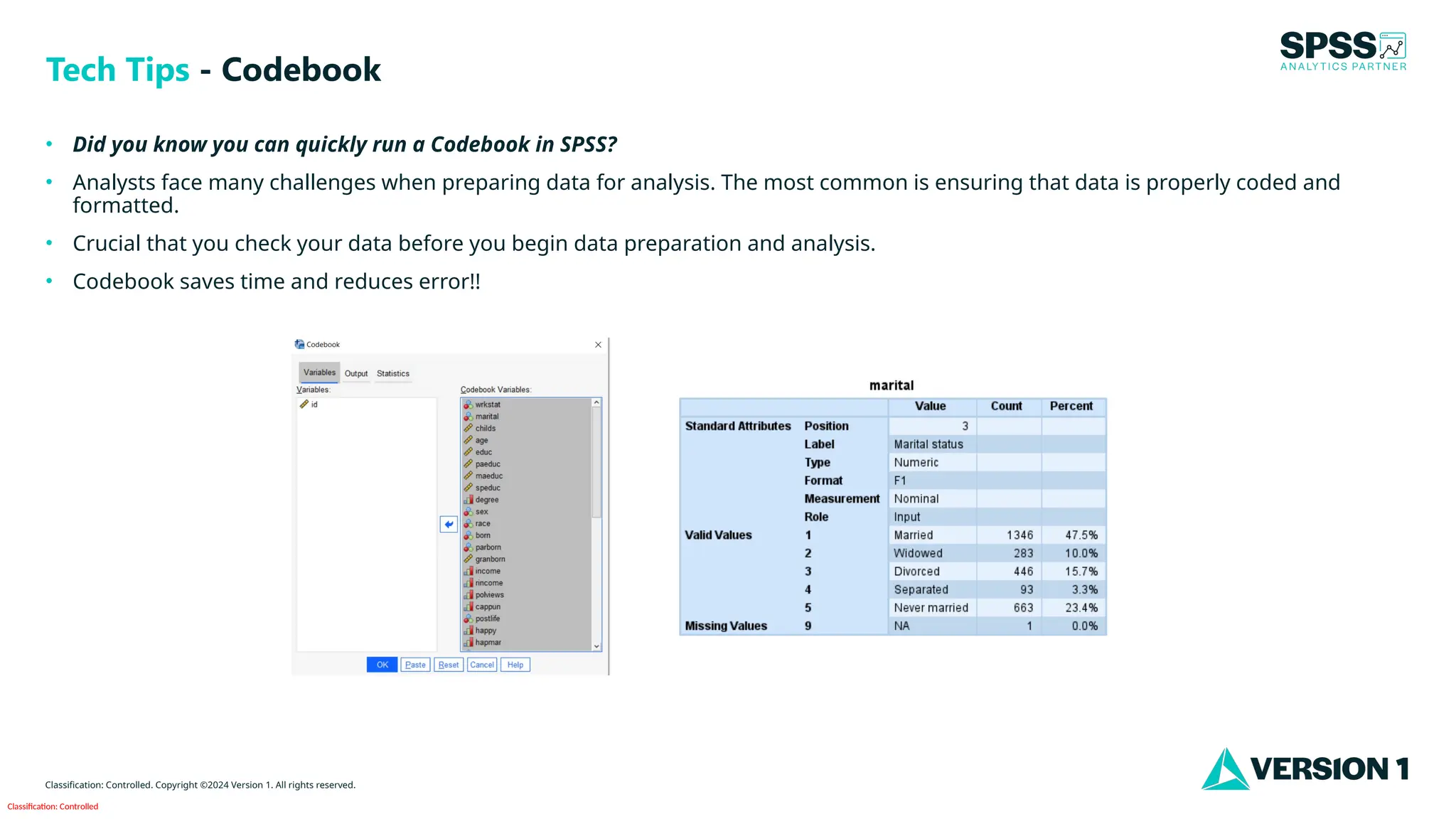
• Did you know you can quickly run a Codebook in SPSS?
• Analysts face many challenges when preparing data for analysis. The most common is ensuring that data is properly coded and
formatted.
• Crucial that you check your data before you begin data preparation and analysis.
• Codebook saves time and reduces error!!
Tech Tips - Codebook
Classification: Controlled
Classification: Controlled. Copyright ©2024 Version 1. All rights reserved.
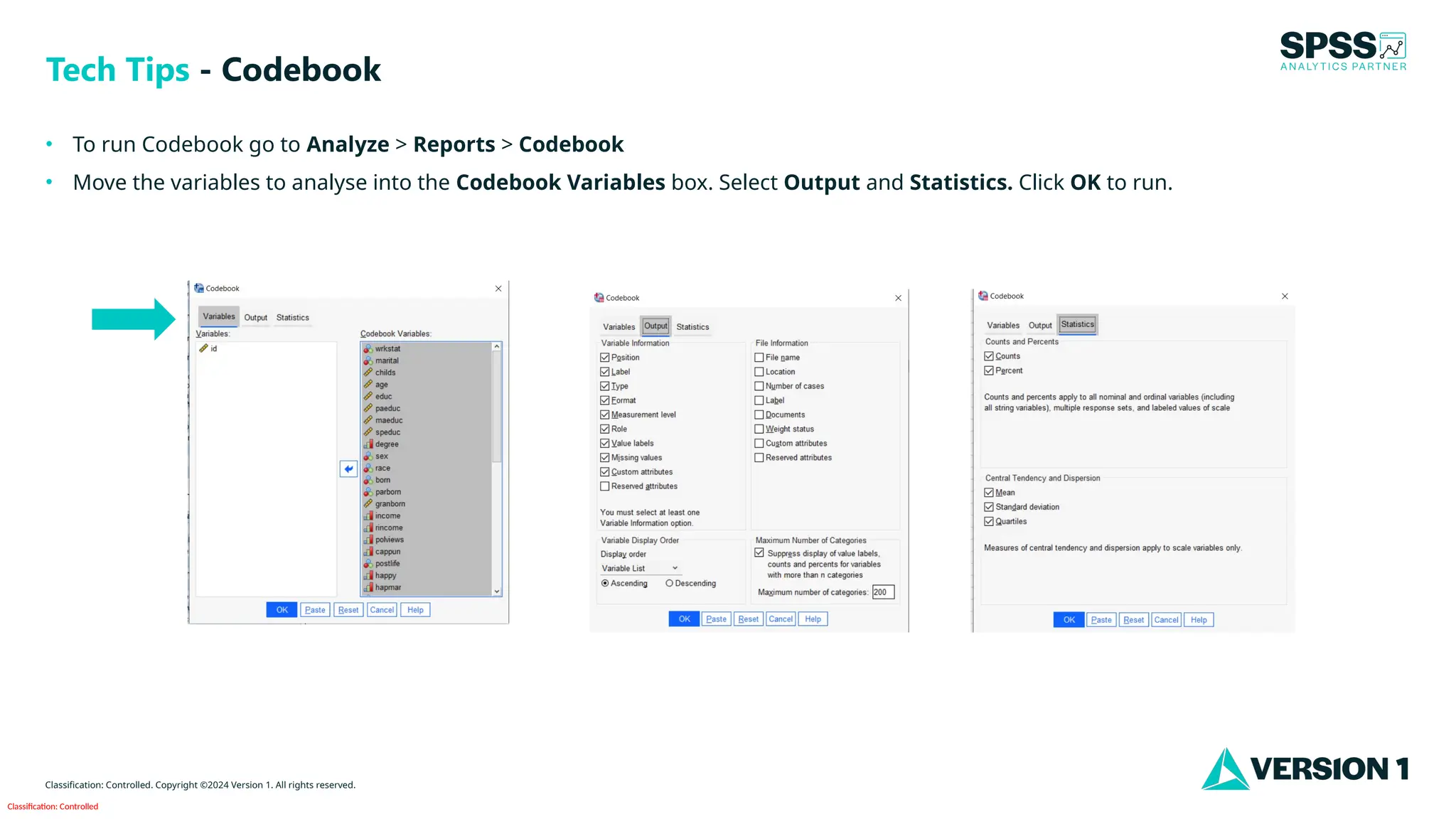
• To run Codebook go to Analyze > Reports > Codebook
• Move the variables to analyse into the Codebook Variables box. Select Output and Statistics. Click OK to run.
Tech Tips - Codebook
Classification: Controlled
Classification: Controlled. Copyright ©2024 Version 1. All rights reserved.
• On the left is an outline of all variables included in the analysis.
• In the output, you can see each variable and its Position,
Label, Type, Format, Measurement, Valid Values, Count,
Percent and Missing Values.
• Codebook provides a complete overview of your data for
examination and checking.
Tech Tips - Codebook
Classification: Controlled
Classification: Controlled. Copyright ©2024 Version 1. All rights reserved.
For more information
please visit spssanalyticspartner.com
Thank You

SPSS Statistics - Running a Codebook.pptx

  • 1.
    Classification: Controlled Classification: Controlled.Copyright ©2024 Version 1. All rights reserved. Codebook Tech Tips – IBM SPSS Statistics
  • 2.
    Classification: Controlled Classification: Controlled.Copyright ©2024 Version 1. All rights reserved. • Did you know you can quickly run a Codebook in SPSS? • Analysts face many challenges when preparing data for analysis. The most common is ensuring that data is properly coded and formatted. • Crucial that you check your data before you begin data preparation and analysis. • Codebook saves time and reduces error!! Tech Tips - Codebook
  • 3.
    Classification: Controlled Classification: Controlled.Copyright ©2024 Version 1. All rights reserved. • To run Codebook go to Analyze > Reports > Codebook • Move the variables to analyse into the Codebook Variables box. Select Output and Statistics. Click OK to run. Tech Tips - Codebook
  • 4.
    Classification: Controlled Classification: Controlled.Copyright ©2024 Version 1. All rights reserved. • On the left is an outline of all variables included in the analysis. • In the output, you can see each variable and its Position, Label, Type, Format, Measurement, Valid Values, Count, Percent and Missing Values. • Codebook provides a complete overview of your data for examination and checking. Tech Tips - Codebook
  • 5.
    Classification: Controlled Classification: Controlled.Copyright ©2024 Version 1. All rights reserved. For more information please visit spssanalyticspartner.com Thank You