Classification: Controlled
Classification: Controlled. Copyright ©2024 Version 1. All rights reserved.
Running a Codebook
Tech Tips – IBM SPSS Statistics
Classification: Controlled
Classification: Controlled. Copyright ©2024 Version 1. All rights reserved.
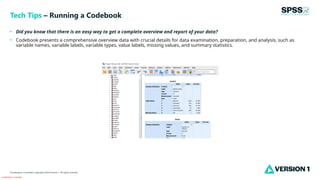
• Did you know that there is an easy way to get a complete overview and report of your data?
• Codebook presents a comprehensive overview data with crucial details for data examination, preparation, and analysis, such as
variable names, variable labels, variable types, value labels, missing values, and summary statistics.
Tech Tips – Running a Codebook
Classification: Controlled
Classification: Controlled. Copyright ©2024 Version 1. All rights reserved.
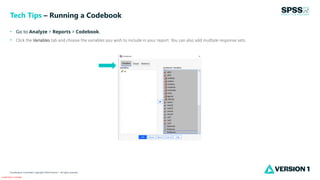
• Go to Analyze > Reports > Codebook.
• Click the Variables tab and choose the variables you wish to include in your report. You can also add multiple response sets.
Tech Tips – Running a Codebook
Classification: Controlled
Classification: Controlled. Copyright ©2024 Version 1. All rights reserved.
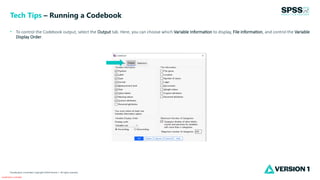
• To control the Codebook output, select the Output tab. Here, you can choose which Variable Information to display, File information, and control the Variable
Display Order.
Tech Tips – Running a Codebook
Classification: Controlled
Classification: Controlled. Copyright ©2024 Version 1. All rights reserved.
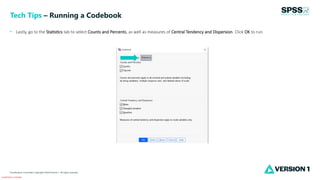
• Lastly, go to the Statistics tab to select Counts and Percents, as well as measures of Central Tendency and Dispersion. Click OK to run.
Tech Tips – Running a Codebook
Classification: Controlled
Classification: Controlled. Copyright ©2024 Version 1. All rights reserved.
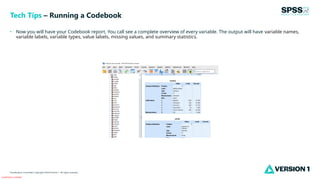
• Now you will have your Codebook report. You call see a complete overview of every variable. The output will have variable names,
variable labels, variable types, value labels, missing values, and summary statistics.
Tech Tips – Running a Codebook
Classification: Controlled
Classification: Controlled. Copyright ©2024 Version 1. All rights reserved.
For more information
please visit spssanalyticspartner.com
Thank You

Running a Codebook in IBM SPSS Statistics .pptx

  • 1.
    Classification: Controlled Classification: Controlled.Copyright ©2024 Version 1. All rights reserved. Running a Codebook Tech Tips – IBM SPSS Statistics
  • 2.
    Classification: Controlled Classification: Controlled.Copyright ©2024 Version 1. All rights reserved. • Did you know that there is an easy way to get a complete overview and report of your data? • Codebook presents a comprehensive overview data with crucial details for data examination, preparation, and analysis, such as variable names, variable labels, variable types, value labels, missing values, and summary statistics. Tech Tips – Running a Codebook
  • 3.
    Classification: Controlled Classification: Controlled.Copyright ©2024 Version 1. All rights reserved. • Go to Analyze > Reports > Codebook. • Click the Variables tab and choose the variables you wish to include in your report. You can also add multiple response sets. Tech Tips – Running a Codebook
  • 4.
    Classification: Controlled Classification: Controlled.Copyright ©2024 Version 1. All rights reserved. • To control the Codebook output, select the Output tab. Here, you can choose which Variable Information to display, File information, and control the Variable Display Order. Tech Tips – Running a Codebook
  • 5.
    Classification: Controlled Classification: Controlled.Copyright ©2024 Version 1. All rights reserved. • Lastly, go to the Statistics tab to select Counts and Percents, as well as measures of Central Tendency and Dispersion. Click OK to run. Tech Tips – Running a Codebook
  • 6.
    Classification: Controlled Classification: Controlled.Copyright ©2024 Version 1. All rights reserved. • Now you will have your Codebook report. You call see a complete overview of every variable. The output will have variable names, variable labels, variable types, value labels, missing values, and summary statistics. Tech Tips – Running a Codebook
  • 7.
    Classification: Controlled Classification: Controlled.Copyright ©2024 Version 1. All rights reserved. For more information please visit spssanalyticspartner.com Thank You