Classification: Controlled
Classification: Controlled. Copyright ©2024 Version 1. All rights reserved.
Creating and Using
Variable Sets
Tech Tips – IBM SPSS Statistics
Classification: Controlled
Classification: Controlled. Copyright ©2024 Version 1. All rights reserved.
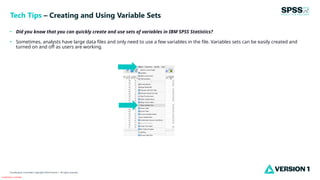
• Did you know that you can quickly create and use sets of variables in IBM SPSS Statistics?
• Sometimes, analysts have large data files and only need to use a few variables in the file. Variables sets can be easily created and
turned on and off as users are working.
Tech Tips – Creating and Using Variable Sets
Classification: Controlled
Classification: Controlled. Copyright ©2024 Version 1. All rights reserved.
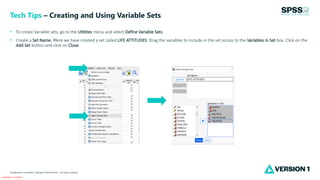
• To create Variable sets, go to the Utilities menu and select Define Variable Sets.
• Create a Set Name. Here we have created a set called LIFE ATTITUDES. Drag the variables to include in the set across to the Variables in Set box. Click on the
Add Set button and click on Close.
Tech Tips – Creating and Using Variable Sets
Classification: Controlled
Classification: Controlled. Copyright ©2024 Version 1. All rights reserved.
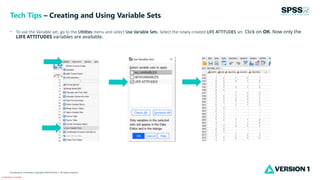
• To use the Variable set, go to the Utilities menu and select Use Variable Sets. Select the newly created LIFE ATTITUDES set. Click on OK. Now only the
LIFE ATTITUDES variables are available.
Tech Tips – Creating and Using Variable Sets
Classification: Controlled
Classification: Controlled. Copyright ©2024 Version 1. All rights reserved.
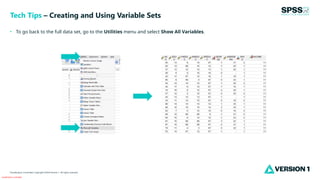
• To go back to the full data set, go to the Utilities menu and select Show All Variables.
Tech Tips – Creating and Using Variable Sets
Classification: Controlled
Classification: Controlled. Copyright ©2024 Version 1. All rights reserved.
For more information
please visit spssanalyticspartner.com
Thank You

SPSS Statistics - Creating and Using Variable Sets in IBM SPSS Statistics.pptx

  • 1.
    Classification: Controlled Classification: Controlled.Copyright ©2024 Version 1. All rights reserved. Creating and Using Variable Sets Tech Tips – IBM SPSS Statistics
  • 2.
    Classification: Controlled Classification: Controlled.Copyright ©2024 Version 1. All rights reserved. • Did you know that you can quickly create and use sets of variables in IBM SPSS Statistics? • Sometimes, analysts have large data files and only need to use a few variables in the file. Variables sets can be easily created and turned on and off as users are working. Tech Tips – Creating and Using Variable Sets
  • 3.
    Classification: Controlled Classification: Controlled.Copyright ©2024 Version 1. All rights reserved. • To create Variable sets, go to the Utilities menu and select Define Variable Sets. • Create a Set Name. Here we have created a set called LIFE ATTITUDES. Drag the variables to include in the set across to the Variables in Set box. Click on the Add Set button and click on Close. Tech Tips – Creating and Using Variable Sets
  • 4.
    Classification: Controlled Classification: Controlled.Copyright ©2024 Version 1. All rights reserved. • To use the Variable set, go to the Utilities menu and select Use Variable Sets. Select the newly created LIFE ATTITUDES set. Click on OK. Now only the LIFE ATTITUDES variables are available. Tech Tips – Creating and Using Variable Sets
  • 5.
    Classification: Controlled Classification: Controlled.Copyright ©2024 Version 1. All rights reserved. • To go back to the full data set, go to the Utilities menu and select Show All Variables. Tech Tips – Creating and Using Variable Sets
  • 6.
    Classification: Controlled Classification: Controlled.Copyright ©2024 Version 1. All rights reserved. For more information please visit spssanalyticspartner.com Thank You