SharePoint Storage
            Best Practices
            Burzin Patel, StorSimple
Silicon Valley SQL Server User Group
          January 13, 2010


   Mark Ginnebaugh, User Group Leader
SharePoint Storage Best Practices

                          Burzin Patel
                         Solutions Architect
                           StorSimple, Inc.
                    burzin@storsimple.com
Agenda

• Introduction
• SharePoint SQL Server Best Practices
  – Storage
  – Configuration
  – Maintenance & Performance Tuning

• Externalizing BLOB storage

• Demo
• StorSimple Solution
• Q&A
Introduction

• Why is SQL Server so important to SharePoint?
  – Central store for most SharePoint data
  – Stress on SQL Server causes stress on front-end
    servers and ultimately degrades user experience

• Why is optimal storage configuration so
  challenging?
  – Highly variable deployments
  – Heavy utilization of back-end SQL Server
  – Database bloat; BLOBs stored in database
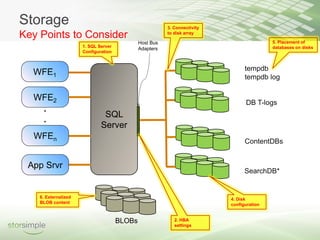
Storage                                                  3. Connectivity
Key Points to Consider                                   to disk array

                                              Host Bus                                     5. Placement of
                      1. SQL Server                                                        databases on disks
                                              Adapters
                      Configuration


                                                                                 tempdb
                                                                                 tempdb log


                                                                                 DB T-logs
     .
                               SQL
     .
                              Server
                                                                                 ContentDBs


                                                                                 SearchDB*


    6. Externalized                                                        4. Disk
    BLOB content                                                           configuration


                                      BLOBs                 2. HBA
                                                            settings
Storage
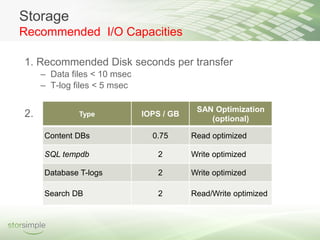
Recommended I/O Capacities

1. Recommended Disk seconds per transfer
     – Data files < 10 msec
     – T-log files < 5 msec

                                           SAN Optimization
2.            Type            IOPS / GB
                                              (optional)

     Content DBs                0.75      Read optimized

     SQL tempdb                  2        Write optimized

     Database T-logs             2        Write optimized

     Search DB                   2        Read/Write optimized
Storage
Database Configuration

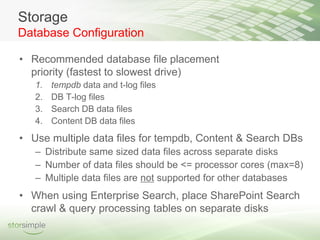
• Recommended database file placement
  priority (fastest to slowest drive)
   1.   tempdb data and t-log files
   2.   DB T-log files
   3.   Search DB data files
   4.   Content DB data files
• Use multiple data files for tempdb, Content & Search DBs
   – Distribute same sized data files across separate disks
   – Number of data files should be <= processor cores (max=8)
   – Multiple data files are not supported for other databases
• When using Enterprise Search, place SharePoint Search
  crawl & query processing tables on separate disks
Storage
 Database Sizing

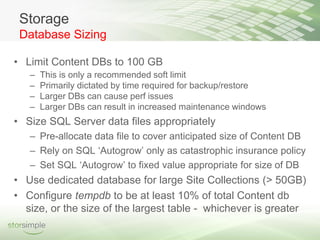
• Limit Content DBs to 100 GB
   –   This is only a recommended soft limit
   –   Primarily dictated by time required for backup/restore
   –   Larger DBs can cause perf issues
   –   Larger DBs can result in increased maintenance windows
• Size SQL Server data files appropriately
   – Pre-allocate data file to cover anticipated size of Content DB
   – Rely on SQL ‘Autogrow’ only as catastrophic insurance policy
   – Set SQL ‘Autogrow’ to fixed value appropriate for size of DB
• Use dedicated database for large Site Collections (> 50GB)
• Configure tempdb to be at least 10% of total Content db
  size, or the size of the largest table - whichever is greater
Configuration
Processors


• Deploy on 64-bit, especially if >1000 users, or >100 GB
  of data
• Use 64-bit SQL Server if using 64-bit OS
• Plan for 2 WFE (dual core) / 20K-40K users
• Plan for 1 DB proc core / 20K users (min 8 cores)
• Scale out beyond 8 processors
Configuration
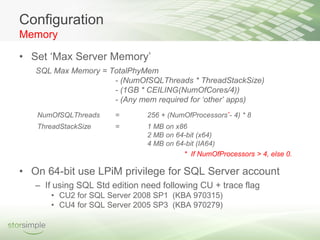
Memory

• Set ‘Max Server Memory’
   SQL Max Memory = TotalPhyMem
                     - (NumOfSQLThreads * ThreadStackSize)
                     - (1GB * CEILING(NumOfCores/4))
                     - (Any mem required for ‘other’ apps)
   NumOfSQLThreads     =       256 + (NumOfProcessors*- 4) * 8
   ThreadStackSize     =       1 MB on x86
                               2 MB on 64-bit (x64)
                               4 MB on 64-bit (IA64)
                                         * If NumOfProcessors > 4, else 0.

• On 64-bit use LPiM privilege for SQL Server account
   – If using SQL Std edition need following CU + trace flag
       • CU2 for SQL Server 2008 SP1 (KBA 970315)
       • CU4 for SQL Server 2005 SP3 (KBA 970279)
Configuration
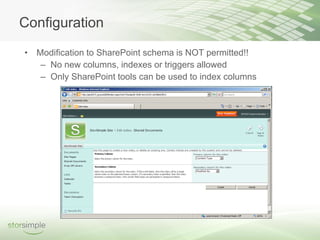
• Modification to SharePoint schema is NOT permitted!!
   – No new columns, indexes or triggers allowed
   – Only SharePoint tools can be used to index columns
Maintenance

• Monitor SQL Server performance regularly
  – Use SQL Server DMVs, SQL Server 2008 Data
    Collectors & Management Data Warehouse can help
  – Recommended Perfmon counters listed in notes section
• Check integrity of the database routinely
• DBCC CHECKDB
  – Can use REPAIR_REBUILD option to fix errors (not
    always possible)
  – REPAIR_ALLOW_DATA_LOSS not supported
  – Time consuming operation, run during non-peak hours
• Avoid database shrink operations
Maintenance
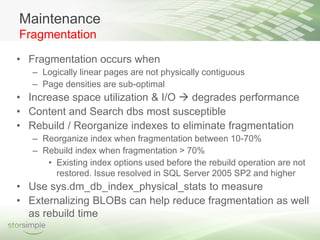
Fragmentation

• Fragmentation occurs when
   – Logically linear pages are not physically contiguous
   – Page densities are sub-optimal
• Increase space utilization & I/O  degrades performance
• Content and Search dbs most susceptible
• Rebuild / Reorganize indexes to eliminate fragmentation
   – Reorganize index when fragmentation between 10-70%
   – Rebuild index when fragmentation > 70%
      • Existing index options used before the rebuild operation are not
        restored. Issue resolved in SQL Server 2005 SP2 and higher
• Use sys.dm_db_index_physical_stats to measure
• Externalizing BLOBs can help reduce fragmentation as well
  as rebuild time
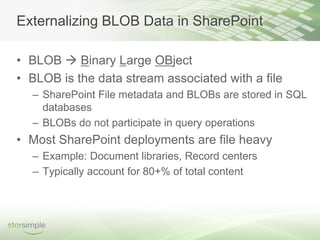
Externalizing BLOB Data in SharePoint

• BLOB  Binary Large OBject
• BLOB is the data stream associated with a file
  – SharePoint File metadata and BLOBs are stored in SQL
    databases
  – BLOBs do not participate in query operations
• Most SharePoint deployments are file heavy
  – Example: Document libraries, Record centers
  – Typically account for 80+% of total content
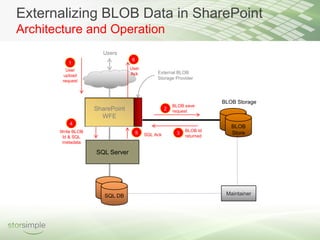
Externalizing BLOB Data in SharePoint
Architecture and Operation
                      Users
                                  6
          1
          User                   User
                                 Ack           External BLOB
         upload
                                               Storage Provider
        request


                                                                        BLOB Storage
                                                        BLOB save
                    SharePoint                      2   request
                      WFE
           4
                                                                           BLOB
       Write BLOB                                            BLOB Id
                                      5   SQL Ack        3                 Store
        Id & SQL                                             returned
        metadata

                    SQL Server


                       SQL DB                                            Maintainer
Demo


 Externalizing BLOBS in SharePoint 2007
using StorSimple Appliance & EBS Provider
Reasons For Externalizing BLOBs

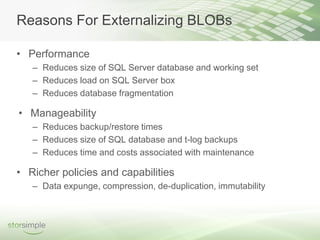
• Performance
   – Reduces size of SQL Server database and working set
   – Reduces load on SQL Server box
   – Reduces database fragmentation

• Manageability
   – Reduces backup/restore times
   – Reduces size of SQL database and t-log backups
   – Reduces time and costs associated with maintenance

• Richer policies and capabilities
   – Data expunge, compression, de-duplication, immutability
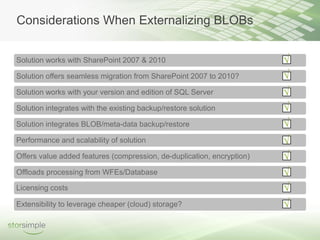
Considerations When Externalizing BLOBs


Solution works with SharePoint 2007 & 2010                              √
Solution offers seamless migration from SharePoint 2007 to 2010?        √
Solution works with your version and edition of SQL Server              √
Solution integrates with the existing backup/restore solution           √
Solution integrates BLOB/meta-data backup/restore                       √
Performance and scalability of solution                                 √
Offers value added features (compression, de-duplication, encryption)   √
Offloads processing from WFEs/Database                                  √
Licensing costs                                                         √
Extensibility to leverage cheaper (cloud) storage?                      √
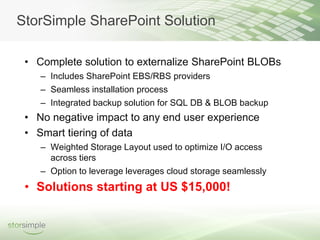
StorSimple SharePoint Solution

 • Complete solution to externalize SharePoint BLOBs
    – Includes SharePoint EBS/RBS providers
    – Seamless installation process
    – Integrated backup solution for SQL DB & BLOB backup
 • No negative impact to any end user experience
 • Smart tiering of data
    – Weighted Storage Layout used to optimize I/O access
      across tiers
    – Option to leverage leverages cloud storage seamlessly
 • Solutions starting at US $15,000!
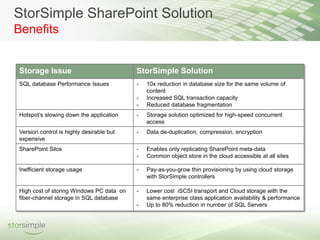
StorSimple SharePoint Solution
Benefits


Storage Issue                             StorSimple Solution
SQL database Performance Issues           -   10x reduction in database size for the same volume of
                                              content
                                          -   Increased SQL transaction capacity
                                          -   Reduced database fragmentation
Hotspot’s slowing down the application    -   Storage solution optimized for high-speed concurrent
                                              access
Version control is highly desirable but   -   Data de-duplication, compression, encryption
expensive
SharePoint Silos                          -   Enables only replicating SharePoint meta-data
                                          -   Common object store in the cloud accessible at all sites

Inefficient storage usage                 -   Pay-as-you-grow thin provisioning by using cloud storage
                                              with StorSimple controllers

High cost of storing Windows PC data on   -   Lower cost iSCSI transport and Cloud storage with the
fiber-channel storage in SQL database         same enterprise class application availability & performance
                                          -   Up to 80% reduction in number of SQL Servers
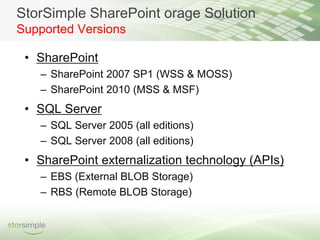
StorSimple SharePoint orage Solution
Supported Versions

 • SharePoint
   – SharePoint 2007 SP1 (WSS & MOSS)
   – SharePoint 2010 (MSS & MSF)
 • SQL Server
   – SQL Server 2005 (all editions)
   – SQL Server 2008 (all editions)
 • SharePoint externalization technology (APIs)
   – EBS (External BLOB Storage)
   – RBS (Remote BLOB Storage)
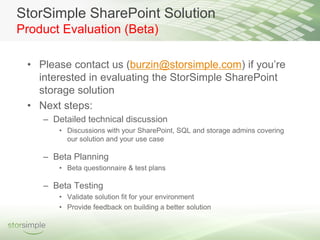
StorSimple SharePoint Solution
Product Evaluation (Beta)

 • Please contact us (burzin@storsimple.com) if you’re
   interested in evaluating the StorSimple SharePoint
   storage solution
 • Next steps:
    – Detailed technical discussion
       • Discussions with your SharePoint, SQL and storage admins covering
         our solution and your use case

    – Beta Planning
       • Beta questionnaire & test plans

    – Beta Testing
       • Validate solution fit for your environment
       • Provide feedback on building a better solution
Q&A


      Thanks!
www.bayareasql.org


To learn more or to inquire about speaking opportunities, please contact:
     Mark Ginnebaugh, User Group Leader mark@designmind.com

SharePoint Storage Best Practices

  • 1.
    SharePoint Storage Best Practices Burzin Patel, StorSimple Silicon Valley SQL Server User Group January 13, 2010 Mark Ginnebaugh, User Group Leader
  • 2.
    SharePoint Storage BestPractices Burzin Patel Solutions Architect StorSimple, Inc. burzin@storsimple.com
  • 3.
    Agenda • Introduction • SharePointSQL Server Best Practices – Storage – Configuration – Maintenance & Performance Tuning • Externalizing BLOB storage • Demo • StorSimple Solution • Q&A
  • 4.
    Introduction • Why isSQL Server so important to SharePoint? – Central store for most SharePoint data – Stress on SQL Server causes stress on front-end servers and ultimately degrades user experience • Why is optimal storage configuration so challenging? – Highly variable deployments – Heavy utilization of back-end SQL Server – Database bloat; BLOBs stored in database
  • 5.
    Storage 3. Connectivity Key Points to Consider to disk array Host Bus 5. Placement of 1. SQL Server databases on disks Adapters Configuration tempdb tempdb log DB T-logs . SQL . Server ContentDBs SearchDB* 6. Externalized 4. Disk BLOB content configuration BLOBs 2. HBA settings
  • 6.
    Storage Recommended I/O Capacities 1.Recommended Disk seconds per transfer – Data files < 10 msec – T-log files < 5 msec SAN Optimization 2. Type IOPS / GB (optional) Content DBs 0.75 Read optimized SQL tempdb 2 Write optimized Database T-logs 2 Write optimized Search DB 2 Read/Write optimized
  • 7.
    Storage Database Configuration • Recommendeddatabase file placement priority (fastest to slowest drive) 1. tempdb data and t-log files 2. DB T-log files 3. Search DB data files 4. Content DB data files • Use multiple data files for tempdb, Content & Search DBs – Distribute same sized data files across separate disks – Number of data files should be <= processor cores (max=8) – Multiple data files are not supported for other databases • When using Enterprise Search, place SharePoint Search crawl & query processing tables on separate disks
  • 8.
    Storage Database Sizing •Limit Content DBs to 100 GB – This is only a recommended soft limit – Primarily dictated by time required for backup/restore – Larger DBs can cause perf issues – Larger DBs can result in increased maintenance windows • Size SQL Server data files appropriately – Pre-allocate data file to cover anticipated size of Content DB – Rely on SQL ‘Autogrow’ only as catastrophic insurance policy – Set SQL ‘Autogrow’ to fixed value appropriate for size of DB • Use dedicated database for large Site Collections (> 50GB) • Configure tempdb to be at least 10% of total Content db size, or the size of the largest table - whichever is greater
  • 9.
    Configuration Processors • Deploy on64-bit, especially if >1000 users, or >100 GB of data • Use 64-bit SQL Server if using 64-bit OS • Plan for 2 WFE (dual core) / 20K-40K users • Plan for 1 DB proc core / 20K users (min 8 cores) • Scale out beyond 8 processors
  • 10.
    Configuration Memory • Set ‘MaxServer Memory’ SQL Max Memory = TotalPhyMem - (NumOfSQLThreads * ThreadStackSize) - (1GB * CEILING(NumOfCores/4)) - (Any mem required for ‘other’ apps) NumOfSQLThreads = 256 + (NumOfProcessors*- 4) * 8 ThreadStackSize = 1 MB on x86 2 MB on 64-bit (x64) 4 MB on 64-bit (IA64) * If NumOfProcessors > 4, else 0. • On 64-bit use LPiM privilege for SQL Server account – If using SQL Std edition need following CU + trace flag • CU2 for SQL Server 2008 SP1 (KBA 970315) • CU4 for SQL Server 2005 SP3 (KBA 970279)
  • 11.
    Configuration • Modification toSharePoint schema is NOT permitted!! – No new columns, indexes or triggers allowed – Only SharePoint tools can be used to index columns
  • 12.
    Maintenance • Monitor SQLServer performance regularly – Use SQL Server DMVs, SQL Server 2008 Data Collectors & Management Data Warehouse can help – Recommended Perfmon counters listed in notes section • Check integrity of the database routinely • DBCC CHECKDB – Can use REPAIR_REBUILD option to fix errors (not always possible) – REPAIR_ALLOW_DATA_LOSS not supported – Time consuming operation, run during non-peak hours • Avoid database shrink operations
  • 13.
    Maintenance Fragmentation • Fragmentation occurswhen – Logically linear pages are not physically contiguous – Page densities are sub-optimal • Increase space utilization & I/O  degrades performance • Content and Search dbs most susceptible • Rebuild / Reorganize indexes to eliminate fragmentation – Reorganize index when fragmentation between 10-70% – Rebuild index when fragmentation > 70% • Existing index options used before the rebuild operation are not restored. Issue resolved in SQL Server 2005 SP2 and higher • Use sys.dm_db_index_physical_stats to measure • Externalizing BLOBs can help reduce fragmentation as well as rebuild time
  • 14.
    Externalizing BLOB Datain SharePoint • BLOB  Binary Large OBject • BLOB is the data stream associated with a file – SharePoint File metadata and BLOBs are stored in SQL databases – BLOBs do not participate in query operations • Most SharePoint deployments are file heavy – Example: Document libraries, Record centers – Typically account for 80+% of total content
  • 15.
    Externalizing BLOB Datain SharePoint Architecture and Operation Users 6 1 User User Ack External BLOB upload Storage Provider request BLOB Storage BLOB save SharePoint 2 request WFE 4 BLOB Write BLOB BLOB Id 5 SQL Ack 3 Store Id & SQL returned metadata SQL Server SQL DB Maintainer
  • 16.
    Demo Externalizing BLOBSin SharePoint 2007 using StorSimple Appliance & EBS Provider
  • 17.
    Reasons For ExternalizingBLOBs • Performance – Reduces size of SQL Server database and working set – Reduces load on SQL Server box – Reduces database fragmentation • Manageability – Reduces backup/restore times – Reduces size of SQL database and t-log backups – Reduces time and costs associated with maintenance • Richer policies and capabilities – Data expunge, compression, de-duplication, immutability
  • 18.
    Considerations When ExternalizingBLOBs Solution works with SharePoint 2007 & 2010 √ Solution offers seamless migration from SharePoint 2007 to 2010? √ Solution works with your version and edition of SQL Server √ Solution integrates with the existing backup/restore solution √ Solution integrates BLOB/meta-data backup/restore √ Performance and scalability of solution √ Offers value added features (compression, de-duplication, encryption) √ Offloads processing from WFEs/Database √ Licensing costs √ Extensibility to leverage cheaper (cloud) storage? √
  • 19.
    StorSimple SharePoint Solution • Complete solution to externalize SharePoint BLOBs – Includes SharePoint EBS/RBS providers – Seamless installation process – Integrated backup solution for SQL DB & BLOB backup • No negative impact to any end user experience • Smart tiering of data – Weighted Storage Layout used to optimize I/O access across tiers – Option to leverage leverages cloud storage seamlessly • Solutions starting at US $15,000!
  • 20.
    StorSimple SharePoint Solution Benefits StorageIssue StorSimple Solution SQL database Performance Issues - 10x reduction in database size for the same volume of content - Increased SQL transaction capacity - Reduced database fragmentation Hotspot’s slowing down the application - Storage solution optimized for high-speed concurrent access Version control is highly desirable but - Data de-duplication, compression, encryption expensive SharePoint Silos - Enables only replicating SharePoint meta-data - Common object store in the cloud accessible at all sites Inefficient storage usage - Pay-as-you-grow thin provisioning by using cloud storage with StorSimple controllers High cost of storing Windows PC data on - Lower cost iSCSI transport and Cloud storage with the fiber-channel storage in SQL database same enterprise class application availability & performance - Up to 80% reduction in number of SQL Servers
  • 21.
    StorSimple SharePoint orageSolution Supported Versions • SharePoint – SharePoint 2007 SP1 (WSS & MOSS) – SharePoint 2010 (MSS & MSF) • SQL Server – SQL Server 2005 (all editions) – SQL Server 2008 (all editions) • SharePoint externalization technology (APIs) – EBS (External BLOB Storage) – RBS (Remote BLOB Storage)
  • 22.
    StorSimple SharePoint Solution ProductEvaluation (Beta) • Please contact us (burzin@storsimple.com) if you’re interested in evaluating the StorSimple SharePoint storage solution • Next steps: – Detailed technical discussion • Discussions with your SharePoint, SQL and storage admins covering our solution and your use case – Beta Planning • Beta questionnaire & test plans – Beta Testing • Validate solution fit for your environment • Provide feedback on building a better solution
  • 23.
    Q&A Thanks!
  • 24.
    www.bayareasql.org To learn moreor to inquire about speaking opportunities, please contact: Mark Ginnebaugh, User Group Leader mark@designmind.com