SQL and Storage Considerations for SharePoint Server 2010 Mike Watson Sr. Product Manager Quest Software
About Mike Product Manager at Quest responsible for availability, scalability, and manageability. Previously instructor for the Microsoft Certified Master program on several topics including Backup/Restore, HA, and DR. Entrepreneur, Mad Scientist, and soon an Author. Previously at Microsoft. Went from support to designing some of Microsoft’s most critical services in just 5 years.  U.S. Army before that. Computers, Finance, Accounting, and  Armor (M1A2 Tank)
www.SharePointMadScientist.com
Agenda What’s new in SharePoint 2010 Better Architecture More Applications Command and Control SQL best practices Storage best practices
What’s Changed in SharePoint 2010 More functionality out of the box Big change to services Bigger variety in workloads Harder to make recommendations Some lessons learned built in
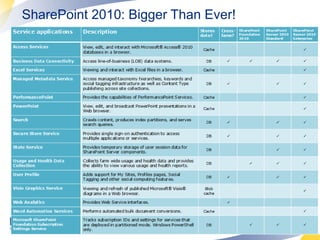
SharePoint 2010: Bigger Than Ever!
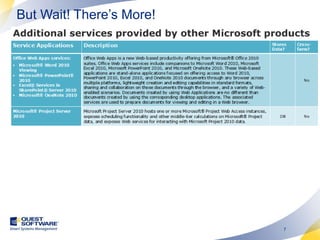
But Wait! There’s More!
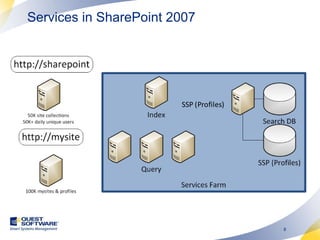
Services in SharePoint 2007
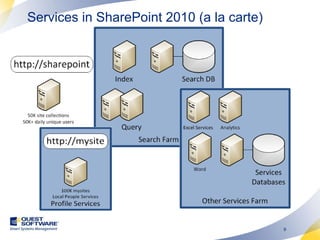
Services in SharePoint 2010 (a la carte)
 
 
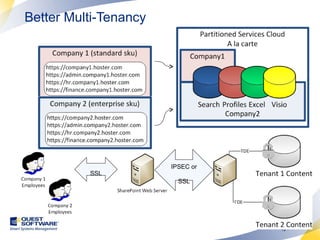
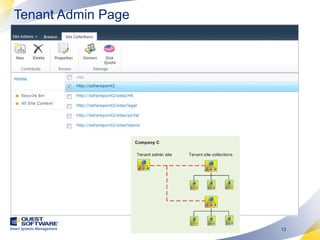
Better Multi-Tenancy  IPSEC or SSL SSL
Tenant Admin Page
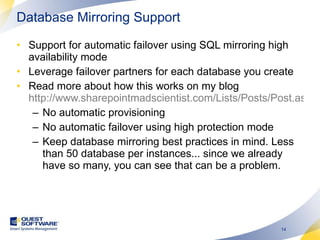
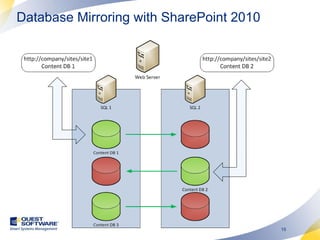
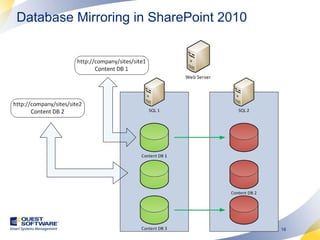
Database Mirroring Support Support for automatic failover using SQL mirroring high availability mode Leverage failover partners for each database you create Read more about how this works on my blog  http://www.sharepointmadscientist.com/Lists/Posts/Post.aspx?ID=46 No automatic provisioning No automatic failover using high protection mode Keep database mirroring best practices in mind. Less than 50 database per instances... since we already have so many, you can see that can be a problem.
Database Mirroring with SharePoint 2010
Database Mirroring in SharePoint 2010
Demo High Availability using Database Mirroring
Command & Control Throttling – Tell end users to leave you alone. Your busy! Large List controls – tell end users they’re crazy trying to make that query, but admins, no problem! SharePoint designer – maybe not Developer Dashboard – Learn just how bad your developers are.  Sandboxing – More like prison for unsavory code. SQL Resource Governor – The nuclear option!
Turn on the Developer Dashboard STSADM C:\Program Files\Common Files\Microsoft Shared\Web Server Extensions\14\BIN>stsadm -o setproperty -pn developer-dashboard -pv ondemand Powershell Run Powershell from the start menu as administrator by right clicking. Execute a Dashboard.ps1 script file containing this:   $ddSettings = [Microsoft.SharePoint.Administration.SPWebService]::ContentService.DeveloperDashboardSettings; $ddSettings.DisplayLevel = ‘OnDemand’; $ddSettings.RequiredPermissions =’EmptyMask’; $ddSettings.TraceEnabled = $true; $ddSettings.Update()   Display Options = “On”, "Off" or "OnDemand"
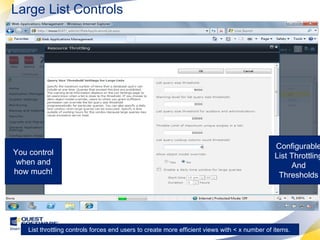
Large List Controls Configurable List Throttling And Thresholds You control when and how much! List throttling controls forces end users to create more efficient views with < x number of items.
SQL Best Practices
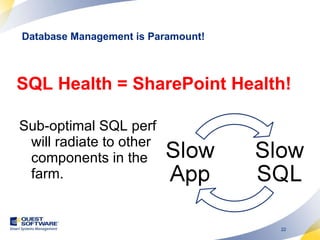
SQL Health = SharePoint Health! Sub-optimal SQL perf will radiate to other components in the farm. Database Management is Paramount!
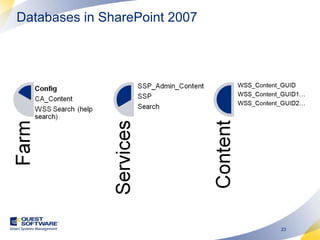
Databases in SharePoint 2007
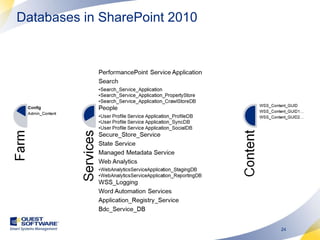
Databases in SharePoint 2010
Use 64Bit! Configure Memory Min & Max values = Total memory – 2GB for OS overhead On 32bit configure AWE  http://technet.microsoft.com/en-us/library/ms175581.aspx Configure Temp DB Allocate 1 data file per processor core Pregrow databases & never autogrow Align partitions 64KB or 256KB Use 64KB or larger multiple for RAID stripe size Dedicate storage for SQL Use RAID 10 Configure SQL to conform w/ best practices
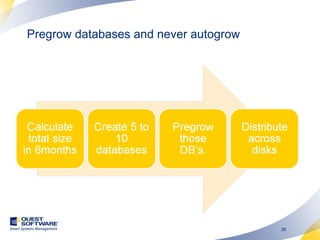
Pregrow databases and never autogrow
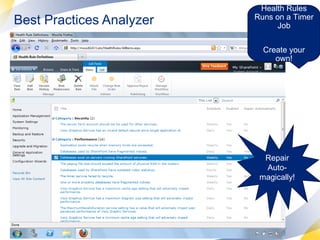
Best Practices Analyzer Health Rules Runs on a Timer Job Create your own! Repair Auto-magically!
Demo SQL Best Practices using SharePoint Health Analyzer
Virtual is never as good as physical (sharing) Some virtualization features don’t work well E.g. Resource pool allocation aka overcommit  Virtualization introduces some artificial limitations to scaling up Processor limitations per machine Ability to leverage memory Sharing across bottlenecks (hw bus, NIC) Some roles work better with virtualization than others… Virtualization is Great But Be Careful!
 
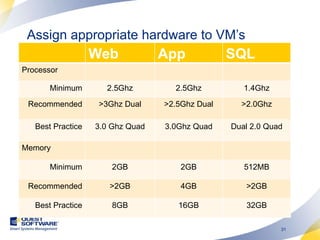
Assign appropriate hardware to VM’s Web App SQL Processor Minimum 2.5Ghz 2.5Ghz 1.4Ghz Recommended >3Ghz Dual >2.5Ghz Dual >2.0Ghz Best Practice 3.0 Ghz Quad 3.0Ghz Quad Dual 2.0 Quad Memory Minimum 2GB 2GB 512MB Recommended >2GB 4GB >2GB Best Practice 8GB 16GB 32GB
Storage Best Practices
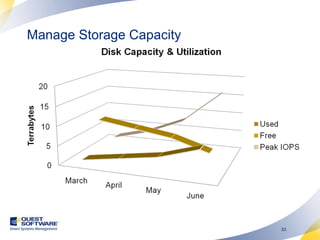
Manage Storage Capacity
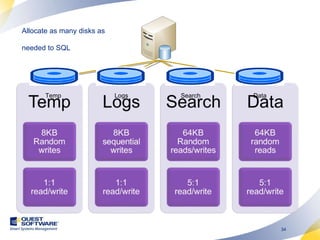
Allocate as many disks as needed to SQL Temp Logs Search Data
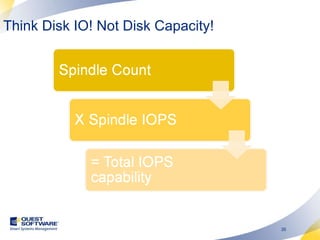
Think Disk IO! Not Disk Capacity!
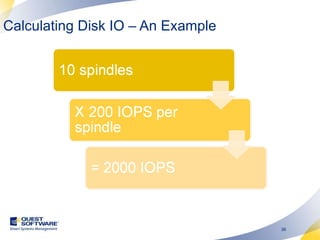
Calculating Disk IO – An Example
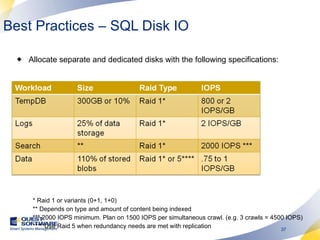
Best Practices – SQL Disk IO Allocate separate and dedicated disks with the following specifications: * Raid 1 or variants (0+1, 1+0) ** Depends on type and amount of content being indexed *** 2000 IOPS minimum. Plan on 1500 IOPS per simultaneous crawl. (e.g. 3 crawls = 4500 IOPS) **** Use Raid 5 when redundancy needs are met with replication
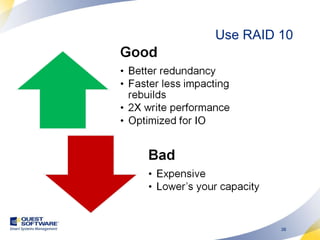
Use RAID 10
Demo Monitoring storage IO
Summary SharePoint 2010 is Big! SharePoint 2010 = X…ability SQL Optimization and Management is Paramount! & Storage Optimization too! SharePoint scales out well. Adjust SQL accordingly
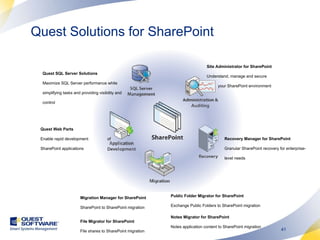
Quest Solutions for SharePoint  Site Administrator for SharePoint  Understand, manage and secure  your SharePoint environment Migration Manager for SharePoint  SharePoint to SharePoint migration File Migrator for SharePoint  File shares to SharePoint migration Recovery Manager for SharePoint Granular SharePoint recovery for enterprise-level needs Quest Web Parts  Enable rapid development  of SharePoint applications Public Folder Migrator for SharePoint Exchange Public Folders to SharePoint migration Notes Migrator for SharePoint Notes application content to SharePoint migration Quest SQL Server Solutions  Maximize SQL Server performance while simplifying tasks and providing visibility and control

Sql And Storage Considerations For Share Point Server 2010

  • 1.
    SQL and StorageConsiderations for SharePoint Server 2010 Mike Watson Sr. Product Manager Quest Software
  • 2.
    About Mike ProductManager at Quest responsible for availability, scalability, and manageability. Previously instructor for the Microsoft Certified Master program on several topics including Backup/Restore, HA, and DR. Entrepreneur, Mad Scientist, and soon an Author. Previously at Microsoft. Went from support to designing some of Microsoft’s most critical services in just 5 years. U.S. Army before that. Computers, Finance, Accounting, and Armor (M1A2 Tank)
  • 3.
  • 4.
    Agenda What’s newin SharePoint 2010 Better Architecture More Applications Command and Control SQL best practices Storage best practices
  • 5.
    What’s Changed inSharePoint 2010 More functionality out of the box Big change to services Bigger variety in workloads Harder to make recommendations Some lessons learned built in
  • 6.
  • 7.
  • 8.
  • 9.
    Services in SharePoint2010 (a la carte)
  • 10.
  • 11.
  • 12.
    Better Multi-Tenancy IPSEC or SSL SSL
  • 13.
  • 14.
    Database Mirroring SupportSupport for automatic failover using SQL mirroring high availability mode Leverage failover partners for each database you create Read more about how this works on my blog http://www.sharepointmadscientist.com/Lists/Posts/Post.aspx?ID=46 No automatic provisioning No automatic failover using high protection mode Keep database mirroring best practices in mind. Less than 50 database per instances... since we already have so many, you can see that can be a problem.
  • 15.
    Database Mirroring withSharePoint 2010
  • 16.
    Database Mirroring inSharePoint 2010
  • 17.
    Demo High Availabilityusing Database Mirroring
  • 18.
    Command & ControlThrottling – Tell end users to leave you alone. Your busy! Large List controls – tell end users they’re crazy trying to make that query, but admins, no problem! SharePoint designer – maybe not Developer Dashboard – Learn just how bad your developers are. Sandboxing – More like prison for unsavory code. SQL Resource Governor – The nuclear option!
  • 19.
    Turn on theDeveloper Dashboard STSADM C:\Program Files\Common Files\Microsoft Shared\Web Server Extensions\14\BIN>stsadm -o setproperty -pn developer-dashboard -pv ondemand Powershell Run Powershell from the start menu as administrator by right clicking. Execute a Dashboard.ps1 script file containing this:   $ddSettings = [Microsoft.SharePoint.Administration.SPWebService]::ContentService.DeveloperDashboardSettings; $ddSettings.DisplayLevel = ‘OnDemand’; $ddSettings.RequiredPermissions =’EmptyMask’; $ddSettings.TraceEnabled = $true; $ddSettings.Update()   Display Options = “On”, &quot;Off&quot; or &quot;OnDemand&quot;
  • 20.
    Large List ControlsConfigurable List Throttling And Thresholds You control when and how much! List throttling controls forces end users to create more efficient views with < x number of items.
  • 21.
  • 22.
    SQL Health =SharePoint Health! Sub-optimal SQL perf will radiate to other components in the farm. Database Management is Paramount!
  • 23.
  • 24.
  • 25.
    Use 64Bit! ConfigureMemory Min & Max values = Total memory – 2GB for OS overhead On 32bit configure AWE http://technet.microsoft.com/en-us/library/ms175581.aspx Configure Temp DB Allocate 1 data file per processor core Pregrow databases & never autogrow Align partitions 64KB or 256KB Use 64KB or larger multiple for RAID stripe size Dedicate storage for SQL Use RAID 10 Configure SQL to conform w/ best practices
  • 26.
    Pregrow databases andnever autogrow
  • 27.
    Best Practices AnalyzerHealth Rules Runs on a Timer Job Create your own! Repair Auto-magically!
  • 28.
    Demo SQL BestPractices using SharePoint Health Analyzer
  • 29.
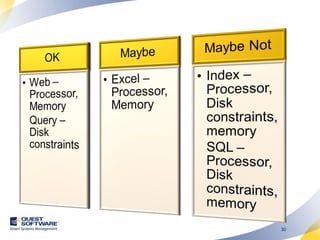
    Virtual is neveras good as physical (sharing) Some virtualization features don’t work well E.g. Resource pool allocation aka overcommit Virtualization introduces some artificial limitations to scaling up Processor limitations per machine Ability to leverage memory Sharing across bottlenecks (hw bus, NIC) Some roles work better with virtualization than others… Virtualization is Great But Be Careful!
  • 30.
  • 31.
    Assign appropriate hardwareto VM’s Web App SQL Processor Minimum 2.5Ghz 2.5Ghz 1.4Ghz Recommended >3Ghz Dual >2.5Ghz Dual >2.0Ghz Best Practice 3.0 Ghz Quad 3.0Ghz Quad Dual 2.0 Quad Memory Minimum 2GB 2GB 512MB Recommended >2GB 4GB >2GB Best Practice 8GB 16GB 32GB
  • 32.
  • 33.
  • 34.
    Allocate as manydisks as needed to SQL Temp Logs Search Data
  • 35.
    Think Disk IO!Not Disk Capacity!
  • 36.
    Calculating Disk IO– An Example
  • 37.
    Best Practices –SQL Disk IO Allocate separate and dedicated disks with the following specifications: * Raid 1 or variants (0+1, 1+0) ** Depends on type and amount of content being indexed *** 2000 IOPS minimum. Plan on 1500 IOPS per simultaneous crawl. (e.g. 3 crawls = 4500 IOPS) **** Use Raid 5 when redundancy needs are met with replication
  • 38.
  • 39.
  • 40.
    Summary SharePoint 2010is Big! SharePoint 2010 = X…ability SQL Optimization and Management is Paramount! & Storage Optimization too! SharePoint scales out well. Adjust SQL accordingly
  • 41.
    Quest Solutions forSharePoint Site Administrator for SharePoint Understand, manage and secure your SharePoint environment Migration Manager for SharePoint SharePoint to SharePoint migration File Migrator for SharePoint File shares to SharePoint migration Recovery Manager for SharePoint Granular SharePoint recovery for enterprise-level needs Quest Web Parts Enable rapid development of SharePoint applications Public Folder Migrator for SharePoint Exchange Public Folders to SharePoint migration Notes Migrator for SharePoint Notes application content to SharePoint migration Quest SQL Server Solutions Maximize SQL Server performance while simplifying tasks and providing visibility and control

Editor's Notes

  • #21 Doing away with the 2000 recommendations and leaving it up to the server admins to throttle as needed. Probably b/c of improved handling of queries, AJAX, and 64-bit server requirements. List throttling controls forces end users to create more efficient views with &lt; x number of items. Better manage system resources.
  • #23 11/06/09
  • #28 Best Practice Analyzer runs on a timer job with configurable rules.
  • #36 Microsoft Partner Program 2006 Launch Training – Train the Trainer Microsoft Confidential October 2005
  • #37 Microsoft Partner Program 2006 Launch Training – Train the Trainer Microsoft Confidential October 2005
  • #38 Microsoft Partner Program 2006 Launch Training – Train the Trainer Microsoft Confidential October 2005
  • #39 11/06/09
  • #42 Quest Site Administrator helps you Discover what SharePoint instances exist across the organization. This includes WSS and Portal (2003 and 2007). It finds it all across the enterprise. Once you discover SharePoint org-wide, Site Administrator helps you understand how SharePoint is being used . It features more than 30 reports to help you see what sites are being used most/least, what users are most active, etc And, with Site Admin, you can manage SharePoint from a central console . You can configure all sites and set permissions from one central console (rather than going to each site to set this). Recovery Manager for SharePoint allows you to recover data anytime and restore it anywhere . Recovery Manager provides emergency access to all SharePoint content all the time. With Recovery Manager, any recovered content can be restored to any SharePoint instance or saved to a file system. Get your business-critical data back online before the entire server farm comes back. Recovery Manager works with backups from SQL databases so all information stored in the databases, including alerts, permissions, metadata and custom views, can be restored. Recovery Manager also provides a convenient way to search, locate and preview  any item from across multiple database backups before restoring it. InTrust Plug In . Coming Q1. An addition to Quest’s proven Auditing and Policy Compliance tool. This plug-in will collect information from your SharePoint environment. More details will be available early 2008. Migration As SharePoint is becoming the main repository for enterprise-wide data, organizations are migrating and consolidating from Quest Public Folder Migrator for SharePoint facilitates the bulk migration of data stored in the public folders on the Exchange server to SharePoint 2003 or 2007 environments .  Public Folder Migrator preserves the folder hierarchy and ensures data consistency and availability. Quest Migration Manager for SharePoint migrate content in document libraries and lists from SharePoint 2003 to SharePoint 2007 . Quest File Migrator for SharePoint (available end of 2007) enables organizations to migrate content in files shares to SharePoint 2007 with an integrated management console. Quest Notes Migrator for SharePoint migrates Lotus application content to SharePoint. Notes Migrator scales from automated migration of standard Notes applications to advanced migration of complex custom Notes applications. Application Development Development Studio for SharePoint is set of easily configured Web parts and application templates that make the power of SharePoint available without coding. Reduce the cost and time to create customer applications in SharePoint by 50-80% and apply valuable coding resources where they are really needed SQL Server Of course, the data you interact with through SharePoint resides on a SQL Server backend, so you also need to consider how you will continue to manage SQL as SharePoint grows. Quest is a leader in SQL Server management.