MSBuild – Inline Task

  Presented by Joncash
       4/5/2012


                         1
Outline
•   The Structure of an Inline Task
•   Input and Output Parameters
•   UsingTask Attributes
•   UsingTask Elements
•   Code Element
•   Examples
    – Hello world
    – BMI

                                      2
Structure of an Inline Task
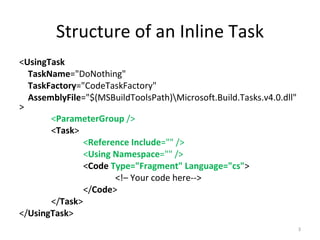
<UsingTask
  TaskName="DoNothing"
  TaskFactory="CodeTaskFactory"
  AssemblyFile="$(MSBuildToolsPath)Microsoft.Build.Tasks.v4.0.dll"
>
       <ParameterGroup />
       <Task>
               <Reference Include="" />
               <Using Namespace="" />
               <Code Type="Fragment" Language="cs">
                      <!– Your code here-->
               </Code>
       </Task>
</UsingTask>
                                                                      3
UsingTask Attributes
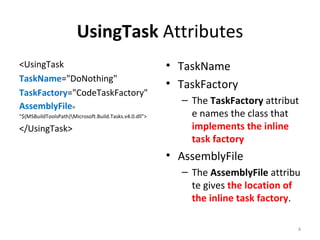
<UsingTask                                              • TaskName
TaskName="DoNothing"
                                                        • TaskFactory
TaskFactory="CodeTaskFactory"
                                                          – The TaskFactory attribut
AssemblyFile=
"$(MSBuildToolsPath)Microsoft.Build.Tasks.v4.0.dll">       e names the class that
</UsingTask>                                                implements the inline
                                                            task factory
                                                        • AssemblyFile
                                                          – The AssemblyFile attribu
                                                            te gives the location of
                                                            the inline task factory.

                                                                                   4
UsingTask Elements
<UsingTask …>                      • ParameterGroup
    <ParameterGroup />               – Input and output
    <Task>                             paramerters
        <Reference Include="" />
                                   • Reference
        <Using Namespace="" />
                                     – Specifies references to
    </Task>
                                       the .NET assemblies that
</UsingTask>
                                       you are using in your code.
                                   • Using
                                     – The Using element lists the
                                       namespaces that you want
                                       to access.

                                                                 5
Code Element
<UsingTask …>                          • Type
  <Task>                                 – Class
      <Code
                                         – Method
       Type="Fragment"
                                         – Fragment
Language="cs">
      <![CDATA[                        • Language
      Log.LogError("Hello, world!");
                                         – cs for c#
      ]]>
                                         – vb for Visual Basic
       </Code>
  </Task>                                – js for JScript
</UsingTask>


                                                                 6
Input and Output Parameters
<UsingTask …>
    <ParameterGroup>
        <Height ParameterType="System.String" Required="true" />
         <Weight ParameterType="System.Int32" Required="true" />
         <BMI ParameterType="System.String" Output="true" />
    </ ParameterGroup>
    <Task>
        …
    </Task>
</UsingTask>


                                                                   7
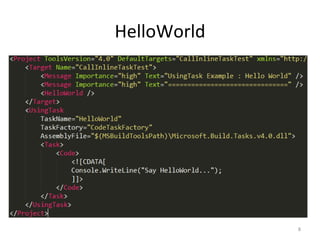
HelloWorld


             8
BMI


      9
BMI Condition


                10

Ms build – inline task

  • 1.
    MSBuild – InlineTask Presented by Joncash 4/5/2012 1
  • 2.
    Outline • The Structure of an Inline Task • Input and Output Parameters • UsingTask Attributes • UsingTask Elements • Code Element • Examples – Hello world – BMI 2
  • 3.
    Structure of anInline Task <UsingTask TaskName="DoNothing" TaskFactory="CodeTaskFactory" AssemblyFile="$(MSBuildToolsPath)Microsoft.Build.Tasks.v4.0.dll" > <ParameterGroup /> <Task> <Reference Include="" /> <Using Namespace="" /> <Code Type="Fragment" Language="cs"> <!– Your code here--> </Code> </Task> </UsingTask> 3
  • 4.
    UsingTask Attributes <UsingTask • TaskName TaskName="DoNothing" • TaskFactory TaskFactory="CodeTaskFactory" – The TaskFactory attribut AssemblyFile= "$(MSBuildToolsPath)Microsoft.Build.Tasks.v4.0.dll"> e names the class that </UsingTask> implements the inline task factory • AssemblyFile – The AssemblyFile attribu te gives the location of the inline task factory. 4
  • 5.
    UsingTask Elements <UsingTask …> • ParameterGroup <ParameterGroup /> – Input and output <Task> paramerters <Reference Include="" /> • Reference <Using Namespace="" /> – Specifies references to </Task> the .NET assemblies that </UsingTask> you are using in your code. • Using – The Using element lists the namespaces that you want to access. 5
  • 6.
    Code Element <UsingTask …> • Type <Task> – Class <Code – Method Type="Fragment" – Fragment Language="cs"> <![CDATA[ • Language Log.LogError("Hello, world!"); – cs for c# ]]> – vb for Visual Basic </Code> </Task> – js for JScript </UsingTask> 6
  • 7.
    Input and OutputParameters <UsingTask …> <ParameterGroup> <Height ParameterType="System.String" Required="true" /> <Weight ParameterType="System.Int32" Required="true" /> <BMI ParameterType="System.String" Output="true" /> </ ParameterGroup> <Task> … </Task> </UsingTask> 7
  • 8.
  • 9.
  • 10.

Editor's Notes

  • #6 &lt;Reference Include=&amp;quot;System.Xml.dll&amp;quot;/&gt; &lt;Using Namespace=&amp;quot;System&amp;quot;/&gt; &lt;Using Namespace=&amp;quot;System.IO&amp;quot;/&gt;
  • #7 Alternatively, you can use the  Source  attribute of the  Code  element to specify the location of a file that contains the code for your task. The code in the source file must be of the type that is specified by the  Type  attribute. If the  Source  attribute is present, the default value of  Type  is  Class . If  Source is not present, the default value is  Fragment .
  • #8 Required  is an optional attribute that is  false  by default Output  is an optional attribute that is  false  by default