The CoFX Data Model
Data Model for the Cockpit Framework (CoFX)
Publishing Date: Oct. 1st 2012
INTRODUCTION
Introduction

• software architects gmbh
  Birkenweg 16
  4060 Leonding
  Austria

• Contact
  Web: http://www.timecockpit.com
  Phone: +43 720 890280
  Email: office@timecockpit.com
ABOUT TIME COCKPIT
            is the leading time tracking solution for knowledge workers.
Graphical time tracking calendar, automatic tracking of your work using
signal trackers, high level of extensibility and customizability, full support
to work offline, and SaaS deployment model make it the optimal choice
especially in the IT consulting business.

Try             for free and without any risk. You can get your trial
account at http://www.timecockpit.com. After the trial period you can use
            for only 0,20€ per user and month without a minimal
subscription time and without a minimal number of users.
ÜBER TIME COCKPIT
           ist die führende Projektzeiterfassung für Knowledge Worker.
Grafischer Zeitbuchungskalender, automatische Tätigkeitsaufzeichnung
über Signal Tracker, umfassende Erweiterbarkeit und Anpassbarkeit, volle
Offlinefähigkeit und einfachste Verwendung durch SaaS machen es zur
Optimalen Lösung auch speziell im IT-Umfeld.

Probieren Sie            kostenlos und ohne Risko einfach aus. Einen
Testzugang erhalten Sie unter http://www.timecockpit.com. Danach
nutzen Sie            um nur 0,20€ pro Benutzer und Tag ohne
Mindestdauer und ohne Mindestbenutzeranzahl.
COFX DATA MODEL
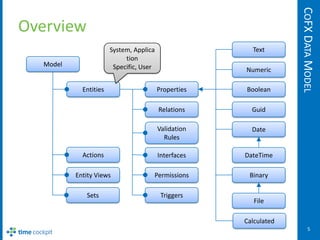
Overview
                       System, Applica                  Text
                            tion
  Model                 Specific, User                Numeric

            Entities                     Properties   Boolean

                                         Relations      Guid

                                         Validation     Date
                                           Rules

            Actions                      Interfaces   DateTime

          Entity Views               Permissions       Binary

             Sets                         Triggers
                                                         File

                                                      Calculated
                                                                          5
COFX MODEL
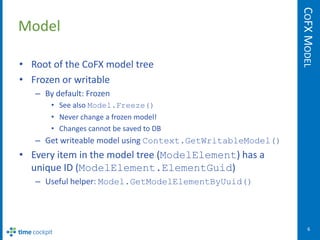
Model

• Root of the CoFX model tree
• Frozen or writable
   – By default: Frozen
       • See also Model.Freeze()
       • Never change a frozen model!
       • Changes cannot be saved to DB
   – Get writeable model using Context.GetWritableModel()
• Every item in the model tree (ModelElement) has a
  unique ID (ModelElement.ElementGuid)
   – Useful helper: Model.GetModelElementByUuid()


                                                                6
COFX MODEL
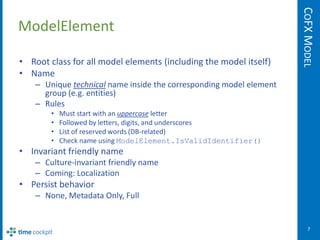
ModelElement

• Root class for all model elements (including the model itself)
• Name
    – Unique technical name inside the corresponding model element
      group (e.g. entities)
    – Rules
        •   Must start with an uppercase letter
        •   Followed by letters, digits, and underscores
        •   List of reserved words (DB-related)
        •   Check name using ModelElement.IsValidIdentifier()
• Invariant friendly name
    – Culture-invariant friendly name
    – Coming: Localization
• Persist behavior
    – None, Metadata Only, Full


                                                                         7
COFX MODEL
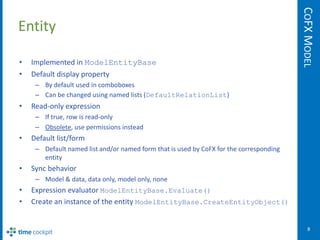
Entity

•   Implemented in ModelEntityBase
•   Default display property
     – By default used in comboboxes
     – Can be changed using named lists (DefaultRelationList)
•   Read-only expression
     – If true, row is read-only
     – Obsolete, use permissions instead
•   Default list/form
     – Default named list and/or named form that is used by CoFX for the corresponding
       entity
•   Sync behavior
     – Model & data, data only, model only, none
•   Expression evaluator ModelEntityBase.Evaluate()
•   Create an instance of the entity ModelEntityBase.CreateEntityObject()


                                                                                             8
COFX MODEL
Properties

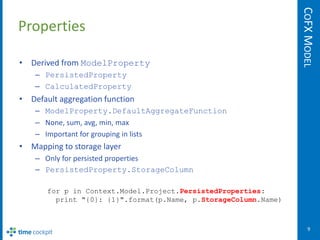
• Derived from ModelProperty
    – PersistedProperty
    – CalculatedProperty
• Default aggregation function
    – ModelProperty.DefaultAggregateFunction
    – None, sum, avg, min, max
    – Important for grouping in lists
• Mapping to storage layer
    – Only for persisted properties
    – PersistedProperty.StorageColumn

       for p in Context.Model.Project.PersistedProperties:
         print "{0}: {1}".format(p.Name, p.StorageColumn.Name)


                                                                     9
COFX MODEL
Properties

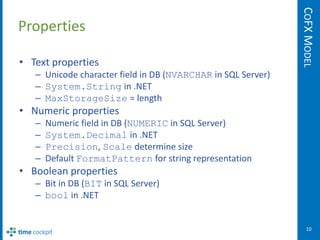
• Text properties
   – Unicode character field in DB (NVARCHAR in SQL Server)
   – System.String in .NET
   – MaxStorageSize = length
• Numeric properties
   –   Numeric field in DB (NUMERIC in SQL Server)
   –   System.Decimal in .NET
   –   Precision, Scale determine size
   –   Default FormatPattern for string representation
• Boolean properties
   – Bit in DB (BIT in SQL Server)
   – bool in .NET


                                                                 10
COFX MODEL
Properties

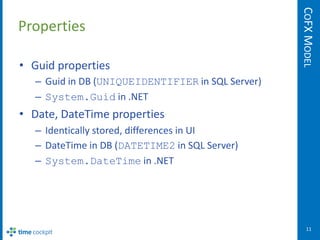
• Guid properties
  – Guid in DB (UNIQUEIDENTIFIER in SQL Server)
  – System.Guid in .NET
• Date, DateTime properties
  – Identically stored, differences in UI
  – DateTime in DB (DATETIME2 in SQL Server)
  – System.DateTime in .NET


                                                     11
COFX MODEL
Properties

• Binary properties
   – Used to store blobs
   – Storage types (BinaryProperty.StorageType)
       • Database
       • Windows Azure Blob Storage (only in the cloud)
   – Content processing
     (BinaryProperty.ContentProcessing)
       • None, compress, encrypt, compress & encrypt
   – Blob in DB (VARBINARY in SQL Server)
   – Byte[] in .NET
   – MaxStorageSize = length in bytes


                                                             12
COFX MODEL
Properties

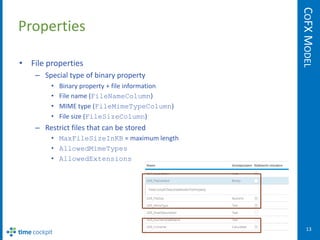
• File properties
    – Special type of binary property
         •   Binary property + file information
         •   File name (FileNameColumn)
         •   MIME type (FileMimeTypeColumn)
         •   File size (FileSizeColumn)
    – Restrict files that can be stored
         • MaxFileSizeInKB = maximum length
         • AllowedMimeTypes
         • AllowedExtensions


                                                     13
COFX MODEL
Properties

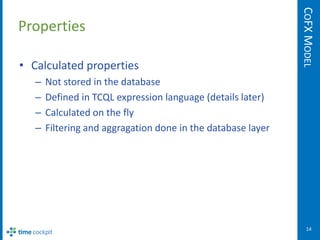
• Calculated properties
   –   Not stored in the database
   –   Defined in TCQL expression language (details later)
   –   Calculated on the fly
   –   Filtering and aggragation done in the database layer


                                                                 14
COFX MODEL
TCQL Expression Language

<expression> ::=
  ( <expression> )
  | <expression> [ Or | And ] <expression>
  | <expression> [ = | <> | < | <= | > | >= ] <expression>
  | <expression> In ( <expression> [, <expression>...] )
  | <expression> In Set( "<expressionName>" [, "<propertyName>" ] )
  | <expression> In <parameterAccess>
  | <expression> [Not] Like <expression>
  | <expression> [ + | - | * | / | % ] <expression>
  | Not <expression>
  | <functionCall>
  | <aggregationFunctionCall>
  | <memberAccess>
  | <literal>
  | <parameterAccess>
  | <nestedStatement>
  | <EnvironmentVariable>


                                                                         15
COFX MODEL
TCQL Expression Language

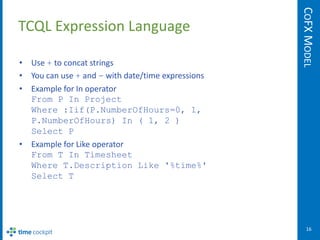
• Use + to concat strings
• You can use + and - with date/time expressions
• Example for In operator
  From P In Project
  Where :Iif(P.NumberOfHours=0, 1,
  P.NumberOfHours) In ( 1, 2 )
  Select P
• Example for Like operator
  From T In Timesheet
  Where T.Description Like '%time%'
  Select T


                                                      16
COFX MODEL
TCQL String Functions

:Len( string-expression )
:Substring( string-expression, start-index, length )
:Replace( string-expression, string-to-find, replacing-string )

:FormatDate( date-expression, format-string )
  (see MSDN Library for details about format string)
:FormatNumber( numeric-expression, format-string )
  (see MSDN Library for details about format strings)
:FormatDateCanonical( date-expression [, boolean-expression] )
  (see MSDN Library for SQL Server's canonical date format)
:FormatDateAsPeriod( date-expression )
  (returns YYYY/MM)


                                                                     17
COFX MODEL
TCQL Date/Time Functions

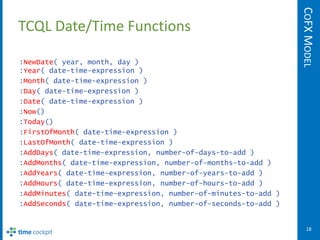
:NewDate( year, month, day )
:Year( date-time-expression )
:Month( date-time-expression )
:Day( date-time-expression )
:Date( date-time-expression )
:Now()
:Today()
:FirstOfMonth( date-time-expression )
:LastOfMonth( date-time-expression )
:AddDays( date-time-expression, number-of-days-to-add )
:AddMonths( date-time-expression, number-of-months-to-add )
:AddYears( date-time-expression, number-of-years-to-add )
:AddHours( date-time-expression, number-of-hours-to-add )
:AddMinutes( date-time-expression, number-of-minutes-to-add )
:AddSeconds( date-time-expression, number-of-seconds-to-add )


                                                                   18
COFX MODEL
TCQL Date/Time Functions

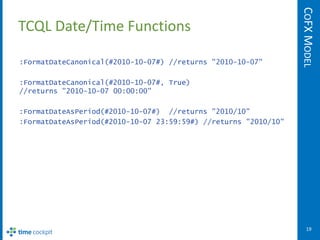
:FormatDateCanonical(#2010-10-07#) //returns "2010-10-07"

:FormatDateCanonical(#2010-10-07#, True)
//returns "2010-10-07 00:00:00"

:FormatDateAsPeriod(#2010-10-07#) //returns "2010/10"
:FormatDateAsPeriod(#2010-10-07 23:59:59#) //returns "2010/10"


                                                                    19
COFX MODEL
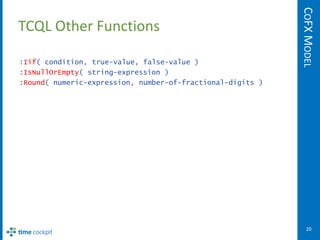
TCQL Other Functions

:Iif( condition, true-value, false-value )
:IsNullOrEmpty( string-expression )
:Round( numeric-expression, number-of-fractional-digits )


                                                               20
COFX MODEL
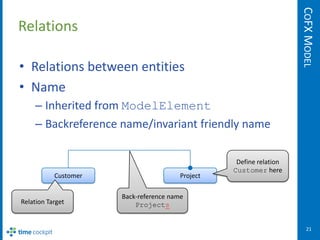
Relations

• Relations between entities
• Name
    – Inherited from ModelElement
    – Backreference name/invariant friendly name

                                                   Define relation
                                                  Customer here
           Customer                     Project

                      Back-reference name
Relation Target           Projects


                                                                        21
COFX MODEL
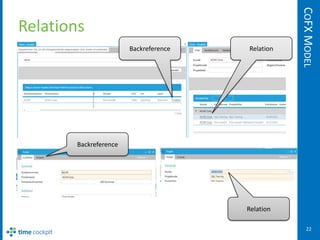
Relations
                       Backreference   Relation


       Backreference


                                       Relation

                                                     22
COFX MODEL
Validation Rules

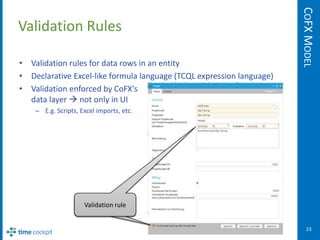
• Validation rules for data rows in an entity
• Declarative Excel-like formula language (TCQL expression language)
• Validation enforced by CoFX's
  data layer  not only in UI
    – E.g. Scripts, Excel imports, etc.


                     Validation rule


                                                                          23
COFX MODEL
Permissions

• Defined using Excel-like TCQL expression
  language
  – No programming necessary
  – Uses TCQL Sets frequently (details see later)
• For WPF developers: Ready for data binding
  (IDataErrorInfo)
• Levels (details see following slides)
  – Per entity
  – Per property

                                                       24
COFX MODEL
Permissions

• Permissions for an entity
  – No permissions defined
     everyone all permissions on all rows
  – At least one permission defined
     • User can only read an object if at least one read or write
       permission is satisfied
     • User can only write an object if at least one write
       permission is satisfied
• Note: Insert, Update, Delete permissions are in
  preview phase
  – Implementation finished, unit tests
    finished, internal review still missing

                                                                       25
COFX MODEL
Permissions

• Permissions for a property
  – User can only access (get/set) properties if she has
    access on entity-level (see previous slide)
  – No property-level permissions defined
     everyone all permissions on all properties
  – At least one permission defined
     • User can only read (get) a property value if at least one
       read (get) or write (set) permission is satisfied
     • User can only write (set) a property value if at least one
       write (set) permission is satisfied
• Insert, Update, Delete are not supported for
  property-level permissions

                                                                       26
COFX MODEL
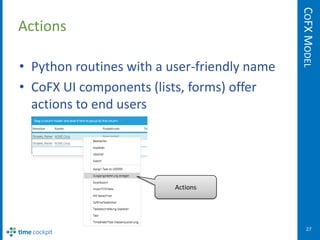
Actions

• Python routines with a user-friendly name
• CoFX UI components (lists, forms) offer
  actions to end users


                          Actions


                                                 27
COFX MODEL
Actions

• Parameter
   – No parameters
   – Entity/form that acts as the parameter
• Code consists of exactly one Python routine
   – Parameter (ExecutionContext)
      • Parameter object (see above)
      • Input set (objects on which the action has been called)
   – Current user
   – Data context
• Details about actions will follow after Python
  introduction
                                                                     28
COFX MODEL
Entity Views

• Declaratively defined lists and forms
  – Aka "named" lists and "named" forms
• Details about definition of lists and forms
  follow later


                                                   29
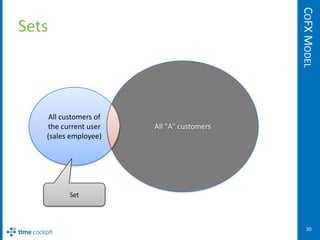
COFX MODEL
Sets


    All customers of
   the current user    All "A" customers
   (sales employee)


          Set


                                              30
COFX MODEL
Sets

• Set of objects with a name
   – E.g. roles that a user is member of
   – E.g. projects in which the user is project manager
• Defined using TCQL (details see later)
• Types
   – Logon
       • Set is filled when user logs in
       • Used for sets that seldom change (e.g. roles of a user)
   – Every query
       • Set is filled right before the query that references the set
       • Can be performance critical

                                                                           31
TRIGGERS
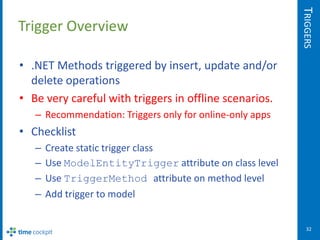
Trigger Overview

• .NET Methods triggered by insert, update and/or
  delete operations
• Be very careful with triggers in offline scenarios.
   – Recommendation: Triggers only for online-only apps
• Checklist
   –   Create static trigger class
   –   Use ModelEntityTrigger attribute on class level
   –   Use TriggerMethod attribute on method level
   –   Add trigger to model


                                                             32
TRIGGERS
Trigger Example

[ModelEntityTrigger]
public static class User
{
   [TriggerMethod]
   public static void AddUser(ExecutionContext context)
   {
       …
   }

    [TriggerMethod]
    public static void UpdateUser(ExecutionContext context)
    {
       …
    }

    …
}


                                                                 33
TRIGGERS
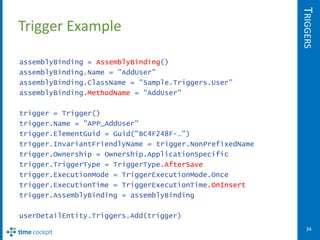
Trigger Example

assemblyBinding = AssemblyBinding()
assemblyBinding.Name = "AddUser"
assemblyBinding.ClassName = "Sample.Triggers.User"
assemblyBinding.MethodName = "AddUser"

trigger = Trigger()
trigger.Name = "APP_AddUser"
trigger.ElementGuid = Guid("BC4F248F-…")
trigger.InvariantFriendlyName = trigger.NonPrefixedName
trigger.Ownership = Ownership.ApplicationSpecific
trigger.TriggerType = TriggerType.AfterSave
trigger.ExecutionMode = TriggerExecutionMode.Once
trigger.ExecutionTime = TriggerExecutionTime.OnInsert
trigger.AssemblyBinding = assemblyBinding

userDetailEntity.Triggers.Add(trigger)
                                                             34
Saves the day.


Thank you!
Questions? You want more?
office@timecockpit.com

The CoFX Data Model

  • 1.
    The CoFX DataModel Data Model for the Cockpit Framework (CoFX) Publishing Date: Oct. 1st 2012
  • 2.
    INTRODUCTION Introduction • software architectsgmbh Birkenweg 16 4060 Leonding Austria • Contact Web: http://www.timecockpit.com Phone: +43 720 890280 Email: office@timecockpit.com
  • 3.
    ABOUT TIME COCKPIT is the leading time tracking solution for knowledge workers. Graphical time tracking calendar, automatic tracking of your work using signal trackers, high level of extensibility and customizability, full support to work offline, and SaaS deployment model make it the optimal choice especially in the IT consulting business. Try for free and without any risk. You can get your trial account at http://www.timecockpit.com. After the trial period you can use for only 0,20€ per user and month without a minimal subscription time and without a minimal number of users.
  • 4.
    ÜBER TIME COCKPIT ist die führende Projektzeiterfassung für Knowledge Worker. Grafischer Zeitbuchungskalender, automatische Tätigkeitsaufzeichnung über Signal Tracker, umfassende Erweiterbarkeit und Anpassbarkeit, volle Offlinefähigkeit und einfachste Verwendung durch SaaS machen es zur Optimalen Lösung auch speziell im IT-Umfeld. Probieren Sie kostenlos und ohne Risko einfach aus. Einen Testzugang erhalten Sie unter http://www.timecockpit.com. Danach nutzen Sie um nur 0,20€ pro Benutzer und Tag ohne Mindestdauer und ohne Mindestbenutzeranzahl.
  • 5.
    COFX DATA MODEL Overview System, Applica Text tion Model Specific, User Numeric Entities Properties Boolean Relations Guid Validation Date Rules Actions Interfaces DateTime Entity Views Permissions Binary Sets Triggers File Calculated 5
  • 6.
    COFX MODEL Model • Rootof the CoFX model tree • Frozen or writable – By default: Frozen • See also Model.Freeze() • Never change a frozen model! • Changes cannot be saved to DB – Get writeable model using Context.GetWritableModel() • Every item in the model tree (ModelElement) has a unique ID (ModelElement.ElementGuid) – Useful helper: Model.GetModelElementByUuid() 6
  • 7.
    COFX MODEL ModelElement • Rootclass for all model elements (including the model itself) • Name – Unique technical name inside the corresponding model element group (e.g. entities) – Rules • Must start with an uppercase letter • Followed by letters, digits, and underscores • List of reserved words (DB-related) • Check name using ModelElement.IsValidIdentifier() • Invariant friendly name – Culture-invariant friendly name – Coming: Localization • Persist behavior – None, Metadata Only, Full 7
  • 8.
    COFX MODEL Entity • Implemented in ModelEntityBase • Default display property – By default used in comboboxes – Can be changed using named lists (DefaultRelationList) • Read-only expression – If true, row is read-only – Obsolete, use permissions instead • Default list/form – Default named list and/or named form that is used by CoFX for the corresponding entity • Sync behavior – Model & data, data only, model only, none • Expression evaluator ModelEntityBase.Evaluate() • Create an instance of the entity ModelEntityBase.CreateEntityObject() 8
  • 9.
    COFX MODEL Properties • Derivedfrom ModelProperty – PersistedProperty – CalculatedProperty • Default aggregation function – ModelProperty.DefaultAggregateFunction – None, sum, avg, min, max – Important for grouping in lists • Mapping to storage layer – Only for persisted properties – PersistedProperty.StorageColumn for p in Context.Model.Project.PersistedProperties: print "{0}: {1}".format(p.Name, p.StorageColumn.Name) 9
  • 10.
    COFX MODEL Properties • Textproperties – Unicode character field in DB (NVARCHAR in SQL Server) – System.String in .NET – MaxStorageSize = length • Numeric properties – Numeric field in DB (NUMERIC in SQL Server) – System.Decimal in .NET – Precision, Scale determine size – Default FormatPattern for string representation • Boolean properties – Bit in DB (BIT in SQL Server) – bool in .NET 10
  • 11.
    COFX MODEL Properties • Guidproperties – Guid in DB (UNIQUEIDENTIFIER in SQL Server) – System.Guid in .NET • Date, DateTime properties – Identically stored, differences in UI – DateTime in DB (DATETIME2 in SQL Server) – System.DateTime in .NET 11
  • 12.
    COFX MODEL Properties • Binaryproperties – Used to store blobs – Storage types (BinaryProperty.StorageType) • Database • Windows Azure Blob Storage (only in the cloud) – Content processing (BinaryProperty.ContentProcessing) • None, compress, encrypt, compress & encrypt – Blob in DB (VARBINARY in SQL Server) – Byte[] in .NET – MaxStorageSize = length in bytes 12
  • 13.
    COFX MODEL Properties • Fileproperties – Special type of binary property • Binary property + file information • File name (FileNameColumn) • MIME type (FileMimeTypeColumn) • File size (FileSizeColumn) – Restrict files that can be stored • MaxFileSizeInKB = maximum length • AllowedMimeTypes • AllowedExtensions 13
  • 14.
    COFX MODEL Properties • Calculatedproperties – Not stored in the database – Defined in TCQL expression language (details later) – Calculated on the fly – Filtering and aggragation done in the database layer 14
  • 15.
    COFX MODEL TCQL ExpressionLanguage <expression> ::= ( <expression> ) | <expression> [ Or | And ] <expression> | <expression> [ = | <> | < | <= | > | >= ] <expression> | <expression> In ( <expression> [, <expression>...] ) | <expression> In Set( "<expressionName>" [, "<propertyName>" ] ) | <expression> In <parameterAccess> | <expression> [Not] Like <expression> | <expression> [ + | - | * | / | % ] <expression> | Not <expression> | <functionCall> | <aggregationFunctionCall> | <memberAccess> | <literal> | <parameterAccess> | <nestedStatement> | <EnvironmentVariable> 15
  • 16.
    COFX MODEL TCQL ExpressionLanguage • Use + to concat strings • You can use + and - with date/time expressions • Example for In operator From P In Project Where :Iif(P.NumberOfHours=0, 1, P.NumberOfHours) In ( 1, 2 ) Select P • Example for Like operator From T In Timesheet Where T.Description Like '%time%' Select T 16
  • 17.
    COFX MODEL TCQL StringFunctions :Len( string-expression ) :Substring( string-expression, start-index, length ) :Replace( string-expression, string-to-find, replacing-string ) :FormatDate( date-expression, format-string ) (see MSDN Library for details about format string) :FormatNumber( numeric-expression, format-string ) (see MSDN Library for details about format strings) :FormatDateCanonical( date-expression [, boolean-expression] ) (see MSDN Library for SQL Server's canonical date format) :FormatDateAsPeriod( date-expression ) (returns YYYY/MM) 17
  • 18.
    COFX MODEL TCQL Date/TimeFunctions :NewDate( year, month, day ) :Year( date-time-expression ) :Month( date-time-expression ) :Day( date-time-expression ) :Date( date-time-expression ) :Now() :Today() :FirstOfMonth( date-time-expression ) :LastOfMonth( date-time-expression ) :AddDays( date-time-expression, number-of-days-to-add ) :AddMonths( date-time-expression, number-of-months-to-add ) :AddYears( date-time-expression, number-of-years-to-add ) :AddHours( date-time-expression, number-of-hours-to-add ) :AddMinutes( date-time-expression, number-of-minutes-to-add ) :AddSeconds( date-time-expression, number-of-seconds-to-add ) 18
  • 19.
    COFX MODEL TCQL Date/TimeFunctions :FormatDateCanonical(#2010-10-07#) //returns "2010-10-07" :FormatDateCanonical(#2010-10-07#, True) //returns "2010-10-07 00:00:00" :FormatDateAsPeriod(#2010-10-07#) //returns "2010/10" :FormatDateAsPeriod(#2010-10-07 23:59:59#) //returns "2010/10" 19
  • 20.
    COFX MODEL TCQL OtherFunctions :Iif( condition, true-value, false-value ) :IsNullOrEmpty( string-expression ) :Round( numeric-expression, number-of-fractional-digits ) 20
  • 21.
    COFX MODEL Relations • Relationsbetween entities • Name – Inherited from ModelElement – Backreference name/invariant friendly name Define relation Customer here Customer Project Back-reference name Relation Target Projects 21
  • 22.
    COFX MODEL Relations Backreference Relation Backreference Relation 22
  • 23.
    COFX MODEL Validation Rules •Validation rules for data rows in an entity • Declarative Excel-like formula language (TCQL expression language) • Validation enforced by CoFX's data layer  not only in UI – E.g. Scripts, Excel imports, etc. Validation rule 23
  • 24.
    COFX MODEL Permissions • Definedusing Excel-like TCQL expression language – No programming necessary – Uses TCQL Sets frequently (details see later) • For WPF developers: Ready for data binding (IDataErrorInfo) • Levels (details see following slides) – Per entity – Per property 24
  • 25.
    COFX MODEL Permissions • Permissionsfor an entity – No permissions defined  everyone all permissions on all rows – At least one permission defined • User can only read an object if at least one read or write permission is satisfied • User can only write an object if at least one write permission is satisfied • Note: Insert, Update, Delete permissions are in preview phase – Implementation finished, unit tests finished, internal review still missing 25
  • 26.
    COFX MODEL Permissions • Permissionsfor a property – User can only access (get/set) properties if she has access on entity-level (see previous slide) – No property-level permissions defined  everyone all permissions on all properties – At least one permission defined • User can only read (get) a property value if at least one read (get) or write (set) permission is satisfied • User can only write (set) a property value if at least one write (set) permission is satisfied • Insert, Update, Delete are not supported for property-level permissions 26
  • 27.
    COFX MODEL Actions • Pythonroutines with a user-friendly name • CoFX UI components (lists, forms) offer actions to end users Actions 27
  • 28.
    COFX MODEL Actions • Parameter – No parameters – Entity/form that acts as the parameter • Code consists of exactly one Python routine – Parameter (ExecutionContext) • Parameter object (see above) • Input set (objects on which the action has been called) – Current user – Data context • Details about actions will follow after Python introduction 28
  • 29.
    COFX MODEL Entity Views •Declaratively defined lists and forms – Aka "named" lists and "named" forms • Details about definition of lists and forms follow later 29
  • 30.
    COFX MODEL Sets All customers of the current user All "A" customers (sales employee) Set 30
  • 31.
    COFX MODEL Sets • Setof objects with a name – E.g. roles that a user is member of – E.g. projects in which the user is project manager • Defined using TCQL (details see later) • Types – Logon • Set is filled when user logs in • Used for sets that seldom change (e.g. roles of a user) – Every query • Set is filled right before the query that references the set • Can be performance critical 31
  • 32.
    TRIGGERS Trigger Overview • .NETMethods triggered by insert, update and/or delete operations • Be very careful with triggers in offline scenarios. – Recommendation: Triggers only for online-only apps • Checklist – Create static trigger class – Use ModelEntityTrigger attribute on class level – Use TriggerMethod attribute on method level – Add trigger to model 32
  • 33.
    TRIGGERS Trigger Example [ModelEntityTrigger] public staticclass User { [TriggerMethod] public static void AddUser(ExecutionContext context) { … } [TriggerMethod] public static void UpdateUser(ExecutionContext context) { … } … } 33
  • 34.
    TRIGGERS Trigger Example assemblyBinding =AssemblyBinding() assemblyBinding.Name = "AddUser" assemblyBinding.ClassName = "Sample.Triggers.User" assemblyBinding.MethodName = "AddUser" trigger = Trigger() trigger.Name = "APP_AddUser" trigger.ElementGuid = Guid("BC4F248F-…") trigger.InvariantFriendlyName = trigger.NonPrefixedName trigger.Ownership = Ownership.ApplicationSpecific trigger.TriggerType = TriggerType.AfterSave trigger.ExecutionMode = TriggerExecutionMode.Once trigger.ExecutionTime = TriggerExecutionTime.OnInsert trigger.AssemblyBinding = assemblyBinding userDetailEntity.Triggers.Add(trigger) 34
  • 35.
    Saves the day. Thankyou! Questions? You want more? office@timecockpit.com