Client-Side Performance Sucks Craig Walker, Chief Technology Officer And what you can do to make it suck less. www.xero.com
Your typical internal network: Easier to control Easier to predict Knowledge of almost everything from LAN speed to operating system
There's a reason why the words “world” and “wide” are in the acronym Control and knowledge are limited to your own environment. Even how the packets fly around the internet is out of your control. www.xero.com
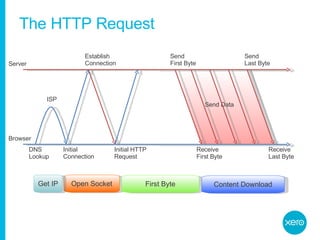
The HTTP Request Server Browser Receive Last Byte Send  Last Byte Send Data Establish  Connection Initial Connection Open Socket Initial HTTP Request First Byte Receive First Byte Send  First Byte Content Download ISP Get IP DNS Lookup
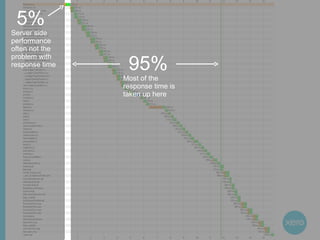
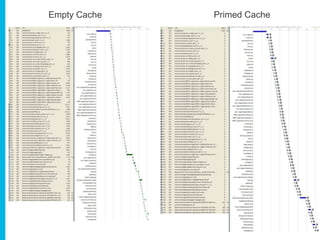
5% Server side performance often not the problem with response time 95% Most of the response time is taken up here
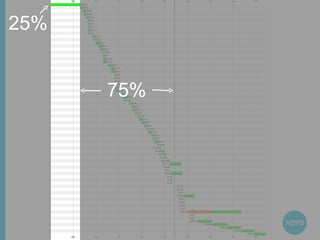
25% 75%
Empty Cache Primed Cache
Focus on the front-end 75-95% of the end-user response time for Xero customers is spent on the front end Much easier to optimise than server side performance Greater potential for improvement – especially from an end-users point-of-view Proven to work
Performance === Usability www.xero.com
The giants who’s shoulders I’m standing on Yahoo! Exceptional Performance team http://developer.yahoo.com/performance/ Steve Souders Former Chief of Performance at Yahoo! Now at Google Creator of YSlow and the 14 Rules Author of High Performance Web Sites Stoyan Stefanov, Patrick Meenan, Julien Lecomte, Stuart Colville, Ed Eliot and many more …
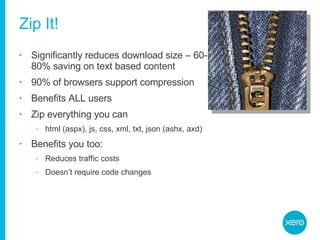
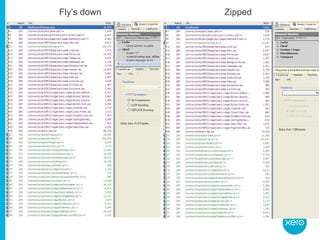
Zip It! Significantly reduces download size – 60-80% saving on text based content 90% of browsers support compression Benefits ALL users Zip everything you can html (aspx), js, css, xml, txt, json (ashx, axd) Benefits you too: Reduces traffic costs Doesn’t require code changes
Fly’s down Zipped
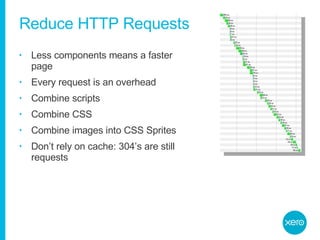
Reduce HTTP Requests Less components means a faster page Every request is an overhead Combine scripts Combine CSS Combine images into CSS Sprites Don’t rely on cache: 304’s are still requests
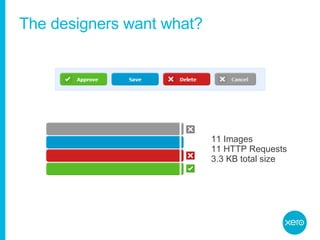
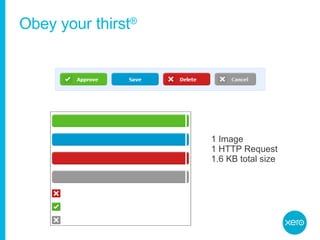
CSS Sprites Combine all small images into one large image Use CSS to control the displaying of each image
The designers want what? 11 Images 11 HTTP Requests 3.3 KB total size
Obey your thirst ® 1 Image 1 HTTP Request 1.6 KB total size
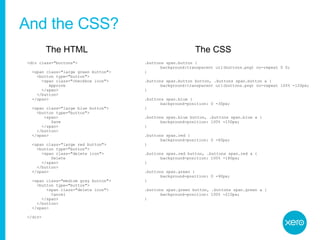
And the CSS? <div class=&quot;buttons&quot;> <span class=&quot;large green button&quot;> <button type=&quot;button&quot;> <span class=&quot;checkbox icon&quot;> Approve </span> </button> </span> <span class=&quot;large blue button&quot;> <button type=&quot;button&quot;> <span> Save </span> </button> </span> <span class=&quot;large red button&quot;> <button type=&quot;button&quot;> <span class=&quot;delete icon&quot;> Delete </span> </button> </span> <span class=&quot;medium gray button&quot;> <button type=&quot;button&quot;> <span class=&quot;delete icon&quot;> Cancel </span> </button> </span> </div> .buttons span.button { background:transparent url(buttons.png) no-repeat 0 0; } .buttons span.button button, .buttons span.button a { background:transparent url(buttons.png) no-repeat 100% -120px; } .buttons span.blue { background-position: 0 -30px; } .buttons span.blue button, .buttons span.blue a { background-position: 100% -150px; } .buttons span.red { background-position: 0 -60px; } .buttons span.red button, .buttons span.red a { background-position: 100% -180px; } .buttons span.green { background-position: 0 -90px; } .buttons span.green button, .buttons span.green a { background-position: 100% -210px; } The HTML The CSS
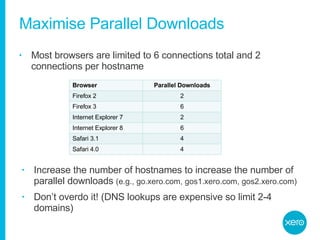
Maximise Parallel Downloads Most browsers are limited to 6 connections total and 2 connections per hostname Increase the number of hostnames to increase the number of parallel downloads  (e.g., go.xero.com, gos1.xero.com, gos2.xero.com) Don’t overdo it! (DNS lookups are expensive so limit 2-4 domains) Browser Parallel Downloads Firefox 2 2 Firefox 3 6 Internet Explorer 7 2 Internet Explorer 8 6 Safari 3.1 4 Safari 4.0 4
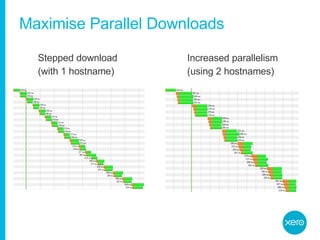
Maximise Parallel Downloads Stepped download  (with 1 hostname) Increased parallelism  (using 2 hostnames)
Use a CDN Content Delivery Network Distributes content closer to the last mile Distribute your static content before distributing your dynamic content Akamai most popular but very expensive Xero utilises a rudimentary CDN using IP lookup to determine location
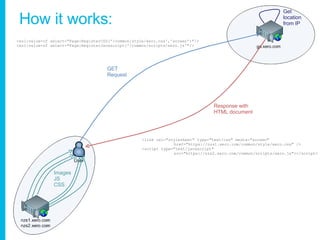
How it works: Images JS CSS <xsl:value-of select=&quot;Page:RegisterCSS('/common/style/xero.css','screen')&quot;/> <xsl:value-of select=&quot;Page:RegisterJavascript('/common/scripts/xero.js'&quot;/>  <link rel=&quot;stylesheet&quot; type=&quot;text/css&quot; media=&quot;screen&quot;  href=&quot;https://nzs1.xero.com/common/style/xero.css&quot; /> <script type=&quot;text/javascript&quot;  src=&quot;https://nzs2.xero.com/common/scripts/xero.js&quot;></script> GET Request Response with HTML document Get  location  from IP
Maximise the cache Understand the ratio of cached vs uncached Add an Expires header Not just for images – should be used on all static content Set a “Never expire” or far future expires policy if you can Reduces HTTP requests – once component is served, the browser never asks for it again Date stamping in file names makes it easier Remove ETags ETags are another caching mechanism – sent with every request Uniquely created per web server – not good in web farms Just turn them off and use Expires headers instead
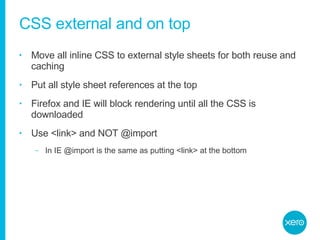
CSS external and on top Move all inline CSS to external style sheets for both reuse and caching Put all style sheet references at the top Firefox and IE will block rendering until all the CSS is downloaded Use <link> and NOT @import In IE @import is the same as putting <link> at the bottom
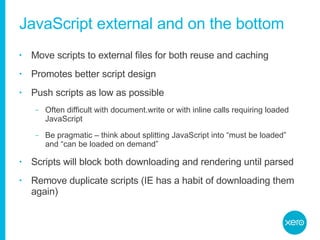
JavaScript external and on the bottom Move scripts to external files for both reuse and caching Promotes better script design Push scripts as low as possible Often difficult with document.write or with inline calls requiring loaded JavaScript Be pragmatic – think about splitting JavaScript into “must be loaded” and “can be loaded on demand” Scripts will block both downloading and rendering until parsed Remove duplicate scripts (IE has a habit of downloading them again)
Notice the  parallel  download here … …  until we hit the JavaScript files where they come down sequentially, blocking any other downloads
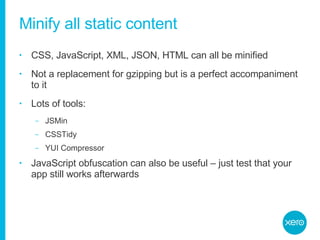
Minify all static content CSS, JavaScript, XML, JSON, HTML can all be minified Not a replacement for gzipping but is a perfect accompaniment to it Lots of tools: JSMin CSSTidy YUI Compressor JavaScript obfuscation can also be useful – just test that your app still works afterwards
Optimise images Use PNGs instead of GIFs Avoid alpha filters – can block rendering and freeze the browser PNG8 is best and supported by IE6 (yes – even with transparency) Optimise further with PNGOUT or PNGCRUSH Make sure you have a favicon.ico Every browser will request it Best not to respond with a 404 Make it small and cacheable
Preloading … Preload components you’ll need in the future Unconditional preload  Xero login page preloads all core components so that the dashboard experience is better Conditional preload Often based on where you think a user might go to next
Reduce cookie weight Cookie’s are sent back with every request Keep cookie size small and only store what’s required – use server-side storage for everything else Consider cookie free domains for static content
Keep it clean Choose a good Ajax library – don’t go writing this stuff yourself Always asynchronous Use JSON over XML Accessing JSON faster and cheaper Less overhead than XML Use GET requests over POSTs wherever possible POST is a 2-step process: send headers, send body POST without a body is essentially a GET anyway And make sure the response is zipped!
Things to take away Focus on the front-end Be an advocate for your users Don’t let designers get in the way of performance But they will so optimise, optimise, optimise!
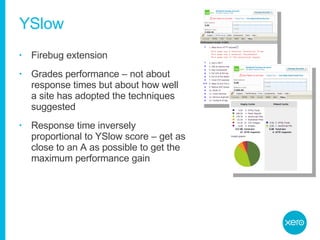
YSlow Firebug extension Grades performance – not about response times but about how well a site has adopted the techniques suggested Response time inversely proportional to YSlow score – get as close to an A as possible to get the maximum performance gain

Fiddler Microsoft built HTTP debugging proxy Inspect HTTP traffic, tamper with incoming and outgoing data and debug performance issues Works with all browsers
AOL PageTest Internal AOL utility gone public Browser plug-in for Internet Explorer Visually displays underlying requests and provides suggestions on how to improve your response times Also available as an external web-based tester at www.webpagetest.org

Any questions? www.xero.com
www.xero.com 0800 GET XERO

Client Side Performance @ Xero

  • 1.
    Client-Side Performance SucksCraig Walker, Chief Technology Officer And what you can do to make it suck less. www.xero.com
  • 2.
    Your typical internalnetwork: Easier to control Easier to predict Knowledge of almost everything from LAN speed to operating system
  • 3.
    There's a reasonwhy the words “world” and “wide” are in the acronym Control and knowledge are limited to your own environment. Even how the packets fly around the internet is out of your control. www.xero.com
  • 4.
    The HTTP RequestServer Browser Receive Last Byte Send Last Byte Send Data Establish Connection Initial Connection Open Socket Initial HTTP Request First Byte Receive First Byte Send First Byte Content Download ISP Get IP DNS Lookup
  • 5.
    5% Server sideperformance often not the problem with response time 95% Most of the response time is taken up here
  • 6.
  • 7.
  • 8.
    Focus on thefront-end 75-95% of the end-user response time for Xero customers is spent on the front end Much easier to optimise than server side performance Greater potential for improvement – especially from an end-users point-of-view Proven to work
  • 9.
  • 10.
    The giants who’sshoulders I’m standing on Yahoo! Exceptional Performance team http://developer.yahoo.com/performance/ Steve Souders Former Chief of Performance at Yahoo! Now at Google Creator of YSlow and the 14 Rules Author of High Performance Web Sites Stoyan Stefanov, Patrick Meenan, Julien Lecomte, Stuart Colville, Ed Eliot and many more …
  • 11.
    Zip It! Significantlyreduces download size – 60-80% saving on text based content 90% of browsers support compression Benefits ALL users Zip everything you can html (aspx), js, css, xml, txt, json (ashx, axd) Benefits you too: Reduces traffic costs Doesn’t require code changes
  • 12.
  • 13.
    Reduce HTTP RequestsLess components means a faster page Every request is an overhead Combine scripts Combine CSS Combine images into CSS Sprites Don’t rely on cache: 304’s are still requests
  • 14.
    CSS Sprites Combineall small images into one large image Use CSS to control the displaying of each image
  • 15.
    The designers wantwhat? 11 Images 11 HTTP Requests 3.3 KB total size
  • 16.
    Obey your thirst® 1 Image 1 HTTP Request 1.6 KB total size
  • 17.
    And the CSS?<div class=&quot;buttons&quot;> <span class=&quot;large green button&quot;> <button type=&quot;button&quot;> <span class=&quot;checkbox icon&quot;> Approve </span> </button> </span> <span class=&quot;large blue button&quot;> <button type=&quot;button&quot;> <span> Save </span> </button> </span> <span class=&quot;large red button&quot;> <button type=&quot;button&quot;> <span class=&quot;delete icon&quot;> Delete </span> </button> </span> <span class=&quot;medium gray button&quot;> <button type=&quot;button&quot;> <span class=&quot;delete icon&quot;> Cancel </span> </button> </span> </div> .buttons span.button { background:transparent url(buttons.png) no-repeat 0 0; } .buttons span.button button, .buttons span.button a { background:transparent url(buttons.png) no-repeat 100% -120px; } .buttons span.blue { background-position: 0 -30px; } .buttons span.blue button, .buttons span.blue a { background-position: 100% -150px; } .buttons span.red { background-position: 0 -60px; } .buttons span.red button, .buttons span.red a { background-position: 100% -180px; } .buttons span.green { background-position: 0 -90px; } .buttons span.green button, .buttons span.green a { background-position: 100% -210px; } The HTML The CSS
  • 18.
    Maximise Parallel DownloadsMost browsers are limited to 6 connections total and 2 connections per hostname Increase the number of hostnames to increase the number of parallel downloads (e.g., go.xero.com, gos1.xero.com, gos2.xero.com) Don’t overdo it! (DNS lookups are expensive so limit 2-4 domains) Browser Parallel Downloads Firefox 2 2 Firefox 3 6 Internet Explorer 7 2 Internet Explorer 8 6 Safari 3.1 4 Safari 4.0 4
  • 19.
    Maximise Parallel DownloadsStepped download (with 1 hostname) Increased parallelism (using 2 hostnames)
  • 20.
    Use a CDNContent Delivery Network Distributes content closer to the last mile Distribute your static content before distributing your dynamic content Akamai most popular but very expensive Xero utilises a rudimentary CDN using IP lookup to determine location
  • 21.
    How it works:Images JS CSS <xsl:value-of select=&quot;Page:RegisterCSS('/common/style/xero.css','screen')&quot;/> <xsl:value-of select=&quot;Page:RegisterJavascript('/common/scripts/xero.js'&quot;/> <link rel=&quot;stylesheet&quot; type=&quot;text/css&quot; media=&quot;screen&quot; href=&quot;https://nzs1.xero.com/common/style/xero.css&quot; /> <script type=&quot;text/javascript&quot; src=&quot;https://nzs2.xero.com/common/scripts/xero.js&quot;></script> GET Request Response with HTML document Get location from IP
  • 22.
    Maximise the cacheUnderstand the ratio of cached vs uncached Add an Expires header Not just for images – should be used on all static content Set a “Never expire” or far future expires policy if you can Reduces HTTP requests – once component is served, the browser never asks for it again Date stamping in file names makes it easier Remove ETags ETags are another caching mechanism – sent with every request Uniquely created per web server – not good in web farms Just turn them off and use Expires headers instead
  • 23.
    CSS external andon top Move all inline CSS to external style sheets for both reuse and caching Put all style sheet references at the top Firefox and IE will block rendering until all the CSS is downloaded Use <link> and NOT @import In IE @import is the same as putting <link> at the bottom
  • 24.
    JavaScript external andon the bottom Move scripts to external files for both reuse and caching Promotes better script design Push scripts as low as possible Often difficult with document.write or with inline calls requiring loaded JavaScript Be pragmatic – think about splitting JavaScript into “must be loaded” and “can be loaded on demand” Scripts will block both downloading and rendering until parsed Remove duplicate scripts (IE has a habit of downloading them again)
  • 25.
    Notice the parallel download here … … until we hit the JavaScript files where they come down sequentially, blocking any other downloads
  • 26.
    Minify all staticcontent CSS, JavaScript, XML, JSON, HTML can all be minified Not a replacement for gzipping but is a perfect accompaniment to it Lots of tools: JSMin CSSTidy YUI Compressor JavaScript obfuscation can also be useful – just test that your app still works afterwards
  • 27.
    Optimise images UsePNGs instead of GIFs Avoid alpha filters – can block rendering and freeze the browser PNG8 is best and supported by IE6 (yes – even with transparency) Optimise further with PNGOUT or PNGCRUSH Make sure you have a favicon.ico Every browser will request it Best not to respond with a 404 Make it small and cacheable
  • 28.
    Preloading … Preloadcomponents you’ll need in the future Unconditional preload Xero login page preloads all core components so that the dashboard experience is better Conditional preload Often based on where you think a user might go to next
  • 29.
    Reduce cookie weightCookie’s are sent back with every request Keep cookie size small and only store what’s required – use server-side storage for everything else Consider cookie free domains for static content
  • 30.
    Keep it cleanChoose a good Ajax library – don’t go writing this stuff yourself Always asynchronous Use JSON over XML Accessing JSON faster and cheaper Less overhead than XML Use GET requests over POSTs wherever possible POST is a 2-step process: send headers, send body POST without a body is essentially a GET anyway And make sure the response is zipped!
  • 31.
    Things to takeaway Focus on the front-end Be an advocate for your users Don’t let designers get in the way of performance But they will so optimise, optimise, optimise!
  • 32.
    YSlow Firebug extensionGrades performance – not about response times but about how well a site has adopted the techniques suggested Response time inversely proportional to YSlow score – get as close to an A as possible to get the maximum performance gain

  • 33.
    Fiddler Microsoft builtHTTP debugging proxy Inspect HTTP traffic, tamper with incoming and outgoing data and debug performance issues Works with all browsers
  • 34.
    AOL PageTest InternalAOL utility gone public Browser plug-in for Internet Explorer Visually displays underlying requests and provides suggestions on how to improve your response times Also available as an external web-based tester at www.webpagetest.org

  • 35.
  • 36.