Spacebrew at SFPC - Brett Renfer 
Spacebrew @ SFPC 
10/28/2014
Spacebrew at SFPC - Brett Renfer 
Spacebrew Basics
Spacebrew at SFPC - Brett Renfer Obligatory hype video!
Spacebrew at SFPC - Brett Renfer 
Spacebrew… 
• is a service and toolkit for 
choreographing interactive spaces 
• makes it easy to connect interactive 
things to one another over networks 
• was developed to support prototyping-driven 
design efforts
Spacebrew at SFPC - Brett Renfer 
Spacebrew is supported by a 
group of amazing people.
Whispering Stairs, 
Shu Yang Lin 
Remote Presence Experiments 
Havas Madsci Lab 
Arduino Day - NYU ITP - Brett Renfer & Julio Terra 
Next Round 
Gustavo Faria, Bernardo Schorr and Stephanie Burgess 
Forget Me Not Remote Flower Watering, 
Lucy Matchett, Joselyn McDonald, Nicole Messier
client 
app 
client 
app 
Spacebrew at SFPC - Brett Renfer 
client 
app 
client 
app 
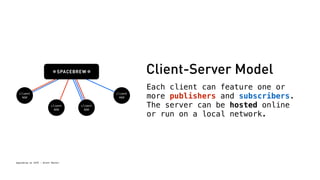
Client-Server Model 
Each client can feature one or 
more publishers and subscribers. 
The server can be hosted online 
or run on a local network.
client 
app 
client 
app 
Spacebrew at SFPC - Brett Renfer 
client 
app 
client 
app 
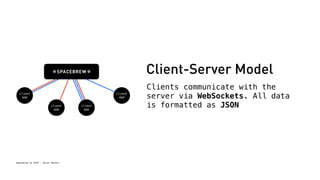
Client-Server Model 
Clients communicate with the 
server via WebSockets. All data 
is formatted as JSON
Spacebrew at SFPC - Brett Renfer 
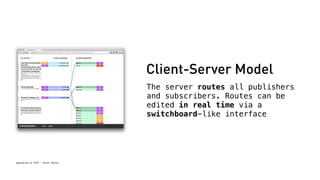
Client-Server Model 
The server routes all publishers 
and subscribers. Routes can be 
edited in real time via a 
switchboard-like interface
Spacebrew at SFPC - Brett Renfer 
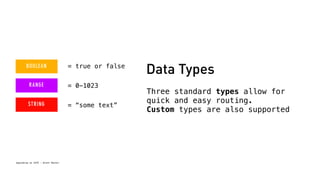
Data Types 
Three standard types allow for 
quick and easy routing. 
Custom types are also supported 
= true or false 
= 0-1023 
= “some text”
Spacebrew at SFPC - Brett Renfer 
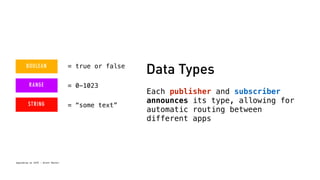
Data Types 
Each publisher and subscriber 
announces its type, allowing for 
automatic routing between 
different apps 
= true or false 
= 0-1023 
= “some text”
Spacebrew at SFPC - Brett Renfer 
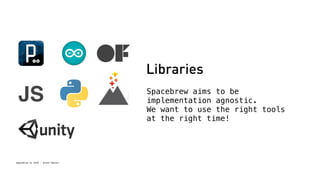
Libraries 
Spacebrew aims to be 
implementation agnostic. 
We want to use the right tools 
at the right time! 
JS
Spacebrew at SFPC - Brett Renfer 
Why? 
• Create a glue between our favorite 
toolkits and languages 
• Focus on real-time communication 
• Wanted to build a toolkit with a low floor 
and a high ceiling
Spacebrew at SFPC - Brett Renfer 
Using Spacebrew
Thinking About Apps 
• We try to silo apps whenever possible 
• Create specialized apps that are easy to re-use 
• Allows for multiple languages for each need 
• Quickly and easily move between machines/ 
Spacebrew at SFPC - Brett Renfer 
networks when necessary 
• Allows for easy prototypes in the future!
Thinking About Prototypes 
• What’s the quickest path to a prototype? 
• Can you use one of the existing examples? 
Or multiple examples? 
• Phone can become a “jump sensor”, 
Spacebrew at SFPC - Brett Renfer 
string example can stand-in for Twitter 
or text messaging
Spacebrew Libraries 
Each Spacebrew library: 
• Connects to a Spacebrew server 
(via WebSockets) 
• Has an API to declare its publisher(s) 
and subscriber(s) 
• Can send + receive messages to/from Spacebrew 
Spacebrew at SFPC - Brett Renfer
Spacebrew Libraries 
Connecting to Spacebrew 
1. Create a Spacebrew Object 
2. Tell your object where Spacebrew server is 
3. Declare any publishers and subscribers 
4. Connect! 
Spacebrew at SFPC - Brett Renfer
Spacebrew + Processing 
• install the library at 
~/Documents/Processing/libraries 
(make the folder if it doesn’t exist!) 
• restart Processing if it was open 
• open the spacebrew_base example to get started! 
Spacebrew at SFPC - Brett Renfer
Spacebrew + Arduino 
• Two routes: 
Spacebrew at SFPC - Brett Renfer 
• the easy road: use Processing + Serial 
• the road less travelled: Spacebrew Arduino lib 
http://github.com/labatrockwell/spacebrew-arduino-library 
• requires Arduino Ethernet shield 
• notoriously difficult to debug!
Spacebrew + Javascript 
• spacebrew.js is a stand-alone script that can run in any 
browser that supports WebSockets 
• this includes: Chrome (OS X, Windows, Android, iOS), 
Spacebrew at SFPC - Brett Renfer 
Safari (OS X, iOS), Firefox, Opera, IE 10 
• open the spacebrew slider example in your text editor 
• open http://bit.ly/sbslide on your smartphone 
• also try http://bit.ly/sbaccel
Spacebrew + openFrameworks 
• ofxSpacebrew connects to Spacebrew via 
ofxLibwebsockets 
• once you have both installed, you can create 
ofxSpacebrew projects via the OF project generator 
• let’s look at example_button 
Spacebrew at SFPC - Brett Renfer
Spacebrew at SFPC - Brett Renfer 
Custom Types
Custom Types 
• Spacebrew supports arbitrary type names and data 
(anything that reads as valid JSON will work) 
• Similar to built-in types, you can only route to 
matching names (e.g. we might know that “float” 
could probably route to “int”, but to Spacebrew 
they’re wholly different) 
Spacebrew at SFPC - Brett Renfer
Example: Ultrabook Tree 
• Each input station sent a custom “bloom” object: 
• Which image (id) 
• Number of laptops 
• Radius 
• Relative position (x,y) 
• Velocity 
• Rotation 
Spacebrew at SFPC - Brett Renfer
Custom Type Demo 
• https://github.com/robotconscience/spacebrew-JSON-examples 
• JSON in spacebrew.js, ofxSpacebrew, and spacebrewP5 
• Why JSON? 
• It’s a simple way to send arbitrary objects 
• Spacebrew uses it, so all libs have some sort of 
Spacebrew at SFPC - Brett Renfer 
JSON library included (if there isn’t one built 
in)
Spacebrew at SFPC - Brett Renfer 
You Got Served
Running Your Own Server 
• Why? 
Spacebrew at SFPC - Brett Renfer 
• sandbox.spacebrew.cc is on the slowest AWS tier 
• Running over the internet introduces some level 
of latency 
• Running a local server OR a remote server allows 
a level of control: only people you choose can 
route/reroute, break your routes, etc 
• Allows you to customize the server code if 
you choose!
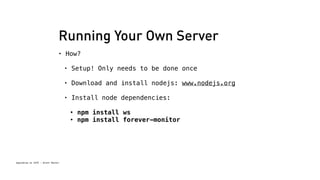
Running Your Own Server 
• How? 
Spacebrew at SFPC - Brett Renfer 
• Setup! Only needs to be done once 
• Download and install nodejs: www.nodejs.org 
• Install node dependencies: 
• npm install ws 
• npm install forever-monitor
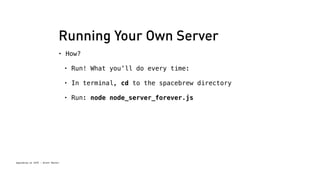
Running Your Own Server 
• How? 
Spacebrew at SFPC - Brett Renfer 
• Run! What you’ll do every time: 
• In terminal, cd to the spacebrew directory 
• Run: node node_server_forever.js
Spacebrew at SFPC - Brett Renfer 
Keep in touch! 
@robotconscience 
brett@robotconscience.com 
@spacebrewcc 
spacebrew.cc
Spacebrew at SFPC - Brett Renfer 
Bonus stuff
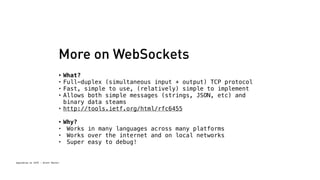
More on WebSockets 
• What? 
• Full-duplex (simultaneous input + output) TCP protocol 
• Fast, simple to use, (relatively) simple to implement 
• Allows both simple messages (strings, JSON, etc) and 
binary data steams 
• http://tools.ietf.org/html/rfc6455 
• Why? 
• Works in many languages across many platforms 
• Works over the internet and on local networks 
• Super easy to debug! 
Spacebrew at SFPC - Brett Renfer
Spacebrew at SFPC - Brett Renfer 
Persistent Admin
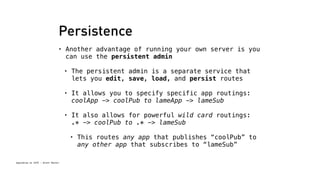
Persistence 
• Another advantage of running your own server is you 
can use the persistent admin 
• The persistent admin is a separate service that 
Spacebrew at SFPC - Brett Renfer 
lets you edit, save, load, and persist routes 
• It allows you to specify specific app routings: 
coolApp -> coolPub to lameApp -> lameSub 
• It also allows for powerful wild card routings: 
.* -> coolPub to .* -> lameSub 
• This routes any app that publishes “coolPub” to 
any other app that subscribes to “lameSub”
Persistence 
• You can run the persistent admin from the spacebrew directory: 
node node_persistent_admin.js 
• Run it in parallel with your server! 
• From the command line, you can list, add, remove, load, and 
save routes: 
Spacebrew at SFPC - Brett Renfer 
• list: ls 
• add: add client1Name,pub,client2Name,sub 
• use .* to create a wildcard 
• remove: remove [index] 
• you can find an index after add or by listing 
• save / load (just that!) 
• load is called on start automatically
Spacebrew at SFPC - Brett Renfer 
Admin API
The Admin API 
• You don’t just have to use our web interface! 
• Javascript, openFrameworks and Cinder (Processing 
soon) support the Admin API 
• The Admin API subscribes to Spacebrew similar to a 
client, firing events each time a client connects/ 
disconnects or changes its pub/sub map 
Spacebrew at SFPC - Brett Renfer 
• It allows you to view, edit, and add any and all 
routes in real time! 
• This allows for apps like the Admin Randomizer 
from the Zip! Zap! Zow! exercise
The Admin API 
• Try it out: http://bit.ly/sbslider-admin 
• Let’s look at the Admin API in Javascript 
Spacebrew at SFPC - Brett Renfer

Spacebrew @ SFPC

  • 1.
    Spacebrew at SFPC- Brett Renfer Spacebrew @ SFPC 10/28/2014
  • 2.
    Spacebrew at SFPC- Brett Renfer Spacebrew Basics
  • 3.
    Spacebrew at SFPC- Brett Renfer Obligatory hype video!
  • 4.
    Spacebrew at SFPC- Brett Renfer Spacebrew… • is a service and toolkit for choreographing interactive spaces • makes it easy to connect interactive things to one another over networks • was developed to support prototyping-driven design efforts
  • 5.
    Spacebrew at SFPC- Brett Renfer Spacebrew is supported by a group of amazing people.
  • 6.
    Whispering Stairs, ShuYang Lin Remote Presence Experiments Havas Madsci Lab Arduino Day - NYU ITP - Brett Renfer & Julio Terra Next Round Gustavo Faria, Bernardo Schorr and Stephanie Burgess Forget Me Not Remote Flower Watering, Lucy Matchett, Joselyn McDonald, Nicole Messier
  • 7.
    client app client app Spacebrew at SFPC - Brett Renfer client app client app Client-Server Model Each client can feature one or more publishers and subscribers. The server can be hosted online or run on a local network.
  • 8.
    client app client app Spacebrew at SFPC - Brett Renfer client app client app Client-Server Model Clients communicate with the server via WebSockets. All data is formatted as JSON
  • 9.
    Spacebrew at SFPC- Brett Renfer Client-Server Model The server routes all publishers and subscribers. Routes can be edited in real time via a switchboard-like interface
  • 10.
    Spacebrew at SFPC- Brett Renfer Data Types Three standard types allow for quick and easy routing. Custom types are also supported = true or false = 0-1023 = “some text”
  • 11.
    Spacebrew at SFPC- Brett Renfer Data Types Each publisher and subscriber announces its type, allowing for automatic routing between different apps = true or false = 0-1023 = “some text”
  • 12.
    Spacebrew at SFPC- Brett Renfer Libraries Spacebrew aims to be implementation agnostic. We want to use the right tools at the right time! JS
  • 13.
    Spacebrew at SFPC- Brett Renfer Why? • Create a glue between our favorite toolkits and languages • Focus on real-time communication • Wanted to build a toolkit with a low floor and a high ceiling
  • 14.
    Spacebrew at SFPC- Brett Renfer Using Spacebrew
  • 15.
    Thinking About Apps • We try to silo apps whenever possible • Create specialized apps that are easy to re-use • Allows for multiple languages for each need • Quickly and easily move between machines/ Spacebrew at SFPC - Brett Renfer networks when necessary • Allows for easy prototypes in the future!
  • 16.
    Thinking About Prototypes • What’s the quickest path to a prototype? • Can you use one of the existing examples? Or multiple examples? • Phone can become a “jump sensor”, Spacebrew at SFPC - Brett Renfer string example can stand-in for Twitter or text messaging
  • 17.
    Spacebrew Libraries EachSpacebrew library: • Connects to a Spacebrew server (via WebSockets) • Has an API to declare its publisher(s) and subscriber(s) • Can send + receive messages to/from Spacebrew Spacebrew at SFPC - Brett Renfer
  • 18.
    Spacebrew Libraries Connectingto Spacebrew 1. Create a Spacebrew Object 2. Tell your object where Spacebrew server is 3. Declare any publishers and subscribers 4. Connect! Spacebrew at SFPC - Brett Renfer
  • 19.
    Spacebrew + Processing • install the library at ~/Documents/Processing/libraries (make the folder if it doesn’t exist!) • restart Processing if it was open • open the spacebrew_base example to get started! Spacebrew at SFPC - Brett Renfer
  • 20.
    Spacebrew + Arduino • Two routes: Spacebrew at SFPC - Brett Renfer • the easy road: use Processing + Serial • the road less travelled: Spacebrew Arduino lib http://github.com/labatrockwell/spacebrew-arduino-library • requires Arduino Ethernet shield • notoriously difficult to debug!
  • 21.
    Spacebrew + Javascript • spacebrew.js is a stand-alone script that can run in any browser that supports WebSockets • this includes: Chrome (OS X, Windows, Android, iOS), Spacebrew at SFPC - Brett Renfer Safari (OS X, iOS), Firefox, Opera, IE 10 • open the spacebrew slider example in your text editor • open http://bit.ly/sbslide on your smartphone • also try http://bit.ly/sbaccel
  • 22.
    Spacebrew + openFrameworks • ofxSpacebrew connects to Spacebrew via ofxLibwebsockets • once you have both installed, you can create ofxSpacebrew projects via the OF project generator • let’s look at example_button Spacebrew at SFPC - Brett Renfer
  • 23.
    Spacebrew at SFPC- Brett Renfer Custom Types
  • 24.
    Custom Types •Spacebrew supports arbitrary type names and data (anything that reads as valid JSON will work) • Similar to built-in types, you can only route to matching names (e.g. we might know that “float” could probably route to “int”, but to Spacebrew they’re wholly different) Spacebrew at SFPC - Brett Renfer
  • 25.
    Spacebrew at SFPC- Brett Renfer
  • 26.
    Example: Ultrabook Tree • Each input station sent a custom “bloom” object: • Which image (id) • Number of laptops • Radius • Relative position (x,y) • Velocity • Rotation Spacebrew at SFPC - Brett Renfer
  • 27.
    Custom Type Demo • https://github.com/robotconscience/spacebrew-JSON-examples • JSON in spacebrew.js, ofxSpacebrew, and spacebrewP5 • Why JSON? • It’s a simple way to send arbitrary objects • Spacebrew uses it, so all libs have some sort of Spacebrew at SFPC - Brett Renfer JSON library included (if there isn’t one built in)
  • 28.
    Spacebrew at SFPC- Brett Renfer You Got Served
  • 29.
    Running Your OwnServer • Why? Spacebrew at SFPC - Brett Renfer • sandbox.spacebrew.cc is on the slowest AWS tier • Running over the internet introduces some level of latency • Running a local server OR a remote server allows a level of control: only people you choose can route/reroute, break your routes, etc • Allows you to customize the server code if you choose!
  • 30.
    Running Your OwnServer • How? Spacebrew at SFPC - Brett Renfer • Setup! Only needs to be done once • Download and install nodejs: www.nodejs.org • Install node dependencies: • npm install ws • npm install forever-monitor
  • 31.
    Running Your OwnServer • How? Spacebrew at SFPC - Brett Renfer • Run! What you’ll do every time: • In terminal, cd to the spacebrew directory • Run: node node_server_forever.js
  • 32.
    Spacebrew at SFPC- Brett Renfer Keep in touch! @robotconscience brett@robotconscience.com @spacebrewcc spacebrew.cc
  • 33.
    Spacebrew at SFPC- Brett Renfer Bonus stuff
  • 34.
    More on WebSockets • What? • Full-duplex (simultaneous input + output) TCP protocol • Fast, simple to use, (relatively) simple to implement • Allows both simple messages (strings, JSON, etc) and binary data steams • http://tools.ietf.org/html/rfc6455 • Why? • Works in many languages across many platforms • Works over the internet and on local networks • Super easy to debug! Spacebrew at SFPC - Brett Renfer
  • 35.
    Spacebrew at SFPC- Brett Renfer Persistent Admin
  • 36.
    Persistence • Anotheradvantage of running your own server is you can use the persistent admin • The persistent admin is a separate service that Spacebrew at SFPC - Brett Renfer lets you edit, save, load, and persist routes • It allows you to specify specific app routings: coolApp -> coolPub to lameApp -> lameSub • It also allows for powerful wild card routings: .* -> coolPub to .* -> lameSub • This routes any app that publishes “coolPub” to any other app that subscribes to “lameSub”
  • 37.
    Persistence • Youcan run the persistent admin from the spacebrew directory: node node_persistent_admin.js • Run it in parallel with your server! • From the command line, you can list, add, remove, load, and save routes: Spacebrew at SFPC - Brett Renfer • list: ls • add: add client1Name,pub,client2Name,sub • use .* to create a wildcard • remove: remove [index] • you can find an index after add or by listing • save / load (just that!) • load is called on start automatically
  • 38.
    Spacebrew at SFPC- Brett Renfer Admin API
  • 39.
    The Admin API • You don’t just have to use our web interface! • Javascript, openFrameworks and Cinder (Processing soon) support the Admin API • The Admin API subscribes to Spacebrew similar to a client, firing events each time a client connects/ disconnects or changes its pub/sub map Spacebrew at SFPC - Brett Renfer • It allows you to view, edit, and add any and all routes in real time! • This allows for apps like the Admin Randomizer from the Zip! Zap! Zow! exercise
  • 40.
    The Admin API • Try it out: http://bit.ly/sbslider-admin • Let’s look at the Admin API in Javascript Spacebrew at SFPC - Brett Renfer