Bootstrapping	
  Puppet	
  &	
  
Applica3on	
  Deployment	
  	
  
PuppetConf	
  ‘13	
  
August	
  22,	
  2013	
  
Presented by:
Robert de Macedo Soares
Application Security Engineer
Business Wire
robert.soares@businesswire.com
@argher
#puppetconf
Purpose	
  of	
  Puppet	
  
•  What	
  problems	
  are	
  we	
  trying	
  to	
  solve?	
  
•  RemediaBon	
  or	
  improvement?	
  
•  Are	
  our	
  exisBng	
  servers	
  a	
  mess?	
  	
  
•  What	
  are	
  our	
  plaDorms?	


Scenario	
  –	
  Best	
  Case	
  
•  Servers	
  are	
  new	
  
•  Servers	
  are	
  uniform	
  
•  No	
  fixes	
  needed	
  
•  Everyone	
  on	
  the	
  same	
  page	
  
•  One	
  operaBng	
  system	


Idealis)c	


Scenario	
  -­‐	
  Reality	
  
•  No	
  baseline	
  configuraBon	
  
•  Inconsistent	
  management	
  pracBces	
  
•  Many	
  fixes	
  required	
  
•  Teams	
  have	
  differing	
  requirements	
  
•  MulBple	
  operaBng	
  systems	


Realis)c	


Divergent	
  Needs	
  
Developers	
  
•  Need	
  deployment	
  soluBon	
  
•  Idempotence	
  
System	
  Administrators	
  
•  System	
  ConfiguraBon	
  
•  Password	
  &	
  User	
  Management	


Divergent	
  Needs	
  (cont.)	
  
Security	
  &	
  Management	
  
•  Host-­‐based	
  firewall	
  management	
  
•  Auditability	
  
•  Compliance	
  
•  ReporBng	
  
Divergent	
  Opera3ng	
  Systems	
  
•  Linux	
  
– Different	
  DistribuBons	
  (RedHat,	
  Debian,	
  etc.)	
  
•  Windows	
  
– Different	
  GeneraBons	
  
•  UNIX	
  
– Solaris?	
  HP-­‐UX?	


Decision	
  Time	
  
•  Right	
  tool	
  for	
  the	
  job	
  
– Puppet	
  Enterprise	
  vs.	
  Open	
  Source	
  
•  Test	
  before	
  comming	
  
•  Older	
  or	
  uncommon	
  operaBng	
  systems?	
  
– Puppet	
  Enterprise	
  simplifies	
  deployment	
  
•  <=10	
  servers?	
  
– Puppet	
  Enterprise	
  is	
  free	
  for	
  10	
  servers	


Open	
  Source	
  –	
  Why?	
  
•  Free	
  
•  Valuable	
  user	
  community	
  
•  Foreman	
  
– Complex	
  but	
  powerful	
  
•  Free	


Puppet	
  Enterprise	
  –	
  Why?	
  
•  Integrated	
  Dashboard	
  
– Auditability	
  /	
  ReporBng	
  
– Server	
  status	
  at	
  a	
  glance	
  
– MCollecBve	
  integraBon	
  (Live	
  Management)	
  
•  Prebuilt	
  Solaris	
  and	
  Linux	
  packages	
  
•  Support!	
  
– DownBme	
  more	
  expensive	
  than	
  licenses	


Bootstrapping	
  Puppet	
  
Infrastructure	
  Deployment	
  
•  What’s	
  our	
  architecture?	
  
– How	
  many	
  Bers?	
  
– How	
  many	
  Puppet	
  masters?	
  
– ReplicaBon?	
  
•  AutomaBon	
  tool	
  
Suggested	
  Architecture	
  
•  Master	
  per	
  Ber	
  
•  ReplicaBon	
  in	
  producBon	
  
– Nice	
  to	
  have	
  
•  Lab	
  master	
  and	
  clients	
  for	
  experimentaBon	
  
– Cover	
  your	
  OS	
  types	
  
•  Source	
  control	
  for	
  manifests	


Tiered	
  Infrastructure	
  
•  Two	
  Bers	
  minimum	
  
– Dev	
  
– ProducBon	
  
•  More	
  Bers	
  beneficial	
  
– Test	
  /	
  QA	
  Ber	
  exposes	
  problems	
  before	
  prod	


Introduc3on	
  to	
  Automa3on	
  
•  What	
  is	
  an	
  automaBon	
  tool?	
  
•  Why	
  use	
  one?	
  
•  Which	
  tool	
  is	
  best?	
  
– Fabric,	
  Capistrano,	
  etc.	
  
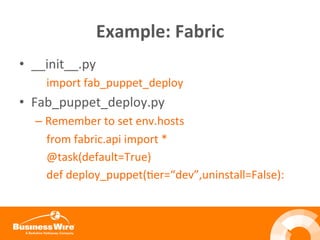
Example:	
  Fabric	
  
•  __init__.py	


  import	
  fab_puppet_deploy	
  
•  Fab_puppet_deploy.py	
  
– Remember	
  to	
  set	
  env.hosts	


  from	
  fabric.api	
  import	
  *	


  @task(default=True)	


  def	
  deploy_puppet(Ber=“dev”,uninstall=False):	
  
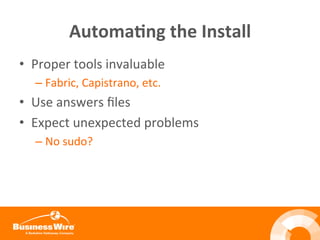
Automa3ng	
  the	
  Install	
  
•  Proper	
  tools	
  invaluable	
  
– Fabric,	
  Capistrano,	
  etc.	
  
•  Use	
  answers	
  files	
  
•  Expect	
  unexpected	
  problems	
  
– No	
  sudo?	


Automa3ng	
  the	
  Install	
  (cont.)	
  
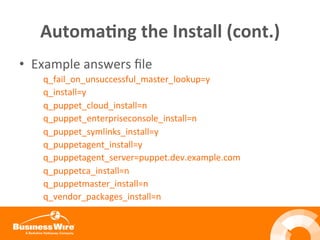
•  Example	
  answers	
  file	
  
q_fail_on_unsuccessful_master_lookup=y	
  	
  
q_install=y	
  
q_puppet_cloud_install=n	
  
q_puppet_enterpriseconsole_install=n	
  
q_puppet_symlinks_install=y	
  
q_puppetagent_install=y	
  
q_puppetagent_server=puppet.dev.example.com	
  
q_puppetca_install=n	
  
q_puppetmaster_install=n	
  
q_vendor_packages_install=n	


Applica3on	
  Deployment	
  
Overview	
  
•  Source	
  control	
  integraBon	
  
•  BASH	
  scripts	
  –	
  easy	
  and	
  powerful	
  
•  Leverage	
  rake	
  API	
  
Early Approach	
  
•  Deploy	
  task	
  file	
  
– Text,	
  lists	
  packages	
  to	
  deploy	
  and	
  tagged	
  version	
  
•  Update	
  Puppet	
  groups	
  
– BASH,	
  rake	
  commands	
  to	
  alter	
  classes	
  /	
  groups	
  
•  Update	
  nodes	
  in	
  (Ber)	
  
– BASH,	
  rake	
  commands	
  to	
  alter	
  node	
  membership	
  
Source	
  Control	
  Workflow	
  
•  Update	
  module	
  -­‐>	
  new	
  tag	
  
– Don’t	
  deploy	
  from	
  trunk!	
  
•  Update	
  deploy	
  task	
  file	
  
•  Check	
  out	
  deploy	
  task	
  file	
  
– svn	
  co	
  hop://repo.example.com/puppet/deployfile	
  
•  Helper	
  script	
  
– Deploys	
  new	
  modules	
  over	
  old	


Introduc3on	
  to	
  Rake	
  
•  Build	
  tool	
  
– Similar	
  to	
  make	
  and	
  Ant	
  
•  Rakefiles	
  are	
  Makefiles	
  
– Standard	
  Ruby	
  syntax	
  
•  Can	
  create	
  mulB-­‐or-­‐single-­‐use	
  tasks	
  
– Namespace:task	
  
Rake	
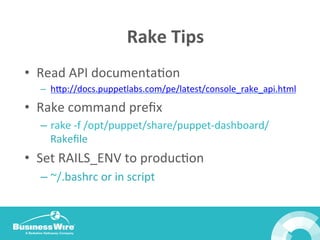
  Tips	
  
•  Read	
  API	
  documentaBon	
  
–  hop://docs.puppetlabs.com/pe/latest/console_rake_api.html	
  
•  Rake	
  command	
  prefix	
  
–  rake	
  -­‐f	
  /opt/puppet/share/puppet-­‐dashboard/
Rakefile	
  
•  Set	
  RAILS_ENV	
  to	
  producBon	
  
– ~/.bashrc	
  or	
  in	
  script	


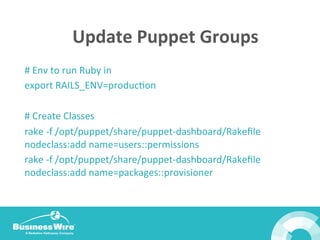
Update	
  Puppet	
  Groups	
  
#	
  Env	
  to	
  run	
  Ruby	
  in	
  
export	
  RAILS_ENV=producBon	


#	
  Create	
  Classes	
  
rake	
  -­‐f	
  /opt/puppet/share/puppet-­‐dashboard/Rakefile	
  
nodeclass:add	
  name=users::permissions	
  
rake	
  -­‐f	
  /opt/puppet/share/puppet-­‐dashboard/Rakefile	
  
nodeclass:add	
  name=packages::provisioner	
  
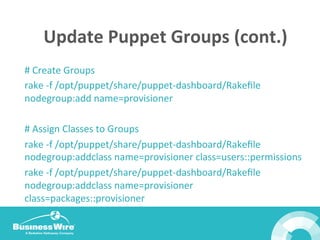
Update	
  Puppet	
  Groups	
  (cont.)	
  
#	
  Create	
  Groups	
  
rake	
  -­‐f	
  /opt/puppet/share/puppet-­‐dashboard/Rakefile	
  
nodegroup:add	
  name=provisioner	


#	
  Assign	
  Classes	
  to	
  Groups	
  
rake	
  -­‐f	
  /opt/puppet/share/puppet-­‐dashboard/Rakefile	
  
nodegroup:addclass	
  name=provisioner	
  class=users::permissions	
  
rake	
  -­‐f	
  /opt/puppet/share/puppet-­‐dashboard/Rakefile	
  
nodegroup:addclass	
  name=provisioner	
  
class=packages::provisioner	
  
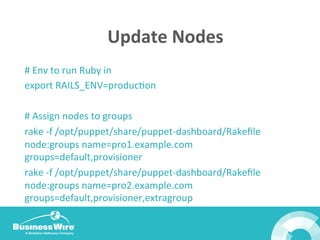
Update	
  Nodes	
  
#	
  Env	
  to	
  run	
  Ruby	
  in	
  
export	
  RAILS_ENV=producBon	


#	
  Assign	
  nodes	
  to	
  groups	
  
rake	
  -­‐f	
  /opt/puppet/share/puppet-­‐dashboard/Rakefile	
  
node:groups	
  name=pro1.example.com	
  
groups=default,provisioner	
  
rake	
  -­‐f	
  /opt/puppet/share/puppet-­‐dashboard/Rakefile	
  
node:groups	
  name=pro2.example.com	
  
groups=default,provisioner,extragroup	
  
Rough	
  Spots	
  
•  Group	
  list	
  must	
  be	
  *complete*	
  
– Rake	
  will	
  recreate	
  the	
  group	
  list	
  for	
  a	
  node	
  
– No	
  incremental	
  addiBon	
  possible	
  
•  Directory	
  ownership	
  
– peadmin	
  /	
  puppet-­‐dashboard	
  or	
  custom	
  user	
  
•  Rake	
  API	
  can	
  be	
  improved	
  
– Nested	
  groups	
  only	
  Puppet	
  Enterprise	
  3.0+	
  
Rough	
  Spots	
  (cont.)	
  
•  Access	
  Control	
  
– No	
  way	
  to	
  limit	
  individual	
  commands	
  	
  
•  TargeBng	
  
– Custom	
  facts	
  and	
  hiera	
  recommended	


Next	
  Steps	
  
• Easy	
  tasks	
  first	
  
• Etc_facts	
  plugin	
  
• Hiera	
  is	
  useful	
  
• Package	
  repository	


Thanks	
  for	
  joining!	
  

Bootstrapping Puppet and Application Deployment - PuppetConf 2013

  • 1.
    Bootstrapping  Puppet  &   Applica3on  Deployment     PuppetConf  ‘13   August  22,  2013   Presented by: Robert de Macedo Soares Application Security Engineer Business Wire robert.soares@businesswire.com @argher #puppetconf
  • 2.
    Purpose  of  Puppet   •  What  problems  are  we  trying  to  solve?   •  RemediaBon  or  improvement?   •  Are  our  exisBng  servers  a  mess?     •  What  are  our  plaDorms?        
  • 3.
    Scenario  –  Best  Case   •  Servers  are  new   •  Servers  are  uniform   •  No  fixes  needed   •  Everyone  on  the  same  page   •  One  operaBng  system     Idealis)c    
  • 4.
    Scenario  -­‐  Reality   •  No  baseline  configuraBon   •  Inconsistent  management  pracBces   •  Many  fixes  required   •  Teams  have  differing  requirements   •  MulBple  operaBng  systems     Realis)c    
  • 5.
    Divergent  Needs   Developers   •  Need  deployment  soluBon   •  Idempotence   System  Administrators   •  System  ConfiguraBon   •  Password  &  User  Management    
  • 6.
    Divergent  Needs  (cont.)   Security  &  Management   •  Host-­‐based  firewall  management   •  Auditability   •  Compliance   •  ReporBng  
  • 7.
    Divergent  Opera3ng  Systems   •  Linux   – Different  DistribuBons  (RedHat,  Debian,  etc.)   •  Windows   – Different  GeneraBons   •  UNIX   – Solaris?  HP-­‐UX?      
  • 8.
    Decision  Time   • Right  tool  for  the  job   – Puppet  Enterprise  vs.  Open  Source   •  Test  before  comming   •  Older  or  uncommon  operaBng  systems?   – Puppet  Enterprise  simplifies  deployment   •  <=10  servers?   – Puppet  Enterprise  is  free  for  10  servers    
  • 9.
    Open  Source  –  Why?   •  Free   •  Valuable  user  community   •  Foreman   – Complex  but  powerful   •  Free    
  • 10.
    Puppet  Enterprise  –  Why?   •  Integrated  Dashboard   – Auditability  /  ReporBng   – Server  status  at  a  glance   – MCollecBve  integraBon  (Live  Management)   •  Prebuilt  Solaris  and  Linux  packages   •  Support!   – DownBme  more  expensive  than  licenses      
  • 11.
  • 12.
    Infrastructure  Deployment   • What’s  our  architecture?   – How  many  Bers?   – How  many  Puppet  masters?   – ReplicaBon?   •  AutomaBon  tool  
  • 13.
    Suggested  Architecture   • Master  per  Ber   •  ReplicaBon  in  producBon   – Nice  to  have   •  Lab  master  and  clients  for  experimentaBon   – Cover  your  OS  types   •  Source  control  for  manifests    
  • 14.
    Tiered  Infrastructure   • Two  Bers  minimum   – Dev   – ProducBon   •  More  Bers  beneficial   – Test  /  QA  Ber  exposes  problems  before  prod    
  • 15.
    Introduc3on  to  Automa3on   •  What  is  an  automaBon  tool?   •  Why  use  one?   •  Which  tool  is  best?   – Fabric,  Capistrano,  etc.  
  • 16.
    Example:  Fabric   • __init__.py          import  fab_puppet_deploy   •  Fab_puppet_deploy.py   – Remember  to  set  env.hosts          from  fabric.api  import  *          @task(default=True)          def  deploy_puppet(Ber=“dev”,uninstall=False):  
  • 17.
    Automa3ng  the  Install   •  Proper  tools  invaluable   – Fabric,  Capistrano,  etc.   •  Use  answers  files   •  Expect  unexpected  problems   – No  sudo?    
  • 18.
    Automa3ng  the  Install  (cont.)   •  Example  answers  file   q_fail_on_unsuccessful_master_lookup=y     q_install=y   q_puppet_cloud_install=n   q_puppet_enterpriseconsole_install=n   q_puppet_symlinks_install=y   q_puppetagent_install=y   q_puppetagent_server=puppet.dev.example.com   q_puppetca_install=n   q_puppetmaster_install=n   q_vendor_packages_install=n    
  • 19.
  • 20.
    Overview   •  Source  control  integraBon   •  BASH  scripts  –  easy  and  powerful   •  Leverage  rake  API  
  • 21.
    Early Approach   • Deploy  task  file   – Text,  lists  packages  to  deploy  and  tagged  version   •  Update  Puppet  groups   – BASH,  rake  commands  to  alter  classes  /  groups   •  Update  nodes  in  (Ber)   – BASH,  rake  commands  to  alter  node  membership  
  • 22.
    Source  Control  Workflow   •  Update  module  -­‐>  new  tag   – Don’t  deploy  from  trunk!   •  Update  deploy  task  file   •  Check  out  deploy  task  file   – svn  co  hop://repo.example.com/puppet/deployfile   •  Helper  script   – Deploys  new  modules  over  old    
  • 23.
    Introduc3on  to  Rake   •  Build  tool   – Similar  to  make  and  Ant   •  Rakefiles  are  Makefiles   – Standard  Ruby  syntax   •  Can  create  mulB-­‐or-­‐single-­‐use  tasks   – Namespace:task  
  • 24.
    Rake  Tips   • Read  API  documentaBon   –  hop://docs.puppetlabs.com/pe/latest/console_rake_api.html   •  Rake  command  prefix   –  rake  -­‐f  /opt/puppet/share/puppet-­‐dashboard/ Rakefile   •  Set  RAILS_ENV  to  producBon   – ~/.bashrc  or  in  script    
  • 25.
    Update  Puppet  Groups   #  Env  to  run  Ruby  in   export  RAILS_ENV=producBon     #  Create  Classes   rake  -­‐f  /opt/puppet/share/puppet-­‐dashboard/Rakefile   nodeclass:add  name=users::permissions   rake  -­‐f  /opt/puppet/share/puppet-­‐dashboard/Rakefile   nodeclass:add  name=packages::provisioner  
  • 26.
    Update  Puppet  Groups  (cont.)   #  Create  Groups   rake  -­‐f  /opt/puppet/share/puppet-­‐dashboard/Rakefile   nodegroup:add  name=provisioner     #  Assign  Classes  to  Groups   rake  -­‐f  /opt/puppet/share/puppet-­‐dashboard/Rakefile   nodegroup:addclass  name=provisioner  class=users::permissions   rake  -­‐f  /opt/puppet/share/puppet-­‐dashboard/Rakefile   nodegroup:addclass  name=provisioner   class=packages::provisioner  
  • 27.
    Update  Nodes   #  Env  to  run  Ruby  in   export  RAILS_ENV=producBon     #  Assign  nodes  to  groups   rake  -­‐f  /opt/puppet/share/puppet-­‐dashboard/Rakefile   node:groups  name=pro1.example.com   groups=default,provisioner   rake  -­‐f  /opt/puppet/share/puppet-­‐dashboard/Rakefile   node:groups  name=pro2.example.com   groups=default,provisioner,extragroup  
  • 28.
    Rough  Spots   • Group  list  must  be  *complete*   – Rake  will  recreate  the  group  list  for  a  node   – No  incremental  addiBon  possible   •  Directory  ownership   – peadmin  /  puppet-­‐dashboard  or  custom  user   •  Rake  API  can  be  improved   – Nested  groups  only  Puppet  Enterprise  3.0+  
  • 29.
    Rough  Spots  (cont.)   •  Access  Control   – No  way  to  limit  individual  commands     •  TargeBng   – Custom  facts  and  hiera  recommended    
  • 30.
    Next  Steps   • Easy  tasks  first   • Etc_facts  plugin   • Hiera  is  useful   • Package  repository     Thanks  for  joining!