dcjq[5] Node.js: What Is It, How
 Does It Work, and What Can I
     Use It For Tomorrow?


             April 28, 2011
            Jonathan Altman
             http://async.io/
               @async_io
what we’ll cover
• What node is
• Why node is the way it is
• What you can do with it
• Set up a running framework to build web apps
• Dissect a simple node web application
node.js is:
•   A non-browser Javascript toolkit/
    framework started by Ryan Dahl
•   Available for *nix-based systems: Linux, OS X, OpenSolaris (and Windows)

•   Built on top of Google’s V8 Javascript engine

•   Compatible with many common Javascript libraries out of the box via
    CommonJS support (http://www.commonjs.org/)

•   A batteries-included framework: HTTP and socket support baked into the
    core of the framework

•   A framework that is easy to build tooling on top of

•   Most importantly: asynchronous from the ground up
node.js is:
•   A non-browser Javascript toolkit/framework started by Ryan Dahl


•   Available for *nix-based systems: Linux,
    OS X, OpenSolaris (and Windows)
•   Built on top of Google’s V8 Javascript engine

•   Compatible with many common Javascript libraries out of the box via
    CommonJS support (http://www.commonjs.org/)

•   A batteries-included framework: HTTP and socket support baked into the core
    of the framework

•   A framework that is easy to build tooling on top of

•   Most importantly: asynchronous from the ground up
node.js is:
•   A non-browser Javascript toolkit/framework started by Ryan Dahl

•   Available for *nix-based systems: Linux, OS X, OpenSolaris (and Windows)


•   Built on top of Google’s V8 Javascript
    engine
•   Compatible with many common Javascript libraries out of the box via
    CommonJS support (http://www.commonjs.org/)

•   A batteries-included framework: HTTP and socket support baked into the
    core of the framework

•   A framework that is easy to build tooling on top of

•   Most importantly: asynchronous from the ground up
node.js is:
•   A non-browser Javascript toolkit/framework started by Ryan Dahl

•   Available for *nix-based systems: Linux, OS X, OpenSolaris (and Windows)

•   Built on top of Google’s V8 Javascript engine


•   Compatible with many common Javascript
    libraries out of the box via CommonJS
    support (http://www.commonjs.org/)
•   A batteries-included framework: HTTP and socket support baked into the core of
    the framework

•   A framework that is easy to build tooling on top of

•   Most importantly: asynchronous from the ground up
node.js is:
•   A non-browser Javascript toolkit/framework started by Ryan Dahl

•   Available for *nix-based systems: Linux, OS X, OpenSolaris (and Windows)

•   Built on top of Google’s V8 Javascript engine

•   Compatible with many common Javascript libraries out of the box via CommonJS
    support (http://www.commonjs.org/)


•   A batteries-included framework: HTTP
    and socket support baked into the core
    of the framework
•   A framework that is easy to build tooling on top of

•   Most importantly: asynchronous from the ground up
node.js is:
•   A non-browser Javascript toolkit/framework started by Ryan Dahl

•   Available for *nix-based systems: Linux, OS X, OpenSolaris (and Windows)

•   Built on top of Google’s V8 Javascript engine

•   Compatible with many common Javascript libraries out of the box via
    CommonJS support (http://www.commonjs.org/)

•   A batteries-included framework: HTTP and socket support baked into the
    core of the framework


•   A framework that is easy to build
    tooling on top of
•   Most importantly: asynchronous from the ground up
node.js is:
•   A non-browser Javascript toolkit/framework started by Ryan Dahl

•   Available for *nix-based systems: Linux, OS X, OpenSolaris (and Windows)

•   Built on top of Google’s V8 Javascript engine

•   Compatible with many common Javascript libraries out of the box via
    CommonJS support (http://www.commonjs.org/)

•   A batteries-included framework: HTTP and socket support baked into the
    core of the framework

• A framework that is easy to build tooling on top of
• Most importantly: asynchronous
    from the ground up
so what does code look like?
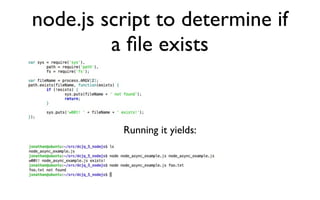
node.js script to determine if
         a file exists


          Running it yields:
whoa, back up: asynchronous?
•   Core trait of the framework
•   Provides scalability
• Long-running operations do not block your server
• Coding looks odd for server writers
whoa, back up: asynchronous?
• Core trait of the framework
• Provides scalability
• Long-running operations do not block your server
• Coding looks odd for server writers
whoa, back up: asynchronous?
• Core trait of the framework
• Provides scalability
• Long-running operations do not block
  your server
• Coding looks odd for server writers
whoa, back up: asynchronous?
• Core trait of the framework
• Provides scalability
• Long-running operations do not block your server
• Coding looks odd for server writers
code looks odd?
• node:                                                      • jQuery:
var sys = require('sys'),                                           $('.station_map').live("pagecreate", function() {

 path = require('path'),                                        if(navigator.geolocation) {

 fs = require('fs');                                              navigator.geolocation.getCurrentPosition(function(position){
                                                                     initializeMap(position.coords.latitude,position.coords.longit
var fileName = process.ARGV[2];                               ude);
path.exists(fileName, function(exists) {                            });

 if (!exists) {                                                 }

 
 sys.puts(fileName + ' not found');                          });

 
 return;                                                  // snippet taken from https://github.com/mikeymckay/Capital-

 }                                                          Bikeshare/blob/master/capitalbikeshare.js


 sys.puts('w00t! ' + fileName + ' exists!');
});
// https://github.com/jonathana/dcjq_5_nodejs/blob/master/
node_async_example.js


 Doesn’t the code look just like the event-driven javascript DHTML-
           based web apps have been written in for years?
node: up and running
•   node.js and its ecosystem still
    evolves very fast
•   Highly recommended to not put any of it in your
    system paths
•   We’ll use ~/local (lots of examples do so...)
node: up and running
• node.js and its ecosystem still evolves very fast
•   Highly recommended to not put
    any of it in your system paths
• We’ll use ~/local (lots of examples do so...)
node: up and running
•   node.js and its ecosystem still evolves very fast
• Highly recommended to not put any of it in your
    system paths

•   We’ll use ~/local (lots of
    examples do so...)
be careful for:
•   Highly recommended not to
    install node in “system”
    locations yet
•   Uncertain security/threat model
• Hide behind a reverse proxy
be careful for:
• Highly recommended not to install node in
    “system” locations yet

•   Uncertain security/threat model
• Hide behind a reverse proxy
be careful for:
• Highly recommended not to install node in
    “system” locations yet
•   Uncertain security/threat model

•   Hide behind a reverse proxy
be careful for:
• Highly recommended not to install node in
    “system” locations yet
•   Uncertain security/threat model
• Hide behind a reverse proxy
•   Everything in this presentation
    could be wrong by now!
basic components
•   node.js itself
• nave: manages multiple versions of node
• npm: node package manager. Like ruby’s gem or
    python’s easy_install
basic components
•   node.js itself

•   nave: manages multiple versions
    of node
•   npm: node package manager. Like ruby’s gem or
    python’s easy_install
basic components
•   node.js itself
• nave: manages multiple versions of node
•   npm: node package manager.
    Like ruby’s gem or python’s
    easy_install
managing versions-nave
•   Again, node.js and its libraries
    move fast
• Like python’s virtualenv or ruby’s rvm, there are
    nave and nvm for node
•   Let’s use nave
• Allows us to have a “stable” environment
• Allows us to test newer versions without risking
    “stable”
managing versions-nave
•   Again, node.js and its libraries move fast

•   Like python’s virtualenv or
    ruby’s rvm, there are nave and
    nvm for node
•   Let’s use nave
• Allows us to have a “stable” environment
• Allows us to test newer versions without risking
managing versions-nave
•   Again, node.js and its libraries move fast
• Like python’s virtualenv or ruby’s rvm, there are
    nave and nvm for node

•   Let’s use nave
•   Allows us to have a “stable” environment
• Allows us to test newer versions without risking
    “stable”
managing versions-nave
•   Again, node.js and its libraries move fast
• Like python’s virtualenv or ruby’s rvm, there are
    nave and nvm for node
•   Let’s use nave

•   Allows us to have a “stable”
    environment
•   Allows us to test newer versions without risking
    “stable”
managing versions-nave
•   Again, node.js and its libraries move fast
• Like python’s virtualenv or ruby’s rvm, there are
    nave and nvm for node
•   Let’s use nave
• Allows us to have a “stable” environment

•   Allows us to test newer
    versions without risking “stable”
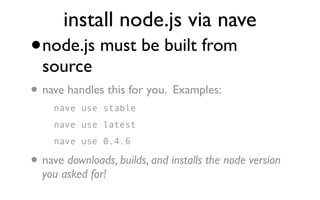
install node.js via nave
•   node.js must be built from
    source
•   nave handles this for you. Examples:
      nave use stable
      nave use latest
      nave use 0.4.6

• nave downloads, builds, and installs the node version
    you asked for!
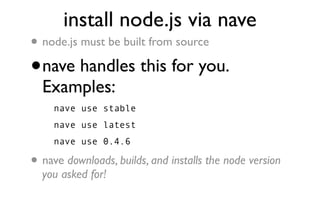
install node.js via nave
•   node.js must be built from source

•   nave handles this for you.
    Examples:
      nave use stable
      nave use latest
      nave use 0.4.6

•   nave downloads, builds, and installs the node version
    you asked for!
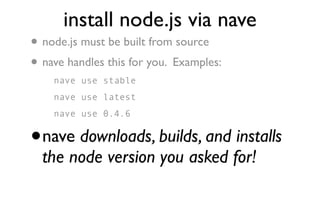
install node.js via nave
•   node.js must be built from source
• nave handles this for you. Examples:
      nave use stable
      nave use latest
      nave use 0.4.6


•   nave downloads, builds, and installs
    the node version you asked for!
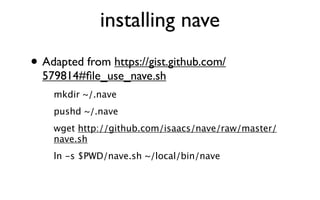
installing nave
• Adapted from https://gist.github.com/
  579814#file_use_nave.sh
    mkdir ~/.nave
    pushd ~/.nave
    wget http://github.com/isaacs/nave/raw/master/
    nave.sh
    ln -s $PWD/nave.sh ~/local/bin/nave
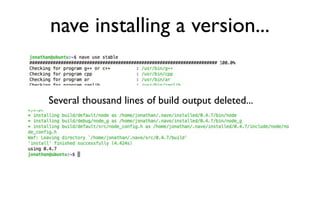
nave installing a version...


Several thousand lines of build output deleted...
npm: node package manager
•   Handles easy installation of node
    packages
• Databases: mysql, postgresql, sqlite, mongodb, etc
• DOM: jsdom
• web frameworks: e.g. express, connect, spark/spark2
• DOM manipulation: YUI3, jQuery
• Utility libraries: backbone/spine, underscore, socket.io
• Templating: mustache, handlebars, ejs, etc
• Testing: vows, expresso, nodemock, nodeunit
npm: node package manager
• Handles easy installation of node packages
• Databases: mysql, postgresql, sqlite, mongodb, etc
• DOM: jsdom
• web frameworks: e.g. express, connect, spark/spark2
• DOM manipulation:YUI3, jQuery
• Utility libraries: backbone/spine, underscore,
  socket.io
• Templating: mustache, handlebars, ejs, etc
• Testing: vows, expresso, nodemock, nodeunit
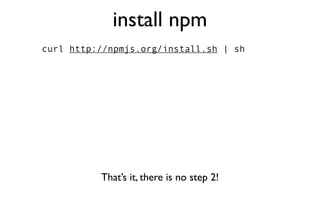
install npm
curl http://npmjs.org/install.sh | sh


          That’s it, there is no step 2!
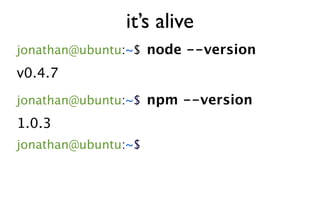
it’s alive
jonathan@ubuntu:~$ node --version
v0.4.7
jonathan@ubuntu:~$ npm --version
1.0.3
jonathan@ubuntu:~$
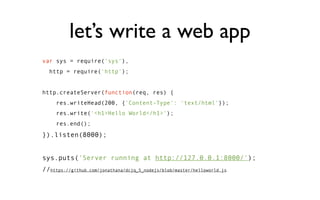
let’s write a web app
var sys = require('sys'),
  http = require('http');


http.createServer(function(req, res) {
     res.writeHead(200, {'Content-Type': 'text/html'});
     res.write('<h1>Hello World</h1>');
     res.end();
}).listen(8000);


sys.puts('Server running at http://127.0.0.1:8000/');
//https://github.com/jonathana/dcjq_5_nodejs/blob/master/helloworld.js
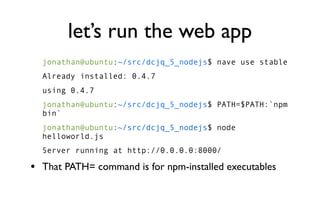
let’s run the web app
  jonathan@ubuntu:~/src/dcjq_5_nodejs$ nave use stable
  Already installed: 0.4.7
  using 0.4.7
  jonathan@ubuntu:~/src/dcjq_5_nodejs$ PATH=$PATH:`npm
  bin`
  jonathan@ubuntu:~/src/dcjq_5_nodejs$ node
  helloworld.js
  Server running at http://0.0.0.0:8000/

• That PATH= command is for npm-installed executables
and visit our webpage
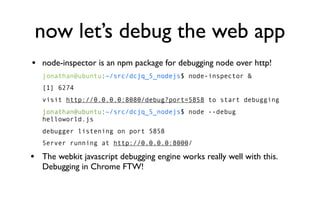
now let’s debug the web app
•   node-inspector is an npm package for debugging node over http!
    jonathan@ubuntu:~/src/dcjq_5_nodejs$ node-inspector &
    [1] 6274
    visit http://0.0.0.0:8080/debug?port=5858 to start debugging
    jonathan@ubuntu:~/src/dcjq_5_nodejs$ node --debug
    helloworld.js
    debugger listening on port 5858
    Server running at http://0.0.0.0:8000/

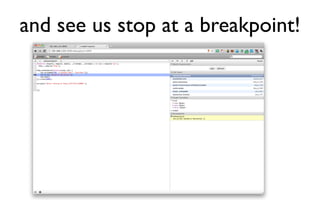
•   The webkit javascript debugging engine works really well with this.
    Debugging in Chrome FTW!
and see us stop at a breakpoint!
advantages of node
•   Javascript makes callback-based
    (“event”) programming familiar
• Fast: framework says take operations that normally block
    webserver and make them asynchronous
• Same language on client and server
• Same libraries on client and server
• Long-running connections to lots of clients: Comet
advantages of node
• Javascript makes callback-based (“event”) programming familiar
• Fast: framework says take operations
  that normally block webserver and
  make them asynchronous
• Same language on client and server
• Same libraries on client and server
• Long-running connections to lots of clients: Comet
advantages of node
• Javascript makes callback-based (“event”) programming familiar
• Fast: framework says take operations that normally block
    webserver and make them asynchronous

•   Same language on client and server
• Same libraries on client and server
• Long-running connections to lots of clients: Comet
advantages of node
• Javascript makes callback-based (“event”) programming familiar
• Fast: framework says take operations that normally block
    webserver and make them asynchronous
• Same language on client and server
• Same libraries on client and server
• Long-running connections to lots of clients: Comet
advantages of node
• Javascript makes callback-based (“event”) programming familiar
• Fast: framework says take operations that normally block
    webserver and make them asynchronous
• Same language on client and server
• Same libraries on client and server

• Long-running connections to lots of
  clients: Comet
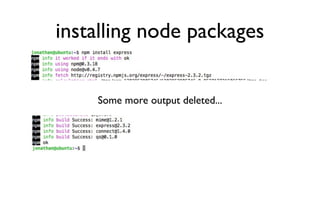
installing node packages


    Some more output deleted...
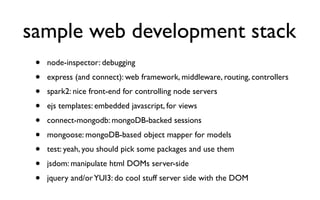
sample web development stack
 •   node-inspector: debugging
 •   express (and connect): web framework, middleware, routing, controllers
 •   spark2: nice front-end for controlling node servers
 •   ejs templates: embedded javascript, for views
 •   connect-mongodb: mongoDB-backed sessions
 •   mongoose: mongoDB-based object mapper for models
 •   test: yeah, you should pick some packages and use them
 •   jsdom: manipulate html DOMs server-side
 •   jquery and/or YUI3: do cool stuff server side with the DOM
Examples/Sample App
• See https://github.com/jonathana/dcjq_5_nodejs for the
  example code used in this presentation and a heavily-
  commented simple web app built using many of the
  packages on the previous slides
appendix: Resources
•   Ryan Dahl: (http://tinyclouds.org/, https://github.com/ry)
•   Ryan’s jsconf 2009 presentation: http://s3.amazonaws.com/four.livejournal/
    20091117/jsconf.pdf
•   Simon Willison’s blog post re: node.js: http://simonwillison.net/2009/Nov/23/node/
•   node.js home: http://nodejs.org/, git repo: https://github.com/joyent/node/

•   node modules: https://github.com/joyent/node/wiki/modules
•   Isaac Schlueter: (npm and nave) https://github.com/isaacs/, http://blog.izs.me/
•   Dav Glass’ mind-bending demonstration of using YUI server-side: http://
    developer.yahoo.com/yui/theater/video.php?v=glass-node
•   Nice list of some apps built using node.js + express: http://expressjs.com/
    applications.html

Dcjq node.js presentation

  • 1.
    dcjq[5] Node.js: WhatIs It, How Does It Work, and What Can I Use It For Tomorrow? April 28, 2011 Jonathan Altman http://async.io/ @async_io
  • 2.
    what we’ll cover •What node is • Why node is the way it is • What you can do with it • Set up a running framework to build web apps • Dissect a simple node web application
  • 3.
    node.js is: • A non-browser Javascript toolkit/ framework started by Ryan Dahl • Available for *nix-based systems: Linux, OS X, OpenSolaris (and Windows) • Built on top of Google’s V8 Javascript engine • Compatible with many common Javascript libraries out of the box via CommonJS support (http://www.commonjs.org/) • A batteries-included framework: HTTP and socket support baked into the core of the framework • A framework that is easy to build tooling on top of • Most importantly: asynchronous from the ground up
  • 4.
    node.js is: • A non-browser Javascript toolkit/framework started by Ryan Dahl • Available for *nix-based systems: Linux, OS X, OpenSolaris (and Windows) • Built on top of Google’s V8 Javascript engine • Compatible with many common Javascript libraries out of the box via CommonJS support (http://www.commonjs.org/) • A batteries-included framework: HTTP and socket support baked into the core of the framework • A framework that is easy to build tooling on top of • Most importantly: asynchronous from the ground up
  • 5.
    node.js is: • A non-browser Javascript toolkit/framework started by Ryan Dahl • Available for *nix-based systems: Linux, OS X, OpenSolaris (and Windows) • Built on top of Google’s V8 Javascript engine • Compatible with many common Javascript libraries out of the box via CommonJS support (http://www.commonjs.org/) • A batteries-included framework: HTTP and socket support baked into the core of the framework • A framework that is easy to build tooling on top of • Most importantly: asynchronous from the ground up
  • 6.
    node.js is: • A non-browser Javascript toolkit/framework started by Ryan Dahl • Available for *nix-based systems: Linux, OS X, OpenSolaris (and Windows) • Built on top of Google’s V8 Javascript engine • Compatible with many common Javascript libraries out of the box via CommonJS support (http://www.commonjs.org/) • A batteries-included framework: HTTP and socket support baked into the core of the framework • A framework that is easy to build tooling on top of • Most importantly: asynchronous from the ground up
  • 7.
    node.js is: • A non-browser Javascript toolkit/framework started by Ryan Dahl • Available for *nix-based systems: Linux, OS X, OpenSolaris (and Windows) • Built on top of Google’s V8 Javascript engine • Compatible with many common Javascript libraries out of the box via CommonJS support (http://www.commonjs.org/) • A batteries-included framework: HTTP and socket support baked into the core of the framework • A framework that is easy to build tooling on top of • Most importantly: asynchronous from the ground up
  • 8.
    node.js is: • A non-browser Javascript toolkit/framework started by Ryan Dahl • Available for *nix-based systems: Linux, OS X, OpenSolaris (and Windows) • Built on top of Google’s V8 Javascript engine • Compatible with many common Javascript libraries out of the box via CommonJS support (http://www.commonjs.org/) • A batteries-included framework: HTTP and socket support baked into the core of the framework • A framework that is easy to build tooling on top of • Most importantly: asynchronous from the ground up
  • 9.
    node.js is: • A non-browser Javascript toolkit/framework started by Ryan Dahl • Available for *nix-based systems: Linux, OS X, OpenSolaris (and Windows) • Built on top of Google’s V8 Javascript engine • Compatible with many common Javascript libraries out of the box via CommonJS support (http://www.commonjs.org/) • A batteries-included framework: HTTP and socket support baked into the core of the framework • A framework that is easy to build tooling on top of • Most importantly: asynchronous from the ground up
  • 10.
    so what doescode look like?
  • 11.
    node.js script todetermine if a file exists Running it yields:
  • 12.
    whoa, back up:asynchronous? • Core trait of the framework • Provides scalability • Long-running operations do not block your server • Coding looks odd for server writers
  • 13.
    whoa, back up:asynchronous? • Core trait of the framework • Provides scalability • Long-running operations do not block your server • Coding looks odd for server writers
  • 14.
    whoa, back up:asynchronous? • Core trait of the framework • Provides scalability • Long-running operations do not block your server • Coding looks odd for server writers
  • 15.
    whoa, back up:asynchronous? • Core trait of the framework • Provides scalability • Long-running operations do not block your server • Coding looks odd for server writers
  • 16.
    code looks odd? •node: • jQuery: var sys = require('sys'), $('.station_map').live("pagecreate", function() { path = require('path'),     if(navigator.geolocation) { fs = require('fs');       navigator.geolocation.getCurrentPosition(function(position){         initializeMap(position.coords.latitude,position.coords.longit var fileName = process.ARGV[2]; ude); path.exists(fileName, function(exists) {       }); if (!exists) {     } sys.puts(fileName + ' not found');   }); return; // snippet taken from https://github.com/mikeymckay/Capital- } Bikeshare/blob/master/capitalbikeshare.js sys.puts('w00t! ' + fileName + ' exists!'); }); // https://github.com/jonathana/dcjq_5_nodejs/blob/master/ node_async_example.js Doesn’t the code look just like the event-driven javascript DHTML- based web apps have been written in for years?
  • 17.
    node: up andrunning • node.js and its ecosystem still evolves very fast • Highly recommended to not put any of it in your system paths • We’ll use ~/local (lots of examples do so...)
  • 18.
    node: up andrunning • node.js and its ecosystem still evolves very fast • Highly recommended to not put any of it in your system paths • We’ll use ~/local (lots of examples do so...)
  • 19.
    node: up andrunning • node.js and its ecosystem still evolves very fast • Highly recommended to not put any of it in your system paths • We’ll use ~/local (lots of examples do so...)
  • 20.
    be careful for: • Highly recommended not to install node in “system” locations yet • Uncertain security/threat model • Hide behind a reverse proxy
  • 21.
    be careful for: •Highly recommended not to install node in “system” locations yet • Uncertain security/threat model • Hide behind a reverse proxy
  • 22.
    be careful for: •Highly recommended not to install node in “system” locations yet • Uncertain security/threat model • Hide behind a reverse proxy
  • 23.
    be careful for: •Highly recommended not to install node in “system” locations yet • Uncertain security/threat model • Hide behind a reverse proxy • Everything in this presentation could be wrong by now!
  • 24.
    basic components • node.js itself • nave: manages multiple versions of node • npm: node package manager. Like ruby’s gem or python’s easy_install
  • 25.
    basic components • node.js itself • nave: manages multiple versions of node • npm: node package manager. Like ruby’s gem or python’s easy_install
  • 26.
    basic components • node.js itself • nave: manages multiple versions of node • npm: node package manager. Like ruby’s gem or python’s easy_install
  • 27.
    managing versions-nave • Again, node.js and its libraries move fast • Like python’s virtualenv or ruby’s rvm, there are nave and nvm for node • Let’s use nave • Allows us to have a “stable” environment • Allows us to test newer versions without risking “stable”
  • 28.
    managing versions-nave • Again, node.js and its libraries move fast • Like python’s virtualenv or ruby’s rvm, there are nave and nvm for node • Let’s use nave • Allows us to have a “stable” environment • Allows us to test newer versions without risking
  • 29.
    managing versions-nave • Again, node.js and its libraries move fast • Like python’s virtualenv or ruby’s rvm, there are nave and nvm for node • Let’s use nave • Allows us to have a “stable” environment • Allows us to test newer versions without risking “stable”
  • 30.
    managing versions-nave • Again, node.js and its libraries move fast • Like python’s virtualenv or ruby’s rvm, there are nave and nvm for node • Let’s use nave • Allows us to have a “stable” environment • Allows us to test newer versions without risking “stable”
  • 31.
    managing versions-nave • Again, node.js and its libraries move fast • Like python’s virtualenv or ruby’s rvm, there are nave and nvm for node • Let’s use nave • Allows us to have a “stable” environment • Allows us to test newer versions without risking “stable”
  • 32.
    install node.js vianave • node.js must be built from source • nave handles this for you. Examples: nave use stable nave use latest nave use 0.4.6 • nave downloads, builds, and installs the node version you asked for!
  • 33.
    install node.js vianave • node.js must be built from source • nave handles this for you. Examples: nave use stable nave use latest nave use 0.4.6 • nave downloads, builds, and installs the node version you asked for!
  • 34.
    install node.js vianave • node.js must be built from source • nave handles this for you. Examples: nave use stable nave use latest nave use 0.4.6 • nave downloads, builds, and installs the node version you asked for!
  • 35.
    installing nave • Adaptedfrom https://gist.github.com/ 579814#file_use_nave.sh mkdir ~/.nave pushd ~/.nave wget http://github.com/isaacs/nave/raw/master/ nave.sh ln -s $PWD/nave.sh ~/local/bin/nave
  • 36.
    nave installing aversion... Several thousand lines of build output deleted...
  • 37.
    npm: node packagemanager • Handles easy installation of node packages • Databases: mysql, postgresql, sqlite, mongodb, etc • DOM: jsdom • web frameworks: e.g. express, connect, spark/spark2 • DOM manipulation: YUI3, jQuery • Utility libraries: backbone/spine, underscore, socket.io • Templating: mustache, handlebars, ejs, etc • Testing: vows, expresso, nodemock, nodeunit
  • 38.
    npm: node packagemanager • Handles easy installation of node packages • Databases: mysql, postgresql, sqlite, mongodb, etc • DOM: jsdom • web frameworks: e.g. express, connect, spark/spark2 • DOM manipulation:YUI3, jQuery • Utility libraries: backbone/spine, underscore, socket.io • Templating: mustache, handlebars, ejs, etc • Testing: vows, expresso, nodemock, nodeunit
  • 39.
    install npm curl http://npmjs.org/install.sh| sh That’s it, there is no step 2!
  • 40.
    it’s alive jonathan@ubuntu:~$ node--version v0.4.7 jonathan@ubuntu:~$ npm --version 1.0.3 jonathan@ubuntu:~$
  • 41.
    let’s write aweb app var sys = require('sys'), http = require('http'); http.createServer(function(req, res) { res.writeHead(200, {'Content-Type': 'text/html'}); res.write('<h1>Hello World</h1>'); res.end(); }).listen(8000); sys.puts('Server running at http://127.0.0.1:8000/'); //https://github.com/jonathana/dcjq_5_nodejs/blob/master/helloworld.js
  • 42.
    let’s run theweb app jonathan@ubuntu:~/src/dcjq_5_nodejs$ nave use stable Already installed: 0.4.7 using 0.4.7 jonathan@ubuntu:~/src/dcjq_5_nodejs$ PATH=$PATH:`npm bin` jonathan@ubuntu:~/src/dcjq_5_nodejs$ node helloworld.js Server running at http://0.0.0.0:8000/ • That PATH= command is for npm-installed executables
  • 43.
  • 44.
    now let’s debugthe web app • node-inspector is an npm package for debugging node over http! jonathan@ubuntu:~/src/dcjq_5_nodejs$ node-inspector & [1] 6274 visit http://0.0.0.0:8080/debug?port=5858 to start debugging jonathan@ubuntu:~/src/dcjq_5_nodejs$ node --debug helloworld.js debugger listening on port 5858 Server running at http://0.0.0.0:8000/ • The webkit javascript debugging engine works really well with this. Debugging in Chrome FTW!
  • 45.
    and see usstop at a breakpoint!
  • 46.
    advantages of node • Javascript makes callback-based (“event”) programming familiar • Fast: framework says take operations that normally block webserver and make them asynchronous • Same language on client and server • Same libraries on client and server • Long-running connections to lots of clients: Comet
  • 47.
    advantages of node •Javascript makes callback-based (“event”) programming familiar • Fast: framework says take operations that normally block webserver and make them asynchronous • Same language on client and server • Same libraries on client and server • Long-running connections to lots of clients: Comet
  • 48.
    advantages of node •Javascript makes callback-based (“event”) programming familiar • Fast: framework says take operations that normally block webserver and make them asynchronous • Same language on client and server • Same libraries on client and server • Long-running connections to lots of clients: Comet
  • 49.
    advantages of node •Javascript makes callback-based (“event”) programming familiar • Fast: framework says take operations that normally block webserver and make them asynchronous • Same language on client and server • Same libraries on client and server • Long-running connections to lots of clients: Comet
  • 50.
    advantages of node •Javascript makes callback-based (“event”) programming familiar • Fast: framework says take operations that normally block webserver and make them asynchronous • Same language on client and server • Same libraries on client and server • Long-running connections to lots of clients: Comet
  • 51.
    installing node packages Some more output deleted...
  • 52.
    sample web developmentstack • node-inspector: debugging • express (and connect): web framework, middleware, routing, controllers • spark2: nice front-end for controlling node servers • ejs templates: embedded javascript, for views • connect-mongodb: mongoDB-backed sessions • mongoose: mongoDB-based object mapper for models • test: yeah, you should pick some packages and use them • jsdom: manipulate html DOMs server-side • jquery and/or YUI3: do cool stuff server side with the DOM
  • 53.
    Examples/Sample App • Seehttps://github.com/jonathana/dcjq_5_nodejs for the example code used in this presentation and a heavily- commented simple web app built using many of the packages on the previous slides
  • 54.
    appendix: Resources • Ryan Dahl: (http://tinyclouds.org/, https://github.com/ry) • Ryan’s jsconf 2009 presentation: http://s3.amazonaws.com/four.livejournal/ 20091117/jsconf.pdf • Simon Willison’s blog post re: node.js: http://simonwillison.net/2009/Nov/23/node/ • node.js home: http://nodejs.org/, git repo: https://github.com/joyent/node/ • node modules: https://github.com/joyent/node/wiki/modules • Isaac Schlueter: (npm and nave) https://github.com/isaacs/, http://blog.izs.me/ • Dav Glass’ mind-bending demonstration of using YUI server-side: http:// developer.yahoo.com/yui/theater/video.php?v=glass-node • Nice list of some apps built using node.js + express: http://expressjs.com/ applications.html