



Joomla! SEO
Technical Search Engine Optimisation
René Kreijveld
 Internet developer
Optimising your website for


  requires 2 things well setup:
•Your content must be in order
•Your template must be spiderable and
 search engine friendly
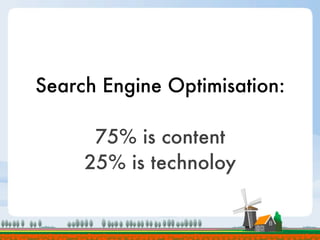
Search Engine Optimisation:

      75% is content
     25% is technoloy
This presentation
is about technology.
     Sorry ;-) ...
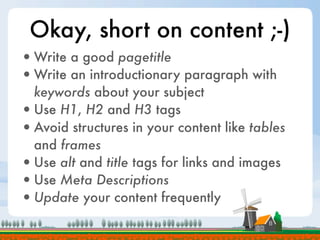
Okay, short on content ;-)
• Write a good pagetitle
• Write an introductionary paragraph with
  keywords about your subject
• Use H1, H2 and H3 tags
• Avoid structures in your content like tables
  and frames
• Use alt and title tags for links and images
• Use Meta Descriptions
• Update your content frequently
How can technology help?
•Create error-free pages [wysiwyg editor]
•Create content and navigation that
 webcrawlers can read [css]
•Present content in the right order [css]
•Generate the right tags H1, H2, H3
 [template overrides]
Why you need content
     in the right order?
•A webcrawler is dumb:
 - it can’t read images
 - it doesn’t understand Javascript
 - it doesn’t understand Flash
 - it doesn’t understand CSS
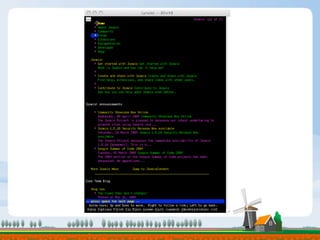
•Let’s take a look at www.joomla.org
•And this is how a webcrawler sees this
  website:
Source-ordered is important
•Prominence to keyword optimized sections
•Spiders see unique page elements before
 sitewide elements
•Place searchable elements above blocks
 that crawlers can’t read (flash etc.)
•No undesired elements in search results
•Importent content loads first
•Better rankings
So it is important that your
  main content comes first.
   How can we do that?
•Create a source-ordered template
•You can never build that with tables
•CSS based design with absolute
  positioning and floated elements is the key
Get the right tools
•If you have Mozilla Firefox:
  Firebug:
  https://addons.mozilla.org/nl/firefox/addon/1843

  Web developer toolbar:
  http://chrispederick.com/work/web-developer/

•If you have Internet Explorer:
  IETester + DebugBar
  http://www.my-debugbar.com/wiki/IETester/HomePage
Let’s start with a simple
        css based design
•http://localhost/so/01
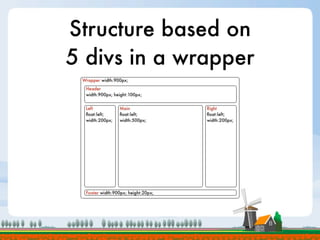
Structure based on
5 divs in a wrapper
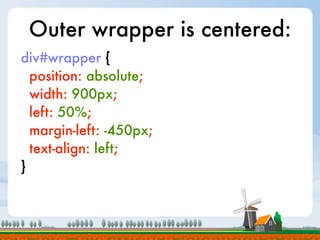
Outer wrapper is centered:
div#wrapper {
  position: absolute;
  width: 900px;
  left: 50%;
  margin-left: -450px;
  text-align: left;
}
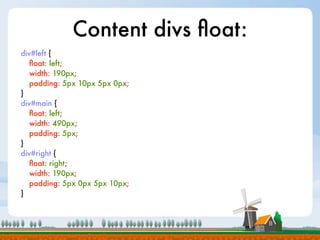
Content divs float:
div#left {
   float: left;
   width: 190px;
   padding: 5px 10px 5px 0px;
}
div#main {
   float: left;
   width: 490px;
   padding: 5px;
}
div#right {
   float: right;
   width: 190px;
   padding: 5px 0px 5px 10px;
}
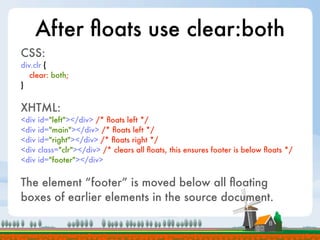
After floats use clear:both
CSS:
div.clr {
   clear: both;
}


XHTML:
<div   id="left"></div> /* floats left */
<div   id="main"></div> /* floats left */
<div   id="right"></div> /* floats right */
<div   class="clr"></div> /* clears all floats, this ensures footer is below floats */
<div   id="footer"></div>


The element “footer” is moved below all floating
boxes of earlier elements in the source document.
First step of optimisation,
  let’s group Left & Main:
•http://localhost/so/02
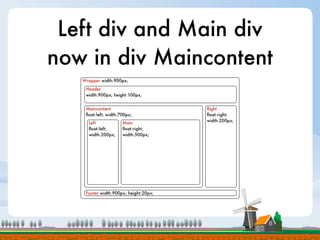
Left div and Main div
now in div Maincontent
New div maincontent,
         main now floats right
div#maincontent {
   float: left;
   width: 700px;
}
div#left {
   float: left;
   width: 190px;
   padding: 5px 10px 5px 0px;
}
div#main {
   float: right;
   width: 490px;
   padding: 5px;
}
Second step of optimisation,
   re-order Left & Main:
•http://localhost/so/03
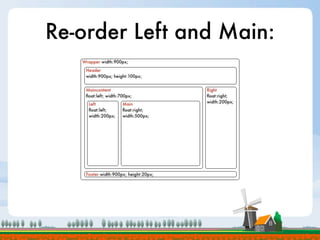
Re-order Left and Main:
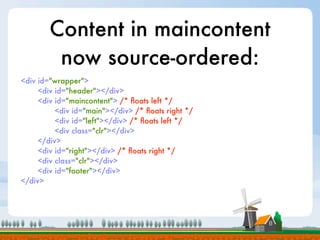
Content in maincontent
         now source-ordered:
<div id="wrapper">
     <div id="header"></div>
     <div id="maincontent"> /* floats left */
          <div id="main"></div> /* floats right */
          <div id="left"></div> /* floats left */
          <div class="clr"></div>
     </div>
     <div id="right"></div> /* floats right */
     <div class="clr"></div>
     <div id="footer"></div>
</div>
Third step of optimisation,
group Maincontent & Right:
•http://localhost/so/04
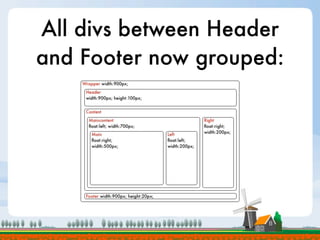
All divs between Header
and Footer now grouped:
Content divs grouped
               together:
<div id="wrapper">
     <div id="header"></div>
     <div id="content">
          <div id="maincontent"> /* floats left */
               <div id="main"></div> /* floats right */
               <div id="left"></div> /* floats left */
               <div class="clr"></div>
          </div>
          <div id="right"></div> /* floats right */
          <div class="clr"></div>
     </div>
     <div id="footer"></div>
</div>
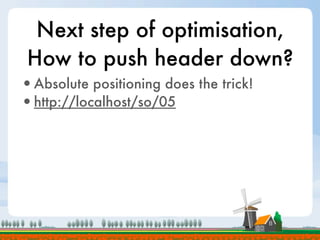
Next step of optimisation,
 How to push header down?
•Absolute positioning does the trick!
•http://localhost/so/05
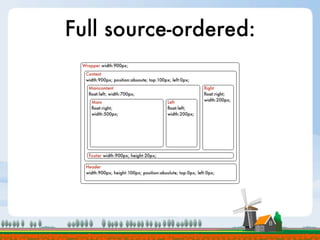
Full source-ordered:
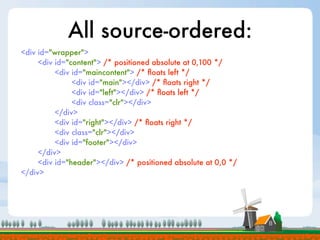
All source-ordered:
<div id="wrapper">
     <div id="content"> /* positioned absolute at 0,100 */
          <div id="maincontent"> /* floats left */
               <div id="main"></div> /* floats right */
               <div id="left"></div> /* floats left */
               <div class="clr"></div>
          </div>
          <div id="right"></div> /* floats right */
          <div class="clr"></div>
          <div id="footer"></div>
     </div>
     <div id="header"></div> /* positioned absolute at 0,0 */
</div>
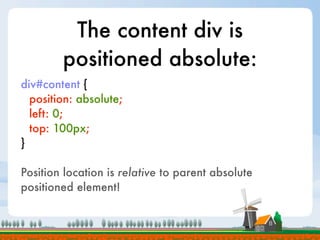
The content div is
        positioned absolute:
div#content {
  position: absolute;
  left: 0;
  top: 100px;
}

Position location is relative to parent absolute
positioned element!
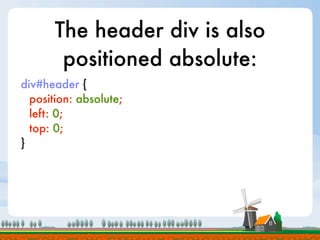
The header div is also
        positioned absolute:
div#header {
  position: absolute;
  left: 0;
  top: 0;
}
Putting it all together in a
      Joomla! template:
•http://localhost/so/06
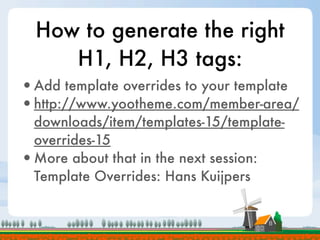
How to generate the right
     H1, H2, H3 tags:
•Add template overrides to your template
•http://www.yootheme.com/member-area/
 downloads/item/templates-15/template-
 overrides-15
•More about that in the next session:
 Template Overrides: Hans Kuijpers
Resources:
http://www.webcreatives.nl/jd09nl
Questions?
Thank you for your attention.
 Meet me at the Dr. Joomla.

Source Ordered Templates - - Joomla!Days NL 2009 #jd09nl

  • 1.
    Joomla! SEO Technical SearchEngine Optimisation
  • 2.
  • 3.
    Optimising your websitefor requires 2 things well setup: •Your content must be in order •Your template must be spiderable and search engine friendly
  • 4.
    Search Engine Optimisation: 75% is content 25% is technoloy
  • 5.
    This presentation is abouttechnology. Sorry ;-) ...
  • 6.
    Okay, short oncontent ;-) • Write a good pagetitle • Write an introductionary paragraph with keywords about your subject • Use H1, H2 and H3 tags • Avoid structures in your content like tables and frames • Use alt and title tags for links and images • Use Meta Descriptions • Update your content frequently
  • 7.
    How can technologyhelp? •Create error-free pages [wysiwyg editor] •Create content and navigation that webcrawlers can read [css] •Present content in the right order [css] •Generate the right tags H1, H2, H3 [template overrides]
  • 8.
    Why you needcontent in the right order? •A webcrawler is dumb: - it can’t read images - it doesn’t understand Javascript - it doesn’t understand Flash - it doesn’t understand CSS •Let’s take a look at www.joomla.org
  • 10.
    •And this ishow a webcrawler sees this website:
  • 12.
    Source-ordered is important •Prominenceto keyword optimized sections •Spiders see unique page elements before sitewide elements •Place searchable elements above blocks that crawlers can’t read (flash etc.) •No undesired elements in search results •Importent content loads first •Better rankings
  • 13.
    So it isimportant that your main content comes first. How can we do that? •Create a source-ordered template •You can never build that with tables •CSS based design with absolute positioning and floated elements is the key
  • 14.
    Get the righttools •If you have Mozilla Firefox: Firebug: https://addons.mozilla.org/nl/firefox/addon/1843 Web developer toolbar: http://chrispederick.com/work/web-developer/ •If you have Internet Explorer: IETester + DebugBar http://www.my-debugbar.com/wiki/IETester/HomePage
  • 15.
    Let’s start witha simple css based design •http://localhost/so/01
  • 16.
    Structure based on 5divs in a wrapper
  • 17.
    Outer wrapper iscentered: div#wrapper { position: absolute; width: 900px; left: 50%; margin-left: -450px; text-align: left; }
  • 18.
    Content divs float: div#left{ float: left; width: 190px; padding: 5px 10px 5px 0px; } div#main { float: left; width: 490px; padding: 5px; } div#right { float: right; width: 190px; padding: 5px 0px 5px 10px; }
  • 19.
    After floats useclear:both CSS: div.clr { clear: both; } XHTML: <div id="left"></div> /* floats left */ <div id="main"></div> /* floats left */ <div id="right"></div> /* floats right */ <div class="clr"></div> /* clears all floats, this ensures footer is below floats */ <div id="footer"></div> The element “footer” is moved below all floating boxes of earlier elements in the source document.
  • 20.
    First step ofoptimisation, let’s group Left & Main: •http://localhost/so/02
  • 21.
    Left div andMain div now in div Maincontent
  • 22.
    New div maincontent, main now floats right div#maincontent { float: left; width: 700px; } div#left { float: left; width: 190px; padding: 5px 10px 5px 0px; } div#main { float: right; width: 490px; padding: 5px; }
  • 23.
    Second step ofoptimisation, re-order Left & Main: •http://localhost/so/03
  • 24.
  • 25.
    Content in maincontent now source-ordered: <div id="wrapper"> <div id="header"></div> <div id="maincontent"> /* floats left */ <div id="main"></div> /* floats right */ <div id="left"></div> /* floats left */ <div class="clr"></div> </div> <div id="right"></div> /* floats right */ <div class="clr"></div> <div id="footer"></div> </div>
  • 26.
    Third step ofoptimisation, group Maincontent & Right: •http://localhost/so/04
  • 27.
    All divs betweenHeader and Footer now grouped:
  • 28.
    Content divs grouped together: <div id="wrapper"> <div id="header"></div> <div id="content"> <div id="maincontent"> /* floats left */ <div id="main"></div> /* floats right */ <div id="left"></div> /* floats left */ <div class="clr"></div> </div> <div id="right"></div> /* floats right */ <div class="clr"></div> </div> <div id="footer"></div> </div>
  • 29.
    Next step ofoptimisation, How to push header down? •Absolute positioning does the trick! •http://localhost/so/05
  • 30.
  • 31.
    All source-ordered: <div id="wrapper"> <div id="content"> /* positioned absolute at 0,100 */ <div id="maincontent"> /* floats left */ <div id="main"></div> /* floats right */ <div id="left"></div> /* floats left */ <div class="clr"></div> </div> <div id="right"></div> /* floats right */ <div class="clr"></div> <div id="footer"></div> </div> <div id="header"></div> /* positioned absolute at 0,0 */ </div>
  • 32.
    The content divis positioned absolute: div#content { position: absolute; left: 0; top: 100px; } Position location is relative to parent absolute positioned element!
  • 33.
    The header divis also positioned absolute: div#header { position: absolute; left: 0; top: 0; }
  • 34.
    Putting it alltogether in a Joomla! template: •http://localhost/so/06
  • 35.
    How to generatethe right H1, H2, H3 tags: •Add template overrides to your template •http://www.yootheme.com/member-area/ downloads/item/templates-15/template- overrides-15 •More about that in the next session: Template Overrides: Hans Kuijpers
  • 36.
  • 37.
  • 38.
    Thank you foryour attention. Meet me at the Dr. Joomla.