
© Hitachi Solutions, Ltd. 2015. All rights reserved.
11/12/2015
Ivan Kurtev
Improving the Traceability and Reliability
of Microsoft Dynamics CRM
Implementations with Microsoft Team
Foundation Server
© Hitachi Solutions, Ltd. 2015. All rights reserved.
Presenters
Ivan Kurtev
• Enterprise Technical Architect
• Hitachi Solutions, Ltd.
• Implementing Dynamics CRM for 9 years
• Contact Information:
• Email: ikurtev@hitachi-solutions.com
• LinkedIn: https://www.linkedin.com/in/ivankurtev
• Twitter: @ikurtev
• Blog: https://mscrmunfiltered.wordpress.com/
© Hitachi Solutions, Ltd. 2015. All rights reserved.
Contents
1. Work Management
2. Source Code Management
3. Build and Deployment
4. Testing
© Hitachi Solutions, Ltd. 2015. All rights reserved.
• TFS On-Premise and Visual Studio Online (VSO) are the same product with
two different release schedules.
• Same core features, the main gaps with VSO are:
– Reporting:
• Closed with Power BI Pack for Visual Studio Online.
– No process or work item customization:
• Currently available only in preview.
• VSO Release Cadence:
– New VSO releases every 3 weeks, no opt-out.
– VSO Release Archive/Plan: https://www.visualstudio.com/news/release-archive-vso
• TFS On-Premise offers more flexibility but requires hardware, installation, and
maintenance, VSO provides easy access anywhere and easy setup.
TFS Versions
© Hitachi Solutions, Ltd. 2015. All rights reserved.
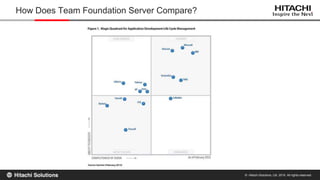
How Does Team Foundation Server Compare?
© Hitachi Solutions, Ltd. 2015. All rights reserved.
• TFS for Microsoft Dynamics CRM Development Management:
– http://msdynamicsworld.com/webcast/tfs-microsoft-dynamics-crm-development-
management-recorded-webcast
• Tips and Tricks for Using the Solution Packager in Microsoft Dynamics CRM
Implementations:
– http://www.xrmvirtual.com/events/
– https://www318.livemeeting.com/cc/usergroups/view?id=47DFT6
• Release Evolution: The New Best Practices for Microsoft Dynamics CRM
Release Management:
– http://msdynamicsworld.com/webcast/release-evolution-new-best-practices-microsoft-
dynamics-crm-release-management
Related Sessions
© Hitachi Solutions, Ltd. 2015. All rights reserved.
Work Management
© Hitachi Solutions, Ltd. 2015. All rights reserved.
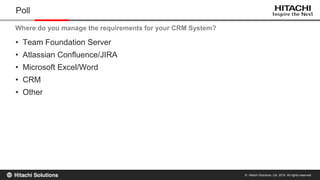
• Team Foundation Server
• Atlassian Confluence/JIRA
• Microsoft Excel/Word
• CRM
• Other
Poll
Where do you manage the requirements for your CRM System?
© Hitachi Solutions, Ltd. 2015. All rights reserved.
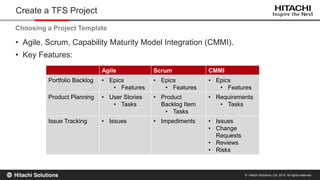
• Agile, Scrum, Capability Maturity Model Integration (CMMI).
• Key Features:
Create a TFS Project
Choosing a Project Template
Agile Scrum CMMI
Portfolio Backlog • Epics
• Features
• Epics
• Features
• Epics
• Features
Product Planning • User Stories
• Tasks
• Product
Backlog Item
• Tasks
• Requirements
• Tasks
Issue Tracking • Issues • Impediments • Issues
• Change
Requests
• Reviews
• Risks
© Hitachi Solutions, Ltd. 2015. All rights reserved.
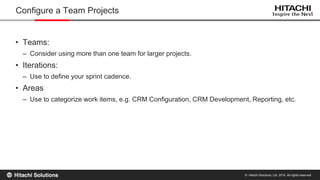
• Teams:
– Consider using more than one team for larger projects.
• Iterations:
– Use to define your sprint cadence.
• Areas
– Use to categorize work items, e.g. CRM Configuration, CRM Development, Reporting, etc.
Configure a Team Projects
© Hitachi Solutions, Ltd. 2015. All rights reserved.
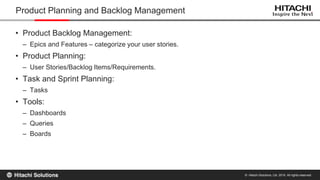
• Product Backlog Management:
– Epics and Features – categorize your user stories.
• Product Planning:
– User Stories/Backlog Items/Requirements.
• Task and Sprint Planning:
– Tasks
• Tools:
– Dashboards
– Queries
– Boards
Product Planning and Backlog Management
© Hitachi Solutions, Ltd. 2015. All rights reserved.
Demo: Managing Epics, Features, User Stories and Tasks in TFS
© Hitachi Solutions, Ltd. 2015. All rights reserved.
Source Code Management
© Hitachi Solutions, Ltd. 2015. All rights reserved.
• Components of a CRM Implementation:
– CRM Solutions
• CRM Metadata
• Custom Code (Plug-ins, Web Resources, Reports)
– Configuration Data
Source Control Management for CRM implementations
© Hitachi Solutions, Ltd. 2015. All rights reserved.
• Which of the following do you manage in source control today:
– Custom Code (Plugins, Jscript, Reports)
– Unpacked CRM solutions
– Configuration Data
– None of the above
Poll
© Hitachi Solutions, Ltd. 2015. All rights reserved.
– Few teams manage CRM Metadata in Source Control.
• But CRM Metadata is as valuable as custom code:
– The definition of an entity and its fields is foundational to any solution.
– Business logic is workflows is just as important as business logic in plug-ins.
• Possible Reasons:
– Historically, it was not possible to break down a solution into its components.
– Functional users who perform configuration may not have a development background and
experience with source control.
– Issues with existing toolsets.
CRM Metadata and Source Control
© Hitachi Solutions, Ltd. 2015. All rights reserved.
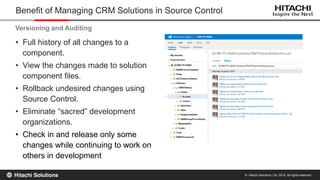
• Full history of all changes to a
component.
• View the changes made to solution
component files.
• Rollback undesired changes using
Source Control.
• Eliminate “sacred” development
organizations.
• Check in and release only some
changes while continuing to work on
others in development
Benefit of Managing CRM Solutions in Source Control
Versioning and Auditing
© Hitachi Solutions, Ltd. 2015. All rights reserved.
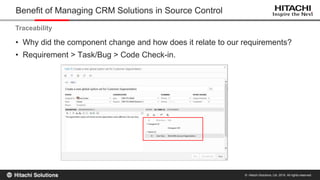
• Why did the component change and how does it relate to our requirements?
• Requirement > Task/Bug > Code Check-in.
Benefit of Managing CRM Solutions in Source Control
Traceability
© Hitachi Solutions, Ltd. 2015. All rights reserved.
• Allows developers to work in isolation on separate development environments
and check CRM metadata changes in source control:
– Works well when the changes are to unrelated components.
• Helps identify potential issues with CRM metadata:
– Conflicts that may result in overwrites of someone else’s changes:
» Requires process for resolving conflicts with changes to the same component.
» Frequent environment refreshes help minimize conflicting changes
– Unintentional or undesired changes that may otherwise go unnoticed.
Benefit of Managing CRM Solutions in Source Control
Support for Team Development
© Hitachi Solutions, Ltd. 2015. All rights reserved.
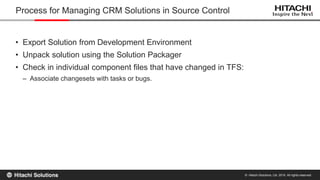
• Export Solution from Development Environment
• Unpack solution using the Solution Packager
• Check in individual component files that have changed in TFS:
– Associate changesets with tasks or bugs.
Process for Managing CRM Solutions in Source Control
© Hitachi Solutions, Ltd. 2015. All rights reserved.
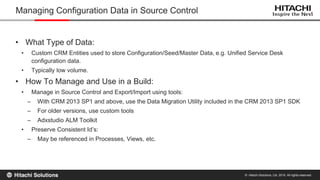
• What Type of Data:
• Custom CRM Entities used to store Configuration/Seed/Master Data, e.g. Unified Service Desk
configuration data.
• Typically low volume.
• How To Manage and Use in a Build:
• Manage in Source Control and Export/Import using tools:
– With CRM 2013 SP1 and above, use the Data Migration Utility included in the CRM 2013 SP1 SDK
– For older versions, use custom tools
– Adxstudio ALM Toolkit
• Preserve Consistent Id’s:
– May be referenced in Processes, Views, etc.
Managing Configuration Data in Source Control
© Hitachi Solutions, Ltd. 2015. All rights reserved.
Demo: Checking In Unpacked CRM Solutions in Source Control
© Hitachi Solutions, Ltd. 2015. All rights reserved.
Build and Deployment
© Hitachi Solutions, Ltd. 2015. All rights reserved.
• Build:
– The creation of a CRM solution package:
• Export from a CRM organization.
• Pack with the Solution Packager.
– The process of collecting artifacts that are not solution-aware:
• Data in custom configuration entities.
• Environment configuration changes.
– Deployment instructions.
• Deployment:
– The import of the solution package into a target CRM environment.
– The import of configuration data and other components.
– The execution of one-time deployment steps.
Build and Deployment for CRM
© Hitachi Solutions, Ltd. 2015. All rights reserved.
• Tasks Required to Build a Solution From Source Control:
– Get Latest or Specific Changeset from TFS.
– Compile custom assemblies for plug-ins and custom workflow activities.
– Pack solution using solution package using a mapping file to merge custom assemblies and
web resources.
• Advantages:
– Traceability:
• TFS Builds are associated with all check-ins and tasks or bugs completed since the last build.
• Now you can answer the question “What is included in the latest release”.
Building CRM Solutions using TFS Build Definitions
© Hitachi Solutions, Ltd. 2015. All rights reserved.
• Continuous Integration:
– Runs for every changeset.
– Ensure that an individual changeset does not introduce breaking changes:
• Especially important when managing unpacked CRM solutions in source control.
– What is included in a continuous integration build:
• For custom code, compiling a Visual Studio solution is sufficient.
• For a CRM solution, there are two options:
– Ensure that all custom code compiles and the solution packs with the solution packager.
– In addition, ensure that the solution imports in a target environment similar to Test.
Continuous Integration Builds
© Hitachi Solutions, Ltd. 2015. All rights reserved.
• Options:
– CRM Solution Import with multiple manual pre- and post-deployment steps.
– Package Deployment:
• Using Package Deployer
• Using the Import-CrmPackage PowerShell cmdlet
• Scheduled TFS Builds:
– Runs on a scheduled basis, can be daily, weekly, bi-weekly, etc.
– Can be used as a deployment tool.
– The XRM CI Framework build definition allows us to deploy a Package Deployer package or
a CRM solution.
Deploying CRM Solutions
© Hitachi Solutions, Ltd. 2015. All rights reserved.
Demo: Building Solutions using the XRM CI Framework Build Definition
© Hitachi Solutions, Ltd. 2015. All rights reserved.
Testing
© Hitachi Solutions, Ltd. 2015. All rights reserved.
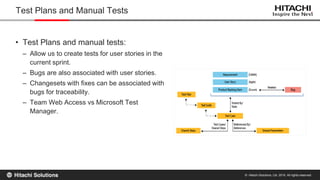
• Test Plans and manual tests:
– Allow us to create tests for user stories in the
current sprint.
– Bugs are also associated with user stories.
– Changesets with fixes can be associated with
bugs for traceability.
– Team Web Access vs Microsoft Test
Manager.
Test Plans and Manual Tests
© Hitachi Solutions, Ltd. 2015. All rights reserved.
• For Custom Code:
– Unit Tests.
– Integration Tests.
– The XRM Test Framework provides a great foundation for both types of tests:
• https://xrmtestframework.codeplex.com
• Created by Wael Hamze and Ramon Tebar.
• For CRM Forms:
– Coded UI Tests.
– Selenium components for Coded UI Cross-Browser Testing.
Automated Tests
Improving the Traceability and Reliability of CRM Implementations with TFS

Improving the Traceability and Reliability of CRM Implementations with TFS

  • 1.
    © Hitachi Solutions,Ltd. 2015. All rights reserved. 11/12/2015 Ivan Kurtev Improving the Traceability and Reliability of Microsoft Dynamics CRM Implementations with Microsoft Team Foundation Server
  • 2.
    © Hitachi Solutions,Ltd. 2015. All rights reserved. Presenters Ivan Kurtev • Enterprise Technical Architect • Hitachi Solutions, Ltd. • Implementing Dynamics CRM for 9 years • Contact Information: • Email: ikurtev@hitachi-solutions.com • LinkedIn: https://www.linkedin.com/in/ivankurtev • Twitter: @ikurtev • Blog: https://mscrmunfiltered.wordpress.com/
  • 3.
    © Hitachi Solutions,Ltd. 2015. All rights reserved. Contents 1. Work Management 2. Source Code Management 3. Build and Deployment 4. Testing
  • 4.
    © Hitachi Solutions,Ltd. 2015. All rights reserved. • TFS On-Premise and Visual Studio Online (VSO) are the same product with two different release schedules. • Same core features, the main gaps with VSO are: – Reporting: • Closed with Power BI Pack for Visual Studio Online. – No process or work item customization: • Currently available only in preview. • VSO Release Cadence: – New VSO releases every 3 weeks, no opt-out. – VSO Release Archive/Plan: https://www.visualstudio.com/news/release-archive-vso • TFS On-Premise offers more flexibility but requires hardware, installation, and maintenance, VSO provides easy access anywhere and easy setup. TFS Versions
  • 5.
    © Hitachi Solutions,Ltd. 2015. All rights reserved. How Does Team Foundation Server Compare?
  • 6.
    © Hitachi Solutions,Ltd. 2015. All rights reserved. • TFS for Microsoft Dynamics CRM Development Management: – http://msdynamicsworld.com/webcast/tfs-microsoft-dynamics-crm-development- management-recorded-webcast • Tips and Tricks for Using the Solution Packager in Microsoft Dynamics CRM Implementations: – http://www.xrmvirtual.com/events/ – https://www318.livemeeting.com/cc/usergroups/view?id=47DFT6 • Release Evolution: The New Best Practices for Microsoft Dynamics CRM Release Management: – http://msdynamicsworld.com/webcast/release-evolution-new-best-practices-microsoft- dynamics-crm-release-management Related Sessions
  • 7.
    © Hitachi Solutions,Ltd. 2015. All rights reserved. Work Management
  • 8.
    © Hitachi Solutions,Ltd. 2015. All rights reserved. • Team Foundation Server • Atlassian Confluence/JIRA • Microsoft Excel/Word • CRM • Other Poll Where do you manage the requirements for your CRM System?
  • 9.
    © Hitachi Solutions,Ltd. 2015. All rights reserved. • Agile, Scrum, Capability Maturity Model Integration (CMMI). • Key Features: Create a TFS Project Choosing a Project Template Agile Scrum CMMI Portfolio Backlog • Epics • Features • Epics • Features • Epics • Features Product Planning • User Stories • Tasks • Product Backlog Item • Tasks • Requirements • Tasks Issue Tracking • Issues • Impediments • Issues • Change Requests • Reviews • Risks
  • 10.
    © Hitachi Solutions,Ltd. 2015. All rights reserved. • Teams: – Consider using more than one team for larger projects. • Iterations: – Use to define your sprint cadence. • Areas – Use to categorize work items, e.g. CRM Configuration, CRM Development, Reporting, etc. Configure a Team Projects
  • 11.
    © Hitachi Solutions,Ltd. 2015. All rights reserved. • Product Backlog Management: – Epics and Features – categorize your user stories. • Product Planning: – User Stories/Backlog Items/Requirements. • Task and Sprint Planning: – Tasks • Tools: – Dashboards – Queries – Boards Product Planning and Backlog Management
  • 12.
    © Hitachi Solutions,Ltd. 2015. All rights reserved. Demo: Managing Epics, Features, User Stories and Tasks in TFS
  • 13.
    © Hitachi Solutions,Ltd. 2015. All rights reserved. Source Code Management
  • 14.
    © Hitachi Solutions,Ltd. 2015. All rights reserved. • Components of a CRM Implementation: – CRM Solutions • CRM Metadata • Custom Code (Plug-ins, Web Resources, Reports) – Configuration Data Source Control Management for CRM implementations
  • 15.
    © Hitachi Solutions,Ltd. 2015. All rights reserved. • Which of the following do you manage in source control today: – Custom Code (Plugins, Jscript, Reports) – Unpacked CRM solutions – Configuration Data – None of the above Poll
  • 16.
    © Hitachi Solutions,Ltd. 2015. All rights reserved. – Few teams manage CRM Metadata in Source Control. • But CRM Metadata is as valuable as custom code: – The definition of an entity and its fields is foundational to any solution. – Business logic is workflows is just as important as business logic in plug-ins. • Possible Reasons: – Historically, it was not possible to break down a solution into its components. – Functional users who perform configuration may not have a development background and experience with source control. – Issues with existing toolsets. CRM Metadata and Source Control
  • 17.
    © Hitachi Solutions,Ltd. 2015. All rights reserved. • Full history of all changes to a component. • View the changes made to solution component files. • Rollback undesired changes using Source Control. • Eliminate “sacred” development organizations. • Check in and release only some changes while continuing to work on others in development Benefit of Managing CRM Solutions in Source Control Versioning and Auditing
  • 18.
    © Hitachi Solutions,Ltd. 2015. All rights reserved. • Why did the component change and how does it relate to our requirements? • Requirement > Task/Bug > Code Check-in. Benefit of Managing CRM Solutions in Source Control Traceability
  • 19.
    © Hitachi Solutions,Ltd. 2015. All rights reserved. • Allows developers to work in isolation on separate development environments and check CRM metadata changes in source control: – Works well when the changes are to unrelated components. • Helps identify potential issues with CRM metadata: – Conflicts that may result in overwrites of someone else’s changes: » Requires process for resolving conflicts with changes to the same component. » Frequent environment refreshes help minimize conflicting changes – Unintentional or undesired changes that may otherwise go unnoticed. Benefit of Managing CRM Solutions in Source Control Support for Team Development
  • 20.
    © Hitachi Solutions,Ltd. 2015. All rights reserved. • Export Solution from Development Environment • Unpack solution using the Solution Packager • Check in individual component files that have changed in TFS: – Associate changesets with tasks or bugs. Process for Managing CRM Solutions in Source Control
  • 21.
    © Hitachi Solutions,Ltd. 2015. All rights reserved. • What Type of Data: • Custom CRM Entities used to store Configuration/Seed/Master Data, e.g. Unified Service Desk configuration data. • Typically low volume. • How To Manage and Use in a Build: • Manage in Source Control and Export/Import using tools: – With CRM 2013 SP1 and above, use the Data Migration Utility included in the CRM 2013 SP1 SDK – For older versions, use custom tools – Adxstudio ALM Toolkit • Preserve Consistent Id’s: – May be referenced in Processes, Views, etc. Managing Configuration Data in Source Control
  • 22.
    © Hitachi Solutions,Ltd. 2015. All rights reserved. Demo: Checking In Unpacked CRM Solutions in Source Control
  • 23.
    © Hitachi Solutions,Ltd. 2015. All rights reserved. Build and Deployment
  • 24.
    © Hitachi Solutions,Ltd. 2015. All rights reserved. • Build: – The creation of a CRM solution package: • Export from a CRM organization. • Pack with the Solution Packager. – The process of collecting artifacts that are not solution-aware: • Data in custom configuration entities. • Environment configuration changes. – Deployment instructions. • Deployment: – The import of the solution package into a target CRM environment. – The import of configuration data and other components. – The execution of one-time deployment steps. Build and Deployment for CRM
  • 25.
    © Hitachi Solutions,Ltd. 2015. All rights reserved. • Tasks Required to Build a Solution From Source Control: – Get Latest or Specific Changeset from TFS. – Compile custom assemblies for plug-ins and custom workflow activities. – Pack solution using solution package using a mapping file to merge custom assemblies and web resources. • Advantages: – Traceability: • TFS Builds are associated with all check-ins and tasks or bugs completed since the last build. • Now you can answer the question “What is included in the latest release”. Building CRM Solutions using TFS Build Definitions
  • 26.
    © Hitachi Solutions,Ltd. 2015. All rights reserved. • Continuous Integration: – Runs for every changeset. – Ensure that an individual changeset does not introduce breaking changes: • Especially important when managing unpacked CRM solutions in source control. – What is included in a continuous integration build: • For custom code, compiling a Visual Studio solution is sufficient. • For a CRM solution, there are two options: – Ensure that all custom code compiles and the solution packs with the solution packager. – In addition, ensure that the solution imports in a target environment similar to Test. Continuous Integration Builds
  • 27.
    © Hitachi Solutions,Ltd. 2015. All rights reserved. • Options: – CRM Solution Import with multiple manual pre- and post-deployment steps. – Package Deployment: • Using Package Deployer • Using the Import-CrmPackage PowerShell cmdlet • Scheduled TFS Builds: – Runs on a scheduled basis, can be daily, weekly, bi-weekly, etc. – Can be used as a deployment tool. – The XRM CI Framework build definition allows us to deploy a Package Deployer package or a CRM solution. Deploying CRM Solutions
  • 28.
    © Hitachi Solutions,Ltd. 2015. All rights reserved. Demo: Building Solutions using the XRM CI Framework Build Definition
  • 29.
    © Hitachi Solutions,Ltd. 2015. All rights reserved. Testing
  • 30.
    © Hitachi Solutions,Ltd. 2015. All rights reserved. • Test Plans and manual tests: – Allow us to create tests for user stories in the current sprint. – Bugs are also associated with user stories. – Changesets with fixes can be associated with bugs for traceability. – Team Web Access vs Microsoft Test Manager. Test Plans and Manual Tests
  • 31.
    © Hitachi Solutions,Ltd. 2015. All rights reserved. • For Custom Code: – Unit Tests. – Integration Tests. – The XRM Test Framework provides a great foundation for both types of tests: • https://xrmtestframework.codeplex.com • Created by Wael Hamze and Ramon Tebar. • For CRM Forms: – Coded UI Tests. – Selenium components for Coded UI Cross-Browser Testing. Automated Tests