One-Click Deployments
Deliver CRM more frequently in a
consistent and reliable way
Wael Hamze
@CRMUG
Wael Hamze
▪ @WaelHamze
▪ http://www.linkedin.com/in/waelhamze
▪ Solution Architect
▪ Specializes in Dynamics CRM, Application
Lifecycle Management & Microsoft
Technology Stack
@CRMUG
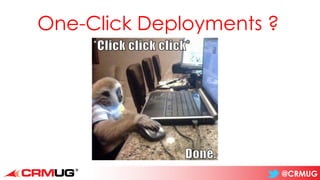
One-Click Deployments ?
@CRMUG
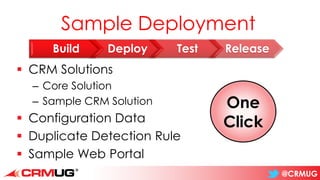
Sample Deployment
▪ CRM Solutions
– Core Solution
– Sample CRM Solution
▪ Configuration Data
▪ Duplicate Detection Rule
▪ Sample Web Portal
Build Deploy Test Release
One
Click
@CRMUG
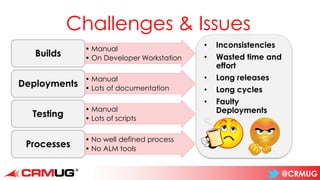
Challenges & Issues
• Manual
• On Developer Workstation
Builds
• Manual
• Lots of documentation
Deployments
• Manual
• Lots of scripts
Testing
• No well defined process
• No ALM tools
Processes
• Inconsistencies
• Wasted time and
effort
• Long releases
• Long cycles
• Faulty
Deployments
@CRMUG
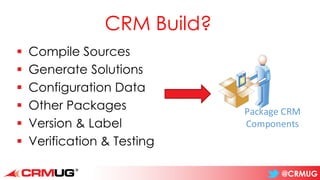
CRM Build?
▪ Compile Sources
▪ Generate Solutions
▪ Configuration Data
▪ Other Packages
▪ Version & Label
▪ Verification & Testing
Package CRM
Components
@CRMUG
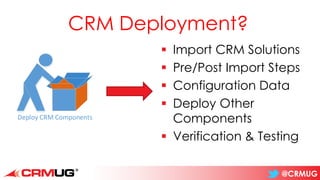
CRM Deployment?
▪ Import CRM Solutions
▪ Pre/Post Import Steps
▪ Configuration Data
▪ Deploy Other
Components
▪ Verification & Testing
Deploy CRM Components
@CRMUG
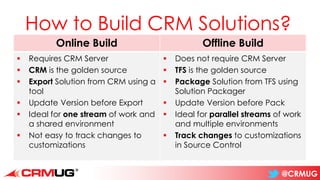
How to Build CRM Solutions?
Online Build Offline Build
▪ Requires CRM Server
▪ CRM is the golden source
▪ Export Solution from CRM using a
tool
▪ Update Version before Export
▪ Ideal for one stream of work and
a shared environment
▪ Not easy to track changes to
customizations
▪ Does not require CRM Server
▪ TFS is the golden source
▪ Package Solution from TFS using
Solution Packager
▪ Update Version before Pack
▪ Ideal for parallel streams of work
and multiple environments
▪ Track changes to customizations
in Source Control
@CRMUG
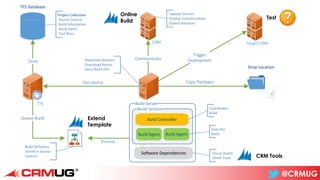
CRM
Communicate
-Update Version
-Publish Customizations
-Export Solutions
TFS
TFS Database
Get source
Build Service
Build Controller
Build Agent Build Agent
Store
Drop Location
Copy Packages
-Download Binaries
-Download Source
-Store Build Info
Build Server
Software Dependencies
Queue Build
Process
-Visual Studio
-Other Tools
Coordinates
Build
Does the
Build
Build Definition
stored in Source
Control
Project Collection
-Source Control
-Build Information
-Work Items
-Test Runs
Extend
Template
CRM Tools
Online
Build
Target CRM
Trigger
Deployment
Test
@CRMUG
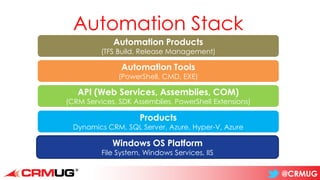
Automation Stack
Automation Products
(TFS Build, Release Management)
Automation Tools
(PowerShell, CMD, EXE)
API (Web Services, Assemblies, COM)
(CRM Services, SDK Assemblies, PowerShell Extensions)
Products
Dynamics CRM, SQL Server, Azure, Hyper-V, Azure
Windows OS Platform
File System, Windows Services, IIS
@CRMUG
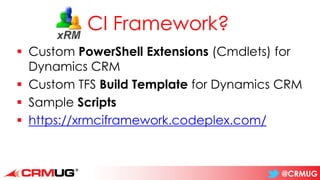
CI Framework?
▪ Custom PowerShell Extensions (Cmdlets) for
Dynamics CRM
▪ Custom TFS Build Template for Dynamics CRM
▪ Sample Scripts
▪ https://xrmciframework.codeplex.com/
@CRMUG
Demo 1
Continuous Integration
using
xRM CI Framework
One
Click
@CRMUG
What about the rest?
▪ Data
▪ Other Solutions
▪ Duplicate Detection Rules
@CRMUG
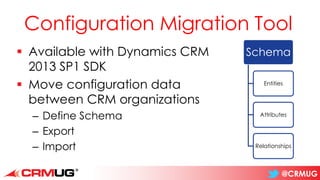
Configuration Migration Tool
▪ Available with Dynamics CRM
2013 SP1 SDK
▪ Move configuration data
between CRM organizations
– Define Schema
– Export
– Import
Schema
Entities
Attributes
Relationships
@CRMUG
CRM Deployment Package
▪ Available with Dynamics CRM 2013 SP1 SDK
▪ Contains CRM Deployment Components
– CRM Solutions
– Flat Data Files
– Data exported using Configuration Migration Tool
– Custom code executed during deployment
– HTML content shown at start/end of Deployment
@CRMUG
Demo 2
Configuration Migration &
Deployment Package
One
Click
@CRMUG
What about the rest?
▪ Other Environments
▪ Portal
▪ Other things?
@CRMUG
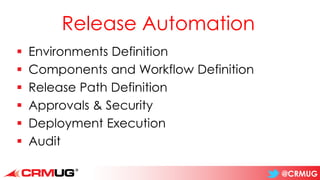
Release Automation
▪ Environments Definition
▪ Components and Workflow Definition
▪ Release Path Definition
▪ Approvals & Security
▪ Deployment Execution
▪ Audit
@CRMUG
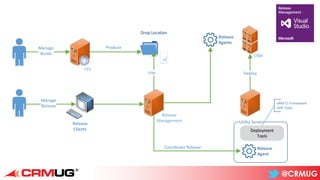
TFS
Release
Management
Drop Location
Produce
Utility Server
Deployment
Tools
-xRM CI Framework
-SDK Tools
CRM
DeployUse
Coordinate Release
Release
Clients
Release
Agent
Manage
Release
Manage
Builds
Release
Agents
@CRMUG
Demo 3
Visual Studio
Release Management
For Dynamics CRM
Releases
One
Click
@CRMUG
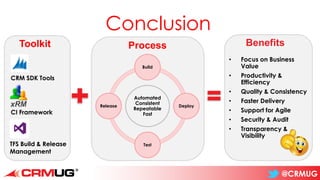
Conclusion
• Focus on Business
Value
• Productivity &
Efficiency
• Quality & Consistency
• Faster Delivery
• Support for Agile
• Security & Audit
• Transparency &
Visibility
Toolkit
CRM SDK Tools
TFS Build & Release
Management
CI Framework
Automated
Consistent
Repeatable
Fast
Build
Deploy
Test
Release
Process Benefits
@CRMUG
Thank You
https://xrmciframework.codeplex.com/
https://xrmtestframework.codeplex.com/
▪ @WaelHamze
▪ http://www.linkedin.com/in/waelhamze

One-Click Deployments - CRMUG London 2014

  • 1.
    One-Click Deployments Deliver CRMmore frequently in a consistent and reliable way Wael Hamze
  • 2.
    @CRMUG Wael Hamze ▪ @WaelHamze ▪http://www.linkedin.com/in/waelhamze ▪ Solution Architect ▪ Specializes in Dynamics CRM, Application Lifecycle Management & Microsoft Technology Stack
  • 3.
  • 4.
    @CRMUG Sample Deployment ▪ CRMSolutions – Core Solution – Sample CRM Solution ▪ Configuration Data ▪ Duplicate Detection Rule ▪ Sample Web Portal Build Deploy Test Release One Click
  • 5.
    @CRMUG Challenges & Issues •Manual • On Developer Workstation Builds • Manual • Lots of documentation Deployments • Manual • Lots of scripts Testing • No well defined process • No ALM tools Processes • Inconsistencies • Wasted time and effort • Long releases • Long cycles • Faulty Deployments
  • 6.
    @CRMUG CRM Build? ▪ CompileSources ▪ Generate Solutions ▪ Configuration Data ▪ Other Packages ▪ Version & Label ▪ Verification & Testing Package CRM Components
  • 7.
    @CRMUG CRM Deployment? ▪ ImportCRM Solutions ▪ Pre/Post Import Steps ▪ Configuration Data ▪ Deploy Other Components ▪ Verification & Testing Deploy CRM Components
  • 8.
    @CRMUG How to BuildCRM Solutions? Online Build Offline Build ▪ Requires CRM Server ▪ CRM is the golden source ▪ Export Solution from CRM using a tool ▪ Update Version before Export ▪ Ideal for one stream of work and a shared environment ▪ Not easy to track changes to customizations ▪ Does not require CRM Server ▪ TFS is the golden source ▪ Package Solution from TFS using Solution Packager ▪ Update Version before Pack ▪ Ideal for parallel streams of work and multiple environments ▪ Track changes to customizations in Source Control
  • 9.
    @CRMUG CRM Communicate -Update Version -Publish Customizations -ExportSolutions TFS TFS Database Get source Build Service Build Controller Build Agent Build Agent Store Drop Location Copy Packages -Download Binaries -Download Source -Store Build Info Build Server Software Dependencies Queue Build Process -Visual Studio -Other Tools Coordinates Build Does the Build Build Definition stored in Source Control Project Collection -Source Control -Build Information -Work Items -Test Runs Extend Template CRM Tools Online Build Target CRM Trigger Deployment Test
  • 10.
    @CRMUG Automation Stack Automation Products (TFSBuild, Release Management) Automation Tools (PowerShell, CMD, EXE) API (Web Services, Assemblies, COM) (CRM Services, SDK Assemblies, PowerShell Extensions) Products Dynamics CRM, SQL Server, Azure, Hyper-V, Azure Windows OS Platform File System, Windows Services, IIS
  • 11.
    @CRMUG CI Framework? ▪ CustomPowerShell Extensions (Cmdlets) for Dynamics CRM ▪ Custom TFS Build Template for Dynamics CRM ▪ Sample Scripts ▪ https://xrmciframework.codeplex.com/
  • 12.
  • 13.
    @CRMUG What about therest? ▪ Data ▪ Other Solutions ▪ Duplicate Detection Rules
  • 14.
    @CRMUG Configuration Migration Tool ▪Available with Dynamics CRM 2013 SP1 SDK ▪ Move configuration data between CRM organizations – Define Schema – Export – Import Schema Entities Attributes Relationships
  • 15.
    @CRMUG CRM Deployment Package ▪Available with Dynamics CRM 2013 SP1 SDK ▪ Contains CRM Deployment Components – CRM Solutions – Flat Data Files – Data exported using Configuration Migration Tool – Custom code executed during deployment – HTML content shown at start/end of Deployment
  • 16.
    @CRMUG Demo 2 Configuration Migration& Deployment Package One Click
  • 17.
    @CRMUG What about therest? ▪ Other Environments ▪ Portal ▪ Other things?
  • 18.
    @CRMUG Release Automation ▪ EnvironmentsDefinition ▪ Components and Workflow Definition ▪ Release Path Definition ▪ Approvals & Security ▪ Deployment Execution ▪ Audit
  • 19.
    @CRMUG TFS Release Management Drop Location Produce Utility Server Deployment Tools -xRMCI Framework -SDK Tools CRM DeployUse Coordinate Release Release Clients Release Agent Manage Release Manage Builds Release Agents
  • 20.
    @CRMUG Demo 3 Visual Studio ReleaseManagement For Dynamics CRM Releases One Click
  • 21.
    @CRMUG Conclusion • Focus onBusiness Value • Productivity & Efficiency • Quality & Consistency • Faster Delivery • Support for Agile • Security & Audit • Transparency & Visibility Toolkit CRM SDK Tools TFS Build & Release Management CI Framework Automated Consistent Repeatable Fast Build Deploy Test Release Process Benefits
  • 22.