Teacher Manual 
First edition 2014
2 
About the Project and Its Aims 
SoteICT is a project of the partnership of Pontis Foundation (Slovakia) and Kasigau Wildlife 
Trust (Kenya), made possible through SlovakAid co-funding. Sote, which in Swahili means 
everybody, stands in the title to demonstrate project’s commitment to make ICT accessible 
to a higher number of students in Kenya and so raise their future employability through 
improved soft and computer skills. We develop these skills in educators and learners alike 
through equipment and software donations, continual trainings, cooperation with school 
management and establishment of student IT clubs and training companies. Having started 
in 2010 with only one school, Moi High School Kasigau, the scope of the project has 
broadened beyond 10 secondary schools and so helps improve lives of thousands of 
students all around Taita Taveta County. 
What We Do and Why It Is Important 
The high penetration of mobile phones, a higher rate of success of businesses which are 
able to market their products online or employers demanding job applicants to possess 
computer skills all demonstrate that ICT has become an integral part of the Kenyan society. 
With high rates of unemployment especially among young people, employers today can pick 
and choose those who best suit a profile of their desired candidate. So, the job market is 
becoming extremely competitive and to stand a chance, the candidate needs to 
demonstrate a set of skills serving as their competitive advantage. The goal of soteICT is 
therefore to provide students with this advantage through enhancing their critical thinking, 
creativity and business skills. This is done through recombination of three important aspects 
which will be dealt with further: integration of ICT in schools at all levels, project-based 
learning and establishment of ICT clubs and student-led training companies. We have 
focused on rural schools in Taita Taveta based on the advice of our partner Kasigau Wildlife 
Trust and gradually expanded our presence in the county whilst supporting the cooperation 
between Kenyan and Slovak schools in project based learning through training companies. 
This manual is an attempt to create a practical guide for teachers that introduces simple but 
powerful ideas and resources and summarizes our experience. We hope the guide will make 
it easier to expand our soteICT programme to other schools in and outside Taita Taveta and 
Kenya.
3 
Contents 
ICT Integration in Education .................................................................................................................. 4 
Project-based Learning .......................................................................................................................... 5 
soteICT Clubs .......................................................................................................................................... 7 
Training Companies ................................................................................................................................ 8 
From a Teacher to a Mentor ............................................................................................................ 10 
Simulation Game ............................................................................................................................... 25 
Training Company Organisational Structures ............................................................................ 26 
Setting Up a Training Company ...................................................................................................... 34 
Keeping the Companies Active ....................................................................................................... 37 
Appendix A: CVs, Cover Letters and Emails ................................................................................. 42 
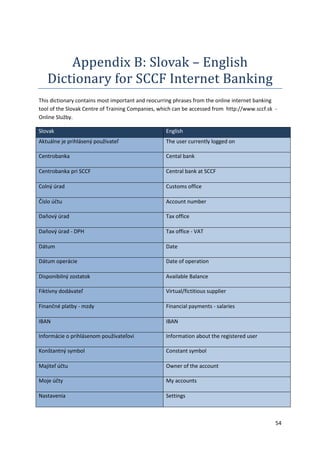
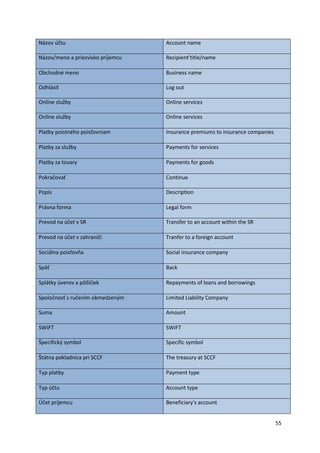
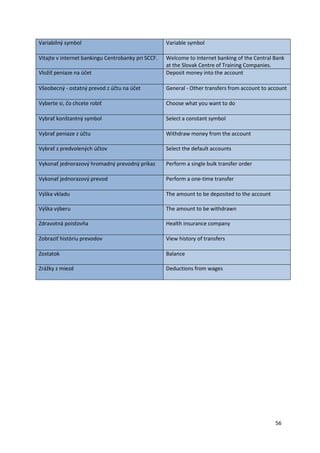
Appendix B: Slovak – English Dictionary for SCCF Internet Banking ...................................... 54 
Appendix C: Our Teachers’ Practices ............................................................................................ 58 
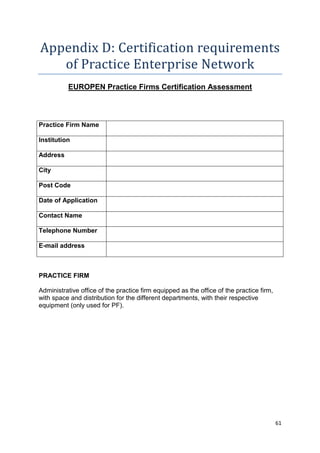
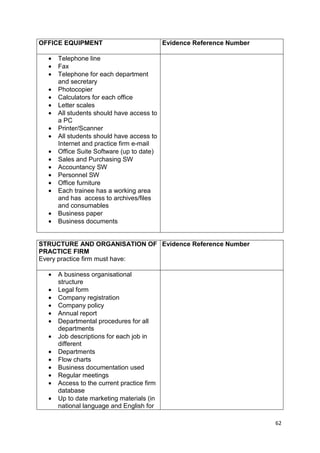
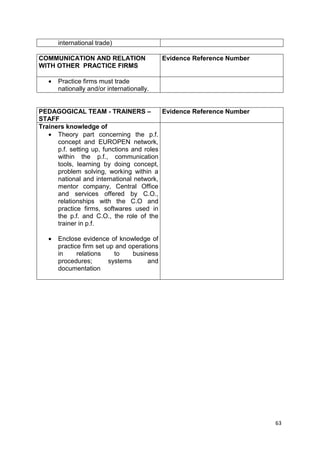
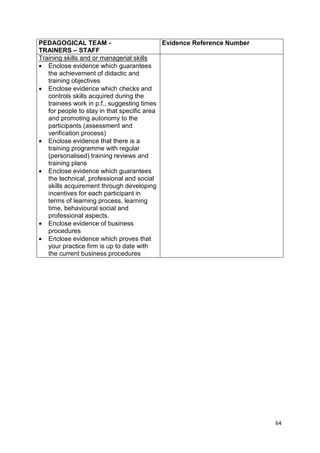
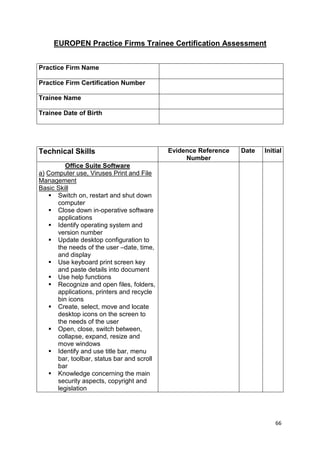
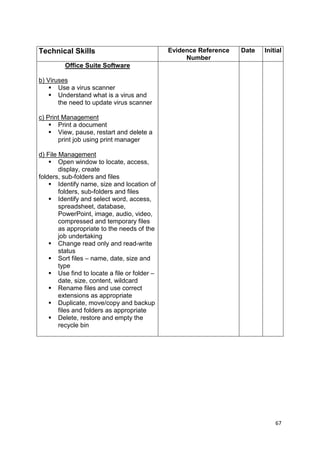
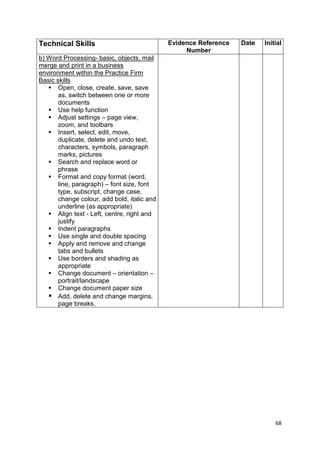
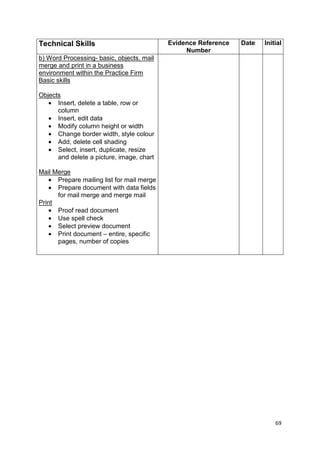
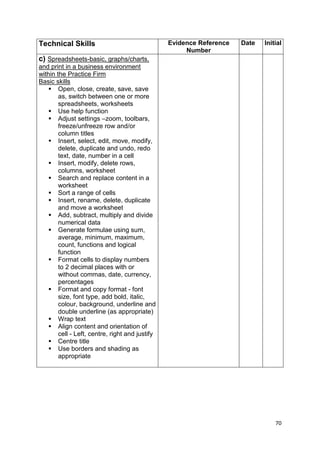
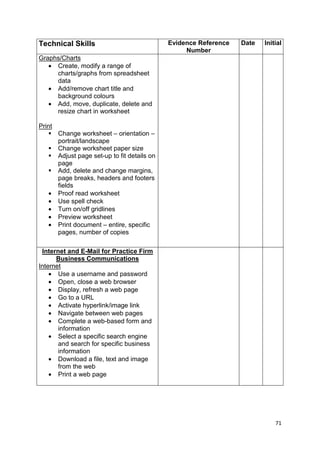
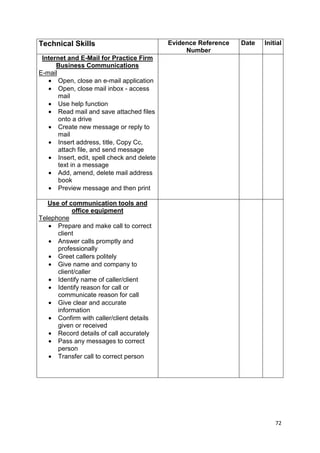
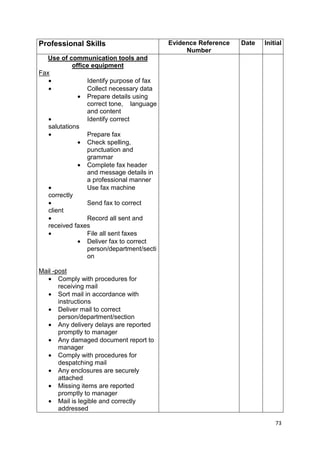
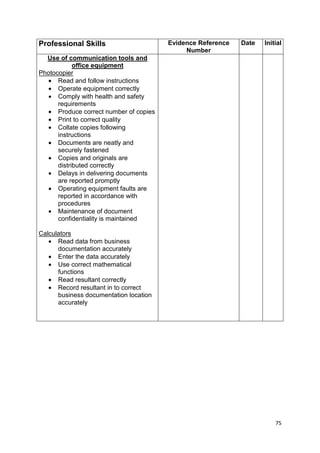
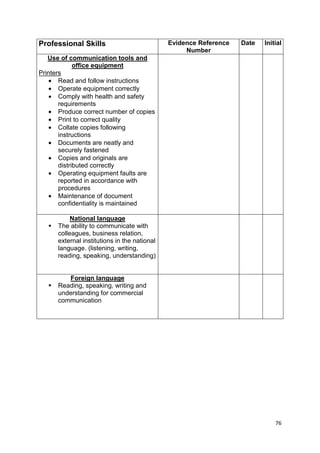
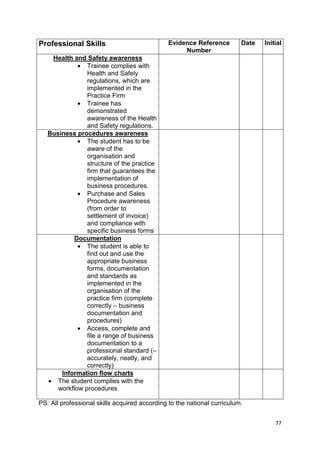
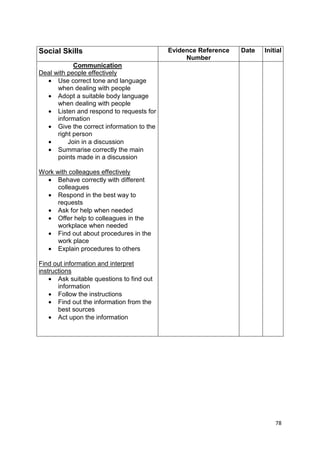
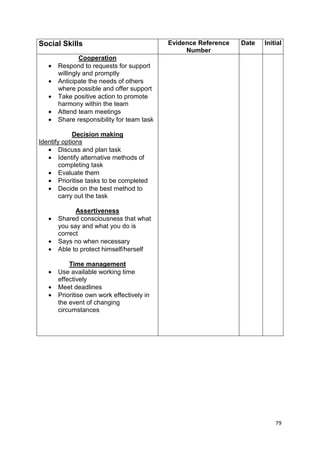
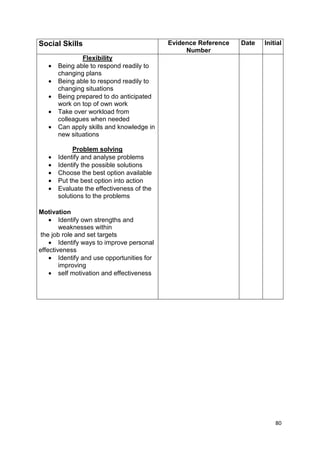
Appendix D: Certification requirements of Practice Enterprise Network ............................. 61 
References and Useful Sources ....................................................................................................... 83
4 
ICT Integration in Education 
In order to turn students into perspective young job applicants or entrepreneurs, the 
integration of ICT in education is inevitable. Moreover, as it will be shown further, the use of 
technology in schools has many advantages not only for the students, but also for the 
teachers and administrators. 
How Students Benefit from the ICT Integration in Education 
First and foremost, the biggest advantage of integrating ICT is the interest and motivation it 
induces in students. Instead of “chalk and talk” methods the students are exposed to more 
engaging processes, using visual and audio content such as pictures, graphs, presentations, 
records, videos and many more, which have a positive impact on their attention. 
Recombining these types of content in a lesson helps students understand initially and 
hence process the information more effectively. The increase in interest and attention then 
positively influences students’ motivation and therefore also their attitudes towards 
studying and the overall education. The effective and balanced use of technology can 
improve academic performance and the innovative methodology of project-based teaching 
enhances soft skills, such as team work. This can increase chances for graduates both for 
university entry and future employment. Innovative teaching methods are also beneficial for 
the school as through these results it gains good reputation and recognition. 
Still, there are many more benefits. Working with a computer and browsing internet 
requires students to find information, think critically, distinguish the important from the 
unimportant, carry out instructions, make decisions, solve various problems and take 
initiative over their own work. All of these skills are essential for students’ future 
professional and even personal lives. They learn to present their own ideas and themselves 
effectively, and by being exposed to ICT it makes them more comfortable with it, which 
results in increase of their self-confidence and self-esteem. Moreover, with internet they 
can get in touch with schools from the whole world (e.g. through Skype, FB or email), for 
example with the Slovak students in the case of this project. This online cooperation not 
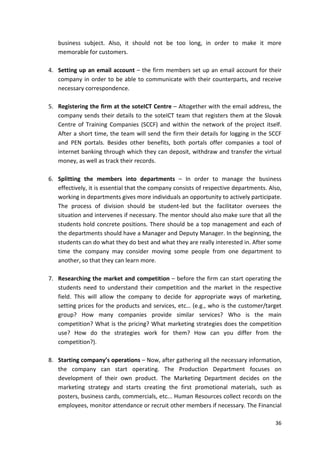
only makes the experience of other cultures more vivid in the classroom, but it motivates 
students to learn from each other and be competitive. Through regular competitions and 
collaboration with other schools students get timely feedback and volunteers mentor them 
on important life skills such as CV writing, job interview simulation and working in student 
training company. 
How Teachers Benefit from the ICT Integration in Education 
By integrating ICT tools in their classes, teachers can instil excitement about studying and 
engage their students in ways that plain “chalk and talk” methods cannot do. Technology 
enables demonstrating complex concepts so that they are easier to comprehend at the first 
hearing, and therefore lessen the time a teacher would spend repeating them. Of course, in
the beginning it may take some time to learn how to create an effective presentation, but 
once it is done it may prove as a great time saver as it can be re-used multiple times with 
some updates according to the valid curricula. Moreover, ICT helps teachers illustrate the 
students such situations, which would be unsafe or risky in the real life, such as, for 
example, chemical processes with poisonous gases or behaviours of dangerous animals. 
Further, not only teachers’ free time is enhanced, but also the time at the class can be used 
more effectively focusing on students’ questions and understanding, rather than redrawing 
graphs, charts, etc… 
The lectures become improved also by teachers’ unlimited access to information and 
resources available online or in various e-learning programmes. The option of storing 
students’ data for years, such as personal details and results, is a great assessment tool. It 
allows to track student’s progress over time and identify the areas which need to be 
improved or focused on further (e.g. if we find out that a student is good at maths but every 
year keeps having problems with geometry tests). Such electronic portfolios may be also 
displayed in communication with parents to inform about their child’s performance. 
Finally, teachers can use ICT to expand their own opportunities, practice or increase their 
competence by overcoming the classroom isolation and getting in touch with colleagues via 
professional networks to share experience, ideas and resources. This can be done in 
teachers’ work time when they do not have classes, but also after work as a part of their 
professional and personal development. 
For teachers, there are many advantages of using professional networks. On a personal 
level, the networks allow them to socialise with their counterparts, discuss their experience, 
communicate easily or join together for a common cause. Professionally, the contacts can 
help them to acquire information or arrange inter-school partnerships. Furthermore, 
potential employers can look up a person via a professional network based on their profile. 
5 
Project-based Learning 
The presence of new technology in classroom doesn’t magically improve student 
performance without effective and innovative methods that use the transformative 
potential of ICT. The successful implementation of project-based learning (PBL) can present 
such innovation that can multiply positive effects of technology in education. It introduces 
student projects of various complexity and duration. They help learners combine their 
knowledge of various subjects from the curriculum and create a final product: research 
outcome or a solution to a certain problem. This outcome is presented publicly in a form of 
a presentation, text, blog article or artefact. It shifts the focus from instruction of curriculum 
to construction of final products based on the knowledge gained from the curriculum. The
students hold various positions within their project teams in PBL and the teacher assumes 
the role of a facilitator. The students learn in the course of PBL various so called 21st century 
skills – collaboration, independent problem solving, communication, project management 
and critical thinking. These skills combined with effective use of ICT tools can help to 
prepare students for real life responsibilities such as, for example, in their future jobs. 
Project-based teaching also cultivates collaboration between teachers as well as the 
application of knowledge in one subject to practical problem solving that involves other 
subjects. There are potential risks in overestimating the final product and underestimating 
the group dynamics. In this case not all students in the project team gain the same skills and 
the team leaders do work on behalf of the weaker members. But effective facilitation and 
regular feedback from the team can help prevent these negative aspects. 
Today, PBL is commonly used in extracurricular activities even without noticing. For 
example, when a particular group of students prepares for a scientific competition or 
creates a school magazine. Our soteICT programme intends to promote PBL across the 
whole spectrum of the school activities and help the students to develop their presentation 
skills through ICT. For instance, student ICT clubs can help school administrators to prepare 
school presentations, brochures, calendars, magazines and business cards using tool like, 
e.g. MS Publisher or PowerPoint software. The ICT club is also a place to develop a long term 
project we introduced – student training companies which help the students simulate 
business operations and make use of the knowledge they have learnt during their Business 
Studies. Besides presentation skills we stress the importance of typing using the automatic 
grammar correction tool and effective business communication skills in preparation of a 
Curriculum Vitae or cover letters. We conduct regular competitions between schools in 
promotional video creation for student companies, CV and essay writing. 
There are various levels of PBL integration in daily life of schools. Our project also helps the 
schools to improve the presentations for their scientific competitions and develops various 
soft skills in students during their weekly ICT clubs. But we strongly believe that teachers of 
all subjects can benefit when they embrace not only technology (email, text editor, 
presentation software, internet, etc.) but also the new possibilities of technology in project-based 
6 
learning. 
We encourage teachers to get further information on PBL and connect through their 
colleagues through professional networks such as Partners in Learning operated by 
Microsoft or blogs like Edutopia.
7 
soteICT Clubs 
Computer literacy is often one of the crucial requirements of companies to their job 
candidates. But ICT brings a great potential to improve much more than just computer skills. 
Computing positively impacts critical thinking, creativity, initiative and accountability – all of 
which are crucial for creating good working habits for both employment and one’s own 
business management. However, due to the lack of resources, time or a high number of 
students, the Computer Studies alone may not be sufficient to develop students’ individual 
skills to the fullest. 
Therefore, benefits of ICT integration in education can be enhanced through establishment 
of ICT clubs. The advantage of ICT clubs is that they allow students to use technology in 
ways which the regular Computer Studies class curricula do not provide. Thus, the ICT clubs 
complement the classes, as besides equipping students with theoretical knowledge they 
provide them with an opportunity to develop their skills through practical experience. While 
the classes focus on teaching how to master a ‘tool’ (e.g. technical aspects – how to use 
Microsoft Office), the clubs should use these ‘tools’ in order to teach practical skills (e.g. 
how to use Microsoft Office tools to create an attractive CV design, how to create effective 
databases, etc...). Also, the clubs put emphasis on students’ ability to use the ‘power of 
internet’, find necessary information on their own, distinguish important from unimportant 
and use the acquired knowledge for their own benefit (e.g. advice on how to successfully 
pass a job interview). 
As the clubs should be student-led, teachers’ position shifts from a ‘lecturer’ to a ‘mentor’. 
This unburdens the teachers as instead of preparing extensive materials and 
demonstrations they operate as motivators and facilitators (e.g. when teaching video 
editors, the mentors give students essential information, but let them explore all the 
functions of the editor themselves). In this way the students get advice and feedback they 
need but they also learn working independently. 
Setting topics and activities for the clubs, the teachers can be creative and try new and 
challenging ideas, so that they can grow, learn and have fun alongside their students. 
Moreover, they can search for some inspiration online (a good source of activity ideas are 
for example www.teach-ict.com/teachershome.htm, www.parkfieldict.co.uk/ictclub/ or 
www.simonhaughton.co.uk/2010/01/ict-club-activities.html). Furthermore, we encourage 
student ICT clubs to focus a big share of their activities on another important aspect of the 
soteICT project - the student training companies.
8 
Training Companies 
With a 40 percent unemployment rate, the formal employment in Kenya is diminishing and 
the impact of small businesses on country’s economy takes on greater significance. Every 
year up to a big number of secondary school graduates start their own firms. However, 
research shows that more than 60 percent (Ndeje, 2013) of these companies go bankrupt 
every year as a result of insufficiency of resources, but mostly also due to the lack of 
practical managerial and organisational skills essential for a successful business leadership. 
In faith that these companies have a potential to grow and improve lives of individuals and 
communities, this project aims to identify and address these problems by providing 
computer-based business learning environment in which students can develop their 
entrepreneurial skills and creativity. 
What Are Training Companies? 
Training companies simulate a real-business environment. Replicating all functions of an 
actual firm, from production, to marketing, sales, customer relations, accounting, human 
resources (HR), etc., they work within detailed structures and departments. Similarly to the 
real firms, they keep their records, materials and documentations, such as orders, invoices 
or shipping forms. In order to make the experience even more real, the global market is 
simulated by cooperation of the practice enterprises working on import-export basis. In the 
case of this project the Practice Enterprise Network connects training companies in Kenya 
and Slovakia. 
What Are the Benefits? 
The advantage of training companies is that they cut across borders by developing business, 
computer and life skills essential for students’ future once they leave high school. The real-world 
skills acquisition occurs through learning by doing. Even though the students can 
make actual products or partner with real companies, the training methodology by the 
Practice Enterprise Network is not based on any real goods or money transaction and 
stresses the need of close simulation of relevant business practice in Kenya. The re-connection 
of education and development of real-life skills happens through replication of 
real business processes. 
Establishing the training companies the project aims to provide the students with a 
competitive advantage to equip them for the job market and entrepreneurship. Usually 
people who start their own businesses without any previous experience acquire the skills 
and knowledge throughout the process. However, naturally the process of learning by doing
necessarily involves mistakes and failures. These are, of course, inevitable and often useful 
as they can be learnt from. Still, in the real world, every mistake costs a company its money. 
Practise enterprises give students an opportunity to learn from their mistakes, to be 
creative, and test their ideas without the risk of a loss. Still, the reactions to their practice 
come from the real world, which is represented by schools in Kenya and abroad, parents 
and the Practice Enterprise Network which are used as testing grounds. In comparison to 
their counterparts, who do not take part in training firms, by the time they leave school 
these students will have known e.g. how to set up a business, manage their companies, how 
to attract customers, which marketing strategies work and which do not, etc… 
Furthermore, even the students who do not intend to start their own businesses benefit 
from their involvement in a practise enterprise significantly. They acquire important work 
habits, skills and experience, which may once serve as important points of reference in their 
CVs when applying for jobs. In comparison to a high school graduate without experience 
who can only put educational track in their CVs, the absolvents of training firms can also add 
working experience, saying, for example, that they have worked as assistant managers of 
the marketing department in a travel agency. And if they were active they can present their 
certificate from the Practice Enterprise Network that acknowledges minimal standards of 
the training company and achievements of particular students. This adds value to their job 
applications. Also, by participating in various competitions by soteICT, these graduates get 
an opportunity to succeed and use this success to point to in order to prove their skills and 
competence in the future. Moreover, as the companies simulate the real world, they 
provide activities through which their employees can improve their CV and cover letter 
writing as well as their behaviours at job interviews. 
In addition, the members also benefit from feedback of their teachers. In training 
companies, teachers turn into mentors and motivators, providing advice and 
encouragement. As the companies should be student-led, the members learn to work 
independently and unburden their tutors. 
For the companies to work effectively it is necessary to secure continuation of activities 
through which the members develop their skills. If set up efficiently, the practise enterprises 
equip the students with very concrete and practical set of skills and prepare them to enter 
the real world of knowledge-based economy and so give them a comparative advantage on 
the job market. 
9
10 
From a Teacher to a Mentor 
(the Role of Teachers in soteICT Clubs And Training Companies) 
Even though the Kenyan curricula are very good at equipping students with an extensive 
knowledge in order to prepare them for any professional choices, they can often feel too 
compressed or heavily based on memorising. Therefore, the ICT clubs and training 
companies aim to provide students with an opportunity to develop their “21st century” skills 
in a way their regular classes may not. Naturally, with a shift from theoretical to practical, 
the method of learning by doing brings a change in the role of teachers in this process. For 
the students to learn the necessary skills, they need to be able to learn to work 
independently, make their own decisions or judgements. Therefore, at the ICT clubs and 
training companies, instead of a lecturer, a teacher becomes a mentor, a motivator and a 
facilitator. 
Mentor 
What Is Mentoring? 
Mentoring can be understood as an active relationship between an experienced person 
(mentor) and a mentee, aimed at developing mentee’s knowledge and skills, which would 
enhance their personal and professional growth. In comparison with teaching, mentoring 
does not focus on providing the mentee with answers to their problems, but rather guiding 
them towards the right direction so that they can resolve problems for themselves. An 
important part of mentoring is a provision of critical, honest, unbiased and balanced 
feedback in a suitable form, in order for the students to learn from and build on. 
What Is the Role of a Mentor? 
Mentor’s role changes according to the needs of individual stages of mentee’s development. 
They pass on the benefit of their experience by sharing knowledge and resources, providing 
guidance, advice but also they pose as role models by sharing information on their own 
career path. 
Instead of telling mentees what to do, mentors realise that the effectiveness of learning is 
enhanced when students are responsible and feel ownership over their work. Focusing on 
students’ total development, mentors help their students to clarify their goals and how to 
achieve them.
A big emphasis is on the relationship between the mentor and the mentee. The students 
can be often unconfident or afraid to share their thoughts with people who they naturally 
look up to and respect. It is up to the mentor to create an atmosphere in which learners will 
feel safe and appreciated. The mentee needs to be valued as a person and be paid attention 
to. Providing non-judgemental support, honest feedback and maintaining confidentiality are 
all essential for creating such an atmosphere. 
In order to make the relationship work, it is essential that the mentor is interested in this 
kind of work. The students need to believe they can trust their mentors and not to feel like 
they bother them with their questions or problems. Mentors should possess active listening 
skills, so that they can analyse and react to what the mentee is saying without interrupting. 
Dealing with different kind of personalities, mentors need to be patient and ready to 
support the students’ views and decisions. Still, an honest and critical feedback is always 
desirable but must not be replaced by imposing mentor’s views and opinions. 
11 
How Does a Mentor Benefit? 
The mentoring relationship does not only benefit the mentee. Taking on the role of a 
mentor is a rewarding and valuable position to be in, given only to professionals with a 
proven record of experience and results. Throughout the process, mentors learn and 
develop alongside their wards; they broaden their knowledge and develop new skills. By 
cooperating with young promising persons, the mentors potentially increase their 
professional and personal networks for the future. Mentoring not only gives them a new 
dimension to their every-day job, but most importantly, allows mentors to see others learn 
from their experience and based on that, grow into productive individuals. 
Feedback 
Often the reason hindering students‘ development rests in their misunderstanding or 
disinformation about their performance. Without any consultations students may struggle 
identifying their mistakes and hence also the areas for further improvements. Therefore, an 
appropriate and regular feedback plays a crucial role in enhancing learners’s potential 
through raising awareness of their strengths as well as areas to work on harder. 
For any feedback to be effective it needs to be understood as an interaction between a 
mentor and a mentee, rather than a one-way communication. It is then also highly valued 
by the students as they know that it comes from someone who they know and respect. 
A quality feedback should adhere to a few basic principles:
1. Timeliness – Feedback should be provided as soon after an activity as possible. This 
allows the students to remember the process of learning or problem resolution 
clearly, reflect upon it and think of rectifications. The mentor should operate in the 
boundaries of “here and now”, which means that they do not bring up mistakes 
stood up from previous assignments in order not to discourage a student. However, 
in case there is a certain pattern of behaviours which needs to be emphasised, an 
exception can be made. 
2. Concreteness – A feedback which is too general or does not focus on specific 
observations may lack effectiveness. Therefore, the mentors need to be clear on the 
subject of their feedback, concentrate on specific issues and provide concrete 
examples wherever possible. The mentees should be acquainted with intended 
outcomes of an assignment. If possible, the point should be summarised again at the 
end of a meeting session. 
3. Practicality – After identifying the problematic areas clearly, it is important to 
provide students with guidance or suggestions on alternative behaviours. The 
mentor and the mentee should be able to agree on actions to be taken in order to 
improve performance. 
4. Balance – In order to prevent the student from taking a defence when receiving 
criticism or getting discouraged, it is important to communicate the message 
sensitively. Therefore, it is advised that a negative feedback is preceded by a positive 
one. The purpose of the positive feedback is to highlight mentee’s strengths and 
successes achieved so far. A student who has been motivated in this way is then 
more receptive to a correcting message. In all cases, feedback should be provided 
confidentially and in private. 
12 
Motivator 
Why Is Motivation Important? 
A strong motivation makes the process of teaching and learning more effective, easier and 
more comfortable for both teachers and students. Generally, if people see a purpose and 
meaning in what they do, and find the end point attractive or useful, they pay more 
attention, they are more collaborative and initiative. What may motivate students is also 
the content of a class and the way in which information is presented. It can often be seen 
that students tend to like or prefer specific classes because they find teacher’s personality 
pleasant or the information is disseminated in an attractive way. Motivated students show 
better behaviour, working habits and improved academic performance. They work harder
because they see the reason of doing so. As it has been mentioned already, one of such 
tools of attracting students attention and increasing their motivation is, e.g. integration of 
ICT in teaching. Another important advantage of motivation is that the students are 
encouraged to move beyond their comfort zone and develop beyond their own limits. 
Motivation instils positive attitudes to education and helps overcome difficult or challenging 
times more easily. 
If the students are motivated, it is not only beneficial for themselves, but also for their 
teachers and the schools. The teachers find it easier to work with inspired students, while 
the school can boast by better academic results positioning it well in the national ranking of 
secondary education institutions. The very same proven record of results also ensures a 
good reputation of teachers and broadens their opportunities for the future. Hence, 
motivation helps to achieve goals of all – students, teachers and schools. It can be seen as a 
smart way of leadership, which is also adopted by top Chief Executive Officers (CEOs) of 
companies worldwide. By getting all the support, encouragement and motivation from their 
mentors, the students have a great potential to find their own confidence and become 
effective leaders themselves. 
13 
How to Motivate Students? 
Motivation 
Most importantly, for anyone to be motivated, they firstly need to see the meaning of their 
effort. Mentors should make the students understand why it is important for them working 
hard, trying new things, thinking outside the box. Further, the mentors should show the 
students meaning behind all the activities, tell them where the actions taken are supposed 
to lead them, what new skills they can develop through them. Often, the problem of 
students’ passivity lays in the fact that they do not understand the purpose behind tasks 
given to them. Even most useful educational tools, such as e.g. training companies, can 
prove ineffective due to members’ inactivity caused by confusion over their purposes. 
Therefore, the best motivators never go without explaining the meaning of every activity 
and by doing so encourage better performance. 
The roles of a motivator and a mentor have much in common and are related to each other. 
Similarly as mentors, motivators need to develop mutual trust and respect with their wards. 
Emotional support and person’s belief that there is someone who has faith in them seem to 
be one of the best encouragement tools. Appreciation and well-communicated criticism 
drive students forward and make them want to achieve more by working harder. On the 
other hand, lack of appreciation may lead to loss of students’ motivation and interest in 
their work. Rewarding does not need to involve any material tokens, a word of appreciation,
a letter or a simple certificate are enough. These certificates, of course, should explicitly 
state the quality or the act for which the person is being rewarded. 
The students get encouraged also by being exposed to inspiring people. Therefore, by 
setting a good example for their wards, teachers can become role models and have a 
positive impact on students’ desire to achieve their goals. 
People often get discouraged when they do not understand their roles or feel like they 
cannot change anything nor have any word in decision-making. Hence, motivation can be 
ensured by allowing the students to get a hands-on experience through taking part in 
planning, problem resolution or individually-assigned tasks. 
14 
Communication and team work 
Communication and team spirit are also essential. In order to be able to fully develop their 
potential, the students need to feel they work in a safe environment. They need to feel they 
can express themselves and will not be mocked for their opinions or actions. It is important 
to be sensitive to students’ personal issues as it may be these which hold them back. Young 
people are often under much pressure from their families, teachers and friends. Students 
with worse performance are often convinced they are “stupid" and therefore designate on 
any attempts to accomplish or excel at anything. However, the experience shows that each 
person has different set of skills and the best qualities await to be discovered. Still, they will 
not come on the surface if the student feels given up on or underestimated. Therefore, one 
of the main roles of teachers is to help students find their talents and interests, and assist 
them in their further development. 
Students may be passive as a consequence of their lack of confidence. There are many 
reasons for that; some may be bullied by their counterparts, some may feel they cannot 
amount to much due to their personal background, origin, gender, looks, handicaps, etc… 
The role of a motivator is to try to identify such reasons and by empathising with students’ 
situations provide them with support which makes them stronger. Again, no difficult or 
sophisticated approaches are necessary. If you see that a student is shy and does not 
believe in himself or herself, start with assigning them simple tasks which you are sure they 
can accomplish. By carrying out challenging tasks and accomplishing them successfully, you 
are showing the students the qualities within themselves and the sense of achievement 
inculcates a higher self-esteem and gives them drive to continue developing further. 
Also, it is not advised assigning multiple roles to a small number of students as the rest may 
feel neglected or may think they are perceived by the teacher as unfit for the tasks. In their 
mentoring positions, teachers should aim at securing development of the highest possible 
number of their wards which can only be done by balanced division of tasks. At this point, a 
mentor and motivator also becomes a facilitator.
15 
Facilitator 
Who Is a Facilitator? 
Facilitators are individuals who help a group to work effectively and achieve improved or 
exceptional performance in order to bring about results. Therefore, an essential part of the 
role is securing quality and continuity of activities which happens through following an 
agreed-on agenda, as well as keeping records, deadlines and encouraging an active 
participation of students. Facilitators support internal and external collaborations between 
schools, clubs and training companies and promote good practice. Even though their 
assistance should be unobtrusive, their guidance promotes mutual understanding, shared 
responsibility, and advocates for fair and inclusive procedures in group’s work. Good 
facilitation helps create a safe environment in which the group members are not afraid to 
take risks or express themselves. The content of activities should be student-led, but the 
role of the teacher is to facilitate the process of learning and its structure. The meaning of 
doing so is to enable the students to benefit to the highest possible measure. 
Good Practices 
1. Time-management 
Time management may be understood as everyone’s own system or a set of practices which 
helps them create the time they need to accomplish a certain task or organise their lives 
more efficiently. There are many benefits of time-keeping. It helps setting up one’s priorities 
and positively impacts discipline, focus and attention, which then leads to a higher 
productivity and therefore, success. 
A good time management system prevents people from losing momentum. By giving their 
work an exact structure it takes them closer to their goals and enhances development of 
their skills. Meeting deadlines at work, at school projects or any team activities does not 
only impact one person, but can have consequences for the whole group. Therefore it is 
important for the teachers to do their best for their students to allow them to benefit the 
most, as it is for the students to try hard in order to secure teacher’s good reputation and 
work results.
As people are diverse, they all develop their own ways of effective time-management. Still, 
the following steps may be useful for some inspiration: 
1. Find out what needs to be done and what the deadlines are. Calculate how much 
16 
time you have to accomplish the tasks. 
2. Set up your priorities. 
3. Set up your goals. 
4. Classify the tasks according to their importance. 
5. Create a time plan for completing each of the assignments. Be realistic and take into 
account unforeseen circumstances. 
6. If possible, you can break the assignment into smaller sub-tasks. 
7. You can define a time limit for each subtask and delegate the students to carry them 
out. 
8. Create a check-list or a tick-box for each of the activities. It works best if you keep it 
in a place where you can see it daily, such as your desk. 
9. Keep an eye on students’ activities and progress to ensure success. 
10. Keep re-evaluating the time you have left and act accordingly. 
11. If there is a task which is holding back the whole group, delegate students who are 
through with their activities to help the slower ones. 
12. When accomplished, check the result of the work yourself and offer feedback. 
13. If you have time, you can improve imperfections. If not, just submit it as soon as 
possible so that you do not miss a deadline. In this case, all your work could be a 
waste. 
14. After completing or submitting the result, you can discuss the process with your 
students. This will allow you to reflect on what the strengths of your team are and 
what, on the other hand, needs to be improved next time. 
In order to effectively follow-up a club or a company agenda and deliver the best outcomes, 
these points are important: 
1. Inform all the participants about the activity. 
2. Explain the expected outcomes. 
3. Set the time limits and never hesitate to remind the students of them throughout 
the process. 
4. Tell the students about the benefit of carrying out the task in order to motivate 
them. 
2. Securing Continuity 
As it has been mentioned already, the main purpose of the soteICT project is to provide 
students with very concrete and practical skills, which would once position them well on a
job market or in the business environment. Still, in order to really develop it is important for 
the students to improve their skills continuously through regular and frequent assignments 
with time-bound targets and specific objectives. Therefore, the soteICT team of teachers, 
who are the biggest strength of the project, should make sure that their students’ progress 
constantly and use the resources provided to them effectively. 
However, on a way to success there may be many obstacles. Such are, for instance, weak 
internet connectivity, insufficiency of time due to the tight schedules, passive students, or 
non-existent customers for the training companies which may lead to a situation, when the 
companies do not know how to progress with their activities. Fortunately, websites are full 
of various ideas and suggestions for fun activities for the clubs. Generally, teachers can be 
very busy and it is understandable if they do not have time to google and read websites 
looking for information. In this case, they can contact the soteICT team, who are here to 
assist the mentors in their roles and are very happy to provide them with some inspirations. 
The following are some of activities which the ICT clubs can carry out to keep busy. For most 
of them, internet connection is not necessary, even though it may come helpful. The ICT 
clubs and the companies can adopt these activities but also recombine them or amend 
them according to their will: 
1. Typing assignments – Typing remains a challenge not only for the young students 
but often even for people who have worked with a computer for some time now. In 
order to master this skill, the students can retype a page from a magazine or a 
textbook. They can even compete about who is the fastest. By having them write 
essays, blogs, articles, etc., the teachers help improve this important skill. Very 
helpful are typing instructors which are usually freely downloadable from web, such 
as, for instance, Mavic Beacon software. (No internet necessary) 
2. MS Office and other programs – If the school is low on internet, the students can 
use the ICT clubs to enhance their abilities working in MS Office. They can learn how 
to use the tools creatively, in a way in which they are not able to use them in class. 
They can, for example, create various posters for the clubs or for the schools, design 
business cards not only for themselves but also for the teachers, prepare leaflets, 
information sheets for parents’ day or school functions. Moreover, if the teachers 
are free, they can even download more programs freely accessible online, or contact 
the soteICT team to provide them with some. An example could be AVS Video Editor, 
or various chatter boxes and animators (Scratch), in which they can even create their 
own PC games. The plan of activities for the ICT clubs could reflect upon the needs of 
the companies; they can correlate. That means that if the companies need to 
prepare a video that week, at the ICT classes they can learn how to work with 
various editors and cut the shot material. (No internet necessary) 
17
3. Thematical presentations – ensuring balanced participation, the students can be 
assigned a theme about which they would have to make a presentation in Power 
Point and pitch in front of the class. They may choose the topic themselves, or if 
passive, the mentor can help. (No internet necessary) 
4. Regular reports – the members of the ICT club and the companies as well as their 
single departments can give oral and written reports about their operations and 
functioning to the mentor on regular basis whilst changing the spokesperson so that 
more students can benefit. (No internet necessary) 
5. Blogs – it happens that the students set up their own blogs but struggle to update 
them. This can be a great activity, as besides keeping them busy and developing their 
typing skills, it also improves their writing, composition, presentation and the way in 
which they express themselves. Instead of just uploading pictures, the teachers may 
have them write regular articles about their activities, interesting topics, news from 
the clubs, schools or their communities. (Internet necessary) 
6. School magazines and yearbooks – in case the internet connection is too weak, 
instead of blogs, students can create regular school magazines reflecting on hottest 
issues or any topic of their choice (approved by the school administration) or school 
year books. Insufficiency of printers, cartridges or paper is not an issue – the 
magazines can exist only in an electronic form and in case there is a good 
connection, they can be accessed online. (No internet necessary ) 
7. SoteICT contests – in order to keep the clubs busy, the soteICT team prepares 
regular contests (e.g. video contests, Ambassadors of Change competitions,CV 
writing contests, business case contests, etc.), which purpose is to help advance 
students’ abilities and knowledge. All the information is distributed through soteICT 
Facebook page and by emails directly to the teachers. Even though sometimes 
internet may be necessary, these contests are mostly designed so that everyone, 
even the schools without internet connectivity are able to join in. 
8. Internal contests – Competitions can be organised within the schools when the 
competing would be the individual students or the companies between each other. 
Besides typing competitions, these may be such as poster competitions, photo essay 
contests, cover letter contests, best marketing contests, best videos, best business 
cards, etc. The contests can also copy the competitions carried out by the soteICT 
team in order to enhance students’ abilities in the given field further. (No internet 
necessary) 
18
9. Business cases – if there is a problem of a missing customer, the mentor or the 
students themselves can make up a business case. This means, the whole story of a 
customer coming to use the services or buy the products would be just virtual. 
However, this virtual customer would spend their money in the company and 
therefore, all the departments would have to start operating and processing the 
transaction as well as using the good service to illustrate quality of their firm in their 
promotional materials. All of these activities, the mechanism and the structure of 
companies’ functioning are explained in the next chapter. (Internet may be very 
helpful but it is not essential) 
10. Kenyan or Kenyan-Slovak cooperation – a wide network of the soteICT project 
which reaches 10 schools in Kenya and a number of them in Slovakia can be used as 
a great opportunity to start inter-school activities, beneficial for both sides. It does 
not only increase the competition and therefore activity, creativity and general 
performance of the groups, but also presents a great chance to learn from each 
other, make friends and get to know other cultures. (Internet necessary) 
11. Thematical months – in the beginning, a mentor introduces a topic, sets up rules, 
standards and expectations and then lets the students work on their own. Finally, 
after the task has been accomplished, the mentor would offer a balanced feedback 
to each of the groups and gives some suggestions for improvements. The themes can 
be practise enterprise related, such as marketing strategy months, but also 
assignments focused on customer relations, financial management, and so on. 
12. Wiki – Teachers can post all the information or instructions on their activities on 
their page on Wiki spaces, which provides room for the teacher and the students to 
communicate online. This allows the students to easily access the instructions any 
time, double check if they are unsure about anything, practise what they have learnt, 
repeat it again, and so master the tools. A great advantage is that this would also 
enable them to work on their own, in the absence of the mentor. The teacher can 
always update the materials from wherever they are. (Internet necessary) 
13. Students’ initiative – the students can come up with their own ideas for the 
activities. This would not only improve their creativity, but it could also boost their 
confidence, teach them how to take the lead and responsibility for their own 
projects, and last but not least, to work independently. 
The clubs can post pictures and information about their activities and successes on soteICT 
Facebook page, so that they can motivate others or get inspired themselves. 
19
20 
3. Balancing the Participation 
It is said that ‘if just one person is talking, very few people are learning’. Thus, for learning at 
class to be effective, it is important that the students themselves take action and are able to 
discuss issues lively. Such an opportunity to participate increases students’ interest and 
therefore has a positive impact on their performance. It also allows them to test their ideas, 
think more independently and develop their presentation skills. Therefore, progressive 
teachers nowadays base their educational methods on participative activities. However, in 
order to maximise the benefits of these activities, teachers need to approach differences in 
students sensitively. Especially, this applies to the ICT clubs, where the mentors often work 
with a high number of students from different classes and with various levels of skills or 
knowledge. To ensure that the highest possible number of students benefit from the 
project, the mentors should be able to address the following issues: 
- The Issue of Dominance: 
Throughout their profession, teachers learn to recognise mainly four types of students: 
a) Students actively participating and thriving at classes, 
b) Quiet students who usually speak only if spoken to but work hard (often timid 
students who still score high grades), 
c) Students who seem to be uninterested in the subject of discussion (this may show 
either in their silence or class-disturbing behaviours), 
d) Mixed cases (depends on how comfortable or safe they feel). 
These differences in people are very natural, but if they are not handled well, they may lead 
to an imbalance in the group dynamics. Each club or a company should have a leader. Still, it 
happens sometimes that the person starts dominating the group with their skills and 
knowledge, which may result in other students feeling intimidated or becoming passive. 
Some of them may do it forcefully, but mostly these students just act out of their 
enthusiasm for the subject. Also, as these students are usually very advanced for their level, 
a teacher may unconsciously cause the situation by always appointing the same person to 
carry out a certain activity, because they can be sure that these students will do it properly. 
In both cases, the dominance of the club by individuals leads to a decrease in number of 
members, who really develop. This problem is apparent especially when comparing 
students’ presentation skills. 
The dominant students should not be favoured so that they can overtake the group but 
neither marginalised so that they lose motivation. Firstly, the mentor should focus on 
monitoring group interactions and identify patterns of behaviours. If intervention is needed,
the facilitators can use phrases like “Let’s hear from those who have not spoken yet”, “What 
does the rest of you think?” or “This is a great idea but we need to move on so let’s discuss 
it later”. The same can be applied when assigning tasks to individuals. Also, individuals 
coming up with alternatives within a group discussion or decision making should be heard 
out and given a serious consideration. All the communication must be respectful and all the 
students should feel appreciated for their contributions. 
With younger students, the method of a Talking Stick may be useful (the stick is passed on 
among the participants and the one who holds it, that one speaks). However, to ensure 
balance in older student groups, more sophisticated methods may be necessary. A ‘flip chart 
method’ starts with a facilitator identifying a problem or a question to the entire group and 
then hands out small cards and gives the participants time to work individually. After they 
have written down their contributions, they place the cards on a flip chart. The ideas, 
opinions or suggestions can then be reviewed proportionally. A great advantage of using 
this method is that it does not favour anyone while at the same time it encourages more 
timid individuals to participate, eliminating feelings of intimidation. 
Another useful method is a determination of exact limitations on students’ participation. 
This could be, for instance, provision of an equal time scope for everyone to present, or 
putting a number on how many times the same individual may carry out a certain activity. 
21 
- the Issue of a High Number of Participants 
The higher is the number of active participants, the better is the quality of learning 
outcomes, as the students need to compete and be more creative. In bigger groups the 
participation can be balanced by creating a mechanism which will enable everyone to get 
engaged in the activities. One such mechanism may be creating schedules for e.g. a month, 
when every day two different students assist the teacher, carry out the assigned tasks, lead 
the class, prepare presentations, etc. Furthermore, through these schedules, the 
participants get to know when it is their turn in advance, which allows them to prepare for 
their ‘shift’. This results in more confidence and thus, better outcomes. Especially more 
timid or passive students will appreciate the method. 
In a very similar manner, mentors may create various ‘class chains’ according to their wish. 
Class chains are usually based on some kind of order – alphabetical; from the oldest to the 
youngest (by the time it’s their turn, the younger students will have had learnt from the 
oldest and perform better); or by the seat in the class – from the front to the back and the 
other way around.
Especially within the training companies, a teacher can always appoint a person from 
another department to give a report of their activities. Sometimes, it does not need to be 
the president only; mentors can talk to department managers and deputies or have them 
appoint anyone else from the group to do the speaking. 
Last but not least, mentors may make the students work in smaller groups, create new 
groups and change partners frequently. Setting up smaller groups may be efficient 
especially at the training company business. If there are more than 25 students in a group, it 
is more beneficial for the students to create two or more companies instead of just one. The 
key thing is that smaller groups allow the participants to get a real ‘hands-on’ experience, 
cooperate closely, learn from each other, and share their knowledge, skills and strengths. 
More companies will also increase the competition between the groups. This could motivate 
the students to work more creatively, they will also learn how to make their company differ 
from the competition and through this added value, attract customers. 
22 
- the Issue of Differences in Students’ Skills and Knowledge 
The fact that the members of the clubs and training companies usually come from all the 
forms and differ by skills, knowledge and age, may be one of the biggest challenges that the 
soteICT mentors need to address. Also, there are students joining and leaving the clubs 
every year, which could negatively impact the continuity of activities or the quality of their 
outcomes. Therefore, it is important to minimise these threats and, if approached 
creatively, use the differences for the benefit of the club and the training companies. 
Naturally, when younger students join the soteICT clubs or training companies, their 
knowledge of computers or business is significantly lower than the knowledge of their older 
counterparts. As they don’t want to slow the others down, they let the older students lead 
without contributing themselves. However, if the older students carry out all the important 
activities and decision making, the younger ones do not really get space for learning and 
improvement and they would rely on the leadership of the older students too much. 
Moreover, this development does not only hold back the young ones, but also the older 
students, who could be working on more complex things. 
One of the ways around this problem may be splitting students into Junior (Form 1, 2) and 
Senior (Form 3, 4) companies, where everyone would be able to participate, contribute and 
develop in accordance with their skills or needs. This allows the younger ones progress and 
learn together, while the older ones can work on a higher level. As the companies within 
one school usually do not focus on a similar business field, they would not pose an unequal 
competition to each other.
Within these schools with a Senior/Junior structures, but also outside them, a system of 
sororities and brotherhoods may be effective. For instance, a president of a Senior company 
has a sister from a Junior firm to mentor; then the twinning can be done on each level, also 
between regular members. In this way, they can both learn from each other, the older ones 
could develop their leadership skills further, while the younger ones would have support in 
their counterparts and therefore should not feel intimidated by their roles. But this system 
can be also used within a single company, especially after recruitment of new members. 
These new recruits should be included in the departments where they are needed most – 
hence, usually to cover the empty spots after the Form 4 students. The pairs would then be 
created within these single departments. The responsibility of the older members is then to 
acquaint the recruited with how the department operates and teach them to work with the 
programs central to firm’s functioning so that they can catch up fast. 
23 
4. Resolving Attendance Issues 
Training companies operate as a simulation of real-life firms and therefore, similarly, the 
attendance and performance of employees is the key to their success. Thus, irregular 
attendance may lead to a decrease in productivity and quality of work as it impedes the 
work of the other members. Due to insufficiency of work force, the firms may be missing 
deadlines or be unavailable to potential customers. Furthermore, this development may 
result in deterioration of morals and discipline within the companies. These problems could 
show up in late arrivals and early departures, long breaks or unexplained and unscheduled 
absences. 
The first thing to do is, therefore, identifying the problem clearly. Each company and IT club 
need to keep records of the attendance of their members so that the facilitator can monitor 
the situation. Of course, reasonable absences and breaks are very natural to companies’ 
everyday functioning but if there exists a clear pattern, an action should be taken in order to 
prevent the behaviour. 
Students often do not understand what is expected of them, so one of most important 
things is to set strong and clear standards for everyone in the beginning and acquaint them 
with possible consequences of misbehaviour. In case that an intervention is necessary, the 
facilitator can usually resolve the problems simply by communication. The problem may be 
temporary, such as sickness, a need to work harder on school assignments, important 
examination period, but also family illness or financial problems, or even serious issues such 
as abuse. It is not teacher’s job to rectify the problematic issues, but rather to provide the 
student with enough time scope or resources to be able to catch up with their work. All of 
these, if handled well, can be resolved and a student can be re-integrated in the group.
However, if the absence seems to be chronic and the member struggles to explain the 
underlying reasons, a teacher or the company itself (Human Resources - HR department) 
should take an action and proceed accordingly to their internal rules. After sending a 
warning letters, HR department may carry out a disciplinary process and in serious cases, 
the member may be expelled. It may be harsh, but just the awareness that this may happen, 
may make students realise that there is many of their counterparts who would like to join in 
but cannot due to the high number of the interested and a limited capacity of ICT labs. 
Hence, the student should start appreciating their positions more and act responsively. 
After taking the corrective measures on the attendance and the re-integration of the 
student, the facilitator should keep monitoring the situation as the elimination of absences 
can shift into other undesirable behaviours or reoccur again after several months. In these 
cases, creation of long-term improvement plans or schedules could be useful so that the 
member can demonstrate an improvement. 
24
25 
Running a Training Company 
Simulation Game 
As mentioned in previous chapters, the essential teaching method in training company 
practice is simulation of the real business environment. Training firms replicate all the 
functions, structures, organisation and working processes of real companies. They are 
established by trainees – students with a support of a facilitator – a teacher. The simulation 
method enables the students to gain hands-on experience through silhoutting the real 
working environment – they can test their ideas and come up with new ones, learn from 
their mistakes, take risks and accountability for their actions. Even though the firms are not 
real, the inscenation requires the students to concentrate, develop their soft and hard skills 
and approach the ‘game’ seriously. The point is to make the firms operate as real as 
possible. 
All the students involved in training companies hold concrete positions within the 
departments and are assigned their own specific tasks for which accomplishment they are 
responsible. This can be perceived as a role play. For that, all the members need to 
understand their roles and what they are expected to deliver. The simulation allows 
students to solve dynamic tasks, such as various business cases when the goods and services 
are sold to virtual or imaginative customers or the firms can work as a cluster and trade 
products or services. 
Facilitator’s role is to ensure that the education is connected to reality. Teaching is 
integrated in the simulation scenario and learning takes place during the process of work 
adhering to real-world business organisation structures. The facilitator should create a safe 
learning environment which would support students’ creativity and initiative. 
The Roles of the SoteICT Structures in the Simulation Game 
Even though the businesses may not be real, all the successes, failures, problems and 
customer feedback that firms receive need to be reflecting those of actual people. This will 
ensure that during their studies the members will have gained such experience and 
knowledge which will help them to stand on their own two feet in the real world. In order to 
ensure this, each of the soteICT structures plays a specific role in the simulation game.
Students – roles of company’s presidents, managers, their deputies, employees and other 
personnel 
26 
Teachers – role of companies’ external consultants and advisors 
Training companies – the network of businesses, a simulation of world’s business 
environment. They can work as a cluster or compete against each other. 
Schools, teachers, parents and the Kenyan – Slovak company network – testing grounds 
for the potential of companies’ products and services; potential customers 
SoteICT Centre – the simulation of state governmental business administration offices: the 
registration office, tax office, etc… The Centre also organises trade fairs, vocational trainings 
and other events. 
Slovak Centre of Training Companies – is a partner and mentor of soteICT Centre and 
registers training companies at Practice Enterprise Network (PEN). It also provides trainings 
to Kenyan teachers on the PEN methodology and tools and organizes various trade fairs. 
Practice Enterprise Network – is an international organization based in Germany that has 
currently more than 40 full and associated country members. It is responsible for the 
training company methodology and issues certificates for student training companies that 
are well established and keep certain minimal standards. Slovakia is mentoring Kenya in 
training company methodology in order for Kenya to become a full member. 
Training Company Organisational Structures 
Even though a product is very important, on its own it may not be enough to ensure 
company’s success. Besides production, an effective firm needs to be able to attract 
customers by appropriate advertising of the product, take care of company’s employees and 
ensure their competence and performance, as well as manage the financial issues and many 
more. A failure to secure all of these aspects may lead to a decrease in company revenue 
and profitability. 
The case of Walt Disney’s may be a good example here. After getting a long-dreamed-about 
job in a newspaper, Disney was fired by the editor for ‘lacking imagination’. With a Mickey 
Mouse existing only in his head at the time, he decided to start his own company. However, 
despite being very skilled in drawing and creative when coming up with ideas for the stories, 
Disney did not know anything about marketing or managing his finances. Thus, the company 
did not do well. Therefore, Walt Disney asked his brother to help him. The brother turned 
out to be great with numbers and advertising and after some time, the company started 
profiting and grew into what we know as Disney’s today. This instance illustrates that
sometime, even despite the best product or an idea, the company cannot prosper without 
securing all the other important aspects. 
In order to be able to manage all of the aspects effectively, companies should work within 
departments. A clear hierarchy structure will allow more students to benefit. We present 
one example of company structure with traditional names for its leaders – President, Vice- 
President, Department Managers. It should be noted, that company structure in the real 
world varies considerably because of many factors – size, core business, legal requirements, 
etc... Often the top management has different titles such as a Chief Executive Officer (CEO) 
and a Chief Operations Officer (COO). Students are free to choose these titles or titles that 
are common within their business sector in Kenya. But we decided to stick with the 
traditional title of a President. Besides the presidents, vice-presidents and secretaries seated 
in the Directorial Department, each department should have a Manager and a Deputy 
Manager. This is efficient in terms of management of the firm – as there will be many issues 
to deal with, it is better to ensure that smaller teams can manage their own work, instead of 
leaving all the supervision and monitoring solely to the top management. The managers and 
the deputies are responsible for operations of their departments and updating the President 
on the most important issues, which should be discussed. 
Hence, the picture below illustrates the example of structure to which each company should 
adhere and have clearly described. The President, Vice-President and General Secretary are 
together known as the Directorial Department, even though each of them has a separate 
role. All of the other departments consist of a Manager, Deputy Manager and employees. 
The Managers answer to the President, based on the agreed mechanism of firm’s internal 
communication. 
27 
Customer 
Relations 
President 
President 
Vice- 
President 
Financial 
Department 
General 
Secretary 
Human 
Resources 
Marketing 
Department 
Production 
Department 
A President is a main director, executor and decision-maker. This means that s/he provides 
strategic leadership by presiding over company’s day-to-day operations and overseeing all
the other managers and employees. The president holds the overall accountability to the 
stakeholders, such as employees, investors, partners, customers, and also the general 
public. His/Her duties include establishing firm’s strategies, plans and goals. Overseeing the 
budgets, the President makes sure that all the resources are allocated appropriately. 
Further, by organising frequent meetings with managers of the departments, the President 
monitors if the departments meet their specific goals, and presides over the quality of their 
work and products in offer. Presidents always look for new opportunities, initiate beneficial 
partnerships and represent the firm at various occasions (in public, at business meetings, in 
contact with governmental officials, etc.). 
28 
Vice-President 
A Vice-President is the second in command to the company President. Therefore, his/her 
duties mirror those of a President with only little differences. In situation, when the 
President is absent or cannot fulfil the duties for whatever reasons, the Vice-President acts 
in his/her stand. Besides the surrogacy of the President, the Vice-President also has his/her 
own roles to play. While the President sets up companies agenda, objectives and strategies, 
the Vice-President carries out the plans and can be directly appointed to assign 
responsibilities to the employees. Being directly involved in firm’s operations, the Vice- 
President collects information, which is then passed on to the President or presented at 
corporate meetings. Usually, Vice-Presidents are more accessible and are in closer touch 
with the common employees than Presidents. Also, in order to increase the efficiency and 
unburden the President, the two leaders can agree on splitting the care of the departments 
between each other (e.g. the Presidents presides over the Secretary, Financial Department 
and Marketing, while the Vice-President oversees the operations of Human Resources, 
Customer Relations and Production Department). In this case, it is important that the 
President and Vice-President meet regularly in order to inform each other and discuss 
further procedures and developments. 
General Secretary 
Secretary’s main role is to support the President and Vice-President and, if assigned, even 
the Managers of the departments. Secretaries maintain effective records on firm’s 
operations, take care of administration and correspondence, and organise meetings. During 
these meetings and negotiations, they take minutes and prepare the respective documents. 
A Secretary may also be responsible for organising President’s time, and follows his/her 
agenda. Among the duties also belongs making any travel arrangements, collection and
distribution of information and spreadsheets, and preparation of all necessary 
documentation. It is advised that Secretary’s records are organised in a manner, which 
allows an external auditor to get a clear picture about firm’s operations since the last visit 
up to the present. 
29 
Financial Department 
The Financial Department is, first and foremost, responsible for company’s day-to-day 
financial operations (any deposits, withdrawals, transfers, tracking and recording the 
transactions, etc.). All the operations are done in PEN or Slovak Centre of Training 
Companies tools for online banking. Therefore, the department, as well as the Directorial 
need to ensure that company’s log-in details for online banking are kept safe. 
Keeping records, the department informs on the financial situation of the company, 
analyses current financial performance, and prepares annual budget and suggestions for the 
future operations or policies of the company. It also creates payment policies for both the 
customers and the suppliers. 
The department does extensive reporting – from informing and discussing issues with the 
President and Vice-President, to all the internal and external financial reports, such as 
monthly or annual reports, to reporting for the government (for the educational purposes of 
the training company these reports will resemble the requirements of Kenyan authorities 
and will be delivered to soteICT Centre). Besides reports, the department also prepares 
receipts, invoices, shipping documents etc... 
The department is also responsible for preparation of annual reports and focuses on 
transparency, assists auditors and also takes active measures to prevent financial crime and 
fraud. 
Another duty of the department is management of firm’s cash flow. The employees ensure 
that the company has enough funds to make payments to its creditors. If saving is 
necessary, the Financial Department prepares a plan of savings for a pre-set period of time. 
In case a loan is necessary, this department asks for it in Mshindi KCB Mshindi (the training 
firm at Marungu Secondary), fills in all the necessary forms, records the details sent by the 
bank (loan numbers, conditions of the loan payments) and makes sure that all the 
instalments are paid on time. The department also makes sure the company pays taxes 
properly and on time. 
Further, the department carries out payments of salaries to all the firm’s employees. 
However, this responsibility can be delegated to the Human Resources Department.
Last but not least, this departments should monitor if and how the company prospers and 
adjust all the financial operations and planning to the situation. The Manager of the 
department informs the President about the problems and suggests solutions or further 
procedures. The department can also create forecasts and advise the President on where to 
invest or with whom to partner. Based on that, department’s head communicates with the 
President on regular and frequent basis. 
30 
Customer Relations Department 
The main role of the Customers Relations Department is to ensure customers’ satisfaction. 
This section is concerned with customers’ perceptions of the company and its products and 
services. The main objective of Customer Relations is to instil a positive image of the firm in 
the public, in order to convert them to buy its products or services. 
Firstly, in order to make sure that the firm produces goods or services, which are needed on 
the market, the Customer Relations can conduct customer preference research. This allows 
the customers to express their opinions and hence the firm is able to identify what the 
customers want. This department should understand consumers’ buying habits - what 
influences their decision to buy, and what, on the other hand, discourages them from doing 
so. The company then adjusts to these findings and proposes innovative products or 
solutions or improves its customer services in order to attract more customers and hence, 
increase the revenue of the company. 
It is important to realise that customers are central and overall important to any business. 
Most companies operate locally and cannot rely on constant supply of new customers. 
Therefore, their customer relations need to be developed in a way that they do not only 
attract the customer to buy once, but convince them to come back and spread a good word 
about the firm, as this, after all, is the best way of advertising. 
Hence, in order to establish good customer relations, the department needs to ensure that 
their consumers are provided with satisfactory services. Customers’ satisfaction is delivered 
by a series of activities or steps designed to provide customers with what they need and 
give them a positive buying experience. Effective businesses thrive to meet or even exceed 
consumers’ expectations. This process is based on understanding customers’ needs and 
behaviours. This can be done by effective communication based on asking questions and 
building a rapport during direct interactions. In this way, firm employees can establish what 
the customer wants and provide them with the best product or service. 
One of the aspects which underpin customers’ satisfaction is ease of use. This means that 
the buying experience should not be too complicated. Companies need to ensure that 
information provided on their website or the website itself is easy to understand. In direct
interaction, the employees need to use vocabulary adjusted to customer’s abilities (e.g. 
when talking to a customer about a computer, a sale assistant should firstly establish how 
well the person understands ICT and then use the jargon appropriately). An emphasis 
should also be put on building relationships with the customers. If the employee manages to 
create a pleasant atmosphere, the customer starts creating positive relation to the brand 
and may come more often. Therefore, a smile and a polite conversation are priceless. 
Customer care starts with the initial contact and continues after the sale has been closed. In 
order to make sure the customer is happy about the service and the bought product, if 
appropriate, the department can send them a follow-up email asking about their 
experience. 
This section also deals with complains. There should be a set policy about how to proceed if 
the customer is not satisfied or wants to return the product. It should not be forgotten that 
unhappy customers tend to spread a bad word about the firm very eagerly,which negatively 
impacts its reputation. Therefore, the employees must always be polite and ensure that the 
customer leaves happy, even if it means that the firm needs to return the money. The profit 
will come back as soon as the happy customer starts telling his friend about the great 
services they have gotten. Sometimes, the conflict may be solved out by provision of any 
complimentary products or offers and discounts. Of course, the money or the product 
should be returned only if the complaint is reasonable. If it is not, the students have a great 
opportunity to practice their negotiation skills and come to a compromising conclusion. 
The department also answers customers’ questions and provides information about the 
company to the public. This section should be responsible for updating firm’s website. The 
role is not only to communicate with the old customers, but also to attract new. All the 
positive examples and best practices can then be shared with the Marketing Department for 
advertising purposes. These two departments also focus closely on building a good 
reputation of the training company by creating and adhering to corporate social 
responsibility strategy. 
31 
Marketing Department 
Marketing is the process and means of communicating the product and its value to 
customers in a way which will make them want to own the product or experience the 
service. It is meant to influence their buying decision and convert them to close a sale. 
Hence, similarly to the Customer Relations, the main role of the Marketing Department is to 
focus on customers and their desires. For this reason, the two sections cooperate closely. In 
order to be able to market their products effectively, the department needs to establish 
who their customer target group is and adjust the advertising strategies around that.
The department is responsible for creating new marketing strategies, business plans and 
keeping records on the achieved sales. These are later used to determine if the expected 
outcomes have been met. If not, the information serves as basis for decision-making about 
the next strategies and approaches. As advised by the Customer Relations Department and 
the President, the marketing section sets up company’s pricing. They also develop the 
tactics of how to reach the potential customers most efficiently – they create business 
cards, posters, leaflets, billboards, commercials, brochures, catalogues, prospects, etc... 
They need to come up with slogans and images which would best capture the advantages of 
owning the product, while emphasising company’s uniqueness and core values. They can 
produce those materials internally or externally and approach other training companies (for 
example Dragon Advertising at Buguta Secondary) to send them proposals and select the 
most suitable or cheapest one. 
This means that the department is also responsible for building the brand for the company. 
Being different is one of the main keys to success. In order to capture people’s attention and 
lure them to use the service, the brand of the company should be positive, memorable, and 
distinctive. In this way they ensure the brand gets noticed and imprints in people’s minds. 
Looking for a service or a product, customers naturally choose the company which they 
remember as interesting, price-friendly, with pleasant employees. 
It is also advised that both the name and the logo of the company should be easily 
memorable. The more words in the title and the more complicated the logo, the more 
difficult it is for the customers to memorise the company, which will make it more difficult 
for them to find the firm and identify the product. The point is to create and promote a 
good, strong and trustworthy brand with an excellent reputation. 
Furthermore, researching company’s competition is one of the essential responsibilities of 
the Marketing Department. It allows the firm to spot a gap on the market and fill it in in 
both product- and service-wise. It is necessary to observe in what ways the competition 
communicate with their customer base and identify if it works for them. Then, the firm 
needs to establish, how its marketing should differ. 
Company’s advertising and marketing must always be active, therefore the departments 
tend to employ creative and initiative individuals. 
Powerful brands and leading companies have a corporate responsibility strategy that 
defines how they relate to their stakeholders (local community, employees, environment 
and suppliers) in a responsible way. This means active and strategic reduction of harmful 
activities (paper and energy waste, pollution, irresponsible behaviour towards customers, 
employees and suppliers) and active support for responsible initiatives (supporting local 
community through philanthropy, reducing paper work, increasing ecological sustainability, 
giving employees more benefits and flexibility than law requires, paying suppliers on time 
and checking if they behave responsibly). 
32
33 
Human Resources Department 
The Human Resources Department manages company’s manpower. Because firm’s success 
depends first and foremost on its workforce, the Human Resources play a crucial role in 
firm’s growth. 
Among duties of this section belongs monitoring and determination of how many 
employees leave the company and thus, how many people the firm has to recruit. This is 
called manpower planning. 
The section organises and oversees the overall process of recruitment. It prepares job 
descriptions, which contain information on job responsibilities, work environment and the 
skills which are required of the candidates. The goal is to recruit people who are the best fits 
for the positions in order to make the company even more prosperous. After advertising the 
job offers, the department short-lists the most interesting people for a job interview. The 
job interviews take place in front of a panel consisting of Human Resources recruitment 
specialists who effectively question the candidates in order to identify the best fit. 
Further, after consulting the President, the department determines salaries of all the 
employees, including the Directorial Department. After receiving money from the Financial 
Department, this section sends out the salaries on regular basis. 
Human Resources also keep records of all the employees. Such include employees’ details, 
but also their performance, attendance or achievements. If an employee shows a pattern of 
a problem with attendance, a disciplinary process can be started. The procedure of the 
disciplinary process is embedded in the policies of the department. A disciplinary action can 
also be taken against individuals who do not respect internal regulations or rules. Best 
employees can be rewarded for their performance and contributions. This is an important 
aspect of motivation of employees who need to see a meaning in their work and feel 
appreciated. Appreciation encourages further development and thriving performance. 
The company can also provide the employees with any necessary training, from the 
introductory programmes to personal and professional development. These trainings could 
be designed and carried out by internal Human Resources specialists. 
In order for a team to work effectively, employees have to learn to communicate and work 
together. Therefore, the department may organise team building events, like dinners, 
games, or trips. The aim of these activities is that the members get to know each other 
better and learn to trust one another. 
In addition, the section monitors employees’ satisfaction and tries to solve any emerging 
issues. It always tries to create the best working environment for all. Employees are the
most valuable resource of the company and need to be treated in respectful and 
transparent manner. 
Finally, based on all the collected information, the department after the discussion with the 
President determines who to dismiss or make redundant. Again, strong internal policies on 
the process need to be developed. 
34 
Production Department 
The main responsibility of the Production Department is to turn inputs into outputs in the 
form of concrete finished goods or services. It receives raw materials, makes records and 
reports to the President. The section oversees that the products are made to the best 
quality possible for the lowest cost. The Manager supervises the whole procedure of 
production and ensures safety of employees. 
The department orders or purchases the necessary components and technology to carry out 
the process effectively. After the materials arrive, the section checks their state and quality. 
All the equipment necessary for the production procedure is stored under supervision of 
this section. 
As the employees of the department are usually creative individuals, they can test their 
ideas, come up with new ones and research on various options and opportunities. They can 
propose the Directorial that they put new goods into production. Constantly, they try to 
make production most cost effective. 
As other departments, even this one keeps effective records. It monitors reception of 
materials, the process of production, and the finished outputs. All the stock taken out of the 
store is recorded, too. These records and their analysis are then reported to the President. 
Also, they report on any damages or necessary maintenance of equipment. 
Finally, the department is responsible for ensuring quality of outputs and report if the 
products do not achieve required parameters. They can cooperate with internal or external 
designer and conduct research and development projects to come up with innovative ways 
of production that are cheaper, more ecological and with a better design. 
Setting Up a Training Company
In order to successfully set up an active training company, facilitators and students should 
follow these steps: 
1. Informative stage - A facilitator explains the students what a training firm is, and 
what its purposes and benefits are. The mentor can use posters, leaflets, business 
cards and brochures of older companies, or companies from other schools to 
illustrate companies’ operations better. If there are no hard copies of such materials 
available, the club can take a look at promotional materials which other firms post 
on soteICT Facebook page. 
Similarly as in the reality, the success of the training company depends on its 
directorial and employees. Therefore, it is important to stress to the students that 
the companies entail much work and focus which means that if they want to get 
involved, they need to be serious about their engagement. 
2. Choosing the business subject and creating a business plan – Firstly, the facilitator 
initiates brainstorming about the business subject of the new firm. They allow 
students to express their opinions and gives everyone serious consideration. When 
choosing the subject, the group should use their knowledge of what their country or 
their communities need – they know best what products are there in offer, what 
products are absent and how services are provided. By observing and discussing how 
the current market looks like, they should be able to identify a gap on the market 
and try to fill it in or provide the services better. The students need to keep in mind 
the ‘demand and supply’ rule in order to establish if their services are really 
necessary and are able to make the firm profitable. The power of the brand and 
marketing is crucial in most business sectors and you cannot only compete with 
price. Students should make a market research and see which service or product is 
missing in their neighbourhood. For example, if they want to open a café, they need 
to find out how many similar companies operate in town, what are their prices, 
quality of coffee and the customer service and try to beat the competition either in 
price or in quality and the overal customer experience and market their brand as a 
trendy lifestyle choice. 
Further, the students can also look at the existing soteICT firm list and use their 
creativity to come up with a special idea and fill in the gap there. Maybe they could 
look at what the network lacks or how their company could fit into the cluster of 
companies that creates synergy between their services and products. 
3. Creating a company name – The students work on their suggestions of firm’s names 
and decide upon the issue democratically. The company name should reflect its 
35
business subject. Also, it should not be too long, in order to make it more 
memorable for customers. 
4. Setting up an email account – the firm members set up an email account for their 
company in order to be able to communicate with their counterparts, and receive 
necessary correspondence. 
5. Registering the firm at the soteICT Centre – Altogether with the email address, the 
company sends their details to the soteICT team that registers them at the Slovak 
Centre of Training Companies (SCCF) and within the network of the project itself. 
After a short time, the team will send the firm their details for logging in the SCCF 
and PEN portals. Besides other benefits, both portals offer companies a tool of 
internet banking through which they can deposit, withdraw and transfer the virtual 
money, as well as track their records. 
6. Splitting the members into departments – In order to manage the business 
effectively, it is essential that the company consists of respective departments. Also, 
working in departments gives more individuals an opportunity to actively participate. 
The process of division should be student-led but the facilitator oversees the 
situation and intervenes if necessary. The mentor should also make sure that all the 
students hold concrete positions. There should be a top management and each of 
the departments should have a Manager and Deputy Manager. In the beginning, the 
students can do what they do best and what they are really interested in. After some 
time the company may consider moving some people from one department to 
another, so that they can learn more. 
7. Researching the market and competition – before the firm can start operating the 
students need to understand their competition and the market in the respective 
field. This will allow the company to decide for appropriate ways of marketing, 
setting prices for the products and services, etc… (e.g., who is the customer/target 
group? How many companies provide similar services? Who is the main 
competition? What is the pricing? What marketing strategies does the competition 
use? How do the strategies work for them? How can you differ from the 
competition?). 
8. Starting company’s operations – Now, after gathering all the necessary information, 
the company can start operating. The Production Department focuses on 
development of their own product. The Marketing Department decides on the 
marketing strategy and starts creating the first promotional materials, such as 
posters, business cards, commercials, etc... Human Resources collect records on the 
employees, monitor attendance or recruit other members if necessary. The Financial 
36
Department works on setting up a bank account with Mshindi KCB in Marungu and 
may also ask for a loan. Customer Relations conduct customer research and start 
contacting potential customers. The Secretary can compose emails to send to the 
soteICT team and the firms within the project’s portfolio to introduce the company 
and possibly even initiate cooperation. The President and Vice-President oversee 
and monitor the operations of single departments, do the main decision-making, 
represent the company, look for new opportunities, etc… They also look for partners 
abroad, cooperate, try looking for opportunities how to export their goods and 
arrange Skype negotiations with other firms. The departments cooperate, share 
relevant information or look for advice. 
9. Running the company - After taking all the initial actions, the company is ready to 
start functioning on regular basis and conduct all of its operations as described in the 
part on the firm structure. 
37 
Keeping the Companies Active 
One of the best things about training companies is that there is nothing that would be 
limiting their activities. While real-world firms often fight difficulties such as insufficiency of 
production materials, financial problems or missing customers, the training companies have 
an advantage of being able to work virtually – hence, even the products and customers can 
be virtual. 
According to the Practice Enterprise Network methodology every operation of training 
company is only for educational purposes and therefore they don’t start doing real business 
and earn real money. However in some cases the school or local community might become 
customers for example in case of printing business cards, calendars, etc... It can happen that 
the students get discouraged if they lack means to finance their production or they struggle 
finding customers. With the loss of motivation also the activity and effectivity of the 
company tend to decrease. Therefore, it is important that the teachers remind the students 
of the fact that the firms are here for them in order to learn and develop. Instead of being 
seen as ends to themselves, the training companies should be perceived as a method of 
teaching and learning. They should not focus solely on production, but help the members 
enhance their business management skills in each of the aspects mentioned in the chapter 
on the company structure. Thus, in some cases it may be even better for the students to 
lack finances as this forces them to move from production, which is usually on a very high 
level, to other attributes of running a business successfully. Even though this may not bring 
them real profit during their studies, the gained knowledge and skills are surely going to pay 
off once they look for a job or want to start their own businesses.
Best practices show that the companies do best in keeping active and progressing, when 
they adhere to and balance the following points: 
38 
1. Emphasis Should Be Put on Activities of the Single Departments 
If the departments are busy, the students are busy which means they are improving their 
skills. This makes them bring the best out of themselves and consequently results in more 
prosperous, successful companies. 
As an example of how to put all the departments in move, a model situation will be used. 
Let us say, that a company called XY deals with pottery. Unfortunately, for some time they 
have struggled to sell their products and so they cannot afford buying new materials for the 
production of any new goods. Therefore, they decide that even against the odds they want 
to make the best out of their time in the training firms and agree on running their business 
virtually. The unsold goods can now pose as a great material to use in their virtual marketing 
strategies. However, because the school is having internet connectivity challenges, the firm 
cannot do online marketing or contact other training firms to sell them the products. Still, 
they manage to take pictures of the products and use them in their posters, leaflets, 
brochures and catalouges. Before they can move to imaginative transactions, they firstly 
check if they have carried out all the activities and steps as mentioned in the section on 
Setting Up a Training Company. If they have, this means that the firm is ready for their first 
customer. 
Now, the firm asks the teacher to act as a customer and welcomes them to their company 
or shop. The teacher is being taken care of by employees of the Customer Relations 
Department who present the products and proceed according to firm’s internal regulations 
on customer service. After being converted to buy, the teacher spends virtual 6000 KSh and 
leaves with imaginative products. 
The money is now sent to the Financial Department. The Financial Department prepares all 
the necessary documentation – receipts if necessary, invoices, and records. They send the 
information about the transaction to the Secretary and the Marketing Department. The 
Secretary takes the record about the transaction, marks it in her/his books, and distributes 
the information to the President and the Vice-President. 
Further, the Financial Department puts the respective amount of money in their bank 
account in Mshindi KCB from Marungu. They can also transfer the amount necessary to pay 
off the employees to the Human Resources Department and then deposit the rest into the 
bank (as they have 20 members, they divide 6000 shillings into 25 portions – they keep the 5 
portions in the bank and use the rest for paying off the salaries). Consequently, they prepare
a report for the President informing about how much money there is in the account and 
start working on their analysis of company’s performance. The information should, again, be 
sent through the Secretary. 
The Human Resources Department now accepts the transfer from the Financial 
Department and depending on the agreed mechanism of paying salaries, starts preparing 
the payments to their employees. Besides that, the section monitors all the departments 
and employee’s performance based on which they prepare appraisals in forms of ‘thank 
you’ letters or identifying an ‘employee of the month’. The department also researches 
employee’s satisfaction and proposes amendments to be made in the future. 
As the company does have the details of their customer - teacher, the Customer Relations 
Department sends them a follow up email thanking them for choosing shopping in XY 
Company. They ask the customer about their shopping experience and if they were satisfied 
with the services provided. This is called customer satisfaction research. Based on the 
answer, they prepare reports for the President and Vice-President, which is again sent 
through the Secretary. The feedback is also sent to the Marketing Department so that they 
can adjust the marketing strategies and advertising based on that. If the customer is 
unsatisfied, the Customer Relations come up with the best solution and rectification. They 
compose an apology letter in which they inform the customer about the proposed 
compensation. 
The Marketing Department now uses the information they have been given to improve 
their marketing and advertising. They brainstorm and come up with an idea how to improve 
their product or think of a new one. This decision must be based on the available account 
balance. The money earned can now be used to increase the production. The department 
consults the Customer Relations Department on whether the product would be wanted on 
the market. If the answer is positive, the Marketing Department asks the Secretary to 
organise a meeting with the President and Vice-President in order to discuss the issue 
further. 
In case that the Directorial Department has decided to go on with the production, they 
agree on the amount which the Financial Department sends to the Production Department. 
After the Financial Department has gone through with the transaction, the Production 
section starts planning the producing process. They order materials and do all the necessary 
paper work. Now, as the money which they have received is just virtual, they still cannot 
afford buying real materials. Therefore, the section can create the picture of the product 
using MS Office tools. Throughout the process, the manager of the department checks on 
the quality of the product. After the product has been made, the Production section asks 
the Secretary to organise a visit by the Marketing Department so that the marketers can 
take pictures and use them in new promotional materials, such as brochures, posters, 
leaflets, commercials, etc… 
39
Throughout the process, the President and Vice-President preside over operations of all the 
departments. Two of them also meet regularly to talk about emerging issues, look for other 
opportunities and try looking for new partnerships. 
Besides the actions mentioned in this model situation, all the departments react and take 
further actions as specified in the chapter dealing with the company structures. 
40 
2. Companies Should Work As a Cluster And Look to Establish International 
Partnerships 
In order to make the training firm experience even more interesting and real, the companies 
within the soteICT network should work as a cluster. This means that they are 
interconnected by a supply chain or they share similar interests and goals and work together 
to achieve them. 
Therefore, a company may look for firms working in the same or similar business field and 
initiate cooperation. For example, a pottery firm would partner a training company that 
makes clay (or, e.g. an advertising company creates marketing campaign for a travel agency, 
investment promotion agency or a computer distributor). For the potters it is feasible as 
they hope to get cheaper clay; the clay firm has a great opportunity to gain a regular 
customer. Therefore, the pottery company’s President would contact clay firm’s President 
and arrange a meeting. If a personal meeting is not possible, the representatives hold a 
Skype call to negotiate the conditions. This activity will help the students understand the 
process of negotiations, importance of appropriate communication, and the influence, that 
the outcomes of such a meeting can have on their businesses. When discussing the 
conditions, both sides do their best to protect their companies’ interests but they also need 
to be prepared to make compromises. The practice enterprises would than trade with one 
another while applying strict commercial principles such as the applicable laws and keeping 
of documentation. 
Furthermore, two companies can organise a Skype call or a meeting even when they face a 
similar problem and want to discuss approaches or solutions of the issues. Also, the older 
companies can volunteer to coach the younger ones and guide them throughout the initial 
period. By consisting of both, companies in Kenya and in Slovakia, the soteICT network 
provides the students with a great opportunity to get in touch with firms working in very 
different conditions and maybe compare the two markets and respective laws. The firms 
can also work on export-import basis. 
Sometimes, the firms can also make an effort to contact real firms or professionals in order 
to get some real-world business information to mirror in the virtual environment or they 
can start looking for opportunities of additional coaching or excursions.
41 
Appendices
42 
Appendix A: CVs, Cover Letters and 
Emails 
Curriculum Vitae (CV) 
Nowadays, the competition at the job market is becoming more and more tremendous. 
With the current Kenyan unemployment rate of 40 percent (Trading Economics, 2014), 
there can be hundreds or even thousands of applications for the same position. Therefore, 
in order to capture recruiter’s attention and secure an invitation for a job interview, the 
students will once need to be able to distinguish themselves from other applicants and 
convince the employers that they are the right fit for the vacancy. 
Especially in bigger companies, organisations or institutions, a CV is usually the first 
encounter between an employer and job seekers. It provides an overview of candidate’s 
education, experience and relevant qualifications. As the recruiters usually do not know the 
applicants, they create a picture of them solely according to the information given. To some 
extent, CVs can be understood as tools of marketing strategy trying to ‘sell’ the ‘product - 
candidate’. Hence, as a form of self-advertising, CVs need to be able to capture attention 
and inflict interest, stressing the advantages of ‘having the product - applicant’, which would 
persuade the recruiter to short-list the candidate for an interview. 
A good CV should adhere to the following basic principles: 
1. Tailoring the CV to the job advertisement – One of the common mistakes of CV 
writing is sending the same CV to a multiple number of potential employers. It is 
important to realise that even though candidate’s experience indeed remains the 
same, companies tend to vary in their requirements. Even firms working in the same 
business field or developing very similar products, usually differ on what they expect 
from their recruitees. These differences are based on companies‘ backgrounds, 
needs and most importantly, the nature of problem they want the new recruitee to 
solve for them. Therefore, the same CV may work for one company, but for the 
other one it may be completely irrelevant.
For an illustration, here are two job advertisements of two companies, both 
concentrating on software development, which are aiming to recruit for a position of 
a Junior Software Developer: 
43 
Company 1: ...looking for a result-oriented individual with analytical skills 
experienced working with Java and MS Office. 
Company 2: …looking for a detail-oriented individual with good research skills 
experienced in Oracle and MS Office. 
As shown, despite the fact that both companies are recruiting for the same position, 
both have very different expectations. Hence, a CV which is not tailored specifically 
to each of the advertisements, could, in the best case, work only for one of the 
positions, in the worst, it would not meet the requirements of neither of them. 
The words which are highlighted in the job advertisements are called key words, or 
key skills, on which candidates should focus during writing their CVs. Therefore, the 
first step in the process of writing would be identifying these key skills and then 
emphasising them within applicant’s experience. If the candidate lacks experience in 
the relevant field, they can use transferable skills from other jobs, voluntary or 
school activities. This will convince the recruiters that the applicant meets the 
requirements and has what it takes to do the job. 
A great comparative advantage of the soteICT practice enterprise members is that 
unlike their counterparts who are not involved in project’s activities, they can use the 
training firm experience as a great reference point to prove their competence. This 
means that instead of just putting down that they are ‘high school graduates’, they 
should mention their training company experience (for instance, that they have 
worked as marketing managers for Mshindi KCB for 3 years and point to their 
successes). 
2. Being concrete – Broad and general phrases offer very unclear picture about 
applicant’ real achievements or performance. Therefore, in their CVs, the candidates 
should be as concrete as possible. Adding some maths always helps and makes the 
person look more professional. 
For instance, instead of saying ‘I helped increase sales’, it sounds better it the 
applicant tells the employer that they ‘helped increase sales by 20 percent over a 4 
month period by introducing special offer for regular customers’. 
3. Personal statements – A personal statement in the CV serves as a profile summary, 
which allows the employer to screen the applicants and identify their suitability for
the position and value for the company. Again, such statement should reflect the key 
requirements and should not exceed 200 words. 
44 
For instance, if the job advertisement is 
Position: Junior Software Developer 
Company 1: ...looking for a result-oriented individual with analytical skills 
experienced working with Java and MS Office. 
…then the statement could be: 
A result-oriented high school graduate experienced working with Java and MS Office 
through active participation in school’s ICT Club, and with a proven record of 
analytical skills, now seeking to bring value and develop further as a Software 
Developer. 
4. The length of the CV – The longer the CV, the more difficult it is for the potential 
employers to find the information they need. The recruiters are often busy and with 
a great number of CVs they do not have more than a few seconds to screen them all 
and decide if they should pay it any more attention. The key skills required should 
clearly stand out from the CV, so that the potential employer does not need to look 
for them or struggle identifying them. If not absolutely necessary, the candidate 
should not exceed 2 pages of A4 format sheet of paper. 3 pages must not be 
exceeded in any case. 
5. Keeping it current – Candidates need to make sure that they update their CVs every 
time a new event occurs. The CV can contain information on all relevant educational 
qualifications, full time and part time jobs, as well as internships and volunteering. It 
is advised that there are no time gaps in the CV, as these may give the impression 
that the candidate has been idle and inactive. Even during the time of a job hunt, the 
candidates can use their talents and experience to undertake some initiative – e.g. 
absolvents of training companies can take one hour a week to provide free business 
training to people in their communities. This experience can be listed in the CV as 
volunteering. Doing so, the candidate will add value to their CVs and prove 
themselves as active individuals. 
6. Telling the truth - The applicants should never put untruthful information in their 
CVs. Employers have their ways of verifying the facts or they can ask the candidate 
to bring the proof of their experience to the interview. The reputation or image of a 
candidate who has been caught lying cannot be rectified.
7. Double-checking for errors - It is important that the applicants make sure that there 
are no grammar mistakes or maladjustment to their CVs. Especially in case when the 
candidates claim to be detail-oriented, such mistakes can prove them otherwise. 
Microsoft Word offers tools which can help in this matter. 
8. Making it look good – As the CV portrays the qualities of a person, it should always 
be neat, clean, with the text adjusted to the format or the chosen design. If the 
company wants someone creative, the CV should reflect upon that. However, for 
jobs in governmental institutions or for serious positions, very creative formats and 
designs are not recommended. Also, the overall design of the CV shows the level of 
candidate’s computing skills. 
The following CVs illustrate the above mentioned points ascending from the simplest, to 
more complex ones. Their electronic versions, which the teachers can obtain by request on 
soteict@gmail.com, can be used at the ICT club classes. They can either serve as illustrations 
for the students to clear up how a CV can look like and how creative they could be. Also, the 
members could be assigned the task to analyse the CV, find out how they fulfil the above 
mentioned points. In case they do not meet some of the requirements, the students can 
discuss which conditions have not been met and how the CV could be improved. After 
distributing the electronic versions to all the ICT members, they can do the amendments 
and improvements individually, while being provided with a feedback by the teacher. 
45
46 
C U R R I C U L U M V I T A E 
CONTACT INFORMATION 
NAME 
DATE OF BIRTH 
ADDRESS 
PHONE CONTACT 
EMAIL CONTACT 
Peter Parker 
1st January 1985 
Kingston Street 1234-123456, Nairobi 
+254 721 001 001 
peter.parker@hotmail.com 
EDUCATION 
2008 – 2012 
2004 – 2008 
University of Nairobi - College of Architecture and Engineering 
Master’s Degree in Engineering 
P. O. Box 30197 - 00100 Nairobi, Kenya 
Moi High School Kabarak 
KCSE – Kenya Certificate of Secondary Education 
Nakuru, Kenya 
WORK EXPERIENCE 
2013 – 2014 
2012 – 2013 
Safaricom, Ltd. 
Network & Service Operation Department 
Responsible for network operation and problem solutions in regional 
centre 
P.O.Box 66827, 00800 Nairobi, Kenya 
Bata Shoe Company, Ltd.
Engineering Department 
Chief Department Assistant responsible for supervision of a branch 
P.O.Box 34213, 00120 Nairobi, Kenya 
47 
LANGUAGE SKILLS 
English – fluent 
Kiswahili – fluent 
French – basic 
CORE SKILLS 
IT: Microsoft Office – Word, Excel, Power Point, Outlook, Linux, 
Photoshop, Windows Movie Maker 
Personal: Target driven with developed analytical and numerical 
ability, reliable, flexible, communicative with proactive approach, 
innovative, detail oriented with eager to learn 
INTERESTS 
Engineering, technology, media, books, football, running 
REFERENCES AVAILABLE ON REQUEST
48
49
50 
Cover letter 
A cover letter explains candidate’s experience as provided in the CV in a story-like format. It 
is an opportunity to go in depth about applicant’s skills and relate them to the key 
requirements from the job advertisement. It should stress applicant’s added value and 
comparative advantage. Furthermore, it also serves as a sample of written communication 
skills. This means that similarly to a CV, the cover letter has to be individualised, too. It must 
be included in the application every time unless the job advertisement clearly states not to. 
A good cover letter needs to include the following: 
1. Candidate’s personal details on the top of the page 
2. Date 
3. Addressing the recipient in a proper and polite form. If known, the name of the 
recruiter should be included (Dear Ms./Mr.) 
4. In the first paragraph, the candidate should mention the position they are applying 
for and how they learnt about it. This is especially useful if the recruiting body opens 
more than one position at the time. 
5. The middle section should start explaining why the applicant is interested in the job 
and what they have to offer or how they can add value to the company. The 
experience and skills should be connected to the job requirements very specifically. 
Every claim should be supported by evidence. A few shorter paragraphs can be used 
instead of putting all the information in the same section. 
6. The conclusion should begin by thanking the recruiter for their time and 
consideration of the application. It should end on a positive note, stating the 
candidate is looking forward to ‘hearing from’ the company or ‘looking forward to 
the meeting/job interview’. 
7. Final greetings (Yours sincerely, or yours faithfully in case you do not know the name 
of the recruiter) 
8. Signature 
The following cover letter can serve as a sample for the students:
51 
Peter Parker 
Kingston Street 1234-123456, Nairobi 
Phone: +254 721 001 001, E-mail: peter.parker@hotmail.com 
23 March 2014 
Dear Taylor Keynes, 
I am writing in order to apply for a position of a Junior Accountant in your company as 
advertised in Daily Nation on 15/3/2014. 
In 2012 I graduated from University of Nairobi, obtaining a Master’s Degree in Accounting. 
During this period I completed student exchange studies covered by bilateral agreements 
between Republic of Kenya and the United Kingdom at University of Bath in the UK where I 
developed my accounting abilities as well as enhanced my English language skills. 
Since 2012 I have worked for AAC, the global leader of audit and consulting services in 
Nairobi on a position a chief assistant at the Department of Audit. In the last two years I have 
significantly deepened my knowledge of accounting processes, personal management and 
consultancy. Recently, I have been an active part of a team responsible for managing an audit 
process of two major financial companies established in Nairobi. 
I am convinced that by putting into practice my advanced organisation and communication 
skills, detail-oriented approach, innovative thinking and enthusiasm, I would be able to 
contribute to your company’s success and become a meaningful part of your team. 
Thank you for consideration! 
Yours Sincerely, 
Peter Parker
52 
Emails 
Before, it was a normal practise to submit job applications personally or send a hard copy of 
the CV and cover letter by post. Nowadays, candidates are more and more often required to 
apply for a job online or send it by email. The employers and recruiters receive a high 
number of emails every day, therefore it is crucial that they are able to figure out quickly 
why the person is contacting them and how to classify that person. Moreover, that first 
email is important in terms of creating good first impression of the candidate. Hence, every 
email must be accompanied by a text, explaining who the sender is, why they are writing 
and what they are attaching to the email. Therefore, in the subject it needs to be clearly 
identified what the main purpose or the message of the email is. 
Some basic rules of composing an email include: 
1. The email address from which the application is send needs to look professional – 
candidates should avoid childish or shameful addresses, such as 
littleprincess33@gmail.com or supersenator@yahoo.com. These could disadvantage 
the applicants in the recruitment process. Most appropriate are email addresses 
including the name of their owner, such as catherine.njeri@gmail.com. 
2. The subject of the message needs to clearly identify the purpose or main theme of 
the email (e.g. Application for a marketing assistant position). An empty field is 
inacceptable. 
3. In the introductory address, it is best if the applicant uses the name of the recipient 
(e.g. Dear Mr. Mghadi). If the name is not known, Dear. Mr./Ms., or Dear Sir or 
Madam can be used. 
4. A simple explanation of why the person is sending the email should follow (e.g. I am 
writing in order to apply for a position of a marketing assistant in your company. I 
am attaching my CV and cover letter which both demonstrate that my experience 
and educational background make me a perfect fit for the position). There is no need 
to include much information as this can be found in the attached documents. 
5. The email can conclude by politely thanking the recruiter for their time and wishing 
them a nice day (e.g. Thank you very much for your time, Have a nice day). 
6. Signing the email is essential. Even though the recruiter can see sender’s name in the 
email address, sending the email without signature is unacceptable, as it looks 
unprofessional and can make an impression that the sender lack attention to detail.
If the applicant knows recipient’s name, they would use ‘Yours sincerely’. In case, the 
name is unknown, ‘Yours faithfully’ should be used. (e.g. Yours sincerely, Catherine 
Njeri). 
7. The documents which the applicant attaches to the email should be named e.g. CV, 
cover letter or e.g. CV Catherine Njeri, Cover Letter Catherine Njeri. It should never 
be named CV for Bata, Cover Letter for Safaricom, etc. as these make an impression 
that the applicants are just hunting for the job and working for these respective firm 
may not necessarily be their dream job. 
53
54 
Appendix B: Slovak – English 
Dictionary for SCCF Internet Banking 
This dictionary contains most important and reocurring phrases from the online internet banking 
tool of the Slovak Centre of Training Companies, which can be accessed from http://www.sccf.sk - 
Online Služby. 
Slovak English 
Aktuálne je prihlásený používateľ The user currently logged on 
Centrobanka Cental bank 
Centrobanka pri SCCF Central bank at SCCF 
Colný úrad Customs office 
Číslo účtu Account number 
Daňový úrad Tax office 
Daňový úrad - DPH Tax office - VAT 
Dátum Date 
Dátum operácie Date of operation 
Disponibilný zostatok Available Balance 
Fiktívny dodávateľ Virtual/fictitious supplier 
Finančné platby - mzdy Financial payments - salaries 
IBAN IBAN 
Informácie o prihlásenom používateľovi Information about the registered user 
Konštantný symbol Constant symbol 
Majiteľ účtu Owner of the account 
Moje účty My accounts 
Nastavenia Settings
55 
Názov účtu Account name 
Názov/meno a priezvisko príjemcu Recipient’title/name 
Obchodné meno Business name 
Odhlásiť Log out 
Online služby Online services 
Platby poistného poisťovniam Insurance premiums to insurance companies 
Platby za služby Payments for services 
Platby za tovary Payments for goods 
Pokračovať Continue 
Popis Description 
Právna forma Legal form 
Prevod na účet v SR Transfer to an account within the SR 
Prevod na účet v zahraničí Tranfer to a foreign account 
Sociálna poisťovňa Social insurance company 
Späť Back 
Splátky úverov a pôžičiek Repayments of loans and borrowings 
Spoločnosť s ručením obmedzeným Limited Liability Company 
Suma Amount 
SWIFT SWIFT 
Špecifický symbol Specific symbol 
Štátna pokladnica pri SCCF The treasury at SCCF 
Typ platby Payment type 
Typ účtu Account type 
Účet príjemcu Beneficiary's account
56 
Variabilný symbol Variable symbol 
Vitajte v internet bankingu Centrobanky pri SCCF. Welcome to Internet banking of the Central Bank 
at the Slovak Centre of Training Companies. 
Vložiť peniaze na účet Deposit money into the account 
Všeobecný - ostatný prevod z účtu na účet General - Other transfers from account to account 
Vyberte si, čo chcete robiť Choose what you want to do 
Vybrať konštantný symbol Select a constant symbol 
Vybrať peniaze z účtu Withdraw money from the account 
Vybrať z predvolených účtov Select the default accounts 
Vykonať jednorazový hromadný prevodný príkaz Perform a single bulk transfer order 
Vykonať jednorazový prevod Perform a one-time transfer 
Výška vkladu The amount to be deposited to the account 
Výška výberu The amount to be withdrawn 
Zdravotná poisťovňa Health insurance company 
Zobraziť históriu prevodov View history of transfers 
Zostatok Balance 
Zrážky z miezd Deductions from wages
57 
Appendix C: Our Teachers’ Practices 
Herman Mwalukuku - ICT Integration in Teaching and Learning 
In the Beginning 
I wish not to keep in mind the older practice that kept me in anguish for many years. I have had very 
little enjoyment for years now with repetitive and boring teaching style: Talking the chalk and 
chalking the talk. I kept on producing results that never gave me happiness instead they left me 
bored and almost giving up. I want to admit that I have been hearing about ICT integration but could 
not realize its reality till 11th February 2012 with the launch of ict4voi at Marungu secondary school. 
Major Huddle 
Teaching of Chemistry and Mathematics is full of challenges. Most students still confess that these 
are the most difficult subjects in terms of abstractness and depth of content. This is aggravated by 
teaching the subjects without practical approach. Trying to engage practical sessions comes with its 
challenges. The common challenges faced by developing schools like Marungu are: Not enough 
apparatus, Consumables like chemicals which are not replaced in good time, Fume chambers which 
are not functioning, Big classes which could not fit in the laboratories, Lack of laboratory technicians 
to prepare the practicals etc. 
The challenges however made me grow… 
ICT Integration, the Solution 
Of all the methods tried, ICT integration seem to be answering my problem. ICT integration may be 
wide in its definition, but in my context, I use it to mean applying simple ICT tools in teaching and 
learning. So far, I have managed to use a digital camera and a computer to make teaching of 
Chemistry simple, interesting and real. With these tools, I can boast of being able to simplify abstract 
subject to a learner level. Focusing on “Qualitative analysis”, the learner is now able to enjoy as they 
learn. They are able to make accurate observation and quick inferences. Furthermore, I am able to 
preserve the environment for not allowing poisonous gases escape into the environment. Clips on 
“the effects of heat on Nitrates” are prepared and played in class for students to follow. With or 
without the functioning fume chamber, such practicals which produce poisonous gases can be done 
with no worry at all. More still, such clips can be replayed or paused for clarification hence child 
friendly. 
Thanks to Kenya-Slovak cooperation funded by Slovak Aid.
58 
Harry Mwailengo: How to Start and Effectively Manage a School ICT 
Club 
Mr Harry Mwailengo- PJ Mwangola Secondary School ICT Patron shares his best practice for 
effective management of the ICT Clubs as follows 
Find responsible members: Clubs cannot start with only one person. There are positions needing to 
be filled with responsible students, defined as loyal, intelligent, and hardworking. A club containing 
student like this will definitely succeed. Also starting to talk with the responsible student will help in 
the planning of the club so that one will not have to do it by oneself beforehand. Assign meaningful 
roles to club members! 
Find a club adviser/Patron: A club adviser/ patron is not a adult/teacher that is supposed to babysit 
a club; they are a trusted mentor. They also need to possess an interest in the club's activity or goal. 
So find the perfect one that would take an interest in the club. So that they would love to be 
involved making the club more active and prosperous. 
Spread the word to the school administration: Even with the best team, you still need approval and 
the justification of the club by the student and administration. Let everyone know about the club 
activity. Carry out club dissemination at the assembly, student baraza even with other schools. 
Punch line: Share, network and collaborate your club activities! 
Plan out how the club will run: At the beginning of the term, come up with a work plan. Failure to 
plan is planning to fail! 
Talk with the other club officers: Make sure there is a high level of communication between the 
club officers. Without good communication, there will be infinitely many problems occurring. 
Associating with others beforehand makes it easy for an alternative or a solution. Encourage 
Communication! 
Convince others to join: Once the club is running, all of the work rest in the officials of the club 
hands. The first thing in order is to get more students to join. Without members it is not considered 
a club, it is good to get people to join if they have a motive to join your club. ICT skills for all = Sote 
ICT ! 
Stay organized: Now that a club has started, it is not over yet. All of the hard parts may have passed, 
but there is still the maintenance of the club, and with low maintenance the club will later on be 
rejected and disbanded. Have plenty of activities that encourage greater participation and 
involvement of Members!
59 
David Lemera: My Passion and Love for Computer Projects 
I joined Taita Academy in Mwatate Sub-county in May 2000 to start a Computer Project in that 
school. The school had purchased 20 computers from a company in Nairobi called Rejomech 
Technologies Ltd, but had no teacher/trainer to start off the project. By the time I left the place in 
May 2002 due to cash flow problems in the school, everyone in the school including pupils, students, 
workers and teachers were computer literate. That was my greatest joy and achievement at the 
time. 
I joined Mwakitawa Secondary School on Monday 3rd March 2003. At the time, there was a student 
population of 360. Since then the population has risen to about 700. When I joined, there wasn’t 
even a single computer in the whole school. These computers started arriving one week after I 
joined the school. I had to manually prepare all input records/documents. After a week, we received 
6 computers. Thereafter, the number kept on rising up to the current 40 for which we thank God. 
In Term 2 of the year 2005, the school under the headship of Mr Joseph Mwadime allowed me to 
form a computer club in the school. It was formed on Tuesday 17th May 2005 with me as its first 
patron. To date, I am still the patron of the club. Since the club’ formation, many students have 
learnt a lot about computers and their uses as tool for data processing and learning. Through the 
computer club, members have participated in various activities outside the school such as 
symposiums, debates, quizzes, presentations etc, giving them a chance to compete and interact with 
computer students from computer clubs in other schools in Taita Taveta County. This club was also 
affiliated to Computers for Schools Kenya (CFSK) and has a certificate from CFSK to that effect issued 
to it in 2006. But the support from CFSK has since stopped and the club is on its own. This challenge 
has really discouraged many members, most of whom have pulled out of the club. We are now left 
with Form 1,2 and few Form 4 students. Apart from college, I have been working with computers for 
over 30 years, including 14 years in primary and secondary schools. 
The following are some of the objectives of the club: 
1. To ensure that its members become computer literate such that even if they do not take 
computer studies as a subject in Forms 3 and 4, they can still be able to work with computers 
when they leave school with the help of the certificate obtained while in school. 
2. To broaden their minds so that they can think of best ways of initiating income generating 
projects to develop the club 
3. To help club members to interact with members from other schools through exchange 
programmes 
4. To enable members in all classes i.e. Form 1, 2, 3, and 4 to interact freely without any 
discrimination 
As a club, we welcome ideas from teachers and members of other clubs on how to make the club 
even better than it is now since we believe that there is always room for improvement. The 
members have that sense of feeling that they own the club, hence the determination for prosperity. 
However, there is a lot of sacrifice involved for any project or initiative to become a reality/success. 
God bless you all.
60 
William Oloishorua: SoteICT Project in Kajire Girls’ High School 
First, let me take this humble opportunity to thank the whole SoteICT management for coming up 
with this noble idea of writing a manual for sharing ideas and experiences among all stakeholders. 
SoteICT through its programs is aimed at transforming the lives of many people including teachers, 
students, parents and the community in this remote part of Kenya- TAITA TAVETA through ICT 
integration in teaching and learning. 
Four years ago, the term technology in the project schools was a vocabulary only read in papers or 
heard on radios/TVs. However, today the schools are leading in the Whole County in terms of ICT 
integration in teaching and learning, thanks to our sponsors Slovak-Aid through the Pontis 
Foundation. 
As clearly stipulated in Kenya’s Vision 2030, the country aim is to turn into a globally competitive and 
prosperous nation with a high quality life. It is expected that achievement of these noble goals 
envisaged in the Vision, will be anchored on an all round adoption of ICT as an implementation tool 
(vision 2030). The Sessional paper No. 1 of 2005 recommends that education in Kenya provide a 
policy framework within which integration of modern ICT tools in teaching and learning. 
This will help bridge the digital gap in the digital world and particularly in the use of the internet. 
One vital way of bridging this gap is introducing computers and related infrastructure as medium of 
instruction in schools. This is one major area Slovak Aid has assisted our schools. ICT will equip the 
future labour force (students) with necessary skills to participate and compete in in the 21st Century 
education and at the same time attain Kenya’s Education goals. Employers out there also expect 
digital literacy such as communication, collaboration, creative thinking and problem solving. 
It is our role as educators/teachers, managers and departments of education to ensure that people 
(Students) leaving schools have the skills and employability they need in the workplace. Through the 
practice companies/firms in our schools for example Marvelous Art Association, Mshindi KCB, Ken- 
Slov, I believe most of those students involved will come out with these necessary skills required in 
the business world.. It is also our duty as educators to help every student realize their full potential 
and help them exploit their talents. Communities are also critical for learning and teachers must 
connect with parents, administrators and students in order to achieve these goals. 
As teachers, we need to be self-driven and passionate in the activities of this noble project. I know 
that it is challenging to to balance between our normal school programs, which are very crowded, 
and extra-curricular programs e.g. coordinating Practice Companies, but at the same time, we can 
make it out of self-sacrifice. One way of succeeding in winning the students spirit is by motivating 
them with whatever one can, from simple gifts to rewards/certificates or even trips where possible. 
The initial stages of this project seems to be faced with its own challenges but I believe if we work 
together as a team, we shall overcome these challenges and realize our objectives. 
The success of the project solely depend on us teachers on the ground. What we do, how we do it 
and how much we are dedicated to achieving our goals. Remember that what you do today 
determines who you become tomorrow.
Appendix D: Certification requirements 
61 
of Practice Enterprise Network 
EUROPEN Practice Firms Certification Assessment 
Practice Firm Name 
Institution 
Address 
City 
Post Code 
Date of Application 
Contact Name 
Telephone Number 
E-mail address 
PRACTICE FIRM 
Administrative office of the practice firm equipped as the office of the practice firm, 
with space and distribution for the different departments, with their respective 
equipment (only used for PF).
62 
OFFICE EQUIPMENT Evidence Reference Number 
· Telephone line 
· Fax 
· Telephone for each department 
and secretary 
· Photocopier 
· Calculators for each office 
· Letter scales 
· All students should have access to 
a PC 
· Printer/Scanner 
· All students should have access to 
Internet and practice firm e-mail 
· Office Suite Software (up to date) 
· Sales and Purchasing SW 
· Accountancy SW 
· Personnel SW 
· Office furniture 
· Each trainee has a working area 
and has access to archives/files 
and consumables 
· Business paper 
· Business documents 
STRUCTURE AND ORGANISATION OF 
PRACTICE FIRM 
Every practice firm must have: 
Evidence Reference Number 
· A business organisational 
structure 
· Legal form 
· Company registration 
· Company policy 
· Annual report 
· Departmental procedures for all 
departments 
· Job descriptions for each job in 
different 
· Departments 
· Flow charts 
· Business documentation used 
· Regular meetings 
· Access to the current practice firm 
database 
· Up to date marketing materials (in 
national language and English for
63 
international trade) 
COMMUNICATION AND RELATION 
WITH OTHER PRACTICE FIRMS 
Evidence Reference Number 
· Practice firms must trade 
nationally and/or internationally. 
PEDAGOGICAL TEAM - TRAINERS – 
STAFF 
Evidence Reference Number 
Trainers knowledge of 
· Theory part concerning the p.f. 
concept and EUROPEN network, 
p.f. setting up, functions and roles 
within the p.f., communication 
tools, learning by doing concept, 
problem solving, working within a 
national and international network, 
mentor company, Central Office 
and services offered by C.O., 
relationships with the C.O and 
practice firms, softwares used in 
the p.f. and C.O., the role of the 
trainer in p.f. 
· Enclose evidence of knowledge of 
practice firm set up and operations 
in relations to business 
procedures; systems and 
documentation
64 
PEDAGOGICAL TEAM - 
TRAINERS – STAFF 
Evidence Reference Number 
Training skills and or managerial skills 
· Enclose evidence which guarantees 
the achievement of didactic and 
training objectives 
· Enclose evidence which checks and 
controls skills acquired during the 
trainees work in p.f., suggesting times 
for people to stay in that specific area 
and promoting autonomy to the 
participants (assessment and 
verification process) 
· Enclose evidence that there is a 
training programme with regular 
(personalised) training reviews and 
training plans 
· Enclose evidence which guarantees 
the technical, professional and social 
skills acquirement through developing 
incentives for each participant in 
terms of learning process, learning 
time, behavioural social and 
professional aspects. 
· Enclose evidence of business 
procedures 
· Enclose evidence which proves that 
your practice firm is up to date with 
the current business procedures
65 
Assessed by Central Office 
Compliant/Non-Compliant 
Date 
Authorised Central Office assessor 
Notified Practice Firm of Decision 
Certificate Number issued for 
compliant
66 
EUROPEN Practice Firms Trainee Certification Assessment 
Practice Firm Name 
Practice Firm Certification Number 
Trainee Name 
Trainee Date of Birth 
Technical Skills Evidence Reference 
Number 
Date Initial 
Office Suite Software 
a) Computer use, Viruses Print and File 
Management 
Basic Skill 
 Switch on, restart and shut down 
computer 
 Close down in-operative software 
applications 
 Identify operating system and 
version number 
 Update desktop configuration to 
the needs of the user –date, time, 
and display 
 Use keyboard print screen key 
and paste details into document 
 Use help functions 
 Recognize and open files, folders, 
applications, printers and recycle 
bin icons 
 Create, select, move and locate 
desktop icons on the screen to 
the needs of the user 
 Open, close, switch between, 
collapse, expand, resize and 
move windows 
 Identify and use title bar, menu 
bar, toolbar, status bar and scroll 
bar 
 Knowledge concerning the main 
security aspects, copyright and 
legislation
67 
Technical Skills Evidence Reference 
Number 
Date Initial 
Office Suite Software 
b) Viruses 
 Use a virus scanner 
 Understand what is a virus and 
the need to update virus scanner 
c) Print Management 
 Print a document 
 View, pause, restart and delete a 
print job using print manager 
d) File Management 
 Open window to locate, access, 
display, create 
folders, sub-folders and files 
 Identify name, size and location of 
folders, sub-folders and files 
 Identify and select word, access, 
spreadsheet, database, 
PowerPoint, image, audio, video, 
compressed and temporary files 
as appropriate to the needs of the 
job undertaking 
 Change read only and read-write 
status 
 Sort files – name, date, size and 
type 
 Use find to locate a file or folder – 
date, size, content, wildcard 
 Rename files and use correct 
extensions as appropriate 
 Duplicate, move/copy and backup 
files and folders as appropriate 
 Delete, restore and empty the 
recycle bin
68 
Technical Skills Evidence Reference 
Number 
Date Initial 
b) Word Processing- basic, objects, mail 
merge and print in a business 
environment within the Practice Firm 
Basic skills 
 Open, close, create, save, save 
as, switch between one or more 
documents 
 Use help function 
 Adjust settings – page view, 
zoom, and toolbars 
 Insert, select, edit, move, 
duplicate, delete and undo text, 
characters, symbols, paragraph 
marks, pictures 
 Search and replace word or 
phrase 
 Format and copy format (word, 
line, paragraph) – font size, font 
type, subscript, change case, 
change colour, add bold, italic and 
underline (as appropriate) 
 Align text - Left, centre, right and 
justify 
 Indent paragraphs 
 Use single and double spacing 
 Apply and remove and change 
tabs and bullets 
 Use borders and shading as 
appropriate 
 Change document – orientation – 
portrait/landscape 
 Change document paper size 
 Add, delete and change margins, 
page breaks,
69 
Technical Skills Evidence Reference 
Number 
Date Initial 
b) Word Processing- basic, objects, mail 
merge and print in a business 
environment within the Practice Firm 
Basic skills 
Objects 
· Insert, delete a table, row or 
column 
· Insert, edit data 
· Modify column height or width 
· Change border width, style colour 
· Add, delete cell shading 
· Select, insert, duplicate, resize 
and delete a picture, image, chart 
Mail Merge 
· Prepare mailing list for mail merge 
· Prepare document with data fields 
for mail merge and merge mail 
Print 
· Proof read document 
· Use spell check 
· Select preview document 
· Print document – entire, specific 
pages, number of copies
70 
Technical Skills Evidence Reference 
Number 
Date Initial 
c) Spreadsheets-basic, graphs/charts, 
and print in a business environment 
within the Practice Firm 
Basic skills 
 Open, close, create, save, save 
as, switch between one or more 
spreadsheets, worksheets 
 Use help function 
 Adjust settings –zoom, toolbars, 
freeze/unfreeze row and/or 
column titles 
 Insert, select, edit, move, modify, 
delete, duplicate and undo, redo 
text, date, number in a cell 
 Insert, modify, delete rows, 
columns, worksheet 
 Search and replace content in a 
worksheet 
 Sort a range of cells 
 Insert, rename, delete, duplicate 
and move a worksheet 
 Add, subtract, multiply and divide 
numerical data 
 Generate formulae using sum, 
average, minimum, maximum, 
count, functions and logical 
function 
 Format cells to display numbers 
to 2 decimal places with or 
without commas, date, currency, 
percentages 
 Format and copy format - font 
size, font type, add bold, italic, 
colour, background, underline and 
double underline (as appropriate) 
 Wrap text 
 Align content and orientation of 
cell - Left, centre, right and justify 
 Centre title 
 Use borders and shading as 
appropriate
71 
Technical Skills Evidence Reference 
Number 
Date Initial 
Graphs/Charts 
· Create, modify a range of 
charts/graphs from spreadsheet 
data 
· Add/remove chart title and 
background colours 
· Add, move, duplicate, delete and 
resize chart in worksheet 
Print 
 Change worksheet – orientation – 
portrait/landscape 
 Change worksheet paper size 
 Adjust page set-up to fit details on 
page 
 Add, delete and change margins, 
page breaks, headers and footers 
fields 
· Proof read worksheet 
· Use spell check 
· Turn on/off gridlines 
· Preview worksheet 
· Print document – entire, specific 
pages, number of copies 
Internet and E-Mail for Practice Firm 
Business Communications 
Internet 
· Use a username and password 
· Open, close a web browser 
· Display, refresh a web page 
· Go to a URL 
· Activate hyperlink/image link 
· Navigate between web pages 
· Complete a web-based form and 
information 
· Select a specific search engine 
and search for specific business 
information 
· Download a file, text and image 
from the web 
· Print a web page
72 
Technical Skills Evidence Reference 
Number 
Date Initial 
Internet and E-Mail for Practice Firm 
Business Communications 
E-mail 
· Open, close an e-mail application 
· Open, close mail inbox - access 
mail 
· Use help function 
· Read mail and save attached files 
onto a drive 
· Create new message or reply to 
mail 
· Insert address, title, Copy Cc, 
attach file, and send message 
· Insert, edit, spell check and delete 
text in a message 
· Add, amend, delete mail address 
book 
· Preview message and then print 
Use of communication tools and 
office equipment 
Telephone 
· Prepare and make call to correct 
client 
· Answer calls promptly and 
professionally 
· Greet callers politely 
· Give name and company to 
client/caller 
· Identify name of caller/client 
· Identify reason for call or 
communicate reason for call 
· Give clear and accurate 
information 
· Confirm with caller/client details 
given or received 
· Record details of call accurately 
· Pass any messages to correct 
person 
· Transfer call to correct person
73 
Professional Skills Evidence Reference 
Number 
Date Initial 
Use of communication tools and 
office equipment 
Fax 
· Identify purpose of fax 
· Collect necessary data 
· Prepare details using 
correct tone, language 
and content 
· Identify correct 
salutations 
· Prepare fax 
· Check spelling, 
punctuation and 
grammar 
· Complete fax header 
and message details in 
a professional manner 
· Use fax machine 
correctly 
· Send fax to correct 
client 
· Record all sent and 
received faxes 
· File all sent faxes 
· Deliver fax to correct 
person/department/secti 
on 
Mail -post 
· Comply with procedures for 
receiving mail 
· Sort mail in accordance with 
instructions 
· Deliver mail to correct 
person/department/section 
· Any delivery delays are reported 
promptly to manager 
· Any damaged document report to 
manager 
· Comply with procedures for 
despatching mail 
· Any enclosures are securely 
attached 
· Missing items are reported 
promptly to manager 
· Mail is legible and correctly 
addressed
74 
· Mail is despatched within 
deadlines
75 
Professional Skills Evidence Reference 
Number 
Date Initial 
Use of communication tools and 
office equipment 
Photocopier 
· Read and follow instructions 
· Operate equipment correctly 
· Comply with health and safety 
requirements 
· Produce correct number of copies 
· Print to correct quality 
· Collate copies following 
instructions 
· Documents are neatly and 
securely fastened 
· Copies and originals are 
distributed correctly 
· Delays in delivering documents 
are reported promptly 
· Operating equipment faults are 
reported in accordance with 
procedures 
· Maintenance of document 
confidentiality is maintained 
Calculators 
· Read data from business 
documentation accurately 
· Enter the data accurately 
· Use correct mathematical 
functions 
· Read resultant correctly 
· Record resultant in to correct 
business documentation location 
accurately
76 
Professional Skills Evidence Reference 
Number 
Date Initial 
Use of communication tools and 
office equipment 
Printers 
· Read and follow instructions 
· Operate equipment correctly 
· Comply with health and safety 
requirements 
· Produce correct number of copies 
· Print to correct quality 
· Collate copies following 
instructions 
· Documents are neatly and 
securely fastened 
· Copies and originals are 
distributed correctly 
· Operating equipment faults are 
reported in accordance with 
procedures 
· Maintenance of document 
confidentiality is maintained 
National language 
 The ability to communicate with 
colleagues, business relation, 
external institutions in the national 
language. (listening, writing, 
reading, speaking, understanding) 
Foreign language 
 Reading, speaking, writing and 
understanding for commercial 
communication
77 
Professional Skills Evidence Reference 
Number 
Date Initial 
Health and Safety awareness 
· Trainee complies with 
Health and Safely 
regulations, which are 
implemented in the 
Practice Firm 
· Trainee has 
demonstrated 
awareness of the Health 
and Safety regulations. 
Business procedures awareness 
· The student has to be 
aware of the 
organisation and 
structure of the practice 
firm that guarantees the 
implementation of 
business procedures. 
· Purchase and Sales 
Procedure awareness 
(from order to 
settlement of invoice) 
and compliance with 
specific business forms 
Documentation 
· The student is able to 
find out and use the 
appropriate business 
forms, documentation 
and standards as 
implemented in the 
organisation of the 
practice firm (complete 
correctly – business 
documentation and 
procedures) 
· Access, complete and 
file a range of business 
documentation to a 
professional standard (– 
accurately, neatly, and 
correctly) 
Information flow charts 
· The student complies with the 
workflow procedures 
PS: All professional skills acquired according to the national curriculum.
78 
Social Skills Evidence Reference 
Number 
Date Initial 
Communication 
Deal with people effectively 
· Use correct tone and language 
when dealing with people 
· Adopt a suitable body language 
when dealing with people 
· Listen and respond to requests for 
information 
· Give the correct information to the 
right person 
· Join in a discussion 
· Summarise correctly the main 
points made in a discussion 
Work with colleagues effectively 
· Behave correctly with different 
colleagues 
· Respond in the best way to 
requests 
· Ask for help when needed 
· Offer help to colleagues in the 
workplace when needed 
· Find out about procedures in the 
work place 
· Explain procedures to others 
Find out information and interpret 
instructions 
· Ask suitable questions to find out 
information 
· Follow the instructions 
· Find out the information from the 
best sources 
· Act upon the information
79 
Social Skills Evidence Reference 
Number 
Date Initial 
Cooperation 
· Respond to requests for support 
willingly and promptly 
· Anticipate the needs of others 
where possible and offer support 
· Take positive action to promote 
harmony within the team 
· Attend team meetings 
· Share responsibility for team task 
Decision making 
Identify options 
· Discuss and plan task 
· Identify alternative methods of 
completing task 
· Evaluate them 
· Prioritise tasks to be completed 
· Decide on the best method to 
carry out the task 
Assertiveness 
· Shared consciousness that what 
you say and what you do is 
correct 
· Says no when necessary 
· Able to protect himself/herself 
Time management 
· Use available working time 
effectively 
· Meet deadlines 
· Prioritise own work effectively in 
the event of changing 
circumstances
80 
Social Skills Evidence Reference 
Number 
Date Initial 
Flexibility 
· Being able to respond readily to 
changing plans 
· Being able to respond readily to 
changing situations 
· Being prepared to do anticipated 
work on top of own work 
· Take over workload from 
colleagues when needed 
· Can apply skills and knowledge in 
new situations 
Problem solving 
· Identify and analyse problems 
· Identify the possible solutions 
· Choose the best option available 
· Put the best option into action 
· Evaluate the effectiveness of the 
solutions to the problems 
Motivation 
· Identify own strengths and 
weaknesses within 
the job role and set targets 
· Identify ways to improve personal 
effectiveness 
· Identify and use opportunities for 
improving 
· self motivation and effectiveness
81 
Social Skills Evidence Reference 
Number 
Date Initial 
Responsibility 
· Comprehension of the individual 
worker function in the collective 
human organisation of the 
practice firm. (Example of the 
clock: the worker is a piece of the 
mechanism of a clock. If he 
doesn’t his job correctly, the clock 
will be in advance or late, but 
won’t give correct time) 
· He/she controls his/her own work 
and products 
· He/she works according to plans 
and deadlines 
· He/she takes good care of 
equipment and materials 
· He/she doesn’t let confidential 
material lying sound 
· He/she respects appointments 
· Respects other persons without 
any racist or discrimination 
attitude 
Autonomy 
· Trainee is able to work on his or 
her own and to participate 
individually in creating collective 
added value.
82 
Candidate Signature 
Date 
Confirmation that Candidate has been 
confirmed competent and has met the 
above assessment criteria 
Name of approved assessor 
Approved Assessor Signature 
Date 
Form to be sent to Central Office 
Assessed by Central Office 
Compliant/Non-Compliant 
Date 
Authorised Central Office assessor 
Certificate Number issued to Trainee
83 
References and Useful Sources 
boyd, danah. it’s complicated: the social lives of networked teens. [Online] Available at: 
http://www.danah.org/itscomplicated/ [Accessed 10 October 2014]. 
GSMA, Digital Entrepreneurship in Kenya 2014, [Online] Available at: 
http://www.gsmaentrepreneurshipkenya.com/ [Accessed 10 October 2014]. 
Design Thinking for Educators, IDEO [Online] Available at: 
http://www.designthinkingforeducators.com/ [Accessed 10 October 2014]. 
Papert, Seymour. Mindstorms: Children, Computers, and Powerful Ideas. Basic Books. 1980. 
Partners in Learning, Microsoft [Online] Available at: http://www.pil-network.com/ [Accessed 10 
October 2014]. 
Practice Enterprise Network, [Online] Available at: http://www.europen.info/ [Accessed 10 October 
2014]. 
Slovenské Centrum Cvičných Firiem (2014) Internet Banking [Online] Available at: http://sccf.sk/ 
[Accessed 12 May 2014]. 
Trading Economics (2014) Kenya Unemployment Rate [Online] Available at: 
http://www.tradingeconomics.com/kenya/unemployment-rate [Accessed 10 May 2014].

SoteICT Teacher Manual - First Edition 2014

  • 1.
  • 2.
    2 About theProject and Its Aims SoteICT is a project of the partnership of Pontis Foundation (Slovakia) and Kasigau Wildlife Trust (Kenya), made possible through SlovakAid co-funding. Sote, which in Swahili means everybody, stands in the title to demonstrate project’s commitment to make ICT accessible to a higher number of students in Kenya and so raise their future employability through improved soft and computer skills. We develop these skills in educators and learners alike through equipment and software donations, continual trainings, cooperation with school management and establishment of student IT clubs and training companies. Having started in 2010 with only one school, Moi High School Kasigau, the scope of the project has broadened beyond 10 secondary schools and so helps improve lives of thousands of students all around Taita Taveta County. What We Do and Why It Is Important The high penetration of mobile phones, a higher rate of success of businesses which are able to market their products online or employers demanding job applicants to possess computer skills all demonstrate that ICT has become an integral part of the Kenyan society. With high rates of unemployment especially among young people, employers today can pick and choose those who best suit a profile of their desired candidate. So, the job market is becoming extremely competitive and to stand a chance, the candidate needs to demonstrate a set of skills serving as their competitive advantage. The goal of soteICT is therefore to provide students with this advantage through enhancing their critical thinking, creativity and business skills. This is done through recombination of three important aspects which will be dealt with further: integration of ICT in schools at all levels, project-based learning and establishment of ICT clubs and student-led training companies. We have focused on rural schools in Taita Taveta based on the advice of our partner Kasigau Wildlife Trust and gradually expanded our presence in the county whilst supporting the cooperation between Kenyan and Slovak schools in project based learning through training companies. This manual is an attempt to create a practical guide for teachers that introduces simple but powerful ideas and resources and summarizes our experience. We hope the guide will make it easier to expand our soteICT programme to other schools in and outside Taita Taveta and Kenya.
  • 3.
    3 Contents ICTIntegration in Education .................................................................................................................. 4 Project-based Learning .......................................................................................................................... 5 soteICT Clubs .......................................................................................................................................... 7 Training Companies ................................................................................................................................ 8 From a Teacher to a Mentor ............................................................................................................ 10 Simulation Game ............................................................................................................................... 25 Training Company Organisational Structures ............................................................................ 26 Setting Up a Training Company ...................................................................................................... 34 Keeping the Companies Active ....................................................................................................... 37 Appendix A: CVs, Cover Letters and Emails ................................................................................. 42 Appendix B: Slovak – English Dictionary for SCCF Internet Banking ...................................... 54 Appendix C: Our Teachers’ Practices ............................................................................................ 58 Appendix D: Certification requirements of Practice Enterprise Network ............................. 61 References and Useful Sources ....................................................................................................... 83
  • 4.
    4 ICT Integrationin Education In order to turn students into perspective young job applicants or entrepreneurs, the integration of ICT in education is inevitable. Moreover, as it will be shown further, the use of technology in schools has many advantages not only for the students, but also for the teachers and administrators. How Students Benefit from the ICT Integration in Education First and foremost, the biggest advantage of integrating ICT is the interest and motivation it induces in students. Instead of “chalk and talk” methods the students are exposed to more engaging processes, using visual and audio content such as pictures, graphs, presentations, records, videos and many more, which have a positive impact on their attention. Recombining these types of content in a lesson helps students understand initially and hence process the information more effectively. The increase in interest and attention then positively influences students’ motivation and therefore also their attitudes towards studying and the overall education. The effective and balanced use of technology can improve academic performance and the innovative methodology of project-based teaching enhances soft skills, such as team work. This can increase chances for graduates both for university entry and future employment. Innovative teaching methods are also beneficial for the school as through these results it gains good reputation and recognition. Still, there are many more benefits. Working with a computer and browsing internet requires students to find information, think critically, distinguish the important from the unimportant, carry out instructions, make decisions, solve various problems and take initiative over their own work. All of these skills are essential for students’ future professional and even personal lives. They learn to present their own ideas and themselves effectively, and by being exposed to ICT it makes them more comfortable with it, which results in increase of their self-confidence and self-esteem. Moreover, with internet they can get in touch with schools from the whole world (e.g. through Skype, FB or email), for example with the Slovak students in the case of this project. This online cooperation not only makes the experience of other cultures more vivid in the classroom, but it motivates students to learn from each other and be competitive. Through regular competitions and collaboration with other schools students get timely feedback and volunteers mentor them on important life skills such as CV writing, job interview simulation and working in student training company. How Teachers Benefit from the ICT Integration in Education By integrating ICT tools in their classes, teachers can instil excitement about studying and engage their students in ways that plain “chalk and talk” methods cannot do. Technology enables demonstrating complex concepts so that they are easier to comprehend at the first hearing, and therefore lessen the time a teacher would spend repeating them. Of course, in
  • 5.
    the beginning itmay take some time to learn how to create an effective presentation, but once it is done it may prove as a great time saver as it can be re-used multiple times with some updates according to the valid curricula. Moreover, ICT helps teachers illustrate the students such situations, which would be unsafe or risky in the real life, such as, for example, chemical processes with poisonous gases or behaviours of dangerous animals. Further, not only teachers’ free time is enhanced, but also the time at the class can be used more effectively focusing on students’ questions and understanding, rather than redrawing graphs, charts, etc… The lectures become improved also by teachers’ unlimited access to information and resources available online or in various e-learning programmes. The option of storing students’ data for years, such as personal details and results, is a great assessment tool. It allows to track student’s progress over time and identify the areas which need to be improved or focused on further (e.g. if we find out that a student is good at maths but every year keeps having problems with geometry tests). Such electronic portfolios may be also displayed in communication with parents to inform about their child’s performance. Finally, teachers can use ICT to expand their own opportunities, practice or increase their competence by overcoming the classroom isolation and getting in touch with colleagues via professional networks to share experience, ideas and resources. This can be done in teachers’ work time when they do not have classes, but also after work as a part of their professional and personal development. For teachers, there are many advantages of using professional networks. On a personal level, the networks allow them to socialise with their counterparts, discuss their experience, communicate easily or join together for a common cause. Professionally, the contacts can help them to acquire information or arrange inter-school partnerships. Furthermore, potential employers can look up a person via a professional network based on their profile. 5 Project-based Learning The presence of new technology in classroom doesn’t magically improve student performance without effective and innovative methods that use the transformative potential of ICT. The successful implementation of project-based learning (PBL) can present such innovation that can multiply positive effects of technology in education. It introduces student projects of various complexity and duration. They help learners combine their knowledge of various subjects from the curriculum and create a final product: research outcome or a solution to a certain problem. This outcome is presented publicly in a form of a presentation, text, blog article or artefact. It shifts the focus from instruction of curriculum to construction of final products based on the knowledge gained from the curriculum. The
  • 6.
    students hold variouspositions within their project teams in PBL and the teacher assumes the role of a facilitator. The students learn in the course of PBL various so called 21st century skills – collaboration, independent problem solving, communication, project management and critical thinking. These skills combined with effective use of ICT tools can help to prepare students for real life responsibilities such as, for example, in their future jobs. Project-based teaching also cultivates collaboration between teachers as well as the application of knowledge in one subject to practical problem solving that involves other subjects. There are potential risks in overestimating the final product and underestimating the group dynamics. In this case not all students in the project team gain the same skills and the team leaders do work on behalf of the weaker members. But effective facilitation and regular feedback from the team can help prevent these negative aspects. Today, PBL is commonly used in extracurricular activities even without noticing. For example, when a particular group of students prepares for a scientific competition or creates a school magazine. Our soteICT programme intends to promote PBL across the whole spectrum of the school activities and help the students to develop their presentation skills through ICT. For instance, student ICT clubs can help school administrators to prepare school presentations, brochures, calendars, magazines and business cards using tool like, e.g. MS Publisher or PowerPoint software. The ICT club is also a place to develop a long term project we introduced – student training companies which help the students simulate business operations and make use of the knowledge they have learnt during their Business Studies. Besides presentation skills we stress the importance of typing using the automatic grammar correction tool and effective business communication skills in preparation of a Curriculum Vitae or cover letters. We conduct regular competitions between schools in promotional video creation for student companies, CV and essay writing. There are various levels of PBL integration in daily life of schools. Our project also helps the schools to improve the presentations for their scientific competitions and develops various soft skills in students during their weekly ICT clubs. But we strongly believe that teachers of all subjects can benefit when they embrace not only technology (email, text editor, presentation software, internet, etc.) but also the new possibilities of technology in project-based 6 learning. We encourage teachers to get further information on PBL and connect through their colleagues through professional networks such as Partners in Learning operated by Microsoft or blogs like Edutopia.
  • 7.
    7 soteICT Clubs Computer literacy is often one of the crucial requirements of companies to their job candidates. But ICT brings a great potential to improve much more than just computer skills. Computing positively impacts critical thinking, creativity, initiative and accountability – all of which are crucial for creating good working habits for both employment and one’s own business management. However, due to the lack of resources, time or a high number of students, the Computer Studies alone may not be sufficient to develop students’ individual skills to the fullest. Therefore, benefits of ICT integration in education can be enhanced through establishment of ICT clubs. The advantage of ICT clubs is that they allow students to use technology in ways which the regular Computer Studies class curricula do not provide. Thus, the ICT clubs complement the classes, as besides equipping students with theoretical knowledge they provide them with an opportunity to develop their skills through practical experience. While the classes focus on teaching how to master a ‘tool’ (e.g. technical aspects – how to use Microsoft Office), the clubs should use these ‘tools’ in order to teach practical skills (e.g. how to use Microsoft Office tools to create an attractive CV design, how to create effective databases, etc...). Also, the clubs put emphasis on students’ ability to use the ‘power of internet’, find necessary information on their own, distinguish important from unimportant and use the acquired knowledge for their own benefit (e.g. advice on how to successfully pass a job interview). As the clubs should be student-led, teachers’ position shifts from a ‘lecturer’ to a ‘mentor’. This unburdens the teachers as instead of preparing extensive materials and demonstrations they operate as motivators and facilitators (e.g. when teaching video editors, the mentors give students essential information, but let them explore all the functions of the editor themselves). In this way the students get advice and feedback they need but they also learn working independently. Setting topics and activities for the clubs, the teachers can be creative and try new and challenging ideas, so that they can grow, learn and have fun alongside their students. Moreover, they can search for some inspiration online (a good source of activity ideas are for example www.teach-ict.com/teachershome.htm, www.parkfieldict.co.uk/ictclub/ or www.simonhaughton.co.uk/2010/01/ict-club-activities.html). Furthermore, we encourage student ICT clubs to focus a big share of their activities on another important aspect of the soteICT project - the student training companies.
  • 8.
    8 Training Companies With a 40 percent unemployment rate, the formal employment in Kenya is diminishing and the impact of small businesses on country’s economy takes on greater significance. Every year up to a big number of secondary school graduates start their own firms. However, research shows that more than 60 percent (Ndeje, 2013) of these companies go bankrupt every year as a result of insufficiency of resources, but mostly also due to the lack of practical managerial and organisational skills essential for a successful business leadership. In faith that these companies have a potential to grow and improve lives of individuals and communities, this project aims to identify and address these problems by providing computer-based business learning environment in which students can develop their entrepreneurial skills and creativity. What Are Training Companies? Training companies simulate a real-business environment. Replicating all functions of an actual firm, from production, to marketing, sales, customer relations, accounting, human resources (HR), etc., they work within detailed structures and departments. Similarly to the real firms, they keep their records, materials and documentations, such as orders, invoices or shipping forms. In order to make the experience even more real, the global market is simulated by cooperation of the practice enterprises working on import-export basis. In the case of this project the Practice Enterprise Network connects training companies in Kenya and Slovakia. What Are the Benefits? The advantage of training companies is that they cut across borders by developing business, computer and life skills essential for students’ future once they leave high school. The real-world skills acquisition occurs through learning by doing. Even though the students can make actual products or partner with real companies, the training methodology by the Practice Enterprise Network is not based on any real goods or money transaction and stresses the need of close simulation of relevant business practice in Kenya. The re-connection of education and development of real-life skills happens through replication of real business processes. Establishing the training companies the project aims to provide the students with a competitive advantage to equip them for the job market and entrepreneurship. Usually people who start their own businesses without any previous experience acquire the skills and knowledge throughout the process. However, naturally the process of learning by doing
  • 9.
    necessarily involves mistakesand failures. These are, of course, inevitable and often useful as they can be learnt from. Still, in the real world, every mistake costs a company its money. Practise enterprises give students an opportunity to learn from their mistakes, to be creative, and test their ideas without the risk of a loss. Still, the reactions to their practice come from the real world, which is represented by schools in Kenya and abroad, parents and the Practice Enterprise Network which are used as testing grounds. In comparison to their counterparts, who do not take part in training firms, by the time they leave school these students will have known e.g. how to set up a business, manage their companies, how to attract customers, which marketing strategies work and which do not, etc… Furthermore, even the students who do not intend to start their own businesses benefit from their involvement in a practise enterprise significantly. They acquire important work habits, skills and experience, which may once serve as important points of reference in their CVs when applying for jobs. In comparison to a high school graduate without experience who can only put educational track in their CVs, the absolvents of training firms can also add working experience, saying, for example, that they have worked as assistant managers of the marketing department in a travel agency. And if they were active they can present their certificate from the Practice Enterprise Network that acknowledges minimal standards of the training company and achievements of particular students. This adds value to their job applications. Also, by participating in various competitions by soteICT, these graduates get an opportunity to succeed and use this success to point to in order to prove their skills and competence in the future. Moreover, as the companies simulate the real world, they provide activities through which their employees can improve their CV and cover letter writing as well as their behaviours at job interviews. In addition, the members also benefit from feedback of their teachers. In training companies, teachers turn into mentors and motivators, providing advice and encouragement. As the companies should be student-led, the members learn to work independently and unburden their tutors. For the companies to work effectively it is necessary to secure continuation of activities through which the members develop their skills. If set up efficiently, the practise enterprises equip the students with very concrete and practical set of skills and prepare them to enter the real world of knowledge-based economy and so give them a comparative advantage on the job market. 9
  • 10.
    10 From aTeacher to a Mentor (the Role of Teachers in soteICT Clubs And Training Companies) Even though the Kenyan curricula are very good at equipping students with an extensive knowledge in order to prepare them for any professional choices, they can often feel too compressed or heavily based on memorising. Therefore, the ICT clubs and training companies aim to provide students with an opportunity to develop their “21st century” skills in a way their regular classes may not. Naturally, with a shift from theoretical to practical, the method of learning by doing brings a change in the role of teachers in this process. For the students to learn the necessary skills, they need to be able to learn to work independently, make their own decisions or judgements. Therefore, at the ICT clubs and training companies, instead of a lecturer, a teacher becomes a mentor, a motivator and a facilitator. Mentor What Is Mentoring? Mentoring can be understood as an active relationship between an experienced person (mentor) and a mentee, aimed at developing mentee’s knowledge and skills, which would enhance their personal and professional growth. In comparison with teaching, mentoring does not focus on providing the mentee with answers to their problems, but rather guiding them towards the right direction so that they can resolve problems for themselves. An important part of mentoring is a provision of critical, honest, unbiased and balanced feedback in a suitable form, in order for the students to learn from and build on. What Is the Role of a Mentor? Mentor’s role changes according to the needs of individual stages of mentee’s development. They pass on the benefit of their experience by sharing knowledge and resources, providing guidance, advice but also they pose as role models by sharing information on their own career path. Instead of telling mentees what to do, mentors realise that the effectiveness of learning is enhanced when students are responsible and feel ownership over their work. Focusing on students’ total development, mentors help their students to clarify their goals and how to achieve them.
  • 11.
    A big emphasisis on the relationship between the mentor and the mentee. The students can be often unconfident or afraid to share their thoughts with people who they naturally look up to and respect. It is up to the mentor to create an atmosphere in which learners will feel safe and appreciated. The mentee needs to be valued as a person and be paid attention to. Providing non-judgemental support, honest feedback and maintaining confidentiality are all essential for creating such an atmosphere. In order to make the relationship work, it is essential that the mentor is interested in this kind of work. The students need to believe they can trust their mentors and not to feel like they bother them with their questions or problems. Mentors should possess active listening skills, so that they can analyse and react to what the mentee is saying without interrupting. Dealing with different kind of personalities, mentors need to be patient and ready to support the students’ views and decisions. Still, an honest and critical feedback is always desirable but must not be replaced by imposing mentor’s views and opinions. 11 How Does a Mentor Benefit? The mentoring relationship does not only benefit the mentee. Taking on the role of a mentor is a rewarding and valuable position to be in, given only to professionals with a proven record of experience and results. Throughout the process, mentors learn and develop alongside their wards; they broaden their knowledge and develop new skills. By cooperating with young promising persons, the mentors potentially increase their professional and personal networks for the future. Mentoring not only gives them a new dimension to their every-day job, but most importantly, allows mentors to see others learn from their experience and based on that, grow into productive individuals. Feedback Often the reason hindering students‘ development rests in their misunderstanding or disinformation about their performance. Without any consultations students may struggle identifying their mistakes and hence also the areas for further improvements. Therefore, an appropriate and regular feedback plays a crucial role in enhancing learners’s potential through raising awareness of their strengths as well as areas to work on harder. For any feedback to be effective it needs to be understood as an interaction between a mentor and a mentee, rather than a one-way communication. It is then also highly valued by the students as they know that it comes from someone who they know and respect. A quality feedback should adhere to a few basic principles:
  • 12.
    1. Timeliness –Feedback should be provided as soon after an activity as possible. This allows the students to remember the process of learning or problem resolution clearly, reflect upon it and think of rectifications. The mentor should operate in the boundaries of “here and now”, which means that they do not bring up mistakes stood up from previous assignments in order not to discourage a student. However, in case there is a certain pattern of behaviours which needs to be emphasised, an exception can be made. 2. Concreteness – A feedback which is too general or does not focus on specific observations may lack effectiveness. Therefore, the mentors need to be clear on the subject of their feedback, concentrate on specific issues and provide concrete examples wherever possible. The mentees should be acquainted with intended outcomes of an assignment. If possible, the point should be summarised again at the end of a meeting session. 3. Practicality – After identifying the problematic areas clearly, it is important to provide students with guidance or suggestions on alternative behaviours. The mentor and the mentee should be able to agree on actions to be taken in order to improve performance. 4. Balance – In order to prevent the student from taking a defence when receiving criticism or getting discouraged, it is important to communicate the message sensitively. Therefore, it is advised that a negative feedback is preceded by a positive one. The purpose of the positive feedback is to highlight mentee’s strengths and successes achieved so far. A student who has been motivated in this way is then more receptive to a correcting message. In all cases, feedback should be provided confidentially and in private. 12 Motivator Why Is Motivation Important? A strong motivation makes the process of teaching and learning more effective, easier and more comfortable for both teachers and students. Generally, if people see a purpose and meaning in what they do, and find the end point attractive or useful, they pay more attention, they are more collaborative and initiative. What may motivate students is also the content of a class and the way in which information is presented. It can often be seen that students tend to like or prefer specific classes because they find teacher’s personality pleasant or the information is disseminated in an attractive way. Motivated students show better behaviour, working habits and improved academic performance. They work harder
  • 13.
    because they seethe reason of doing so. As it has been mentioned already, one of such tools of attracting students attention and increasing their motivation is, e.g. integration of ICT in teaching. Another important advantage of motivation is that the students are encouraged to move beyond their comfort zone and develop beyond their own limits. Motivation instils positive attitudes to education and helps overcome difficult or challenging times more easily. If the students are motivated, it is not only beneficial for themselves, but also for their teachers and the schools. The teachers find it easier to work with inspired students, while the school can boast by better academic results positioning it well in the national ranking of secondary education institutions. The very same proven record of results also ensures a good reputation of teachers and broadens their opportunities for the future. Hence, motivation helps to achieve goals of all – students, teachers and schools. It can be seen as a smart way of leadership, which is also adopted by top Chief Executive Officers (CEOs) of companies worldwide. By getting all the support, encouragement and motivation from their mentors, the students have a great potential to find their own confidence and become effective leaders themselves. 13 How to Motivate Students? Motivation Most importantly, for anyone to be motivated, they firstly need to see the meaning of their effort. Mentors should make the students understand why it is important for them working hard, trying new things, thinking outside the box. Further, the mentors should show the students meaning behind all the activities, tell them where the actions taken are supposed to lead them, what new skills they can develop through them. Often, the problem of students’ passivity lays in the fact that they do not understand the purpose behind tasks given to them. Even most useful educational tools, such as e.g. training companies, can prove ineffective due to members’ inactivity caused by confusion over their purposes. Therefore, the best motivators never go without explaining the meaning of every activity and by doing so encourage better performance. The roles of a motivator and a mentor have much in common and are related to each other. Similarly as mentors, motivators need to develop mutual trust and respect with their wards. Emotional support and person’s belief that there is someone who has faith in them seem to be one of the best encouragement tools. Appreciation and well-communicated criticism drive students forward and make them want to achieve more by working harder. On the other hand, lack of appreciation may lead to loss of students’ motivation and interest in their work. Rewarding does not need to involve any material tokens, a word of appreciation,
  • 14.
    a letter ora simple certificate are enough. These certificates, of course, should explicitly state the quality or the act for which the person is being rewarded. The students get encouraged also by being exposed to inspiring people. Therefore, by setting a good example for their wards, teachers can become role models and have a positive impact on students’ desire to achieve their goals. People often get discouraged when they do not understand their roles or feel like they cannot change anything nor have any word in decision-making. Hence, motivation can be ensured by allowing the students to get a hands-on experience through taking part in planning, problem resolution or individually-assigned tasks. 14 Communication and team work Communication and team spirit are also essential. In order to be able to fully develop their potential, the students need to feel they work in a safe environment. They need to feel they can express themselves and will not be mocked for their opinions or actions. It is important to be sensitive to students’ personal issues as it may be these which hold them back. Young people are often under much pressure from their families, teachers and friends. Students with worse performance are often convinced they are “stupid" and therefore designate on any attempts to accomplish or excel at anything. However, the experience shows that each person has different set of skills and the best qualities await to be discovered. Still, they will not come on the surface if the student feels given up on or underestimated. Therefore, one of the main roles of teachers is to help students find their talents and interests, and assist them in their further development. Students may be passive as a consequence of their lack of confidence. There are many reasons for that; some may be bullied by their counterparts, some may feel they cannot amount to much due to their personal background, origin, gender, looks, handicaps, etc… The role of a motivator is to try to identify such reasons and by empathising with students’ situations provide them with support which makes them stronger. Again, no difficult or sophisticated approaches are necessary. If you see that a student is shy and does not believe in himself or herself, start with assigning them simple tasks which you are sure they can accomplish. By carrying out challenging tasks and accomplishing them successfully, you are showing the students the qualities within themselves and the sense of achievement inculcates a higher self-esteem and gives them drive to continue developing further. Also, it is not advised assigning multiple roles to a small number of students as the rest may feel neglected or may think they are perceived by the teacher as unfit for the tasks. In their mentoring positions, teachers should aim at securing development of the highest possible number of their wards which can only be done by balanced division of tasks. At this point, a mentor and motivator also becomes a facilitator.
  • 15.
    15 Facilitator WhoIs a Facilitator? Facilitators are individuals who help a group to work effectively and achieve improved or exceptional performance in order to bring about results. Therefore, an essential part of the role is securing quality and continuity of activities which happens through following an agreed-on agenda, as well as keeping records, deadlines and encouraging an active participation of students. Facilitators support internal and external collaborations between schools, clubs and training companies and promote good practice. Even though their assistance should be unobtrusive, their guidance promotes mutual understanding, shared responsibility, and advocates for fair and inclusive procedures in group’s work. Good facilitation helps create a safe environment in which the group members are not afraid to take risks or express themselves. The content of activities should be student-led, but the role of the teacher is to facilitate the process of learning and its structure. The meaning of doing so is to enable the students to benefit to the highest possible measure. Good Practices 1. Time-management Time management may be understood as everyone’s own system or a set of practices which helps them create the time they need to accomplish a certain task or organise their lives more efficiently. There are many benefits of time-keeping. It helps setting up one’s priorities and positively impacts discipline, focus and attention, which then leads to a higher productivity and therefore, success. A good time management system prevents people from losing momentum. By giving their work an exact structure it takes them closer to their goals and enhances development of their skills. Meeting deadlines at work, at school projects or any team activities does not only impact one person, but can have consequences for the whole group. Therefore it is important for the teachers to do their best for their students to allow them to benefit the most, as it is for the students to try hard in order to secure teacher’s good reputation and work results.
  • 16.
    As people arediverse, they all develop their own ways of effective time-management. Still, the following steps may be useful for some inspiration: 1. Find out what needs to be done and what the deadlines are. Calculate how much 16 time you have to accomplish the tasks. 2. Set up your priorities. 3. Set up your goals. 4. Classify the tasks according to their importance. 5. Create a time plan for completing each of the assignments. Be realistic and take into account unforeseen circumstances. 6. If possible, you can break the assignment into smaller sub-tasks. 7. You can define a time limit for each subtask and delegate the students to carry them out. 8. Create a check-list or a tick-box for each of the activities. It works best if you keep it in a place where you can see it daily, such as your desk. 9. Keep an eye on students’ activities and progress to ensure success. 10. Keep re-evaluating the time you have left and act accordingly. 11. If there is a task which is holding back the whole group, delegate students who are through with their activities to help the slower ones. 12. When accomplished, check the result of the work yourself and offer feedback. 13. If you have time, you can improve imperfections. If not, just submit it as soon as possible so that you do not miss a deadline. In this case, all your work could be a waste. 14. After completing or submitting the result, you can discuss the process with your students. This will allow you to reflect on what the strengths of your team are and what, on the other hand, needs to be improved next time. In order to effectively follow-up a club or a company agenda and deliver the best outcomes, these points are important: 1. Inform all the participants about the activity. 2. Explain the expected outcomes. 3. Set the time limits and never hesitate to remind the students of them throughout the process. 4. Tell the students about the benefit of carrying out the task in order to motivate them. 2. Securing Continuity As it has been mentioned already, the main purpose of the soteICT project is to provide students with very concrete and practical skills, which would once position them well on a
  • 17.
    job market orin the business environment. Still, in order to really develop it is important for the students to improve their skills continuously through regular and frequent assignments with time-bound targets and specific objectives. Therefore, the soteICT team of teachers, who are the biggest strength of the project, should make sure that their students’ progress constantly and use the resources provided to them effectively. However, on a way to success there may be many obstacles. Such are, for instance, weak internet connectivity, insufficiency of time due to the tight schedules, passive students, or non-existent customers for the training companies which may lead to a situation, when the companies do not know how to progress with their activities. Fortunately, websites are full of various ideas and suggestions for fun activities for the clubs. Generally, teachers can be very busy and it is understandable if they do not have time to google and read websites looking for information. In this case, they can contact the soteICT team, who are here to assist the mentors in their roles and are very happy to provide them with some inspirations. The following are some of activities which the ICT clubs can carry out to keep busy. For most of them, internet connection is not necessary, even though it may come helpful. The ICT clubs and the companies can adopt these activities but also recombine them or amend them according to their will: 1. Typing assignments – Typing remains a challenge not only for the young students but often even for people who have worked with a computer for some time now. In order to master this skill, the students can retype a page from a magazine or a textbook. They can even compete about who is the fastest. By having them write essays, blogs, articles, etc., the teachers help improve this important skill. Very helpful are typing instructors which are usually freely downloadable from web, such as, for instance, Mavic Beacon software. (No internet necessary) 2. MS Office and other programs – If the school is low on internet, the students can use the ICT clubs to enhance their abilities working in MS Office. They can learn how to use the tools creatively, in a way in which they are not able to use them in class. They can, for example, create various posters for the clubs or for the schools, design business cards not only for themselves but also for the teachers, prepare leaflets, information sheets for parents’ day or school functions. Moreover, if the teachers are free, they can even download more programs freely accessible online, or contact the soteICT team to provide them with some. An example could be AVS Video Editor, or various chatter boxes and animators (Scratch), in which they can even create their own PC games. The plan of activities for the ICT clubs could reflect upon the needs of the companies; they can correlate. That means that if the companies need to prepare a video that week, at the ICT classes they can learn how to work with various editors and cut the shot material. (No internet necessary) 17
  • 18.
    3. Thematical presentations– ensuring balanced participation, the students can be assigned a theme about which they would have to make a presentation in Power Point and pitch in front of the class. They may choose the topic themselves, or if passive, the mentor can help. (No internet necessary) 4. Regular reports – the members of the ICT club and the companies as well as their single departments can give oral and written reports about their operations and functioning to the mentor on regular basis whilst changing the spokesperson so that more students can benefit. (No internet necessary) 5. Blogs – it happens that the students set up their own blogs but struggle to update them. This can be a great activity, as besides keeping them busy and developing their typing skills, it also improves their writing, composition, presentation and the way in which they express themselves. Instead of just uploading pictures, the teachers may have them write regular articles about their activities, interesting topics, news from the clubs, schools or their communities. (Internet necessary) 6. School magazines and yearbooks – in case the internet connection is too weak, instead of blogs, students can create regular school magazines reflecting on hottest issues or any topic of their choice (approved by the school administration) or school year books. Insufficiency of printers, cartridges or paper is not an issue – the magazines can exist only in an electronic form and in case there is a good connection, they can be accessed online. (No internet necessary ) 7. SoteICT contests – in order to keep the clubs busy, the soteICT team prepares regular contests (e.g. video contests, Ambassadors of Change competitions,CV writing contests, business case contests, etc.), which purpose is to help advance students’ abilities and knowledge. All the information is distributed through soteICT Facebook page and by emails directly to the teachers. Even though sometimes internet may be necessary, these contests are mostly designed so that everyone, even the schools without internet connectivity are able to join in. 8. Internal contests – Competitions can be organised within the schools when the competing would be the individual students or the companies between each other. Besides typing competitions, these may be such as poster competitions, photo essay contests, cover letter contests, best marketing contests, best videos, best business cards, etc. The contests can also copy the competitions carried out by the soteICT team in order to enhance students’ abilities in the given field further. (No internet necessary) 18
  • 19.
    9. Business cases– if there is a problem of a missing customer, the mentor or the students themselves can make up a business case. This means, the whole story of a customer coming to use the services or buy the products would be just virtual. However, this virtual customer would spend their money in the company and therefore, all the departments would have to start operating and processing the transaction as well as using the good service to illustrate quality of their firm in their promotional materials. All of these activities, the mechanism and the structure of companies’ functioning are explained in the next chapter. (Internet may be very helpful but it is not essential) 10. Kenyan or Kenyan-Slovak cooperation – a wide network of the soteICT project which reaches 10 schools in Kenya and a number of them in Slovakia can be used as a great opportunity to start inter-school activities, beneficial for both sides. It does not only increase the competition and therefore activity, creativity and general performance of the groups, but also presents a great chance to learn from each other, make friends and get to know other cultures. (Internet necessary) 11. Thematical months – in the beginning, a mentor introduces a topic, sets up rules, standards and expectations and then lets the students work on their own. Finally, after the task has been accomplished, the mentor would offer a balanced feedback to each of the groups and gives some suggestions for improvements. The themes can be practise enterprise related, such as marketing strategy months, but also assignments focused on customer relations, financial management, and so on. 12. Wiki – Teachers can post all the information or instructions on their activities on their page on Wiki spaces, which provides room for the teacher and the students to communicate online. This allows the students to easily access the instructions any time, double check if they are unsure about anything, practise what they have learnt, repeat it again, and so master the tools. A great advantage is that this would also enable them to work on their own, in the absence of the mentor. The teacher can always update the materials from wherever they are. (Internet necessary) 13. Students’ initiative – the students can come up with their own ideas for the activities. This would not only improve their creativity, but it could also boost their confidence, teach them how to take the lead and responsibility for their own projects, and last but not least, to work independently. The clubs can post pictures and information about their activities and successes on soteICT Facebook page, so that they can motivate others or get inspired themselves. 19
  • 20.
    20 3. Balancingthe Participation It is said that ‘if just one person is talking, very few people are learning’. Thus, for learning at class to be effective, it is important that the students themselves take action and are able to discuss issues lively. Such an opportunity to participate increases students’ interest and therefore has a positive impact on their performance. It also allows them to test their ideas, think more independently and develop their presentation skills. Therefore, progressive teachers nowadays base their educational methods on participative activities. However, in order to maximise the benefits of these activities, teachers need to approach differences in students sensitively. Especially, this applies to the ICT clubs, where the mentors often work with a high number of students from different classes and with various levels of skills or knowledge. To ensure that the highest possible number of students benefit from the project, the mentors should be able to address the following issues: - The Issue of Dominance: Throughout their profession, teachers learn to recognise mainly four types of students: a) Students actively participating and thriving at classes, b) Quiet students who usually speak only if spoken to but work hard (often timid students who still score high grades), c) Students who seem to be uninterested in the subject of discussion (this may show either in their silence or class-disturbing behaviours), d) Mixed cases (depends on how comfortable or safe they feel). These differences in people are very natural, but if they are not handled well, they may lead to an imbalance in the group dynamics. Each club or a company should have a leader. Still, it happens sometimes that the person starts dominating the group with their skills and knowledge, which may result in other students feeling intimidated or becoming passive. Some of them may do it forcefully, but mostly these students just act out of their enthusiasm for the subject. Also, as these students are usually very advanced for their level, a teacher may unconsciously cause the situation by always appointing the same person to carry out a certain activity, because they can be sure that these students will do it properly. In both cases, the dominance of the club by individuals leads to a decrease in number of members, who really develop. This problem is apparent especially when comparing students’ presentation skills. The dominant students should not be favoured so that they can overtake the group but neither marginalised so that they lose motivation. Firstly, the mentor should focus on monitoring group interactions and identify patterns of behaviours. If intervention is needed,
  • 21.
    the facilitators canuse phrases like “Let’s hear from those who have not spoken yet”, “What does the rest of you think?” or “This is a great idea but we need to move on so let’s discuss it later”. The same can be applied when assigning tasks to individuals. Also, individuals coming up with alternatives within a group discussion or decision making should be heard out and given a serious consideration. All the communication must be respectful and all the students should feel appreciated for their contributions. With younger students, the method of a Talking Stick may be useful (the stick is passed on among the participants and the one who holds it, that one speaks). However, to ensure balance in older student groups, more sophisticated methods may be necessary. A ‘flip chart method’ starts with a facilitator identifying a problem or a question to the entire group and then hands out small cards and gives the participants time to work individually. After they have written down their contributions, they place the cards on a flip chart. The ideas, opinions or suggestions can then be reviewed proportionally. A great advantage of using this method is that it does not favour anyone while at the same time it encourages more timid individuals to participate, eliminating feelings of intimidation. Another useful method is a determination of exact limitations on students’ participation. This could be, for instance, provision of an equal time scope for everyone to present, or putting a number on how many times the same individual may carry out a certain activity. 21 - the Issue of a High Number of Participants The higher is the number of active participants, the better is the quality of learning outcomes, as the students need to compete and be more creative. In bigger groups the participation can be balanced by creating a mechanism which will enable everyone to get engaged in the activities. One such mechanism may be creating schedules for e.g. a month, when every day two different students assist the teacher, carry out the assigned tasks, lead the class, prepare presentations, etc. Furthermore, through these schedules, the participants get to know when it is their turn in advance, which allows them to prepare for their ‘shift’. This results in more confidence and thus, better outcomes. Especially more timid or passive students will appreciate the method. In a very similar manner, mentors may create various ‘class chains’ according to their wish. Class chains are usually based on some kind of order – alphabetical; from the oldest to the youngest (by the time it’s their turn, the younger students will have had learnt from the oldest and perform better); or by the seat in the class – from the front to the back and the other way around.
  • 22.
    Especially within thetraining companies, a teacher can always appoint a person from another department to give a report of their activities. Sometimes, it does not need to be the president only; mentors can talk to department managers and deputies or have them appoint anyone else from the group to do the speaking. Last but not least, mentors may make the students work in smaller groups, create new groups and change partners frequently. Setting up smaller groups may be efficient especially at the training company business. If there are more than 25 students in a group, it is more beneficial for the students to create two or more companies instead of just one. The key thing is that smaller groups allow the participants to get a real ‘hands-on’ experience, cooperate closely, learn from each other, and share their knowledge, skills and strengths. More companies will also increase the competition between the groups. This could motivate the students to work more creatively, they will also learn how to make their company differ from the competition and through this added value, attract customers. 22 - the Issue of Differences in Students’ Skills and Knowledge The fact that the members of the clubs and training companies usually come from all the forms and differ by skills, knowledge and age, may be one of the biggest challenges that the soteICT mentors need to address. Also, there are students joining and leaving the clubs every year, which could negatively impact the continuity of activities or the quality of their outcomes. Therefore, it is important to minimise these threats and, if approached creatively, use the differences for the benefit of the club and the training companies. Naturally, when younger students join the soteICT clubs or training companies, their knowledge of computers or business is significantly lower than the knowledge of their older counterparts. As they don’t want to slow the others down, they let the older students lead without contributing themselves. However, if the older students carry out all the important activities and decision making, the younger ones do not really get space for learning and improvement and they would rely on the leadership of the older students too much. Moreover, this development does not only hold back the young ones, but also the older students, who could be working on more complex things. One of the ways around this problem may be splitting students into Junior (Form 1, 2) and Senior (Form 3, 4) companies, where everyone would be able to participate, contribute and develop in accordance with their skills or needs. This allows the younger ones progress and learn together, while the older ones can work on a higher level. As the companies within one school usually do not focus on a similar business field, they would not pose an unequal competition to each other.
  • 23.
    Within these schoolswith a Senior/Junior structures, but also outside them, a system of sororities and brotherhoods may be effective. For instance, a president of a Senior company has a sister from a Junior firm to mentor; then the twinning can be done on each level, also between regular members. In this way, they can both learn from each other, the older ones could develop their leadership skills further, while the younger ones would have support in their counterparts and therefore should not feel intimidated by their roles. But this system can be also used within a single company, especially after recruitment of new members. These new recruits should be included in the departments where they are needed most – hence, usually to cover the empty spots after the Form 4 students. The pairs would then be created within these single departments. The responsibility of the older members is then to acquaint the recruited with how the department operates and teach them to work with the programs central to firm’s functioning so that they can catch up fast. 23 4. Resolving Attendance Issues Training companies operate as a simulation of real-life firms and therefore, similarly, the attendance and performance of employees is the key to their success. Thus, irregular attendance may lead to a decrease in productivity and quality of work as it impedes the work of the other members. Due to insufficiency of work force, the firms may be missing deadlines or be unavailable to potential customers. Furthermore, this development may result in deterioration of morals and discipline within the companies. These problems could show up in late arrivals and early departures, long breaks or unexplained and unscheduled absences. The first thing to do is, therefore, identifying the problem clearly. Each company and IT club need to keep records of the attendance of their members so that the facilitator can monitor the situation. Of course, reasonable absences and breaks are very natural to companies’ everyday functioning but if there exists a clear pattern, an action should be taken in order to prevent the behaviour. Students often do not understand what is expected of them, so one of most important things is to set strong and clear standards for everyone in the beginning and acquaint them with possible consequences of misbehaviour. In case that an intervention is necessary, the facilitator can usually resolve the problems simply by communication. The problem may be temporary, such as sickness, a need to work harder on school assignments, important examination period, but also family illness or financial problems, or even serious issues such as abuse. It is not teacher’s job to rectify the problematic issues, but rather to provide the student with enough time scope or resources to be able to catch up with their work. All of these, if handled well, can be resolved and a student can be re-integrated in the group.
  • 24.
    However, if theabsence seems to be chronic and the member struggles to explain the underlying reasons, a teacher or the company itself (Human Resources - HR department) should take an action and proceed accordingly to their internal rules. After sending a warning letters, HR department may carry out a disciplinary process and in serious cases, the member may be expelled. It may be harsh, but just the awareness that this may happen, may make students realise that there is many of their counterparts who would like to join in but cannot due to the high number of the interested and a limited capacity of ICT labs. Hence, the student should start appreciating their positions more and act responsively. After taking the corrective measures on the attendance and the re-integration of the student, the facilitator should keep monitoring the situation as the elimination of absences can shift into other undesirable behaviours or reoccur again after several months. In these cases, creation of long-term improvement plans or schedules could be useful so that the member can demonstrate an improvement. 24
  • 25.
    25 Running aTraining Company Simulation Game As mentioned in previous chapters, the essential teaching method in training company practice is simulation of the real business environment. Training firms replicate all the functions, structures, organisation and working processes of real companies. They are established by trainees – students with a support of a facilitator – a teacher. The simulation method enables the students to gain hands-on experience through silhoutting the real working environment – they can test their ideas and come up with new ones, learn from their mistakes, take risks and accountability for their actions. Even though the firms are not real, the inscenation requires the students to concentrate, develop their soft and hard skills and approach the ‘game’ seriously. The point is to make the firms operate as real as possible. All the students involved in training companies hold concrete positions within the departments and are assigned their own specific tasks for which accomplishment they are responsible. This can be perceived as a role play. For that, all the members need to understand their roles and what they are expected to deliver. The simulation allows students to solve dynamic tasks, such as various business cases when the goods and services are sold to virtual or imaginative customers or the firms can work as a cluster and trade products or services. Facilitator’s role is to ensure that the education is connected to reality. Teaching is integrated in the simulation scenario and learning takes place during the process of work adhering to real-world business organisation structures. The facilitator should create a safe learning environment which would support students’ creativity and initiative. The Roles of the SoteICT Structures in the Simulation Game Even though the businesses may not be real, all the successes, failures, problems and customer feedback that firms receive need to be reflecting those of actual people. This will ensure that during their studies the members will have gained such experience and knowledge which will help them to stand on their own two feet in the real world. In order to ensure this, each of the soteICT structures plays a specific role in the simulation game.
  • 26.
    Students – rolesof company’s presidents, managers, their deputies, employees and other personnel 26 Teachers – role of companies’ external consultants and advisors Training companies – the network of businesses, a simulation of world’s business environment. They can work as a cluster or compete against each other. Schools, teachers, parents and the Kenyan – Slovak company network – testing grounds for the potential of companies’ products and services; potential customers SoteICT Centre – the simulation of state governmental business administration offices: the registration office, tax office, etc… The Centre also organises trade fairs, vocational trainings and other events. Slovak Centre of Training Companies – is a partner and mentor of soteICT Centre and registers training companies at Practice Enterprise Network (PEN). It also provides trainings to Kenyan teachers on the PEN methodology and tools and organizes various trade fairs. Practice Enterprise Network – is an international organization based in Germany that has currently more than 40 full and associated country members. It is responsible for the training company methodology and issues certificates for student training companies that are well established and keep certain minimal standards. Slovakia is mentoring Kenya in training company methodology in order for Kenya to become a full member. Training Company Organisational Structures Even though a product is very important, on its own it may not be enough to ensure company’s success. Besides production, an effective firm needs to be able to attract customers by appropriate advertising of the product, take care of company’s employees and ensure their competence and performance, as well as manage the financial issues and many more. A failure to secure all of these aspects may lead to a decrease in company revenue and profitability. The case of Walt Disney’s may be a good example here. After getting a long-dreamed-about job in a newspaper, Disney was fired by the editor for ‘lacking imagination’. With a Mickey Mouse existing only in his head at the time, he decided to start his own company. However, despite being very skilled in drawing and creative when coming up with ideas for the stories, Disney did not know anything about marketing or managing his finances. Thus, the company did not do well. Therefore, Walt Disney asked his brother to help him. The brother turned out to be great with numbers and advertising and after some time, the company started profiting and grew into what we know as Disney’s today. This instance illustrates that
  • 27.
    sometime, even despitethe best product or an idea, the company cannot prosper without securing all the other important aspects. In order to be able to manage all of the aspects effectively, companies should work within departments. A clear hierarchy structure will allow more students to benefit. We present one example of company structure with traditional names for its leaders – President, Vice- President, Department Managers. It should be noted, that company structure in the real world varies considerably because of many factors – size, core business, legal requirements, etc... Often the top management has different titles such as a Chief Executive Officer (CEO) and a Chief Operations Officer (COO). Students are free to choose these titles or titles that are common within their business sector in Kenya. But we decided to stick with the traditional title of a President. Besides the presidents, vice-presidents and secretaries seated in the Directorial Department, each department should have a Manager and a Deputy Manager. This is efficient in terms of management of the firm – as there will be many issues to deal with, it is better to ensure that smaller teams can manage their own work, instead of leaving all the supervision and monitoring solely to the top management. The managers and the deputies are responsible for operations of their departments and updating the President on the most important issues, which should be discussed. Hence, the picture below illustrates the example of structure to which each company should adhere and have clearly described. The President, Vice-President and General Secretary are together known as the Directorial Department, even though each of them has a separate role. All of the other departments consist of a Manager, Deputy Manager and employees. The Managers answer to the President, based on the agreed mechanism of firm’s internal communication. 27 Customer Relations President President Vice- President Financial Department General Secretary Human Resources Marketing Department Production Department A President is a main director, executor and decision-maker. This means that s/he provides strategic leadership by presiding over company’s day-to-day operations and overseeing all
  • 28.
    the other managersand employees. The president holds the overall accountability to the stakeholders, such as employees, investors, partners, customers, and also the general public. His/Her duties include establishing firm’s strategies, plans and goals. Overseeing the budgets, the President makes sure that all the resources are allocated appropriately. Further, by organising frequent meetings with managers of the departments, the President monitors if the departments meet their specific goals, and presides over the quality of their work and products in offer. Presidents always look for new opportunities, initiate beneficial partnerships and represent the firm at various occasions (in public, at business meetings, in contact with governmental officials, etc.). 28 Vice-President A Vice-President is the second in command to the company President. Therefore, his/her duties mirror those of a President with only little differences. In situation, when the President is absent or cannot fulfil the duties for whatever reasons, the Vice-President acts in his/her stand. Besides the surrogacy of the President, the Vice-President also has his/her own roles to play. While the President sets up companies agenda, objectives and strategies, the Vice-President carries out the plans and can be directly appointed to assign responsibilities to the employees. Being directly involved in firm’s operations, the Vice- President collects information, which is then passed on to the President or presented at corporate meetings. Usually, Vice-Presidents are more accessible and are in closer touch with the common employees than Presidents. Also, in order to increase the efficiency and unburden the President, the two leaders can agree on splitting the care of the departments between each other (e.g. the Presidents presides over the Secretary, Financial Department and Marketing, while the Vice-President oversees the operations of Human Resources, Customer Relations and Production Department). In this case, it is important that the President and Vice-President meet regularly in order to inform each other and discuss further procedures and developments. General Secretary Secretary’s main role is to support the President and Vice-President and, if assigned, even the Managers of the departments. Secretaries maintain effective records on firm’s operations, take care of administration and correspondence, and organise meetings. During these meetings and negotiations, they take minutes and prepare the respective documents. A Secretary may also be responsible for organising President’s time, and follows his/her agenda. Among the duties also belongs making any travel arrangements, collection and
  • 29.
    distribution of informationand spreadsheets, and preparation of all necessary documentation. It is advised that Secretary’s records are organised in a manner, which allows an external auditor to get a clear picture about firm’s operations since the last visit up to the present. 29 Financial Department The Financial Department is, first and foremost, responsible for company’s day-to-day financial operations (any deposits, withdrawals, transfers, tracking and recording the transactions, etc.). All the operations are done in PEN or Slovak Centre of Training Companies tools for online banking. Therefore, the department, as well as the Directorial need to ensure that company’s log-in details for online banking are kept safe. Keeping records, the department informs on the financial situation of the company, analyses current financial performance, and prepares annual budget and suggestions for the future operations or policies of the company. It also creates payment policies for both the customers and the suppliers. The department does extensive reporting – from informing and discussing issues with the President and Vice-President, to all the internal and external financial reports, such as monthly or annual reports, to reporting for the government (for the educational purposes of the training company these reports will resemble the requirements of Kenyan authorities and will be delivered to soteICT Centre). Besides reports, the department also prepares receipts, invoices, shipping documents etc... The department is also responsible for preparation of annual reports and focuses on transparency, assists auditors and also takes active measures to prevent financial crime and fraud. Another duty of the department is management of firm’s cash flow. The employees ensure that the company has enough funds to make payments to its creditors. If saving is necessary, the Financial Department prepares a plan of savings for a pre-set period of time. In case a loan is necessary, this department asks for it in Mshindi KCB Mshindi (the training firm at Marungu Secondary), fills in all the necessary forms, records the details sent by the bank (loan numbers, conditions of the loan payments) and makes sure that all the instalments are paid on time. The department also makes sure the company pays taxes properly and on time. Further, the department carries out payments of salaries to all the firm’s employees. However, this responsibility can be delegated to the Human Resources Department.
  • 30.
    Last but notleast, this departments should monitor if and how the company prospers and adjust all the financial operations and planning to the situation. The Manager of the department informs the President about the problems and suggests solutions or further procedures. The department can also create forecasts and advise the President on where to invest or with whom to partner. Based on that, department’s head communicates with the President on regular and frequent basis. 30 Customer Relations Department The main role of the Customers Relations Department is to ensure customers’ satisfaction. This section is concerned with customers’ perceptions of the company and its products and services. The main objective of Customer Relations is to instil a positive image of the firm in the public, in order to convert them to buy its products or services. Firstly, in order to make sure that the firm produces goods or services, which are needed on the market, the Customer Relations can conduct customer preference research. This allows the customers to express their opinions and hence the firm is able to identify what the customers want. This department should understand consumers’ buying habits - what influences their decision to buy, and what, on the other hand, discourages them from doing so. The company then adjusts to these findings and proposes innovative products or solutions or improves its customer services in order to attract more customers and hence, increase the revenue of the company. It is important to realise that customers are central and overall important to any business. Most companies operate locally and cannot rely on constant supply of new customers. Therefore, their customer relations need to be developed in a way that they do not only attract the customer to buy once, but convince them to come back and spread a good word about the firm, as this, after all, is the best way of advertising. Hence, in order to establish good customer relations, the department needs to ensure that their consumers are provided with satisfactory services. Customers’ satisfaction is delivered by a series of activities or steps designed to provide customers with what they need and give them a positive buying experience. Effective businesses thrive to meet or even exceed consumers’ expectations. This process is based on understanding customers’ needs and behaviours. This can be done by effective communication based on asking questions and building a rapport during direct interactions. In this way, firm employees can establish what the customer wants and provide them with the best product or service. One of the aspects which underpin customers’ satisfaction is ease of use. This means that the buying experience should not be too complicated. Companies need to ensure that information provided on their website or the website itself is easy to understand. In direct
  • 31.
    interaction, the employeesneed to use vocabulary adjusted to customer’s abilities (e.g. when talking to a customer about a computer, a sale assistant should firstly establish how well the person understands ICT and then use the jargon appropriately). An emphasis should also be put on building relationships with the customers. If the employee manages to create a pleasant atmosphere, the customer starts creating positive relation to the brand and may come more often. Therefore, a smile and a polite conversation are priceless. Customer care starts with the initial contact and continues after the sale has been closed. In order to make sure the customer is happy about the service and the bought product, if appropriate, the department can send them a follow-up email asking about their experience. This section also deals with complains. There should be a set policy about how to proceed if the customer is not satisfied or wants to return the product. It should not be forgotten that unhappy customers tend to spread a bad word about the firm very eagerly,which negatively impacts its reputation. Therefore, the employees must always be polite and ensure that the customer leaves happy, even if it means that the firm needs to return the money. The profit will come back as soon as the happy customer starts telling his friend about the great services they have gotten. Sometimes, the conflict may be solved out by provision of any complimentary products or offers and discounts. Of course, the money or the product should be returned only if the complaint is reasonable. If it is not, the students have a great opportunity to practice their negotiation skills and come to a compromising conclusion. The department also answers customers’ questions and provides information about the company to the public. This section should be responsible for updating firm’s website. The role is not only to communicate with the old customers, but also to attract new. All the positive examples and best practices can then be shared with the Marketing Department for advertising purposes. These two departments also focus closely on building a good reputation of the training company by creating and adhering to corporate social responsibility strategy. 31 Marketing Department Marketing is the process and means of communicating the product and its value to customers in a way which will make them want to own the product or experience the service. It is meant to influence their buying decision and convert them to close a sale. Hence, similarly to the Customer Relations, the main role of the Marketing Department is to focus on customers and their desires. For this reason, the two sections cooperate closely. In order to be able to market their products effectively, the department needs to establish who their customer target group is and adjust the advertising strategies around that.
  • 32.
    The department isresponsible for creating new marketing strategies, business plans and keeping records on the achieved sales. These are later used to determine if the expected outcomes have been met. If not, the information serves as basis for decision-making about the next strategies and approaches. As advised by the Customer Relations Department and the President, the marketing section sets up company’s pricing. They also develop the tactics of how to reach the potential customers most efficiently – they create business cards, posters, leaflets, billboards, commercials, brochures, catalogues, prospects, etc... They need to come up with slogans and images which would best capture the advantages of owning the product, while emphasising company’s uniqueness and core values. They can produce those materials internally or externally and approach other training companies (for example Dragon Advertising at Buguta Secondary) to send them proposals and select the most suitable or cheapest one. This means that the department is also responsible for building the brand for the company. Being different is one of the main keys to success. In order to capture people’s attention and lure them to use the service, the brand of the company should be positive, memorable, and distinctive. In this way they ensure the brand gets noticed and imprints in people’s minds. Looking for a service or a product, customers naturally choose the company which they remember as interesting, price-friendly, with pleasant employees. It is also advised that both the name and the logo of the company should be easily memorable. The more words in the title and the more complicated the logo, the more difficult it is for the customers to memorise the company, which will make it more difficult for them to find the firm and identify the product. The point is to create and promote a good, strong and trustworthy brand with an excellent reputation. Furthermore, researching company’s competition is one of the essential responsibilities of the Marketing Department. It allows the firm to spot a gap on the market and fill it in in both product- and service-wise. It is necessary to observe in what ways the competition communicate with their customer base and identify if it works for them. Then, the firm needs to establish, how its marketing should differ. Company’s advertising and marketing must always be active, therefore the departments tend to employ creative and initiative individuals. Powerful brands and leading companies have a corporate responsibility strategy that defines how they relate to their stakeholders (local community, employees, environment and suppliers) in a responsible way. This means active and strategic reduction of harmful activities (paper and energy waste, pollution, irresponsible behaviour towards customers, employees and suppliers) and active support for responsible initiatives (supporting local community through philanthropy, reducing paper work, increasing ecological sustainability, giving employees more benefits and flexibility than law requires, paying suppliers on time and checking if they behave responsibly). 32
  • 33.
    33 Human ResourcesDepartment The Human Resources Department manages company’s manpower. Because firm’s success depends first and foremost on its workforce, the Human Resources play a crucial role in firm’s growth. Among duties of this section belongs monitoring and determination of how many employees leave the company and thus, how many people the firm has to recruit. This is called manpower planning. The section organises and oversees the overall process of recruitment. It prepares job descriptions, which contain information on job responsibilities, work environment and the skills which are required of the candidates. The goal is to recruit people who are the best fits for the positions in order to make the company even more prosperous. After advertising the job offers, the department short-lists the most interesting people for a job interview. The job interviews take place in front of a panel consisting of Human Resources recruitment specialists who effectively question the candidates in order to identify the best fit. Further, after consulting the President, the department determines salaries of all the employees, including the Directorial Department. After receiving money from the Financial Department, this section sends out the salaries on regular basis. Human Resources also keep records of all the employees. Such include employees’ details, but also their performance, attendance or achievements. If an employee shows a pattern of a problem with attendance, a disciplinary process can be started. The procedure of the disciplinary process is embedded in the policies of the department. A disciplinary action can also be taken against individuals who do not respect internal regulations or rules. Best employees can be rewarded for their performance and contributions. This is an important aspect of motivation of employees who need to see a meaning in their work and feel appreciated. Appreciation encourages further development and thriving performance. The company can also provide the employees with any necessary training, from the introductory programmes to personal and professional development. These trainings could be designed and carried out by internal Human Resources specialists. In order for a team to work effectively, employees have to learn to communicate and work together. Therefore, the department may organise team building events, like dinners, games, or trips. The aim of these activities is that the members get to know each other better and learn to trust one another. In addition, the section monitors employees’ satisfaction and tries to solve any emerging issues. It always tries to create the best working environment for all. Employees are the
  • 34.
    most valuable resourceof the company and need to be treated in respectful and transparent manner. Finally, based on all the collected information, the department after the discussion with the President determines who to dismiss or make redundant. Again, strong internal policies on the process need to be developed. 34 Production Department The main responsibility of the Production Department is to turn inputs into outputs in the form of concrete finished goods or services. It receives raw materials, makes records and reports to the President. The section oversees that the products are made to the best quality possible for the lowest cost. The Manager supervises the whole procedure of production and ensures safety of employees. The department orders or purchases the necessary components and technology to carry out the process effectively. After the materials arrive, the section checks their state and quality. All the equipment necessary for the production procedure is stored under supervision of this section. As the employees of the department are usually creative individuals, they can test their ideas, come up with new ones and research on various options and opportunities. They can propose the Directorial that they put new goods into production. Constantly, they try to make production most cost effective. As other departments, even this one keeps effective records. It monitors reception of materials, the process of production, and the finished outputs. All the stock taken out of the store is recorded, too. These records and their analysis are then reported to the President. Also, they report on any damages or necessary maintenance of equipment. Finally, the department is responsible for ensuring quality of outputs and report if the products do not achieve required parameters. They can cooperate with internal or external designer and conduct research and development projects to come up with innovative ways of production that are cheaper, more ecological and with a better design. Setting Up a Training Company
  • 35.
    In order tosuccessfully set up an active training company, facilitators and students should follow these steps: 1. Informative stage - A facilitator explains the students what a training firm is, and what its purposes and benefits are. The mentor can use posters, leaflets, business cards and brochures of older companies, or companies from other schools to illustrate companies’ operations better. If there are no hard copies of such materials available, the club can take a look at promotional materials which other firms post on soteICT Facebook page. Similarly as in the reality, the success of the training company depends on its directorial and employees. Therefore, it is important to stress to the students that the companies entail much work and focus which means that if they want to get involved, they need to be serious about their engagement. 2. Choosing the business subject and creating a business plan – Firstly, the facilitator initiates brainstorming about the business subject of the new firm. They allow students to express their opinions and gives everyone serious consideration. When choosing the subject, the group should use their knowledge of what their country or their communities need – they know best what products are there in offer, what products are absent and how services are provided. By observing and discussing how the current market looks like, they should be able to identify a gap on the market and try to fill it in or provide the services better. The students need to keep in mind the ‘demand and supply’ rule in order to establish if their services are really necessary and are able to make the firm profitable. The power of the brand and marketing is crucial in most business sectors and you cannot only compete with price. Students should make a market research and see which service or product is missing in their neighbourhood. For example, if they want to open a café, they need to find out how many similar companies operate in town, what are their prices, quality of coffee and the customer service and try to beat the competition either in price or in quality and the overal customer experience and market their brand as a trendy lifestyle choice. Further, the students can also look at the existing soteICT firm list and use their creativity to come up with a special idea and fill in the gap there. Maybe they could look at what the network lacks or how their company could fit into the cluster of companies that creates synergy between their services and products. 3. Creating a company name – The students work on their suggestions of firm’s names and decide upon the issue democratically. The company name should reflect its 35
  • 36.
    business subject. Also,it should not be too long, in order to make it more memorable for customers. 4. Setting up an email account – the firm members set up an email account for their company in order to be able to communicate with their counterparts, and receive necessary correspondence. 5. Registering the firm at the soteICT Centre – Altogether with the email address, the company sends their details to the soteICT team that registers them at the Slovak Centre of Training Companies (SCCF) and within the network of the project itself. After a short time, the team will send the firm their details for logging in the SCCF and PEN portals. Besides other benefits, both portals offer companies a tool of internet banking through which they can deposit, withdraw and transfer the virtual money, as well as track their records. 6. Splitting the members into departments – In order to manage the business effectively, it is essential that the company consists of respective departments. Also, working in departments gives more individuals an opportunity to actively participate. The process of division should be student-led but the facilitator oversees the situation and intervenes if necessary. The mentor should also make sure that all the students hold concrete positions. There should be a top management and each of the departments should have a Manager and Deputy Manager. In the beginning, the students can do what they do best and what they are really interested in. After some time the company may consider moving some people from one department to another, so that they can learn more. 7. Researching the market and competition – before the firm can start operating the students need to understand their competition and the market in the respective field. This will allow the company to decide for appropriate ways of marketing, setting prices for the products and services, etc… (e.g., who is the customer/target group? How many companies provide similar services? Who is the main competition? What is the pricing? What marketing strategies does the competition use? How do the strategies work for them? How can you differ from the competition?). 8. Starting company’s operations – Now, after gathering all the necessary information, the company can start operating. The Production Department focuses on development of their own product. The Marketing Department decides on the marketing strategy and starts creating the first promotional materials, such as posters, business cards, commercials, etc... Human Resources collect records on the employees, monitor attendance or recruit other members if necessary. The Financial 36
  • 37.
    Department works onsetting up a bank account with Mshindi KCB in Marungu and may also ask for a loan. Customer Relations conduct customer research and start contacting potential customers. The Secretary can compose emails to send to the soteICT team and the firms within the project’s portfolio to introduce the company and possibly even initiate cooperation. The President and Vice-President oversee and monitor the operations of single departments, do the main decision-making, represent the company, look for new opportunities, etc… They also look for partners abroad, cooperate, try looking for opportunities how to export their goods and arrange Skype negotiations with other firms. The departments cooperate, share relevant information or look for advice. 9. Running the company - After taking all the initial actions, the company is ready to start functioning on regular basis and conduct all of its operations as described in the part on the firm structure. 37 Keeping the Companies Active One of the best things about training companies is that there is nothing that would be limiting their activities. While real-world firms often fight difficulties such as insufficiency of production materials, financial problems or missing customers, the training companies have an advantage of being able to work virtually – hence, even the products and customers can be virtual. According to the Practice Enterprise Network methodology every operation of training company is only for educational purposes and therefore they don’t start doing real business and earn real money. However in some cases the school or local community might become customers for example in case of printing business cards, calendars, etc... It can happen that the students get discouraged if they lack means to finance their production or they struggle finding customers. With the loss of motivation also the activity and effectivity of the company tend to decrease. Therefore, it is important that the teachers remind the students of the fact that the firms are here for them in order to learn and develop. Instead of being seen as ends to themselves, the training companies should be perceived as a method of teaching and learning. They should not focus solely on production, but help the members enhance their business management skills in each of the aspects mentioned in the chapter on the company structure. Thus, in some cases it may be even better for the students to lack finances as this forces them to move from production, which is usually on a very high level, to other attributes of running a business successfully. Even though this may not bring them real profit during their studies, the gained knowledge and skills are surely going to pay off once they look for a job or want to start their own businesses.
  • 38.
    Best practices showthat the companies do best in keeping active and progressing, when they adhere to and balance the following points: 38 1. Emphasis Should Be Put on Activities of the Single Departments If the departments are busy, the students are busy which means they are improving their skills. This makes them bring the best out of themselves and consequently results in more prosperous, successful companies. As an example of how to put all the departments in move, a model situation will be used. Let us say, that a company called XY deals with pottery. Unfortunately, for some time they have struggled to sell their products and so they cannot afford buying new materials for the production of any new goods. Therefore, they decide that even against the odds they want to make the best out of their time in the training firms and agree on running their business virtually. The unsold goods can now pose as a great material to use in their virtual marketing strategies. However, because the school is having internet connectivity challenges, the firm cannot do online marketing or contact other training firms to sell them the products. Still, they manage to take pictures of the products and use them in their posters, leaflets, brochures and catalouges. Before they can move to imaginative transactions, they firstly check if they have carried out all the activities and steps as mentioned in the section on Setting Up a Training Company. If they have, this means that the firm is ready for their first customer. Now, the firm asks the teacher to act as a customer and welcomes them to their company or shop. The teacher is being taken care of by employees of the Customer Relations Department who present the products and proceed according to firm’s internal regulations on customer service. After being converted to buy, the teacher spends virtual 6000 KSh and leaves with imaginative products. The money is now sent to the Financial Department. The Financial Department prepares all the necessary documentation – receipts if necessary, invoices, and records. They send the information about the transaction to the Secretary and the Marketing Department. The Secretary takes the record about the transaction, marks it in her/his books, and distributes the information to the President and the Vice-President. Further, the Financial Department puts the respective amount of money in their bank account in Mshindi KCB from Marungu. They can also transfer the amount necessary to pay off the employees to the Human Resources Department and then deposit the rest into the bank (as they have 20 members, they divide 6000 shillings into 25 portions – they keep the 5 portions in the bank and use the rest for paying off the salaries). Consequently, they prepare
  • 39.
    a report forthe President informing about how much money there is in the account and start working on their analysis of company’s performance. The information should, again, be sent through the Secretary. The Human Resources Department now accepts the transfer from the Financial Department and depending on the agreed mechanism of paying salaries, starts preparing the payments to their employees. Besides that, the section monitors all the departments and employee’s performance based on which they prepare appraisals in forms of ‘thank you’ letters or identifying an ‘employee of the month’. The department also researches employee’s satisfaction and proposes amendments to be made in the future. As the company does have the details of their customer - teacher, the Customer Relations Department sends them a follow up email thanking them for choosing shopping in XY Company. They ask the customer about their shopping experience and if they were satisfied with the services provided. This is called customer satisfaction research. Based on the answer, they prepare reports for the President and Vice-President, which is again sent through the Secretary. The feedback is also sent to the Marketing Department so that they can adjust the marketing strategies and advertising based on that. If the customer is unsatisfied, the Customer Relations come up with the best solution and rectification. They compose an apology letter in which they inform the customer about the proposed compensation. The Marketing Department now uses the information they have been given to improve their marketing and advertising. They brainstorm and come up with an idea how to improve their product or think of a new one. This decision must be based on the available account balance. The money earned can now be used to increase the production. The department consults the Customer Relations Department on whether the product would be wanted on the market. If the answer is positive, the Marketing Department asks the Secretary to organise a meeting with the President and Vice-President in order to discuss the issue further. In case that the Directorial Department has decided to go on with the production, they agree on the amount which the Financial Department sends to the Production Department. After the Financial Department has gone through with the transaction, the Production section starts planning the producing process. They order materials and do all the necessary paper work. Now, as the money which they have received is just virtual, they still cannot afford buying real materials. Therefore, the section can create the picture of the product using MS Office tools. Throughout the process, the manager of the department checks on the quality of the product. After the product has been made, the Production section asks the Secretary to organise a visit by the Marketing Department so that the marketers can take pictures and use them in new promotional materials, such as brochures, posters, leaflets, commercials, etc… 39
  • 40.
    Throughout the process,the President and Vice-President preside over operations of all the departments. Two of them also meet regularly to talk about emerging issues, look for other opportunities and try looking for new partnerships. Besides the actions mentioned in this model situation, all the departments react and take further actions as specified in the chapter dealing with the company structures. 40 2. Companies Should Work As a Cluster And Look to Establish International Partnerships In order to make the training firm experience even more interesting and real, the companies within the soteICT network should work as a cluster. This means that they are interconnected by a supply chain or they share similar interests and goals and work together to achieve them. Therefore, a company may look for firms working in the same or similar business field and initiate cooperation. For example, a pottery firm would partner a training company that makes clay (or, e.g. an advertising company creates marketing campaign for a travel agency, investment promotion agency or a computer distributor). For the potters it is feasible as they hope to get cheaper clay; the clay firm has a great opportunity to gain a regular customer. Therefore, the pottery company’s President would contact clay firm’s President and arrange a meeting. If a personal meeting is not possible, the representatives hold a Skype call to negotiate the conditions. This activity will help the students understand the process of negotiations, importance of appropriate communication, and the influence, that the outcomes of such a meeting can have on their businesses. When discussing the conditions, both sides do their best to protect their companies’ interests but they also need to be prepared to make compromises. The practice enterprises would than trade with one another while applying strict commercial principles such as the applicable laws and keeping of documentation. Furthermore, two companies can organise a Skype call or a meeting even when they face a similar problem and want to discuss approaches or solutions of the issues. Also, the older companies can volunteer to coach the younger ones and guide them throughout the initial period. By consisting of both, companies in Kenya and in Slovakia, the soteICT network provides the students with a great opportunity to get in touch with firms working in very different conditions and maybe compare the two markets and respective laws. The firms can also work on export-import basis. Sometimes, the firms can also make an effort to contact real firms or professionals in order to get some real-world business information to mirror in the virtual environment or they can start looking for opportunities of additional coaching or excursions.
  • 41.
  • 42.
    42 Appendix A:CVs, Cover Letters and Emails Curriculum Vitae (CV) Nowadays, the competition at the job market is becoming more and more tremendous. With the current Kenyan unemployment rate of 40 percent (Trading Economics, 2014), there can be hundreds or even thousands of applications for the same position. Therefore, in order to capture recruiter’s attention and secure an invitation for a job interview, the students will once need to be able to distinguish themselves from other applicants and convince the employers that they are the right fit for the vacancy. Especially in bigger companies, organisations or institutions, a CV is usually the first encounter between an employer and job seekers. It provides an overview of candidate’s education, experience and relevant qualifications. As the recruiters usually do not know the applicants, they create a picture of them solely according to the information given. To some extent, CVs can be understood as tools of marketing strategy trying to ‘sell’ the ‘product - candidate’. Hence, as a form of self-advertising, CVs need to be able to capture attention and inflict interest, stressing the advantages of ‘having the product - applicant’, which would persuade the recruiter to short-list the candidate for an interview. A good CV should adhere to the following basic principles: 1. Tailoring the CV to the job advertisement – One of the common mistakes of CV writing is sending the same CV to a multiple number of potential employers. It is important to realise that even though candidate’s experience indeed remains the same, companies tend to vary in their requirements. Even firms working in the same business field or developing very similar products, usually differ on what they expect from their recruitees. These differences are based on companies‘ backgrounds, needs and most importantly, the nature of problem they want the new recruitee to solve for them. Therefore, the same CV may work for one company, but for the other one it may be completely irrelevant.
  • 43.
    For an illustration,here are two job advertisements of two companies, both concentrating on software development, which are aiming to recruit for a position of a Junior Software Developer: 43 Company 1: ...looking for a result-oriented individual with analytical skills experienced working with Java and MS Office. Company 2: …looking for a detail-oriented individual with good research skills experienced in Oracle and MS Office. As shown, despite the fact that both companies are recruiting for the same position, both have very different expectations. Hence, a CV which is not tailored specifically to each of the advertisements, could, in the best case, work only for one of the positions, in the worst, it would not meet the requirements of neither of them. The words which are highlighted in the job advertisements are called key words, or key skills, on which candidates should focus during writing their CVs. Therefore, the first step in the process of writing would be identifying these key skills and then emphasising them within applicant’s experience. If the candidate lacks experience in the relevant field, they can use transferable skills from other jobs, voluntary or school activities. This will convince the recruiters that the applicant meets the requirements and has what it takes to do the job. A great comparative advantage of the soteICT practice enterprise members is that unlike their counterparts who are not involved in project’s activities, they can use the training firm experience as a great reference point to prove their competence. This means that instead of just putting down that they are ‘high school graduates’, they should mention their training company experience (for instance, that they have worked as marketing managers for Mshindi KCB for 3 years and point to their successes). 2. Being concrete – Broad and general phrases offer very unclear picture about applicant’ real achievements or performance. Therefore, in their CVs, the candidates should be as concrete as possible. Adding some maths always helps and makes the person look more professional. For instance, instead of saying ‘I helped increase sales’, it sounds better it the applicant tells the employer that they ‘helped increase sales by 20 percent over a 4 month period by introducing special offer for regular customers’. 3. Personal statements – A personal statement in the CV serves as a profile summary, which allows the employer to screen the applicants and identify their suitability for
  • 44.
    the position andvalue for the company. Again, such statement should reflect the key requirements and should not exceed 200 words. 44 For instance, if the job advertisement is Position: Junior Software Developer Company 1: ...looking for a result-oriented individual with analytical skills experienced working with Java and MS Office. …then the statement could be: A result-oriented high school graduate experienced working with Java and MS Office through active participation in school’s ICT Club, and with a proven record of analytical skills, now seeking to bring value and develop further as a Software Developer. 4. The length of the CV – The longer the CV, the more difficult it is for the potential employers to find the information they need. The recruiters are often busy and with a great number of CVs they do not have more than a few seconds to screen them all and decide if they should pay it any more attention. The key skills required should clearly stand out from the CV, so that the potential employer does not need to look for them or struggle identifying them. If not absolutely necessary, the candidate should not exceed 2 pages of A4 format sheet of paper. 3 pages must not be exceeded in any case. 5. Keeping it current – Candidates need to make sure that they update their CVs every time a new event occurs. The CV can contain information on all relevant educational qualifications, full time and part time jobs, as well as internships and volunteering. It is advised that there are no time gaps in the CV, as these may give the impression that the candidate has been idle and inactive. Even during the time of a job hunt, the candidates can use their talents and experience to undertake some initiative – e.g. absolvents of training companies can take one hour a week to provide free business training to people in their communities. This experience can be listed in the CV as volunteering. Doing so, the candidate will add value to their CVs and prove themselves as active individuals. 6. Telling the truth - The applicants should never put untruthful information in their CVs. Employers have their ways of verifying the facts or they can ask the candidate to bring the proof of their experience to the interview. The reputation or image of a candidate who has been caught lying cannot be rectified.
  • 45.
    7. Double-checking forerrors - It is important that the applicants make sure that there are no grammar mistakes or maladjustment to their CVs. Especially in case when the candidates claim to be detail-oriented, such mistakes can prove them otherwise. Microsoft Word offers tools which can help in this matter. 8. Making it look good – As the CV portrays the qualities of a person, it should always be neat, clean, with the text adjusted to the format or the chosen design. If the company wants someone creative, the CV should reflect upon that. However, for jobs in governmental institutions or for serious positions, very creative formats and designs are not recommended. Also, the overall design of the CV shows the level of candidate’s computing skills. The following CVs illustrate the above mentioned points ascending from the simplest, to more complex ones. Their electronic versions, which the teachers can obtain by request on soteict@gmail.com, can be used at the ICT club classes. They can either serve as illustrations for the students to clear up how a CV can look like and how creative they could be. Also, the members could be assigned the task to analyse the CV, find out how they fulfil the above mentioned points. In case they do not meet some of the requirements, the students can discuss which conditions have not been met and how the CV could be improved. After distributing the electronic versions to all the ICT members, they can do the amendments and improvements individually, while being provided with a feedback by the teacher. 45
  • 46.
    46 C UR R I C U L U M V I T A E CONTACT INFORMATION NAME DATE OF BIRTH ADDRESS PHONE CONTACT EMAIL CONTACT Peter Parker 1st January 1985 Kingston Street 1234-123456, Nairobi +254 721 001 001 peter.parker@hotmail.com EDUCATION 2008 – 2012 2004 – 2008 University of Nairobi - College of Architecture and Engineering Master’s Degree in Engineering P. O. Box 30197 - 00100 Nairobi, Kenya Moi High School Kabarak KCSE – Kenya Certificate of Secondary Education Nakuru, Kenya WORK EXPERIENCE 2013 – 2014 2012 – 2013 Safaricom, Ltd. Network & Service Operation Department Responsible for network operation and problem solutions in regional centre P.O.Box 66827, 00800 Nairobi, Kenya Bata Shoe Company, Ltd.
  • 47.
    Engineering Department ChiefDepartment Assistant responsible for supervision of a branch P.O.Box 34213, 00120 Nairobi, Kenya 47 LANGUAGE SKILLS English – fluent Kiswahili – fluent French – basic CORE SKILLS IT: Microsoft Office – Word, Excel, Power Point, Outlook, Linux, Photoshop, Windows Movie Maker Personal: Target driven with developed analytical and numerical ability, reliable, flexible, communicative with proactive approach, innovative, detail oriented with eager to learn INTERESTS Engineering, technology, media, books, football, running REFERENCES AVAILABLE ON REQUEST
  • 48.
  • 49.
  • 50.
    50 Cover letter A cover letter explains candidate’s experience as provided in the CV in a story-like format. It is an opportunity to go in depth about applicant’s skills and relate them to the key requirements from the job advertisement. It should stress applicant’s added value and comparative advantage. Furthermore, it also serves as a sample of written communication skills. This means that similarly to a CV, the cover letter has to be individualised, too. It must be included in the application every time unless the job advertisement clearly states not to. A good cover letter needs to include the following: 1. Candidate’s personal details on the top of the page 2. Date 3. Addressing the recipient in a proper and polite form. If known, the name of the recruiter should be included (Dear Ms./Mr.) 4. In the first paragraph, the candidate should mention the position they are applying for and how they learnt about it. This is especially useful if the recruiting body opens more than one position at the time. 5. The middle section should start explaining why the applicant is interested in the job and what they have to offer or how they can add value to the company. The experience and skills should be connected to the job requirements very specifically. Every claim should be supported by evidence. A few shorter paragraphs can be used instead of putting all the information in the same section. 6. The conclusion should begin by thanking the recruiter for their time and consideration of the application. It should end on a positive note, stating the candidate is looking forward to ‘hearing from’ the company or ‘looking forward to the meeting/job interview’. 7. Final greetings (Yours sincerely, or yours faithfully in case you do not know the name of the recruiter) 8. Signature The following cover letter can serve as a sample for the students:
  • 51.
    51 Peter Parker Kingston Street 1234-123456, Nairobi Phone: +254 721 001 001, E-mail: peter.parker@hotmail.com 23 March 2014 Dear Taylor Keynes, I am writing in order to apply for a position of a Junior Accountant in your company as advertised in Daily Nation on 15/3/2014. In 2012 I graduated from University of Nairobi, obtaining a Master’s Degree in Accounting. During this period I completed student exchange studies covered by bilateral agreements between Republic of Kenya and the United Kingdom at University of Bath in the UK where I developed my accounting abilities as well as enhanced my English language skills. Since 2012 I have worked for AAC, the global leader of audit and consulting services in Nairobi on a position a chief assistant at the Department of Audit. In the last two years I have significantly deepened my knowledge of accounting processes, personal management and consultancy. Recently, I have been an active part of a team responsible for managing an audit process of two major financial companies established in Nairobi. I am convinced that by putting into practice my advanced organisation and communication skills, detail-oriented approach, innovative thinking and enthusiasm, I would be able to contribute to your company’s success and become a meaningful part of your team. Thank you for consideration! Yours Sincerely, Peter Parker
  • 52.
    52 Emails Before,it was a normal practise to submit job applications personally or send a hard copy of the CV and cover letter by post. Nowadays, candidates are more and more often required to apply for a job online or send it by email. The employers and recruiters receive a high number of emails every day, therefore it is crucial that they are able to figure out quickly why the person is contacting them and how to classify that person. Moreover, that first email is important in terms of creating good first impression of the candidate. Hence, every email must be accompanied by a text, explaining who the sender is, why they are writing and what they are attaching to the email. Therefore, in the subject it needs to be clearly identified what the main purpose or the message of the email is. Some basic rules of composing an email include: 1. The email address from which the application is send needs to look professional – candidates should avoid childish or shameful addresses, such as littleprincess33@gmail.com or supersenator@yahoo.com. These could disadvantage the applicants in the recruitment process. Most appropriate are email addresses including the name of their owner, such as catherine.njeri@gmail.com. 2. The subject of the message needs to clearly identify the purpose or main theme of the email (e.g. Application for a marketing assistant position). An empty field is inacceptable. 3. In the introductory address, it is best if the applicant uses the name of the recipient (e.g. Dear Mr. Mghadi). If the name is not known, Dear. Mr./Ms., or Dear Sir or Madam can be used. 4. A simple explanation of why the person is sending the email should follow (e.g. I am writing in order to apply for a position of a marketing assistant in your company. I am attaching my CV and cover letter which both demonstrate that my experience and educational background make me a perfect fit for the position). There is no need to include much information as this can be found in the attached documents. 5. The email can conclude by politely thanking the recruiter for their time and wishing them a nice day (e.g. Thank you very much for your time, Have a nice day). 6. Signing the email is essential. Even though the recruiter can see sender’s name in the email address, sending the email without signature is unacceptable, as it looks unprofessional and can make an impression that the sender lack attention to detail.
  • 53.
    If the applicantknows recipient’s name, they would use ‘Yours sincerely’. In case, the name is unknown, ‘Yours faithfully’ should be used. (e.g. Yours sincerely, Catherine Njeri). 7. The documents which the applicant attaches to the email should be named e.g. CV, cover letter or e.g. CV Catherine Njeri, Cover Letter Catherine Njeri. It should never be named CV for Bata, Cover Letter for Safaricom, etc. as these make an impression that the applicants are just hunting for the job and working for these respective firm may not necessarily be their dream job. 53
  • 54.
    54 Appendix B:Slovak – English Dictionary for SCCF Internet Banking This dictionary contains most important and reocurring phrases from the online internet banking tool of the Slovak Centre of Training Companies, which can be accessed from http://www.sccf.sk - Online Služby. Slovak English Aktuálne je prihlásený používateľ The user currently logged on Centrobanka Cental bank Centrobanka pri SCCF Central bank at SCCF Colný úrad Customs office Číslo účtu Account number Daňový úrad Tax office Daňový úrad - DPH Tax office - VAT Dátum Date Dátum operácie Date of operation Disponibilný zostatok Available Balance Fiktívny dodávateľ Virtual/fictitious supplier Finančné platby - mzdy Financial payments - salaries IBAN IBAN Informácie o prihlásenom používateľovi Information about the registered user Konštantný symbol Constant symbol Majiteľ účtu Owner of the account Moje účty My accounts Nastavenia Settings
  • 55.
    55 Názov účtuAccount name Názov/meno a priezvisko príjemcu Recipient’title/name Obchodné meno Business name Odhlásiť Log out Online služby Online services Online služby Online services Platby poistného poisťovniam Insurance premiums to insurance companies Platby za služby Payments for services Platby za tovary Payments for goods Pokračovať Continue Popis Description Právna forma Legal form Prevod na účet v SR Transfer to an account within the SR Prevod na účet v zahraničí Tranfer to a foreign account Sociálna poisťovňa Social insurance company Späť Back Splátky úverov a pôžičiek Repayments of loans and borrowings Spoločnosť s ručením obmedzeným Limited Liability Company Suma Amount SWIFT SWIFT Špecifický symbol Specific symbol Štátna pokladnica pri SCCF The treasury at SCCF Typ platby Payment type Typ účtu Account type Účet príjemcu Beneficiary's account
  • 56.
    56 Variabilný symbolVariable symbol Vitajte v internet bankingu Centrobanky pri SCCF. Welcome to Internet banking of the Central Bank at the Slovak Centre of Training Companies. Vložiť peniaze na účet Deposit money into the account Všeobecný - ostatný prevod z účtu na účet General - Other transfers from account to account Vyberte si, čo chcete robiť Choose what you want to do Vybrať konštantný symbol Select a constant symbol Vybrať peniaze z účtu Withdraw money from the account Vybrať z predvolených účtov Select the default accounts Vykonať jednorazový hromadný prevodný príkaz Perform a single bulk transfer order Vykonať jednorazový prevod Perform a one-time transfer Výška vkladu The amount to be deposited to the account Výška výberu The amount to be withdrawn Zdravotná poisťovňa Health insurance company Zobraziť históriu prevodov View history of transfers Zostatok Balance Zrážky z miezd Deductions from wages
  • 57.
    57 Appendix C:Our Teachers’ Practices Herman Mwalukuku - ICT Integration in Teaching and Learning In the Beginning I wish not to keep in mind the older practice that kept me in anguish for many years. I have had very little enjoyment for years now with repetitive and boring teaching style: Talking the chalk and chalking the talk. I kept on producing results that never gave me happiness instead they left me bored and almost giving up. I want to admit that I have been hearing about ICT integration but could not realize its reality till 11th February 2012 with the launch of ict4voi at Marungu secondary school. Major Huddle Teaching of Chemistry and Mathematics is full of challenges. Most students still confess that these are the most difficult subjects in terms of abstractness and depth of content. This is aggravated by teaching the subjects without practical approach. Trying to engage practical sessions comes with its challenges. The common challenges faced by developing schools like Marungu are: Not enough apparatus, Consumables like chemicals which are not replaced in good time, Fume chambers which are not functioning, Big classes which could not fit in the laboratories, Lack of laboratory technicians to prepare the practicals etc. The challenges however made me grow… ICT Integration, the Solution Of all the methods tried, ICT integration seem to be answering my problem. ICT integration may be wide in its definition, but in my context, I use it to mean applying simple ICT tools in teaching and learning. So far, I have managed to use a digital camera and a computer to make teaching of Chemistry simple, interesting and real. With these tools, I can boast of being able to simplify abstract subject to a learner level. Focusing on “Qualitative analysis”, the learner is now able to enjoy as they learn. They are able to make accurate observation and quick inferences. Furthermore, I am able to preserve the environment for not allowing poisonous gases escape into the environment. Clips on “the effects of heat on Nitrates” are prepared and played in class for students to follow. With or without the functioning fume chamber, such practicals which produce poisonous gases can be done with no worry at all. More still, such clips can be replayed or paused for clarification hence child friendly. Thanks to Kenya-Slovak cooperation funded by Slovak Aid.
  • 58.
    58 Harry Mwailengo:How to Start and Effectively Manage a School ICT Club Mr Harry Mwailengo- PJ Mwangola Secondary School ICT Patron shares his best practice for effective management of the ICT Clubs as follows Find responsible members: Clubs cannot start with only one person. There are positions needing to be filled with responsible students, defined as loyal, intelligent, and hardworking. A club containing student like this will definitely succeed. Also starting to talk with the responsible student will help in the planning of the club so that one will not have to do it by oneself beforehand. Assign meaningful roles to club members! Find a club adviser/Patron: A club adviser/ patron is not a adult/teacher that is supposed to babysit a club; they are a trusted mentor. They also need to possess an interest in the club's activity or goal. So find the perfect one that would take an interest in the club. So that they would love to be involved making the club more active and prosperous. Spread the word to the school administration: Even with the best team, you still need approval and the justification of the club by the student and administration. Let everyone know about the club activity. Carry out club dissemination at the assembly, student baraza even with other schools. Punch line: Share, network and collaborate your club activities! Plan out how the club will run: At the beginning of the term, come up with a work plan. Failure to plan is planning to fail! Talk with the other club officers: Make sure there is a high level of communication between the club officers. Without good communication, there will be infinitely many problems occurring. Associating with others beforehand makes it easy for an alternative or a solution. Encourage Communication! Convince others to join: Once the club is running, all of the work rest in the officials of the club hands. The first thing in order is to get more students to join. Without members it is not considered a club, it is good to get people to join if they have a motive to join your club. ICT skills for all = Sote ICT ! Stay organized: Now that a club has started, it is not over yet. All of the hard parts may have passed, but there is still the maintenance of the club, and with low maintenance the club will later on be rejected and disbanded. Have plenty of activities that encourage greater participation and involvement of Members!
  • 59.
    59 David Lemera:My Passion and Love for Computer Projects I joined Taita Academy in Mwatate Sub-county in May 2000 to start a Computer Project in that school. The school had purchased 20 computers from a company in Nairobi called Rejomech Technologies Ltd, but had no teacher/trainer to start off the project. By the time I left the place in May 2002 due to cash flow problems in the school, everyone in the school including pupils, students, workers and teachers were computer literate. That was my greatest joy and achievement at the time. I joined Mwakitawa Secondary School on Monday 3rd March 2003. At the time, there was a student population of 360. Since then the population has risen to about 700. When I joined, there wasn’t even a single computer in the whole school. These computers started arriving one week after I joined the school. I had to manually prepare all input records/documents. After a week, we received 6 computers. Thereafter, the number kept on rising up to the current 40 for which we thank God. In Term 2 of the year 2005, the school under the headship of Mr Joseph Mwadime allowed me to form a computer club in the school. It was formed on Tuesday 17th May 2005 with me as its first patron. To date, I am still the patron of the club. Since the club’ formation, many students have learnt a lot about computers and their uses as tool for data processing and learning. Through the computer club, members have participated in various activities outside the school such as symposiums, debates, quizzes, presentations etc, giving them a chance to compete and interact with computer students from computer clubs in other schools in Taita Taveta County. This club was also affiliated to Computers for Schools Kenya (CFSK) and has a certificate from CFSK to that effect issued to it in 2006. But the support from CFSK has since stopped and the club is on its own. This challenge has really discouraged many members, most of whom have pulled out of the club. We are now left with Form 1,2 and few Form 4 students. Apart from college, I have been working with computers for over 30 years, including 14 years in primary and secondary schools. The following are some of the objectives of the club: 1. To ensure that its members become computer literate such that even if they do not take computer studies as a subject in Forms 3 and 4, they can still be able to work with computers when they leave school with the help of the certificate obtained while in school. 2. To broaden their minds so that they can think of best ways of initiating income generating projects to develop the club 3. To help club members to interact with members from other schools through exchange programmes 4. To enable members in all classes i.e. Form 1, 2, 3, and 4 to interact freely without any discrimination As a club, we welcome ideas from teachers and members of other clubs on how to make the club even better than it is now since we believe that there is always room for improvement. The members have that sense of feeling that they own the club, hence the determination for prosperity. However, there is a lot of sacrifice involved for any project or initiative to become a reality/success. God bless you all.
  • 60.
    60 William Oloishorua:SoteICT Project in Kajire Girls’ High School First, let me take this humble opportunity to thank the whole SoteICT management for coming up with this noble idea of writing a manual for sharing ideas and experiences among all stakeholders. SoteICT through its programs is aimed at transforming the lives of many people including teachers, students, parents and the community in this remote part of Kenya- TAITA TAVETA through ICT integration in teaching and learning. Four years ago, the term technology in the project schools was a vocabulary only read in papers or heard on radios/TVs. However, today the schools are leading in the Whole County in terms of ICT integration in teaching and learning, thanks to our sponsors Slovak-Aid through the Pontis Foundation. As clearly stipulated in Kenya’s Vision 2030, the country aim is to turn into a globally competitive and prosperous nation with a high quality life. It is expected that achievement of these noble goals envisaged in the Vision, will be anchored on an all round adoption of ICT as an implementation tool (vision 2030). The Sessional paper No. 1 of 2005 recommends that education in Kenya provide a policy framework within which integration of modern ICT tools in teaching and learning. This will help bridge the digital gap in the digital world and particularly in the use of the internet. One vital way of bridging this gap is introducing computers and related infrastructure as medium of instruction in schools. This is one major area Slovak Aid has assisted our schools. ICT will equip the future labour force (students) with necessary skills to participate and compete in in the 21st Century education and at the same time attain Kenya’s Education goals. Employers out there also expect digital literacy such as communication, collaboration, creative thinking and problem solving. It is our role as educators/teachers, managers and departments of education to ensure that people (Students) leaving schools have the skills and employability they need in the workplace. Through the practice companies/firms in our schools for example Marvelous Art Association, Mshindi KCB, Ken- Slov, I believe most of those students involved will come out with these necessary skills required in the business world.. It is also our duty as educators to help every student realize their full potential and help them exploit their talents. Communities are also critical for learning and teachers must connect with parents, administrators and students in order to achieve these goals. As teachers, we need to be self-driven and passionate in the activities of this noble project. I know that it is challenging to to balance between our normal school programs, which are very crowded, and extra-curricular programs e.g. coordinating Practice Companies, but at the same time, we can make it out of self-sacrifice. One way of succeeding in winning the students spirit is by motivating them with whatever one can, from simple gifts to rewards/certificates or even trips where possible. The initial stages of this project seems to be faced with its own challenges but I believe if we work together as a team, we shall overcome these challenges and realize our objectives. The success of the project solely depend on us teachers on the ground. What we do, how we do it and how much we are dedicated to achieving our goals. Remember that what you do today determines who you become tomorrow.
  • 61.
    Appendix D: Certificationrequirements 61 of Practice Enterprise Network EUROPEN Practice Firms Certification Assessment Practice Firm Name Institution Address City Post Code Date of Application Contact Name Telephone Number E-mail address PRACTICE FIRM Administrative office of the practice firm equipped as the office of the practice firm, with space and distribution for the different departments, with their respective equipment (only used for PF).
  • 62.
    62 OFFICE EQUIPMENTEvidence Reference Number · Telephone line · Fax · Telephone for each department and secretary · Photocopier · Calculators for each office · Letter scales · All students should have access to a PC · Printer/Scanner · All students should have access to Internet and practice firm e-mail · Office Suite Software (up to date) · Sales and Purchasing SW · Accountancy SW · Personnel SW · Office furniture · Each trainee has a working area and has access to archives/files and consumables · Business paper · Business documents STRUCTURE AND ORGANISATION OF PRACTICE FIRM Every practice firm must have: Evidence Reference Number · A business organisational structure · Legal form · Company registration · Company policy · Annual report · Departmental procedures for all departments · Job descriptions for each job in different · Departments · Flow charts · Business documentation used · Regular meetings · Access to the current practice firm database · Up to date marketing materials (in national language and English for
  • 63.
    63 international trade) COMMUNICATION AND RELATION WITH OTHER PRACTICE FIRMS Evidence Reference Number · Practice firms must trade nationally and/or internationally. PEDAGOGICAL TEAM - TRAINERS – STAFF Evidence Reference Number Trainers knowledge of · Theory part concerning the p.f. concept and EUROPEN network, p.f. setting up, functions and roles within the p.f., communication tools, learning by doing concept, problem solving, working within a national and international network, mentor company, Central Office and services offered by C.O., relationships with the C.O and practice firms, softwares used in the p.f. and C.O., the role of the trainer in p.f. · Enclose evidence of knowledge of practice firm set up and operations in relations to business procedures; systems and documentation
  • 64.
    64 PEDAGOGICAL TEAM- TRAINERS – STAFF Evidence Reference Number Training skills and or managerial skills · Enclose evidence which guarantees the achievement of didactic and training objectives · Enclose evidence which checks and controls skills acquired during the trainees work in p.f., suggesting times for people to stay in that specific area and promoting autonomy to the participants (assessment and verification process) · Enclose evidence that there is a training programme with regular (personalised) training reviews and training plans · Enclose evidence which guarantees the technical, professional and social skills acquirement through developing incentives for each participant in terms of learning process, learning time, behavioural social and professional aspects. · Enclose evidence of business procedures · Enclose evidence which proves that your practice firm is up to date with the current business procedures
  • 65.
    65 Assessed byCentral Office Compliant/Non-Compliant Date Authorised Central Office assessor Notified Practice Firm of Decision Certificate Number issued for compliant
  • 66.
    66 EUROPEN PracticeFirms Trainee Certification Assessment Practice Firm Name Practice Firm Certification Number Trainee Name Trainee Date of Birth Technical Skills Evidence Reference Number Date Initial Office Suite Software a) Computer use, Viruses Print and File Management Basic Skill Switch on, restart and shut down computer Close down in-operative software applications Identify operating system and version number Update desktop configuration to the needs of the user –date, time, and display Use keyboard print screen key and paste details into document Use help functions Recognize and open files, folders, applications, printers and recycle bin icons Create, select, move and locate desktop icons on the screen to the needs of the user Open, close, switch between, collapse, expand, resize and move windows Identify and use title bar, menu bar, toolbar, status bar and scroll bar Knowledge concerning the main security aspects, copyright and legislation
  • 67.
    67 Technical SkillsEvidence Reference Number Date Initial Office Suite Software b) Viruses Use a virus scanner Understand what is a virus and the need to update virus scanner c) Print Management Print a document View, pause, restart and delete a print job using print manager d) File Management Open window to locate, access, display, create folders, sub-folders and files Identify name, size and location of folders, sub-folders and files Identify and select word, access, spreadsheet, database, PowerPoint, image, audio, video, compressed and temporary files as appropriate to the needs of the job undertaking Change read only and read-write status Sort files – name, date, size and type Use find to locate a file or folder – date, size, content, wildcard Rename files and use correct extensions as appropriate Duplicate, move/copy and backup files and folders as appropriate Delete, restore and empty the recycle bin
  • 68.
    68 Technical SkillsEvidence Reference Number Date Initial b) Word Processing- basic, objects, mail merge and print in a business environment within the Practice Firm Basic skills Open, close, create, save, save as, switch between one or more documents Use help function Adjust settings – page view, zoom, and toolbars Insert, select, edit, move, duplicate, delete and undo text, characters, symbols, paragraph marks, pictures Search and replace word or phrase Format and copy format (word, line, paragraph) – font size, font type, subscript, change case, change colour, add bold, italic and underline (as appropriate) Align text - Left, centre, right and justify Indent paragraphs Use single and double spacing Apply and remove and change tabs and bullets Use borders and shading as appropriate Change document – orientation – portrait/landscape Change document paper size Add, delete and change margins, page breaks,
  • 69.
    69 Technical SkillsEvidence Reference Number Date Initial b) Word Processing- basic, objects, mail merge and print in a business environment within the Practice Firm Basic skills Objects · Insert, delete a table, row or column · Insert, edit data · Modify column height or width · Change border width, style colour · Add, delete cell shading · Select, insert, duplicate, resize and delete a picture, image, chart Mail Merge · Prepare mailing list for mail merge · Prepare document with data fields for mail merge and merge mail Print · Proof read document · Use spell check · Select preview document · Print document – entire, specific pages, number of copies
  • 70.
    70 Technical SkillsEvidence Reference Number Date Initial c) Spreadsheets-basic, graphs/charts, and print in a business environment within the Practice Firm Basic skills Open, close, create, save, save as, switch between one or more spreadsheets, worksheets Use help function Adjust settings –zoom, toolbars, freeze/unfreeze row and/or column titles Insert, select, edit, move, modify, delete, duplicate and undo, redo text, date, number in a cell Insert, modify, delete rows, columns, worksheet Search and replace content in a worksheet Sort a range of cells Insert, rename, delete, duplicate and move a worksheet Add, subtract, multiply and divide numerical data Generate formulae using sum, average, minimum, maximum, count, functions and logical function Format cells to display numbers to 2 decimal places with or without commas, date, currency, percentages Format and copy format - font size, font type, add bold, italic, colour, background, underline and double underline (as appropriate) Wrap text Align content and orientation of cell - Left, centre, right and justify Centre title Use borders and shading as appropriate
  • 71.
    71 Technical SkillsEvidence Reference Number Date Initial Graphs/Charts · Create, modify a range of charts/graphs from spreadsheet data · Add/remove chart title and background colours · Add, move, duplicate, delete and resize chart in worksheet Print Change worksheet – orientation – portrait/landscape Change worksheet paper size Adjust page set-up to fit details on page Add, delete and change margins, page breaks, headers and footers fields · Proof read worksheet · Use spell check · Turn on/off gridlines · Preview worksheet · Print document – entire, specific pages, number of copies Internet and E-Mail for Practice Firm Business Communications Internet · Use a username and password · Open, close a web browser · Display, refresh a web page · Go to a URL · Activate hyperlink/image link · Navigate between web pages · Complete a web-based form and information · Select a specific search engine and search for specific business information · Download a file, text and image from the web · Print a web page
  • 72.
    72 Technical SkillsEvidence Reference Number Date Initial Internet and E-Mail for Practice Firm Business Communications E-mail · Open, close an e-mail application · Open, close mail inbox - access mail · Use help function · Read mail and save attached files onto a drive · Create new message or reply to mail · Insert address, title, Copy Cc, attach file, and send message · Insert, edit, spell check and delete text in a message · Add, amend, delete mail address book · Preview message and then print Use of communication tools and office equipment Telephone · Prepare and make call to correct client · Answer calls promptly and professionally · Greet callers politely · Give name and company to client/caller · Identify name of caller/client · Identify reason for call or communicate reason for call · Give clear and accurate information · Confirm with caller/client details given or received · Record details of call accurately · Pass any messages to correct person · Transfer call to correct person
  • 73.
    73 Professional SkillsEvidence Reference Number Date Initial Use of communication tools and office equipment Fax · Identify purpose of fax · Collect necessary data · Prepare details using correct tone, language and content · Identify correct salutations · Prepare fax · Check spelling, punctuation and grammar · Complete fax header and message details in a professional manner · Use fax machine correctly · Send fax to correct client · Record all sent and received faxes · File all sent faxes · Deliver fax to correct person/department/secti on Mail -post · Comply with procedures for receiving mail · Sort mail in accordance with instructions · Deliver mail to correct person/department/section · Any delivery delays are reported promptly to manager · Any damaged document report to manager · Comply with procedures for despatching mail · Any enclosures are securely attached · Missing items are reported promptly to manager · Mail is legible and correctly addressed
  • 74.
    74 · Mailis despatched within deadlines
  • 75.
    75 Professional SkillsEvidence Reference Number Date Initial Use of communication tools and office equipment Photocopier · Read and follow instructions · Operate equipment correctly · Comply with health and safety requirements · Produce correct number of copies · Print to correct quality · Collate copies following instructions · Documents are neatly and securely fastened · Copies and originals are distributed correctly · Delays in delivering documents are reported promptly · Operating equipment faults are reported in accordance with procedures · Maintenance of document confidentiality is maintained Calculators · Read data from business documentation accurately · Enter the data accurately · Use correct mathematical functions · Read resultant correctly · Record resultant in to correct business documentation location accurately
  • 76.
    76 Professional SkillsEvidence Reference Number Date Initial Use of communication tools and office equipment Printers · Read and follow instructions · Operate equipment correctly · Comply with health and safety requirements · Produce correct number of copies · Print to correct quality · Collate copies following instructions · Documents are neatly and securely fastened · Copies and originals are distributed correctly · Operating equipment faults are reported in accordance with procedures · Maintenance of document confidentiality is maintained National language The ability to communicate with colleagues, business relation, external institutions in the national language. (listening, writing, reading, speaking, understanding) Foreign language Reading, speaking, writing and understanding for commercial communication
  • 77.
    77 Professional SkillsEvidence Reference Number Date Initial Health and Safety awareness · Trainee complies with Health and Safely regulations, which are implemented in the Practice Firm · Trainee has demonstrated awareness of the Health and Safety regulations. Business procedures awareness · The student has to be aware of the organisation and structure of the practice firm that guarantees the implementation of business procedures. · Purchase and Sales Procedure awareness (from order to settlement of invoice) and compliance with specific business forms Documentation · The student is able to find out and use the appropriate business forms, documentation and standards as implemented in the organisation of the practice firm (complete correctly – business documentation and procedures) · Access, complete and file a range of business documentation to a professional standard (– accurately, neatly, and correctly) Information flow charts · The student complies with the workflow procedures PS: All professional skills acquired according to the national curriculum.
  • 78.
    78 Social SkillsEvidence Reference Number Date Initial Communication Deal with people effectively · Use correct tone and language when dealing with people · Adopt a suitable body language when dealing with people · Listen and respond to requests for information · Give the correct information to the right person · Join in a discussion · Summarise correctly the main points made in a discussion Work with colleagues effectively · Behave correctly with different colleagues · Respond in the best way to requests · Ask for help when needed · Offer help to colleagues in the workplace when needed · Find out about procedures in the work place · Explain procedures to others Find out information and interpret instructions · Ask suitable questions to find out information · Follow the instructions · Find out the information from the best sources · Act upon the information
  • 79.
    79 Social SkillsEvidence Reference Number Date Initial Cooperation · Respond to requests for support willingly and promptly · Anticipate the needs of others where possible and offer support · Take positive action to promote harmony within the team · Attend team meetings · Share responsibility for team task Decision making Identify options · Discuss and plan task · Identify alternative methods of completing task · Evaluate them · Prioritise tasks to be completed · Decide on the best method to carry out the task Assertiveness · Shared consciousness that what you say and what you do is correct · Says no when necessary · Able to protect himself/herself Time management · Use available working time effectively · Meet deadlines · Prioritise own work effectively in the event of changing circumstances
  • 80.
    80 Social SkillsEvidence Reference Number Date Initial Flexibility · Being able to respond readily to changing plans · Being able to respond readily to changing situations · Being prepared to do anticipated work on top of own work · Take over workload from colleagues when needed · Can apply skills and knowledge in new situations Problem solving · Identify and analyse problems · Identify the possible solutions · Choose the best option available · Put the best option into action · Evaluate the effectiveness of the solutions to the problems Motivation · Identify own strengths and weaknesses within the job role and set targets · Identify ways to improve personal effectiveness · Identify and use opportunities for improving · self motivation and effectiveness
  • 81.
    81 Social SkillsEvidence Reference Number Date Initial Responsibility · Comprehension of the individual worker function in the collective human organisation of the practice firm. (Example of the clock: the worker is a piece of the mechanism of a clock. If he doesn’t his job correctly, the clock will be in advance or late, but won’t give correct time) · He/she controls his/her own work and products · He/she works according to plans and deadlines · He/she takes good care of equipment and materials · He/she doesn’t let confidential material lying sound · He/she respects appointments · Respects other persons without any racist or discrimination attitude Autonomy · Trainee is able to work on his or her own and to participate individually in creating collective added value.
  • 82.
    82 Candidate Signature Date Confirmation that Candidate has been confirmed competent and has met the above assessment criteria Name of approved assessor Approved Assessor Signature Date Form to be sent to Central Office Assessed by Central Office Compliant/Non-Compliant Date Authorised Central Office assessor Certificate Number issued to Trainee
  • 83.
    83 References andUseful Sources boyd, danah. it’s complicated: the social lives of networked teens. [Online] Available at: http://www.danah.org/itscomplicated/ [Accessed 10 October 2014]. GSMA, Digital Entrepreneurship in Kenya 2014, [Online] Available at: http://www.gsmaentrepreneurshipkenya.com/ [Accessed 10 October 2014]. Design Thinking for Educators, IDEO [Online] Available at: http://www.designthinkingforeducators.com/ [Accessed 10 October 2014]. Papert, Seymour. Mindstorms: Children, Computers, and Powerful Ideas. Basic Books. 1980. Partners in Learning, Microsoft [Online] Available at: http://www.pil-network.com/ [Accessed 10 October 2014]. Practice Enterprise Network, [Online] Available at: http://www.europen.info/ [Accessed 10 October 2014]. Slovenské Centrum Cvičných Firiem (2014) Internet Banking [Online] Available at: http://sccf.sk/ [Accessed 12 May 2014]. Trading Economics (2014) Kenya Unemployment Rate [Online] Available at: http://www.tradingeconomics.com/kenya/unemployment-rate [Accessed 10 May 2014].