First steps with Solr 4.7
Achraf KRID
Plan
•Definition
•Installation (with tomcat 7)
•Querying, faceting
•Indexation
•Configuration
•Symfony Integration
•Comparaison
Solr ?
SolrTM is the popular, blazing fast open source enterprise search platform from
the Apache LuceneTM project. Its major features include powerful full-text
search, hit highlighting, faceted search, near real-time indexing, dynamic
clustering, database integration, rich document (e.g., Word, PDF) handling, and
geospatial search.
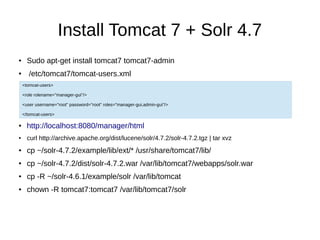
Install Tomcat 7 + Solr 4.7
● Sudo apt-get install tomcat7 tomcat7-admin
● /etc/tomcat7/tomcat-users.xml
● http://localhost:8080/manager/html
● curl http://archive.apache.org/dist/lucene/solr/4.7.2/solr-4.7.2.tgz | tar xvz
● cp ~/solr-4.7.2/example/lib/ext/* /usr/share/tomcat7/lib/
● cp ~/solr-4.7.2/dist/solr-4.7.2.war /var/lib/tomcat7/webapps/solr.war
● cp -R ~/solr-4.6.1/example/solr /var/lib/tomcat
● chown -R tomcat7:tomcat7 /var/lib/tomcat7/solr
<tomcat-users>
<role rolename="manager-gui"/>
<user username="root" password="root" roles="manager-gui,admin-gui"/>
</tomcat-users>
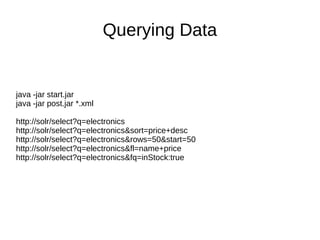
Querying Data
java -jar start.jar
java -jar post.jar *.xml
http://solr/select?q=electronics
http://solr/select?q=electronics&sort=price+desc
http://solr/select?q=electronics&rows=50&start=50
http://solr/select?q=electronics&fl=name+price
http://solr/select?q=electronics&fq=inStock:true
Facets
&facet=true&facet.field=cat&facet.field=inStock
&facet.query=price:[0 TO 10]&facet.query=price:[10 TO *]
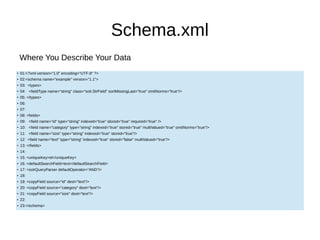
Schema.xml
●
01:<?xml version="1.0" encoding="UTF-8" ?>
●
02:<schema name="example" version="1.1">
●
03: <types>
●
04: <fieldType name="string" class="solr.StrField" sortMissingLast="true" omitNorms="true"/>
●
05: </types>
●
06:
●
07:
●
08: <fields>
●
09: <field name="id" type="string" indexed="true" stored="true" required="true" />
●
10: <field name="category" type="string" indexed="true" stored="true" multiValued="true" omitNorms="true"/>
●
11: <field name="size" type="string" indexed="true" stored="true"/>
●
12: <field name="text" type="string" indexed="true" stored="false" multiValued="true"/>
●
13: </fields>
●
14:
●
15: <uniqueKey>id</uniqueKey>
●
16: <defaultSearchField>text</defaultSearchField>
●
17: <solrQueryParser defaultOperator="AND"/>
●
18:
●
19: <copyField source="id" dest="text"/>
●
20: <copyField source="category" dest="text"/>
●
21: <copyField source="size" dest="text"/>
●
22:
●
23:</schema>
Where You Describe Your Data
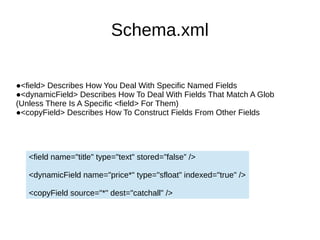
Schema.xml
●<field> Describes How You Deal With Specific Named Fields
●<dynamicField> Describes How To Deal With Fields That Match A Glob
(Unless There Is A Specific <field> For Them)
●<copyField> Describes How To Construct Fields From Other Fields
<field name="title" type="text" stored=”false” />
<dynamicField name="price*" type="sfloat" indexed="true" />
<copyField source="*" dest="catchall" />
Schema.xml
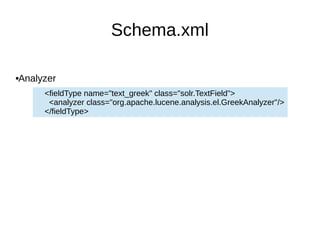
Analyzer
<fieldType name="text_greek" class="solr.TextField">
<analyzer class="org.apache.lucene.analysis.el.GreekAnalyzer"/>
</fieldType>
Schema.xml
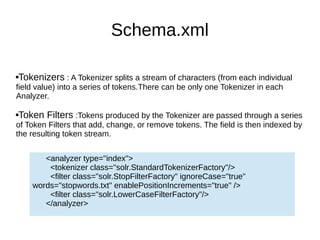
Tokenizers : A Tokenizer splits a stream of characters (from each individual
field value) into a series of tokens.There can be only one Tokenizer in each
Analyzer.
Token Filters :Tokens produced by the Tokenizer are passed through a series
of Token Filters that add, change, or remove tokens. The field is then indexed by
the resulting token stream.
<analyzer type="index">
<tokenizer class="solr.StandardTokenizerFactory"/>
<filter class="solr.StopFilterFactory" ignoreCase="true"
words="stopwords.txt" enablePositionIncrements="true" />
<filter class="solr.LowerCaseFilterFactory"/>
</analyzer>
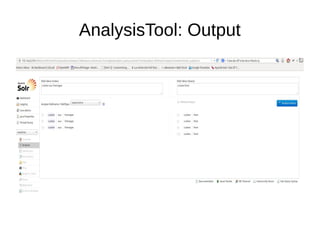
AnalysisTool: Output
Solrconfig.xml
solrconfig.xml is where you configure options for how this Solr instance should
behave.
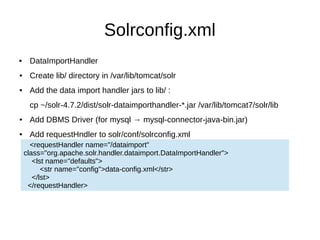
Solrconfig.xml
 DataImportHandler
● Create lib/ directory in /var/lib/tomcat/solr
● Add the data import handler jars to lib/ :
cp ~/solr-4.7.2/dist/solr-dataimporthandler-*.jar /var/lib/tomcat7/solr/lib
● Add DBMS Driver (for mysql → mysql-connector-java-bin.jar)
● Add requestHndler to solr/conf/solrconfig.xml
<requestHandler name="/dataimport"
class="org.apache.solr.handler.dataimport.DataImportHandler">
<lst name="defaults">
<str name="config">data-config.xml</str>
</lst>
</requestHandler>
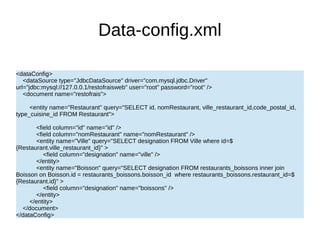
Data-config.xml
<dataConfig>
<dataSource type="JdbcDataSource" driver="com.mysql.jdbc.Driver"
url="jdbc:mysql://127.0.0.1/restofraisweb" user="root" password="root" />
<document name="restofrais">
<entity name="Restaurant" query="SELECT id, nomRestaurant, ville_restaurant_id,code_postal_id,
type_cuisine_id FROM Restaurant">
<field column="id" name="id" />
<field column="nomRestaurant" name="nomRestaurant" />
<entity name="Ville" query="SELECT designation FROM Ville where id=$
{Restaurant.ville_restaurant_id}" >
<field column="designation" name="ville" />
</entity>
<entity name="Boisson" query="SELECT designation FROM restaurants_boissons inner join
Boisson on Boisson.id = restaurants_boissons.boisson_id where restaurants_boissons.restaurant_id=$
{Restaurant.id}" >
<field column="designation" name="boissons" />
</entity>
</entity>
</document>
</dataConfig>
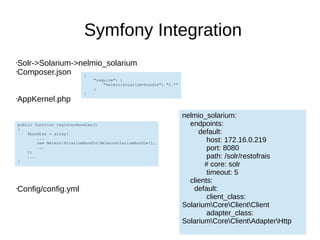
Symfony Integration
•Solr->Solarium->nelmio_solarium
•Composer.json
•AppKernel.php
•Config/config.yml
{
"require": {
"nelmio/solarium-bundle": "2.*"
}
}
public function registerBundles()
{
$bundles = array(
...
new NelmioSolariumBundleNelmioSolariumBundle(),
...
);
...
}
nelmio_solarium:
endpoints:
default:
host: 172.16.0.219
port: 8080
path: /solr/restofrais
# core: solr
timeout: 5
clients:
default:
client_class:
SolariumCoreClientClient
adapter_class:
SolariumCoreClientAdapterHttp
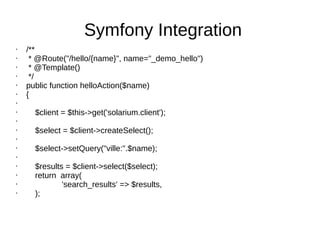
Symfony Integration
• /**
• * @Route("/hello/{name}", name="_demo_hello")
• * @Template()
• */
• public function helloAction($name)
• {
•
• $client = $this->get('solarium.client');
•
• $select = $client->createSelect();
•
• $select->setQuery("ville:".$name);
•
• $results = $client->select($select);
• return array(
• 'search_results' => $results,
• );
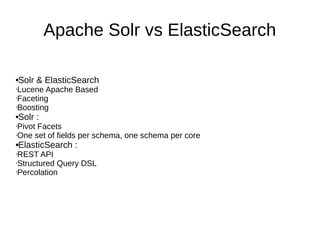
Apache Solr vs ElasticSearch
Solr & ElasticSearch
•Lucene Apache Based
•Faceting
•Boosting
Solr :
•Pivot Facets
•One set of fields per schema, one schema per core
ElasticSearch :
•REST API
•Structured Query DSL
•Percolation
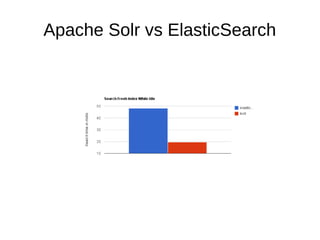
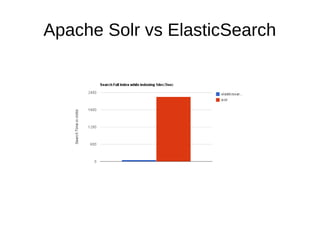
Apache Solr vs ElasticSearch
Links
●Solr wiki
http://wiki.apache.org/solr/
●Install Solr 4.6 with Tomcat 7 on Debian 7 :
http://pacoup.com/2014/02/05/install-solr-4-6-with-tomcat-7-on-debian-7
●solr-vs-elasticsearch.com :
http://solr-vs-elasticsearch.com
●Nelmio Solarium Bundle :
https://github.com/nelmio/NelmioSolariumBundle
●The Many Facets of Apache Solr, Yonik Seeley
http://www.youtube.com/watch?v=LyjiLYN-qIk

Solr a.b-ab

  • 1.
    First steps withSolr 4.7 Achraf KRID
  • 2.
    Plan •Definition •Installation (with tomcat7) •Querying, faceting •Indexation •Configuration •Symfony Integration •Comparaison
  • 3.
    Solr ? SolrTM isthe popular, blazing fast open source enterprise search platform from the Apache LuceneTM project. Its major features include powerful full-text search, hit highlighting, faceted search, near real-time indexing, dynamic clustering, database integration, rich document (e.g., Word, PDF) handling, and geospatial search.
  • 4.
    Install Tomcat 7+ Solr 4.7 ● Sudo apt-get install tomcat7 tomcat7-admin ● /etc/tomcat7/tomcat-users.xml ● http://localhost:8080/manager/html ● curl http://archive.apache.org/dist/lucene/solr/4.7.2/solr-4.7.2.tgz | tar xvz ● cp ~/solr-4.7.2/example/lib/ext/* /usr/share/tomcat7/lib/ ● cp ~/solr-4.7.2/dist/solr-4.7.2.war /var/lib/tomcat7/webapps/solr.war ● cp -R ~/solr-4.6.1/example/solr /var/lib/tomcat ● chown -R tomcat7:tomcat7 /var/lib/tomcat7/solr <tomcat-users> <role rolename="manager-gui"/> <user username="root" password="root" roles="manager-gui,admin-gui"/> </tomcat-users>
  • 5.
    Querying Data java -jarstart.jar java -jar post.jar *.xml http://solr/select?q=electronics http://solr/select?q=electronics&sort=price+desc http://solr/select?q=electronics&rows=50&start=50 http://solr/select?q=electronics&fl=name+price http://solr/select?q=electronics&fq=inStock:true
  • 6.
  • 7.
    Schema.xml ● 01:<?xml version="1.0" encoding="UTF-8"?> ● 02:<schema name="example" version="1.1"> ● 03: <types> ● 04: <fieldType name="string" class="solr.StrField" sortMissingLast="true" omitNorms="true"/> ● 05: </types> ● 06: ● 07: ● 08: <fields> ● 09: <field name="id" type="string" indexed="true" stored="true" required="true" /> ● 10: <field name="category" type="string" indexed="true" stored="true" multiValued="true" omitNorms="true"/> ● 11: <field name="size" type="string" indexed="true" stored="true"/> ● 12: <field name="text" type="string" indexed="true" stored="false" multiValued="true"/> ● 13: </fields> ● 14: ● 15: <uniqueKey>id</uniqueKey> ● 16: <defaultSearchField>text</defaultSearchField> ● 17: <solrQueryParser defaultOperator="AND"/> ● 18: ● 19: <copyField source="id" dest="text"/> ● 20: <copyField source="category" dest="text"/> ● 21: <copyField source="size" dest="text"/> ● 22: ● 23:</schema> Where You Describe Your Data
  • 8.
    Schema.xml ●<field> Describes HowYou Deal With Specific Named Fields ●<dynamicField> Describes How To Deal With Fields That Match A Glob (Unless There Is A Specific <field> For Them) ●<copyField> Describes How To Construct Fields From Other Fields <field name="title" type="text" stored=”false” /> <dynamicField name="price*" type="sfloat" indexed="true" /> <copyField source="*" dest="catchall" />
  • 9.
    Schema.xml Analyzer <fieldType name="text_greek" class="solr.TextField"> <analyzerclass="org.apache.lucene.analysis.el.GreekAnalyzer"/> </fieldType>
  • 10.
    Schema.xml Tokenizers : ATokenizer splits a stream of characters (from each individual field value) into a series of tokens.There can be only one Tokenizer in each Analyzer. Token Filters :Tokens produced by the Tokenizer are passed through a series of Token Filters that add, change, or remove tokens. The field is then indexed by the resulting token stream. <analyzer type="index"> <tokenizer class="solr.StandardTokenizerFactory"/> <filter class="solr.StopFilterFactory" ignoreCase="true" words="stopwords.txt" enablePositionIncrements="true" /> <filter class="solr.LowerCaseFilterFactory"/> </analyzer>
  • 11.
  • 12.
    Solrconfig.xml solrconfig.xml is whereyou configure options for how this Solr instance should behave.
  • 13.
    Solrconfig.xml  DataImportHandler ● Createlib/ directory in /var/lib/tomcat/solr ● Add the data import handler jars to lib/ : cp ~/solr-4.7.2/dist/solr-dataimporthandler-*.jar /var/lib/tomcat7/solr/lib ● Add DBMS Driver (for mysql → mysql-connector-java-bin.jar) ● Add requestHndler to solr/conf/solrconfig.xml <requestHandler name="/dataimport" class="org.apache.solr.handler.dataimport.DataImportHandler"> <lst name="defaults"> <str name="config">data-config.xml</str> </lst> </requestHandler>
  • 14.
    Data-config.xml <dataConfig> <dataSource type="JdbcDataSource" driver="com.mysql.jdbc.Driver" url="jdbc:mysql://127.0.0.1/restofraisweb"user="root" password="root" /> <document name="restofrais"> <entity name="Restaurant" query="SELECT id, nomRestaurant, ville_restaurant_id,code_postal_id, type_cuisine_id FROM Restaurant"> <field column="id" name="id" /> <field column="nomRestaurant" name="nomRestaurant" /> <entity name="Ville" query="SELECT designation FROM Ville where id=$ {Restaurant.ville_restaurant_id}" > <field column="designation" name="ville" /> </entity> <entity name="Boisson" query="SELECT designation FROM restaurants_boissons inner join Boisson on Boisson.id = restaurants_boissons.boisson_id where restaurants_boissons.restaurant_id=$ {Restaurant.id}" > <field column="designation" name="boissons" /> </entity> </entity> </document> </dataConfig>
  • 15.
    Symfony Integration •Solr->Solarium->nelmio_solarium •Composer.json •AppKernel.php •Config/config.yml { "require": { "nelmio/solarium-bundle":"2.*" } } public function registerBundles() { $bundles = array( ... new NelmioSolariumBundleNelmioSolariumBundle(), ... ); ... } nelmio_solarium: endpoints: default: host: 172.16.0.219 port: 8080 path: /solr/restofrais # core: solr timeout: 5 clients: default: client_class: SolariumCoreClientClient adapter_class: SolariumCoreClientAdapterHttp
  • 16.
    Symfony Integration • /** •* @Route("/hello/{name}", name="_demo_hello") • * @Template() • */ • public function helloAction($name) • { • • $client = $this->get('solarium.client'); • • $select = $client->createSelect(); • • $select->setQuery("ville:".$name); • • $results = $client->select($select); • return array( • 'search_results' => $results, • );
  • 17.
    Apache Solr vsElasticSearch Solr & ElasticSearch •Lucene Apache Based •Faceting •Boosting Solr : •Pivot Facets •One set of fields per schema, one schema per core ElasticSearch : •REST API •Structured Query DSL •Percolation
  • 18.
    Apache Solr vsElasticSearch
  • 19.
    Apache Solr vsElasticSearch
  • 20.
    Links ●Solr wiki http://wiki.apache.org/solr/ ●Install Solr4.6 with Tomcat 7 on Debian 7 : http://pacoup.com/2014/02/05/install-solr-4-6-with-tomcat-7-on-debian-7 ●solr-vs-elasticsearch.com : http://solr-vs-elasticsearch.com ●Nelmio Solarium Bundle : https://github.com/nelmio/NelmioSolariumBundle ●The Many Facets of Apache Solr, Yonik Seeley http://www.youtube.com/watch?v=LyjiLYN-qIk