socialfavesocialfave
socialfave
Getting Started
with
Socialfave
socialfave
socialfavesocialfave
socialfave
What is Socialfave?
Notice
socialfave
This document is intended to familiarize you quickly with Socialfave.
It is not exhaustive: some features are not covered (example: bulk
actions) and the others are not described in detail.
Some features described here are not available in the free version
of Socialfave (example: with the free plan, you can access only a
summary of the statistics).
socialfavesocialfave
socialfave
What is Socialfave?
What is Socialfave?
socialfave
socialfavesocialfave
socialfave
What is Socialfave?
Socialfave
is a web application
based on a powerful filter system
to manage and analyze your Twitter profile.
socialfave
socialfavesocialfave
socialfave
What is Socialfave?
Socialfave
is organized in 4 main modules:
1. Tweets, Retweets and likes
2. Community
3. Scheduler
4. Public profile
socialfave
socialfavesocialfave
socialfave
What is Socialfave?
1. Tweets, Retweets and likes
socialfave
Filter
Analyze
Order
Delete, Retweet,
like, ...
Tag and rate
socialfavesocialfave
socialfave
What is Socialfave?
•Quickly filter your Tweets through more than 20 filters (content,
engagement, author, ...)
•Sort your Tweets according to different characteristics (engagement,
age, ...)
•Tag your Tweets in order to classify them or to mark them for later
action.
•Rate your Tweets in order to prioritize them.
•Analyze your filtered Tweets using more than 20 statistics:
engagements (retweets and likes), the hashtags and the mentions
having generated the most engagements, the best time to Tweet, ...
socialfave
socialfavesocialfave
socialfave
What is Socialfave?
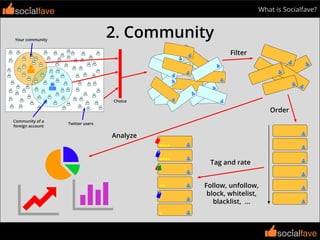
2. Community
socialfave
Filter
Analyze
Order
Follow, unfollow,
block, whitelist,
blacklist, ...
Tag and rate
Twitter users
Your community
Community of a
foreign account
Choice
socialfavesocialfave
socialfave
What is Socialfave?
•Filter the members of your community according to the size of their
network, their activity, their profile or their demographic attributes.
Nearly 40 filters available.
•Discover your new followers, unfollowers, fans, not followbacks, ...
•Tag your community members in order to classify them or to mark
them for later action.
•Rate your community members in order to hierarchy them.
•Follow, unfollow, whitelist, blacklist, ...
•Quickly discover new interesting Twitter accounts by searching in
foreign account followers or followings or in a selection of Twitter
accounts, using the same filters. Use the same filters as your
community.
•Sort the filtered users according to their activity, the size of their
networks, ...
•Analyze the filtered users using more than 20 statistics: size of
their network, activity, demographic data, profile, evolution in your
community, ...
socialfave
socialfavesocialfave
socialfave
What is Socialfave?
3. Scheduler
socialfave
Matrix of mentions
socialfavesocialfave
socialfave
What is Socialfave?
•Schedule a Tweet to a given date and time, or according to a
calendar.
•Create multiple calendars based on the importance of the Tweets or
their target.
•You can set different Tweeting hours for each day if you wish.
•You can block the sending of a Tweet until it has been validated.
socialfave
socialfavesocialfave
socialfave
What is Socialfave?
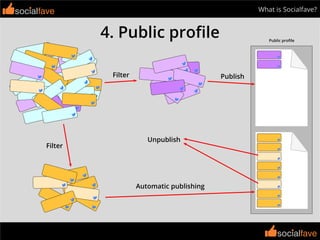
4. Public profile
socialfave
Unpublish
PublishFilter
Filter
Automatic publishing
Public profile
socialfavesocialfave
socialfave
What is Socialfave?
•Share your favorite tweets on a public profile.
•Organize your public profile by topics.
•Publish your Tweets manually or automatically.
socialfave
socialfavesocialfave
socialfave
Starting
Starting
socialfave
socialfave
socialfave
Startingsocialfave
Click here to create an account ...
... or here if you already have one.
socialfave
socialfave
Startingsocialfave
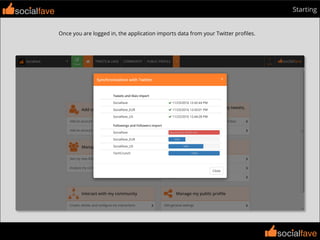
Once you are logged in, the application imports data from your Twitter profiles.
socialfave
socialfave
Startingsocialfave
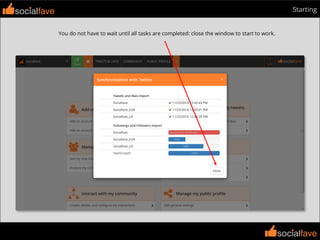
You do not have to wait until all tasks are completed: close the window to start to work.
socialfave
socialfave
Startingsocialfave
The homepage contains some shortcuts to other parts of the application.
socialfave
socialfave
Startingsocialfave
Click here when you want to return to this page.
socialfave
socialfave
Startingsocialfave
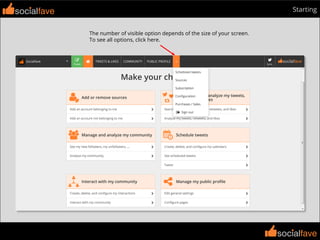
The black navigation bar allows you to navigate through the application.
socialfave
socialfave
Startingsocialfave
The number of visible option depends of the size of your screen.
To see all options, click here.
socialfave
socialfave
Startingsocialfave
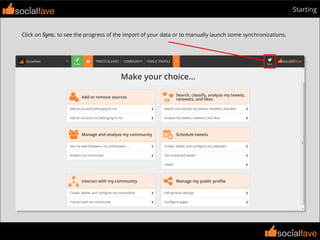
Click on Sync. to see the progress of the import of your data or to manually launch some synchronizations.
socialfave
socialfave
Startingsocialfave
Click on Subscription to change your plan.
socialfave
socialfave
Startingsocialfave
To add an account, click on Sources ...
... or click here.
socialfavesocialfave
socialfave
Tweets, Retweets and likes
socialfave
socialfave
socialfave
Tweets, Retweets and likes
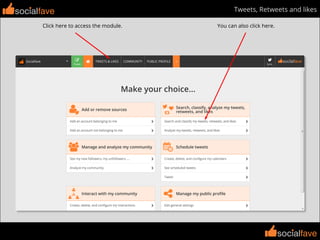
Click here to access the module.
socialfave
You can also click here.
socialfave
socialfave
Tweets, Retweets and likes
Use the sliders or the navigation buttons to move through the pages.
socialfave
socialfave
socialfave
Tweets, Retweets and likes
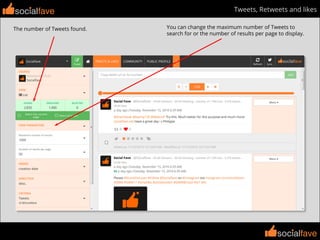
You can change the maximum number of Tweets to
search for or the number of results per page to display.
socialfave
The number of Tweets found.
socialfave
socialfave
Tweets, Retweets and likessocialfave
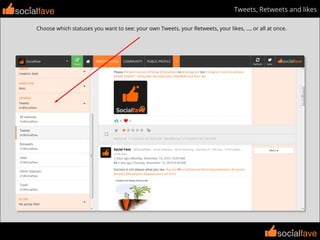
Choose which statuses you want to see: your own Tweets, your Retweets, your likes, ..., or all at once.
socialfave
socialfave
Tweets, Retweets and likessocialfave
Choose the order and direction the way you want to display your tweets.
socialfave
socialfave
Tweets, Retweets and likessocialfave
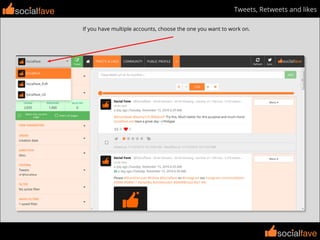
If you have multiple accounts, choose the one you want to work on.
socialfave
socialfave
Tweets, Retweets and likessocialfave
You can choose to work with an account while displaying the statuses of
another account (or even all your accounts).
socialfave
socialfave
Tweets, Retweets and likessocialfave
Tweets information or actions that depend on an account are always relative to the working account.
Retweeted 1 day ago by @Socialfave
Click here to retweet with @Socialfave
Working account: @Socialfave
Displayed statuses are those of
@Sociafave_US
socialfave
socialfave
Tweets, Retweets and likessocialfave
Use filters for more accurate results.
socialfave
socialfave
Tweets, Retweets and likessocialfave
You can make some actions on a status: Retweet, like, rate, tag, delete (from Socialfave only).
socialfave
socialfave
Tweets, Retweets and likessocialfave
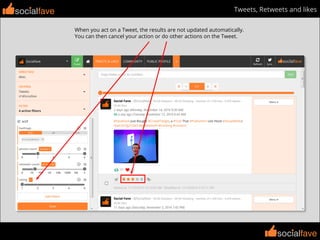
When you act on a Tweet, the results are not updated automatically.
You can then cancel your action or do other actions on the Tweet.
socialfave
socialfave
Tweets, Retweets and likessocialfave
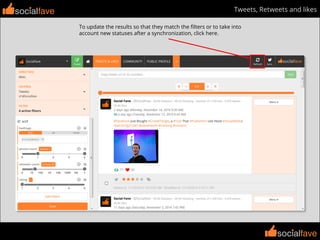
To update the results so that they match the filters or to take into
account new statuses after a synchronization, click here.
socialfave
socialfave
Tweets, Retweets and likes
Click here to see statitistics on the found statuses.
socialfave
socialfave
socialfave
Tweets, Retweets and likes
Choose the statistical data you want to see.
socialfave
socialfave
socialfave
Tweets, Retweets and likes
You can export the graphics.
socialfave
socialfave
socialfave
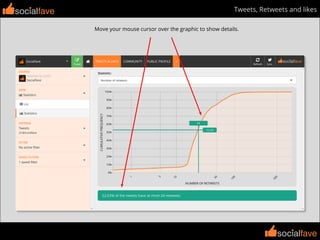
Tweets, Retweets and likes
Move your mouse cursor over the graphic to show details.
socialfave
socialfave
socialfave
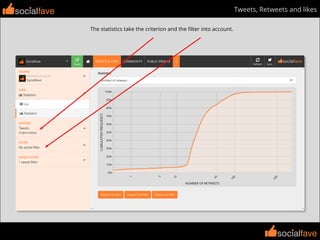
Tweets, Retweets and likes
The statistics take the criterion and the filter into account.
socialfave
socialfave
socialfave
Tweets, Retweets and likes
Here, the statistics are made on @Socialfave’s Tweets that are less than a month old.
socialfave
socialfavesocialfave
socialfave
Community
Community
socialfave
socialfave
socialfave
Community
Click here to access the module.
socialfave
You can also click here.
socialfave
socialfave
Communitysocialfave
Use the sliders or the navigation buttons to move through the pages.
socialfave
socialfave
Communitysocialfave
You can change the maximum number of users to
search for or the number of results per page to display.
The number of users found.
socialfave
socialfave
Communitysocialfave
You can change the way the latest status is displayed.
The latest status
socialfave
socialfave
Communitysocialfave
Choose the users you want to see: your followers, followings, unfollowers, whitelisted, blacklisted, ...
socialfave
socialfave
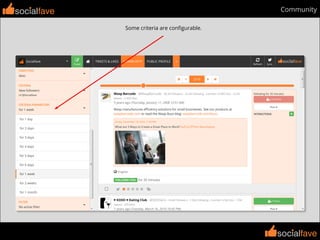
Communitysocialfave
Some criteria are configurable.
socialfave
socialfave
Communitysocialfave
Choose the order and direction in which you want to display the users.
socialfave
socialfave
Communitysocialfave
If you have multiple accounts, choose the one you want to work on.
socialfave
socialfave
Communitysocialfave
You can choose to work with an account and display the users from a
different source from the working account community.
socialfave
socialfave
Communitysocialfave
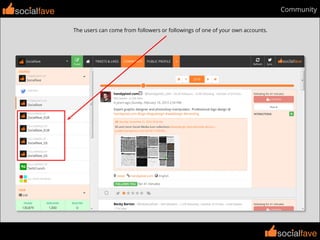
The users can come from followers or followings of one of your own accounts.
socialfave
socialfave
Communitysocialfave
The users can come from followers or followings of an account that does not belong to you (foreign account).
socialfave
socialfave
Communitysocialfave
The users can come from all your sources (followers and followings of your own accounts or foreign accounts).
socialfave
socialfave
Communitysocialfave
The Twitter source allows you to discover Twitter users to follow.
socialfave
socialfave
Communitysocialfave
Some orders depend on the working account and are not available when you select the Twitter source.
socialfave
socialfave
Communitysocialfave
Choose another order.
Unavailable orders
socialfave
socialfave
Communitysocialfave
Users information or actions that depend on an account are always relative to the working account.
This user follow @Socialfave
Working account: @Socialfave
Displayed users are those who
follow @TechCrunch
Click here to unfollow this
user with @Socialfave
socialfave
socialfave
Communitysocialfave
Use the first criterion to see all the users of the chosen source.
socialfave
socialfave
Communitysocialfave
The other criteria are relative to the working account.
socialfave
socialfave
Communitysocialfave
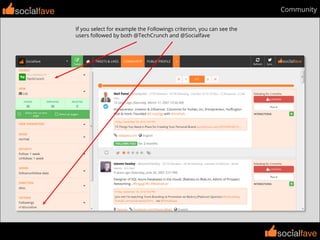
If you select for example the Followings criterion, you can see the
users followed by both @TechCrunch and @Socialfave
socialfave
socialfave
Communitysocialfave
Use filters for more accurate results.
socialfave
socialfave
Communitysocialfave
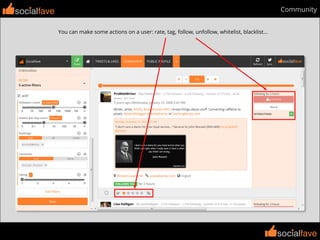
You can make some actions on a user: rate, tag, follow, unfollow, whitelist, blacklist...
socialfave
socialfave
Communitysocialfave
When you act on a user, the results are not updated automatically.
You can then cancel your action or do other actions on the user.
socialfave
socialfave
Communitysocialfave
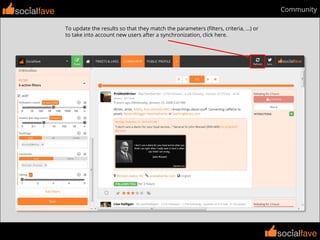
To update the results so that they match the parameters (filters, criteria, ...) or
to take into account new users after a synchronization, click here.
socialfave
socialfave
Communitysocialfave
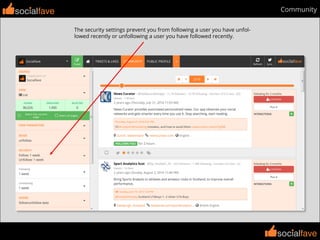
The security settings prevent you from following a user you have unfol-
lowed recently or unfollowing a user you have followed recently.
socialfave
socialfave
Communitysocialfave
Choose the Follow mode to see only the users you can follow: you can’t follow a user you
already follow or you have blacklisted, or you have unfollowed recently.
socialfave
socialfave
Communitysocialfave
Choose the Unfollow mode to see only the users you can unfollow: you can’t unfollow a user
you have already unfollowed or you have whitelisted, or you have followed recently.
socialfave
socialfave
Communitysocialfave
Click here to see statistics on the found users.
socialfave
socialfave
Communitysocialfave
Choose the statistical data you want to see.
socialfave
socialfave
Communitysocialfave
You can export the graphics.
socialfave
socialfave
Communitysocialfave
Move your mouse cursor over the graphic to show details.
socialfave
socialfave
Communitysocialfave
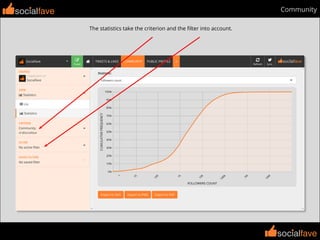
The statistics take the criterion and the filter into account.
socialfave
socialfave
Communitysocialfave
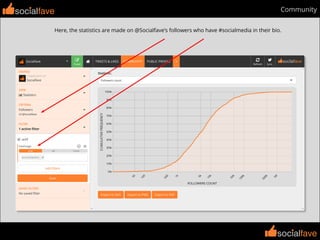
Here, the statistics are made on @Socialfave’s followers who have #socialmedia in their bio.
socialfavesocialfave
socialfave
Scheduler
Scheduler
socialfave
socialfave
socialfave
Schedulersocialfave
Choose the account you want to Tweet with.
socialfave
socialfave
Communitysocialfave
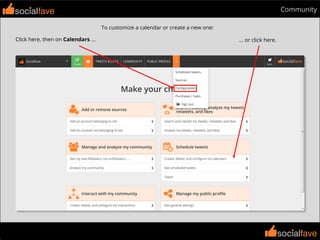
To customize a calendar or create a new one:
Click here, then on Calendars ... ... or click here.
socialfave
socialfave
Communitysocialfave
Click here to create a calendar.
socialfave
socialfave
Communitysocialfave
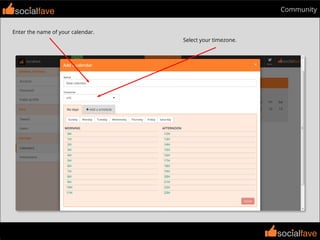
Enter the name of your calendar.
Select your timezone.
socialfave
socialfave
Communitysocialfave
Select the days to configure.
socialfave
socialfave
Communitysocialfave
Click and choose the minutes.
socialfave
socialfave
Communitysocialfave
Add some Tweeting times.
socialfave
socialfave
Communitysocialfave
Click here to add Tweeting times for other days (or even additional times for some days).
socialfave
socialfave
Communitysocialfave
Here we have added a Tweeting slot at 12H00 on Sunday, Wednesday, Saturday.
socialfave
socialfave
Communitysocialfave
Click here to save your calendar.
socialfave
socialfave
Communitysocialfave
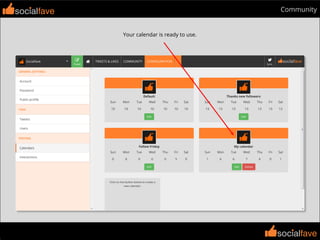
Your calendar is ready to use.
socialfave
socialfave
Scheduler
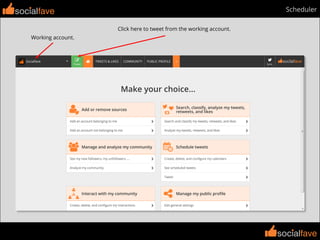
Click here to tweet from the working account.
socialfave
Working account.
socialfave
socialfave
Scheduler
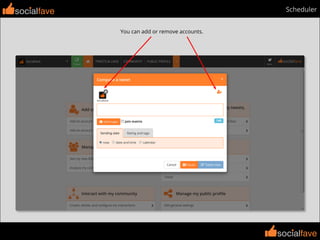
You can add or remove accounts.
socialfave
socialfave
socialfave
Scheduler
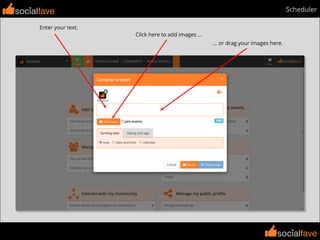
Enter your text.
socialfave
Click here to add images ...
... or drag your images here.
socialfave
socialfave
Schedulersocialfave
Check this box to join a mentions matrix to your Tweet.
socialfave
socialfave
Schedulersocialfave
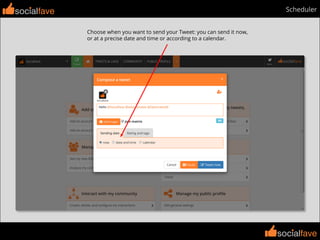
Choose when you want to send your Tweet: you can send it now,
or at a precise date and time or according to a calendar.
socialfave
socialfave
Schedulersocialfave
If you want to Tweet according to a calendar, you must
choose the calendar to use (for each account if necessary).
socialfave
socialfave
Schedulersocialfave
Click here to validate your Tweet ...
... or here if you want to validate it later.
socialfave
socialfave
Scheduler
Click here to see your scheduled Tweets ...
socialfave
... or click here.
socialfave
socialfave
Schedulersocialfave
You can see your scheduled Tweet.
socialfave
socialfave
Schedulersocialfave
You can edit the Tweet to change its content or when you want to send it. You can also delete it.
socialfave
socialfave
Schedulersocialfave
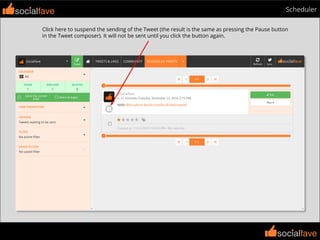
Click here to suspend the sending of the Tweet (the result is the same as pressing the Pause button
in the Tweet composer). It will not be sent until you click the button again.
socialfave
socialfave
Schedulersocialfave
You can choose to see the scheduled Tweets of a specific calendar or those sent without calendar.
socialfave
socialfave
Schedulersocialfave
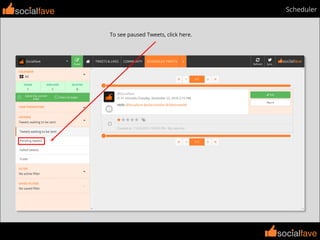
To see paused Tweets, click here.
socialfave
socialfave
Schedulersocialfave
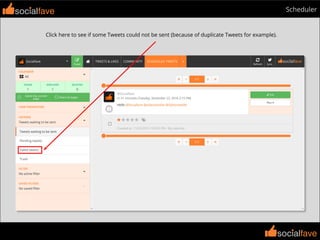
Click here to see if some Tweets could not be sent (because of duplicate Tweets for example).
socialfave
socialfave
Schedulersocialfave
If you have a lot of scheduled Tweets, you can use filters to quickly retrieve your Tweets.
socialfavesocialfave
socialfave
Public Profile
Public Profile
socialfave
socialfave
socialfave
Public Profile
Click here to access the module.
socialfave
You can also click here.
socialfave
socialfave
Public Profilesocialfave
You can find your public profile url here.
socialfave
socialfave
Public Profilesocialfave
Your username is based on the name of the Twitter account you used to create your Socialfave account.
socialfave
socialfave
Public Profilesocialfave
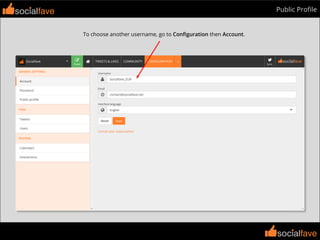
To choose another username, go to Configuration then Account.
socialfave
socialfave
Public Profilesocialfave
If you go to your public profile now, you will get an error because
you have not published anything yet. So publish some Tweets.
socialfave
socialfave
Public Profilesocialfave
If you go to your public profile now, you see your published Tweets.
socialfave
socialfave
Public Profilesocialfave
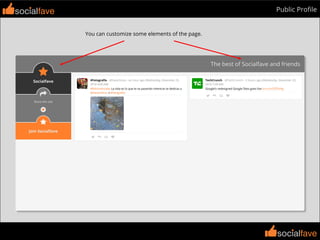
You can customize some elements of the page.
socialfave
socialfave
Public Profile
Go to Configuration then Public profile, or click here.
socialfave
socialfave
socialfave
Public Profile
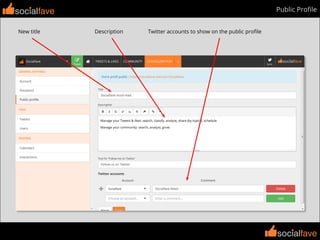
New title
socialfave
Description Twitter accounts to show on the public profile
socialfave
socialfave
Public Profilesocialfave
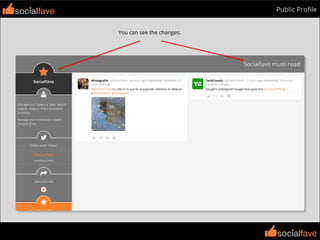
You can see the changes.
socialfave
socialfave
Public Profilesocialfave
To remove a Tweet from the public profile, click here.
socialfave
socialfave
Public Profilesocialfave
Use the Publish mode to see the unpublished Tweets only.
socialfave
socialfave
Public Profilesocialfave
Use the Unpublish mode to see the published Tweets only.
socialfave
socialfave
Public Profilesocialfave
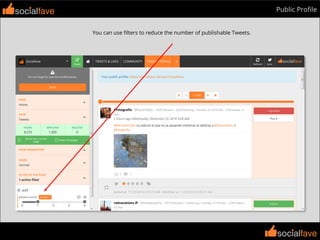
You can use filters to reduce the number of publishable Tweets.
socialfave
socialfave
Public Profilesocialfave
You must save the modifications to take them into account.
socialfave
socialfave
Public Profilesocialfave
Here, we have added a filter to restrict the publishable Tweets to
those sent by @harcefotos and @radvacations.
socialfave
socialfave
Public Profilesocialfave
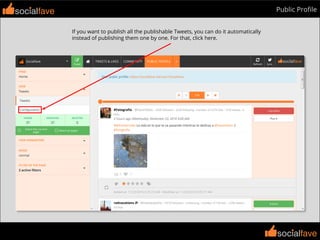
If you want to publish all the publishable Tweets, you can do it automatically
instead of publishing them one by one. For that, click here.
socialfave
socialfave
Public Profilesocialfave
Click here to publish the publishable Tweets automatically (and don’t forget to save).
socialfave
socialfave
Public Profilesocialfave
All publishable Tweets appear on your public profile.
socialfave
socialfave
Public Profilesocialfave
You can have multiple pages on your public profile.
To add a page, click here.
socialfave
socialfave
Public Profilesocialfave
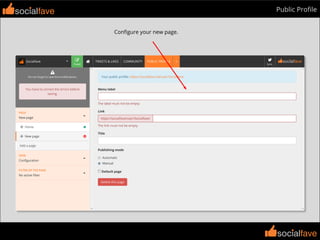
Configure your new page.
socialfave
socialfave
Public Profilesocialfave
Here, we have created a new page for Social Media Tweets, with automatic publishing.
socialfave
socialfave
Public Profilesocialfave
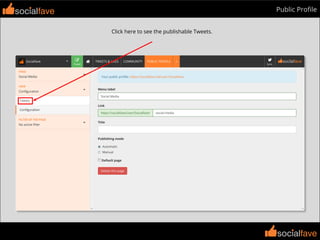
Click here to see the publishable Tweets.
socialfave
socialfave
Public Profilesocialfave
We have added a filter to publish only Tweets containing a #socialmedia hashtag.
socialfave
socialfave
Public Profilesocialfave
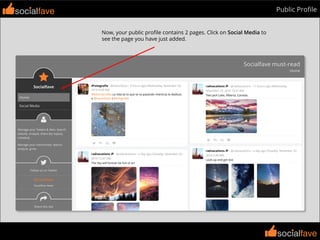
Now, your public profile contains 2 pages. Click on Social Media to
see the page you have just added.
socialfave
socialfave
Public Profilesocialfave
Here is your new page.
socialfave
socialfave
Public Profilesocialfave
The name of the first page is not very significant, but you can change it.
socialfave
socialfave
Public Profilesocialfave
Click here to select the Home page.
socialfave
socialfave
Public Profilesocialfave
Click here to configure the page.
socialfave
socialfave
Public Profilesocialfave
Here is the configuration after some changes.
socialfave
socialfave
Public Profilesocialfave
You can change the order of the pages, drag the page using the handle.
socialfave
socialfave
Public Profilesocialfave
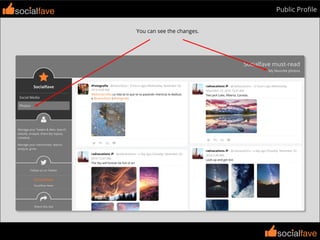
You can see the changes.
socialfavesocialfave
socialfave
socialfave
Socialfave website
https://socialfave.net

Getting Started with Socialfave