Social Work Research at UBC Libraries


1. Policies and                •   Extended Loans
   Procedures                  •   Interlibrary Loan


2. Keyword Searching           •   Using AND/OR/( )
                               •   Truncation
                               •   “Searchable” Topics
                               •   Subject Headings
                               •   Hands-on Exercises for the Catalogue


3. Reference Collection        •   Bibliographies
                               •   Other Interesting Sources
                                   (Annual Review of Sociology)


4. Indexes and Abstracts       •   Social Work Abstracts
                               •   Scope and Indexing
                               •   Searching by Keyword
                               •   Searching by Descriptor
                               •   Finding Articles


5. Web of Science              •   Scope
                               •   Citation Searching


6. Digital Dissertations       •   Searching by Author/Student
                               •   Searching by Supervisor
                               •   Searching by Topic


7. RefWorks


8. Getting Help


                                                                          1
Keyword Searching
Most research will begin in the library catalogue or in a periodical index. In either case,
good keyword searching skills are essential for finding relevant materials.

There are some important steps for searching by keyword:
   1. Identify the key concepts in your research
   2. Understand how to search for your terms in the catalogue and databases
   3. Conduct a search and analyze your results
   4. Adjust search terms accordingly and search again

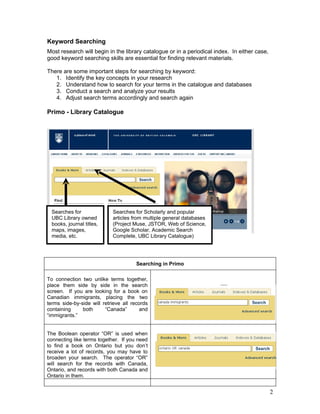
Primo - Library Catalogue


  Searches for              Searches for Scholarly and popular
  UBC Library owned         articles from multiple general databases
  books, journal titles,    (Project Muse, JSTOR, Web of Science,
  maps, images,             Google Scholar, Academic Search
  media, etc.               Complete, UBC Library Catalogue)


                                      Searching in Primo

To connection two unlike terms together,
place them side by side in the search
screen. If you are looking for a book on
Canadian immigrants, placing the two
terms side-by-side will retrieve all records
containing     both      “Canada”        and
“immigrants.”


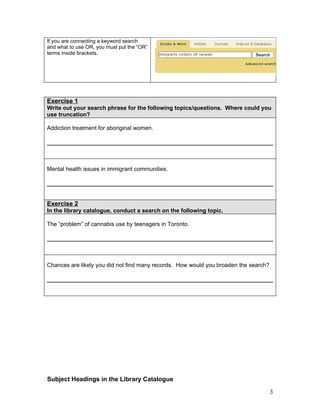
The Boolean operator “OR” is used when
connecting like terms together. If you need
to find a book on Ontario but you don’t
receive a lot of records, you may have to
broaden your search. The operator “OR”
will search for the records with Canada,
Ontario, and records with both Canada and
Ontario in them.


                                                                                              2
If you are connecting a keyword search
and what to use OR, you must put the “OR”
terms inside brackets.


Exercise 1
Write out your search phrase for the following topics/questions. Where could you
use truncation?

Addiction treatment for aboriginal women.


Mental health issues in immigrant communities.


Exercise 2
In the library catalogue, conduct a search on the following topic.

The “problem” of cannabis use by teenagers in Toronto.


Chances are likely you did not find many records. How would you broaden the search?


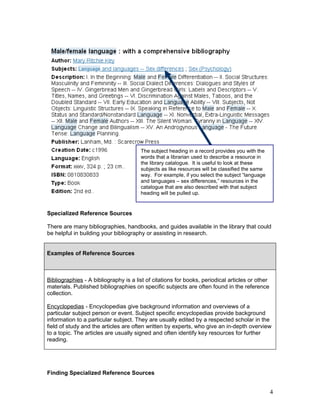
Subject Headings in the Library Catalogue

                                                                                      3
The subject heading in a record provides you with the
                                       words that a librarian used to describe a resource in
                                       the library catalogue. It is useful to look at these
                                       subjects as like resources will be classified the same
                                       way. For example, if you select the subject “language
                                       and languages – sex differences,” resources in the
                                       catalogue that are also described with that subject
                                       heading will be pulled up.


Specialized Reference Sources

There are many bibliographies, handbooks, and guides available in the library that could
be helpful in building your bibliography or assisting in research.


Examples of Reference Sources


Bibliographies - A bibliography is a list of citations for books, periodical articles or other
materials. Published bibliographies on specific subjects are often found in the reference
collection.

Encyclopedias - Encyclopedias give background information and overviews of a
particular subject person or event. Subject specific encyclopedias provide background
information to a particular subject. They are usually edited by a respected scholar in the
field of study and the articles are often written by experts, who give an in-depth overview
to a topic. The articles are usually signed and often identify key resources for further
reading.


Finding Specialized Reference Sources


                                                                                                 4
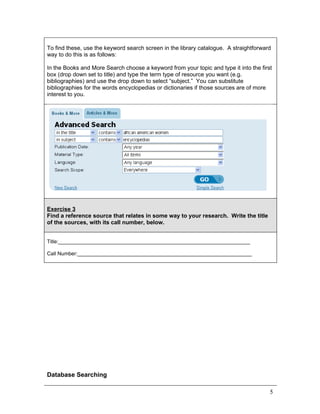
To find these, use the keyword search screen in the library catalogue. A straightforward
way to do this is as follows:

In the Books and More Search choose a keyword from your topic and type it into the first
box (drop down set to title) and type the term type of resource you want (e.g.
bibliographies) and use the drop down to select “subject.” You can substitute
bibliographies for the words encyclopedias or dictionaries if those sources are of more
interest to you.


Exercise 3
Find a reference source that relates in some way to your research. Write the title
of the sources, with its call number, below.


Title:__________________________________________________________________

Call Number:____________________________________________________________


Database Searching

                                                                                       5
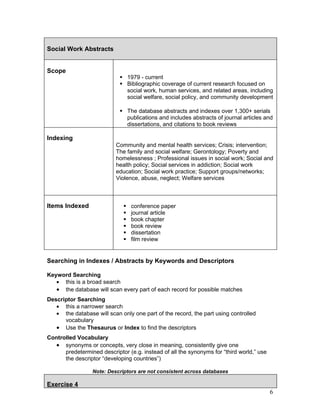
Social Work Abstracts


Scope
                             1979 - current
                             Bibliographic coverage of current research focused on
                              social work, human services, and related areas, including
                              social welfare, social policy, and community development

                             The database abstracts and indexes over 1,300+ serials
                              publications and includes abstracts of journal articles and
                              dissertations, and citations to book reviews

Indexing
                           Community and mental health services; Crisis; intervention;
                           The family and social welfare; Gerontology; Poverty and
                           homelessness ; Professional issues in social work; Social and
                           health policy; Social services in addiction; Social work
                           education; Social work practice; Support groups/networks;
                           Violence, abuse, neglect; Welfare services


Items Indexed                    conference paper
                                 journal article
                                 book chapter
                                 book review
                                 dissertation
                                 film review


Searching in Indexes / Abstracts by Keywords and Descriptors

Keyword Searching
   • this is a broad search
   • the database will scan every part of each record for possible matches
Descriptor Searching
   • this a narrower search
   • the database will scan only one part of the record, the part using controlled
      vocabulary
   • Use the Thesaurus or Index to find the descriptors
Controlled Vocabulary
   • synonyms or concepts, very close in meaning, consistently give one
      predetermined descriptor (e.g. instead of all the synonyms for “third world,” use
      the descriptor “developing countries”)

                 Note: Descriptors are not consistent across databases

Exercise 4
                                                                                          6
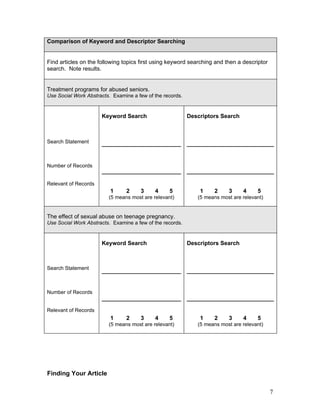
Comparison of Keyword and Descriptor Searching


Find articles on the following topics first using keyword searching and then a descriptor
search. Note results.


Treatment programs for abused seniors.
Use Social Work Abstracts. Examine a few of the records.


                      Keyword Search                       Descriptors Search


Search Statement


Number of Records


Relevant of Records
                          1     2     3     4     5            1    2     3     4     5
                         (5 means most are relevant)          (5 means most are relevant)


The effect of sexual abuse on teenage pregnancy.
Use Social Work Abstracts. Examine a few of the records.


                      Keyword Search                       Descriptors Search


Search Statement


Number of Records


Relevant of Records
                          1     2     3     4     5            1    2     3     4     5
                         (5 means most are relevant)          (5 means most are relevant)


Finding Your Article

                                                                                            7
1. The article is available full-text in that database. No further action is required.
   2. The citation and abstract are available but not the article.

        Write down the citation information:

              o    Author
              o    Article Title
              o    Name of the Journal
              o    Volume
              o    Issue
              o    Year
              o    Pages


        Use the                 button to determine if UBC Libraries have the article in
          paper copy or electronically.

              o If it is available electronically, click on the link provided
              o    If it is available in paper, use the library catalogue to get a call number
                   for your journal. Make sure the libraries have the volume and issue
                   that you need.

   3. If the article is NOT available in paper or electronically, use Inter Library Loan.
       ILL service information can be found at:

       http://elred.library.ubc.ca/cgi-bin/authenticate_patron.pl


Exercise 5
Use the citations below to determine if we have the items in paper or
electronic copy.


The Abuse of Older Men: Implications for Social Work
Kosberg, Jordan I
Australian Social Work, vol. 62, no. 2, pp. 202-215, June 2009


                                                                                            8
Web of Science: Citation Searching


Use Web of Science when you want to know who is citing a scholar’s work. This index
has three components: Art & Humanities, Social Sciences, and Science. You can “de-
select” the other two components if you wish. For citation searching click on the “Cited
Reference Search” button.

Search on a topic can also be done in Web of Science, using the “General Search”
option. Please note that discipline-specific indexes are usually the best starting places
for your topic search.

Web of Science coverage begins in 1945 and is updated weekly. Over 8,000 research
journals are indexed. Citations to journal articles form the bulk of the index, but there are
some records for books, reviews, etc.


Demonstration of Citation Searching

Find the citations to

Kaufman, Carol E. (May 2007) Culture, context, and sexual risk among Northern Plains
American Indian youth. Social Science & Medicine, vol. 64, no. 10, pp. 2152-2164.


Cited Author
Use:                    Last Name, First Initial and then Asterisk
For example:            Kaufman C*


Cited Journal           The ISI Journal Abbreviation
Use:                    SOC SCI MED
For example:

Cited Year              Typing in a year is useful of the scholar wrote a number of articles
                        for the same journal.


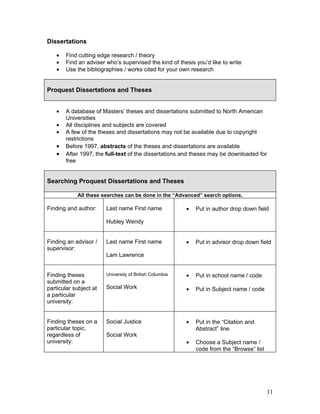
Note: Scholars can make mistakes with their references. Close matches are listed
in Web of Science. Mark and view all records that are close. See example on the
following page.


                                                                                               9
1. Select the article with the                   2. Finish the search
 correction citation information.


Exercise 6


In the Cited Reference Search option, look up the ISI journal abbreviation for Social
Work Research.


In the Cited Reference Search option, find the number of cited references to this article
by R.J. Aguilara: The Impact of Specific Battering Experiences on the Self-Esteem of
Abused Women. 9 (1): 35-45 Mar 1994


In the Cited Reference Search option, find the number of cited references to this book by
Himani Bannerji, The Dark Side of the Nation: Essays on Multiculturalism, Nationalism
and Gender.


In the General Search option, conduct a search on the politics/discourse of weight and
health. How many articles did you find? Do the same search in Social Work Abstracts.
What do you think of the differences in results?


                                                                                        10
Dissertations

   •   Find cutting edge research / theory
   •   Find an adviser who’s supervised the kind of thesis you’d like to write
   •   Use the bibliographies / works cited for your own research


Proquest Dissertations and Theses


   •   A database of Masters’ theses and dissertations submitted to North American
       Universities
   •   All disciplines and subjects are covered
   •   A few of the theses and dissertations may not be available due to copyright
       restrictions
   •   Before 1997, abstracts of the theses and dissertations are available
   •   After 1997, the full-text of the dissertations and theses may be downloaded for
       free


Searching Proquest Dissertations and Theses

            All these searches can be done in the “Advanced” search options.

Finding and author:     Last name First name             •   Put in author drop down field

                        Hubley Wendy


Finding an advisor /    Last name First name             •   Put in advisor drop down field
supervisor:
                        Lam Lawrence


Finding theses          University of British Columbia   •   Put in school name / code
submitted on a
particular subject at   Social Work                      •   Put in Subject name / code
a particular
university:


Finding theses on a     Social Justice                   •   Put in the “Citation and
particular topic,                                            Abstract” line
regardless of           Social Work
university:                                              •   Choose a Subject name /
                                                             code from the “Browse” list


                                                                                           11
Exercise 7


What is the name of the student who submitted the dissertation, “A Case for Social Work
Intervention with the Long-Term Unemployed” in 1998?


Find theses and dissertations with the subject code “Social Work” that were submitted at
UBC. How many were there?


                                                                                      12
RefWorks


What is RefWorks?


RefWorks is a web-based bibliographic management tool (citation manager) that allows
you to create a database of citations or references to resources (books, journal articles,
web sites, etc.). It facilitates the insertion of citations within a research paper as in-text
references, footnotes, or endnotes, and the creation of a formatted bibliography using a
citation style of choice. All major citation styles are supported (e.g., APA, MLA, Chicago,
etc.).


Who can use RefWorks?


UBC Libraries have a purchased a campus-wide license for RefWorks. Any
current UBC student, staff or faculty member can access and use this software
without individual charge.


For additional information, including workshops offered on RefWorks, got to:

http://toby.library.ubc.ca/webpage/webpage.cfm?id=486


Getting Help

Librarians at the libraries’ reference desks are able to provide assistance. If you require
further help, there are several ways to get help from a librarian:

  The Reference Desk on the 2nd floor of Koerner Library
  AskAway Chat Reference
    http://www.questionpoint.org/crs/servlet/org.oclc.home.TFSRedirect?virtcategory=12379
  Consultations with your Subject Specialist, Erin Fields (604) 822-0977 or
    erin.fields@ubc.ca (by appointment only)


                                                                                            13

Social Work Graduate Workshop Handout

  • 1.
    Social Work Researchat UBC Libraries 1. Policies and • Extended Loans Procedures • Interlibrary Loan 2. Keyword Searching • Using AND/OR/( ) • Truncation • “Searchable” Topics • Subject Headings • Hands-on Exercises for the Catalogue 3. Reference Collection • Bibliographies • Other Interesting Sources (Annual Review of Sociology) 4. Indexes and Abstracts • Social Work Abstracts • Scope and Indexing • Searching by Keyword • Searching by Descriptor • Finding Articles 5. Web of Science • Scope • Citation Searching 6. Digital Dissertations • Searching by Author/Student • Searching by Supervisor • Searching by Topic 7. RefWorks 8. Getting Help 1
  • 2.
    Keyword Searching Most researchwill begin in the library catalogue or in a periodical index. In either case, good keyword searching skills are essential for finding relevant materials. There are some important steps for searching by keyword: 1. Identify the key concepts in your research 2. Understand how to search for your terms in the catalogue and databases 3. Conduct a search and analyze your results 4. Adjust search terms accordingly and search again Primo - Library Catalogue Searches for Searches for Scholarly and popular UBC Library owned articles from multiple general databases books, journal titles, (Project Muse, JSTOR, Web of Science, maps, images, Google Scholar, Academic Search media, etc. Complete, UBC Library Catalogue) Searching in Primo To connection two unlike terms together, place them side by side in the search screen. If you are looking for a book on Canadian immigrants, placing the two terms side-by-side will retrieve all records containing both “Canada” and “immigrants.” The Boolean operator “OR” is used when connecting like terms together. If you need to find a book on Ontario but you don’t receive a lot of records, you may have to broaden your search. The operator “OR” will search for the records with Canada, Ontario, and records with both Canada and Ontario in them. 2
  • 3.
    If you areconnecting a keyword search and what to use OR, you must put the “OR” terms inside brackets. Exercise 1 Write out your search phrase for the following topics/questions. Where could you use truncation? Addiction treatment for aboriginal women. Mental health issues in immigrant communities. Exercise 2 In the library catalogue, conduct a search on the following topic. The “problem” of cannabis use by teenagers in Toronto. Chances are likely you did not find many records. How would you broaden the search? Subject Headings in the Library Catalogue 3
  • 4.
    The subject headingin a record provides you with the words that a librarian used to describe a resource in the library catalogue. It is useful to look at these subjects as like resources will be classified the same way. For example, if you select the subject “language and languages – sex differences,” resources in the catalogue that are also described with that subject heading will be pulled up. Specialized Reference Sources There are many bibliographies, handbooks, and guides available in the library that could be helpful in building your bibliography or assisting in research. Examples of Reference Sources Bibliographies - A bibliography is a list of citations for books, periodical articles or other materials. Published bibliographies on specific subjects are often found in the reference collection. Encyclopedias - Encyclopedias give background information and overviews of a particular subject person or event. Subject specific encyclopedias provide background information to a particular subject. They are usually edited by a respected scholar in the field of study and the articles are often written by experts, who give an in-depth overview to a topic. The articles are usually signed and often identify key resources for further reading. Finding Specialized Reference Sources 4
  • 5.
    To find these,use the keyword search screen in the library catalogue. A straightforward way to do this is as follows: In the Books and More Search choose a keyword from your topic and type it into the first box (drop down set to title) and type the term type of resource you want (e.g. bibliographies) and use the drop down to select “subject.” You can substitute bibliographies for the words encyclopedias or dictionaries if those sources are of more interest to you. Exercise 3 Find a reference source that relates in some way to your research. Write the title of the sources, with its call number, below. Title:__________________________________________________________________ Call Number:____________________________________________________________ Database Searching 5
  • 6.
    Social Work Abstracts Scope  1979 - current  Bibliographic coverage of current research focused on social work, human services, and related areas, including social welfare, social policy, and community development  The database abstracts and indexes over 1,300+ serials publications and includes abstracts of journal articles and dissertations, and citations to book reviews Indexing Community and mental health services; Crisis; intervention; The family and social welfare; Gerontology; Poverty and homelessness ; Professional issues in social work; Social and health policy; Social services in addiction; Social work education; Social work practice; Support groups/networks; Violence, abuse, neglect; Welfare services Items Indexed  conference paper  journal article  book chapter  book review  dissertation  film review Searching in Indexes / Abstracts by Keywords and Descriptors Keyword Searching • this is a broad search • the database will scan every part of each record for possible matches Descriptor Searching • this a narrower search • the database will scan only one part of the record, the part using controlled vocabulary • Use the Thesaurus or Index to find the descriptors Controlled Vocabulary • synonyms or concepts, very close in meaning, consistently give one predetermined descriptor (e.g. instead of all the synonyms for “third world,” use the descriptor “developing countries”) Note: Descriptors are not consistent across databases Exercise 4 6
  • 7.
    Comparison of Keywordand Descriptor Searching Find articles on the following topics first using keyword searching and then a descriptor search. Note results. Treatment programs for abused seniors. Use Social Work Abstracts. Examine a few of the records. Keyword Search Descriptors Search Search Statement Number of Records Relevant of Records 1 2 3 4 5 1 2 3 4 5 (5 means most are relevant) (5 means most are relevant) The effect of sexual abuse on teenage pregnancy. Use Social Work Abstracts. Examine a few of the records. Keyword Search Descriptors Search Search Statement Number of Records Relevant of Records 1 2 3 4 5 1 2 3 4 5 (5 means most are relevant) (5 means most are relevant) Finding Your Article 7
  • 8.
    1. The articleis available full-text in that database. No further action is required. 2. The citation and abstract are available but not the article.  Write down the citation information: o Author o Article Title o Name of the Journal o Volume o Issue o Year o Pages  Use the button to determine if UBC Libraries have the article in paper copy or electronically. o If it is available electronically, click on the link provided o If it is available in paper, use the library catalogue to get a call number for your journal. Make sure the libraries have the volume and issue that you need. 3. If the article is NOT available in paper or electronically, use Inter Library Loan. ILL service information can be found at: http://elred.library.ubc.ca/cgi-bin/authenticate_patron.pl Exercise 5 Use the citations below to determine if we have the items in paper or electronic copy. The Abuse of Older Men: Implications for Social Work Kosberg, Jordan I Australian Social Work, vol. 62, no. 2, pp. 202-215, June 2009 8
  • 9.
    Web of Science:Citation Searching Use Web of Science when you want to know who is citing a scholar’s work. This index has three components: Art & Humanities, Social Sciences, and Science. You can “de- select” the other two components if you wish. For citation searching click on the “Cited Reference Search” button. Search on a topic can also be done in Web of Science, using the “General Search” option. Please note that discipline-specific indexes are usually the best starting places for your topic search. Web of Science coverage begins in 1945 and is updated weekly. Over 8,000 research journals are indexed. Citations to journal articles form the bulk of the index, but there are some records for books, reviews, etc. Demonstration of Citation Searching Find the citations to Kaufman, Carol E. (May 2007) Culture, context, and sexual risk among Northern Plains American Indian youth. Social Science & Medicine, vol. 64, no. 10, pp. 2152-2164. Cited Author Use: Last Name, First Initial and then Asterisk For example: Kaufman C* Cited Journal The ISI Journal Abbreviation Use: SOC SCI MED For example: Cited Year Typing in a year is useful of the scholar wrote a number of articles for the same journal. Note: Scholars can make mistakes with their references. Close matches are listed in Web of Science. Mark and view all records that are close. See example on the following page. 9
  • 10.
    1. Select thearticle with the 2. Finish the search correction citation information. Exercise 6 In the Cited Reference Search option, look up the ISI journal abbreviation for Social Work Research. In the Cited Reference Search option, find the number of cited references to this article by R.J. Aguilara: The Impact of Specific Battering Experiences on the Self-Esteem of Abused Women. 9 (1): 35-45 Mar 1994 In the Cited Reference Search option, find the number of cited references to this book by Himani Bannerji, The Dark Side of the Nation: Essays on Multiculturalism, Nationalism and Gender. In the General Search option, conduct a search on the politics/discourse of weight and health. How many articles did you find? Do the same search in Social Work Abstracts. What do you think of the differences in results? 10
  • 11.
    Dissertations • Find cutting edge research / theory • Find an adviser who’s supervised the kind of thesis you’d like to write • Use the bibliographies / works cited for your own research Proquest Dissertations and Theses • A database of Masters’ theses and dissertations submitted to North American Universities • All disciplines and subjects are covered • A few of the theses and dissertations may not be available due to copyright restrictions • Before 1997, abstracts of the theses and dissertations are available • After 1997, the full-text of the dissertations and theses may be downloaded for free Searching Proquest Dissertations and Theses All these searches can be done in the “Advanced” search options. Finding and author: Last name First name • Put in author drop down field Hubley Wendy Finding an advisor / Last name First name • Put in advisor drop down field supervisor: Lam Lawrence Finding theses University of British Columbia • Put in school name / code submitted on a particular subject at Social Work • Put in Subject name / code a particular university: Finding theses on a Social Justice • Put in the “Citation and particular topic, Abstract” line regardless of Social Work university: • Choose a Subject name / code from the “Browse” list 11
  • 12.
    Exercise 7 What isthe name of the student who submitted the dissertation, “A Case for Social Work Intervention with the Long-Term Unemployed” in 1998? Find theses and dissertations with the subject code “Social Work” that were submitted at UBC. How many were there? 12
  • 13.
    RefWorks What is RefWorks? RefWorksis a web-based bibliographic management tool (citation manager) that allows you to create a database of citations or references to resources (books, journal articles, web sites, etc.). It facilitates the insertion of citations within a research paper as in-text references, footnotes, or endnotes, and the creation of a formatted bibliography using a citation style of choice. All major citation styles are supported (e.g., APA, MLA, Chicago, etc.). Who can use RefWorks? UBC Libraries have a purchased a campus-wide license for RefWorks. Any current UBC student, staff or faculty member can access and use this software without individual charge. For additional information, including workshops offered on RefWorks, got to: http://toby.library.ubc.ca/webpage/webpage.cfm?id=486 Getting Help Librarians at the libraries’ reference desks are able to provide assistance. If you require further help, there are several ways to get help from a librarian:  The Reference Desk on the 2nd floor of Koerner Library  AskAway Chat Reference http://www.questionpoint.org/crs/servlet/org.oclc.home.TFSRedirect?virtcategory=12379  Consultations with your Subject Specialist, Erin Fields (604) 822-0977 or erin.fields@ubc.ca (by appointment only) 13