Samuel
Folasayo
Simplify Authentication: Add Social Login
Today!
technology for good
Joe Nyirenda
TechPrane
Learning Objectives
● What is social login and why use it?
● Key benefits of using FastAPI
● How Social Login Works: OAuth 2.0 basics
● Implementing social login with Google as an example
What is Social Login?
Definition:
Social login is a single sign-on (SSO) technology that allows users to
authenticate on a third-party application using their social media credentials
Benefits:
Simplifies the registration process
Improves user experience
Reduces forgotten password issues
Popular Providers:
Google, Facebook, Twitter, GitHub, LinkedIn, etc
Why Use FastAPI?
Key Features of FastAPI:
High performance, comparable to Node.js and Go
Built-in support for asynchronous programming
Automatic generation of OpenAPI and JSON Schema
Seamless integration with modern authentication libraries
Benefits of Social Login Integration:
FastAPI’s dependency injection simplifies the integration process
Robust ecosystem of extensions and tools
How Social Login Works
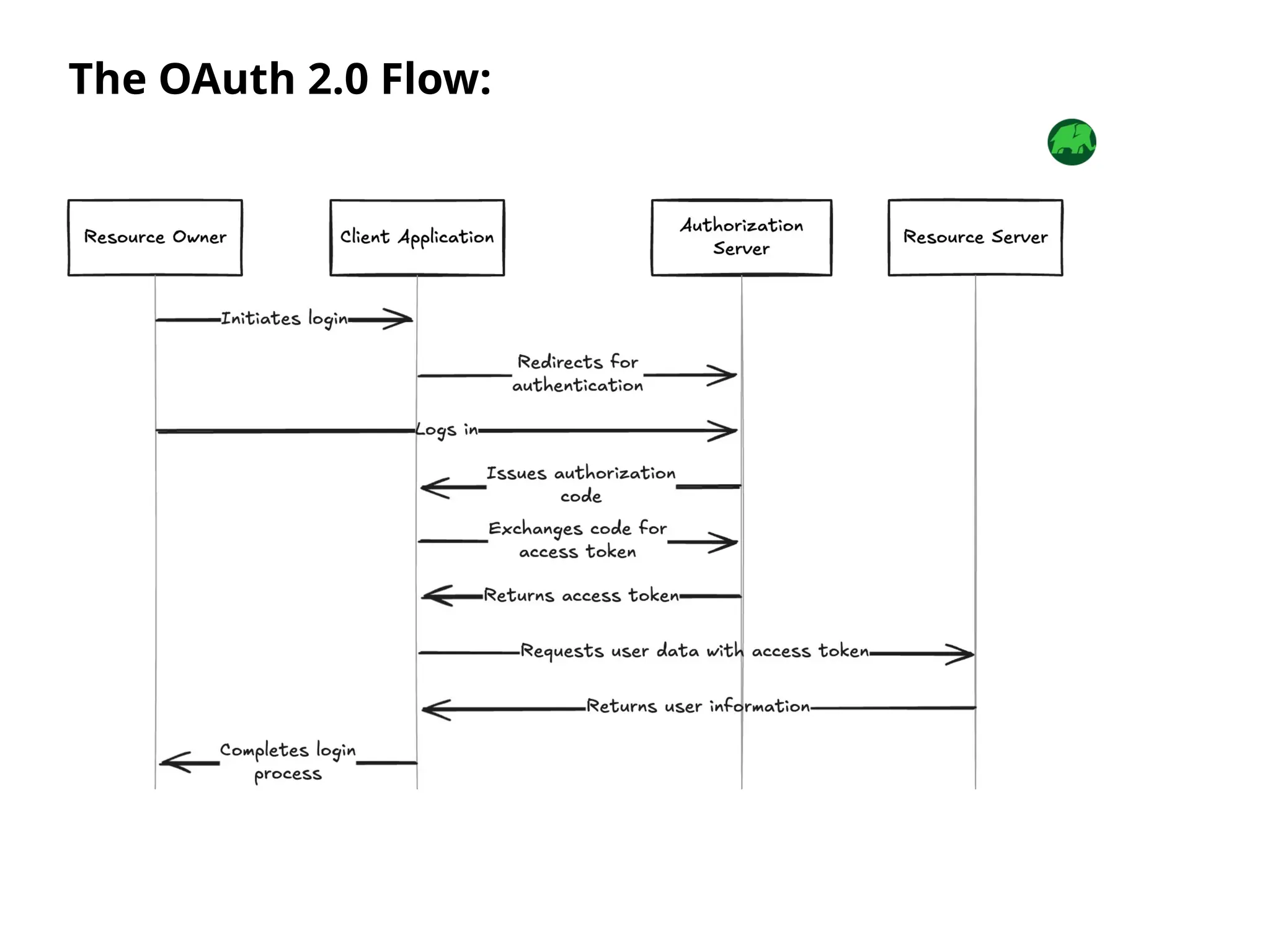
The OAuth 2.0 Flow:
User Authentication:
User logs in via a social provider
(e.g., Google)
Authorization Code:
Social provider issues a code to the
application
Access Token:
Application exchanges the code for
an access token
Data Retrieval:
Access token is used to fetch user
information
Key Components:
Authorization Server: The social provider
(e.g., Google)
Client Application: Your FastAPI application
Resource Owner: The user
The OAuth 2.0 Flow:
What is OAuth?
Definition:
OAuth (Open Authorization) is an open standard for access delegation that
enables secure, third-party access to user resources without sharing credentials
Key Benefits:
Enhances security by avoiding password sharing
Provides granular control over permissions
Improves user experience with single sign-on (SSO)
How OAuth Works
Authorization Request:
The client redirects the user to the authorization server
User Authorization:
The user consents to granting permissions
Authorization Code:
The server returns a code to the client
Token Exchange:
The client exchanges the code for an access token
API Request:
The client uses the access token to fetch resources
OAuth Authorization Grant Flow:
Step 1 - Google Developer Console Setup
Go to the Google Developer Console
Create a new project
Enable the "Google+ API" or "Google Identity
Services"
Create credentials:
○ Choose "OAuth 2.0 Client IDs"
○ Set the authorized redirect URIs (e.g.,
http://localhost:8000/auth/callback)
Download the credentials JSON file
Register Your App on GitHub
Go to GitHub Developer Settings
Click New OAuth App
Fill in the required details:
○ Application Name: [Your App Name]
○ Homepage URL: http://localhost:8000
(or your app URL)
○ Authorization Callback URL:
http://localhost:8000/auth/callback
Save your changes
Copy the Client ID and Client Secret
Register Your App on LinkedIn
Go to LinkedIn Developer Portal
Create a new application
Fill in the required details:
○ App Name: [Your App Name]
○ Redirect URLs:
http://localhost:8000/auth/callback
Save your changes
Copy the Client ID and Client Secret
Implementation Overview
Steps for Integration:
Set up a project in the social provider's developer console
Configure the FastAPI application
Implement OAuth 2.0 flow using libraries like authlib
Store user data securely
Implementation Overview
Steps for Integration:
Set up a project in the social provider's developer console
Step 2 - FastAPI Configuration
Installing Required Libraries:
pip install “fastapi[standard]” authlib python-dotenv
Setting Up Environment Variables: .env file example:
CLIENT_ID=your-google-client-id
CLIENT_SECRET=your-google-client-secret
LINKEDIN_CLIENT_ID=your-linkedin-client-id
LINKEDIN_CLIENT_SECRET=your-linkedin-client-secret
GITHUB_CLIENT_ID=your-github-client-id
GITHUB_CLIENT_SECRET=your-github-client-secret
REDIRECT_URI=http://localhost:8000/auth/callback
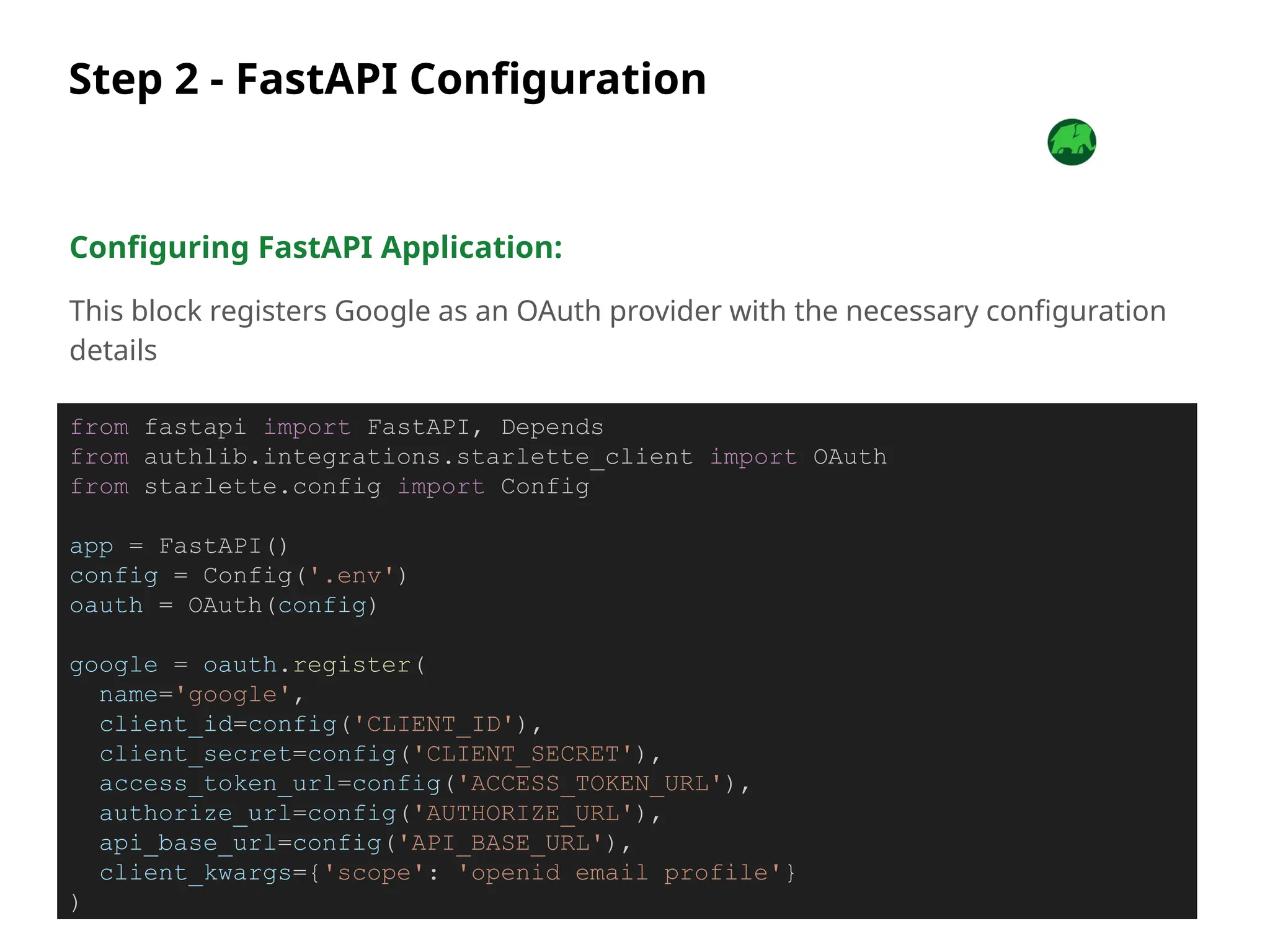
Step 2 - FastAPI Configuration
Configuring FastAPI Application:
This block registers Google as an OAuth provider with the necessary configuration
details
from fastapi import FastAPI, Depends
from authlib.integrations.starlette_client import OAuth
from starlette.config import Config
app = FastAPI()
config = Config('.env')
oauth = OAuth(config)
google = oauth.register(
name='google',
client_id=config('CLIENT_ID'),
client_secret=config('CLIENT_SECRET'),
access_token_url=config('ACCESS_TOKEN_URL'),
authorize_url=config('AUTHORIZE_URL'),
api_base_url=config('API_BASE_URL'),
client_kwargs={'scope': 'openid email profile'}
)
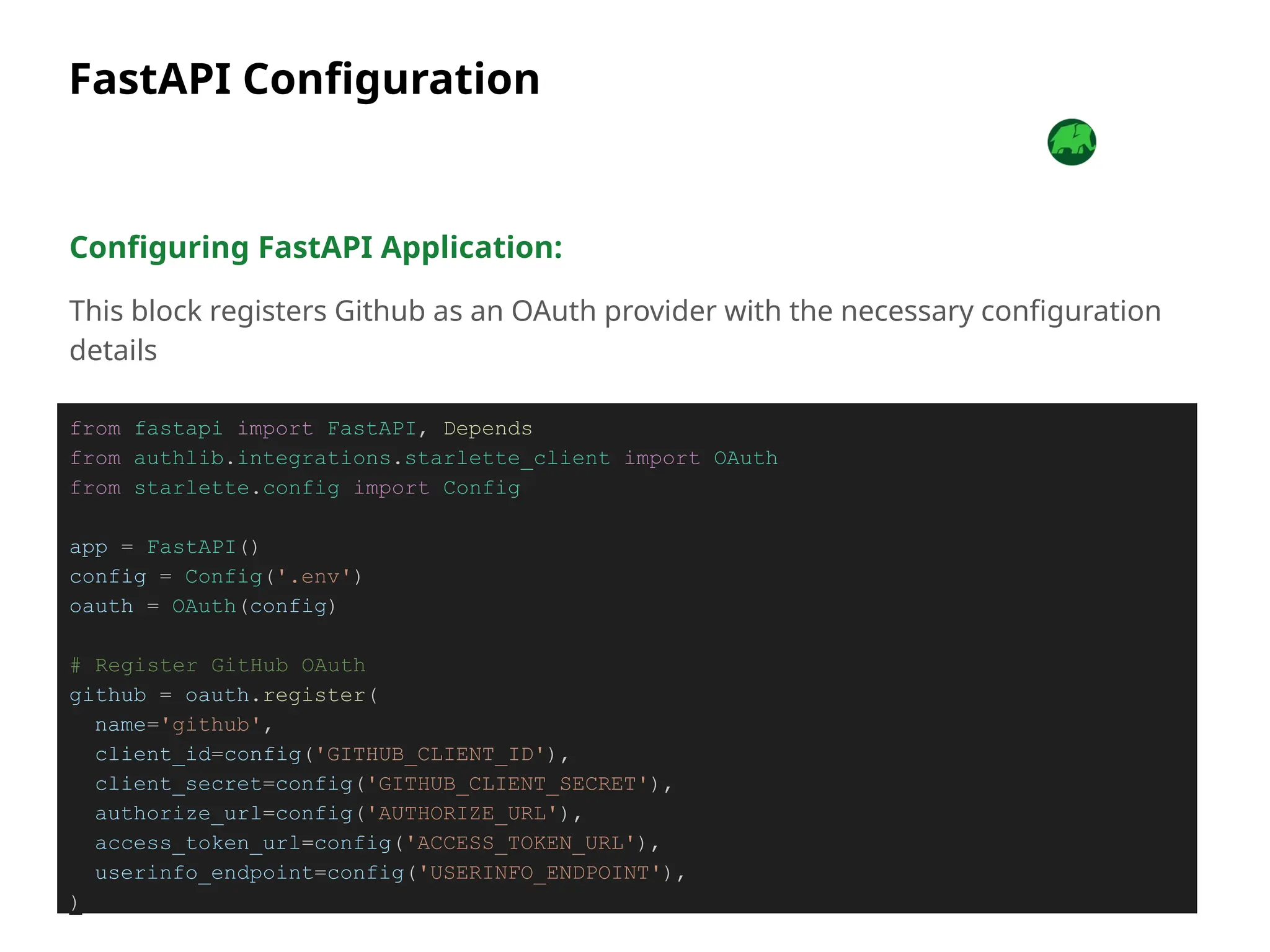
FastAPI Configuration
Configuring FastAPI Application:
This block registers Github as an OAuth provider with the necessary configuration
details
from fastapi import FastAPI, Depends
from authlib.integrations.starlette_client import OAuth
from starlette.config import Config
app = FastAPI()
config = Config('.env')
oauth = OAuth(config)
# Register GitHub OAuth
github = oauth.register(
name='github',
client_id=config('GITHUB_CLIENT_ID'),
client_secret=config('GITHUB_CLIENT_SECRET'),
authorize_url=config('AUTHORIZE_URL'),
access_token_url=config('ACCESS_TOKEN_URL'),
userinfo_endpoint=config('USERINFO_ENDPOINT'),
)
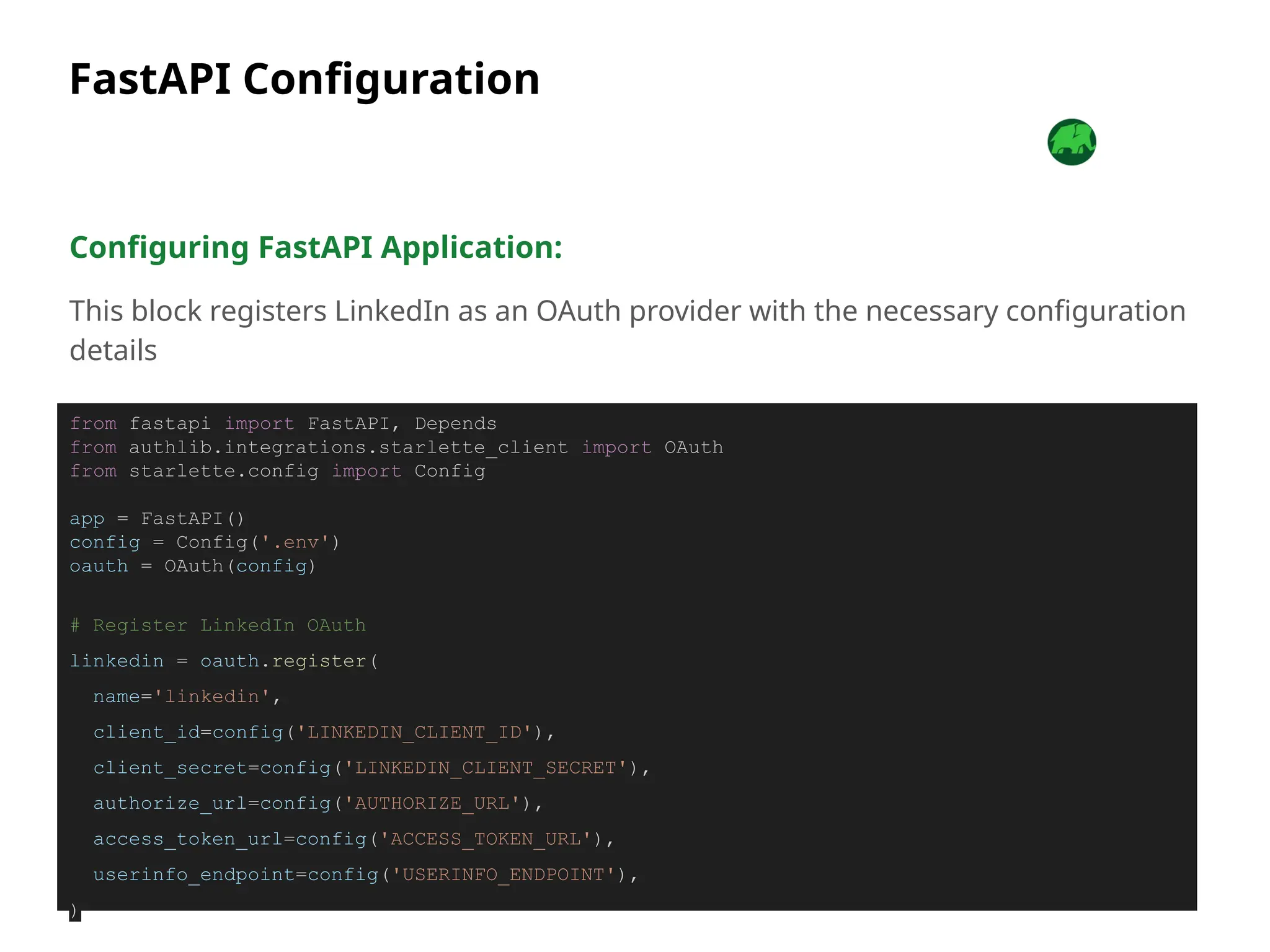
FastAPI Configuration
Configuring FastAPI Application:
This block registers LinkedIn as an OAuth provider with the necessary configuration
details
from fastapi import FastAPI, Depends
from authlib.integrations.starlette_client import OAuth
from starlette.config import Config
app = FastAPI()
config = Config('.env')
oauth = OAuth(config)
# Register LinkedIn OAuth
linkedin = oauth.register(
name='linkedin',
client_id=config('LINKEDIN_CLIENT_ID'),
client_secret=config('LINKEDIN_CLIENT_SECRET'),
authorize_url=config('AUTHORIZE_URL'),
access_token_url=config('ACCESS_TOKEN_URL'),
userinfo_endpoint=config('USERINFO_ENDPOINT'),
)
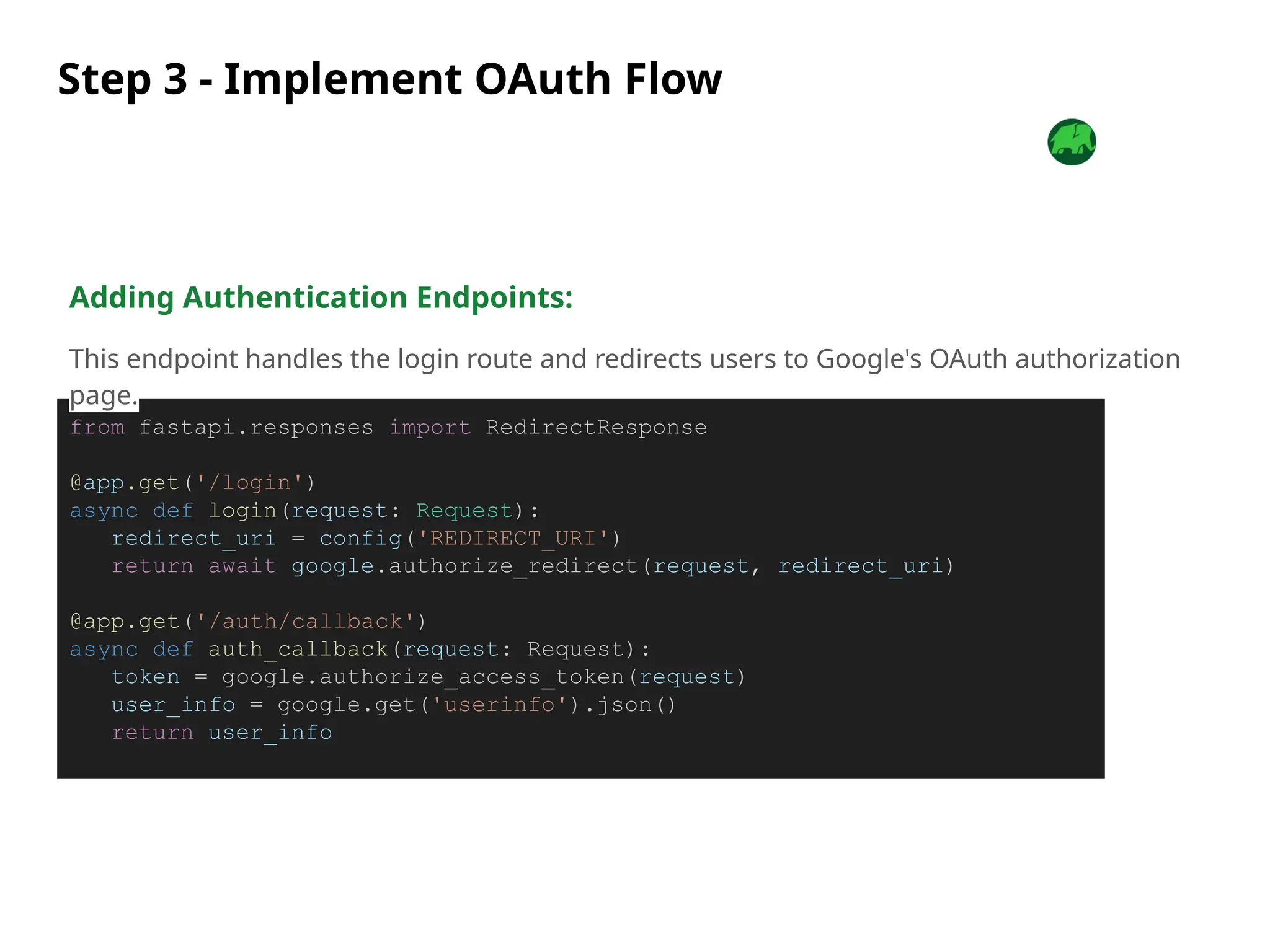
Step 3 - Implement OAuth Flow
from fastapi.responses import RedirectResponse
@app.get('/login')
async def login(request: Request):
redirect_uri = config('REDIRECT_URI')
return await google.authorize_redirect(request, redirect_uri)
@app.get('/auth/callback')
async def auth_callback(request: Request):
token = google.authorize_access_token(request)
user_info = google.get('userinfo').json()
return user_info
Adding Authentication Endpoints:
This endpoint handles the login route and redirects users to Google's OAuth authorization
page.
Step 4 - Storing User Data
Storing Retrieved Data:
@app.get('/auth/callback')
async def auth_callback(request: Request):
try:
# Authenticate and fetch user info
token = await google.authorize_access_token(request)
response = await google.get('userinfo')
user_info = response.json()
# Check if the user already exists in the database
existing_user = users_collection.find_one({"email": user_info["email"]})
if not existing_user:
# Add new user to the database
new_user = {
"email": user_info["email"],
"name": user_info["name"],
"profile_picture": user_info["picture"]
}
users_collection.insert_one(new_user)
else:
# Update existing user details
users_collection.update_one(
{"_id": existing_user["_id"]},
{"$set": {
"name": user_info["name"],
"profile_picture": user_info["picture"]
}}
)
return {"message": "User authenticated successfully", "user_info": user_info}
except Exception as e:
return {"error": str(e)}
Conclusion
Social login simplifies authentication and enhances user experience
FastAPI’s features make it an excellent choice for implementing social login
Following best practices ensures a secure and seamless integration

SSO with Social Login Integration & FastAPI Simplified

  • 1.
    Samuel Folasayo Simplify Authentication: AddSocial Login Today! technology for good Joe Nyirenda TechPrane
  • 2.
    Learning Objectives ● Whatis social login and why use it? ● Key benefits of using FastAPI ● How Social Login Works: OAuth 2.0 basics ● Implementing social login with Google as an example
  • 3.
    What is SocialLogin? Definition: Social login is a single sign-on (SSO) technology that allows users to authenticate on a third-party application using their social media credentials Benefits: Simplifies the registration process Improves user experience Reduces forgotten password issues Popular Providers: Google, Facebook, Twitter, GitHub, LinkedIn, etc
  • 4.
    Why Use FastAPI? KeyFeatures of FastAPI: High performance, comparable to Node.js and Go Built-in support for asynchronous programming Automatic generation of OpenAPI and JSON Schema Seamless integration with modern authentication libraries
  • 5.
    Benefits of SocialLogin Integration: FastAPI’s dependency injection simplifies the integration process Robust ecosystem of extensions and tools
  • 6.
    How Social LoginWorks The OAuth 2.0 Flow: User Authentication: User logs in via a social provider (e.g., Google) Authorization Code: Social provider issues a code to the application Access Token: Application exchanges the code for an access token Data Retrieval: Access token is used to fetch user information Key Components: Authorization Server: The social provider (e.g., Google) Client Application: Your FastAPI application Resource Owner: The user
  • 7.
  • 8.
    What is OAuth? Definition: OAuth(Open Authorization) is an open standard for access delegation that enables secure, third-party access to user resources without sharing credentials Key Benefits: Enhances security by avoiding password sharing Provides granular control over permissions Improves user experience with single sign-on (SSO)
  • 9.
    How OAuth Works AuthorizationRequest: The client redirects the user to the authorization server User Authorization: The user consents to granting permissions Authorization Code: The server returns a code to the client Token Exchange: The client exchanges the code for an access token API Request: The client uses the access token to fetch resources OAuth Authorization Grant Flow:
  • 10.
    Step 1 -Google Developer Console Setup Go to the Google Developer Console Create a new project Enable the "Google+ API" or "Google Identity Services" Create credentials: ○ Choose "OAuth 2.0 Client IDs" ○ Set the authorized redirect URIs (e.g., http://localhost:8000/auth/callback) Download the credentials JSON file
  • 11.
    Register Your Appon GitHub Go to GitHub Developer Settings Click New OAuth App Fill in the required details: ○ Application Name: [Your App Name] ○ Homepage URL: http://localhost:8000 (or your app URL) ○ Authorization Callback URL: http://localhost:8000/auth/callback Save your changes Copy the Client ID and Client Secret
  • 12.
    Register Your Appon LinkedIn Go to LinkedIn Developer Portal Create a new application Fill in the required details: ○ App Name: [Your App Name] ○ Redirect URLs: http://localhost:8000/auth/callback Save your changes Copy the Client ID and Client Secret
  • 13.
    Implementation Overview Steps forIntegration: Set up a project in the social provider's developer console Configure the FastAPI application Implement OAuth 2.0 flow using libraries like authlib Store user data securely
  • 14.
    Implementation Overview Steps forIntegration: Set up a project in the social provider's developer console
  • 15.
    Step 2 -FastAPI Configuration Installing Required Libraries: pip install “fastapi[standard]” authlib python-dotenv Setting Up Environment Variables: .env file example: CLIENT_ID=your-google-client-id CLIENT_SECRET=your-google-client-secret LINKEDIN_CLIENT_ID=your-linkedin-client-id LINKEDIN_CLIENT_SECRET=your-linkedin-client-secret GITHUB_CLIENT_ID=your-github-client-id GITHUB_CLIENT_SECRET=your-github-client-secret REDIRECT_URI=http://localhost:8000/auth/callback
  • 16.
    Step 2 -FastAPI Configuration Configuring FastAPI Application: This block registers Google as an OAuth provider with the necessary configuration details from fastapi import FastAPI, Depends from authlib.integrations.starlette_client import OAuth from starlette.config import Config app = FastAPI() config = Config('.env') oauth = OAuth(config) google = oauth.register( name='google', client_id=config('CLIENT_ID'), client_secret=config('CLIENT_SECRET'), access_token_url=config('ACCESS_TOKEN_URL'), authorize_url=config('AUTHORIZE_URL'), api_base_url=config('API_BASE_URL'), client_kwargs={'scope': 'openid email profile'} )
  • 17.
    FastAPI Configuration Configuring FastAPIApplication: This block registers Github as an OAuth provider with the necessary configuration details from fastapi import FastAPI, Depends from authlib.integrations.starlette_client import OAuth from starlette.config import Config app = FastAPI() config = Config('.env') oauth = OAuth(config) # Register GitHub OAuth github = oauth.register( name='github', client_id=config('GITHUB_CLIENT_ID'), client_secret=config('GITHUB_CLIENT_SECRET'), authorize_url=config('AUTHORIZE_URL'), access_token_url=config('ACCESS_TOKEN_URL'), userinfo_endpoint=config('USERINFO_ENDPOINT'), )
  • 18.
    FastAPI Configuration Configuring FastAPIApplication: This block registers LinkedIn as an OAuth provider with the necessary configuration details from fastapi import FastAPI, Depends from authlib.integrations.starlette_client import OAuth from starlette.config import Config app = FastAPI() config = Config('.env') oauth = OAuth(config) # Register LinkedIn OAuth linkedin = oauth.register( name='linkedin', client_id=config('LINKEDIN_CLIENT_ID'), client_secret=config('LINKEDIN_CLIENT_SECRET'), authorize_url=config('AUTHORIZE_URL'), access_token_url=config('ACCESS_TOKEN_URL'), userinfo_endpoint=config('USERINFO_ENDPOINT'), )
  • 19.
    Step 3 -Implement OAuth Flow from fastapi.responses import RedirectResponse @app.get('/login') async def login(request: Request): redirect_uri = config('REDIRECT_URI') return await google.authorize_redirect(request, redirect_uri) @app.get('/auth/callback') async def auth_callback(request: Request): token = google.authorize_access_token(request) user_info = google.get('userinfo').json() return user_info Adding Authentication Endpoints: This endpoint handles the login route and redirects users to Google's OAuth authorization page.
  • 20.
    Step 4 -Storing User Data Storing Retrieved Data: @app.get('/auth/callback') async def auth_callback(request: Request): try: # Authenticate and fetch user info token = await google.authorize_access_token(request) response = await google.get('userinfo') user_info = response.json() # Check if the user already exists in the database existing_user = users_collection.find_one({"email": user_info["email"]}) if not existing_user: # Add new user to the database new_user = { "email": user_info["email"], "name": user_info["name"], "profile_picture": user_info["picture"] } users_collection.insert_one(new_user) else: # Update existing user details users_collection.update_one( {"_id": existing_user["_id"]}, {"$set": { "name": user_info["name"], "profile_picture": user_info["picture"] }} ) return {"message": "User authenticated successfully", "user_info": user_info} except Exception as e: return {"error": str(e)}
  • 21.
    Conclusion Social login simplifiesauthentication and enhances user experience FastAPI’s features make it an excellent choice for implementing social login Following best practices ensures a secure and seamless integration

Editor's Notes

  • #10 Go to the Google Developer Console: https://console.cloud.google.com/
  • #11 Go to GitHub Developer Settings: https://github.com/settings/developers
  • #12 Go to LinkedIn Developer Portal: https://www.linkedin.com/developers/
  • #20 This code defines an asynchronous endpoint (/auth/callback) that handles the OAuth callback, authenticates the user via Google, checks if the user exists in the database, and either adds or updates their details in the database based on their email.