Samuel Folasayo
Master Tortoise ORM &
PostgreSQL: Your Ultimate
Beginner's Guide
Simplifying Python/PostgreSQL Database Integration
Joe Nyirenda
Learning Objectives
● Understand the basics of Tortoise ORM and PostgreSQL
● Learn how to setup and configure your environment
● Define models and perform CRUD operations
● Query data and handle relationships effectively
● Build efficient and scalable Python applications with Tortoise ORM and
PostgreSQL
What is Tortoise ORM?
A lightweight Object Relational Mapper (ORM) for Python.
Built with asyncio support for high-performance applications.
Simple syntax and seamless integration with Python's async features.
Key Features:
Asynchronous execution
Schema generation
Support for multiple backends, including PostgreSQL.
Why PostgreSQL?
Open-source, powerful, and reliable relational database system.
Features advanced data types and robust query capabilities.
Ideal for scalable and complex applications.
Why Use Tortoise ORM with PostgreSQL?
Simplifies database interactions.
Enhances developer productivity.
Combines PostgreSQL's power with Python's simplicity.
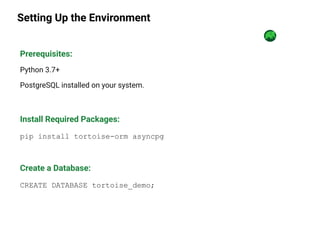
Setting Up the Environment
Prerequisites:
Python 3.7+
PostgreSQL installed on your system.
Install Required Packages:
pip install tortoise-orm asyncpg
Create a Database:
CREATE DATABASE tortoise_demo;
Connecting to PostgreSQL
import os
from dotenv import load_dotenv
from tortoise import Tortoise
# Load environment variables from a .env file (if you're using one)
load_dotenv()
# Fetch username and password from environment variables
DB_USERNAME = os.getenv('DB_USERNAME')
DB_PASSWORD = os.getenv('DB_PASSWORD')
# Define the database connection using environment variables
DATABASE_CONFIG = {
"connections": {
"default": f"postgres://{DB_USERNAME}:{DB_PASSWORD}@localhost:5432/tortoise_demo"
},
"apps": {
"models": {
"models": ["__main__"],
"default_connection"
: "default",
},
},
}
async def init():
await Tortoise.init(
config=DATABASE_CONFIG
)
await Tortoise.generate_schemas()
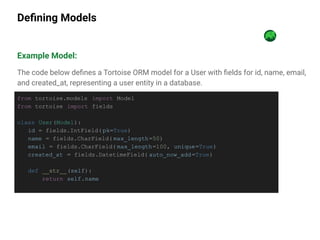
Defining Models
Example Model:
The code below defines a Tortoise ORM model for a User with fields for id, name, email,
and created_at, representing a user entity in a database.
from tortoise.models import Model
from tortoise import fields
class User(Model):
id = fields.IntField( pk=True)
name = fields.CharField( max_length=50)
email = fields.CharField( max_length=100, unique=True)
created_at = fields.DatetimeField( auto_now_add=True)
def __str__(self):
return self.name
Basic CRUD Operations
Create:
user = await User.create(name="John Doe", email="john@example.com" )
user = await User.get(id=1)
print(user.name)
Read:
Update:
user.name = "Jane Doe"
await user.save()
Delete:
await user.delete()
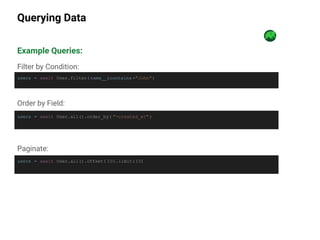
Querying Data
Example Queries:
Filter by Condition:
users = await User.filter( name__icontains ="John")
users = await User.all().order_by( "-created_at" )
Order by Field:
Paginate:
users = await User.all().offset( 10).limit(10)
Relationships
Defining Relationships:
class Post(Model):
id = fields.IntField(pk=True)
title =
fields.CharField(max_length=100)
content = fields.TextField()
author =
fields.ForeignKeyField(
"models.User",
related_name="posts")
Fetching Related Data:
user = await
User.get(id=1).prefetch_related( "po
sts")
for post in user.posts:
print(post.title)
Explanation:
In this example, we are modeling a one-to-many relationship between the User
and Post models using Foreign Key in Tortoise ORM.
One-to-many relationship: This means that a single user can have many posts,
but each post is associated with exactly one user.
Putting It All Together
Example: Complete Workflow
async def main():
await init()
# Create user and post
user = await User.create(name="Alice", email="alice@example.com" )
post = await Post.create(title="My First Post" , content="Hello World!" ,
author=user)
# Query and display
users = await User.all().prefetch_related( "posts")
for user in users:
print(f"{user.name} wrote {len(user.posts)} posts.")
await main()
Results
Conclusion
Tortoise ORM simplifies database interactions in Python
PostgreSQL provides a robust backend for scalable applications
Combined, they enable fast and efficient development

A Beginner's Guide to Tortoise ORM and PostgreSQL

  • 1.
    Samuel Folasayo Master TortoiseORM & PostgreSQL: Your Ultimate Beginner's Guide Simplifying Python/PostgreSQL Database Integration Joe Nyirenda
  • 2.
    Learning Objectives ● Understandthe basics of Tortoise ORM and PostgreSQL ● Learn how to setup and configure your environment ● Define models and perform CRUD operations ● Query data and handle relationships effectively ● Build efficient and scalable Python applications with Tortoise ORM and PostgreSQL
  • 3.
    What is TortoiseORM? A lightweight Object Relational Mapper (ORM) for Python. Built with asyncio support for high-performance applications. Simple syntax and seamless integration with Python's async features. Key Features: Asynchronous execution Schema generation Support for multiple backends, including PostgreSQL.
  • 4.
    Why PostgreSQL? Open-source, powerful,and reliable relational database system. Features advanced data types and robust query capabilities. Ideal for scalable and complex applications. Why Use Tortoise ORM with PostgreSQL? Simplifies database interactions. Enhances developer productivity. Combines PostgreSQL's power with Python's simplicity.
  • 5.
    Setting Up theEnvironment Prerequisites: Python 3.7+ PostgreSQL installed on your system. Install Required Packages: pip install tortoise-orm asyncpg Create a Database: CREATE DATABASE tortoise_demo;
  • 6.
    Connecting to PostgreSQL importos from dotenv import load_dotenv from tortoise import Tortoise # Load environment variables from a .env file (if you're using one) load_dotenv() # Fetch username and password from environment variables DB_USERNAME = os.getenv('DB_USERNAME') DB_PASSWORD = os.getenv('DB_PASSWORD') # Define the database connection using environment variables DATABASE_CONFIG = { "connections": { "default": f"postgres://{DB_USERNAME}:{DB_PASSWORD}@localhost:5432/tortoise_demo" }, "apps": { "models": { "models": ["__main__"], "default_connection" : "default", }, }, } async def init(): await Tortoise.init( config=DATABASE_CONFIG ) await Tortoise.generate_schemas()
  • 7.
    Defining Models Example Model: Thecode below defines a Tortoise ORM model for a User with fields for id, name, email, and created_at, representing a user entity in a database. from tortoise.models import Model from tortoise import fields class User(Model): id = fields.IntField( pk=True) name = fields.CharField( max_length=50) email = fields.CharField( max_length=100, unique=True) created_at = fields.DatetimeField( auto_now_add=True) def __str__(self): return self.name
  • 8.
    Basic CRUD Operations Create: user= await User.create(name="John Doe", email="john@example.com" ) user = await User.get(id=1) print(user.name) Read: Update: user.name = "Jane Doe" await user.save() Delete: await user.delete()
  • 9.
    Querying Data Example Queries: Filterby Condition: users = await User.filter( name__icontains ="John") users = await User.all().order_by( "-created_at" ) Order by Field: Paginate: users = await User.all().offset( 10).limit(10)
  • 10.
    Relationships Defining Relationships: class Post(Model): id= fields.IntField(pk=True) title = fields.CharField(max_length=100) content = fields.TextField() author = fields.ForeignKeyField( "models.User", related_name="posts") Fetching Related Data: user = await User.get(id=1).prefetch_related( "po sts") for post in user.posts: print(post.title) Explanation: In this example, we are modeling a one-to-many relationship between the User and Post models using Foreign Key in Tortoise ORM. One-to-many relationship: This means that a single user can have many posts, but each post is associated with exactly one user.
  • 11.
    Putting It AllTogether Example: Complete Workflow async def main(): await init() # Create user and post user = await User.create(name="Alice", email="alice@example.com" ) post = await Post.create(title="My First Post" , content="Hello World!" , author=user) # Query and display users = await User.all().prefetch_related( "posts") for user in users: print(f"{user.name} wrote {len(user.posts)} posts.") await main()
  • 12.
  • 13.
    Conclusion Tortoise ORM simplifiesdatabase interactions in Python PostgreSQL provides a robust backend for scalable applications Combined, they enable fast and efficient development