By : Nisha Baswal
OAuth provides a method for clients to access
server resources on behalf of a resource
owner(end-User).
It also provides a process for end-users to authorize
third-party access to their server resources without
sharing their credentials.
Why OAuth is Required?
OAuth Roles and definitions
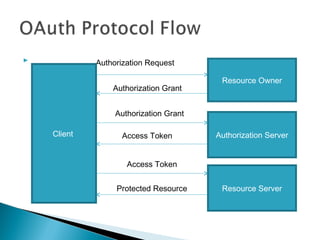
OAuth Protocol Flow
LIMITATIONS with Password Sharing : In
order to provide third-party applications access to
restricted resources, the resource owner shares its
credentials with the third party.
Trust :Clear text password will be shared.
More Access than required.
Unable to revoke access once provided
OAuth is required for delegating Access
To Certain Party

For Certain Resources

For Limited Time

Which can be selectively revoked
    Resource Owner : An entity capable of granting access to a protected
     resources
    e.g- Picasa User

    Resource Server : The server hosting the protected resource capable of
     accepting and responding to protected resource requests using access tokens
    e.g-Picasa Hosting

    Client : An application making protected resource requests on behalf of the
     resource owner with its authorization
    e.g- any Third Party User or Application

    Authorization Server : The server issuing access tokens to the client after
     successfully authenticating the resource owner and obtaining authorization.
    e.g-Google Auth server
            Authorization Request

                                         Resource Owner
                 Authorization Grant


                  Authorization Grant

    Client          Access Token        Authorization Server


                     Access Token


                  Protected Resource     Resource Server
   Most web applications will use the web server client profile and authorization code access grant
    type to obtain an access token on behalf of an end user.
   Client applications, for example, JavaScript running in the browser or native mobile or desktop
    apps, run on a user's computer or other device. Such apps are able to protect per-user secrets,
    but, since they are widely distributed, a common client secret would not be secure. The user-
    agent flow allows these applications to obtain an access token
   when an access token expires
Demo
(web Server Implementation)
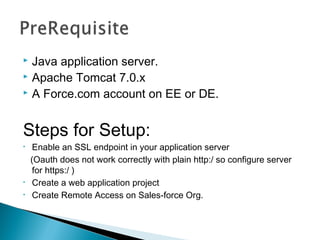
 Java application server.
 Apache Tomcat 7.0.x
 A Force.com account on EE or DE.


Steps for Setup:
•    Enable an SSL endpoint in your application server
    (Oauth does not work correctly with plain http:/ so configure server
     for https:/ )
•    Create a web application project
•    Create Remote Access on Sales-force Org.
Steps to install and configure SSL support on Tomcat
Create   a keystore file to store the server's private key and self-signed
certificate by executing the following command:
   %JAVA_HOME%bin keytool –genkey –alias tomcat –keyalg RSA


Uncommentthe "SSL HTTP/1.1 Connector" entry in
$CATALINA_BASE/conf/server.xml and modify to
   <Connector SSLEnabled="true" acceptCount="100" clientAuth="false"
   disableUploadTimeout="true" enableLookups="false" maxThreads="25"
   port="8443" keystoreFile=“<file-Path>/.keystore" keystorePass="password"
   protocol="HTTP/1.1" scheme="https"
   secure="true" sslProtocol="TLS" />
   Log in to Salesforce.com with your developer account, navigate to
    Setup ➤ Develop ➤ Remote Access
    and click New to create a new remote access
   After clicking Save, you will see your new application’s credentials.
    Consumer Key and Consumer Secret
   Copy the consumer key and consumer secret and paste them to existing
    servlet parameters , build application and Run.


   You will see an error message if the web app is not running on a secure
    port:
   Click the link and you are taken to the Salesforce.com login page:
   Login and a screen displays asking you to allow the sample app to access
    your data: This authorization page only appears the first time the web
    application requests access; subsequent sessions require authentication,
    but skip the authorization step.
   On authorizing access to your data, control returns to the sample web app, and it is
    able to interact with your Force.com data using a token issued during the OAuth
    process:
O auth 2

O auth 2

  • 1.
    By : NishaBaswal
  • 2.
    OAuth provides amethod for clients to access server resources on behalf of a resource owner(end-User). It also provides a process for end-users to authorize third-party access to their server resources without sharing their credentials. Why OAuth is Required? OAuth Roles and definitions OAuth Protocol Flow
  • 3.
    LIMITATIONS with PasswordSharing : In order to provide third-party applications access to restricted resources, the resource owner shares its credentials with the third party. Trust :Clear text password will be shared. More Access than required. Unable to revoke access once provided
  • 4.
    OAuth is requiredfor delegating Access To Certain Party For Certain Resources For Limited Time Which can be selectively revoked
  • 5.
    Resource Owner : An entity capable of granting access to a protected resources e.g- Picasa User  Resource Server : The server hosting the protected resource capable of accepting and responding to protected resource requests using access tokens e.g-Picasa Hosting  Client : An application making protected resource requests on behalf of the resource owner with its authorization e.g- any Third Party User or Application  Authorization Server : The server issuing access tokens to the client after successfully authenticating the resource owner and obtaining authorization. e.g-Google Auth server
  • 6.
    Authorization Request Resource Owner Authorization Grant Authorization Grant Client Access Token Authorization Server Access Token Protected Resource Resource Server
  • 7.
    Most web applications will use the web server client profile and authorization code access grant type to obtain an access token on behalf of an end user.
  • 8.
    Client applications, for example, JavaScript running in the browser or native mobile or desktop apps, run on a user's computer or other device. Such apps are able to protect per-user secrets, but, since they are widely distributed, a common client secret would not be secure. The user- agent flow allows these applications to obtain an access token
  • 9.
    when an access token expires
  • 11.
  • 12.
     Java applicationserver.  Apache Tomcat 7.0.x  A Force.com account on EE or DE. Steps for Setup: • Enable an SSL endpoint in your application server (Oauth does not work correctly with plain http:/ so configure server for https:/ ) • Create a web application project • Create Remote Access on Sales-force Org.
  • 13.
    Steps to installand configure SSL support on Tomcat Create a keystore file to store the server's private key and self-signed certificate by executing the following command: %JAVA_HOME%bin keytool –genkey –alias tomcat –keyalg RSA Uncommentthe "SSL HTTP/1.1 Connector" entry in $CATALINA_BASE/conf/server.xml and modify to <Connector SSLEnabled="true" acceptCount="100" clientAuth="false" disableUploadTimeout="true" enableLookups="false" maxThreads="25" port="8443" keystoreFile=“<file-Path>/.keystore" keystorePass="password" protocol="HTTP/1.1" scheme="https" secure="true" sslProtocol="TLS" />
  • 14.
    Log in to Salesforce.com with your developer account, navigate to Setup ➤ Develop ➤ Remote Access and click New to create a new remote access
  • 15.
    After clicking Save, you will see your new application’s credentials. Consumer Key and Consumer Secret
  • 16.
    Copy the consumer key and consumer secret and paste them to existing servlet parameters , build application and Run.  You will see an error message if the web app is not running on a secure port:
  • 17.
    Click the link and you are taken to the Salesforce.com login page:
  • 18.
    Login and a screen displays asking you to allow the sample app to access your data: This authorization page only appears the first time the web application requests access; subsequent sessions require authentication, but skip the authorization step.
  • 19.
    On authorizing access to your data, control returns to the sample web app, and it is able to interact with your Force.com data using a token issued during the OAuth process: