
IBM Connections 3.0.1.1 Integration
With IBM Sametime 8.5.2 IFR1


                                 Brian Bermingham
                                      bberming@ie.ibm.com
Who Am I?


      Brian Bermingham
      Social Software Customer Excellence
       Email: bberming@ie.ibm.com
      Twitter: @brianbermingham


2                                           © 2012 IBM Corporation
Agenda
    IBM Connections 3.0.1.1 integration with IBM Sametime
     v8.5.2 IFR1


    References
    IBM Redbooks:
      Creating Integrated Web Experience with IBM Lotus collaboration softw


3                                                             © 2012 IBM Corporation
Integration


4             © 2012 IBM Corporation
Integrating Connections with Sametime
    Sametime Awareness via the Sametime Client
    Sametime Awareness via the Sametime Server


5                                                © 2012 IBM Corporation
Sametime Awareness through the Sametime Client
    Connects to mini http server in Connect client
       Client must be 8.0.2 or above
    Browser connects over http to the local client listening on 59449
    Presence awareness can be retrieved over SSL for:
       Sametime 8.5 or later standalone client
       Notes 8.5.1 or later embedded client
    User must be logged into Sametime from the same machine where
     they access Connections


6                                                                   © 2012 IBM Corporation
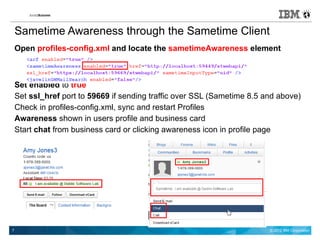
Sametime Awareness through the Sametime Client
    Open profiles-config.xml and locate the sametimeAwareness element


    Set enabled to true
    Set ssl_href port to 59669 if sending traffic over SSL (Sametime 8.5 and above)
    Check in profiles-config.xml, sync and restart Profiles
    Awareness shown in users profile and business card
    Start chat from business card or clicking awareness icon in profile page


7                                                                         © 2012 IBM Corporation
Sametime Awareness through the Sametime Server
    Requirements:
     Profiles application of IBM Connections
     Domino® Server 8.5 or later
     Sametime Community Server 8.5.1 or later
     Sametime Proxy Server 8.5.1 or 8.5.2
       ST 8.5.1 proxy server environments cannot be set up with SSO:
         Tivoli® Access Manager, Computer Associates' SiteMinder, or Windows™ desktop.
         ST 8.5.2 environments supports SSO with any security proxies that are supported by both Sametime and IBM
           Connections.
     IBM Sametime Community Server 8.5.1 environments, must configure server in front of Connections to
       proxy Sametime requests (IHS, Edge, etc.). Not required with Sametime 8.5.2 IFR1


8                                                                                                © 2012 IBM Corporation
Sametime Awareness through the Sametime Server
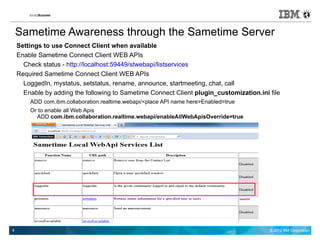
    Settings to use Connect Client when available
    Enable Sametime Connect Client WEB APIs
      Check status - http://localhost:59449/stwebapi/listservices
    Required Sametime Connect Client WEB APIs
      LoggedIn, mystatus, setstatus, rename, announce, startmeeting, chat, call
      Enable by adding the following to Sametime Connect Client plugin_customization.ini file
        ADD com.ibm.collaboration.realtime.webapi/<place API name here>Enabled=true
        Or to enable all Web Apis
          ADD com.ibm.collaboration.realtime.webapi/enableAllWebApisOverride=true


9                                                                                        © 2012 IBM Corporation
Configuring Single Sign-On
 Prerequisites for Single Sign-On
   Common DNS domain
   Common realm name
   Time synchronisation
 Export LTPA Key for WebSphere
 Import LTPA Key into Domino
 Enable multi server session authentication
 Restart HTTP
 http://www-10.lotus.com/ldd/lcwiki.nsf/dx/5._Implement_and_test_single_sign-on


10                                                                      © 2012 IBM Corporation
Testing SSO between Connections and Sametime
 Always verify SSO in both directions
 Log in to IBM Connections – http://<connections-server>/homepage
 Verify same user is logged in to Sametime –
 http://<sametime-server>/stwebclient/popup.jsp
 Clear cookies
 Try the reverse
   Log in to Sametime
   Verify user is logged into Connections


11                                                                  © 2012 IBM Corporation
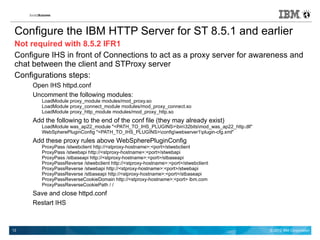
Configure the IBM HTTP Server for ST 8.5.1 and earlier
 Not required with 8.5.2 IFR1
 Configure IHS in front of Connections to act as a proxy server for awareness and
 chat between the client and STProxy server
 Configurations steps:
      Open IHS httpd.conf
      Uncomment the following modules:
         LoadModule proxy_module modules/mod_proxy.so
         LoadModule proxy_connect_module modules/mod_proxy_connect.so
         LoadModule proxy_http_module modules/mod_proxy_http.so
      Add the following to the end of the conf file (they may already exist)
         LoadModule was_ap22_module "<PATH_TO_IHS_PLUGINS>bin32bitsmod_was_ap22_http.dll"
         WebSpherePluginConfig "<PATH_TO_IHS_PLUGINS>configwebserver1plugin-cfg.xml"
      Add these proxy rules above WebSpherePluginConfig
         ProxyPass /stwebclient http://<stproxy-hostname>:<port>/stwebclient
         ProxyPass /stwebapi http://<stproxy-hostname>:<port>/stwebapi
         ProxyPass /stbaseapi http://<stproxy-hostname>:<port>/stbaseapi
         ProxyPassReverse /stwebclient http://<stproxy-hostname>:<port>/stwebclient
         ProxyPassReverse /stwebapi http://<stproxy-hostname>:<port>/stwebapi
         ProxyPassReverse /stbaseapi http://<stproxy-hostname>:<port>/stbaseapi
         ProxyPassReverseCookieDomain http://<stproxy-hostname>:<port> ibm.com
         ProxyPassReverseCookiePath / /
      Save and close httpd.conf
      Restart IHS


12                                                                                             © 2012 IBM Corporation
Enable Connections configuration with STProxy
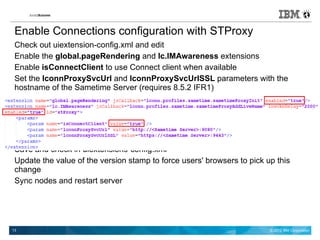
 Check out uiextension-config.xml and edit
 Enable the global.pageRendering and lc.IMAwareness extensions
 Enable isConnectClient to use Connect client when available
 Set the lconnProxySvcUrl and lconnProxySvcUrlSSL parameters with the
 hostname of the Sametime Server (requires 8.5.2 IFR1)


 Save and check in uiextensions-config.xml
 Update the value of the version stamp to force users' browsers to pick up this
 change
 Sync nodes and restart server


13                                                                       © 2012 IBM Corporation
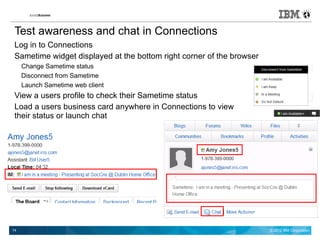
Test awareness and chat in Connections
 Log in to Connections
 Sametime widget displayed at the bottom right corner of the browser
     Change Sametime status
     Disconnect from Sametime
     Launch Sametime web client
 View a users profile to check their Sametime status
 Load a users business card anywhere in Connections to view
 their status or launch chat


14                                                                     © 2012 IBM Corporation
Sametime Integration Resources
 IBM Connections Product Documentation:
   Adding Sametime awareness though the Sametime client
   Adding Sametime awareness through the Sametime server
 IBM Redbooks: Creating Integrated Web Experience with IBM Lotus collaboratio
   Includes Portal, Connections, Sametime, and Quickr Domino integration steps


15                                                               © 2012 IBM Corporation
Plugins


16        © 2012 IBM Corporation
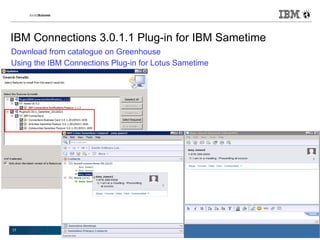
IBM Connections 3.0.1.1 Plug-in for IBM Sametime
Download from catalogue on Greenhouse
Using the IBM Connections Plug-in for Lotus Sametime


17                                                     © 2012 IBM Corporation
Thank You For Your Time


        bberming@ie.ibm.com
         @brianbermingham


18                             © 2012 IBM Corporation

Soccnx III - IBM Connections 3.0.1 Integration with Sametime

  • 1.
    IBM Connections 3.0.1.1Integration With IBM Sametime 8.5.2 IFR1 Brian Bermingham bberming@ie.ibm.com
  • 2.
    Who Am I? Brian Bermingham Social Software Customer Excellence Email: bberming@ie.ibm.com Twitter: @brianbermingham 2 © 2012 IBM Corporation
  • 3.
    Agenda IBM Connections 3.0.1.1 integration with IBM Sametime v8.5.2 IFR1 References IBM Redbooks: Creating Integrated Web Experience with IBM Lotus collaboration softw 3 © 2012 IBM Corporation
  • 4.
    Integration 4 © 2012 IBM Corporation
  • 5.
    Integrating Connections withSametime Sametime Awareness via the Sametime Client Sametime Awareness via the Sametime Server 5 © 2012 IBM Corporation
  • 6.
    Sametime Awareness throughthe Sametime Client Connects to mini http server in Connect client Client must be 8.0.2 or above Browser connects over http to the local client listening on 59449 Presence awareness can be retrieved over SSL for: Sametime 8.5 or later standalone client Notes 8.5.1 or later embedded client User must be logged into Sametime from the same machine where they access Connections 6 © 2012 IBM Corporation
  • 7.
    Sametime Awareness throughthe Sametime Client Open profiles-config.xml and locate the sametimeAwareness element Set enabled to true Set ssl_href port to 59669 if sending traffic over SSL (Sametime 8.5 and above) Check in profiles-config.xml, sync and restart Profiles Awareness shown in users profile and business card Start chat from business card or clicking awareness icon in profile page 7 © 2012 IBM Corporation
  • 8.
    Sametime Awareness throughthe Sametime Server Requirements: Profiles application of IBM Connections Domino® Server 8.5 or later Sametime Community Server 8.5.1 or later Sametime Proxy Server 8.5.1 or 8.5.2 ST 8.5.1 proxy server environments cannot be set up with SSO: Tivoli® Access Manager, Computer Associates' SiteMinder, or Windows™ desktop. ST 8.5.2 environments supports SSO with any security proxies that are supported by both Sametime and IBM Connections. IBM Sametime Community Server 8.5.1 environments, must configure server in front of Connections to proxy Sametime requests (IHS, Edge, etc.). Not required with Sametime 8.5.2 IFR1 8 © 2012 IBM Corporation
  • 9.
    Sametime Awareness throughthe Sametime Server Settings to use Connect Client when available Enable Sametime Connect Client WEB APIs Check status - http://localhost:59449/stwebapi/listservices Required Sametime Connect Client WEB APIs LoggedIn, mystatus, setstatus, rename, announce, startmeeting, chat, call Enable by adding the following to Sametime Connect Client plugin_customization.ini file ADD com.ibm.collaboration.realtime.webapi/<place API name here>Enabled=true Or to enable all Web Apis ADD com.ibm.collaboration.realtime.webapi/enableAllWebApisOverride=true 9 © 2012 IBM Corporation
  • 10.
    Configuring Single Sign-On Prerequisites for Single Sign-On Common DNS domain Common realm name Time synchronisation Export LTPA Key for WebSphere Import LTPA Key into Domino Enable multi server session authentication Restart HTTP http://www-10.lotus.com/ldd/lcwiki.nsf/dx/5._Implement_and_test_single_sign-on 10 © 2012 IBM Corporation
  • 11.
    Testing SSO betweenConnections and Sametime Always verify SSO in both directions Log in to IBM Connections – http://<connections-server>/homepage Verify same user is logged in to Sametime – http://<sametime-server>/stwebclient/popup.jsp Clear cookies Try the reverse Log in to Sametime Verify user is logged into Connections 11 © 2012 IBM Corporation
  • 12.
    Configure the IBMHTTP Server for ST 8.5.1 and earlier Not required with 8.5.2 IFR1 Configure IHS in front of Connections to act as a proxy server for awareness and chat between the client and STProxy server Configurations steps: Open IHS httpd.conf Uncomment the following modules: LoadModule proxy_module modules/mod_proxy.so LoadModule proxy_connect_module modules/mod_proxy_connect.so LoadModule proxy_http_module modules/mod_proxy_http.so Add the following to the end of the conf file (they may already exist) LoadModule was_ap22_module "<PATH_TO_IHS_PLUGINS>bin32bitsmod_was_ap22_http.dll" WebSpherePluginConfig "<PATH_TO_IHS_PLUGINS>configwebserver1plugin-cfg.xml" Add these proxy rules above WebSpherePluginConfig ProxyPass /stwebclient http://<stproxy-hostname>:<port>/stwebclient ProxyPass /stwebapi http://<stproxy-hostname>:<port>/stwebapi ProxyPass /stbaseapi http://<stproxy-hostname>:<port>/stbaseapi ProxyPassReverse /stwebclient http://<stproxy-hostname>:<port>/stwebclient ProxyPassReverse /stwebapi http://<stproxy-hostname>:<port>/stwebapi ProxyPassReverse /stbaseapi http://<stproxy-hostname>:<port>/stbaseapi ProxyPassReverseCookieDomain http://<stproxy-hostname>:<port> ibm.com ProxyPassReverseCookiePath / / Save and close httpd.conf Restart IHS 12 © 2012 IBM Corporation
  • 13.
    Enable Connections configurationwith STProxy Check out uiextension-config.xml and edit Enable the global.pageRendering and lc.IMAwareness extensions Enable isConnectClient to use Connect client when available Set the lconnProxySvcUrl and lconnProxySvcUrlSSL parameters with the hostname of the Sametime Server (requires 8.5.2 IFR1) Save and check in uiextensions-config.xml Update the value of the version stamp to force users' browsers to pick up this change Sync nodes and restart server 13 © 2012 IBM Corporation
  • 14.
    Test awareness andchat in Connections Log in to Connections Sametime widget displayed at the bottom right corner of the browser Change Sametime status Disconnect from Sametime Launch Sametime web client View a users profile to check their Sametime status Load a users business card anywhere in Connections to view their status or launch chat 14 © 2012 IBM Corporation
  • 15.
    Sametime Integration Resources IBM Connections Product Documentation: Adding Sametime awareness though the Sametime client Adding Sametime awareness through the Sametime server IBM Redbooks: Creating Integrated Web Experience with IBM Lotus collaboratio Includes Portal, Connections, Sametime, and Quickr Domino integration steps 15 © 2012 IBM Corporation
  • 16.
    Plugins 16 © 2012 IBM Corporation
  • 17.
    IBM Connections 3.0.1.1Plug-in for IBM Sametime Download from catalogue on Greenhouse Using the IBM Connections Plug-in for Lotus Sametime 17 © 2012 IBM Corporation
  • 18.
    Thank You ForYour Time bberming@ie.ibm.com @brianbermingham 18 © 2012 IBM Corporation