© 2013 IBM Corporation 
IBM Sametime Deployment Planning 
Open Mic Webcast 
May 8, 2013 
 
%REE7XPSDNDQGKULV%LVKRS
2 | © 2013 IBM Corporation 
Agenda 
■ Sametime Components 
■ Common Deployments 
■ Virtualization 
■ QA
3 | © 2013 IBM Corporation 
What does Sametime offer? 
■ System Console 
■ Sametime Community 
■ Sametime Proxy 
■ Meeting Server 
■ Sametime Media Server
4 | © 2013 IBM Corporation 
Sametime System Console Server 
■ The System Console is the core planning server and allows you to 
setup all of your deployment plans for the various servers that you 
will install. 
■ It organizes server settings, policies, and other Sametime specific 
configurations for the various servers in a given deployment.
5 | © 2013 IBM Corporation 
Sametime Community Server 
■ The backbone of the Sametime environment 
■ Provides chat features between clients 
■ Prerequisite for many of the other Sametime products
6 | © 2013 IBM Corporation 
Sametime Proxy Server 
■ Offers communication for the browser-based chat client, Android 
client, and iOS client 
■ Provides awareness for users in browser-based meetings 
■ Delivers the web audio/video plugin to the meeting 
■ Can be integrated with products such as iNotes to offer Sametime 
within that client
7 | © 2013 IBM Corporation 
Sametime Meeting Server 
■ Provides a place that users can join to share content with each 
other through slides, screen shares, and application control. 
■ When a Media Manager is installed it can offer audio and video 
within a meeting room. 
■ The Meeting Server replaces the Classic Meeting Server that runs 
on the Community Server. 
■ The Meeting Server is now available directly from within the rich 
client so there is no longer a requirement to use a web browser to 
attend a meeting.
8 | © 2013 IBM Corporation 
Sametime Media Server 
■ A Sametime Media environment includes the following components (Note: 
not all are required to be installed) 
─ Sametime Media Server, Turn Server, and Bandwidth Manager. 
■ The media server includes three components 
─ SIP Proxy Registrar, Conference Manager, Packet Switcher 
■ All of these components are needed and can be installed onto separate 
machines or the same machine Note: If you ever wish to cluster the SIP 
Proxy Registrar or Conference Manger you will want to be sure to install 
each component as a separate node. 
■ The Turn Server is optional; however, if you plan to allow external access 
or have an intricately set up internal network you will want to install and 
configure the Turn Server to ensure media will work. 
■ The Bandwidth Manager is completely optional and can be 
installed/configured later, if needed.
9 | © 2013 IBM Corporation 
Additional Components Needed By Sametime 
■ DB2 stores information regarding your deployment. DB2 will 
include data such as meeting rooms, server version information, 
cluster information, deployment information, etc. 
■ LDAP is a directory that stores information for users and will 
include information about a user's (name, password, email, etc.)
10 | © 2013 IBM Corporation 
LDAP Server 
■ In order to take advantage of the new Sametime components and 
the features they offer, an LDAP server must be configured and 
available for use.
11 | © 2013 IBM Corporation 
DB2 Server 
■ At the core of every install is the DB2 server which stores the 
databases for our various servers. 
■ It contains information ranging from anything like setup and 
Deployment Plans, to the actual Meeting Server Rooms 
themselves.
12 | © 2013 IBM Corporation 
Examples of Deployments 
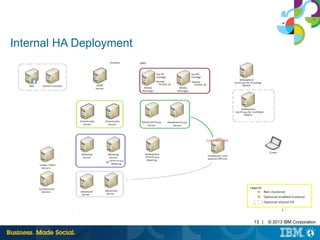
■ Internal High Availability (HA) deployment 
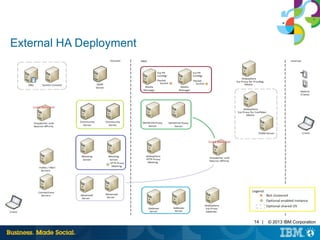
■ External High Availability (HA) deployment
13 | © 2013 IBM Corporation 
Internal HA Deployment
14 | © 2013 IBM Corporation 
External HA Deployment
External HA Deployment 
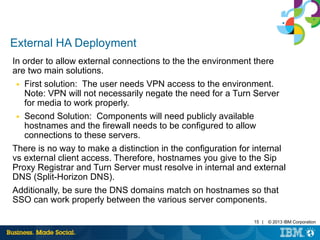
In order to allow external connections to the the environment there 
are two main solutions. 
■ First solution: The user needs VPN access to the environment. 
Note: VPN will not necessarily negate the need for a Turn Server 
for media to work properly. 
■ Second Solution: Components will need publicly available 
hostnames and the firewall needs to be configured to allow 
connections to these servers. 
There is no way to make a distinction in the configuration for internal 
vs external client access. Therefore, hostnames you give to the Sip 
Proxy Registrar and Turn Server must resolve in internal and external 
DNS (Split-Horizon DNS). 
Additionally, be sure the DNS domains match on hostnames so that 
SSO can work properly between the various server components. 
15 | © 2013 IBM Corporation
16 | © 2013 IBM Corporation 
Other Deployments 
■ The deployments we discussed are in no way the only 
deployments available but offer some of our more common 
scenarios. 
■ If additional redundancy is needed additional servers and/or 
secondary nodes may be installed.
17 | © 2013 IBM Corporation 
Virtualization 
■ When planning a VM environment careful consideration should go 
into what hardware is available. 
■ When comparing the system requirements to available resources 
verify that each individual VM meets or exceeds the minimum 
resources. 
■ In other words if you have a VM host server with 4 gigabytes of 
memory and 4 cores this will only be able to support one server (or 
possibly 2 servers) since each server will only receive a subset of 
those resources.
18 | © 2013 IBM Corporation 
Client Deployment 
■ The Sametime Client you will want to have installed is 8.5.2 IFR1 
with the security hotfix. 
■ The Notes version does not correspond to the Sametime version
19 | © 2013 IBM Corporation 
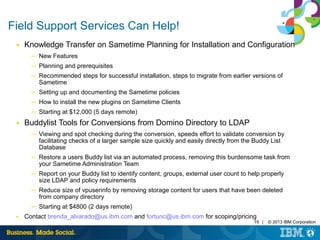
Field Support Services Can Help! 
■ Knowledge Transfer on Sametime Planning for Installation and Configuration 
─ New Features 
─ Planning and prerequisites 
─ Recommended steps for successful installation, steps to migrate from earlier versions of 
Sametime 
─ Setting up and documenting the Sametime policies 
─ How to install the new plugins on Sametime Clients 
─ Starting at $12,000 (5 days remote) 
■ Buddylist Tools for Conversions from Domino Directory to LDAP 
─ Viewing and spot checking during the conversion, speeds effort to validate conversion by 
facilitating checks of a larger sample size quickly and easily directly from the Buddy List 
Database 
─ Restore a users Buddy list via an automated process, removing this burdensome task from 
your Sametime Administration Team 
─ Report on your Buddy list to identify content, groups, external user count to help properly 
size LDAP and policy requirements 
─ Reduce size of vpuserinfo by removing storage content for users that have been deleted 
from company directory 
─ Starting at $4800 (2 days remote) 
■ Contact brenda_alvarado@us.ibm.com and fortunc@us.ibm.com for scoping/pricing
20 | © 2013 IBM Corporation 
Press *1 on your telephone to ask a question. 
Visit our Support Technical Exchange page or our Facebook page for details on future 
events. 
To help shape the future of IBM software, take this quality survey and share your 
opinion of IBM software used within your organization: https://ibm.biz/BdxqB2 
IBM Collaboration Solutions Support page 
http://www.facebook.com/IBMLotusSupport 
WebSphere Portal 
http://twitter.com/IBM_ICSSupport

Tech sametime-deployment-enablement

  • 1.
    © 2013 IBMCorporation IBM Sametime Deployment Planning Open Mic Webcast May 8, 2013 %REE7XPSDNDQGKULV%LVKRS
  • 2.
    2 | ©2013 IBM Corporation Agenda ■ Sametime Components ■ Common Deployments ■ Virtualization ■ QA
  • 3.
    3 | ©2013 IBM Corporation What does Sametime offer? ■ System Console ■ Sametime Community ■ Sametime Proxy ■ Meeting Server ■ Sametime Media Server
  • 4.
    4 | ©2013 IBM Corporation Sametime System Console Server ■ The System Console is the core planning server and allows you to setup all of your deployment plans for the various servers that you will install. ■ It organizes server settings, policies, and other Sametime specific configurations for the various servers in a given deployment.
  • 5.
    5 | ©2013 IBM Corporation Sametime Community Server ■ The backbone of the Sametime environment ■ Provides chat features between clients ■ Prerequisite for many of the other Sametime products
  • 6.
    6 | ©2013 IBM Corporation Sametime Proxy Server ■ Offers communication for the browser-based chat client, Android client, and iOS client ■ Provides awareness for users in browser-based meetings ■ Delivers the web audio/video plugin to the meeting ■ Can be integrated with products such as iNotes to offer Sametime within that client
  • 7.
    7 | ©2013 IBM Corporation Sametime Meeting Server ■ Provides a place that users can join to share content with each other through slides, screen shares, and application control. ■ When a Media Manager is installed it can offer audio and video within a meeting room. ■ The Meeting Server replaces the Classic Meeting Server that runs on the Community Server. ■ The Meeting Server is now available directly from within the rich client so there is no longer a requirement to use a web browser to attend a meeting.
  • 8.
    8 | ©2013 IBM Corporation Sametime Media Server ■ A Sametime Media environment includes the following components (Note: not all are required to be installed) ─ Sametime Media Server, Turn Server, and Bandwidth Manager. ■ The media server includes three components ─ SIP Proxy Registrar, Conference Manager, Packet Switcher ■ All of these components are needed and can be installed onto separate machines or the same machine Note: If you ever wish to cluster the SIP Proxy Registrar or Conference Manger you will want to be sure to install each component as a separate node. ■ The Turn Server is optional; however, if you plan to allow external access or have an intricately set up internal network you will want to install and configure the Turn Server to ensure media will work. ■ The Bandwidth Manager is completely optional and can be installed/configured later, if needed.
  • 9.
    9 | ©2013 IBM Corporation Additional Components Needed By Sametime ■ DB2 stores information regarding your deployment. DB2 will include data such as meeting rooms, server version information, cluster information, deployment information, etc. ■ LDAP is a directory that stores information for users and will include information about a user's (name, password, email, etc.)
  • 10.
    10 | ©2013 IBM Corporation LDAP Server ■ In order to take advantage of the new Sametime components and the features they offer, an LDAP server must be configured and available for use.
  • 11.
    11 | ©2013 IBM Corporation DB2 Server ■ At the core of every install is the DB2 server which stores the databases for our various servers. ■ It contains information ranging from anything like setup and Deployment Plans, to the actual Meeting Server Rooms themselves.
  • 12.
    12 | ©2013 IBM Corporation Examples of Deployments ■ Internal High Availability (HA) deployment ■ External High Availability (HA) deployment
  • 13.
    13 | ©2013 IBM Corporation Internal HA Deployment
  • 14.
    14 | ©2013 IBM Corporation External HA Deployment
  • 15.
    External HA Deployment In order to allow external connections to the the environment there are two main solutions. ■ First solution: The user needs VPN access to the environment. Note: VPN will not necessarily negate the need for a Turn Server for media to work properly. ■ Second Solution: Components will need publicly available hostnames and the firewall needs to be configured to allow connections to these servers. There is no way to make a distinction in the configuration for internal vs external client access. Therefore, hostnames you give to the Sip Proxy Registrar and Turn Server must resolve in internal and external DNS (Split-Horizon DNS). Additionally, be sure the DNS domains match on hostnames so that SSO can work properly between the various server components. 15 | © 2013 IBM Corporation
  • 16.
    16 | ©2013 IBM Corporation Other Deployments ■ The deployments we discussed are in no way the only deployments available but offer some of our more common scenarios. ■ If additional redundancy is needed additional servers and/or secondary nodes may be installed.
  • 17.
    17 | ©2013 IBM Corporation Virtualization ■ When planning a VM environment careful consideration should go into what hardware is available. ■ When comparing the system requirements to available resources verify that each individual VM meets or exceeds the minimum resources. ■ In other words if you have a VM host server with 4 gigabytes of memory and 4 cores this will only be able to support one server (or possibly 2 servers) since each server will only receive a subset of those resources.
  • 18.
    18 | ©2013 IBM Corporation Client Deployment ■ The Sametime Client you will want to have installed is 8.5.2 IFR1 with the security hotfix. ■ The Notes version does not correspond to the Sametime version
  • 19.
    19 | ©2013 IBM Corporation Field Support Services Can Help! ■ Knowledge Transfer on Sametime Planning for Installation and Configuration ─ New Features ─ Planning and prerequisites ─ Recommended steps for successful installation, steps to migrate from earlier versions of Sametime ─ Setting up and documenting the Sametime policies ─ How to install the new plugins on Sametime Clients ─ Starting at $12,000 (5 days remote) ■ Buddylist Tools for Conversions from Domino Directory to LDAP ─ Viewing and spot checking during the conversion, speeds effort to validate conversion by facilitating checks of a larger sample size quickly and easily directly from the Buddy List Database ─ Restore a users Buddy list via an automated process, removing this burdensome task from your Sametime Administration Team ─ Report on your Buddy list to identify content, groups, external user count to help properly size LDAP and policy requirements ─ Reduce size of vpuserinfo by removing storage content for users that have been deleted from company directory ─ Starting at $4800 (2 days remote) ■ Contact brenda_alvarado@us.ibm.com and fortunc@us.ibm.com for scoping/pricing
  • 20.
    20 | ©2013 IBM Corporation Press *1 on your telephone to ask a question. Visit our Support Technical Exchange page or our Facebook page for details on future events. To help shape the future of IBM software, take this quality survey and share your opinion of IBM software used within your organization: https://ibm.biz/BdxqB2 IBM Collaboration Solutions Support page http://www.facebook.com/IBMLotusSupport WebSphere Portal http://twitter.com/IBM_ICSSupport