

AD305: IBM Sametime
iWidgets: Extending
Connections' Use of
Sametime
Jason Cheung, IBM

© 2014 IBM Corporation
Please Note
IBM’s statements regarding its plans, directions, and intent are subject to change or withdrawal without notice at IBM’s sole
discretion.
Information regarding potential future products is intended to outline our general product direction and it should not be
relied on in making a purchasing decision.
The information mentioned regarding potential future products is not a commitment, promise, or legal obligation to deliver
any material, code or functionality. Information about potential future products may not be incorporated into any contract.
The development, release, and timing of any future features or functionality described for our products remains at our sole
discretion

Performance is based on measurements and projections using standard IBM benchmarks in a controlled environment.
The actual throughput or performance that any user will experience will vary depending upon many factors, including
considerations such as the amount of multiprogramming in the user’s job stream, the I/O configuration, the storage
configuration, and the workload processed. Therefore, no assurance can be given that an individual user will achieve
results similar to those stated here.

2
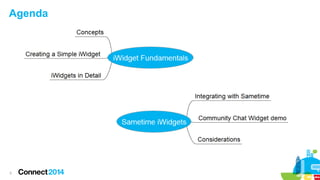
Agenda

3
Introduction


4

What is an iWidget?
–
A small browser-based component
–
IBM specification
–
Used in multiple platforms
●
IBM Mashup Center
●
IBM WebSphere Portal
●
IBM Connections
Introduction

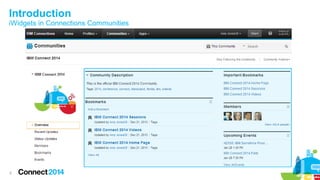
iWidgets in Connections Communities

5
Creating a Simple iWidget

6
Creating a Simple iWidget

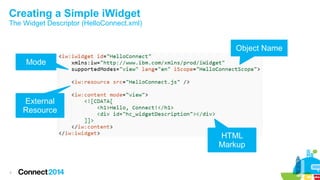
The Widget Descriptor (HelloConnect.xml)

Object Name
Mode

External
Resource
HTML
Markup

7
Creating a Simple iWidget

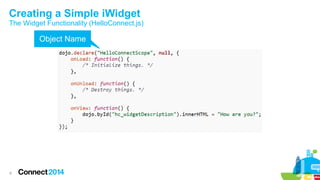
The Widget Functionality (HelloConnect.js)

Object Name

8
Adding an iWidget to a
Connections Community

9
Adding an iWidget to a Connections Community
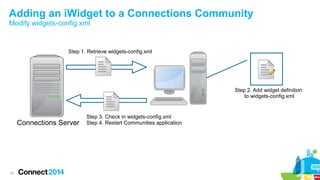
Modify widgets-config.xml

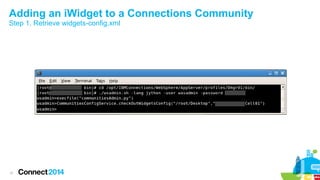
Step 1. Retrieve widgets-config.xml

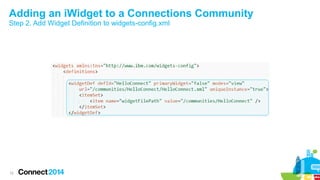
Step 2. Add widget definition
to widgets-config.xml

Connections Server

10

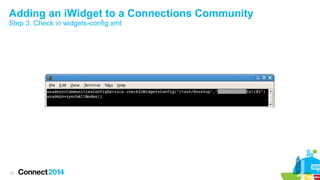
Step 3. Check in widgets-config.xml
Step 4. Restart Communities application
Adding an iWidget to a Connections Community
Step 1. Retrieve widgets-config.xml

11
Adding an iWidget to a Connections Community
Step 2. Add Widget Definition to widgets-config.xml

12
Adding an iWidget to a Connections Community
Step 3. Check in widgets-config.xml

13
Adding an iWidget to a Connections Community
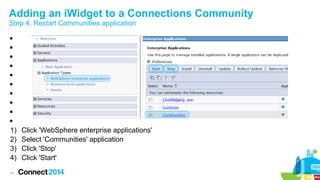
Step 4. Restart Communities application











1)
2)
3)
4)
14

Click 'WebSphere enterprise applications'
Select 'Communities' application
Click 'Stop'
Click 'Start'
Adding an iWidget to a Connections Community
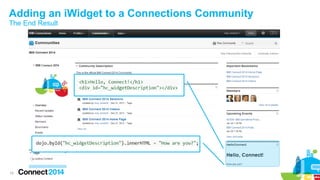
The End Result

15
iWidgets in Detail

16
iWidgets in Detail
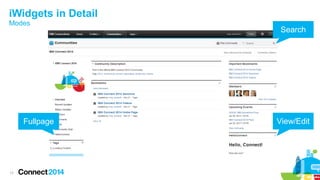
Modes

Fullpage

17

Search

View/Edit
iWidgets in Detail
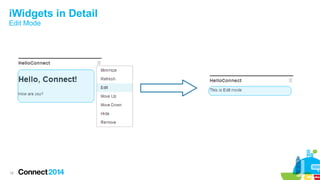
Edit Mode

18
iWidgets in Detail
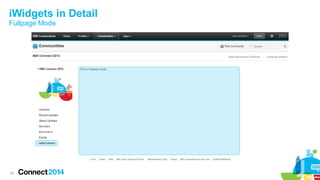
Fullpage Mode

19
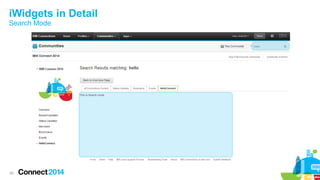
iWidgets in Detail
Search Mode

20
iWidgets in Detail
iWidget Functions (1/4)


iContext
–
Programmatically interact with iWidget




iContext.getItemSet(“itemSetId”)
–
Retrieve a pre-defined itemset from the widget descriptor




HelloConnect.xml




[“itemsPerPage”]
“5”
21
iWidgets in Detail
iWidget Functions (2/4)


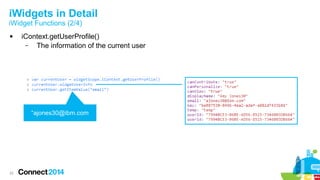
iContext.getUserProfile()
–
The information of the current user

“ajones30@ibm.com

22
iWidgets in Detail
iWidget Functions (3/4)


23

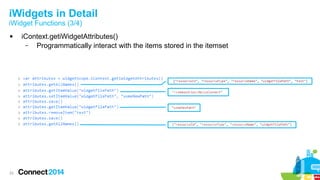
iContext.getiWidgetAttributes()
–
Programmatically interact with the items stored in the itemset
iWidgets in Detail
iWidget Functions (4/4)


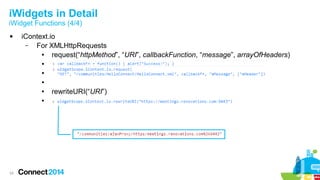
iContext.io
–
For XMLHttpRequests
●
request(“httpMethod”, “URI”, callbackFunction, “message”, arrayOfHeaders)
●
●
●
●
●

24

rewriteURI(“URI”)
iWidgets in Detail
Best Practices






25

Minimize the number of HTTP requests
Use non-blocking HTTP requests
Use browser cache for static files
Reuse page styles
Encapsulate variables to the widget's scope
Integrating Sametime

26
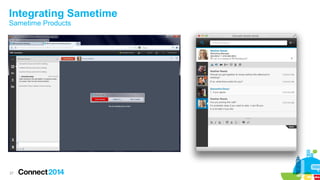
Integrating Sametime
Sametime Products

27
Integrating Sametime

Sample Sametime Integration Points


Sametime Advanced 9.0 Software Development Kit
–
Manage persistent chat rooms, folders, SkillTap, compliance, and broadcast
communities
–
Retrieve data as an ATOM feed
–



Sametime Browser Client Toolkit
–
Manage contacts, groups, watchlists, open chats, preferences, and more...
–
Integrate Sametime Proxy functionality directly into your web page
–



28

Download the Sametime 9 SDK
Community Chat Widget
Demo

29
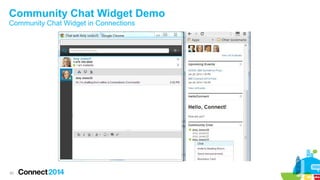
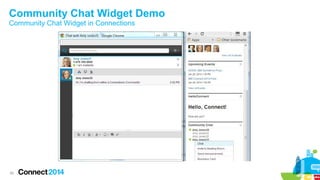
Community Chat Widget Demo
Community Chat Widget in Connections

30
Community Chat Widget Demo
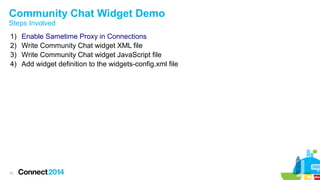
Steps Involved
1)
2)
3)
4)

31

Enable Sametime Proxy in Connections
Write Community Chat widget XML file
Write Community Chat widget JavaScript file
Add widget definition to the widgets-config.xml file
Community Chat Widget Demo
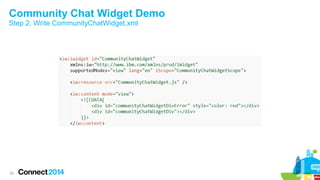
Step 2. Write CommunityChatWidget.xml

32
Community Chat Widget Demo
Step 3. Write CommunityChatWidget.js


33

Code...
Community Chat Widget Demo
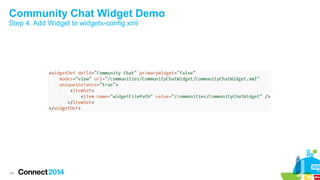
Step 4. Add Widget to widgets-config.xml

34
Community Chat Widget Demo
Community Chat Widget in Connections

35
Considerations when Integrating
with Sametime

36
Considerations when Integrating with Sametime
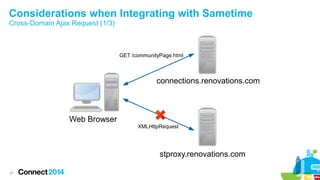
Cross-Domain Ajax Request (1/3)

GET /communityPage.html

connections.renovations.com

Web Browser

XMLHttpRequest

stproxy.renovations.com
37
Considerations when Integrating with Sametime
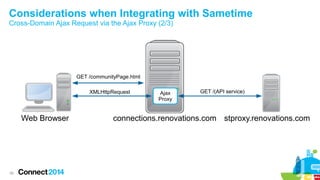
Cross-Domain Ajax Request via the Ajax Proxy (2/3)

GET /communityPage.html
XMLHttpRequest

Web Browser

38

Ajax
Proxy

GET /(API service)

connections.renovations.com stproxy.renovations.com
Considerations when Integrating with Sametime
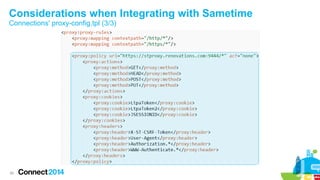
Connections' proxy-config.tpl (3/3)

39
Considerations when Integrating with Sametime
Single Sign-On (SSO)



40

No need to explicitly log into iWidget's Sametime service
Details for 'Configuring single sign-on...'
Considerations when Integrating with Sametime
Managing Membership – Events SPI (1/2)


41

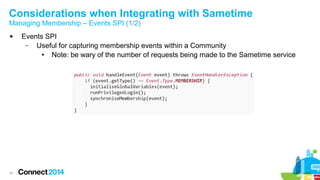
Events SPI
–
Useful for capturing membership events within a Community
●
Note: be wary of the number of requests being made to the Sametime service
Considerations when Integrating with Sametime
Managing Membership – Registering an Event Listener JAR (2/2)



42

WebSphere shared libraries allow the code in the Events SPI handler to be published
Add the shared library to the News module on the Connections server
Summary

43
Summary






44

iWidget is: XML descriptor and JavaScript functionality
Deploying an iWidget to Connections - widgets-config.xml
Considerations when including Sametime
Additional Resources















45

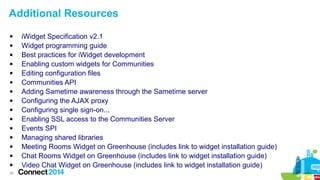
iWidget Specification v2.1
Widget programming guide
Best practices for iWidget development
Enabling custom widgets for Communities
Editing configuration files
Communities API
Adding Sametime awareness through the Sametime server
Configuring the AJAX proxy
Configuring single sign-on...
Enabling SSL access to the Communities Server
Events SPI
Managing shared libraries
Meeting Rooms Widget on Greenhouse (includes link to widget installation guide)
Chat Rooms Widget on Greenhouse (includes link to widget installation guide)
Video Chat Widget on Greenhouse (includes link to widget installation guide)
Plan your week...
Tues 1/28

Wednesday 1/29
D306;Keep Calm and Call On! IBM
Sametime Communicate Softphone
Made Simple; Ginni Saini, IBM

BOF103; Sametime Customer
Advisory Council Kick Off; William
Kulju, IBM

CUST117;Social Communications in
Social Business. One Client's Fast
Journey; Gopal Soora, IBM; Manfred
Leistner, E.G.O.

AD207 Widgets, Live Text and Now
Open Social: Linking Your Data to
the World; Andrew Davis, IBM

ID303;Architecting a Highly
Avaliable IBM Sametime 9
Environment; Fernando Salazar, IBM

BP503;What Does it Do to the
Network? Answering Question #1 for
IBM Sametime 9 Video; Peter Lurie,
Polycom
BP501;Building and Deploying
Custom IBM Sametime Connect
Client Installations;Carl Tyler, Epilio
SB205 Strategies for Connecting the
Global Workforce through the Cloud
R Buisan
ID201; Social Communications from
the Cloud; Marc Pagnier, IBM
ID300;What's New in IBM Sametime
9;Marlon Machado, IBM Corporation
(R2)
AD506;IBM Sametime Proxy 9: A
Fuller, Richer Customizable
Experience; William Holmes, IBM
46

SHOW401; Taking IBM Sametime
Mobile; Gabriella Davis, The Turtle
Partnership; Paul Mooney, Bluewave
Technology;
ID305;IBM Sametime Mobile - Now
With Voice and Video!; Steve Babin,
IBM; Russ Fahey, IBM
ID304;IBM Sametime 9 Voice and
Video Deployment; Bhavuk
Srivastava, IBM India
AD505;How to Integrate Sametime
Meetings Using the Remote Client
SDK; Ron Pontrich, IBM; Andrew
Ortwein, IBM
BP502;Is Your IBM Sametime
Deployment Stuck in First Gear?
Learn From UC Mechanics; David
Price, Meridian IT Inc.; Peter Lurie,
Polycom

Thursday 1/30
ID302;Upgrading and Migrating to
IBM Sametime 9;Tony Payne, IBM
SHOW400; IBM Sametime 9.0 Media
Components on Linux for the
Windows Administrator; Jeff Miller,
IBM
ID301;IBM Sametime 9 Voice and
Video: The Value Today and the
Roadmap for Tomorrow; Pat Galvin,
IBM; Julie Reed, IBM
ASK102 Ask the Product Managers
ASK101 Ask the Developers
Questions

47
 Access Connect Online to complete your session surveys using any:
– Web or mobile browser
– Connect Online kiosk onsite
– AD305

48
Engage Online


SocialBiz User Group socialbizug.org
– Join the epicenter of Notes and Collaboration user groups



Follow us on Twitter
– @IBMConnect and @IBMSocialBiz



LinkedIn http://bit.ly/SBComm
– Participate in the IBM Social Business group on LinkedIn:



Facebook https://www.facebook.com/IBMSocialBiz
– Like IBM Social Business on Facebook



Social Business Insights blog ibm.com/blogs/socialbusiness
– Read and engage with our bloggers

49
Acknowledgements and Disclaimers
Availability. References in this presentation to IBM products, programs, or services do not imply that they will be available in all countries in which IBM operates.
The workshops, sessions and materials have been prepared by IBM or the session speakers and reflect their own views. They are provided for informational purposes only, and are neither
intended to, nor shall have the effect of being, legal or other guidance or advice to any participant. While efforts were made to verify the completeness and accuracy of the information
contained in this presentation, it is provided AS-IS without warranty of any kind, express or implied. IBM shall not be responsible for any damages arising out of the use of, or otherwise
related to, this presentation or any other materials. Nothing contained in this presentation is intended to, nor shall have the effect of, creating any warranties or representations from IBM or
its suppliers or licensors, or altering the terms and conditions of the applicable license agreement governing the use of IBM software.
All customer examples described are presented as illustrations of how those customers have used IBM products and the results they may have achieved. Actual environmental costs and
performance characteristics may vary by customer. Nothing contained in these materials is intended to, nor shall have the effect of, stating or implying that any activities undertaken by you
will result in any specific sales, revenue growth or other results.

© Copyright IBM Corporation 2014. All rights reserved.
 U.S. Government Users Restricted Rights - Use, duplication or disclosure restricted by GSA ADP Schedule Contract with IBM Corp.
 IBM, the IBM logo, ibm.com, and Sametime, Connections, WebSphere, Rational Application Developer, Greenhouse, ClearCase are trademarks or registered trademarks of International
Business Machines Corporation in the United States, other countries, or both. If these and other IBM trademarked terms are marked on their first occurrence in this information with a
trademark symbol (® or ™), these symbols indicate U.S. registered or common law trademarks owned by IBM at the time this information was published. Such trademarks may also be
registered or common law trademarks in other countries. A current list of IBM trademarks is available on the Web at “Copyright and trademark information” at
www.ibm.com/legal/copytrade.shtml
Google Chrome, Mozilla Firefox
Other company, product, or service names may be trademarks or service marks of others.

50

AD305:

  • 1.
    AD305: IBM Sametime iWidgets:Extending Connections' Use of Sametime Jason Cheung, IBM © 2014 IBM Corporation
  • 2.
    Please Note IBM’s statementsregarding its plans, directions, and intent are subject to change or withdrawal without notice at IBM’s sole discretion. Information regarding potential future products is intended to outline our general product direction and it should not be relied on in making a purchasing decision. The information mentioned regarding potential future products is not a commitment, promise, or legal obligation to deliver any material, code or functionality. Information about potential future products may not be incorporated into any contract. The development, release, and timing of any future features or functionality described for our products remains at our sole discretion Performance is based on measurements and projections using standard IBM benchmarks in a controlled environment. The actual throughput or performance that any user will experience will vary depending upon many factors, including considerations such as the amount of multiprogramming in the user’s job stream, the I/O configuration, the storage configuration, and the workload processed. Therefore, no assurance can be given that an individual user will achieve results similar to those stated here. 2
  • 3.
  • 4.
    Introduction  4 What is aniWidget? – A small browser-based component – IBM specification – Used in multiple platforms ● IBM Mashup Center ● IBM WebSphere Portal ● IBM Connections
  • 5.
  • 6.
  • 7.
    Creating a SimpleiWidget The Widget Descriptor (HelloConnect.xml) Object Name Mode External Resource HTML Markup 7
  • 8.
    Creating a SimpleiWidget The Widget Functionality (HelloConnect.js) Object Name 8
  • 9.
    Adding an iWidgetto a Connections Community 9
  • 10.
    Adding an iWidgetto a Connections Community Modify widgets-config.xml Step 1. Retrieve widgets-config.xml Step 2. Add widget definition to widgets-config.xml Connections Server 10 Step 3. Check in widgets-config.xml Step 4. Restart Communities application
  • 11.
    Adding an iWidgetto a Connections Community Step 1. Retrieve widgets-config.xml 11
  • 12.
    Adding an iWidgetto a Connections Community Step 2. Add Widget Definition to widgets-config.xml 12
  • 13.
    Adding an iWidgetto a Connections Community Step 3. Check in widgets-config.xml 13
  • 14.
    Adding an iWidgetto a Connections Community Step 4. Restart Communities application           1) 2) 3) 4) 14 Click 'WebSphere enterprise applications' Select 'Communities' application Click 'Stop' Click 'Start'
  • 15.
    Adding an iWidgetto a Connections Community The End Result 15
  • 16.
  • 17.
  • 18.
  • 19.
  • 20.
  • 21.
    iWidgets in Detail iWidgetFunctions (1/4)  iContext – Programmatically interact with iWidget   iContext.getItemSet(“itemSetId”) – Retrieve a pre-defined itemset from the widget descriptor   HelloConnect.xml   [“itemsPerPage”] “5” 21
  • 22.
    iWidgets in Detail iWidgetFunctions (2/4)  iContext.getUserProfile() – The information of the current user “ajones30@ibm.com 22
  • 23.
    iWidgets in Detail iWidgetFunctions (3/4)  23 iContext.getiWidgetAttributes() – Programmatically interact with the items stored in the itemset
  • 24.
    iWidgets in Detail iWidgetFunctions (4/4)  iContext.io – For XMLHttpRequests ● request(“httpMethod”, “URI”, callbackFunction, “message”, arrayOfHeaders) ● ● ● ● ● 24 rewriteURI(“URI”)
  • 25.
    iWidgets in Detail BestPractices      25 Minimize the number of HTTP requests Use non-blocking HTTP requests Use browser cache for static files Reuse page styles Encapsulate variables to the widget's scope
  • 26.
  • 27.
  • 28.
    Integrating Sametime Sample SametimeIntegration Points  Sametime Advanced 9.0 Software Development Kit – Manage persistent chat rooms, folders, SkillTap, compliance, and broadcast communities – Retrieve data as an ATOM feed –  Sametime Browser Client Toolkit – Manage contacts, groups, watchlists, open chats, preferences, and more... – Integrate Sametime Proxy functionality directly into your web page –  28 Download the Sametime 9 SDK
  • 29.
  • 30.
    Community Chat WidgetDemo Community Chat Widget in Connections 30
  • 31.
    Community Chat WidgetDemo Steps Involved 1) 2) 3) 4) 31 Enable Sametime Proxy in Connections Write Community Chat widget XML file Write Community Chat widget JavaScript file Add widget definition to the widgets-config.xml file
  • 32.
    Community Chat WidgetDemo Step 2. Write CommunityChatWidget.xml 32
  • 33.
    Community Chat WidgetDemo Step 3. Write CommunityChatWidget.js  33 Code...
  • 34.
    Community Chat WidgetDemo Step 4. Add Widget to widgets-config.xml 34
  • 35.
    Community Chat WidgetDemo Community Chat Widget in Connections 35
  • 36.
  • 37.
    Considerations when Integratingwith Sametime Cross-Domain Ajax Request (1/3) GET /communityPage.html connections.renovations.com Web Browser XMLHttpRequest stproxy.renovations.com 37
  • 38.
    Considerations when Integratingwith Sametime Cross-Domain Ajax Request via the Ajax Proxy (2/3) GET /communityPage.html XMLHttpRequest Web Browser 38 Ajax Proxy GET /(API service) connections.renovations.com stproxy.renovations.com
  • 39.
    Considerations when Integratingwith Sametime Connections' proxy-config.tpl (3/3) 39
  • 40.
    Considerations when Integratingwith Sametime Single Sign-On (SSO)   40 No need to explicitly log into iWidget's Sametime service Details for 'Configuring single sign-on...'
  • 41.
    Considerations when Integratingwith Sametime Managing Membership – Events SPI (1/2)  41 Events SPI – Useful for capturing membership events within a Community ● Note: be wary of the number of requests being made to the Sametime service
  • 42.
    Considerations when Integratingwith Sametime Managing Membership – Registering an Event Listener JAR (2/2)   42 WebSphere shared libraries allow the code in the Events SPI handler to be published Add the shared library to the News module on the Connections server
  • 43.
  • 44.
    Summary      44 iWidget is: XMLdescriptor and JavaScript functionality Deploying an iWidget to Connections - widgets-config.xml Considerations when including Sametime
  • 45.
    Additional Resources                45 iWidget Specificationv2.1 Widget programming guide Best practices for iWidget development Enabling custom widgets for Communities Editing configuration files Communities API Adding Sametime awareness through the Sametime server Configuring the AJAX proxy Configuring single sign-on... Enabling SSL access to the Communities Server Events SPI Managing shared libraries Meeting Rooms Widget on Greenhouse (includes link to widget installation guide) Chat Rooms Widget on Greenhouse (includes link to widget installation guide) Video Chat Widget on Greenhouse (includes link to widget installation guide)
  • 46.
    Plan your week... Tues1/28 Wednesday 1/29 D306;Keep Calm and Call On! IBM Sametime Communicate Softphone Made Simple; Ginni Saini, IBM BOF103; Sametime Customer Advisory Council Kick Off; William Kulju, IBM CUST117;Social Communications in Social Business. One Client's Fast Journey; Gopal Soora, IBM; Manfred Leistner, E.G.O. AD207 Widgets, Live Text and Now Open Social: Linking Your Data to the World; Andrew Davis, IBM ID303;Architecting a Highly Avaliable IBM Sametime 9 Environment; Fernando Salazar, IBM BP503;What Does it Do to the Network? Answering Question #1 for IBM Sametime 9 Video; Peter Lurie, Polycom BP501;Building and Deploying Custom IBM Sametime Connect Client Installations;Carl Tyler, Epilio SB205 Strategies for Connecting the Global Workforce through the Cloud R Buisan ID201; Social Communications from the Cloud; Marc Pagnier, IBM ID300;What's New in IBM Sametime 9;Marlon Machado, IBM Corporation (R2) AD506;IBM Sametime Proxy 9: A Fuller, Richer Customizable Experience; William Holmes, IBM 46 SHOW401; Taking IBM Sametime Mobile; Gabriella Davis, The Turtle Partnership; Paul Mooney, Bluewave Technology; ID305;IBM Sametime Mobile - Now With Voice and Video!; Steve Babin, IBM; Russ Fahey, IBM ID304;IBM Sametime 9 Voice and Video Deployment; Bhavuk Srivastava, IBM India AD505;How to Integrate Sametime Meetings Using the Remote Client SDK; Ron Pontrich, IBM; Andrew Ortwein, IBM BP502;Is Your IBM Sametime Deployment Stuck in First Gear? Learn From UC Mechanics; David Price, Meridian IT Inc.; Peter Lurie, Polycom Thursday 1/30 ID302;Upgrading and Migrating to IBM Sametime 9;Tony Payne, IBM SHOW400; IBM Sametime 9.0 Media Components on Linux for the Windows Administrator; Jeff Miller, IBM ID301;IBM Sametime 9 Voice and Video: The Value Today and the Roadmap for Tomorrow; Pat Galvin, IBM; Julie Reed, IBM ASK102 Ask the Product Managers ASK101 Ask the Developers
  • 47.
  • 48.
     Access ConnectOnline to complete your session surveys using any: – Web or mobile browser – Connect Online kiosk onsite – AD305 48
  • 49.
    Engage Online  SocialBiz UserGroup socialbizug.org – Join the epicenter of Notes and Collaboration user groups  Follow us on Twitter – @IBMConnect and @IBMSocialBiz  LinkedIn http://bit.ly/SBComm – Participate in the IBM Social Business group on LinkedIn:  Facebook https://www.facebook.com/IBMSocialBiz – Like IBM Social Business on Facebook  Social Business Insights blog ibm.com/blogs/socialbusiness – Read and engage with our bloggers 49
  • 50.
    Acknowledgements and Disclaimers Availability.References in this presentation to IBM products, programs, or services do not imply that they will be available in all countries in which IBM operates. The workshops, sessions and materials have been prepared by IBM or the session speakers and reflect their own views. They are provided for informational purposes only, and are neither intended to, nor shall have the effect of being, legal or other guidance or advice to any participant. While efforts were made to verify the completeness and accuracy of the information contained in this presentation, it is provided AS-IS without warranty of any kind, express or implied. IBM shall not be responsible for any damages arising out of the use of, or otherwise related to, this presentation or any other materials. Nothing contained in this presentation is intended to, nor shall have the effect of, creating any warranties or representations from IBM or its suppliers or licensors, or altering the terms and conditions of the applicable license agreement governing the use of IBM software. All customer examples described are presented as illustrations of how those customers have used IBM products and the results they may have achieved. Actual environmental costs and performance characteristics may vary by customer. Nothing contained in these materials is intended to, nor shall have the effect of, stating or implying that any activities undertaken by you will result in any specific sales, revenue growth or other results. © Copyright IBM Corporation 2014. All rights reserved.  U.S. Government Users Restricted Rights - Use, duplication or disclosure restricted by GSA ADP Schedule Contract with IBM Corp.  IBM, the IBM logo, ibm.com, and Sametime, Connections, WebSphere, Rational Application Developer, Greenhouse, ClearCase are trademarks or registered trademarks of International Business Machines Corporation in the United States, other countries, or both. If these and other IBM trademarked terms are marked on their first occurrence in this information with a trademark symbol (® or ™), these symbols indicate U.S. registered or common law trademarks owned by IBM at the time this information was published. Such trademarks may also be registered or common law trademarks in other countries. A current list of IBM trademarks is available on the Web at “Copyright and trademark information” at www.ibm.com/legal/copytrade.shtml Google Chrome, Mozilla Firefox Other company, product, or service names may be trademarks or service marks of others. 50