










© 2014 IBM Corporation
AD506:
IBM Sametime Proxy 9:
A Fuller, Richer Customizable Experience
William Holmes, IBM
(Technical Lead, Sametime Proxy Development)
22
IBM’s statements regarding its plans, directions, and intent are subject to change or withdrawal without notice at IBM’s sole
discretion.
Information regarding potential future products is intended to outline our general product direction and it should not be
relied on in making a purchasing decision.
The information mentioned regarding potential future products is not a commitment, promise, or legal obligation to deliver
any material, code or functionality. Information about potential future products may not be incorporated into any contract.
The development, release, and timing of any future features or functionality described for our products remains at our sole
discretion
Performance is based on measurements and projections using standard IBM benchmarks in a controlled environment.
The actual throughput or performance that any user will experience will vary depending upon many factors, including
considerations such as the amount of multiprogramming in the user’s job stream, the I/O configuration, the storage
configuration, and the workload processed. Therefore, no assurance can be given that an individual user will achieve
results similar to those stated here.
Please Note
3
Agenda
 Side by Side
– Sametime Proxy 8.5.2IFR1 > Sametime Proxy 9.0
 User Experience
– Consistency based on real world behaviors
 New Enhancements
– Rich Communication
 New Integration
– Backward Compatibility
– JavaScript & CSS resources
 Customization
– Embedded Experience
– Web Client
 Future Considerations
44
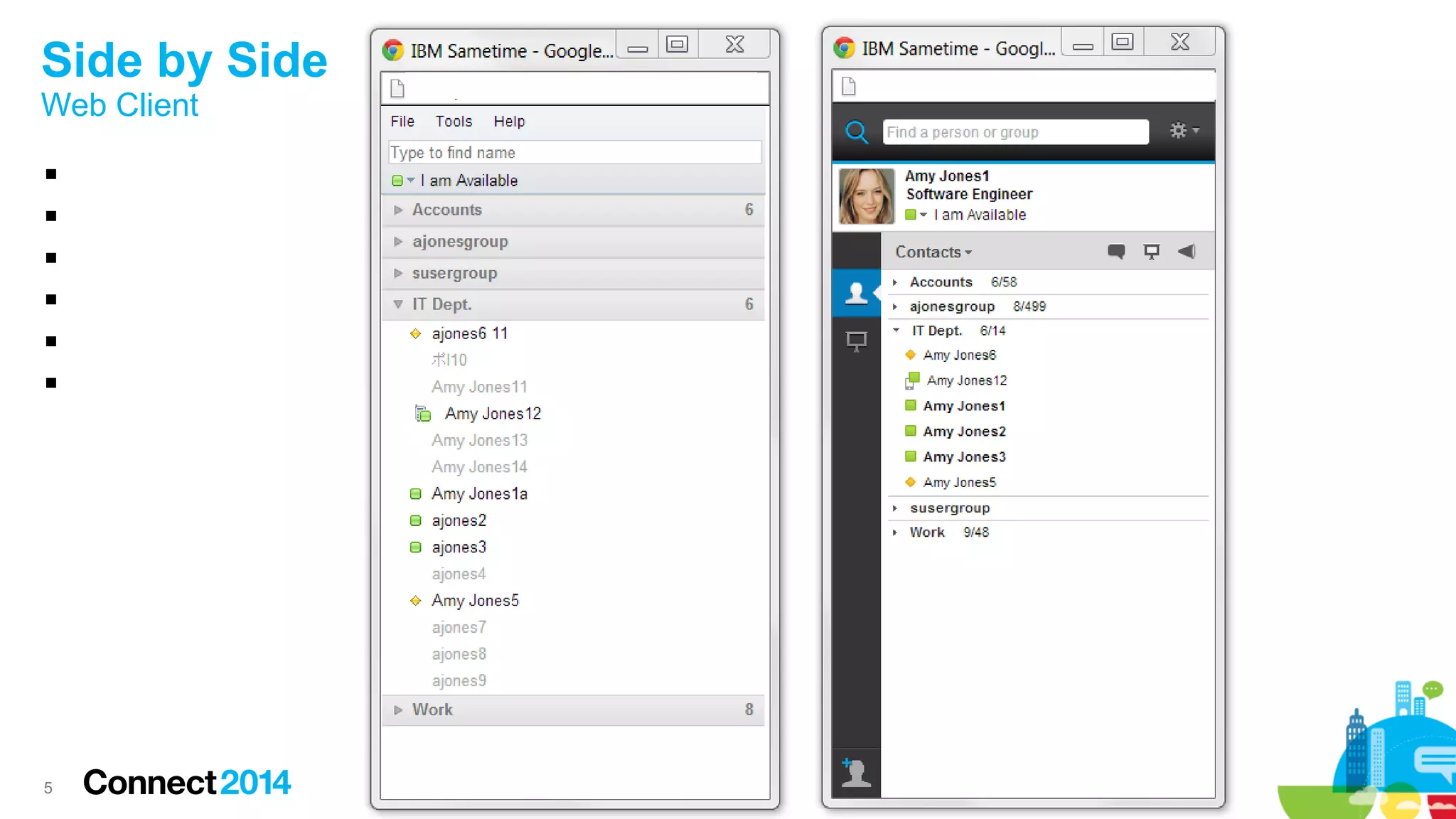
Side by Side
5
Side by Side
Web Client






6
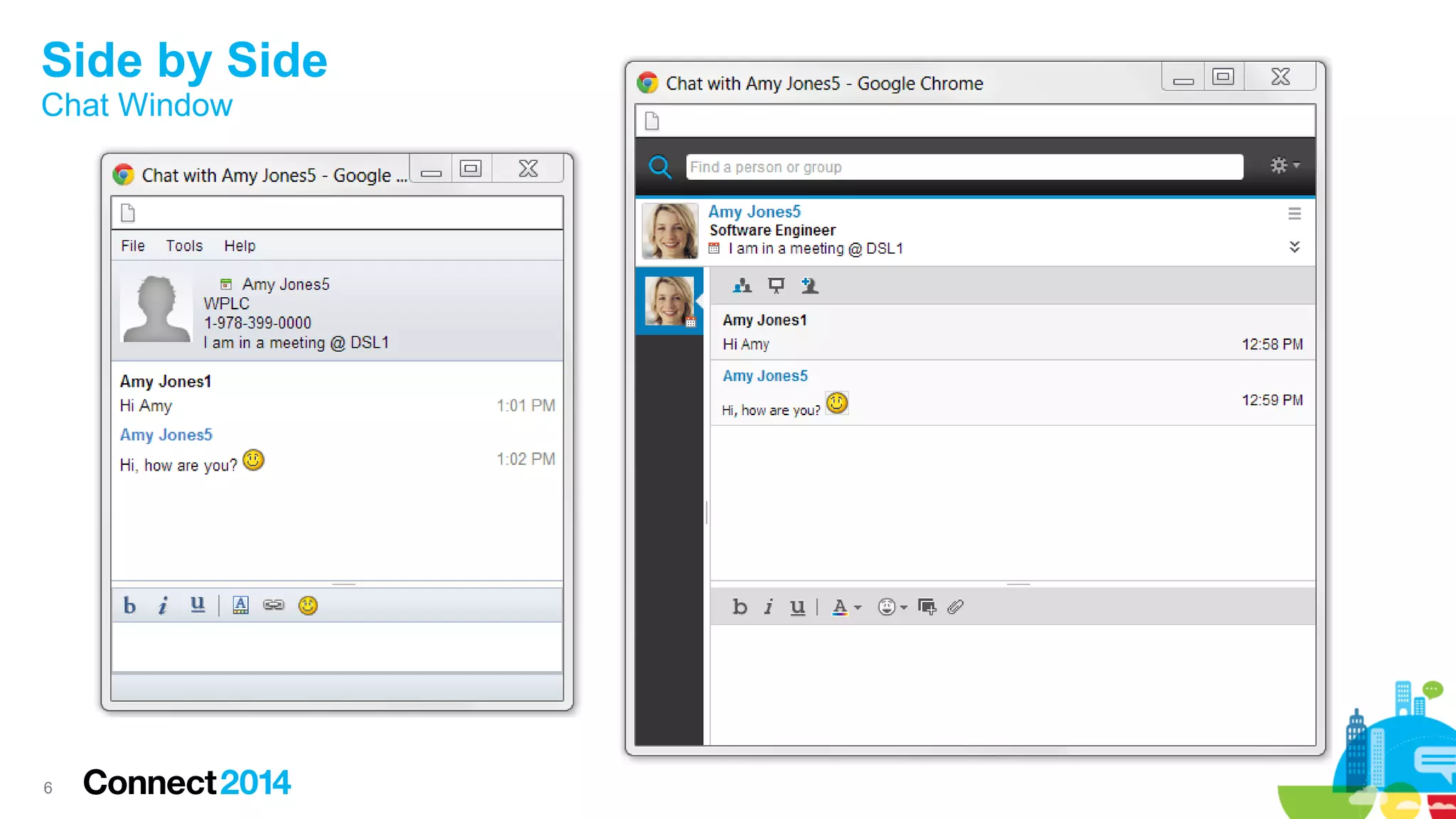
Side by Side
Chat Window
7
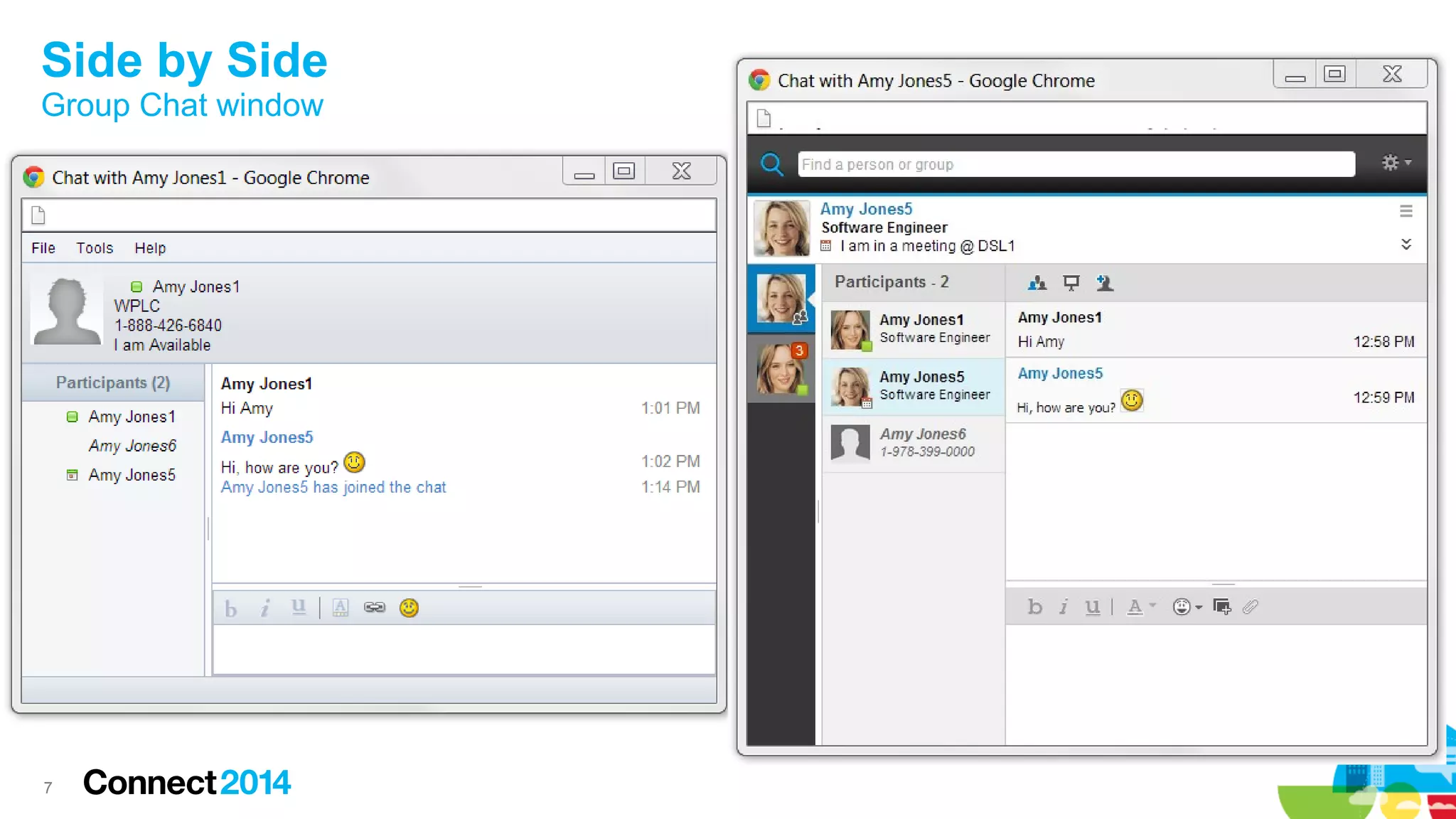
Side by Side
Group Chat window
88
User Experience
9
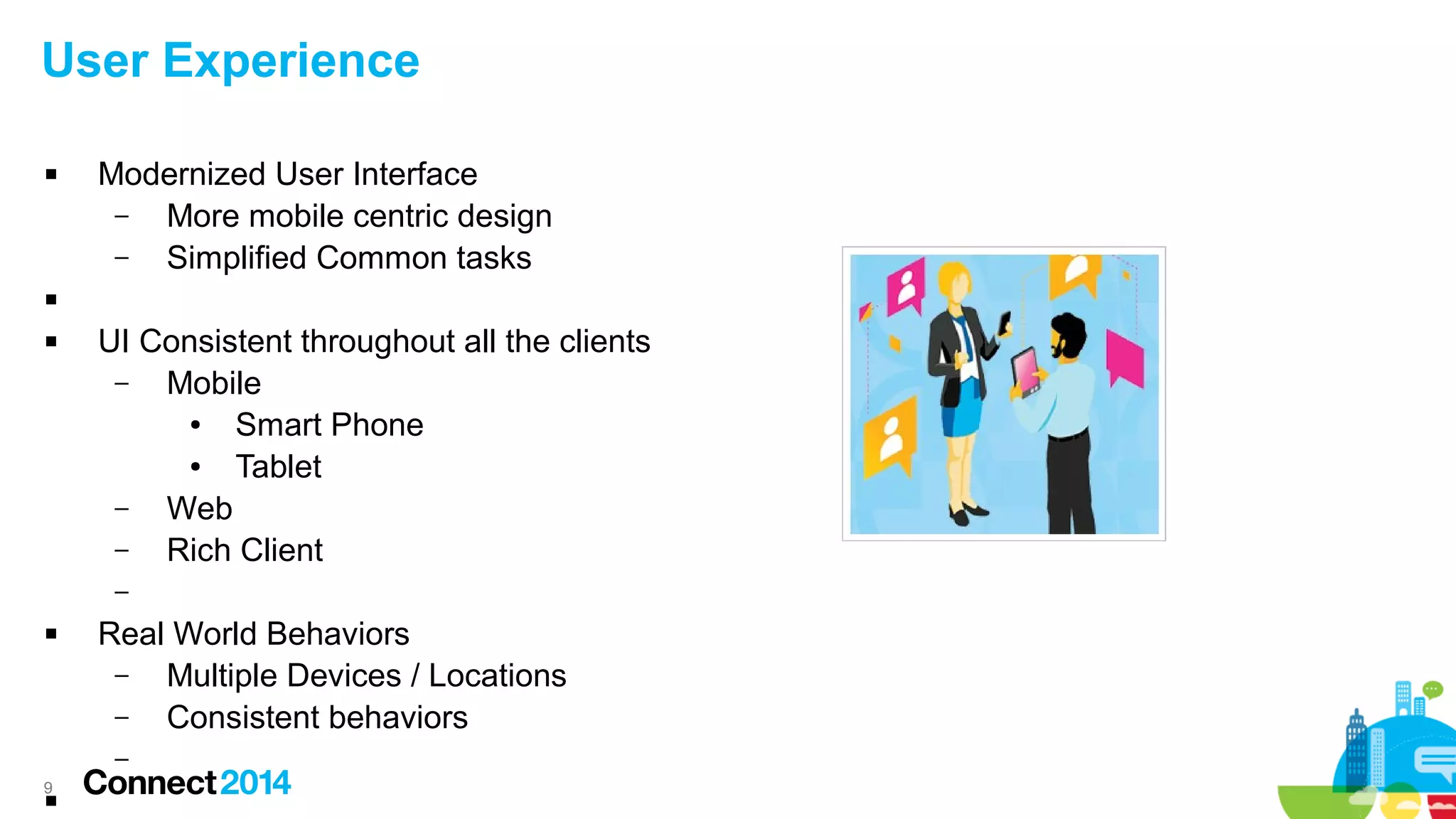
User Experience
 Modernized User Interface
– More mobile centric design
– Simplified Common tasks

 UI Consistent throughout all the clients
– Mobile
● Smart Phone
● Tablet
– Web
– Rich Client
–
 Real World Behaviors
– Multiple Devices / Locations
– Consistent behaviors
–

10
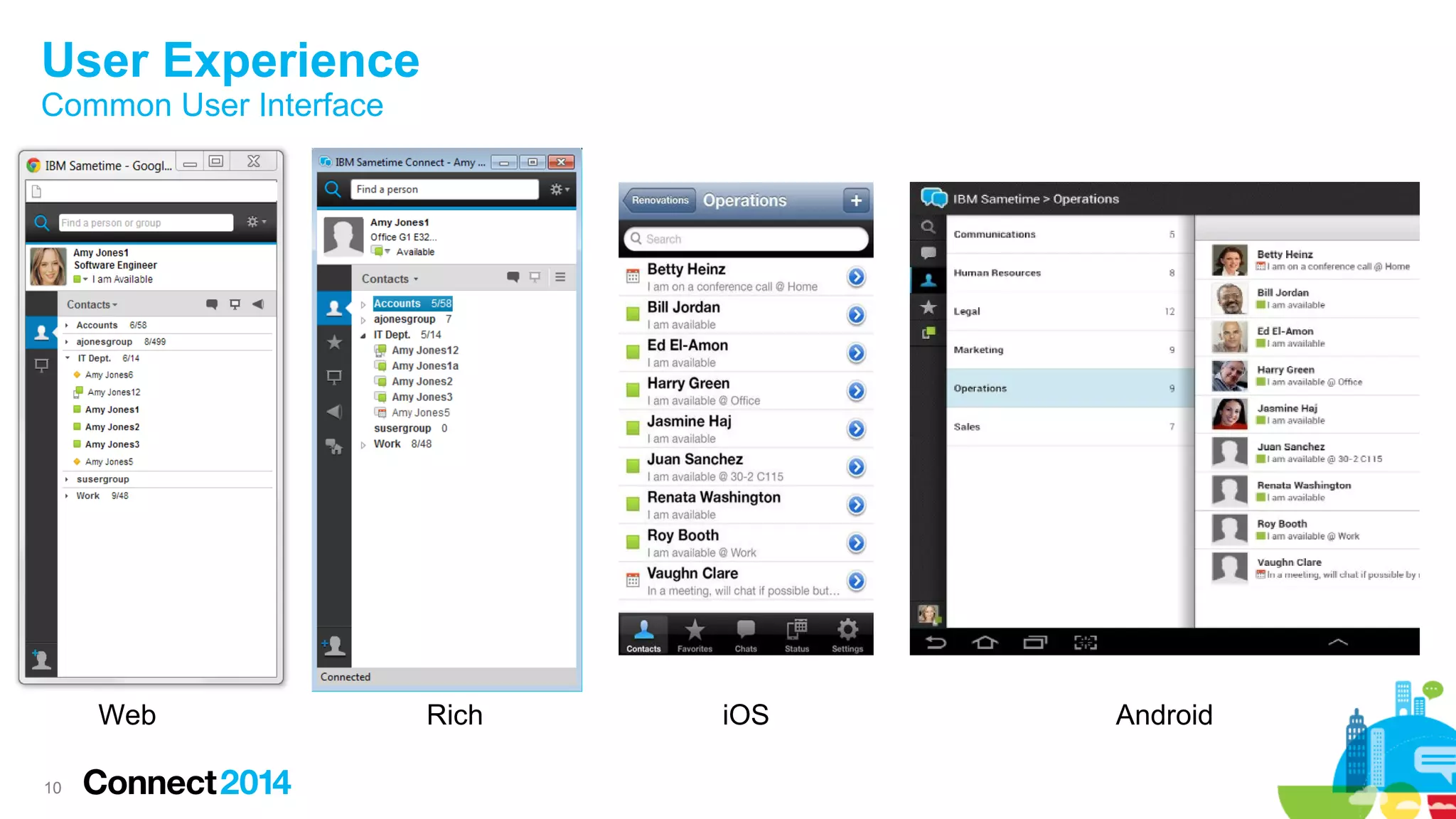
User Experience
Common User Interface

–

–
Web Rich iOS Android
1111
New Enhancements
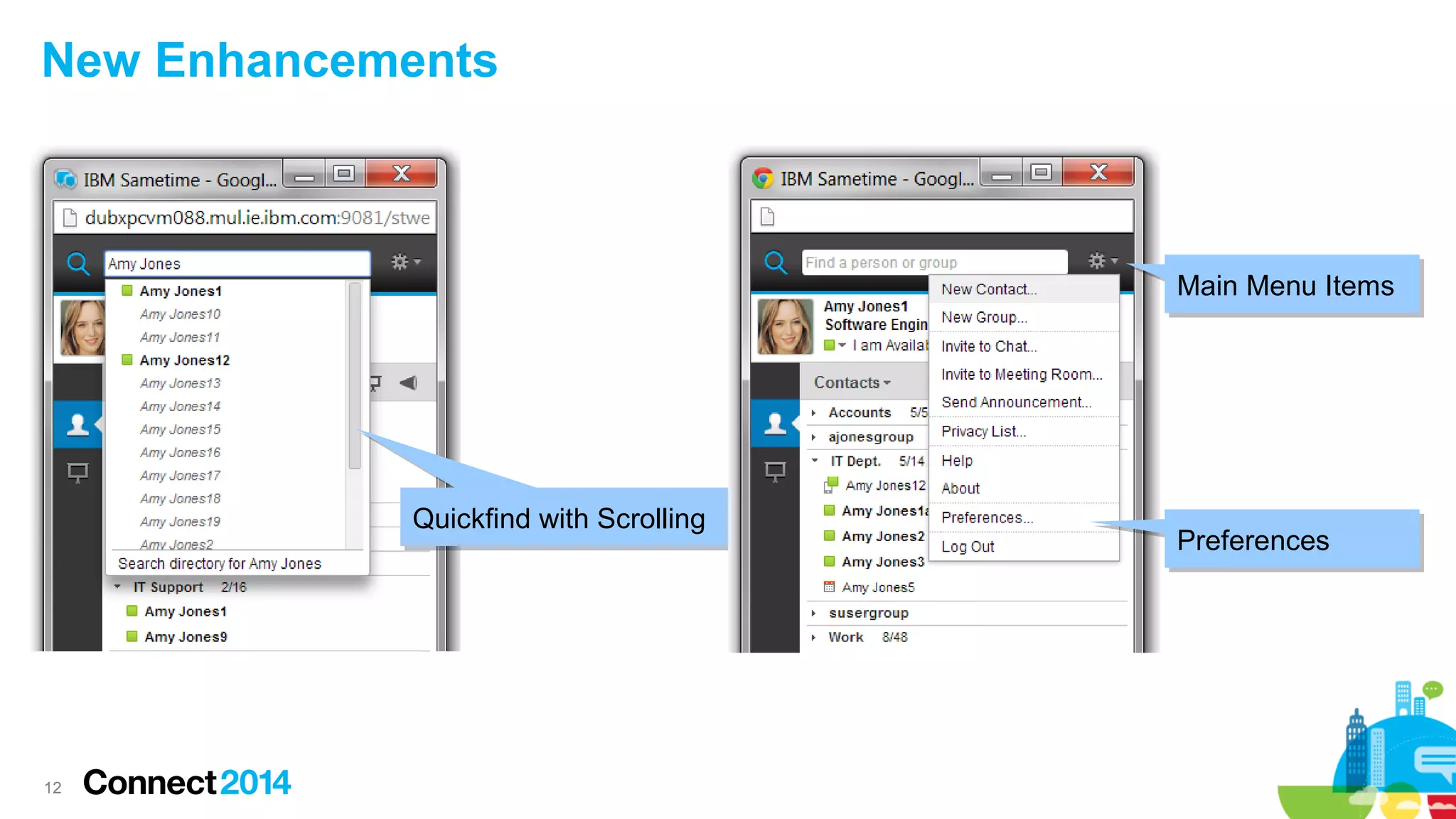
12
New Enhancements
Quickfind with ScrollingQuickfind with Scrolling
Main Menu ItemsMain Menu Items
PreferencesPreferences
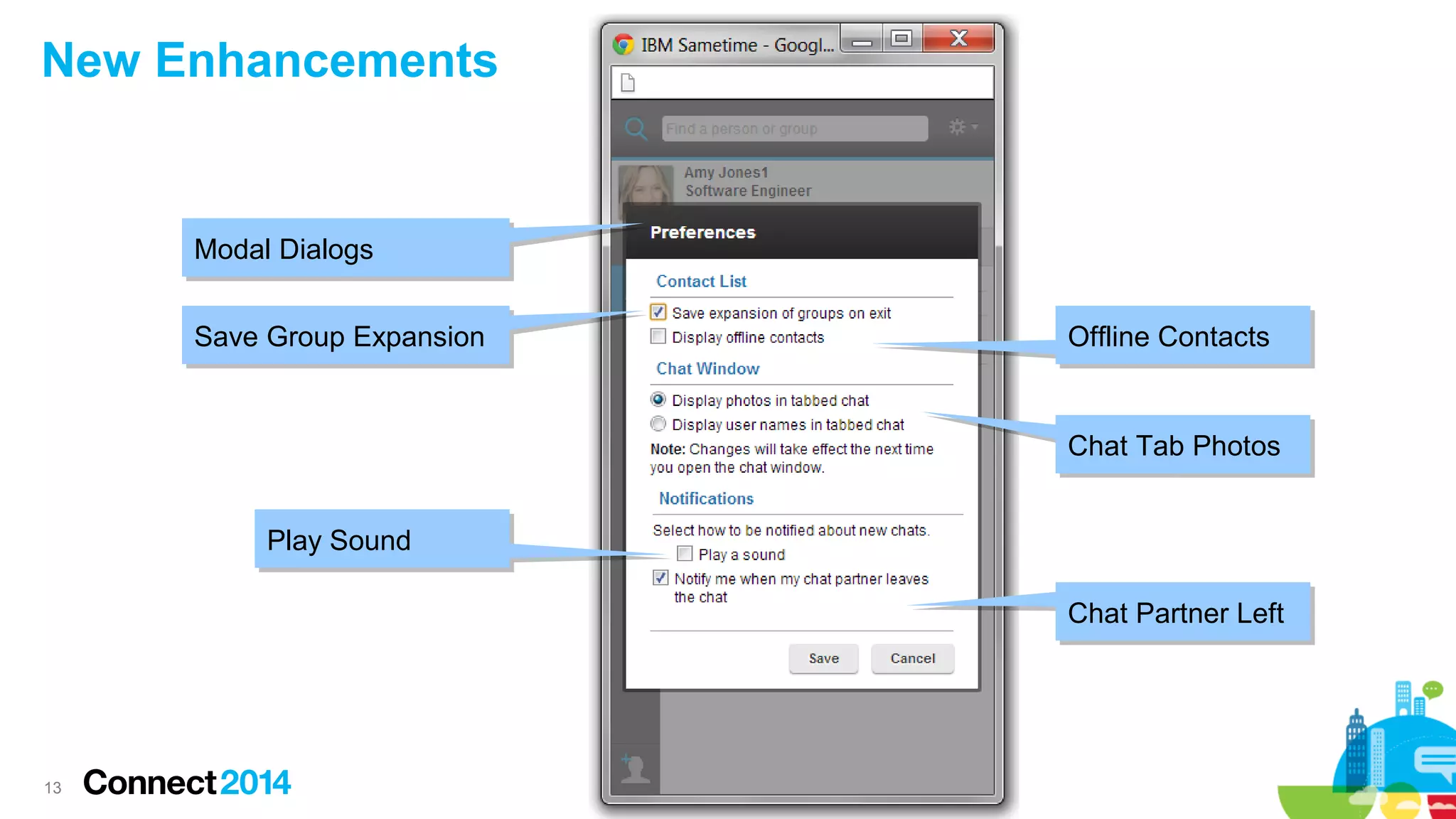
13
New Enhancements
Save Group ExpansionSave Group Expansion
Play SoundPlay Sound
Offline ContactsOffline Contacts
Chat Tab PhotosChat Tab Photos
Chat Partner LeftChat Partner Left
Modal DialogsModal Dialogs
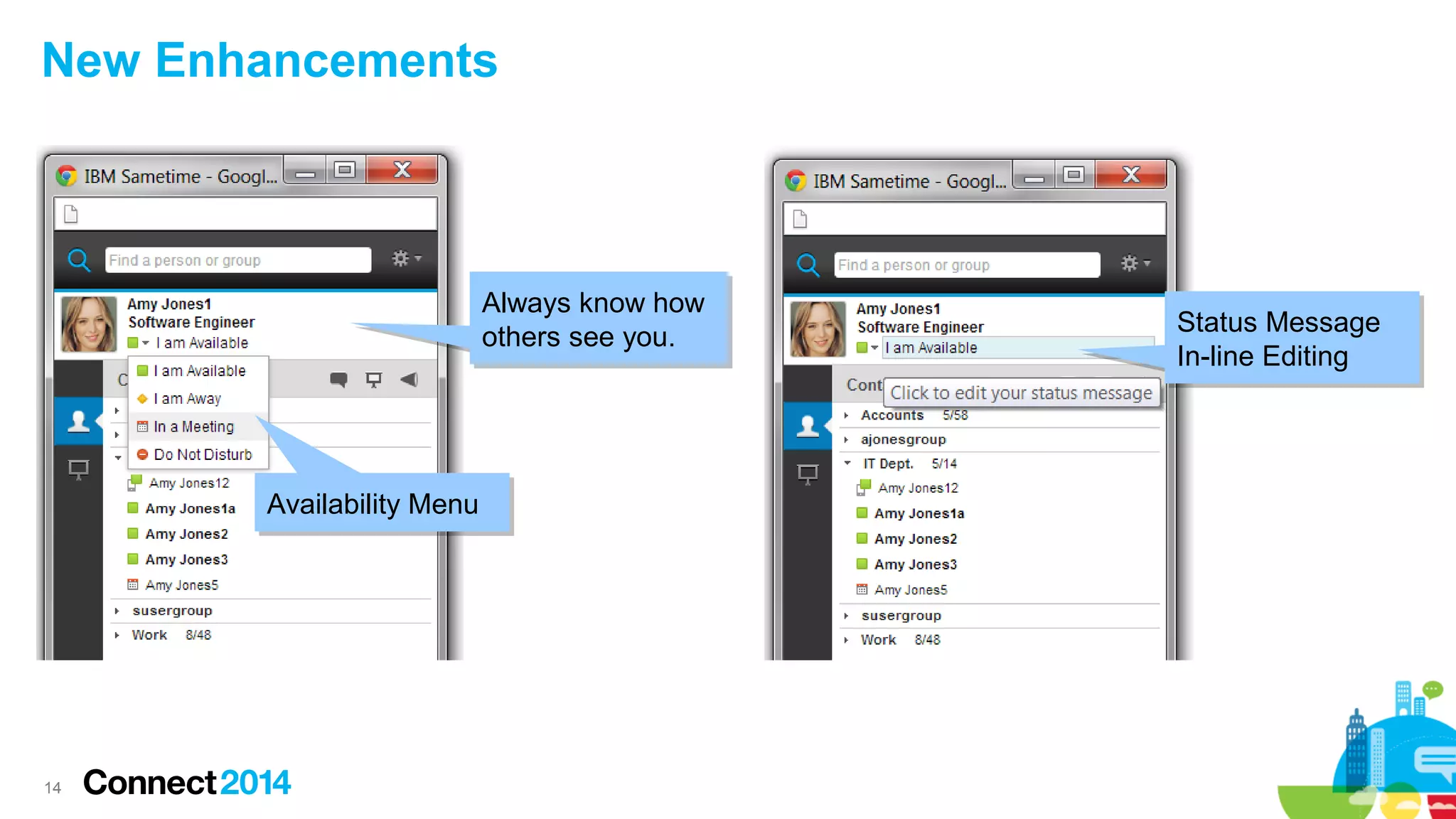
14
New Enhancements
Availability MenuAvailability Menu
Status Message
In-line Editing
Status Message
In-line Editing
Always know how
others see you.
Always know how
others see you.
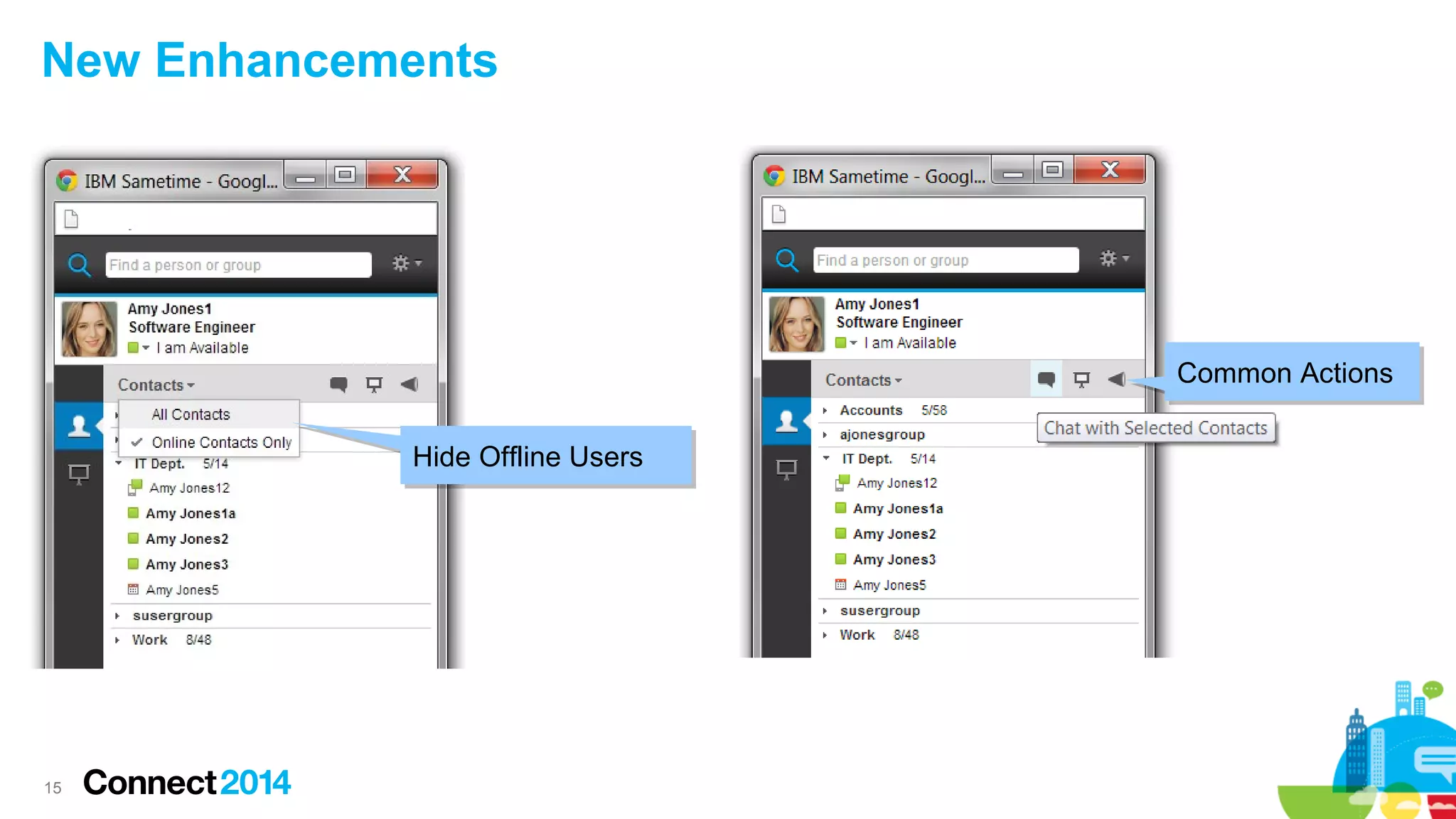
15
New Enhancements
Hide Offline UsersHide Offline Users
Common ActionsCommon Actions
16
New Enhancements
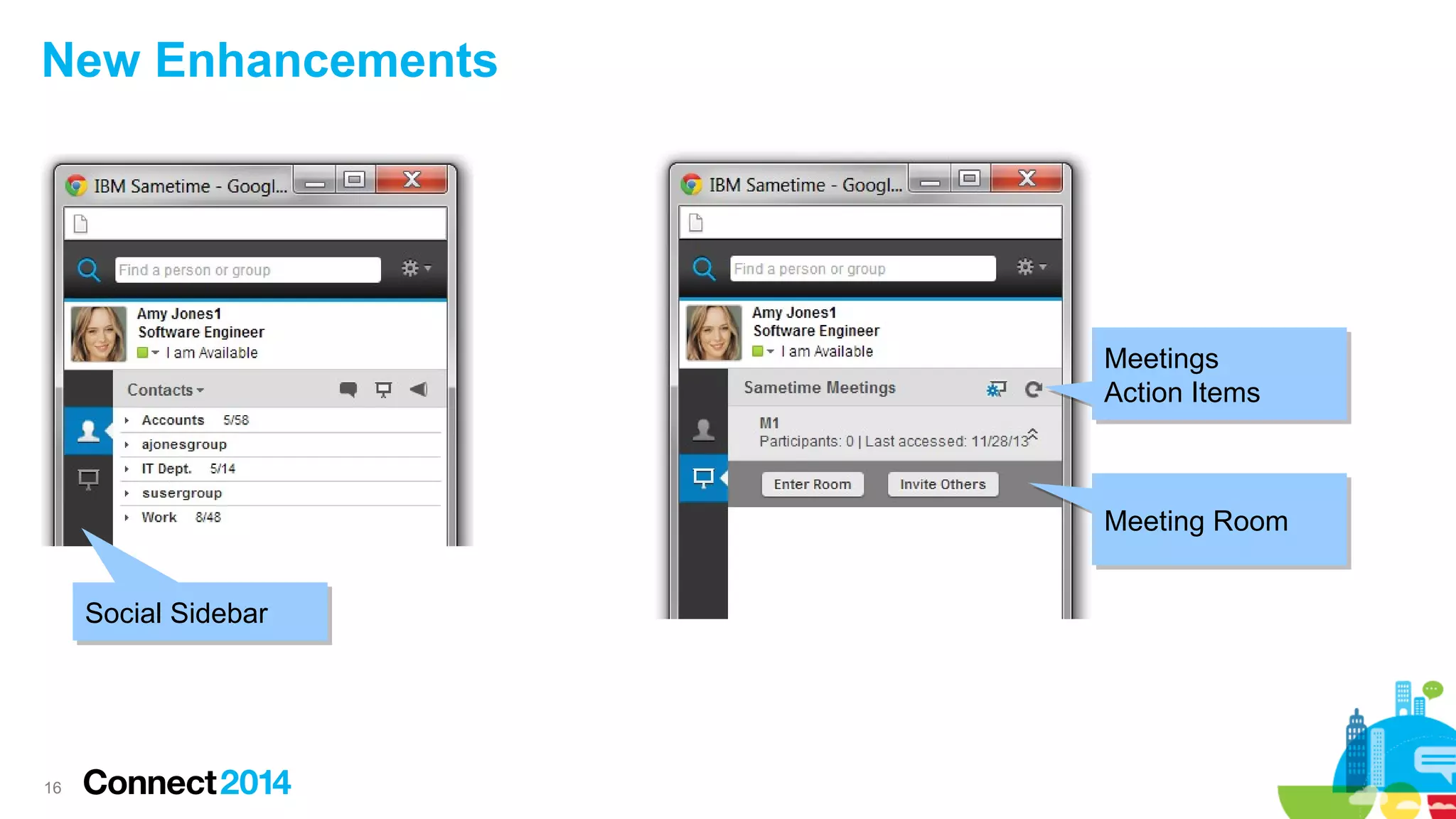
Social SidebarSocial Sidebar
Meetings
Action Items
Meetings
Action Items
Meeting RoomMeeting Room
17
New Enhancements
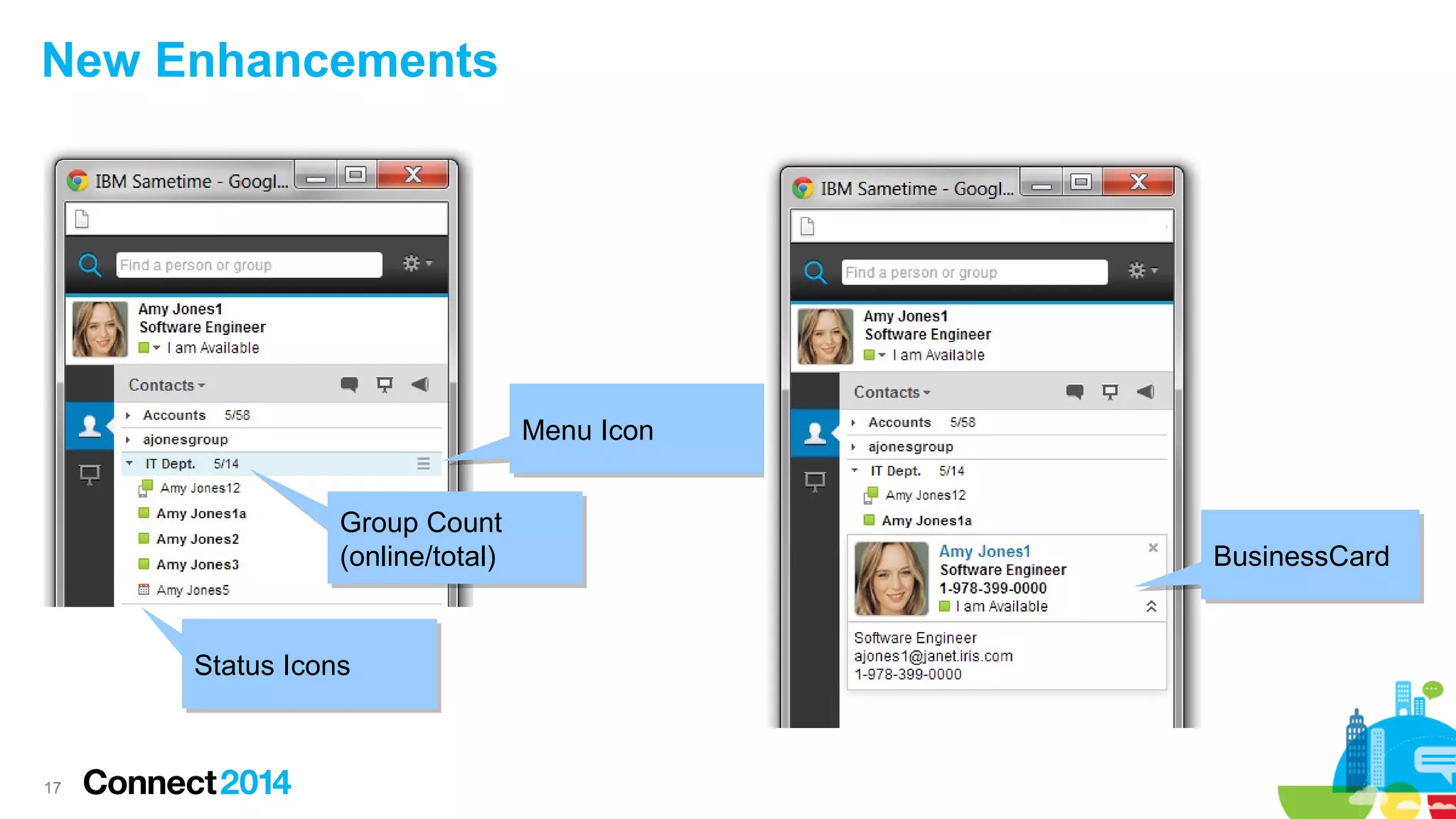
Menu IconMenu Icon
Group Count
(online/total)
Group Count
(online/total)
Status IconsStatus Icons
BusinessCardBusinessCard
18
New Enhancements
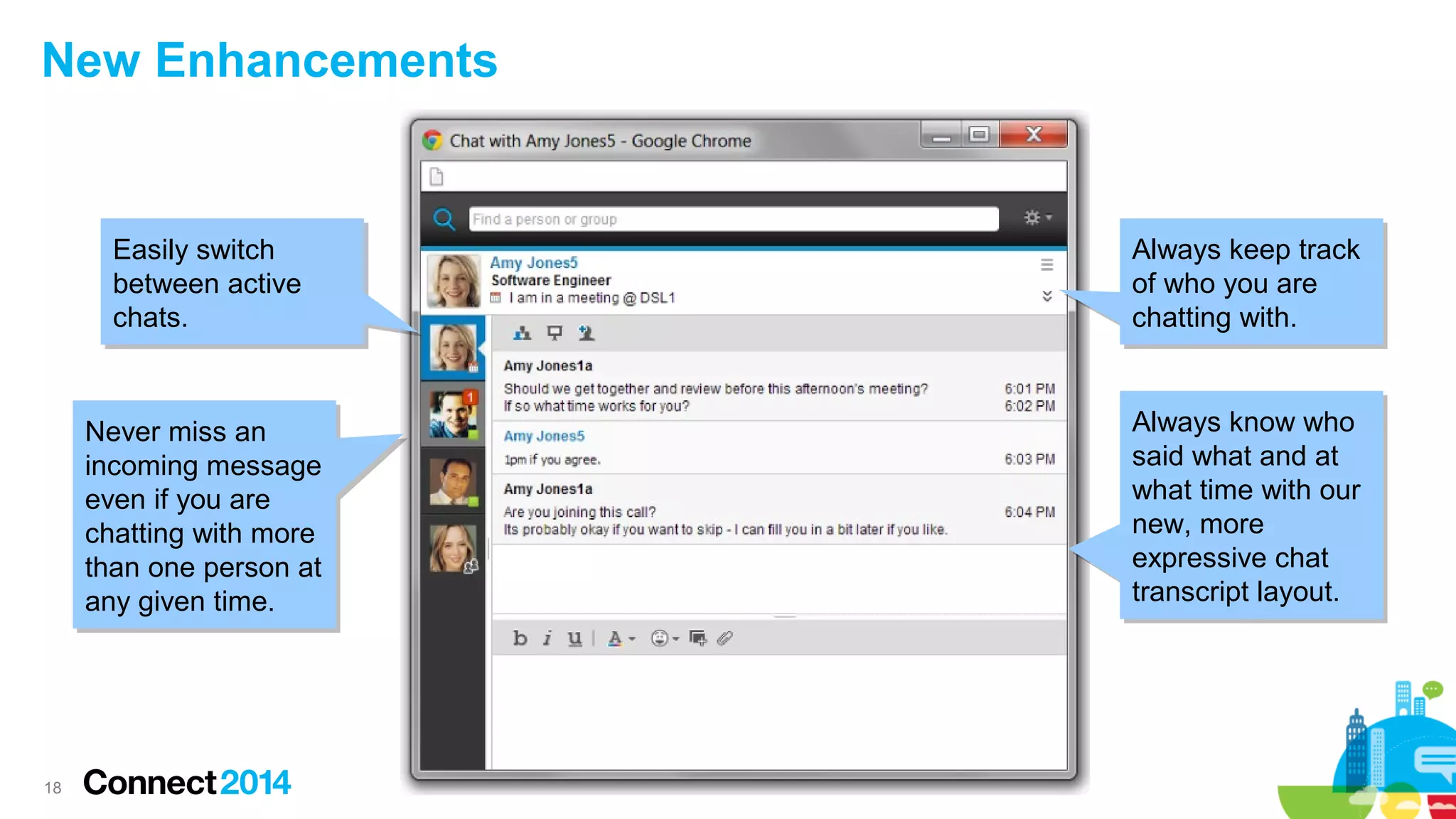
Easily switch
between active
chats.
Easily switch
between active
chats.
Never miss an
incoming message
even if you are
chatting with more
than one person at
any given time.
Never miss an
incoming message
even if you are
chatting with more
than one person at
any given time.
Always keep track
of who you are
chatting with.
Always keep track
of who you are
chatting with.
Always know who
said what and at
what time with our
new, more
expressive chat
transcript layout.
Always know who
said what and at
what time with our
new, more
expressive chat
transcript layout.
19
New Enhancements
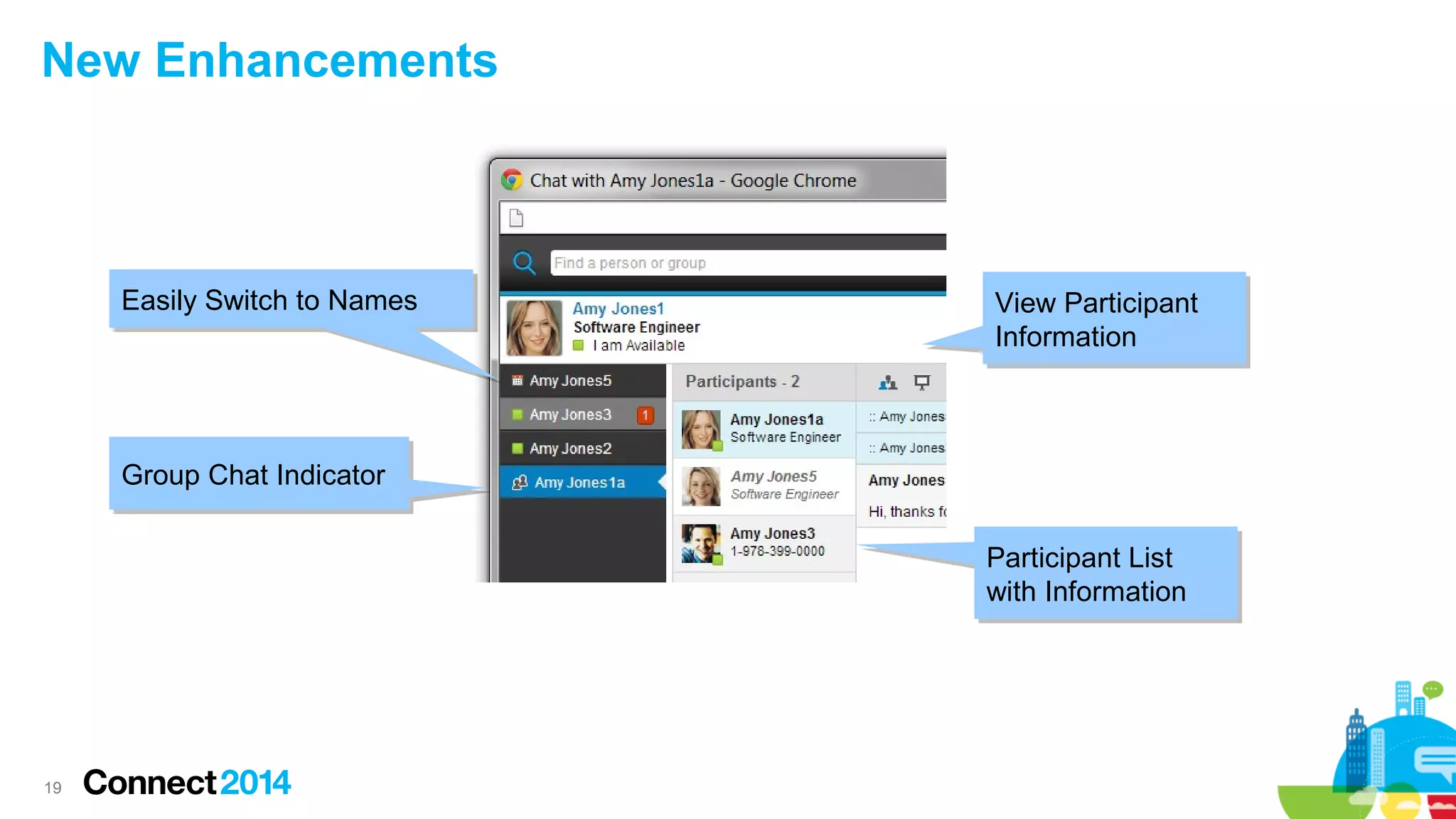
Easily Switch to NamesEasily Switch to Names
Group Chat IndicatorGroup Chat Indicator
Participant List
with Information
Participant List
with Information
View Participant
Information
View Participant
Information
20
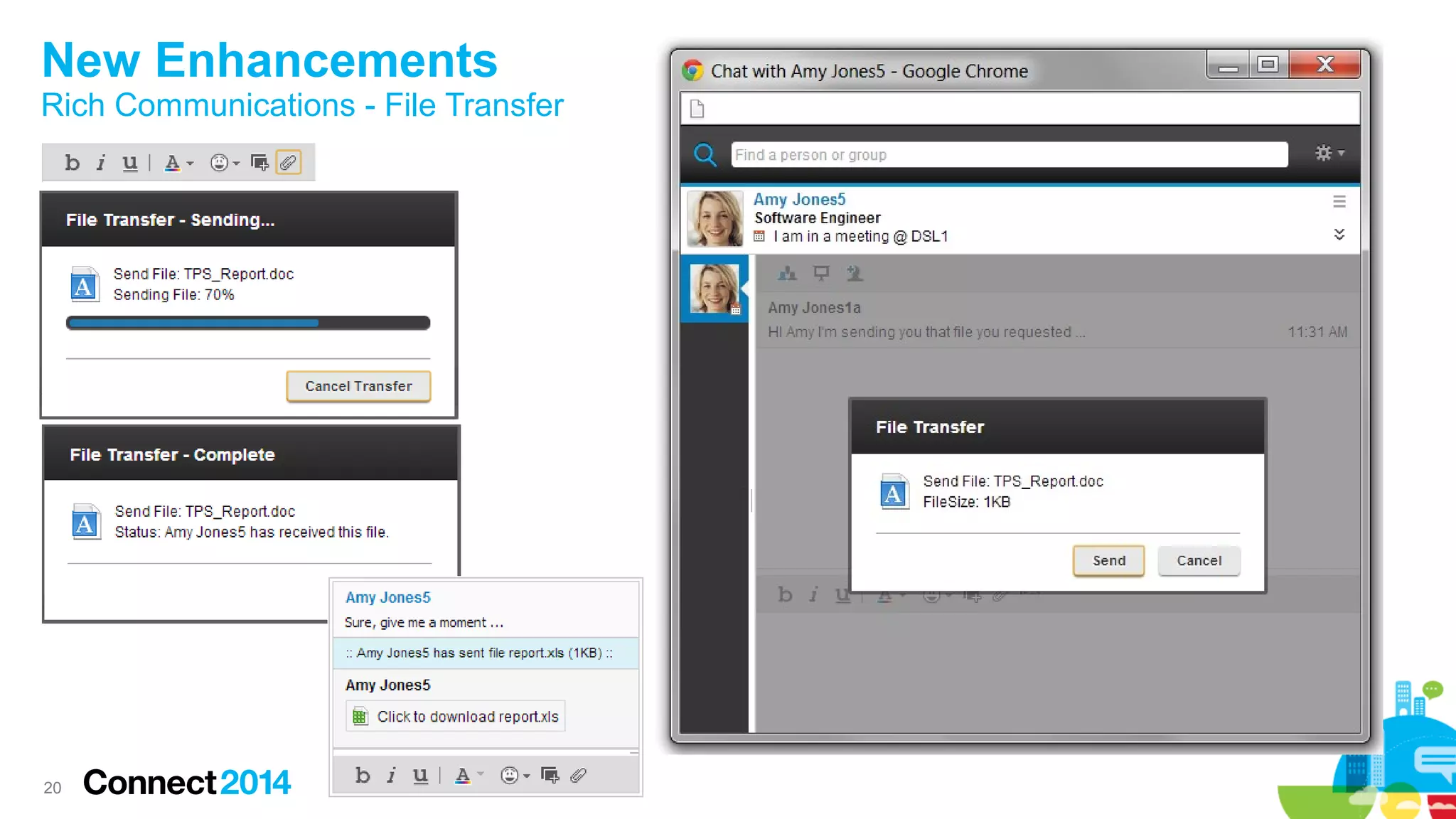
New Enhancements
Rich Communications - File Transfer

–
21
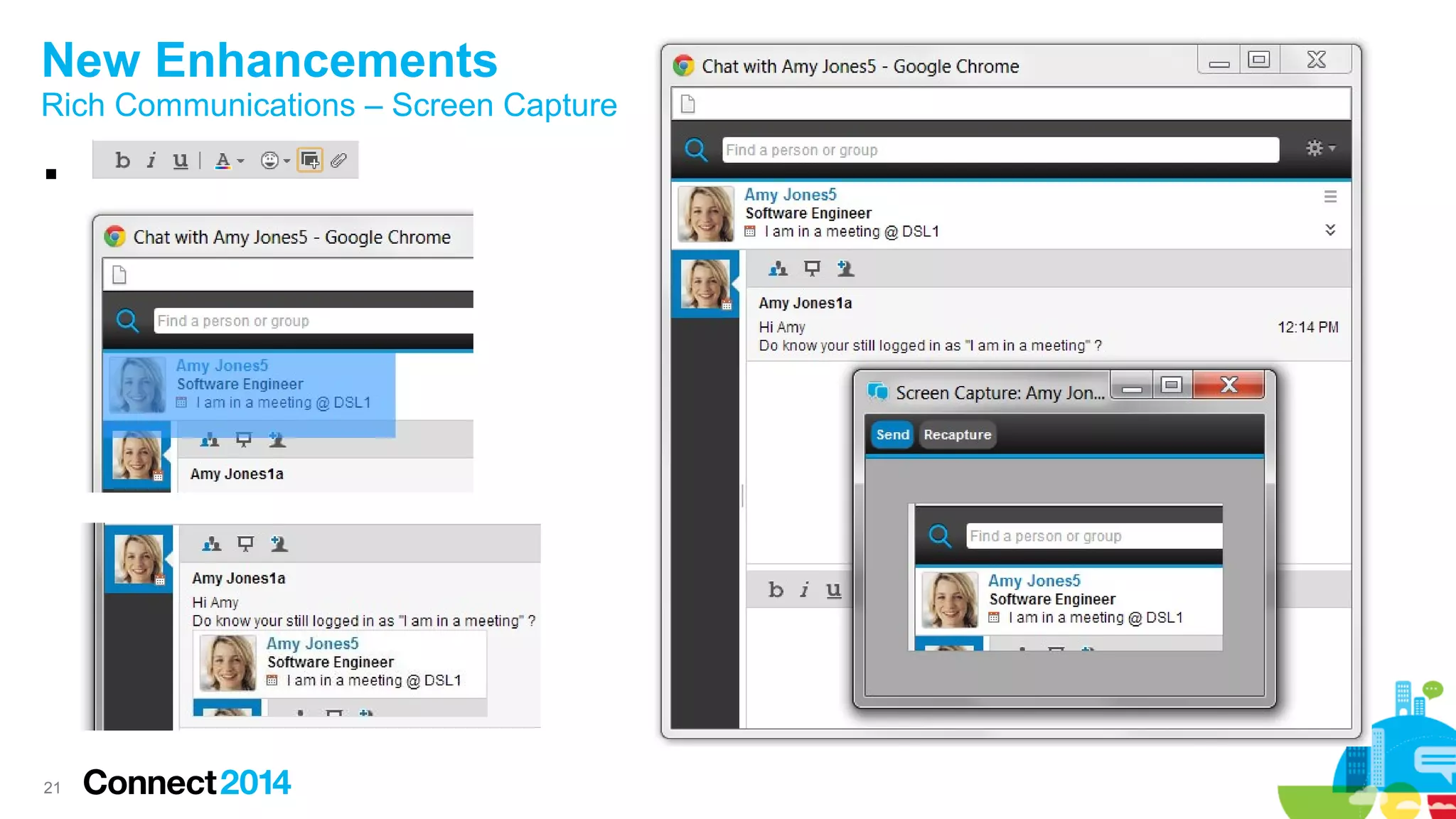
New Enhancements
Rich Communications – Screen Capture

–
2222
Product Demo
See it in action
2323
New Integration
IBM Product Integration
24
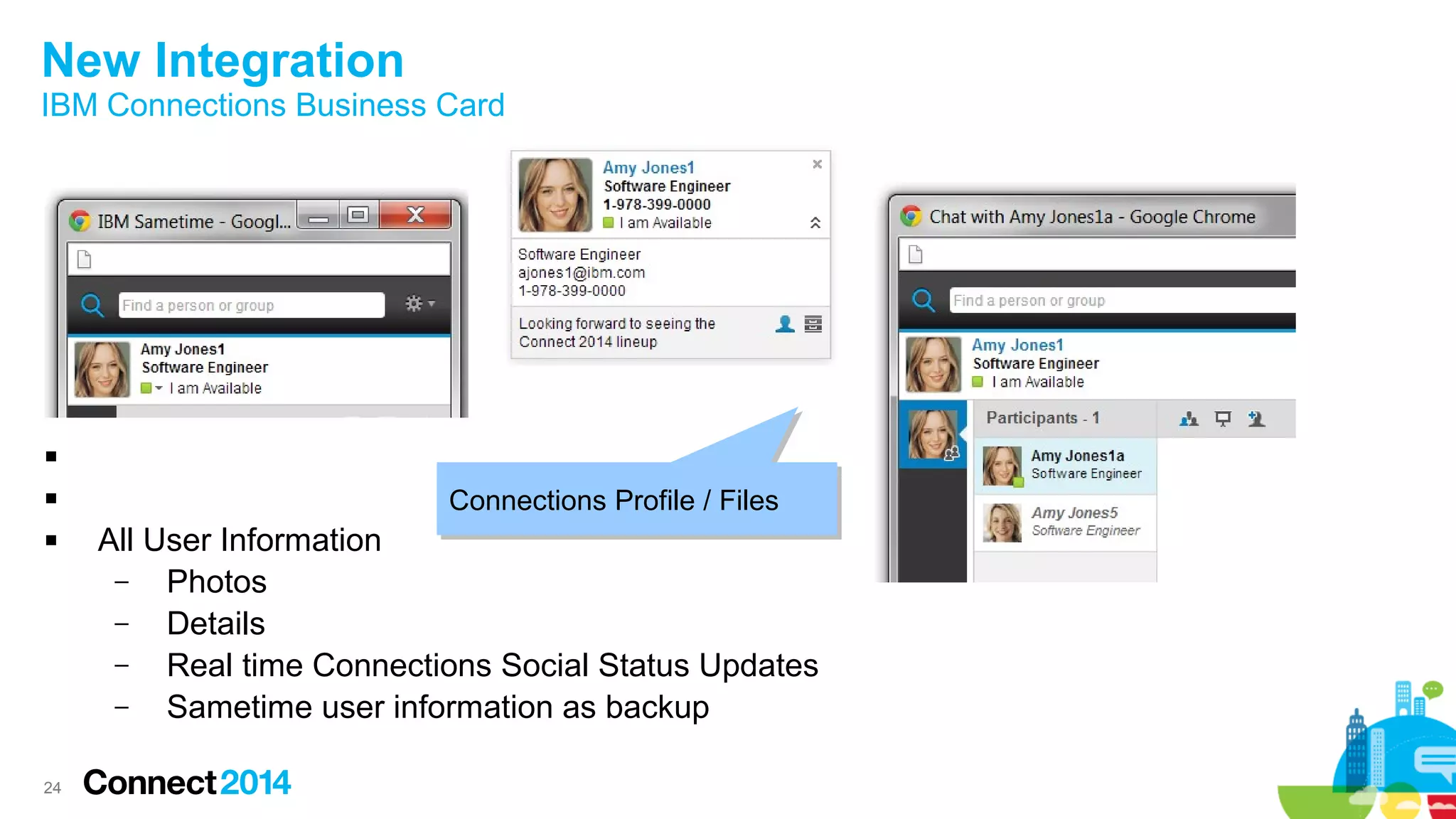
New Integration
IBM Connections Business Card








 All User Information
– Photos
– Details
– Real time Connections Social Status Updates
– Sametime user information as backup
Connections Profile / FilesConnections Profile / Files
25
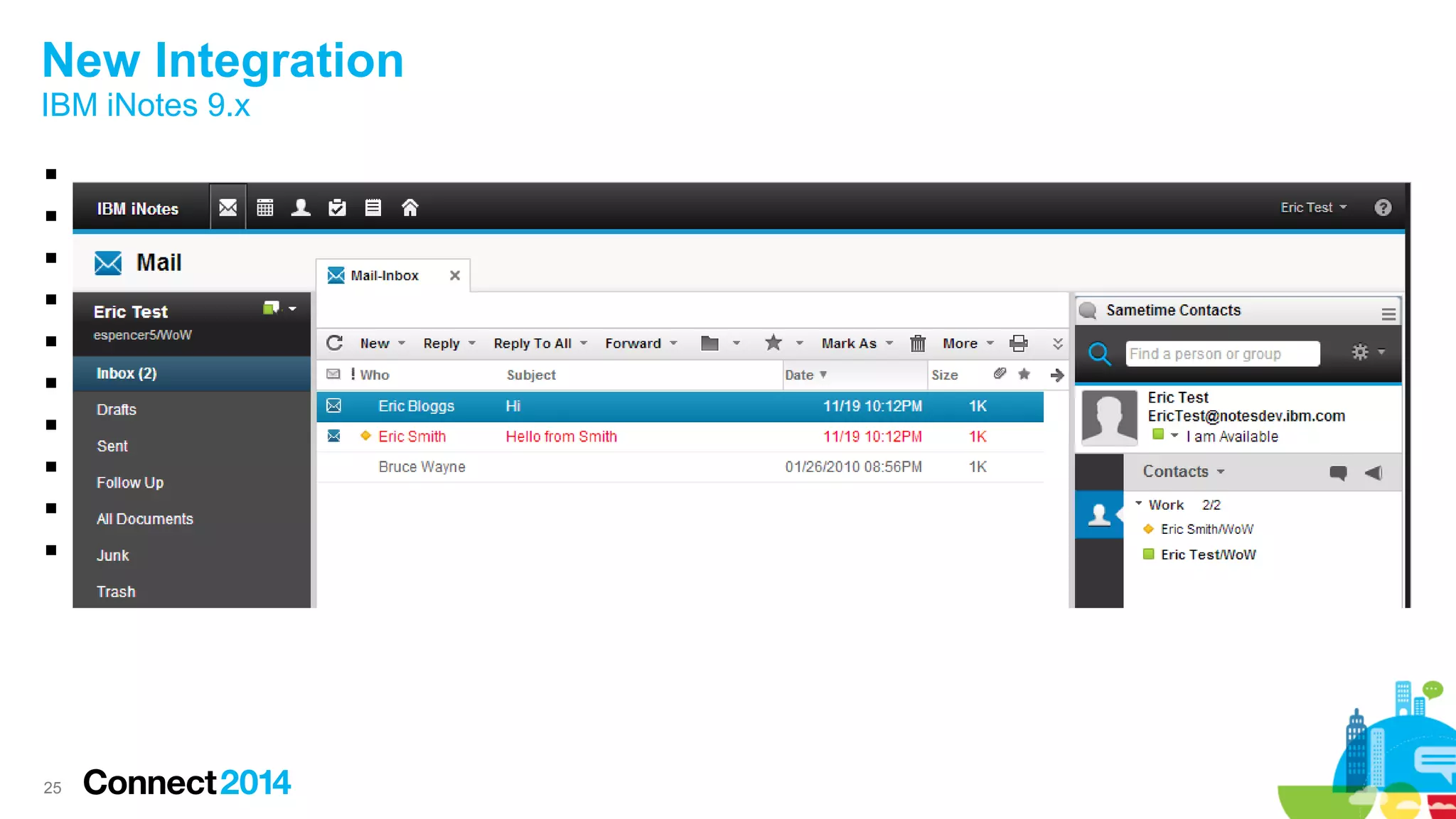
New Integration
IBM iNotes 9.x










26
New Integration
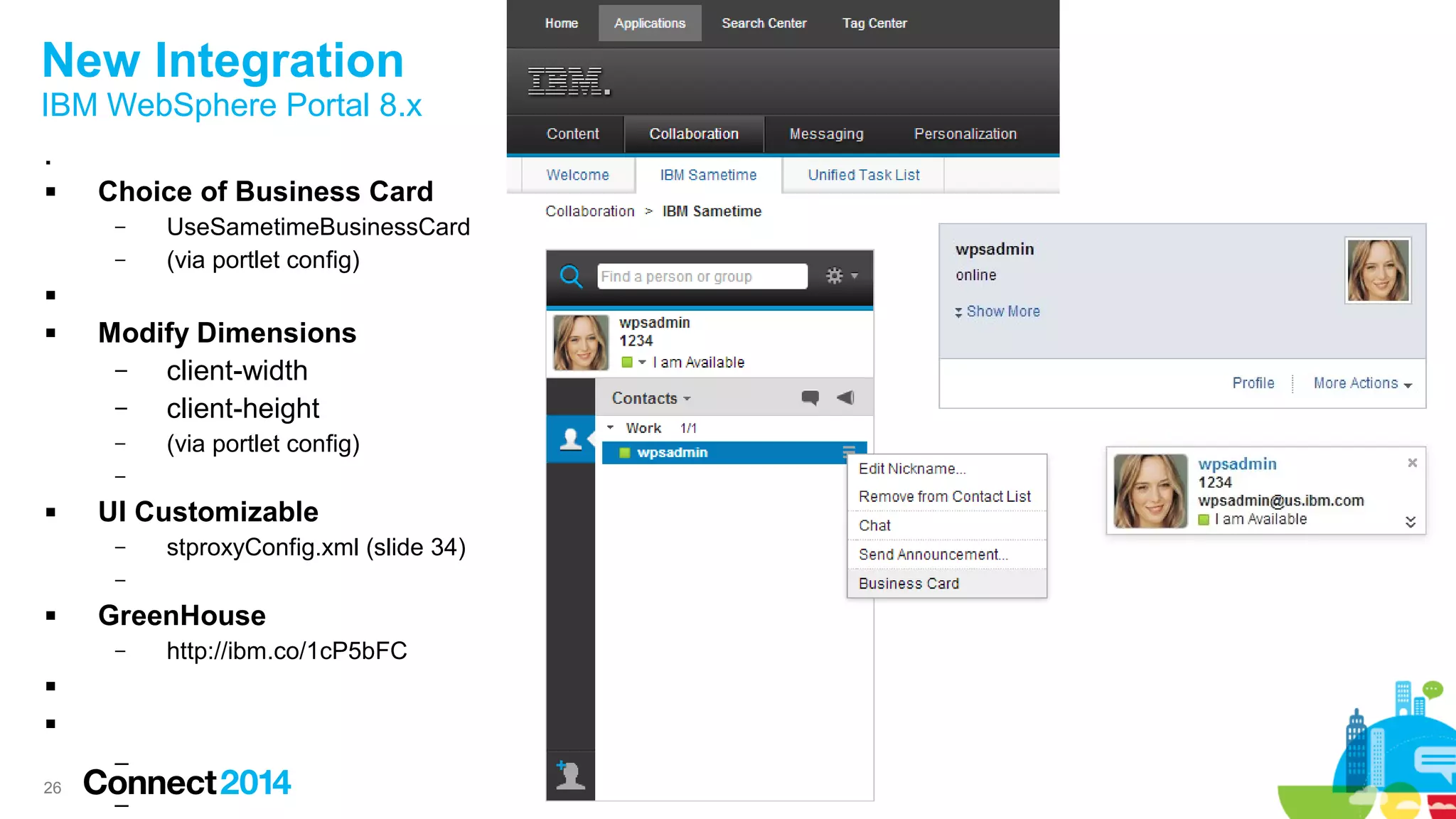
IBM WebSphere Portal 8.x

 Choice of Business Card
– UseSametimeBusinessCard
– (via portlet config)

 Modify Dimensions
– client-width
– client-height
– (via portlet config)
–
 UI Customizable
– stproxyConfig.xml (slide 34)
–
 GreenHouse
– http://ibm.co/1cP5bFC


–
–
2727
New Integration
IBM Sametime Proxy
28
New Integration
Backward Compatibility
 JavaScript
– Existing resources are still available (including parameters)
● baseComps.js
● widgetsLight.js
● livenameLight.js

 CSS
– Existing CSS resources are still available
– NOTE
● 8.5.2IFR1 CSS class names may have changed
● Existing CSS class attributes may have changed
●
 Existing 8.5.2IFR1 integration will still work as expected.
29
New Integration
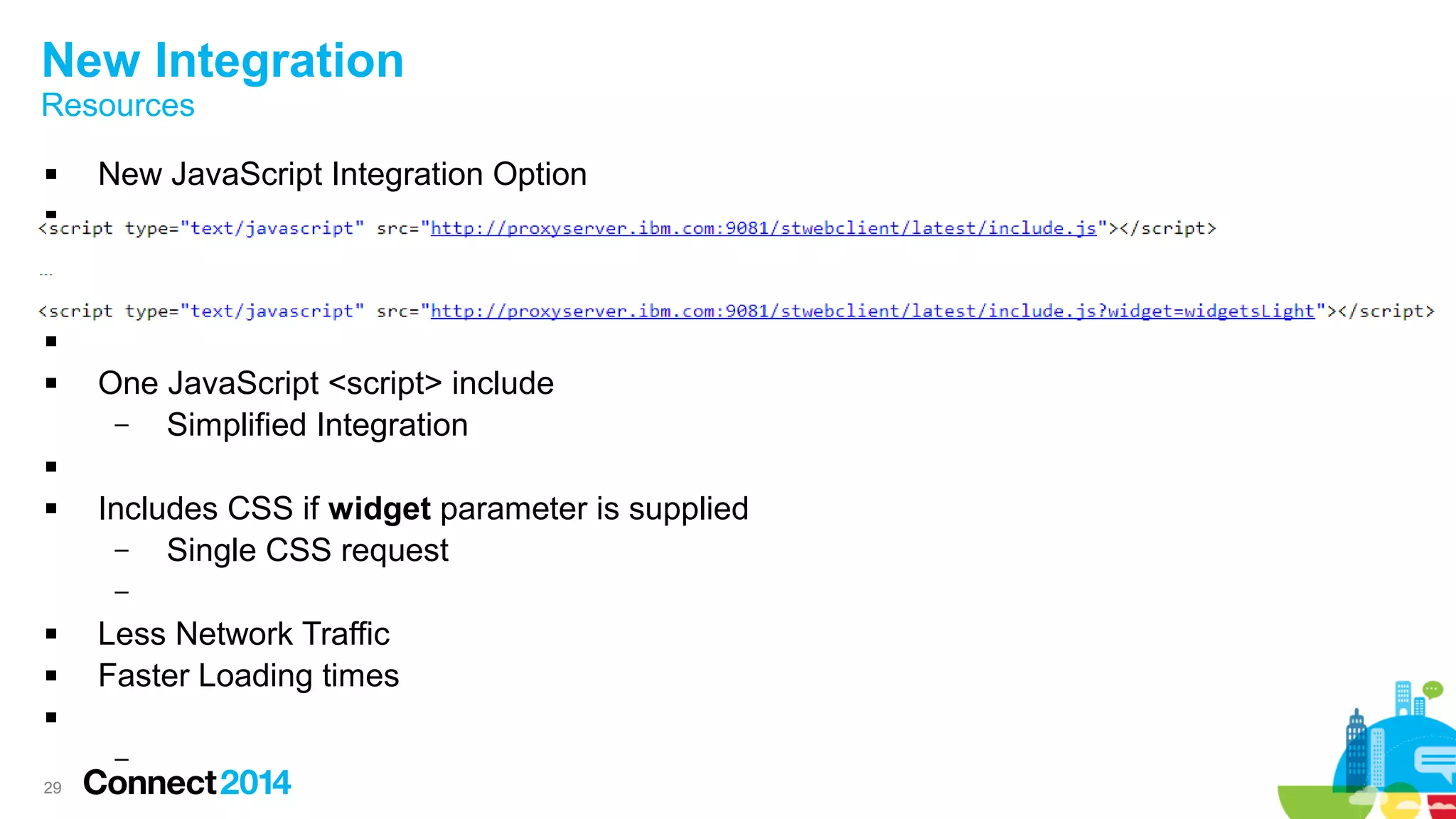
Resources
 New JavaScript Integration Option




 One JavaScript <script> include
– Simplified Integration

 Includes CSS if widget parameter is supplied
– Single CSS request
–
 Less Network Traffic
 Faster Loading times

–
30
New Integration
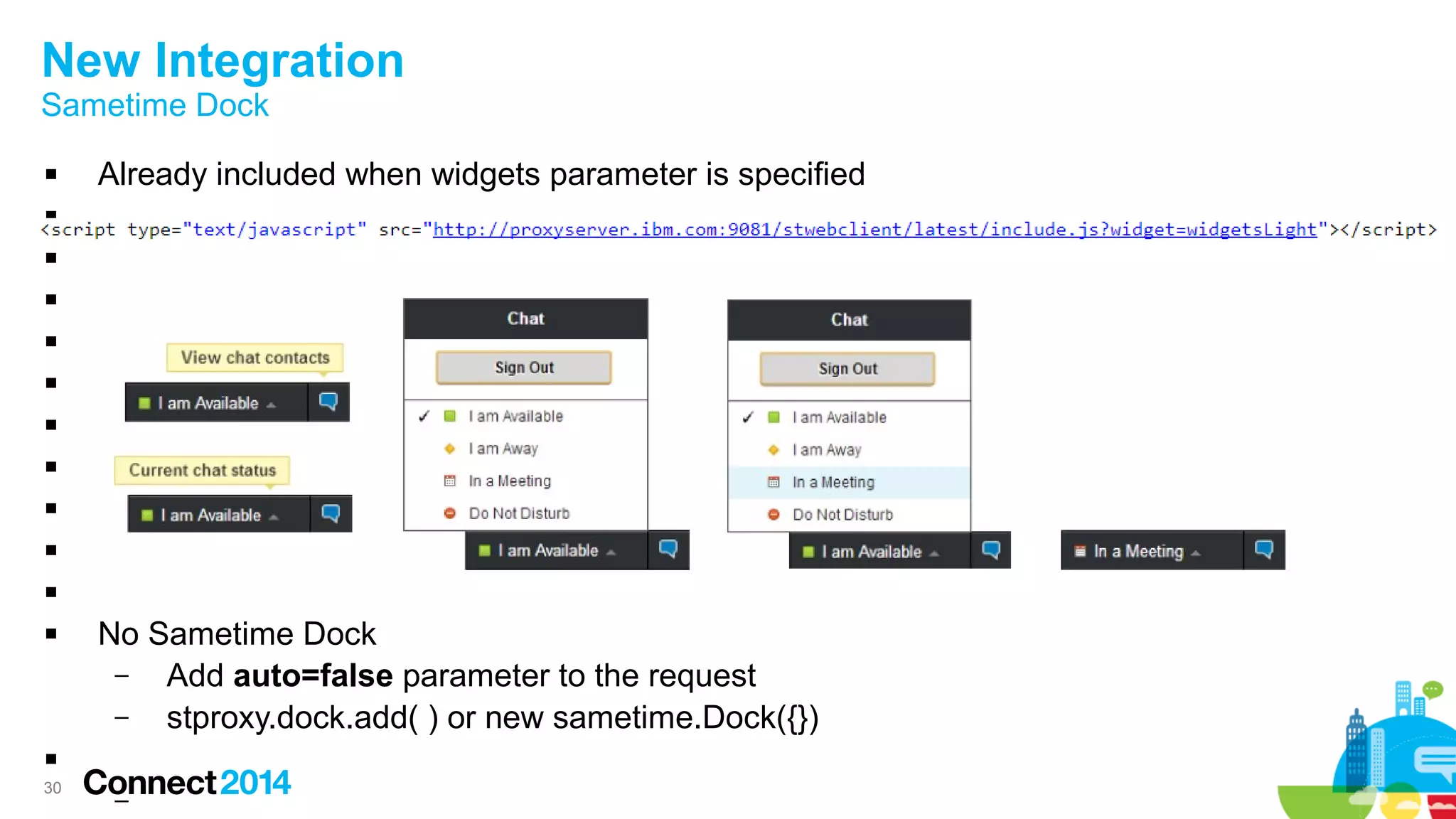
Sametime Dock
 Already included when widgets parameter is specified










 No Sametime Dock
– Add auto=false parameter to the request
– stproxy.dock.add( ) or new sametime.Dock({})

–
3131
Integration Demo
UI Widgets
3232
Customization
33
Customization
Existing Plugin Architecture

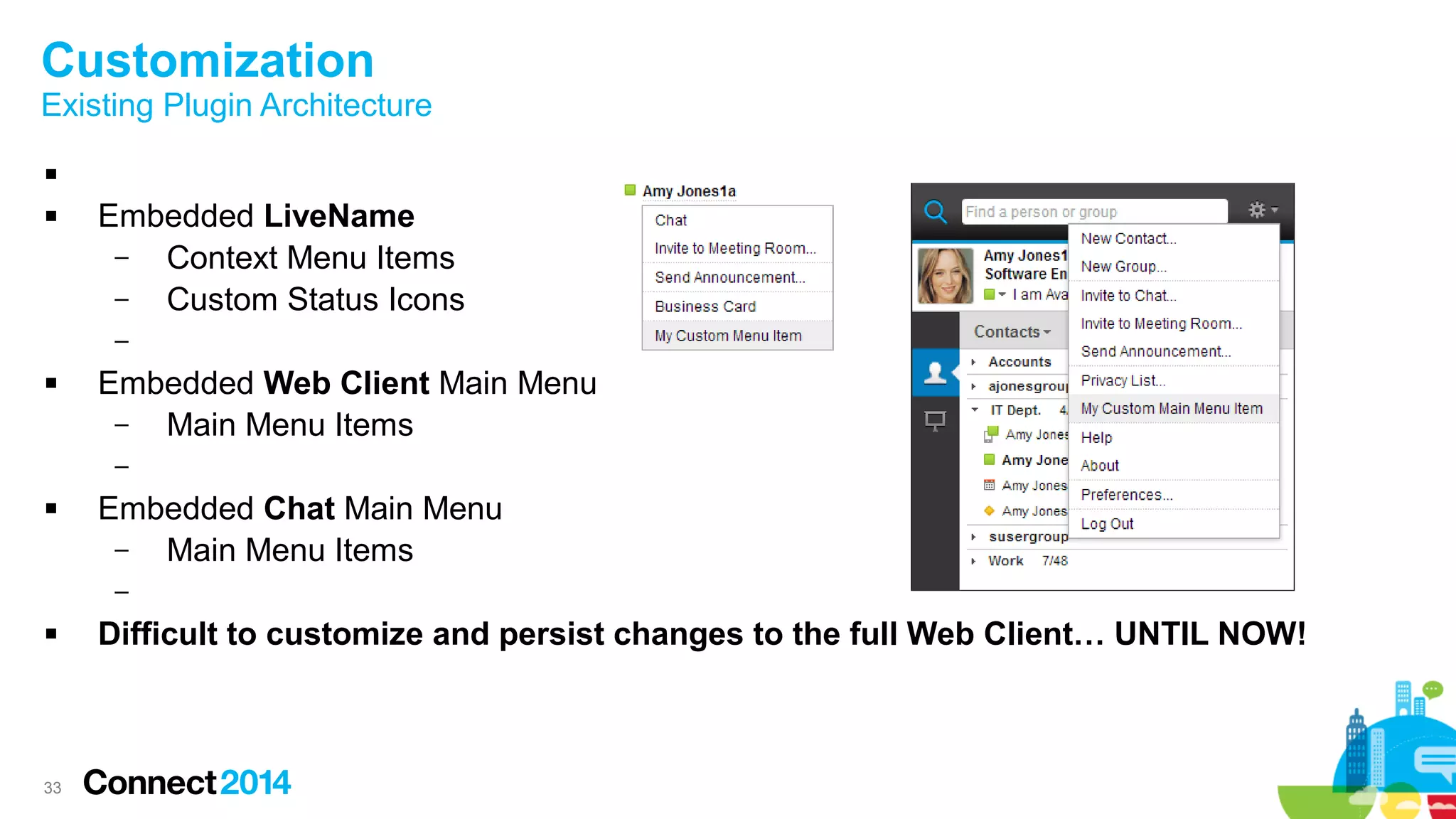
 Embedded LiveName
– Context Menu Items
– Custom Status Icons
–
 Embedded Web Client Main Menu
– Main Menu Items
–
 Embedded Chat Main Menu
– Main Menu Items
–
 Difficult to customize and persist changes to the full Web Client… UNTIL NOW!
34
Customization
Sametime Proxy Configuration
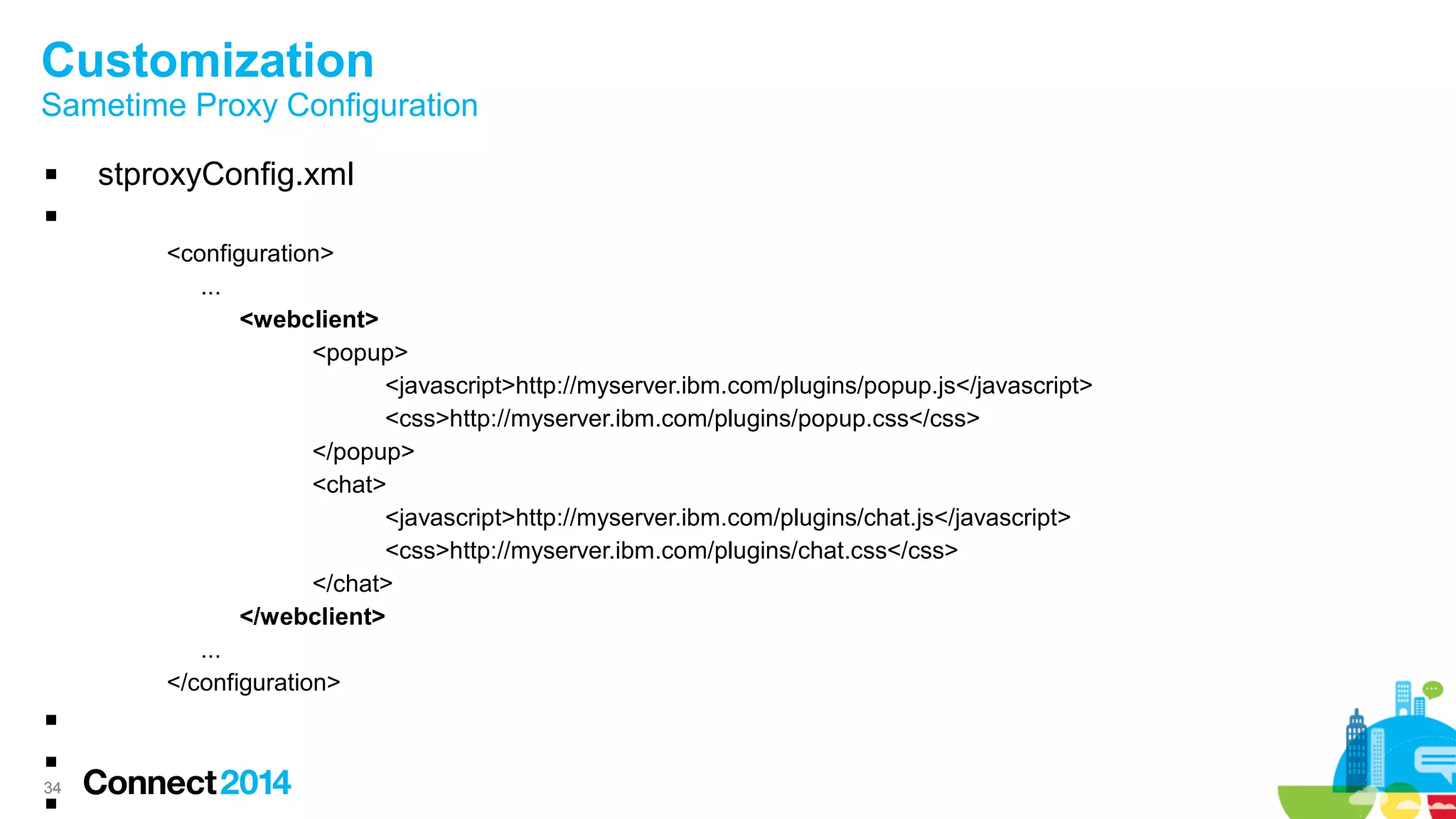
 stproxyConfig.xml

<configuration>
...
<webclient>
<popup>
<javascript>http://myserver.ibm.com/plugins/popup.js</javascript>
<css>http://myserver.ibm.com/plugins/popup.css</css>
</popup>
<chat>
<javascript>http://myserver.ibm.com/plugins/chat.js</javascript>
<css>http://myserver.ibm.com/plugins/chat.css</css>
</chat>
</webclient>
...
</configuration>



3535
Customization
Web Client – Contact List
36
Customization
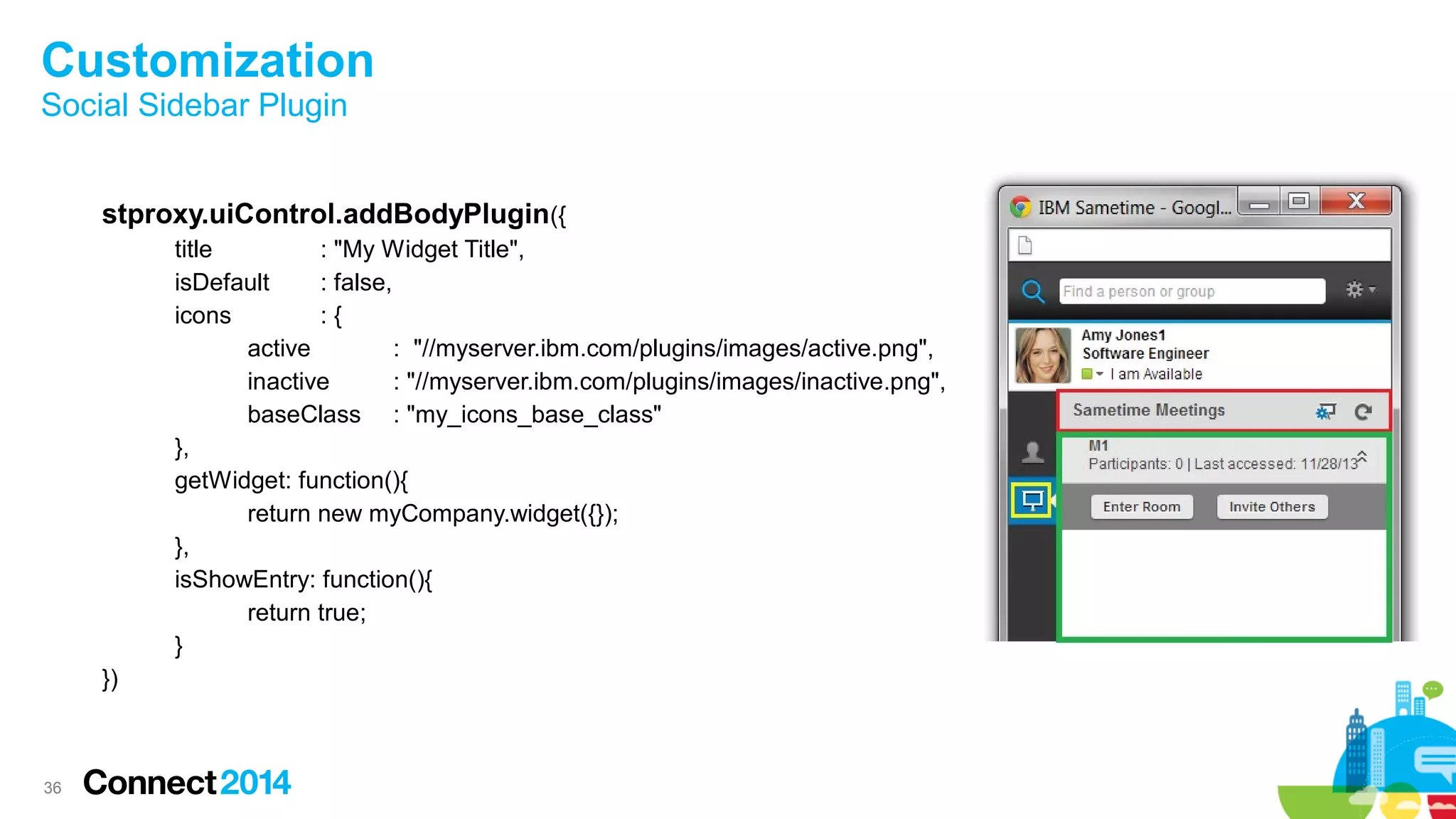
Social Sidebar Plugin
stproxy.uiControl.addBodyPlugin({
title : "My Widget Title",
isDefault : false,
icons : {
active : "//myserver.ibm.com/plugins/images/active.png",
inactive : "//myserver.ibm.com/plugins/images/inactive.png",
baseClass : "my_icons_base_class"
},
getWidget: function(){
return new myCompany.widget({});
},
isShowEntry: function(){
return true;
}
})
3737
Customization Demo
Social Sidebar & Chat Window
3838
Considerations
Ideas, Proposals & Concepts
39
Considerations
 WebSphere Portal
– Single Sametime Proxy Contact List Portlet
–
 More Plugin Extensions
– Chat Action Menu Items
– Chat Editor Toolbar Items
–
 Sametime Proxy Web Client Plugin Extension Catalogue
– Publicly Available

 Auto Away
– Screen Lock
– Screen Saver
4040
Questions
4141
© Copyright IBM Corporation 2014. All rights reserved.
 U.S. Government Users Restricted Rights - Use, duplication or disclosure restricted by GSA ADP Schedule Contract with IBM Corp.
 IBM, the IBM logo, ibm.com, Sametime, DB2, WebSphere and IBM Connections are trademarks or registered trademarks of International Business Machines Corporation in the United
States, other countries, or both. If these and other IBM trademarked terms are marked on their first occurrence in this information with a trademark symbol (® or ™), these symbols
indicate U.S. registered or common law trademarks owned by IBM at the time this information was published. Such trademarks may also be registered or common law trademarks in
other countries. A current list of IBM trademarks is available on the Web at “Copyright and trademark information” at www.ibm.com/legal/copytrade.shtml
 Twitter, LinkedIn, Facebook and other company, product, or service names may be trademarks or service marks of others.
Availability. References in this presentation to IBM products, programs, or services do not imply that they will be available in all countries in which IBM operates.
The workshops, sessions and materials have been prepared by IBM or the session speakers and reflect their own views. They are provided for informational purposes only, and are neither
intended to, nor shall have the effect of being, legal or other guidance or advice to any participant. While efforts were made to verify the completeness and accuracy of the information
contained in this presentation, it is provided AS-IS without warranty of any kind, express or implied. IBM shall not be responsible for any damages arising out of the use of, or otherwise
related to, this presentation or any other materials. Nothing contained in this presentation is intended to, nor shall have the effect of, creating any warranties or representations from IBM or
its suppliers or licensors, or altering the terms and conditions of the applicable license agreement governing the use of IBM software.
All customer examples described are presented as illustrations of how those customers have used IBM products and the results they may have achieved. Actual environmental costs and
performance characteristics may vary by customer. Nothing contained in these materials is intended to, nor shall have the effect of, stating or implying that any activities undertaken by you
will result in any specific sales, revenue growth or other results.
Acknowledgements and Disclaimers
42
 Access Connect Online to complete your session surveys using any:
– Web or mobile browser
– Connect Online kiosk onsite
42
4343
Engage Online
 SocialBiz User Group socialbizug.org
– Join the epicenter of Notes and Collaboration user groups
 Follow us on Twitter
– @IBMConnect and @IBMSocialBiz
 LinkedIn http://bit.ly/SBComm
– Participate in the IBM Social Business group on LinkedIn:
 Facebook https://www.facebook.com/IBMSocialBiz
– Like IBM Social Business on Facebook
 Social Business Insights blog ibm.com/blogs/socialbusiness
– Read and engage with our bloggers
Engage Online

AD506: IBM Connect 2014. IBM Sametime Proxy 9: A fuller, richer customizable experience.

  • 1.
    © 2014 IBMCorporation AD506: IBM Sametime Proxy 9: A Fuller, Richer Customizable Experience William Holmes, IBM (Technical Lead, Sametime Proxy Development)
  • 2.
    22 IBM’s statements regardingits plans, directions, and intent are subject to change or withdrawal without notice at IBM’s sole discretion. Information regarding potential future products is intended to outline our general product direction and it should not be relied on in making a purchasing decision. The information mentioned regarding potential future products is not a commitment, promise, or legal obligation to deliver any material, code or functionality. Information about potential future products may not be incorporated into any contract. The development, release, and timing of any future features or functionality described for our products remains at our sole discretion Performance is based on measurements and projections using standard IBM benchmarks in a controlled environment. The actual throughput or performance that any user will experience will vary depending upon many factors, including considerations such as the amount of multiprogramming in the user’s job stream, the I/O configuration, the storage configuration, and the workload processed. Therefore, no assurance can be given that an individual user will achieve results similar to those stated here. Please Note
  • 3.
    3 Agenda  Side bySide – Sametime Proxy 8.5.2IFR1 > Sametime Proxy 9.0  User Experience – Consistency based on real world behaviors  New Enhancements – Rich Communication  New Integration – Backward Compatibility – JavaScript & CSS resources  Customization – Embedded Experience – Web Client  Future Considerations
  • 4.
  • 5.
    5 Side by Side WebClient      
  • 6.
  • 7.
  • 8.
  • 9.
    9 User Experience  ModernizedUser Interface – More mobile centric design – Simplified Common tasks   UI Consistent throughout all the clients – Mobile ● Smart Phone ● Tablet – Web – Rich Client –  Real World Behaviors – Multiple Devices / Locations – Consistent behaviors – 
  • 10.
    10 User Experience Common UserInterface  –  – Web Rich iOS Android
  • 11.
  • 12.
    12 New Enhancements Quickfind withScrollingQuickfind with Scrolling Main Menu ItemsMain Menu Items PreferencesPreferences
  • 13.
    13 New Enhancements Save GroupExpansionSave Group Expansion Play SoundPlay Sound Offline ContactsOffline Contacts Chat Tab PhotosChat Tab Photos Chat Partner LeftChat Partner Left Modal DialogsModal Dialogs
  • 14.
    14 New Enhancements Availability MenuAvailabilityMenu Status Message In-line Editing Status Message In-line Editing Always know how others see you. Always know how others see you.
  • 15.
    15 New Enhancements Hide OfflineUsersHide Offline Users Common ActionsCommon Actions
  • 16.
    16 New Enhancements Social SidebarSocialSidebar Meetings Action Items Meetings Action Items Meeting RoomMeeting Room
  • 17.
    17 New Enhancements Menu IconMenuIcon Group Count (online/total) Group Count (online/total) Status IconsStatus Icons BusinessCardBusinessCard
  • 18.
    18 New Enhancements Easily switch betweenactive chats. Easily switch between active chats. Never miss an incoming message even if you are chatting with more than one person at any given time. Never miss an incoming message even if you are chatting with more than one person at any given time. Always keep track of who you are chatting with. Always keep track of who you are chatting with. Always know who said what and at what time with our new, more expressive chat transcript layout. Always know who said what and at what time with our new, more expressive chat transcript layout.
  • 19.
    19 New Enhancements Easily Switchto NamesEasily Switch to Names Group Chat IndicatorGroup Chat Indicator Participant List with Information Participant List with Information View Participant Information View Participant Information
  • 20.
  • 21.
    21 New Enhancements Rich Communications– Screen Capture  –
  • 22.
  • 23.
  • 24.
    24 New Integration IBM ConnectionsBusiness Card          All User Information – Photos – Details – Real time Connections Social Status Updates – Sametime user information as backup Connections Profile / FilesConnections Profile / Files
  • 25.
    25 New Integration IBM iNotes9.x          
  • 26.
    26 New Integration IBM WebSpherePortal 8.x   Choice of Business Card – UseSametimeBusinessCard – (via portlet config)   Modify Dimensions – client-width – client-height – (via portlet config) –  UI Customizable – stproxyConfig.xml (slide 34) –  GreenHouse – http://ibm.co/1cP5bFC   – –
  • 27.
  • 28.
    28 New Integration Backward Compatibility JavaScript – Existing resources are still available (including parameters) ● baseComps.js ● widgetsLight.js ● livenameLight.js   CSS – Existing CSS resources are still available – NOTE ● 8.5.2IFR1 CSS class names may have changed ● Existing CSS class attributes may have changed ●  Existing 8.5.2IFR1 integration will still work as expected.
  • 29.
    29 New Integration Resources  NewJavaScript Integration Option      One JavaScript <script> include – Simplified Integration   Includes CSS if widget parameter is supplied – Single CSS request –  Less Network Traffic  Faster Loading times  –
  • 30.
    30 New Integration Sametime Dock Already included when widgets parameter is specified            No Sametime Dock – Add auto=false parameter to the request – stproxy.dock.add( ) or new sametime.Dock({})  –
  • 31.
  • 32.
  • 33.
    33 Customization Existing Plugin Architecture  Embedded LiveName – Context Menu Items – Custom Status Icons –  Embedded Web Client Main Menu – Main Menu Items –  Embedded Chat Main Menu – Main Menu Items –  Difficult to customize and persist changes to the full Web Client… UNTIL NOW!
  • 34.
    34 Customization Sametime Proxy Configuration stproxyConfig.xml  <configuration> ... <webclient> <popup> <javascript>http://myserver.ibm.com/plugins/popup.js</javascript> <css>http://myserver.ibm.com/plugins/popup.css</css> </popup> <chat> <javascript>http://myserver.ibm.com/plugins/chat.js</javascript> <css>http://myserver.ibm.com/plugins/chat.css</css> </chat> </webclient> ... </configuration>   
  • 35.
  • 36.
    36 Customization Social Sidebar Plugin stproxy.uiControl.addBodyPlugin({ title: "My Widget Title", isDefault : false, icons : { active : "//myserver.ibm.com/plugins/images/active.png", inactive : "//myserver.ibm.com/plugins/images/inactive.png", baseClass : "my_icons_base_class" }, getWidget: function(){ return new myCompany.widget({}); }, isShowEntry: function(){ return true; } })
  • 37.
  • 38.
  • 39.
    39 Considerations  WebSphere Portal –Single Sametime Proxy Contact List Portlet –  More Plugin Extensions – Chat Action Menu Items – Chat Editor Toolbar Items –  Sametime Proxy Web Client Plugin Extension Catalogue – Publicly Available   Auto Away – Screen Lock – Screen Saver
  • 40.
  • 41.
    4141 © Copyright IBMCorporation 2014. All rights reserved.  U.S. Government Users Restricted Rights - Use, duplication or disclosure restricted by GSA ADP Schedule Contract with IBM Corp.  IBM, the IBM logo, ibm.com, Sametime, DB2, WebSphere and IBM Connections are trademarks or registered trademarks of International Business Machines Corporation in the United States, other countries, or both. If these and other IBM trademarked terms are marked on their first occurrence in this information with a trademark symbol (® or ™), these symbols indicate U.S. registered or common law trademarks owned by IBM at the time this information was published. Such trademarks may also be registered or common law trademarks in other countries. A current list of IBM trademarks is available on the Web at “Copyright and trademark information” at www.ibm.com/legal/copytrade.shtml  Twitter, LinkedIn, Facebook and other company, product, or service names may be trademarks or service marks of others. Availability. References in this presentation to IBM products, programs, or services do not imply that they will be available in all countries in which IBM operates. The workshops, sessions and materials have been prepared by IBM or the session speakers and reflect their own views. They are provided for informational purposes only, and are neither intended to, nor shall have the effect of being, legal or other guidance or advice to any participant. While efforts were made to verify the completeness and accuracy of the information contained in this presentation, it is provided AS-IS without warranty of any kind, express or implied. IBM shall not be responsible for any damages arising out of the use of, or otherwise related to, this presentation or any other materials. Nothing contained in this presentation is intended to, nor shall have the effect of, creating any warranties or representations from IBM or its suppliers or licensors, or altering the terms and conditions of the applicable license agreement governing the use of IBM software. All customer examples described are presented as illustrations of how those customers have used IBM products and the results they may have achieved. Actual environmental costs and performance characteristics may vary by customer. Nothing contained in these materials is intended to, nor shall have the effect of, stating or implying that any activities undertaken by you will result in any specific sales, revenue growth or other results. Acknowledgements and Disclaimers
  • 42.
    42  Access ConnectOnline to complete your session surveys using any: – Web or mobile browser – Connect Online kiosk onsite 42
  • 43.
    4343 Engage Online  SocialBizUser Group socialbizug.org – Join the epicenter of Notes and Collaboration user groups  Follow us on Twitter – @IBMConnect and @IBMSocialBiz  LinkedIn http://bit.ly/SBComm – Participate in the IBM Social Business group on LinkedIn:  Facebook https://www.facebook.com/IBMSocialBiz – Like IBM Social Business on Facebook  Social Business Insights blog ibm.com/blogs/socialbusiness – Read and engage with our bloggers Engage Online