Website Construction
Client-side programming with JQuery


     Frédéric Haziza <daz@it.uu.se>


            Department of Computer Systems
                         Uppsala University


                          Summer 2009
JavaScript allows developers to


                           create rich and interactive web interfaces

         establish asynchronous communication with servers for constantly
                      up-to-date data without a page refresh.


2   WebConst’09 | Website Construction (Client-side programming with JQuery)
Javascript


                                                      tutorial


3   WebConst’09 | Website Construction (Client-side programming with JQuery)
Javascript library


                                          Write less, do more.

           JQuery / JQuery UI
           MooTools
           Scriptaculous / Prototype                                           Element selection
           Dojo                                                                DOM manipulation
           Yahoo! UI Library (YUI)                                             AJAX
           MochiKit
           ... ?? ...


4   WebConst’09 | Website Construction (Client-side programming with JQuery)
Loading jQuery

       <html>
         <head>
           ...
           < s c r i p t t y p e=" t e x t / j a v a s c r i p t "
                         s r c=" p a t h / t o / j q u e r y . j s "></ s c r i p t>
           ...
           < s c r i p t t y p e=" t e x t / j a v a s c r i p t ">
               // Your c o d e h e r e
           </ s c r i p t>

           </ head>

         <body>
            <!−− y o u r c o n t e n t −−>
         </ body>
       </ html>


5   WebConst’09 | Website Construction (Client-side programming with JQuery)
Usally, most programmers end up testing:


       <html>
         <head>
            ...
            < s c r i p t t y p e=" t e x t / j a v a s c r i p t ">
                 window . o n l o a d = f u n c t i o n ( ) {
                                a l e r t ( ’ Hello world ! ’ ) ;
                            }
            </ s c r i p t>
         </ head>
         <body>
            <!−− y o u r c o n t e n t −−>
         </ body>
       </ html>


6   WebConst’09 | Website Construction (Client-side programming with JQuery)
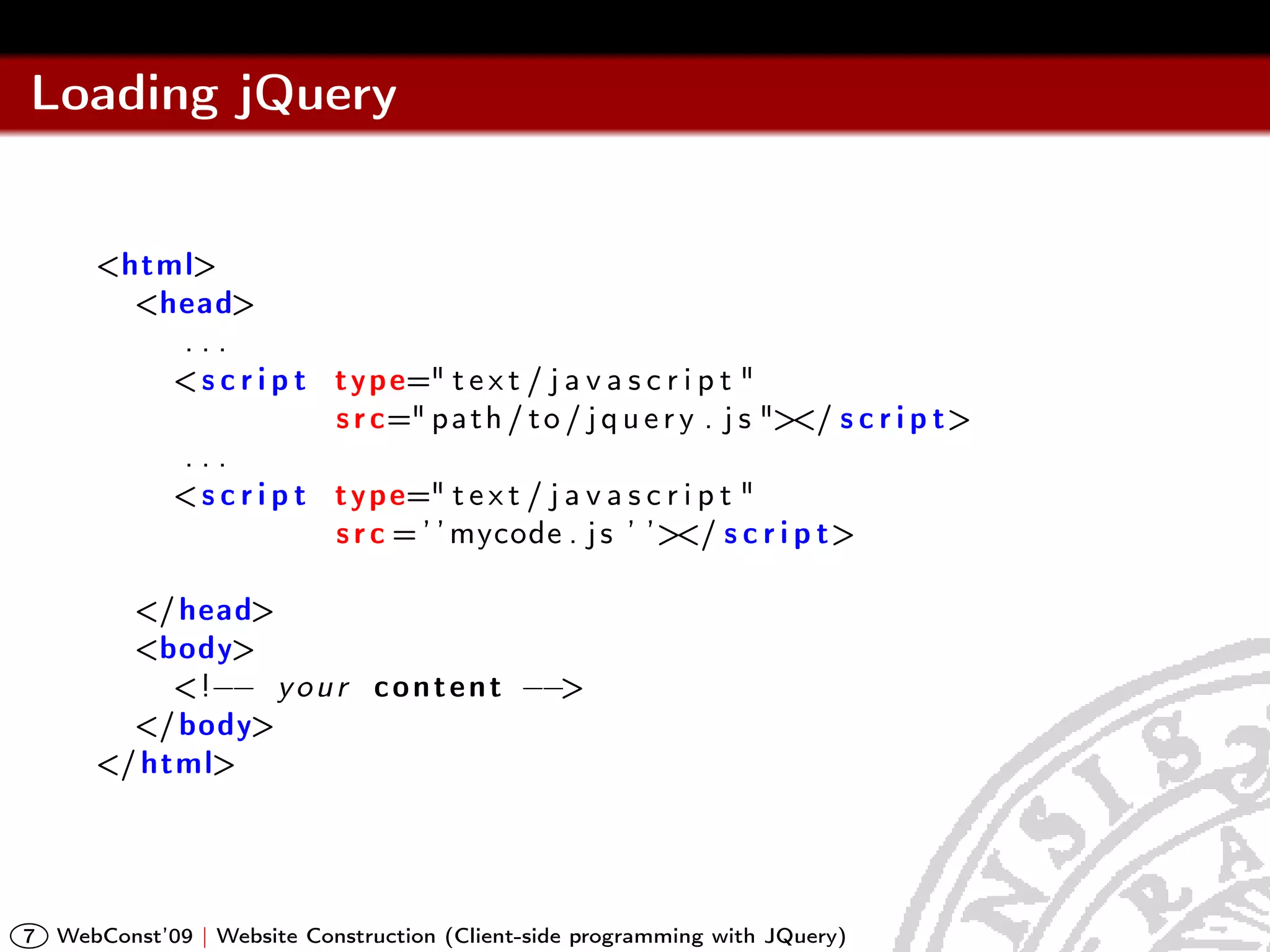
Loading jQuery


       <html>
         <head>
           ...
           < s c r i p t t y p e=" t e x t / j a v a s c r i p t "
                         s r c=" p a t h / t o / j q u e r y . j s "></ s c r i p t>
           ...
           < s c r i p t t y p e=" t e x t / j a v a s c r i p t "
                         s r c = ’ ’ mycode . j s ’ ’></ s c r i p t>

         </ head>
         <body>
            <!−− y o u r c o n t e n t −−>
         </ body>
       </ html>


7   WebConst’09 | Website Construction (Client-side programming with JQuery)
Saving bandwidth


       Instead of loading from your own server, get it from google.

       http://ajax.googleapis.com/ajax/libs/jquery/1/jquery.min.js

                                            Readable      Non-readable


8   WebConst’09 | Website Construction (Client-side programming with JQuery)
JQuery - Documentation


                                                    Homepage

                                                   Online docs


9   WebConst’09 | Website Construction (Client-side programming with JQuery)
Old style
       <script type="text/javascript">

        function notEmpty(){

             var myTextField = document.getElementById(’myText’);
             if(myTextField.value != "")
                alert("You entered: " + myTextField.value)
             else
                alert("Would you please enter some text?")
        }

       </script>

       <input type=’text’ id=’myText’ />
       <input type=’button’
              value=’Form Checker’ />
              onclick=’notEmpty()’ />


10   WebConst’09 | Website Construction (Client-side programming with JQuery)
Simple with JQuery


       Problem
       Need to wait for the document to be ready

       Solution
       JQuery: Event handler waits for the document to be ready.

       $(document).ready(function() {
           // do stuff when DOM is ready
       });

                                               What is the DOM?


11   WebConst’09 | Website Construction (Client-side programming with JQuery)
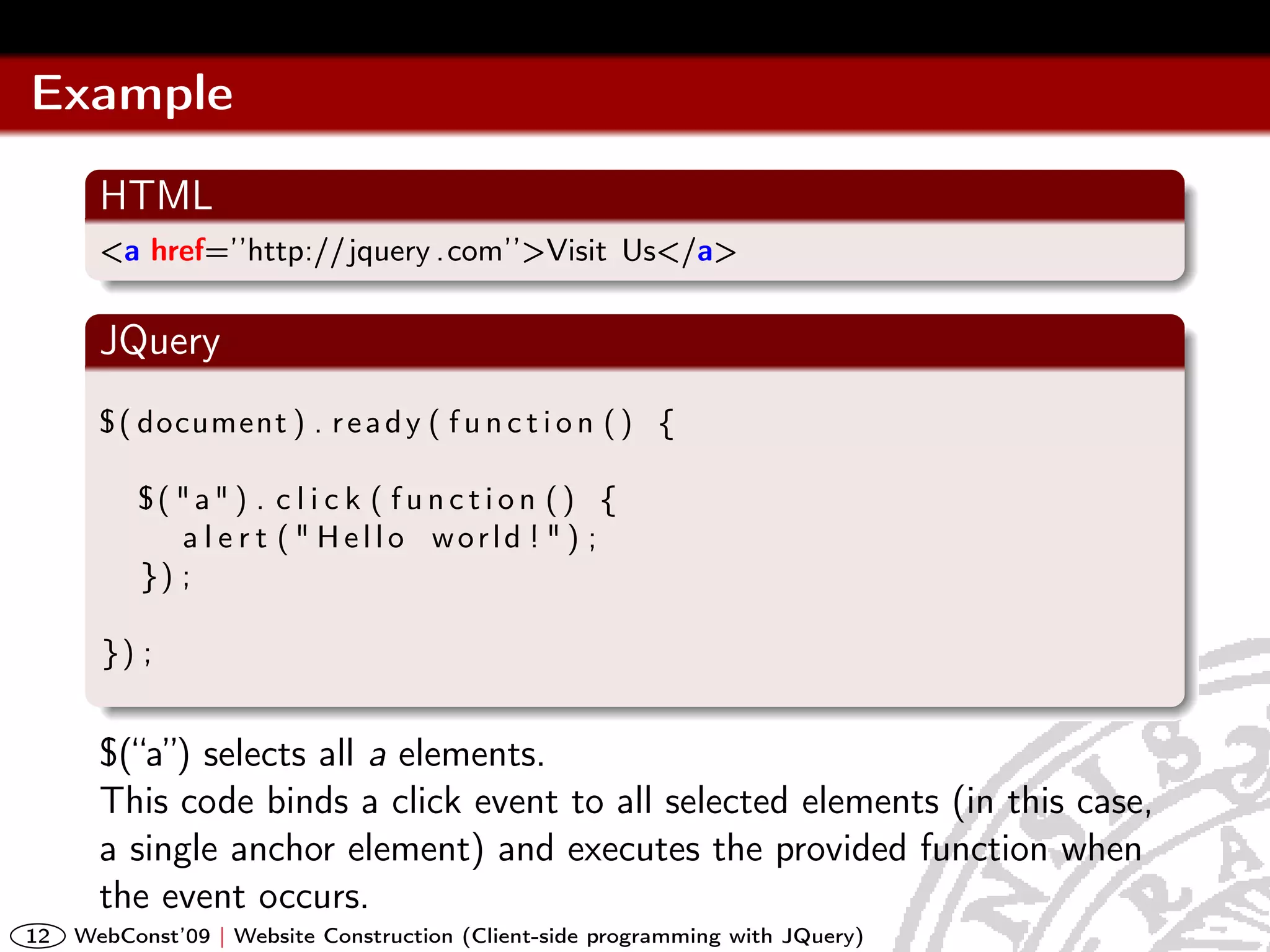
Example
       HTML
       <a href=’’http://jquery .com’’>Visit Us</a>

       JQuery
       $ ( document ) . r e a d y ( f u n c t i o n ( ) {

          $( "a" ) . c l i c k ( f u n c t i o n ( ) {
             a l e r t ( " Hello world ! " ) ;
          }) ;

       }) ;


       $(“a”) selects all a elements.
       This code binds a click event to all selected elements (in this case,
       a single anchor element) and executes the provided function when
       the event occurs.
12   WebConst’09 | Website Construction (Client-side programming with JQuery)
The magic $


       $(’a’);
       All anchors in the document (CSS/XPath)

       $(’div.container’);
       All divs with a container class (CSS)

       $(’div[@class=codeSnippet]/code’);
       All code elements that are direct children of divs in the document
       with the class ’codeSnippet’. (XPath)

       As of version 1.2, XPath syntax has been separated out in its own
       plugin (reducing the footprint, i.e smaller file size)

13   WebConst’09 | Website Construction (Client-side programming with JQuery)
The magic $


       $( selector, [context] );

       The selector can be a CSS selector or an XPath query. The context
       limits the scope of the search. Note that it returns an object which
       represent all matching elements.
                                                 JQuery selectors


14   WebConst’09 | Website Construction (Client-side programming with JQuery)
JQuery Effects


                                                  JQuery effects

                                                   online demo


15   WebConst’09 | Website Construction (Client-side programming with JQuery)

handout-05b

  • 1.
    Website Construction Client-side programmingwith JQuery Frédéric Haziza <daz@it.uu.se> Department of Computer Systems Uppsala University Summer 2009
  • 2.
    JavaScript allows developersto create rich and interactive web interfaces establish asynchronous communication with servers for constantly up-to-date data without a page refresh. 2 WebConst’09 | Website Construction (Client-side programming with JQuery)
  • 3.
    Javascript tutorial 3 WebConst’09 | Website Construction (Client-side programming with JQuery)
  • 4.
    Javascript library Write less, do more. JQuery / JQuery UI MooTools Scriptaculous / Prototype Element selection Dojo DOM manipulation Yahoo! UI Library (YUI) AJAX MochiKit ... ?? ... 4 WebConst’09 | Website Construction (Client-side programming with JQuery)
  • 5.
    Loading jQuery <html> <head> ... < s c r i p t t y p e=" t e x t / j a v a s c r i p t " s r c=" p a t h / t o / j q u e r y . j s "></ s c r i p t> ... < s c r i p t t y p e=" t e x t / j a v a s c r i p t "> // Your c o d e h e r e </ s c r i p t> </ head> <body> <!−− y o u r c o n t e n t −−> </ body> </ html> 5 WebConst’09 | Website Construction (Client-side programming with JQuery)
  • 6.
    Usally, most programmersend up testing: <html> <head> ... < s c r i p t t y p e=" t e x t / j a v a s c r i p t "> window . o n l o a d = f u n c t i o n ( ) { a l e r t ( ’ Hello world ! ’ ) ; } </ s c r i p t> </ head> <body> <!−− y o u r c o n t e n t −−> </ body> </ html> 6 WebConst’09 | Website Construction (Client-side programming with JQuery)
  • 7.
    Loading jQuery <html> <head> ... < s c r i p t t y p e=" t e x t / j a v a s c r i p t " s r c=" p a t h / t o / j q u e r y . j s "></ s c r i p t> ... < s c r i p t t y p e=" t e x t / j a v a s c r i p t " s r c = ’ ’ mycode . j s ’ ’></ s c r i p t> </ head> <body> <!−− y o u r c o n t e n t −−> </ body> </ html> 7 WebConst’09 | Website Construction (Client-side programming with JQuery)
  • 8.
    Saving bandwidth Instead of loading from your own server, get it from google. http://ajax.googleapis.com/ajax/libs/jquery/1/jquery.min.js Readable Non-readable 8 WebConst’09 | Website Construction (Client-side programming with JQuery)
  • 9.
    JQuery - Documentation Homepage Online docs 9 WebConst’09 | Website Construction (Client-side programming with JQuery)
  • 10.
    Old style <script type="text/javascript"> function notEmpty(){ var myTextField = document.getElementById(’myText’); if(myTextField.value != "") alert("You entered: " + myTextField.value) else alert("Would you please enter some text?") } </script> <input type=’text’ id=’myText’ /> <input type=’button’ value=’Form Checker’ /> onclick=’notEmpty()’ /> 10 WebConst’09 | Website Construction (Client-side programming with JQuery)
  • 11.
    Simple with JQuery Problem Need to wait for the document to be ready Solution JQuery: Event handler waits for the document to be ready. $(document).ready(function() { // do stuff when DOM is ready }); What is the DOM? 11 WebConst’09 | Website Construction (Client-side programming with JQuery)
  • 12.
    Example HTML <a href=’’http://jquery .com’’>Visit Us</a> JQuery $ ( document ) . r e a d y ( f u n c t i o n ( ) { $( "a" ) . c l i c k ( f u n c t i o n ( ) { a l e r t ( " Hello world ! " ) ; }) ; }) ; $(“a”) selects all a elements. This code binds a click event to all selected elements (in this case, a single anchor element) and executes the provided function when the event occurs. 12 WebConst’09 | Website Construction (Client-side programming with JQuery)
  • 13.
    The magic $ $(’a’); All anchors in the document (CSS/XPath) $(’div.container’); All divs with a container class (CSS) $(’div[@class=codeSnippet]/code’); All code elements that are direct children of divs in the document with the class ’codeSnippet’. (XPath) As of version 1.2, XPath syntax has been separated out in its own plugin (reducing the footprint, i.e smaller file size) 13 WebConst’09 | Website Construction (Client-side programming with JQuery)
  • 14.
    The magic $ $( selector, [context] ); The selector can be a CSS selector or an XPath query. The context limits the scope of the search. Note that it returns an object which represent all matching elements. JQuery selectors 14 WebConst’09 | Website Construction (Client-side programming with JQuery)
  • 15.
    JQuery Effects JQuery effects online demo 15 WebConst’09 | Website Construction (Client-side programming with JQuery)