移动应用开发
PhoneGap + JQuery + Dreamweaver
very much!
But,   less than 7yue
MOBILE HTML
Web App
    or
Hybrid App
    or
Native App
?MOBILE HTML


               http://mobilehtml5.org/
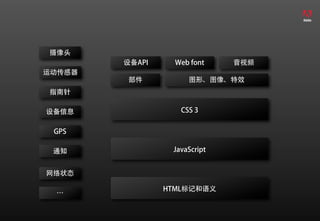
摄像头
        设备API     Web font    音视频
运动传感器
        部件           图形、图像、特效
指南针

设备信息               CSS 3


 GPS

 通知              JavaScript


网络状态

                HTML标记和语义
 …
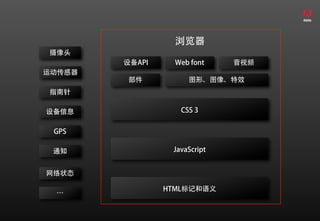
浏览器
摄像头
        设备API     Web font    音视频
运动传感器
        部件           图形、图像、特效
指南针

设备信息               CSS 3


 GPS

 通知              JavaScript


网络状态

                HTML标记和语义
 …
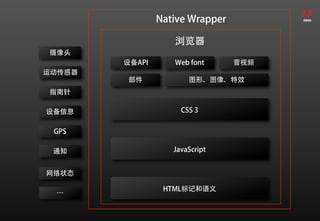
Native Wrapper

                   浏览器
摄像头
        设备API      Web font      音视频
运动传感器
        部件             图形、图像、特效
指南针

设备信息                 CSS 3


 GPS

 通知                JavaScript


网络状态

                 HTML标记和语义
 …
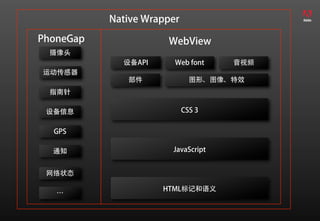
Native Wrapper
PhoneGap              WebView
  摄像头
             设备API      Web font    音视频
运动传感器
              部件              图形、图像、特效
  指南针

 设备信息                       CSS 3


  GPS

  通知                   JavaScript


 网络状态

                     HTML标记和语义
   …
Web App & Hybrid App


         使用
HTML + JavaScript + CSS3
    开发的移动应用
 (基于浏览器+可安装的)
Framework?

  Tools?
JQuery mobile
  (http://jquerymobile.com/)


创建面向现代智能移动设备的
    跨平台UI框架
构建于JQuery Core
跨平台
(iOS, Android, Blackberry, Palm WebOS, Nokia/Symbian,
Windows Phone 7, MeeGo, Opera Mobile/Mini, Firefox
Mobile, Kindle, Nook, 所有现代浏览器)


HTML5标记配置
轻量级
模块化架构
触摸和鼠标事件支持
强大的主题框架
统一的、可扩充的UI组件
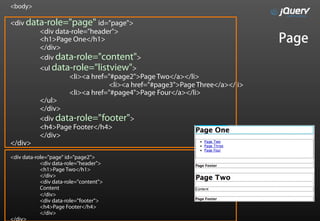
<body>

<div data-role="page" id="page">
        <div data-role="header">
        <h1>Page One</h1>                                               Page
        </div>
        <div data-role="content">
        <ul data-role="listview">
                 <li><a href="#page2">Page Two</a></li>
                             <li><a href="#page3">Page Three</a></li>
                 <li><a href="#page4">Page Four</a></li>
        </ul>
        </div>
        <div data-role="footer">
        <h4>Page Footer</h4>
        </div>
</div>
<div data-role="page" id="page2">
            <div data-role="header">
            <h1>Page Two</h1>
            </div>
            <div data-role="content">
            Content
            </div>
            <div data-role="footer">
            <h4>Page Footer</h4>
            </div>
</div>
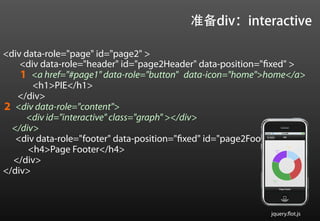
准备div:interactive

<div data-role="page" id="page2" >
    <div data-role="header" id="page2Header" data-position="fixed" >
    1 <a href="#page1" data-role="button" data-icon="home">home</a>
       <h1>PIE</h1>
   </div>
2 <div data-role="content">
     <div id="interactive" class="graph" ></div>
  </div>
   <div data-role="footer" data-position="fixed" id="page2Footer">
      <h4>Page Footer</h4>
  </div>
</div>


                                                            jquery.flot.js
准备数据
$(function () {
      var data=[];
      var series = Math.floor(Math.random()*5)+5;
      for( var i = 0; i<series; i++)
      {
      data[i] = { label: "Series"+(i+1),
                     data: Math.floor(Math.random()*100)+1 }
      }
…


                                                       jquery.flot.js
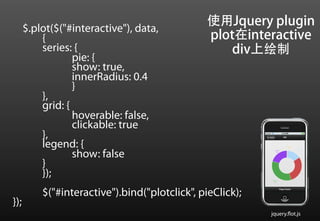
$.plot($("#interactive"), data,
                                                使用Jquery plugin
          {                                     plot在interactive
          series: {                                div上绘制
                  pie: {
                  show: true,
                  innerRadius: 0.4
                  }
          },
          grid: {
                  hoverable: false,
                  clickable: true
          },
          legend: {
                  show: false
          }
          });
          $("#interactive").bind("plotclick", pieClick);
});
                                                           jquery.flot.js
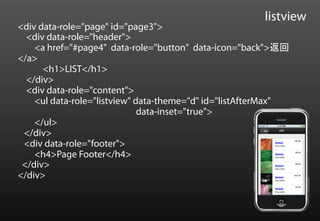
listview
<div data-role="page" id="page3">
  <div data-role="header">
    <a href="#page4" data-role="button" data-icon="back">返回
</a>
      <h1>LIST</h1>
  </div>
  <div data-role="content">
    <ul data-role="listview" data-theme="d" id="listAfterMax"
                              data-inset="true">
    </ul>
 </div>
 <div data-role="footer">
    <h4>Page Footer</h4>
 </div>
</div>
数据
var itemData = [
       {imgURL: "images/flowing-rock.jpg" ,
            label: "Series1",
            desc: 10,
            price: 120, stock:1200},
       {imgURL: "images/grass-blades.jpg" ,
            label: "Series2",
            desc: 30,
            price: 220,
            ck:200},
       …… ];
“itemrenderer”
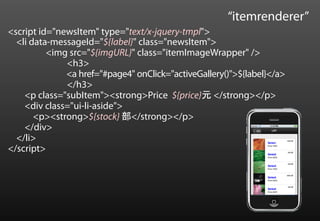
<script id="newsItem" type="text/x-jquery-tmpl">
  <li data-messageId="${label}" class="newsItem">
          <img src="${imgURL}" class="itemImageWrapper" />
              <h3>
              <a href="#page4" onClick="activeGallery()">${label}</a>
              </h3>
    <p class="subItem"><strong>Price ${price}元 </strong></p>
    <div class="ui-li-aside">
       <p><strong>${stock} 部</strong></p>
    </div>
  </li>
</script>
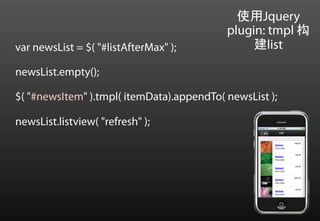
使用Jquery
                                           plugin: tmpl 构
var newsList = $( "#listAfterMax" );            建list

newsList.empty();

$( "#newsItem" ).tmpl( itemData).appendTo( newsList );

newsList.listview( "refresh" );
My Stupid Demo
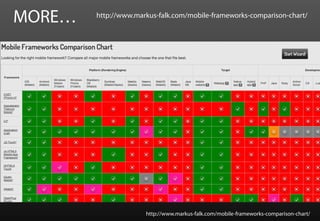
MORE…   http://www.markus-falk.com/mobile-frameworks-comparison-chart/


                      http://www.markus-falk.com/mobile-frameworks-comparison-chart/
PhoneGap
使用HTML5、CSS3、JavaScript构建
APP


访问移动设备本地特性


phoneGap plugin


打包部署到多种平台
打包
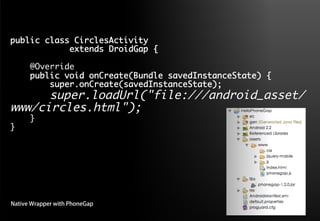
public class CirclesActivity 	
     	     	extends DroidGap {	
    	
    @Override	
    public void onCreate(Bundle savedInstanceState) {	
        super.onCreate(savedInstanceState);	
      super.loadUrl("file:///android_asset/
www/circles.html");	
      }	
}	


Native Wrapper with PhoneGap
在dreamweaver中构建
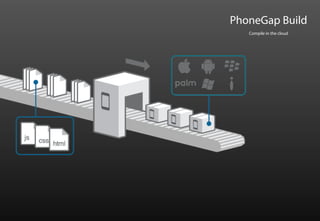
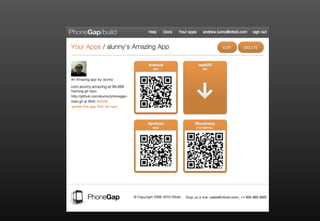
PhoneGap : Build
PhoneGap Build
   Compile in the cloud
PhoneGap plugin
定制PhoneGap Plugin
    (IOS 和 Android)

一个JavaScript与匹配的Java


一个JavaScript与匹配的.h和.m
PhoneGap如何工作?
PhoneGap架构


             Web App                                      PhoneGap Plug-ins
        HTML5+JavaScript+CSS3                      摄像头        运动传感器             设备信息


                                                   指南针           GPS             通知
HTML5                           PhoneGap
 API                              JS API
                                                  网络状态            …

                                     PhoneGap
                                     Native API
          HTML Engine                                         定制plugin

        (WebView、UIWebView…)


                      OS API                                           OS API


                                              Mobile OS
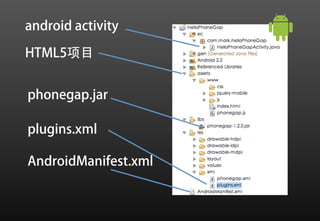
android activity

HTML5项目


phonegap.jar

plugins.xml

AndroidManifest.xml
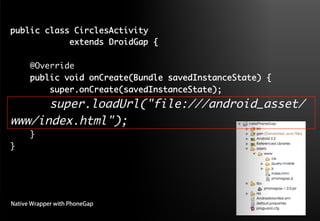
public class CirclesActivity 	
     	     	extends DroidGap {	
    	
    @Override	
    public void onCreate(Bundle savedInstanceState) {	
        super.onCreate(savedInstanceState);	
      super.loadUrl("file:///android_asset/
www/index.html");	
      }	
}	


Native Wrapper with PhoneGap
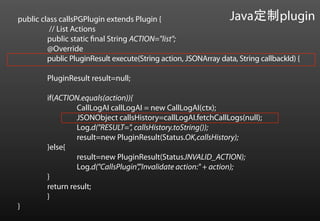
public class callsPGPlugin extends Plugin {                       Java定制plugin
          // List Actions
         public static final String ACTION="list";
         @Override
         public PluginResult execute(String action, JSONArray data, String callbackId) {

         PluginResult result=null;

         if(ACTION.equals(action)){
                  CallLogAI callLogAI = new CallLogAI(ctx);
                  JSONObject callsHistory=callLogAI.fetchCallLogs(null);
                  Log.d("RESULT=", callsHistory.toString());
                  result=new PluginResult(Status.OK,callsHistory);
         }else{
                  result=new PluginResult(Status.INVALID_ACTION);
                  Log.d("CallsPlugin","Invalidate action:" + action);
         }
         return result;
         }
}
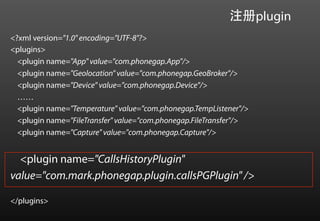
注册plugin
<?xml version="1.0" encoding="UTF-8"?>
<plugins>
  <plugin name="App" value="com.phonegap.App"/>
  <plugin name="Geolocation" value="com.phonegap.GeoBroker"/>
  <plugin name="Device" value="com.phonegap.Device"/>
  ……
  <plugin name="Temperature" value="com.phonegap.TempListener"/>
  <plugin name="FileTransfer" value="com.phonegap.FileTransfer"/>
  <plugin name="Capture" value="com.phonegap.Capture"/>


  <plugin name="CallsHistoryPlugin"
value="com.mark.phonegap.plugin.callsPGPlugin" />

</plugins>
Javascript接口
var CallsListing=function(){};

CallsListing.prototype.list=function(successCallback,failureCallback){
        return PhoneGap.exec(successCallback,
                                            failureCallback,
                                            'CallsHistoryPlugin',
                                            'list',['test']
                                     );
};

PhoneGap.addConstructor(function(){
     PhoneGap.addPlugin("callsListing",new CallsListing);
});
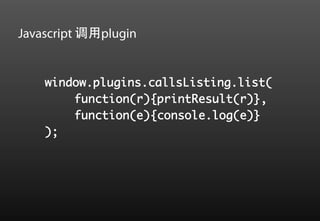
Javascript 调用plugin


    window.plugins.callsListing.list(	
        	function(r){printResult(r)},	
        	function(e){console.log(e)}	
    );
window.plugins.callsListing.list(	
        	function(r){printResult(r)},	
        	function(e){console.log(e)}	
   );	

  CallsListing.prototype.list=function
  (successCallback,failureCallback){	
        	return PhoneGap.exec(successCallback,	
        	failureCallback,	
        	'CallsHistoryPlugin',	
        	'list',['test’]);	
  };	
                                             public class callsPGPlugin extends Plugin {
                                                       // List Actions
<plugin name="CallsHistoryPlugin"                     public static final String ACTION="lis
value="com.mark.phonegap.plugin.callsPGPlu            @Override
                                                      public PluginResult execute(String
gin" />
                                             action, JSONArray data, String callbackId) {
PhoneGap的
  小秘密
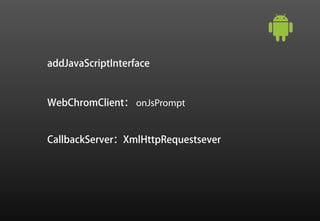
addJavaScriptInterface


WebChromClient: onJsPrompt


CallbackServer:XmlHttpRequestsever
CallsListing.prototype.list=function
(successCallback,failureCallback){	
      	return PhoneGap.exec(successCallback,	
      	failureCallback,	
      	'CallsHistoryPlugin',	
      	'list',['test’]);	
};	


PhoneGap.exec = function(success, fail, service, action, args) {
…
var r = prompt(JSON.stringify(args), "gap:"+JSON.stringify([service,
action, callbackId, true]));
…
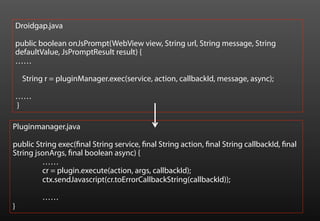
Droidgap.java

    public boolean onJsPrompt(WebView view, String url, String message, String
    defaultValue, JsPromptResult result) {
    ……

     String r = pluginManager.exec(service, action, callbackId, message, async);

    ……
    }

Pluginmanager.java

public String exec(final String service, final String action, final String callbackId, final
String jsonArgs, final boolean async) {
         ……
         cr = plugin.execute(action, args, callbackId);
         ctx.sendJavascript(cr.toErrorCallbackString(callbackId));

           ……
}
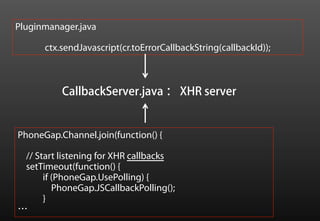
Pluginmanager.java

      ctx.sendJavascript(cr.toErrorCallbackString(callbackId));


          CallbackServer.java : XHR server


PhoneGap.Channel.join(function() {

 // Start listening for XHR callbacks
 setTimeout(function() {
      if (PhoneGap.UsePolling) {
         PhoneGap.JSCallbackPolling();
      }
…
Appcelerator Titanium

        Native?
        JavaScriptCore
        Mozilla Rhino
Mark Dong
Developer Evangelist
dong@adobe.com
weibo.com/donglongfei

After max+phonegap

  • 1.
  • 3.
  • 4.
    But, less than 7yue
  • 5.
  • 6.
    Web App or Hybrid App or Native App
  • 7.
    ?MOBILE HTML http://mobilehtml5.org/
  • 8.
    摄像头 设备API Web font 音视频 运动传感器 部件 图形、图像、特效 指南针 设备信息 CSS 3 GPS 通知 JavaScript 网络状态 HTML标记和语义 …
  • 9.
    浏览器 摄像头 设备API Web font 音视频 运动传感器 部件 图形、图像、特效 指南针 设备信息 CSS 3 GPS 通知 JavaScript 网络状态 HTML标记和语义 …
  • 10.
    Native Wrapper 浏览器 摄像头 设备API Web font 音视频 运动传感器 部件 图形、图像、特效 指南针 设备信息 CSS 3 GPS 通知 JavaScript 网络状态 HTML标记和语义 …
  • 11.
    Native Wrapper PhoneGap WebView 摄像头 设备API Web font 音视频 运动传感器 部件 图形、图像、特效 指南针 设备信息 CSS 3 GPS 通知 JavaScript 网络状态 HTML标记和语义 …
  • 12.
    Web App &Hybrid App 使用 HTML + JavaScript + CSS3 开发的移动应用 (基于浏览器+可安装的)
  • 13.
  • 15.
    JQuery mobile (http://jquerymobile.com/) 创建面向现代智能移动设备的 跨平台UI框架
  • 16.
    构建于JQuery Core 跨平台 (iOS, Android,Blackberry, Palm WebOS, Nokia/Symbian, Windows Phone 7, MeeGo, Opera Mobile/Mini, Firefox Mobile, Kindle, Nook, 所有现代浏览器) HTML5标记配置 轻量级 模块化架构 触摸和鼠标事件支持 强大的主题框架 统一的、可扩充的UI组件
  • 17.
    <body> <div data-role="page" id="page"> <div data-role="header"> <h1>Page One</h1> Page </div> <div data-role="content"> <ul data-role="listview"> <li><a href="#page2">Page Two</a></li> <li><a href="#page3">Page Three</a></li> <li><a href="#page4">Page Four</a></li> </ul> </div> <div data-role="footer"> <h4>Page Footer</h4> </div> </div> <div data-role="page" id="page2"> <div data-role="header"> <h1>Page Two</h1> </div> <div data-role="content"> Content </div> <div data-role="footer"> <h4>Page Footer</h4> </div> </div>
  • 18.
    准备div:interactive <div data-role="page" id="page2"> <div data-role="header" id="page2Header" data-position="fixed" > 1 <a href="#page1" data-role="button" data-icon="home">home</a> <h1>PIE</h1> </div> 2 <div data-role="content"> <div id="interactive" class="graph" ></div> </div> <div data-role="footer" data-position="fixed" id="page2Footer"> <h4>Page Footer</h4> </div> </div> jquery.flot.js
  • 19.
    准备数据 $(function () { var data=[]; var series = Math.floor(Math.random()*5)+5; for( var i = 0; i<series; i++) { data[i] = { label: "Series"+(i+1), data: Math.floor(Math.random()*100)+1 } } … jquery.flot.js
  • 20.
    $.plot($("#interactive"), data, 使用Jquery plugin { plot在interactive series: { div上绘制 pie: { show: true, innerRadius: 0.4 } }, grid: { hoverable: false, clickable: true }, legend: { show: false } }); $("#interactive").bind("plotclick", pieClick); }); jquery.flot.js
  • 21.
    listview <div data-role="page" id="page3"> <div data-role="header"> <a href="#page4" data-role="button" data-icon="back">返回 </a> <h1>LIST</h1> </div> <div data-role="content"> <ul data-role="listview" data-theme="d" id="listAfterMax" data-inset="true"> </ul> </div> <div data-role="footer"> <h4>Page Footer</h4> </div> </div>
  • 22.
    数据 var itemData =[ {imgURL: "images/flowing-rock.jpg" , label: "Series1", desc: 10, price: 120, stock:1200}, {imgURL: "images/grass-blades.jpg" , label: "Series2", desc: 30, price: 220, ck:200}, …… ];
  • 23.
    “itemrenderer” <script id="newsItem" type="text/x-jquery-tmpl"> <li data-messageId="${label}" class="newsItem"> <img src="${imgURL}" class="itemImageWrapper" /> <h3> <a href="#page4" onClick="activeGallery()">${label}</a> </h3> <p class="subItem"><strong>Price ${price}元 </strong></p> <div class="ui-li-aside"> <p><strong>${stock} 部</strong></p> </div> </li> </script>
  • 24.
    使用Jquery plugin: tmpl 构 var newsList = $( "#listAfterMax" ); 建list newsList.empty(); $( "#newsItem" ).tmpl( itemData).appendTo( newsList ); newsList.listview( "refresh" );
  • 25.
  • 26.
    MORE… http://www.markus-falk.com/mobile-frameworks-comparison-chart/
  • 27.
    MORE… http://www.markus-falk.com/mobile-frameworks-comparison-chart/ http://www.markus-falk.com/mobile-frameworks-comparison-chart/
  • 28.
  • 29.
  • 31.
  • 32.
    public class CirclesActivity extends DroidGap { @Override public void onCreate(Bundle savedInstanceState) { super.onCreate(savedInstanceState); super.loadUrl("file:///android_asset/ www/circles.html"); } } Native Wrapper with PhoneGap
  • 33.
  • 34.
  • 35.
    PhoneGap Build Compile in the cloud
  • 37.
  • 38.
    定制PhoneGap Plugin (IOS 和 Android) 一个JavaScript与匹配的Java 一个JavaScript与匹配的.h和.m
  • 39.
  • 40.
    PhoneGap架构 Web App PhoneGap Plug-ins HTML5+JavaScript+CSS3 摄像头 运动传感器 设备信息 指南针 GPS 通知 HTML5 PhoneGap API JS API 网络状态 … PhoneGap Native API HTML Engine 定制plugin (WebView、UIWebView…) OS API OS API Mobile OS
  • 41.
  • 42.
    public class CirclesActivity extends DroidGap { @Override public void onCreate(Bundle savedInstanceState) { super.onCreate(savedInstanceState); super.loadUrl("file:///android_asset/ www/index.html"); } } Native Wrapper with PhoneGap
  • 43.
    public class callsPGPluginextends Plugin { Java定制plugin // List Actions public static final String ACTION="list"; @Override public PluginResult execute(String action, JSONArray data, String callbackId) { PluginResult result=null; if(ACTION.equals(action)){ CallLogAI callLogAI = new CallLogAI(ctx); JSONObject callsHistory=callLogAI.fetchCallLogs(null); Log.d("RESULT=", callsHistory.toString()); result=new PluginResult(Status.OK,callsHistory); }else{ result=new PluginResult(Status.INVALID_ACTION); Log.d("CallsPlugin","Invalidate action:" + action); } return result; } }
  • 44.
    注册plugin <?xml version="1.0" encoding="UTF-8"?> <plugins> <plugin name="App" value="com.phonegap.App"/> <plugin name="Geolocation" value="com.phonegap.GeoBroker"/> <plugin name="Device" value="com.phonegap.Device"/> …… <plugin name="Temperature" value="com.phonegap.TempListener"/> <plugin name="FileTransfer" value="com.phonegap.FileTransfer"/> <plugin name="Capture" value="com.phonegap.Capture"/> <plugin name="CallsHistoryPlugin" value="com.mark.phonegap.plugin.callsPGPlugin" /> </plugins>
  • 45.
    Javascript接口 var CallsListing=function(){}; CallsListing.prototype.list=function(successCallback,failureCallback){ return PhoneGap.exec(successCallback, failureCallback, 'CallsHistoryPlugin', 'list',['test'] ); }; PhoneGap.addConstructor(function(){ PhoneGap.addPlugin("callsListing",new CallsListing); });
  • 46.
    Javascript 调用plugin window.plugins.callsListing.list( function(r){printResult(r)}, function(e){console.log(e)} );
  • 47.
    window.plugins.callsListing.list( function(r){printResult(r)}, function(e){console.log(e)} ); CallsListing.prototype.list=function (successCallback,failureCallback){ return PhoneGap.exec(successCallback, failureCallback, 'CallsHistoryPlugin', 'list',['test’]); }; public class callsPGPlugin extends Plugin { // List Actions <plugin name="CallsHistoryPlugin" public static final String ACTION="lis value="com.mark.phonegap.plugin.callsPGPlu @Override public PluginResult execute(String gin" /> action, JSONArray data, String callbackId) {
  • 48.
  • 49.
  • 50.
    CallsListing.prototype.list=function (successCallback,failureCallback){ return PhoneGap.exec(successCallback, failureCallback, 'CallsHistoryPlugin', 'list',['test’]); }; PhoneGap.exec = function(success, fail, service, action, args) { … var r = prompt(JSON.stringify(args), "gap:"+JSON.stringify([service, action, callbackId, true])); …
  • 51.
    Droidgap.java public boolean onJsPrompt(WebView view, String url, String message, String defaultValue, JsPromptResult result) { …… String r = pluginManager.exec(service, action, callbackId, message, async); …… } Pluginmanager.java public String exec(final String service, final String action, final String callbackId, final String jsonArgs, final boolean async) { …… cr = plugin.execute(action, args, callbackId); ctx.sendJavascript(cr.toErrorCallbackString(callbackId)); …… }
  • 52.
    Pluginmanager.java ctx.sendJavascript(cr.toErrorCallbackString(callbackId)); CallbackServer.java : XHR server PhoneGap.Channel.join(function() { // Start listening for XHR callbacks setTimeout(function() { if (PhoneGap.UsePolling) { PhoneGap.JSCallbackPolling(); } …
  • 53.
    Appcelerator Titanium Native? JavaScriptCore Mozilla Rhino
  • 54.