silvio.montanari@thoughtworks.com
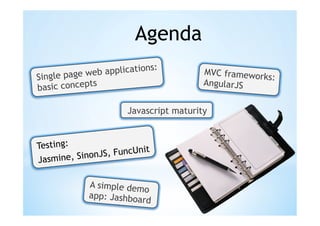
Agenda
                           ns:
              eb applicatio               MVC framewor
Single page w                                         ks:
              s                           AngularJS
basic concept

                        Javascript maturity


Testing:                  n it
            n onJS, FuncU
Jasmine, Si

             A simple dem
                           o
             app: Jashboa
                          rd
Javascript:
a first class citizen?
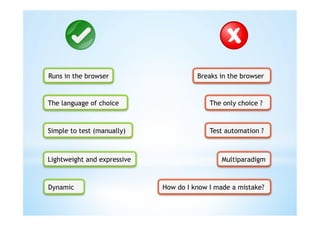
Runs in the browser                    Breaks in the browser


The language of choice                     The only choice ?


Simple to test (manually)                  Test automation ?


Lightweight and expressive                     Multiparadigm


Dynamic                      How do I know I made a mistake?
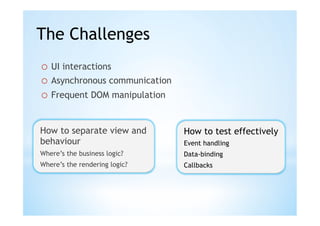
The Challenges
o  UI interactions
o  Asynchronous communication
o  Frequent DOM manipulation


How to separate view and        How to test effectively
behaviour                       Event handling
Where’s the business logic?     Data-binding
Where’s the rendering logic?    Callbacks
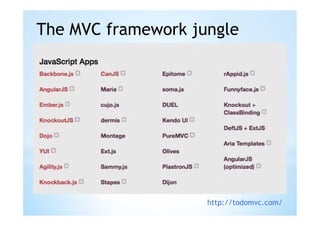
The MVC framework jungle


                    http://todomvc.com/
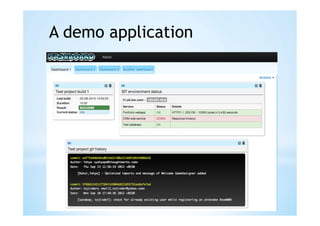
A demo application
Two-way data binding


     Directives


Dependency injection
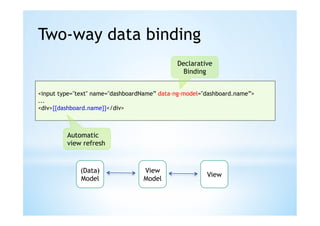
Two-way data binding
                                             Declarative
                                               Binding


<input type="text" name="dashboardName” data-ng-model="dashboard.name”>
...
<div>{{dashboard.name}}</div>


         Automatic
         view refresh


             (Data)               View
                                                       View
             Model                Model
DOM decoupling and behaviour
view separation


     Example: we want to display a
     message box in alert style
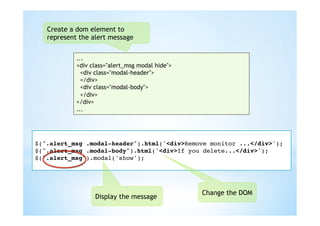
Create a dom element to
   represent the alert message


            ...
            <div class="alert_msg modal hide">
              <div class="modal-header">
              </div>
              <div class="modal-body">
              </div>
            </div>
            ...


!
$(".alert_msg .modal-header").html('<div>Remove monitor ...</div>');!
$(".alert_msg .modal-body").html('<div>If you delete...</div>');!
$(".alert_msg").modal('show');!
!


                                                 Change the DOM
                  Display the message
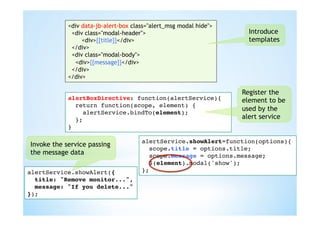
<div class="alert_msg modal hide">
                 data-jb-alert-box class="alert_msg modal hide">
             <div class="modal-header">                              Introduce
                 <div>{{title}}</div>                                templates
             </div>
             <div class="modal-body">
              <div>{{message}}</div>
             </div>
            </div>

                                                                   Register the
            alertBoxDirective: function(alertService){!            element to be
                                   Wrap the
               return function(scope, element) {!
                                   widget logic                    used by the
                 alertService.bindTo(element);!
               };!                 into a service                  alert service
            }!

                                      alertService.showAlert=function(options){!
Invoke the service passing
                                        scope.title = options.title;!
the message data                        scope.message = options.message;!
                                        $(element).modal('show');!
                                        $(".alert_msg").modal('show');!
alertService.showAlert({!             };!
  title: "Remove monitor...",!
  message: "If you delete..."!
});!
DOM decoupling and behaviour
view separation (2)

     Example: we want to display an
     overlay message while the data
     loads from the server
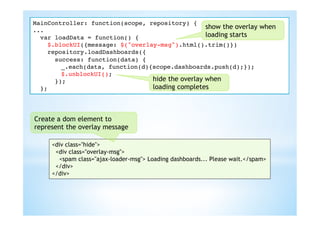
MainController: function(scope, repository) {!
...!
                                                   show the overlay when
  var loadData = function() {!                     loading starts
     $.blockUI({message: $("overlay-msg").html().trim()})!
     repository.loadDashboards({!
     repository.loadDashboards({!
       success: function(data) {!
   ! success: function(data) {!
        !_.each(data, function(d){scope.dashboards.push(d);});!
   ! });!_.each(data, function(d){scope.dashboards.push(d);}); !        !!
                                                                        !
  };! });!
   !     $.unblockUI();!
! };! });!                        hide the overlay when
! };!                             loading completes


Create a dom element to
represent the overlay message

     <div class="hide">
      <div class="overlay-msg">
       <spam class="ajax-loader-msg"> Loading dashboards... Please wait.</spam>
      </div>
     </div>
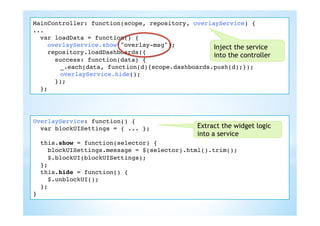
MainController: function(scope, repository) overlayService) {!
                                  repository, {!
...!
  var loadData = function() {!
     overlayService.show("overlay-msg");!
     $.blockUI({message: $("overlay-msg").html().trim()})! service
                                                   Inject the
     repository.loadDashboards({!
                                                   into the controller
       success: function(data) {!
   !   !_.each(data, function(d){scope.dashboards.push(d);});! !
                     function(d){scope.dashboards.push(d);});          !
   !   !overlayService.hide();!
       !$.unblockUI();!
       });!
  };!


OverlayService: function() {!
   var blockUISettings = { ... };!            Extract the widget logic
!                                             into a service
   this.show = function(selector) {!
     blockUISettings.message = $(selector).html().trim();!
     $.blockUI(blockUISettings);!
   };!
   this.hide = function() {!
     $.unblockUI();!
   };!
}!
MainController: function(scope, repository) {!
MainController: function(scope, repository, overlayService) {!
                                  repository) {!
                                                     Notify the view
...!
...!
  var loadData = function() {!
  var loadData = function() {!{    !                 when data loading
     scope.$broadcast("DataLoadingStart");!
     overlayService.show("overlay-msg");!
     repository.loadDashboards({!                    starts and when it
     repository.loadDashboards({!
     repository.loadDashboards({!
       success: function(data) {!                    completes
   ! success: function(data) {!
       success: function(data) {!
        !_.each(data, function(d){scope.dashboards.push(d);}); !!
   ! });!
   !   !_.each(data, function(d){scope.dashboards.push(d);});! !!
        !_.each(data, function(d){scope.dashboards.push(d);}); !        !
   !   !scope.$broadcast("DataLoadingComplete"); !!
        !overlayService.hide();!
  };! });!
! };! });!
       });!
! };!
  };!

<div class="hide">
     class="hide" data-jb-overlay="{show:'DataLoadingStart’,hide:'DataLoadingComplete'}">
 <div class="overlay-msg">
  <spam class="ajax-loader-msg"> Loading dashboards... Please wait.</spam>
 </div>
</div>

OverlayDirective: function(scope, element, attrs) {!
   var actions = {!
      show: function(){overlayService.show(element);},!
      hide: function(){overlayService.hide(element);}!
   }!                                                    Listen to the
   var eventsMap = scope.$eval(attrs['jbOverlay']);!     specified events
   _.each(_.keys(eventsMap), function(actionName) {     !
      scope.$on(eventsMap[actionName], actions[actionName]);!
   });!
}!
DOM decoupling and behaviour
view separation (3)
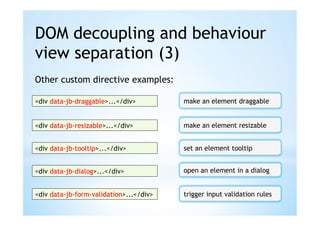
Other custom directive examples:

<div data-jb-draggable>...</div>         make an element draggable


<div data-jb-resizable>...</div>         make an element resizable


<div data-jb-tooltip>...</div>           set an element tooltip


<div data-jb-dialog>...</div>            open an element in a dialog


<div data-jb-form-validation>...</div>   trigger input validation rules
Dependency injection
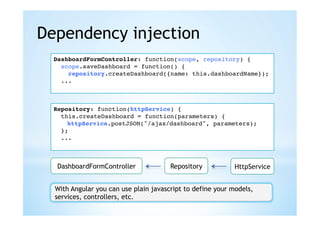
  DashboardFormController: function(scope, repository) {!
    scope.saveDashboard = function() {!
      repository.createDashboard({name: this.dashboardName});!
    ...!
  !


  Repository: function(httpService) {!
    this.createDashboard = function(parameters) {!
     !httpService.postJSON("/ajax/dashboard", parameters);!
    };!
    ...!
  !


   DashboardFormController             Repository           HttpService


  With Angular you can use plain javascript to define your models,
  services, controllers, etc.
Good practices with
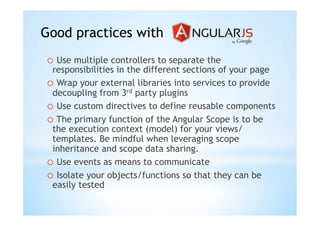
o  Use multiple controllers to separate the
 responsibilities in the different sections of your page
o  Wrap your external libraries into services to provide
 decoupling from 3rd party plugins
o  Use custom directives to define reusable components
o  The primary function of the Angular Scope is to be
 the execution context (model) for your views/
 templates. Be mindful when leveraging scope
 inheritance and scope data sharing.
o  Use events as means to communicate
o  Isolate your objects/functions so that they can be
 easily tested
Modules and namespacing
  Define your module/namespace

var jashboard = (function(module) {!
  module.services = angular.module('jashboard.services', []);!
  module.application = angular.module('jashboard',...); !
  return module;!
}(jashboard || {}));!

    http://www.adequatelygood.com/2010/3/JavaScript-Module-Pattern-In-Depth


  Add functionality


jashboard = _.extend(jashboard, {!
  AlertService: function() {...}!
});!
Organising the file structure
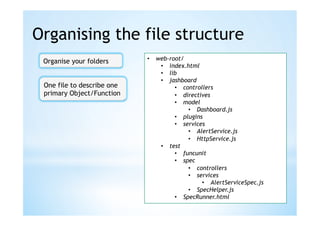
 Organise your folders      •  web-root/
                                •  index.html
                                •  lib
                                •  jashboard
 One file to describe one            •  controllers
 primary Object/Function             •  directives
                                     •  model
                                          •  Dashboard.js
                                     •  plugins
                                     •  services
                                          •  AlertService.js
                                          •  HttpService.js
                                •  test
                                     •  funcunit
                                     •  spec
                                          •  controllers
                                          •  services
                                               •  AlertServiceSpec.js
                                          •  SpecHelper.js
                                     •  SpecRunner.html
Loading dependencies


          http://javascriptmvc.com/docs.html#!stealjs


          http://requirejs.org/
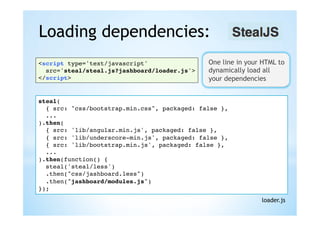
Loading dependencies:
<script type='text/javascript' !               One line in your HTML to
  src='steal/steal.js?jashboard/loader.js'>!   dynamically load all
</script>!                                     your dependencies


steal(!
  { src: "css/bootstrap.min.css", packaged: false },!
  ...!
).then(!
  { src: 'lib/angular.min.js', packaged: false },!
  { src: 'lib/underscore-min.js', packaged: false },!
  { src: 'lib/bootstrap.min.js', packaged: false },!
  ...!
).then(function() {!
  steal('steal/less')!
  .then("css/jashboard.less")!
  .then("jashboard/modules.js")!
});!
                                                               loader.js
Unit testing

                                     Behaviour driven development in Javascript


http://pivotal.github.com/jasmine/


                                     Advanced spying, mocking and stubbing


http://sinonjs.org/
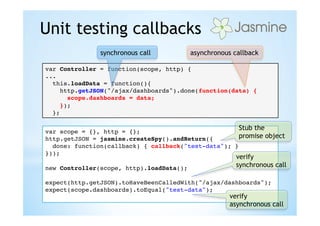
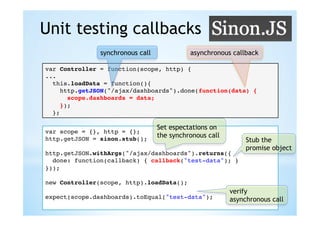
Unit testing callbacks
               synchronous call          asynchronous callback

var Controller = function(scope, http) {!
...!
  this.loadData = function(){!
     http.getJSON("/ajax/dashboards").done(function(data) {!
       scope.dashboards = data;!
     });!
  };!


var scope = {}, http = {};!
                                                       Stub the
http.getJSON = jasmine.createSpy().andReturn({!       promise object
  done: function(callback) { callback("test-data"); }!
}));!
!
                                                     verify
new Controller(scope, http).loadData();!             synchronous call
!
expect(http.getJSON).toHaveBeenCalledWith("/ajax/dashboards");!
expect(scope.dashboards).toEqual("test-data");!
!                                                  verify
                                                     asynchronous call
Unit testing callbacks
                synchronous call             asynchronous callback

var Controller = function(scope, http) {!
...!
  this.loadData = function(){!
     http.getJSON("/ajax/dashboards").done(function(data) {!
       scope.dashboards = data;!
     });!
  };!

                                   Set espectations on
var scope = {}, http = {};!
                               the synchronous call
http.getJSON = sinon.stub();!                             Stub the
!                                                         promise object
http.getJSON.withArgs("/ajax/dashboards").returns({!
  done: function(callback) { callback("test-data"); }!
}));!
!
new Controller(scope, http).loadData();!
!                                                   verify
expect(scope.dashboards).toEqual("test-data");!     asynchronous call
!
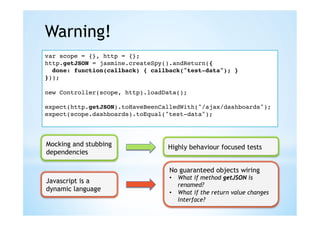
Warning!
var scope = {}, http = {};!
http.getJSON = jasmine.createSpy().andReturn({!
  done: function(callback) { callback("test-data"); }!
}));!
!
new Controller(scope, http).loadData();!
!
expect(http.getJSON).toHaveBeenCalledWith("/ajax/dashboards");!
expect(scope.dashboards).toEqual("test-data");!
!


Mocking and stubbing             Highly behaviour focused tests
dependencies

                                  No guaranteed objects wiring
                                  •  What if method getJSON is
Javascript is a
                                     renamed?
dynamic language                  •  What if the return value changes
                                     interface?
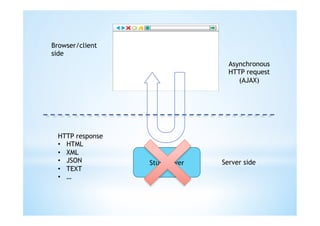
Functional testing
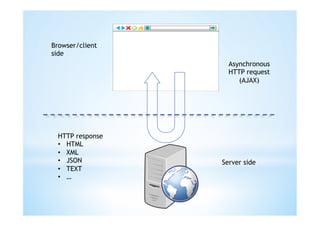
Browser/client
side
                    Asynchronous
                    HTTP request
                       (AJAX)


  HTTP response
  •  HTML
  •  XML
  •  JSON         Server side
  •  TEXT
  •  …
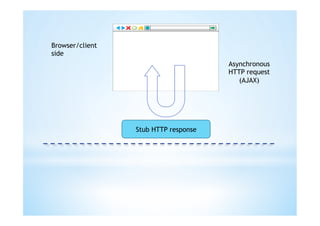
Browser/client
side
                                  Asynchronous
                                  HTTP request
                                     (AJAX)


  HTTP response
  •  HTML
  •  XML
  •  JSON         Stub server   Server side
  •  TEXT
  •  …
Browser/client
side
                                      Asynchronous
                                      HTTP request
                                         (AJAX)


                 Stub HTTP response
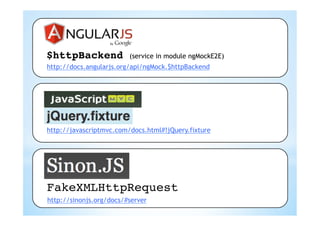
$httpBackend             (service in module ngMockE2E)
http://docs.angularjs.org/api/ngMock.$httpBackend


http://javascriptmvc.com/docs.html#!jQuery.fixture


FakeXMLHttpRequest!
http://sinonjs.org/docs/#server
Static fixtures
$.fixture("GET /ajax/dashboards","//test/.../dashboards.json");!


   [
       {
         "id": "dashboard_1", "name": "first dashboard",
         "monitors": [
           {
             "id": "monitor_1",
             "name": "Zombie-Dash build",
             "refresh_interval": 10,
             "type": "build",
             "configuration": {
               "type": "jenkins",
               "hostname": "zombie-dev.host.com",
               "port": 9080,
               "build_id": "zombie_build"
             }
           }
         ]
       },
       {
         "id": "dashboard_2", "name": "second dashboard”, "monitors": []
       }
   ]
                                                                           dashboards.json
Dynamic fixtures
$.fixture("GET /ajax/dashboards",
function(ajaxOptions, requestSettings, headers) {!
  return [200, "success", {json: [!
     {!
        id: "dashboard_1", name: "my dashboard",!
        monitors: [!
        {!
           id: "monitor_1",!
           name: "Zombie-Dash build",!
           refresh_interval: 10,!
           type: "build",!
           configuration: {!
              type: "jenkins",!
              hostname: "zombie-dev.host.com",!
              port: 9080,!
              build_id: "zombie_build"!
           }!
        }]!
     }!
  ]}];!
});!
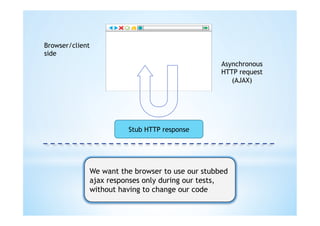
Browser/client
side
                                                 Asynchronous
                                                 HTTP request
                                                    (AJAX)


                       Stub HTTP response


             We want the browser to use our stubbed
             ajax responses only during our tests,
             without having to change our code
file://.../index.html?test_scenario=sample_scenario


...!
steal ({src: 'test/funcunit/test_scenario_loader.js', ignore: true});!
!


  (function() {!
    var regexp = /?test_scenario=(w+)/!
    var match = regexp.exec(window.location.search);!
    if (match) {!
       var scenarioName = match[1];!
       steal(!
         { src: 'lib/sinon-1.5.2.js', ignore: true },!
         { src: 'jquery/dom/fixture', ignore: true }!
       ).then("test/funcunit/scenarios/" + scenarioName + ".js");!
    }!
  }());!

                                                        test_scenario_loader.js
Example scenario
                                 Static fixtures


$.fixture("GET /ajax/dashboards", "//test/funcunit/fixtures/
fixture_dashboards.json");!
$.fixture("GET /ajax/monitor/monitor_1/runtime", "//test/funcunit/
fixtures/fixture_build_monitor_1.json");!
!
$.fixture("POST /ajax/dashboard", function(ajaxOriginalOptions, !
ajaxOptions, headers) {!
  var data = JSON.parse(ajaxOptions.data);!
!
  return [201, "success", {json: {id: "dashboard_4", name:   !
  data.name, monitors: [] } }, {} ];!
});!


                                      Dynamic fixture
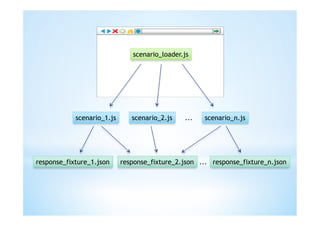
scenario_loader.js


            scenario_1.js      scenario_2.js   ...   scenario_n.js


response_fixture_1.json     response_fixture_2.json ... response_fixture_n.json
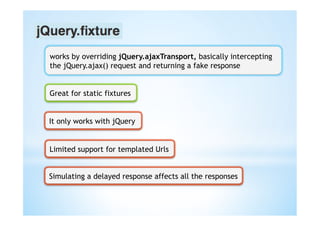
works by overriding jQuery.ajaxTransport, basically intercepting
the jQuery.ajax() request and returning a fake response


Great for static fixtures


It only works with jQuery


Limited support for templated Urls


Simulating a delayed response affects all the responses
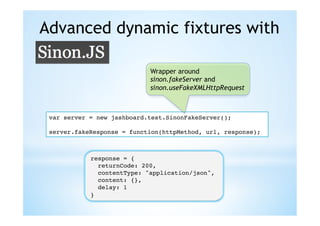
Advanced dynamic fixtures with

                            Wrapper around
                            sinon.fakeServer and
                            sinon.useFakeXMLHttpRequest


 var server = new jashboard.test.SinonFakeServer();!
 !
 server.fakeResponse = function(httpMethod, url, response);!


            response = {!
               returnCode: 200,!
               contentType: "application/json",!
               content: {},!
               delay: 1!
            }!
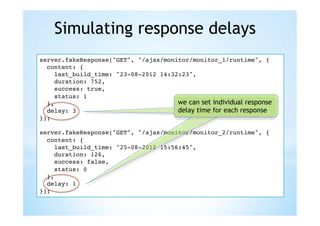
Simulating response delays
server.fakeResponse("GET", "/ajax/monitor/monitor_1/runtime", {!
  content: {!
     last_build_time: "23-08-2012 14:32:23",!
     duration: 752,!
     success: true,!
     status: 1!
  },!                                  we can set individual response
  delay: 3!                            delay time for each response
});!
!
server.fakeResponse("GET", "/ajax/monitor/monitor_2/runtime", {!
  content: {!
     last_build_time: "25-08-2012 15:56:45",!
     duration: 126,!
     success: false,!
     status: 0!
  },!
  delay: 1!
});!
Using Url templates
server.fakeResponse("POST", //ajax/dashboard/(w+)/monitor/,    !
  function(request, dashboard_id) {!
   !...!
});!
!
server.fakeResponse("PUT", //ajax/monitor/(w+)/position/, !
  function(request, monitor_id) {!
     var position = JSON.parse(request.requestBody);!
     console.log(monitor_id + " moved to [" + position.top + ”, " +
position.left + "]");!
     return {returnCode: 201};!
});!
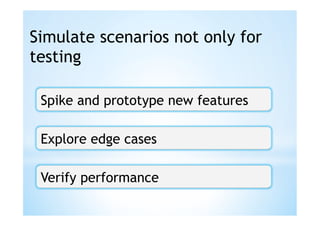
Simulate scenarios not only for
testing

 Spike and prototype new features

 Explore edge cases

 Verify performance
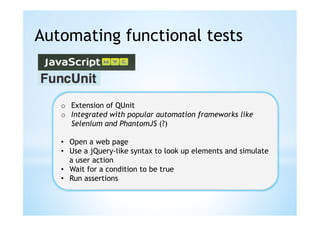
Automating functional tests


   o  Extension of QUnit
   o  Integrated with popular automation frameworks like
      Selenium and PhantomJS (?)

   •  Open a web page
   •  Use a jQuery-like syntax to look up elements and simulate
      a user action
   •  Wait for a condition to be true
   •  Run assertions
Examples of functional tests
module("Feature: display monitors in a dashboard", {!
  setup: function() {!
     S.open('index.html');!
  }!
});!
test("should load and display build monitor data", function() {!
  S("#tab-dashboard_2").visible().click();!
  S("#monitor_2 .monitor-title").visible().text("Epic build");!
  ...!
)}!
!
module("Feature: create a new dashboard", {!
...!
test("should create a new dashboard", function() {!
  //open form dialog!
  ...!
  S("input[name='dashboardName']).visible().type("some name");!
  S("#saveDashboard").visible().click();!
  S(".dashboard-tab").size(4, function() {!
     equal(S(".dashboard-tab").last().text(), "some name");   !
  });!
});!
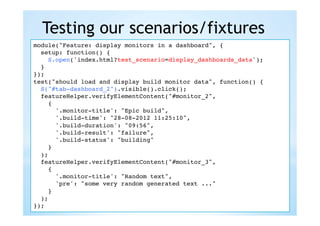
Testing our scenarios/fixtures
module("Feature: display monitors in a dashboard", {!
  setup: function() {!
     S.open('index.html?test_scenario=display_dashboards_data');!
     S.open('index.html');!
  }!
});!
test("should load and display build monitor data", function() {!
  S("#tab-dashboard_2").visible().click();!
  featureHelper.verifyElementContent("#monitor_2",!
     {!
        '.monitor-title': "Epic build",!
        '.build-time': "28-08-2012 11:25:10",!
        '.build-duration': "09:56",!
        '.build-result': "failure",!
        '.build-status': "building"!
     }!
  );!
  featureHelper.verifyElementContent("#monitor_3",!
     {!
        '.monitor-title': "Random text",!
        'pre': "some very random generated text ..."!
     }!
  );!
});!
Verifying expected ajax requests
 test("should create a new dashboard", function() {!
  openDashboardDialog();!
  featureHelper.inputText("input[name='dashboardName']", "TEST");!
  S("#saveDashboard").visible().click();!
  ...!
                                                            funcunit test


$.fixture("POST /ajax/dashboard", function(ajaxOriginalOptions, !
  ajaxOptions, headers) {!
  var data = JSON.parse(ajaxOptions.data);!
!
  if("TEST" === data.name) {!
     return [201, "success", {json: {id: "dashboard_4", name: "TEST",       !
     monitors: [] } }, {} ];!
  }!
  throw "unexpected data in the POST request: " + ajaxOptions.data;!
});!
                                                            test scenario
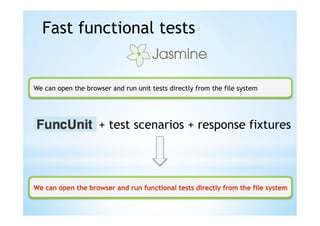
Fast functional tests


We can open the browser and run unit tests directly from the file system


                    + test scenarios + response fixtures
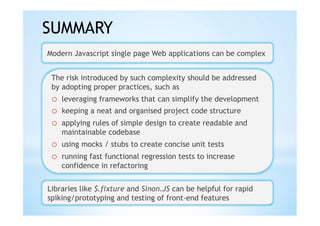
SUMMARY
Modern Javascript single page Web applications can be complex


 The risk introduced by such complexity should be addressed
 by adopting proper practices, such as
 o  leveraging frameworks that can simplify the development
 o  keeping a neat and organised project code structure
 o  applying rules of simple design to create readable and
    maintainable codebase
 o  using mocks / stubs to create concise unit tests
 o  running fast functional regression tests to increase
    confidence in refactoring


Libraries like $.fixture and Sinon.JS can be helpful for rapid
spiking/prototyping and testing of front-end features

Single page webapps & javascript-testing

  • 1.
  • 2.
    Agenda ns: eb applicatio MVC framewor Single page w ks: s AngularJS basic concept Javascript maturity Testing: n it n onJS, FuncU Jasmine, Si A simple dem o app: Jashboa rd
  • 3.
  • 4.
    Runs in thebrowser Breaks in the browser The language of choice The only choice ? Simple to test (manually) Test automation ? Lightweight and expressive Multiparadigm Dynamic How do I know I made a mistake?
  • 5.
    The Challenges o  UIinteractions o  Asynchronous communication o  Frequent DOM manipulation How to separate view and How to test effectively behaviour Event handling Where’s the business logic? Data-binding Where’s the rendering logic? Callbacks
  • 6.
    The MVC frameworkjungle http://todomvc.com/
  • 7.
  • 8.
    Two-way data binding Directives Dependency injection
  • 9.
    Two-way data binding Declarative Binding <input type="text" name="dashboardName” data-ng-model="dashboard.name”> ... <div>{{dashboard.name}}</div> Automatic view refresh (Data) View View Model Model
  • 10.
    DOM decoupling andbehaviour view separation Example: we want to display a message box in alert style
  • 11.
    Create a domelement to represent the alert message ... <div class="alert_msg modal hide"> <div class="modal-header"> </div> <div class="modal-body"> </div> </div> ... ! $(".alert_msg .modal-header").html('<div>Remove monitor ...</div>');! $(".alert_msg .modal-body").html('<div>If you delete...</div>');! $(".alert_msg").modal('show');! ! Change the DOM Display the message
  • 12.
    <div class="alert_msg modalhide"> data-jb-alert-box class="alert_msg modal hide"> <div class="modal-header"> Introduce <div>{{title}}</div> templates </div> <div class="modal-body"> <div>{{message}}</div> </div> </div> Register the alertBoxDirective: function(alertService){! element to be Wrap the return function(scope, element) {! widget logic used by the alertService.bindTo(element);! };! into a service alert service }! alertService.showAlert=function(options){! Invoke the service passing scope.title = options.title;! the message data scope.message = options.message;! $(element).modal('show');! $(".alert_msg").modal('show');! alertService.showAlert({! };! title: "Remove monitor...",! message: "If you delete..."! });!
  • 13.
    DOM decoupling andbehaviour view separation (2) Example: we want to display an overlay message while the data loads from the server
  • 14.
    MainController: function(scope, repository){! ...! show the overlay when var loadData = function() {! loading starts $.blockUI({message: $("overlay-msg").html().trim()})! repository.loadDashboards({! repository.loadDashboards({! success: function(data) {! ! success: function(data) {! !_.each(data, function(d){scope.dashboards.push(d);});! ! });!_.each(data, function(d){scope.dashboards.push(d);}); ! !! ! };! });! ! $.unblockUI();! ! };! });! hide the overlay when ! };! loading completes Create a dom element to represent the overlay message <div class="hide"> <div class="overlay-msg"> <spam class="ajax-loader-msg"> Loading dashboards... Please wait.</spam> </div> </div>
  • 15.
    MainController: function(scope, repository)overlayService) {! repository, {! ...! var loadData = function() {! overlayService.show("overlay-msg");! $.blockUI({message: $("overlay-msg").html().trim()})! service Inject the repository.loadDashboards({! into the controller success: function(data) {! ! !_.each(data, function(d){scope.dashboards.push(d);});! ! function(d){scope.dashboards.push(d);}); ! ! !overlayService.hide();! !$.unblockUI();! });! };! OverlayService: function() {! var blockUISettings = { ... };! Extract the widget logic ! into a service this.show = function(selector) {! blockUISettings.message = $(selector).html().trim();! $.blockUI(blockUISettings);! };! this.hide = function() {! $.unblockUI();! };! }!
  • 16.
    MainController: function(scope, repository){! MainController: function(scope, repository, overlayService) {! repository) {! Notify the view ...! ...! var loadData = function() {! var loadData = function() {!{ ! when data loading scope.$broadcast("DataLoadingStart");! overlayService.show("overlay-msg");! repository.loadDashboards({! starts and when it repository.loadDashboards({! repository.loadDashboards({! success: function(data) {! completes ! success: function(data) {! success: function(data) {! !_.each(data, function(d){scope.dashboards.push(d);}); !! ! });! ! !_.each(data, function(d){scope.dashboards.push(d);});! !! !_.each(data, function(d){scope.dashboards.push(d);}); ! ! ! !scope.$broadcast("DataLoadingComplete"); !! !overlayService.hide();! };! });! ! };! });! });! ! };! };! <div class="hide"> class="hide" data-jb-overlay="{show:'DataLoadingStart’,hide:'DataLoadingComplete'}"> <div class="overlay-msg"> <spam class="ajax-loader-msg"> Loading dashboards... Please wait.</spam> </div> </div> OverlayDirective: function(scope, element, attrs) {! var actions = {! show: function(){overlayService.show(element);},! hide: function(){overlayService.hide(element);}! }! Listen to the var eventsMap = scope.$eval(attrs['jbOverlay']);! specified events _.each(_.keys(eventsMap), function(actionName) { ! scope.$on(eventsMap[actionName], actions[actionName]);! });! }!
  • 17.
    DOM decoupling andbehaviour view separation (3) Other custom directive examples: <div data-jb-draggable>...</div> make an element draggable <div data-jb-resizable>...</div> make an element resizable <div data-jb-tooltip>...</div> set an element tooltip <div data-jb-dialog>...</div> open an element in a dialog <div data-jb-form-validation>...</div> trigger input validation rules
  • 18.
    Dependency injection DashboardFormController: function(scope, repository) {! scope.saveDashboard = function() {! repository.createDashboard({name: this.dashboardName});! ...! ! Repository: function(httpService) {! this.createDashboard = function(parameters) {! !httpService.postJSON("/ajax/dashboard", parameters);! };! ...! ! DashboardFormController Repository HttpService With Angular you can use plain javascript to define your models, services, controllers, etc.
  • 19.
    Good practices with o Use multiple controllers to separate the responsibilities in the different sections of your page o  Wrap your external libraries into services to provide decoupling from 3rd party plugins o  Use custom directives to define reusable components o  The primary function of the Angular Scope is to be the execution context (model) for your views/ templates. Be mindful when leveraging scope inheritance and scope data sharing. o  Use events as means to communicate o  Isolate your objects/functions so that they can be easily tested
  • 20.
    Modules and namespacing Define your module/namespace var jashboard = (function(module) {! module.services = angular.module('jashboard.services', []);! module.application = angular.module('jashboard',...); ! return module;! }(jashboard || {}));! http://www.adequatelygood.com/2010/3/JavaScript-Module-Pattern-In-Depth Add functionality jashboard = _.extend(jashboard, {! AlertService: function() {...}! });!
  • 21.
    Organising the filestructure Organise your folders •  web-root/ •  index.html •  lib •  jashboard One file to describe one •  controllers primary Object/Function •  directives •  model •  Dashboard.js •  plugins •  services •  AlertService.js •  HttpService.js •  test •  funcunit •  spec •  controllers •  services •  AlertServiceSpec.js •  SpecHelper.js •  SpecRunner.html
  • 22.
    Loading dependencies http://javascriptmvc.com/docs.html#!stealjs http://requirejs.org/
  • 23.
    Loading dependencies: <script type='text/javascript'! One line in your HTML to src='steal/steal.js?jashboard/loader.js'>! dynamically load all </script>! your dependencies steal(! { src: "css/bootstrap.min.css", packaged: false },! ...! ).then(! { src: 'lib/angular.min.js', packaged: false },! { src: 'lib/underscore-min.js', packaged: false },! { src: 'lib/bootstrap.min.js', packaged: false },! ...! ).then(function() {! steal('steal/less')! .then("css/jashboard.less")! .then("jashboard/modules.js")! });! loader.js
  • 24.
    Unit testing Behaviour driven development in Javascript http://pivotal.github.com/jasmine/ Advanced spying, mocking and stubbing http://sinonjs.org/
  • 25.
    Unit testing callbacks synchronous call asynchronous callback var Controller = function(scope, http) {! ...! this.loadData = function(){! http.getJSON("/ajax/dashboards").done(function(data) {! scope.dashboards = data;! });! };! var scope = {}, http = {};! Stub the http.getJSON = jasmine.createSpy().andReturn({! promise object done: function(callback) { callback("test-data"); }! }));! ! verify new Controller(scope, http).loadData();! synchronous call ! expect(http.getJSON).toHaveBeenCalledWith("/ajax/dashboards");! expect(scope.dashboards).toEqual("test-data");! ! verify asynchronous call
  • 26.
    Unit testing callbacks synchronous call asynchronous callback var Controller = function(scope, http) {! ...! this.loadData = function(){! http.getJSON("/ajax/dashboards").done(function(data) {! scope.dashboards = data;! });! };! Set espectations on var scope = {}, http = {};! the synchronous call http.getJSON = sinon.stub();! Stub the ! promise object http.getJSON.withArgs("/ajax/dashboards").returns({! done: function(callback) { callback("test-data"); }! }));! ! new Controller(scope, http).loadData();! ! verify expect(scope.dashboards).toEqual("test-data");! asynchronous call !
  • 27.
    Warning! var scope ={}, http = {};! http.getJSON = jasmine.createSpy().andReturn({! done: function(callback) { callback("test-data"); }! }));! ! new Controller(scope, http).loadData();! ! expect(http.getJSON).toHaveBeenCalledWith("/ajax/dashboards");! expect(scope.dashboards).toEqual("test-data");! ! Mocking and stubbing Highly behaviour focused tests dependencies No guaranteed objects wiring •  What if method getJSON is Javascript is a renamed? dynamic language •  What if the return value changes interface?
  • 28.
  • 29.
    Browser/client side Asynchronous HTTP request (AJAX) HTTP response •  HTML •  XML •  JSON Server side •  TEXT •  …
  • 30.
    Browser/client side Asynchronous HTTP request (AJAX) HTTP response •  HTML •  XML •  JSON Stub server Server side •  TEXT •  …
  • 31.
    Browser/client side Asynchronous HTTP request (AJAX) Stub HTTP response
  • 32.
    $httpBackend (service in module ngMockE2E) http://docs.angularjs.org/api/ngMock.$httpBackend http://javascriptmvc.com/docs.html#!jQuery.fixture FakeXMLHttpRequest! http://sinonjs.org/docs/#server
  • 33.
    Static fixtures $.fixture("GET /ajax/dashboards","//test/.../dashboards.json");! [ { "id": "dashboard_1", "name": "first dashboard", "monitors": [ { "id": "monitor_1", "name": "Zombie-Dash build", "refresh_interval": 10, "type": "build", "configuration": { "type": "jenkins", "hostname": "zombie-dev.host.com", "port": 9080, "build_id": "zombie_build" } } ] }, { "id": "dashboard_2", "name": "second dashboard”, "monitors": [] } ] dashboards.json
  • 34.
    Dynamic fixtures $.fixture("GET /ajax/dashboards", function(ajaxOptions,requestSettings, headers) {! return [200, "success", {json: [! {! id: "dashboard_1", name: "my dashboard",! monitors: [! {! id: "monitor_1",! name: "Zombie-Dash build",! refresh_interval: 10,! type: "build",! configuration: {! type: "jenkins",! hostname: "zombie-dev.host.com",! port: 9080,! build_id: "zombie_build"! }! }]! }! ]}];! });!
  • 35.
    Browser/client side Asynchronous HTTP request (AJAX) Stub HTTP response We want the browser to use our stubbed ajax responses only during our tests, without having to change our code
  • 36.
    file://.../index.html?test_scenario=sample_scenario ...! steal ({src: 'test/funcunit/test_scenario_loader.js',ignore: true});! ! (function() {! var regexp = /?test_scenario=(w+)/! var match = regexp.exec(window.location.search);! if (match) {! var scenarioName = match[1];! steal(! { src: 'lib/sinon-1.5.2.js', ignore: true },! { src: 'jquery/dom/fixture', ignore: true }! ).then("test/funcunit/scenarios/" + scenarioName + ".js");! }! }());! test_scenario_loader.js
  • 37.
    Example scenario Static fixtures $.fixture("GET /ajax/dashboards", "//test/funcunit/fixtures/ fixture_dashboards.json");! $.fixture("GET /ajax/monitor/monitor_1/runtime", "//test/funcunit/ fixtures/fixture_build_monitor_1.json");! ! $.fixture("POST /ajax/dashboard", function(ajaxOriginalOptions, ! ajaxOptions, headers) {! var data = JSON.parse(ajaxOptions.data);! ! return [201, "success", {json: {id: "dashboard_4", name: ! data.name, monitors: [] } }, {} ];! });! Dynamic fixture
  • 38.
    scenario_loader.js scenario_1.js scenario_2.js ... scenario_n.js response_fixture_1.json response_fixture_2.json ... response_fixture_n.json
  • 39.
    works by overridingjQuery.ajaxTransport, basically intercepting the jQuery.ajax() request and returning a fake response Great for static fixtures It only works with jQuery Limited support for templated Urls Simulating a delayed response affects all the responses
  • 40.
    Advanced dynamic fixtureswith Wrapper around sinon.fakeServer and sinon.useFakeXMLHttpRequest var server = new jashboard.test.SinonFakeServer();! ! server.fakeResponse = function(httpMethod, url, response);! response = {! returnCode: 200,! contentType: "application/json",! content: {},! delay: 1! }!
  • 41.
    Simulating response delays server.fakeResponse("GET","/ajax/monitor/monitor_1/runtime", {! content: {! last_build_time: "23-08-2012 14:32:23",! duration: 752,! success: true,! status: 1! },! we can set individual response delay: 3! delay time for each response });! ! server.fakeResponse("GET", "/ajax/monitor/monitor_2/runtime", {! content: {! last_build_time: "25-08-2012 15:56:45",! duration: 126,! success: false,! status: 0! },! delay: 1! });!
  • 42.
    Using Url templates server.fakeResponse("POST",//ajax/dashboard/(w+)/monitor/, ! function(request, dashboard_id) {! !...! });! ! server.fakeResponse("PUT", //ajax/monitor/(w+)/position/, ! function(request, monitor_id) {! var position = JSON.parse(request.requestBody);! console.log(monitor_id + " moved to [" + position.top + ”, " + position.left + "]");! return {returnCode: 201};! });!
  • 43.
    Simulate scenarios notonly for testing Spike and prototype new features Explore edge cases Verify performance
  • 44.
    Automating functional tests o  Extension of QUnit o  Integrated with popular automation frameworks like Selenium and PhantomJS (?) •  Open a web page •  Use a jQuery-like syntax to look up elements and simulate a user action •  Wait for a condition to be true •  Run assertions
  • 45.
    Examples of functionaltests module("Feature: display monitors in a dashboard", {! setup: function() {! S.open('index.html');! }! });! test("should load and display build monitor data", function() {! S("#tab-dashboard_2").visible().click();! S("#monitor_2 .monitor-title").visible().text("Epic build");! ...! )}! ! module("Feature: create a new dashboard", {! ...! test("should create a new dashboard", function() {! //open form dialog! ...! S("input[name='dashboardName']).visible().type("some name");! S("#saveDashboard").visible().click();! S(".dashboard-tab").size(4, function() {! equal(S(".dashboard-tab").last().text(), "some name"); ! });! });!
  • 46.
    Testing our scenarios/fixtures module("Feature:display monitors in a dashboard", {! setup: function() {! S.open('index.html?test_scenario=display_dashboards_data');! S.open('index.html');! }! });! test("should load and display build monitor data", function() {! S("#tab-dashboard_2").visible().click();! featureHelper.verifyElementContent("#monitor_2",! {! '.monitor-title': "Epic build",! '.build-time': "28-08-2012 11:25:10",! '.build-duration': "09:56",! '.build-result': "failure",! '.build-status': "building"! }! );! featureHelper.verifyElementContent("#monitor_3",! {! '.monitor-title': "Random text",! 'pre': "some very random generated text ..."! }! );! });!
  • 47.
    Verifying expected ajaxrequests test("should create a new dashboard", function() {! openDashboardDialog();! featureHelper.inputText("input[name='dashboardName']", "TEST");! S("#saveDashboard").visible().click();! ...! funcunit test $.fixture("POST /ajax/dashboard", function(ajaxOriginalOptions, ! ajaxOptions, headers) {! var data = JSON.parse(ajaxOptions.data);! ! if("TEST" === data.name) {! return [201, "success", {json: {id: "dashboard_4", name: "TEST", ! monitors: [] } }, {} ];! }! throw "unexpected data in the POST request: " + ajaxOptions.data;! });! test scenario
  • 48.
    Fast functional tests Wecan open the browser and run unit tests directly from the file system + test scenarios + response fixtures
  • 49.
    SUMMARY Modern Javascript singlepage Web applications can be complex The risk introduced by such complexity should be addressed by adopting proper practices, such as o  leveraging frameworks that can simplify the development o  keeping a neat and organised project code structure o  applying rules of simple design to create readable and maintainable codebase o  using mocks / stubs to create concise unit tests o  running fast functional regression tests to increase confidence in refactoring Libraries like $.fixture and Sinon.JS can be helpful for rapid spiking/prototyping and testing of front-end features