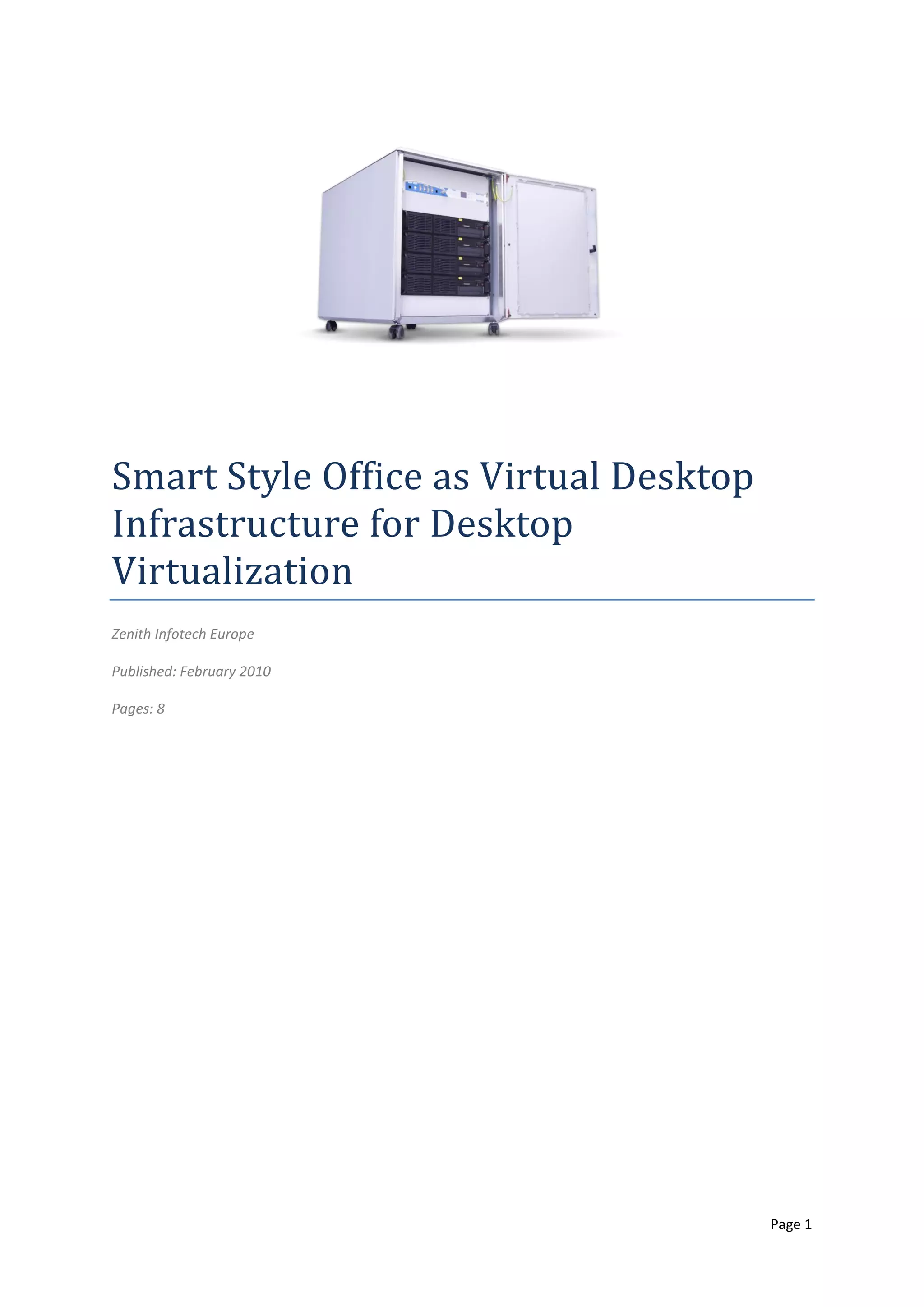
Smart Style Office as Virtual Desktop
Infrastructure for Desktop
Virtualization
Zenith Infotech Europe

Published: February 2010

Pages: 8


                                        Page 1
Contents
Introduction and Definitions .................................................................................................................................. 3
    Desktop Virtualization Concept.......................................................................................................................... 3
    Virtual Desktop Infrastructure ........................................................................................................................... 3
    Remote Desktop Software ................................................................................................................................. 4
    Thin Clients ......................................................................................................................................................... 4
Advantages and Disadvantages .............................................................................................................................. 4
    Benefits .............................................................................................................................................................. 4
    Limitations .......................................................................................................................................................... 4
The Opportunity ..................................................................................................................................................... 4
Use Cases ................................................................................................................................................................ 5
    Remote Administration ...................................................................................................................................... 5
    Hosted Desktops ................................................................................................................................................ 5
    Desktop Migration.............................................................................................................................................. 5
    Securing Devices and Data ................................................................................................................................. 5
    Supporting a Changing Workforce ..................................................................................................................... 5
Technical Considerations ........................................................................................................................................ 6
Smart Style Office as Virtual Desktop Infrastructure .............................................................................................. 6
    Smart Style Office Architecture .......................................................................................................................... 6
    Smart Style Office Components ......................................................................................................................... 6
    Recommended Configuration ............................................................................................................................ 7
    Recommendations ............................................................................................................................................. 7
Other White Papers ................................................................................................................................................ 7


                                                                                                                                                                  Page 2
White Paper Introduction
Smart Style Office as Virtual Desktop Infrastructure for Desktop Virtualization

Client or desktop virtualization is a priority for       Pick up the desktops of your clients, move them
companies, but adoption is ramping up slowly due         onto a Smart Style Office and achieve the same
to complexity and cost. While lowering costs is          objectives around application functionality without
driving client virtualization interest, manageability,   reengineering the application, lowering the costs
security and remote access are the driving forces        for your clients.
in the business case for desktop virtualization.
                                                         Desktop Virtualization Concept
                                                         The concept stores the resulting virtualized
Introduction and Definitions                             desktop on a remote central server, instead of on
This white paper examines the current state of           the local storage of a client; thus, when users work
desktop virtualization and how Smart Style Office        from their remote desktop client, all of the
can be the underlying platform to provide virtual        programs, applications, processes, and data used
desktop infrastructure. Desktop virtualization,          are kept and run centrally. This scenario allows
sometimes called client virtualization, as a             users to access their desktops on any capable
concept, separates a personal computer desktop           device, such as a traditional personal computer,
environment from a physical machine using a              notebook computer, smartphone, or thin client. In
client-server model of computing.                        simple terms, virtual machines are running on the
                                                         server (for each client) and clients can connect to
For most organisations the fastest growing server        their computers using remote desktop software.
workload that will be running in their data centres
will be the desktop. That of course represents a         It involves encapsulating and delivering either
trend towards centralised computing bringing back        access from a client to an entire information
in all that distributed computing capability into        system environment or the environment itself to
contained environments. Many users will see that         connect to a remote client device. The client
again as a return to the vision of thin client           device may use an entirely different hardware
computing, but it is much more than that. This is        architecture than that used by the projected
an easy path to transition, an easy to way to take       desktop environment, and may also be based upon
your presence and responsibilities out of that           an entirely different operating system.
distributed location without having the need to
                                                         The desktop virtualization model allows the use of
reengineer your application.
                                                         virtual machines to let multiple network
The key is that if you wanted to deliver a thin client   subscribers maintain individualized desktops on a
model you had to reengineer your application in          single, centrally located computer or server. This
that server hosted environment. With the hosted          can be the Smart Style Office platform solution as
virtualized desktop world you just pick up the           offered by Zenith Infotech. The central machine or
application, software and the whole environment          SSO may operate at a business premise or data
bring it into a data centre or central location and      center. Users may be geographically scattered, but
run it on a server platform and users access it          all will be connected to the central machine by a
remotely.                                                local area network, a wide area network or the
                                                         public internet.
Performance wise it didn’t use to be good enough
for every user or every type of application, but this    Virtual Desktop Infrastructure
changed since the introduction of Smart Style            Virtual desktop infrastructure, sometimes referred
Office. Important is to use virtualized desktops and     to as virtual desktop interface (VDI) is the server
Smart Style Office for users where it really works.      computing      model     enabling    virtualization,

                                                                                                      Page 3
encompassing the hardware and software systems         Advantages and Disadvantages
required to support the virtualized environment. In    The shared resources model inherent in desktop
other words, VDI is the practice of hosting a          virtualization offers advantages over the
desktop operating system within a virtual machine      traditional model, in which every computer
(VM) running on a centralized server.                  operates as a completely self-contained unit with
                                                       its own operating system, peripherals and
A Virtual Desktop Infrastructure (VDI) separates
                                                       application programs. Overall hardware expenses
the personal desktop environment from the
                                                       may diminish as users can share resources
physical machines. It creates a virtual image of
                                                       allocated to them on an as-needed basis.
that personal desktop environment on a remote
central physical server rather than on the actual
physical desktop of the client. VDI allows end-user
                                                       Benefits
                                                               simpler provisioning of new desktops
to access their personal desktops from any
connected device such as the traditional personal              use of templates forces standardization
computer, notebook, netbook, thin Clients or even              reduced downtime in the event of server
the more recent Smart Phones or iPads.                          or client hardware-failures
                                                               lower cost of deploying new applications
By using a Virtual Desktop Infrastructure IT                   desktop image-management capabilities
responsible can switch to remote administration of             secure remote access to an enterprise
desktops and can limit the administration and                   desktop environment
maintenance of actual physical machines by simply              longer refresh cycle desktops
cutting down on these physical machines. One
large computer can be used as a server to serve        Limitations
several terminals or thin clients.                             some loss of user autonomy, but this is a
                                                                serious gain for IT administrators
Remote Desktop Software                                        difficulty in running certain complex
Remote desktop refers to software or an OS                      applications, such as multimedia
feature allowing applications to be run on a server,           increased downtime in the event of
while being displayed locally. Remote control is                network failures
achieved from one computer to another                          reliance on connectivity to corporate or
connected via the local area network or the                     public network
internet. The controlling computer displays a copy             complexity and high costs of VDI
of the image received from the controlled                       deployment and management
computer’s display screen. The software on the
controlling computer transmits its own keyboard
and mouse activity to the controlled computer,         The Opportunity
where the remote control software implements
                                                       According to a recent research report by Gartner,
these actions. The controlled computer then
                                                       the worldwide hosted virtual desktop (HVD)
behaves as if the actions were performed directly
                                                       market will accelerate through 2013 to reach 49
at that computer.
                                                       million units, up from more than 500,000 units in
                                                       2009. The worldwide HVD revenue will grow from
Thin Clients
                                                       about $1.3 billion in 2009, which is less than 1% of
A thin client is a computer or computer program
                                                       the worldwide professional PC market, to $65.7
which depends heavily on its server to fulfil its
                                                       billion in 2013, which will be equal to more than
traditional computation roles. The most common
                                                       40% of the worldwide professional PC market.
type of modern thin clients is a low-end computer
terminal which concentrates solely on providing a      Gartner estimates that approximately 15% of
graphical user interface to the end-user. The          current worldwide traditional professional desktop
remaining functionality, in particular the operating   PCs will migrate to HVDs by 2014. Read more:
system, is provided by the server.                     http://www.gartner.com/it/page.jsp?id=920814

                                                                                                    Page 4
Use Cases                                              Desktop Migration
Managing desktops is getting harder by the day.        Organizations are faced with the daunting task of
Employees are more mobile and are located in           having to migrate their desktop environments to
multi-site work environment, malicious code is         Windows 7 as Windows XP availability and support
more targeted; applications are larger and harder      are squeezed. The consensus is clear; Microsoft
to deploy in a timely manner; patch management         Windows 7 is a desirable and increasingly urgent
is a nightmare; and managing dozens of PC images       desktop upgrade. Many organizations are
is all but impossible. And let’s not even discuss      accelerating their move to desktop virtualization
upcoming Windows migrations. Users will tell you       to virtualize their Windows 7 migration rather than
that their machines are simply too slow and that IT    implement Windows 7 in their existing desktop
is not responsive to their needs. IT support costs     architecture.
are on the rise, and organizations are looking for a
                                                       According to Citrix the benefits of transforming
way to curtail their spending. Today’s technologies
                                                       their IT infrastructure with desktop virtualization
don’t address desktop operations, but it is not
                                                       accomplish several key goals at once: (1) deliver
technology which are driving the use cases of
                                                       complete Windows 7 desktops to any device,
desktop virtualization.
                                                       anywhere, instantly: PC, Mac, smartphone, iPad,
Remote Administration                                  netbooks or thin clients; (2) lower cost of desktop
A simple use for desktop virtualization involves       management with longer PC refresh cycles; (3)
remote administration, where the controlling           control corporate data and ensuring IT
computer will work almost the same as on a             compliance.
duplicated desktop, except that the actions of the
controlling computer or SSO may be almost
                                                       Securing Devices and Data
                                                       An operating system will always require patching,
unnoticeable on the remote computer display.
                                                       but increasingly the challenge is securing the data.
This differs from simple remote desktop software       For most small and large organization, securing
in that several people can use the same controlling    data and intellectual property are top business
computer at once without disturbing each other’s       objectives. To do this, however, they are forced to
work. This could be useful for several                 deploy multiple technologies, such as antimalware,
administrators doing different tasks on the same       host intrusion prevention, information leak
server.                                                prevention and encryption, making it difficult for IT
                                                       to keep up with the latest threats.
In some cases one can buy one large (or server)
and several thin clients, rather than purchasing a     Supporting a Changing Workforce
complete computer for each physical workstation.       The number of typical 9-to-5 office-bound workers
The controlling thin client computers need only        decreases every year. IT faces a two-fold
enough resources to run the remote controlling         challenge: 1) the increasing number of mobile and
software, therefore virtualization can provide a       remote employees, and 2) a younger, more
very simple and cheap computing system.                demanding generation of workers. And IT must
                                                       still provide a consistent level of service to these
Hosted Desktops                                        users that now require anytime, anywhere access
Hosted virtual desktops results from desktop           to data and applications. Furthermore, companies
virtualization services provided through an            deal more often with multi-location support issues
outsourced, hosted subscription model. Hosted          and flexible employment. This means that the IT
virtual desktop services generally include a           infrastructure needs to support freelance and
managed desktop client operating system                contractors and provision desktops in a temporary
configuration. Transferring information technology     situation.
infrastructure to an outsourced model can shift
accounting for the associated costs from capital
expenses to operating expenses.

                                                                                                     Page 5
Technical Considerations                               enables IT support staff to provision virtual
When researching the market for appropriate            desktops as large files rather than as individual,
hardware and software solutions supporting             physical PCs. Hosted desktop virtualization is
desktop virtualization, consider following:            where the desktop environment executes in a
                                                       protected environment in a data center or central
        OS support: multiple OS support ranging       location. These desktops are always on and users
         from Windows, Linux, FreeBSD,…                can access their environments from anywhere,
        Audio support: the remote control             including native business continuity and disaster
         software transfers audio signals across       recovery capabilities.
         the network and plays the audio through
         the speakers attached to the computer.        Smart Style Office Components
        Built-in encryption: the software has at      The SSO Virtual Desktop Infrastructure consists of
         least one method of encrypting data           the minimal following components:
         between the local and remote computers,
                                                              2 x CS414 nodes with quad core CPU AMD
         and the encryption is built into the
                                                               2.7GHz and 28 GB usable memory in total
         remote control software.
                                                              Storage capacity of 12 x 1TB secondary
        File transfer: the software allows the user
                                                               storage and 4 x 60 GB primary SSD in total
         to transfer files between the local and
                                                              2 switches for public and private network
         remote computers, from within the client
                                                              1 x Racktivity device for power monitoring
         software’s user interface.
                                                              Fully racked and cabled with space to
        Local application deliver: users can
                                                               scale with 2 more node in same rack
         disconnect from the remote computer
         and work offline with the local computer             Cloud Management Center with extensive
         using a desktop virtualised application.              virtual machine controls: start, stop,
                                                               snapshot, clone, restart, etc. but also
        Single instance management: means you
                                                               storage and server management tools.
         only need to update operating system
         patching, application updates and profile     Each node on the Smart Style Office platform can
         changes once.                                 host up to 7 virtual desktops (Windows 7) at 2 GB
        Seamless window: the software allows an       RAM per desktop. It does not require additional
         application to be run on the server, and      server software such as Citrix XenDesktop or
         just the application window to be shown       VMware View. Windows users can take benefit
         on the client’s desktop, without user         from Terminal Services or Remote Desktop
         interface chrome.                             Services.

                                                       Following functionality is important in desktop
Smart Style Office as Virtual                          virtualization:
Desktop Infrastructure                                        Golden image support allowing you to
                                                               deploy new desktops to specific user
Smart Style Office Architecture                                groups
Using SSO as client virtualization solution
                                                              Desktop performance monitoring with
addresses security, management, availability and
                                                               real time data and consumption reporting
flexibility needs. Client virtualization encompasses
                                                              Snapshot functionality allowing users to
four different technologies: 1) local desktop
                                                               roll-back and roll-forward
virtualization; 2) hosted desktop virtualization; 3)
                                                              Local peripheral support allowing users to
local application virtualization; and 4) hosted
                                                               connect devices via hardware thin client
application virtualization.
                                                              Multimedia support with fluent video and
Smart Style Office supports both local and hosted              audio streaming
desktop virtualization. Local desktop virtualization


                                                                                                  Page 6
The system itself can be located at the customer       case around the cost savings that your preferred
premise and has all remote administration tools        vendor is hyping. Focus your arguments on data
included. As long as there is power and IP, remote     and endpoint security, improved desktop
administrators can access their Smart Style Office     manageability, and flexible remote access. Cost
instance and make changes to the configuration,        savings are having a hard time proving it to
adding new users, removing old profiles, etc.          customers because of the additional server
                                                       hardware, software and bandwidth needed. Those
Besides on-premise deployments, Smart Style            resellers that focus on hard IT support costs
Office can also be placed at the data center. This     combined with softer benefits are proving value
requires another view on bandwidth consumption         from day one.
and security configuration, but the user experience
should be identical compared to a local                Step 2: Define your scenarios and classify your
deployment.                                            users.

It is important to consider the availability           Many of you have already gone through this
requirements of the customer. When all resources       exercise as part of your traditional PC
are consumed for desktop virtualization on the         management process. For the rest, use a two-step
Smart Style Office instance with a maximum             classification method: 1) Based on performance
occupancy, it might not have enough resource left      needs, put users in task-based, knowledge, and
to rebuild a server. This won’t have down-time         power user groups, and 2) further segment your
impact in case a provisioned desktop is corrupted      users based on whether they are mobile, remote,
by a virus for example. It is recommended to           or third party. The remaining users who can’t find
deploy desktops at an 80% fill rate against total      a home in this classification should remain on a
capacity, so there is physical resource left for       traditional PC for now.
temporary desktops or desktop rebuilds in case
you need it.                                           Step 3: Pick a problem scenario to start with, build
                                                       out from there.
Recommended Configuration
                                                       Take a look at your user population. Are there
Example Desktop Virtualization for 10 users
                                                       groups that have specific needs, such as access to
        5 new thin clients + 5 existing PCs           highly confidential customer data or the ability to
        3 x CS414 nodes (2 desktop nodes + 1          use a non-managed device, which the traditional
         server/standby node)                          PC model doesn’t accommodate well? These are
                                                       great starting points for a client virtualization pilot.
        2 x switches + Racktivity device
                                                       Use the success of the pilot to build your case for
Recommendations                                        new user groups and technologies.
As a reseller of Zenith Infotech’s products and
services, there is no one-size-fits-all client
virtualization solution, nor is every user a fit for
                                                       Other White Papers
virtualization. Desktop environments are almost                Smart Style Office as Virtual Desktop
always unique, so more than with other                          Infrastructure for Desktop Virtualization
technologies, your mileage will vary. Make sure                Smart Style Office as iSCSI Target for
you build a tailored business case that prioritizes             Storay Array and Storage Area Network
your customer’s scenarios. Forrester recommends                Smart Style Office as as Application Host
that you take this three-step approach:                         for Multi-Site Small Office Environments
                                                               Smart Style Office as Wide Area Network
Step 1: Build a new business case around security               Host for Data Center Services
and manageability, not cost savings.                           Smart Style Office as Server Cluster for
                                                                High Availability Workloads
As with any new technology, you must build a
business case. Refrain from building this business

                                                                                                       Page 7
Disclaimer

The information contained in this document
represents the current view of Zenith Infotech
Europe on the issues discussed as of the date of
publication. Because Zenith Infotech Europe must
respond to changing market conditions, it should
not be interpreted to be a commitment on the part
of Zenith Infotech Europe, and Zenith Infotech
Europe cannot guarantee the accuracy of any
information presented after the date of
publication.

This White Paper is for informational purposes
only. Zenith Infotech Europemakes no warranties,
express, implied or statutory, as to the information
in this document.

Complying with all applicable copyright laws is the
responsibility of the user. Without limiting the
rights under copyright, no part of this document
may be reproduced, stored in or introduced into a
retrieval system, or transmitted in any form or by
any means (electronic, mechanical, photocopying,
recording, or otherwise), or for any purpose,
without the express written permission of
Microsoft Corporation.

Zenith Infotech Europe may have patents, patent
applications, trademarks, copyrights, or other
intellectual property rights covering subject matter
in this document. Except as expressly provided in
any written license agreement from Zenith Infotech
Europe, the furnishing of this document does not
give you any license to these patents, trademarks,
copyrights, or other intellectual property.


©2011 Zenith Infotech Europe. All rights reserved.


                                                       Page 8

White Paper: Smart Style Office as Virtual Deskopt Infrastructure for Desktop Virtualization

  • 1.
    Smart Style Officeas Virtual Desktop Infrastructure for Desktop Virtualization Zenith Infotech Europe Published: February 2010 Pages: 8 Page 1
  • 2.
    Contents Introduction and Definitions.................................................................................................................................. 3 Desktop Virtualization Concept.......................................................................................................................... 3 Virtual Desktop Infrastructure ........................................................................................................................... 3 Remote Desktop Software ................................................................................................................................. 4 Thin Clients ......................................................................................................................................................... 4 Advantages and Disadvantages .............................................................................................................................. 4 Benefits .............................................................................................................................................................. 4 Limitations .......................................................................................................................................................... 4 The Opportunity ..................................................................................................................................................... 4 Use Cases ................................................................................................................................................................ 5 Remote Administration ...................................................................................................................................... 5 Hosted Desktops ................................................................................................................................................ 5 Desktop Migration.............................................................................................................................................. 5 Securing Devices and Data ................................................................................................................................. 5 Supporting a Changing Workforce ..................................................................................................................... 5 Technical Considerations ........................................................................................................................................ 6 Smart Style Office as Virtual Desktop Infrastructure .............................................................................................. 6 Smart Style Office Architecture .......................................................................................................................... 6 Smart Style Office Components ......................................................................................................................... 6 Recommended Configuration ............................................................................................................................ 7 Recommendations ............................................................................................................................................. 7 Other White Papers ................................................................................................................................................ 7 Page 2
  • 3.
    White Paper Introduction SmartStyle Office as Virtual Desktop Infrastructure for Desktop Virtualization Client or desktop virtualization is a priority for Pick up the desktops of your clients, move them companies, but adoption is ramping up slowly due onto a Smart Style Office and achieve the same to complexity and cost. While lowering costs is objectives around application functionality without driving client virtualization interest, manageability, reengineering the application, lowering the costs security and remote access are the driving forces for your clients. in the business case for desktop virtualization. Desktop Virtualization Concept The concept stores the resulting virtualized Introduction and Definitions desktop on a remote central server, instead of on This white paper examines the current state of the local storage of a client; thus, when users work desktop virtualization and how Smart Style Office from their remote desktop client, all of the can be the underlying platform to provide virtual programs, applications, processes, and data used desktop infrastructure. Desktop virtualization, are kept and run centrally. This scenario allows sometimes called client virtualization, as a users to access their desktops on any capable concept, separates a personal computer desktop device, such as a traditional personal computer, environment from a physical machine using a notebook computer, smartphone, or thin client. In client-server model of computing. simple terms, virtual machines are running on the server (for each client) and clients can connect to For most organisations the fastest growing server their computers using remote desktop software. workload that will be running in their data centres will be the desktop. That of course represents a It involves encapsulating and delivering either trend towards centralised computing bringing back access from a client to an entire information in all that distributed computing capability into system environment or the environment itself to contained environments. Many users will see that connect to a remote client device. The client again as a return to the vision of thin client device may use an entirely different hardware computing, but it is much more than that. This is architecture than that used by the projected an easy path to transition, an easy to way to take desktop environment, and may also be based upon your presence and responsibilities out of that an entirely different operating system. distributed location without having the need to The desktop virtualization model allows the use of reengineer your application. virtual machines to let multiple network The key is that if you wanted to deliver a thin client subscribers maintain individualized desktops on a model you had to reengineer your application in single, centrally located computer or server. This that server hosted environment. With the hosted can be the Smart Style Office platform solution as virtualized desktop world you just pick up the offered by Zenith Infotech. The central machine or application, software and the whole environment SSO may operate at a business premise or data bring it into a data centre or central location and center. Users may be geographically scattered, but run it on a server platform and users access it all will be connected to the central machine by a remotely. local area network, a wide area network or the public internet. Performance wise it didn’t use to be good enough for every user or every type of application, but this Virtual Desktop Infrastructure changed since the introduction of Smart Style Virtual desktop infrastructure, sometimes referred Office. Important is to use virtualized desktops and to as virtual desktop interface (VDI) is the server Smart Style Office for users where it really works. computing model enabling virtualization, Page 3
  • 4.
    encompassing the hardwareand software systems Advantages and Disadvantages required to support the virtualized environment. In The shared resources model inherent in desktop other words, VDI is the practice of hosting a virtualization offers advantages over the desktop operating system within a virtual machine traditional model, in which every computer (VM) running on a centralized server. operates as a completely self-contained unit with its own operating system, peripherals and A Virtual Desktop Infrastructure (VDI) separates application programs. Overall hardware expenses the personal desktop environment from the may diminish as users can share resources physical machines. It creates a virtual image of allocated to them on an as-needed basis. that personal desktop environment on a remote central physical server rather than on the actual physical desktop of the client. VDI allows end-user Benefits  simpler provisioning of new desktops to access their personal desktops from any connected device such as the traditional personal  use of templates forces standardization computer, notebook, netbook, thin Clients or even  reduced downtime in the event of server the more recent Smart Phones or iPads. or client hardware-failures  lower cost of deploying new applications By using a Virtual Desktop Infrastructure IT  desktop image-management capabilities responsible can switch to remote administration of  secure remote access to an enterprise desktops and can limit the administration and desktop environment maintenance of actual physical machines by simply  longer refresh cycle desktops cutting down on these physical machines. One large computer can be used as a server to serve Limitations several terminals or thin clients.  some loss of user autonomy, but this is a serious gain for IT administrators Remote Desktop Software  difficulty in running certain complex Remote desktop refers to software or an OS applications, such as multimedia feature allowing applications to be run on a server,  increased downtime in the event of while being displayed locally. Remote control is network failures achieved from one computer to another  reliance on connectivity to corporate or connected via the local area network or the public network internet. The controlling computer displays a copy  complexity and high costs of VDI of the image received from the controlled deployment and management computer’s display screen. The software on the controlling computer transmits its own keyboard and mouse activity to the controlled computer, The Opportunity where the remote control software implements According to a recent research report by Gartner, these actions. The controlled computer then the worldwide hosted virtual desktop (HVD) behaves as if the actions were performed directly market will accelerate through 2013 to reach 49 at that computer. million units, up from more than 500,000 units in 2009. The worldwide HVD revenue will grow from Thin Clients about $1.3 billion in 2009, which is less than 1% of A thin client is a computer or computer program the worldwide professional PC market, to $65.7 which depends heavily on its server to fulfil its billion in 2013, which will be equal to more than traditional computation roles. The most common 40% of the worldwide professional PC market. type of modern thin clients is a low-end computer terminal which concentrates solely on providing a Gartner estimates that approximately 15% of graphical user interface to the end-user. The current worldwide traditional professional desktop remaining functionality, in particular the operating PCs will migrate to HVDs by 2014. Read more: system, is provided by the server. http://www.gartner.com/it/page.jsp?id=920814 Page 4
  • 5.
    Use Cases Desktop Migration Managing desktops is getting harder by the day. Organizations are faced with the daunting task of Employees are more mobile and are located in having to migrate their desktop environments to multi-site work environment, malicious code is Windows 7 as Windows XP availability and support more targeted; applications are larger and harder are squeezed. The consensus is clear; Microsoft to deploy in a timely manner; patch management Windows 7 is a desirable and increasingly urgent is a nightmare; and managing dozens of PC images desktop upgrade. Many organizations are is all but impossible. And let’s not even discuss accelerating their move to desktop virtualization upcoming Windows migrations. Users will tell you to virtualize their Windows 7 migration rather than that their machines are simply too slow and that IT implement Windows 7 in their existing desktop is not responsive to their needs. IT support costs architecture. are on the rise, and organizations are looking for a According to Citrix the benefits of transforming way to curtail their spending. Today’s technologies their IT infrastructure with desktop virtualization don’t address desktop operations, but it is not accomplish several key goals at once: (1) deliver technology which are driving the use cases of complete Windows 7 desktops to any device, desktop virtualization. anywhere, instantly: PC, Mac, smartphone, iPad, Remote Administration netbooks or thin clients; (2) lower cost of desktop A simple use for desktop virtualization involves management with longer PC refresh cycles; (3) remote administration, where the controlling control corporate data and ensuring IT computer will work almost the same as on a compliance. duplicated desktop, except that the actions of the controlling computer or SSO may be almost Securing Devices and Data An operating system will always require patching, unnoticeable on the remote computer display. but increasingly the challenge is securing the data. This differs from simple remote desktop software For most small and large organization, securing in that several people can use the same controlling data and intellectual property are top business computer at once without disturbing each other’s objectives. To do this, however, they are forced to work. This could be useful for several deploy multiple technologies, such as antimalware, administrators doing different tasks on the same host intrusion prevention, information leak server. prevention and encryption, making it difficult for IT to keep up with the latest threats. In some cases one can buy one large (or server) and several thin clients, rather than purchasing a Supporting a Changing Workforce complete computer for each physical workstation. The number of typical 9-to-5 office-bound workers The controlling thin client computers need only decreases every year. IT faces a two-fold enough resources to run the remote controlling challenge: 1) the increasing number of mobile and software, therefore virtualization can provide a remote employees, and 2) a younger, more very simple and cheap computing system. demanding generation of workers. And IT must still provide a consistent level of service to these Hosted Desktops users that now require anytime, anywhere access Hosted virtual desktops results from desktop to data and applications. Furthermore, companies virtualization services provided through an deal more often with multi-location support issues outsourced, hosted subscription model. Hosted and flexible employment. This means that the IT virtual desktop services generally include a infrastructure needs to support freelance and managed desktop client operating system contractors and provision desktops in a temporary configuration. Transferring information technology situation. infrastructure to an outsourced model can shift accounting for the associated costs from capital expenses to operating expenses. Page 5
  • 6.
    Technical Considerations enables IT support staff to provision virtual When researching the market for appropriate desktops as large files rather than as individual, hardware and software solutions supporting physical PCs. Hosted desktop virtualization is desktop virtualization, consider following: where the desktop environment executes in a protected environment in a data center or central  OS support: multiple OS support ranging location. These desktops are always on and users from Windows, Linux, FreeBSD,… can access their environments from anywhere,  Audio support: the remote control including native business continuity and disaster software transfers audio signals across recovery capabilities. the network and plays the audio through the speakers attached to the computer. Smart Style Office Components  Built-in encryption: the software has at The SSO Virtual Desktop Infrastructure consists of least one method of encrypting data the minimal following components: between the local and remote computers,  2 x CS414 nodes with quad core CPU AMD and the encryption is built into the 2.7GHz and 28 GB usable memory in total remote control software.  Storage capacity of 12 x 1TB secondary  File transfer: the software allows the user storage and 4 x 60 GB primary SSD in total to transfer files between the local and  2 switches for public and private network remote computers, from within the client  1 x Racktivity device for power monitoring software’s user interface.  Fully racked and cabled with space to  Local application deliver: users can scale with 2 more node in same rack disconnect from the remote computer and work offline with the local computer  Cloud Management Center with extensive using a desktop virtualised application. virtual machine controls: start, stop, snapshot, clone, restart, etc. but also  Single instance management: means you storage and server management tools. only need to update operating system patching, application updates and profile Each node on the Smart Style Office platform can changes once. host up to 7 virtual desktops (Windows 7) at 2 GB  Seamless window: the software allows an RAM per desktop. It does not require additional application to be run on the server, and server software such as Citrix XenDesktop or just the application window to be shown VMware View. Windows users can take benefit on the client’s desktop, without user from Terminal Services or Remote Desktop interface chrome. Services. Following functionality is important in desktop Smart Style Office as Virtual virtualization: Desktop Infrastructure  Golden image support allowing you to deploy new desktops to specific user Smart Style Office Architecture groups Using SSO as client virtualization solution  Desktop performance monitoring with addresses security, management, availability and real time data and consumption reporting flexibility needs. Client virtualization encompasses  Snapshot functionality allowing users to four different technologies: 1) local desktop roll-back and roll-forward virtualization; 2) hosted desktop virtualization; 3)  Local peripheral support allowing users to local application virtualization; and 4) hosted connect devices via hardware thin client application virtualization.  Multimedia support with fluent video and Smart Style Office supports both local and hosted audio streaming desktop virtualization. Local desktop virtualization Page 6
  • 7.
    The system itselfcan be located at the customer case around the cost savings that your preferred premise and has all remote administration tools vendor is hyping. Focus your arguments on data included. As long as there is power and IP, remote and endpoint security, improved desktop administrators can access their Smart Style Office manageability, and flexible remote access. Cost instance and make changes to the configuration, savings are having a hard time proving it to adding new users, removing old profiles, etc. customers because of the additional server hardware, software and bandwidth needed. Those Besides on-premise deployments, Smart Style resellers that focus on hard IT support costs Office can also be placed at the data center. This combined with softer benefits are proving value requires another view on bandwidth consumption from day one. and security configuration, but the user experience should be identical compared to a local Step 2: Define your scenarios and classify your deployment. users. It is important to consider the availability Many of you have already gone through this requirements of the customer. When all resources exercise as part of your traditional PC are consumed for desktop virtualization on the management process. For the rest, use a two-step Smart Style Office instance with a maximum classification method: 1) Based on performance occupancy, it might not have enough resource left needs, put users in task-based, knowledge, and to rebuild a server. This won’t have down-time power user groups, and 2) further segment your impact in case a provisioned desktop is corrupted users based on whether they are mobile, remote, by a virus for example. It is recommended to or third party. The remaining users who can’t find deploy desktops at an 80% fill rate against total a home in this classification should remain on a capacity, so there is physical resource left for traditional PC for now. temporary desktops or desktop rebuilds in case you need it. Step 3: Pick a problem scenario to start with, build out from there. Recommended Configuration Take a look at your user population. Are there Example Desktop Virtualization for 10 users groups that have specific needs, such as access to  5 new thin clients + 5 existing PCs highly confidential customer data or the ability to  3 x CS414 nodes (2 desktop nodes + 1 use a non-managed device, which the traditional server/standby node) PC model doesn’t accommodate well? These are great starting points for a client virtualization pilot.  2 x switches + Racktivity device Use the success of the pilot to build your case for Recommendations new user groups and technologies. As a reseller of Zenith Infotech’s products and services, there is no one-size-fits-all client virtualization solution, nor is every user a fit for Other White Papers virtualization. Desktop environments are almost  Smart Style Office as Virtual Desktop always unique, so more than with other Infrastructure for Desktop Virtualization technologies, your mileage will vary. Make sure  Smart Style Office as iSCSI Target for you build a tailored business case that prioritizes Storay Array and Storage Area Network your customer’s scenarios. Forrester recommends  Smart Style Office as as Application Host that you take this three-step approach: for Multi-Site Small Office Environments  Smart Style Office as Wide Area Network Step 1: Build a new business case around security Host for Data Center Services and manageability, not cost savings.  Smart Style Office as Server Cluster for High Availability Workloads As with any new technology, you must build a business case. Refrain from building this business Page 7
  • 8.
    Disclaimer The information containedin this document represents the current view of Zenith Infotech Europe on the issues discussed as of the date of publication. Because Zenith Infotech Europe must respond to changing market conditions, it should not be interpreted to be a commitment on the part of Zenith Infotech Europe, and Zenith Infotech Europe cannot guarantee the accuracy of any information presented after the date of publication. This White Paper is for informational purposes only. Zenith Infotech Europemakes no warranties, express, implied or statutory, as to the information in this document. Complying with all applicable copyright laws is the responsibility of the user. Without limiting the rights under copyright, no part of this document may be reproduced, stored in or introduced into a retrieval system, or transmitted in any form or by any means (electronic, mechanical, photocopying, recording, or otherwise), or for any purpose, without the express written permission of Microsoft Corporation. Zenith Infotech Europe may have patents, patent applications, trademarks, copyrights, or other intellectual property rights covering subject matter in this document. Except as expressly provided in any written license agreement from Zenith Infotech Europe, the furnishing of this document does not give you any license to these patents, trademarks, copyrights, or other intellectual property. ©2011 Zenith Infotech Europe. All rights reserved. Page 8