IJRET: International Journal of Research in Engineering and Technology eISSN: 2319-1163 | pISSN: 2321-7308
__________________________________________________________________________________________
Volume: 02 Issue: 10 | Oct-2013, Available @ http://www.ijret.org 33
SMART PHONE FOR ELDERLY POPULACE
Shiv Kumar Goel1
, Nikita Haryani2
, Pramod Tiwari3
, Abhishek Jain4
, Prasad Kuvalekar5
1
Deputy HOD (Asst. Prof.), VES Institute of Technology, Chembur, Mumbai
2, 3, 4, 5
VES Institute of Technology, Chembur, Mumbai
Shiva_goyal1@rediffmail.com, nikitaharyani@gmail.com, tiwari.pramod@gmail.com, abhishek3.aj@gmail.com,
pjkuvalekar@gmail.com
Abstract
Smart phones possessions used to be considered as a luxury. Over the period of time, it became a necessity rather than luxury. Smart
phones are essential for everyone including the elderly population. The device can act as a long-range communicator, multimedia
device, infotainment device, etc. However, the current problems with the existing smart phones are that its complex features and
interface designs have intimidated some elder users from using the device. The problem can be addressed by identifying the features
needed for these special users. The device should have the features like larger intuitive interface, ergonomics, etc. which has been
designed to make it user friendly for elder population. The proposal has been made with the view that the elder population of the fore
coming future will be tech savvy.
Keywords: SMS: Short Messaging Service, IR: Infrared Radiation, GPS: Global Positioning Service, 2G: second
Generation, 3G: Third Generation, 4G: Fourth Generation, WLAN: Wireless Local Area Network, CDMA: Code Division
Multiple Access. GSM: Global System for Mobile communication, PDA: Personal Digital Assistant, HAC: Hearing Aid
Compatibility, M3: Rating indicates the handset has satisfied the ANSI standard, M4: Rating indicates the handset has
exceeded the ANSI standard, SAR: Specific Absorption Rate, RF: Radio Frequency,
----------------------------------------------------------------------***-----------------------------------------------------------------------
1. INTRODUCTION
A smart phone is a phone created on a mobile operating system,
with superior computing potential and connectivity than a
feature phone. Initial smart phones amalgamated the functions
of a PDA with a mobile phone. Later models added the
functionality of handy media players, digital cameras
and GPS routing units to form one multi-use device. Many
contemporary smart phones also comprises of high-
resolution touch screens and web browsers. High-speed data
access is provided by Wi-Fi (WLAN) and mobile broadband
(2G/3G/4G). In recent years, the rapid development of mobile
application markets and of mobile business has been drivers of
smart phone recognition.
Although there isn't one perfect smart phone for the elderly,
there are many features that make phones easier for the elderly
to use. Technologies can play a colossal role in sustaining older
people to escort them in a high-quality environment. Nine out
of ten elderly people believed that phone (i.e. mobile and
landline) as one of the most important devices in their
existence. The mobile devices could be useful for
communications and safekeeping purposes. For example,
mobile phones enable the elderly users to remain connected
with their relatives and acquaintances. Such devices become
vital predominantly during emergencies.
In the face of the convenience of smart phones especially to the
elder population, there are still many annotations from this
group regarding the interfaces of the existing mobile devices
being intricate to use. In relation to these asserts, many studies
have reported that older adults who want to send a text message
but could not confidently do so. It is very regrettable when
some elderly people do not even wish to use a smart phone
owing to the reason that the interface is not very well designed
for them.
The problem of complex functionality can be addressed by
identifying the various necessities of a simpler interface. The
user interface should possess simpler design along with the
features like larger buttons and the color combinations which
are suited for the elder population’s vision. A noteworthy
percentage of elderly people have meager vision, hearing
inability and recollection problems, which frequently cause
communication problems, such as failing to hear ringtone,
dialing a wrong number, etc.
A survey was conducted to comprehend how older people
interact with mobile phones and to identify the characteristics
IJRET: International Journal of Research in Engineering and Technology eISSN: 2319-1163 | pISSN: 2321-7308
__________________________________________________________________________________________
Volume: 02 Issue: 10 | Oct-2013, Available @ http://www.ijret.org 34
of such ageing-friendly mechanism. The findings revealed that
older people are passive users of smart phones; they experience
apprehension of consequences of using unfamiliar technology.
They mostly prefer design features that could give support to
them due to their declining functional abilities. It is also
highlighted that gender, socio-economic surroundings, ethnic
and cultural background could have an effect on the preference
for smart phones. The work focuses on the design approach that
includes improving the graphical icons, multi-layered interface,
supplementing the mobile interface among others. One
significant finding is the need for labeled icons whose portrayal
has a semantically close meaning. Such icon should have a
natural, close relationship between depicted substance and
associated functions.
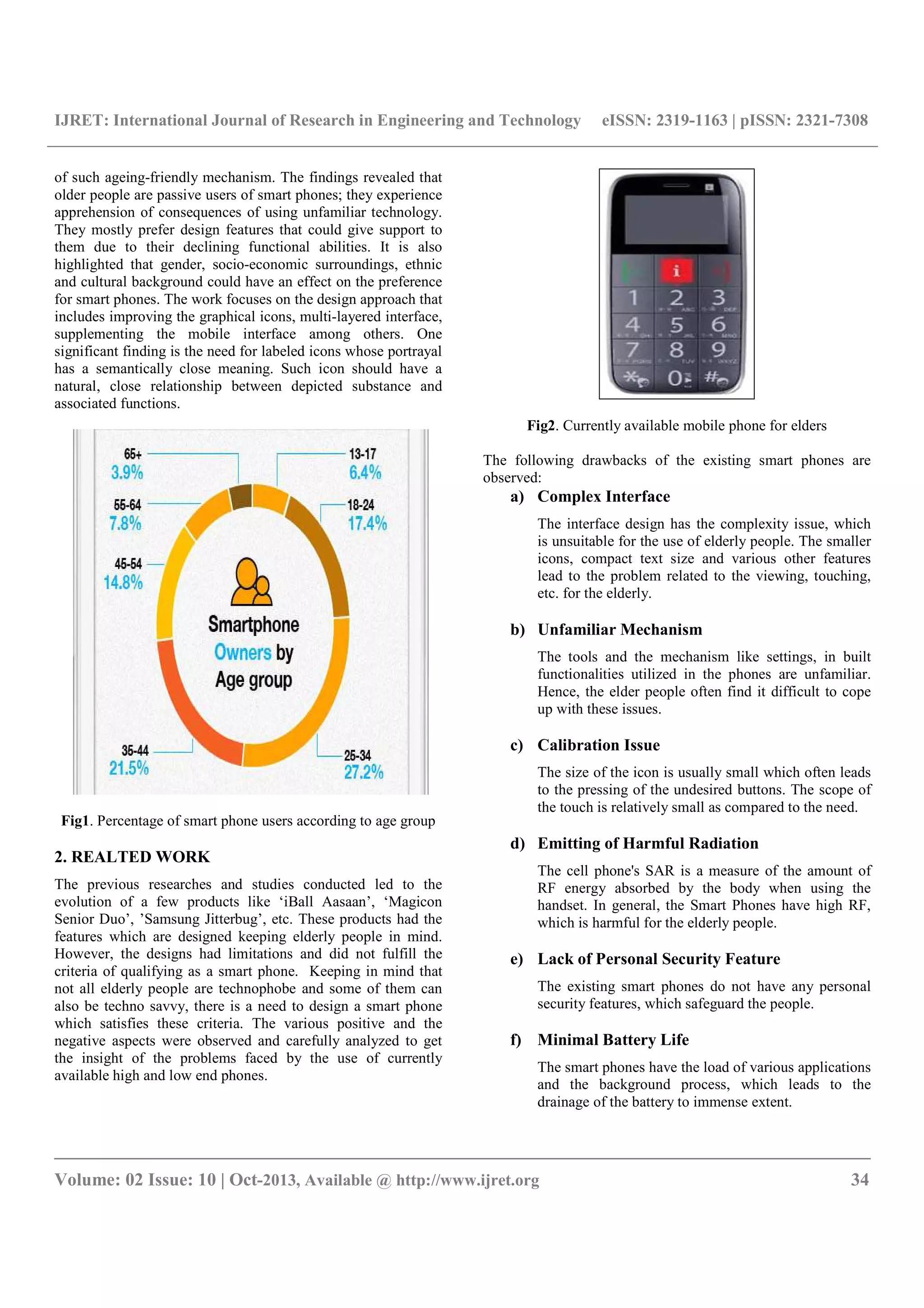
Fig1. Percentage of smart phone users according to age group
2. REALTED WORK
The previous researches and studies conducted led to the
evolution of a few products like ‘iBall Aasaan’, ‘Magicon
Senior Duo’, ’Samsung Jitterbug’, etc. These products had the
features which are designed keeping elderly people in mind.
However, the designs had limitations and did not fulfill the
criteria of qualifying as a smart phone. Keeping in mind that
not all elderly people are technophobe and some of them can
also be techno savvy, there is a need to design a smart phone
which satisfies these criteria. The various positive and the
negative aspects were observed and carefully analyzed to get
the insight of the problems faced by the use of currently
available high and low end phones.
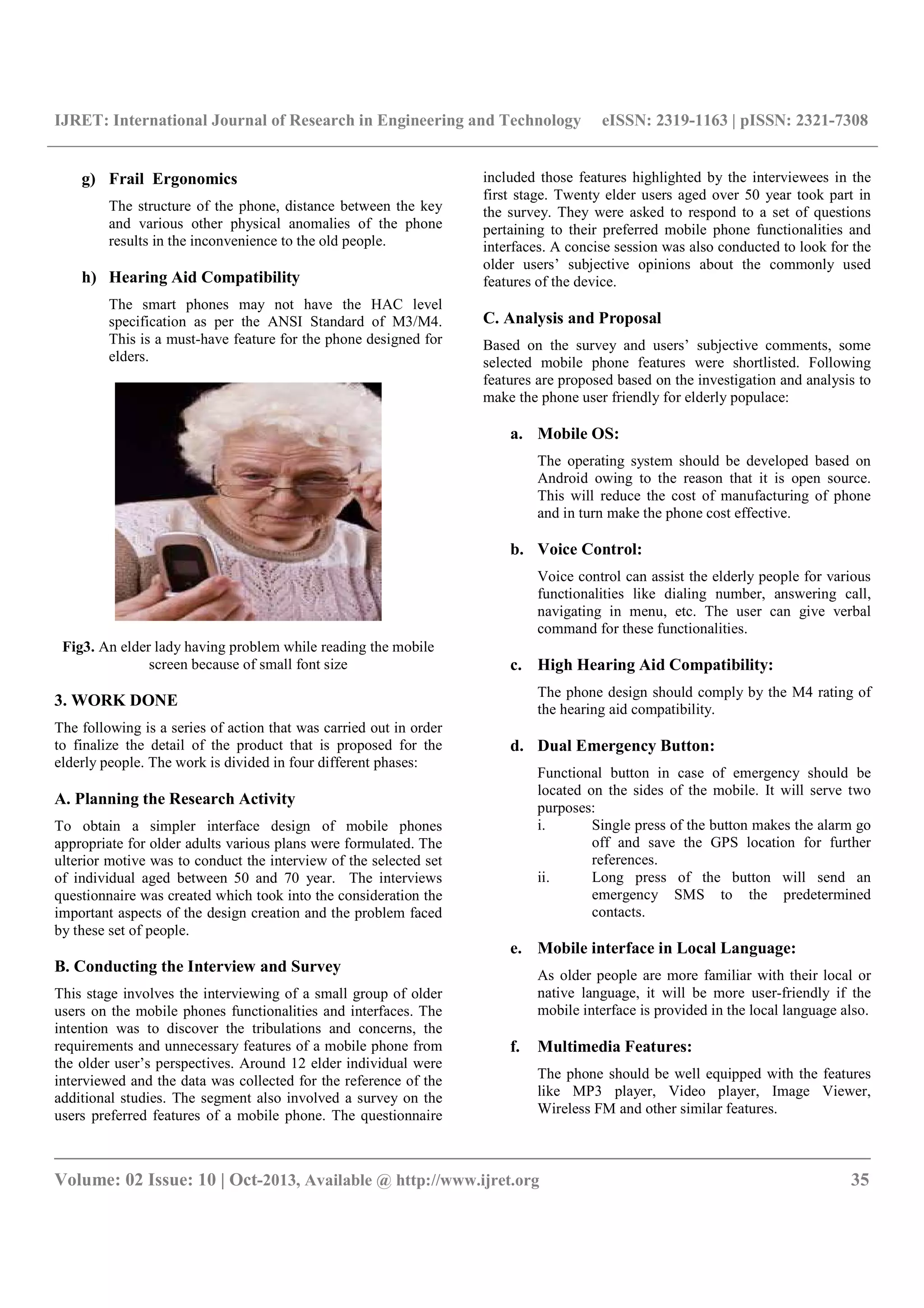
Fig2. Currently available mobile phone for elders
The following drawbacks of the existing smart phones are
observed:
a) Complex Interface
The interface design has the complexity issue, which
is unsuitable for the use of elderly people. The smaller
icons, compact text size and various other features
lead to the problem related to the viewing, touching,
etc. for the elderly.
b) Unfamiliar Mechanism
The tools and the mechanism like settings, in built
functionalities utilized in the phones are unfamiliar.
Hence, the elder people often find it difficult to cope
up with these issues.
c) Calibration Issue
The size of the icon is usually small which often leads
to the pressing of the undesired buttons. The scope of
the touch is relatively small as compared to the need.
d) Emitting of Harmful Radiation
The cell phone's SAR is a measure of the amount of
RF energy absorbed by the body when using the
handset. In general, the Smart Phones have high RF,
which is harmful for the elderly people.
e) Lack of Personal Security Feature
The existing smart phones do not have any personal
security features, which safeguard the people.
f) Minimal Battery Life
The smart phones have the load of various applications
and the background process, which leads to the
drainage of the battery to immense extent.
IJRET: International Journal of Research in Engineering and Technology eISSN: 2319-1163 | pISSN: 2321-7308
__________________________________________________________________________________________
Volume: 02 Issue: 10 | Oct-2013, Available @ http://www.ijret.org 35
g) Frail Ergonomics
The structure of the phone, distance between the key
and various other physical anomalies of the phone
results in the inconvenience to the old people.
h) Hearing Aid Compatibility
The smart phones may not have the HAC level
specification as per the ANSI Standard of M3/M4.
This is a must-have feature for the phone designed for
elders.
Fig3. An elder lady having problem while reading the mobile
screen because of small font size
3. WORK DONE
The following is a series of action that was carried out in order
to finalize the detail of the product that is proposed for the
elderly people. The work is divided in four different phases:
A. Planning the Research Activity
To obtain a simpler interface design of mobile phones
appropriate for older adults various plans were formulated. The
ulterior motive was to conduct the interview of the selected set
of individual aged between 50 and 70 year. The interviews
questionnaire was created which took into the consideration the
important aspects of the design creation and the problem faced
by these set of people.
B. Conducting the Interview and Survey
This stage involves the interviewing of a small group of older
users on the mobile phones functionalities and interfaces. The
intention was to discover the tribulations and concerns, the
requirements and unnecessary features of a mobile phone from
the older user’s perspectives. Around 12 elder individual were
interviewed and the data was collected for the reference of the
additional studies. The segment also involved a survey on the
users preferred features of a mobile phone. The questionnaire
included those features highlighted by the interviewees in the
first stage. Twenty elder users aged over 50 year took part in
the survey. They were asked to respond to a set of questions
pertaining to their preferred mobile phone functionalities and
interfaces. A concise session was also conducted to look for the
older users’ subjective opinions about the commonly used
features of the device.
C. Analysis and Proposal
Based on the survey and users’ subjective comments, some
selected mobile phone features were shortlisted. Following
features are proposed based on the investigation and analysis to
make the phone user friendly for elderly populace:
a. Mobile OS:
The operating system should be developed based on
Android owing to the reason that it is open source.
This will reduce the cost of manufacturing of phone
and in turn make the phone cost effective.
b. Voice Control:
Voice control can assist the elderly people for various
functionalities like dialing number, answering call,
navigating in menu, etc. The user can give verbal
command for these functionalities.
c. High Hearing Aid Compatibility:
The phone design should comply by the M4 rating of
the hearing aid compatibility.
d. Dual Emergency Button:
Functional button in case of emergency should be
located on the sides of the mobile. It will serve two
purposes:
i. Single press of the button makes the alarm go
off and save the GPS location for further
references.
ii. Long press of the button will send an
emergency SMS to the predetermined
contacts.
e. Mobile interface in Local Language:
As older people are more familiar with their local or
native language, it will be more user-friendly if the
mobile interface is provided in the local language also.
f. Multimedia Features:
The phone should be well equipped with the features
like MP3 player, Video player, Image Viewer,
Wireless FM and other similar features.
IJRET: International Journal of Research in Engineering and Technology eISSN: 2319-1163 | pISSN: 2321-7308
__________________________________________________________________________________________
Volume: 02 Issue: 10 | Oct-2013, Available @ http://www.ijret.org 36
g. Lesser Infrared Radiation:
There is accumulating evidence that cell phones that
operate on GSM networks emit significantly more
radiation than the cell phones operating on CDMA
networks. Hence, CDMA network should be preferred
over GSM.
h. Sturdy Ergonomics:
The phone should be designed in the manner which
should not only be strong and sturdy but also easy to
handle with shaking hand.
i. Battery Life:
The use of super capacitor should optimize the
battery life and enhance the charging speed, which is a
must have of the phone.
j. High Contrast Text/Larger Icons:
The use of high contrast text and the larger icons will
enable the elderly people to make use of the phone
with higher convenience.
k. Medicine Reminder:
There will be an inbuilt feature Medicine Reminder
like alarm. The reminder for the medicine can be set
and can be handy for the time to time reminder of the
intake of the medicine. Suppose reminder for medicine
named X has been set, so the ringtone for the reminder
will be “YOUR TIME TO TAKE MEDICINE X”. It
can be in local language also as preferred by the user.
l. Ringtone for Call or Message:
If the contact details of person named A are saved in
contact menu then whenever person A calls then the
ringtone will be “You have a call from person A”.
So there is no need to look at the screen for elderly
people as they may have vision problems. They can
directly know whose call is there by the ringtone itself.
m. Contact Details:
There will be 3 inbuilt groups:
1. Assistances
2. Relatives
3. Others
As in current phones one needs to divide the contact
details by making groups. But elder people may find it
difficult to make the groups. So inbuilt groups must be
provided They can save contacts for their help in
assistances. They can save their relatives contacts in
relatives groups.
n. Other Features:
1. Mobile Tracker
2. Flashlight/Torch
3. Entertainment/Games
The following design has been proposed based on the points
that are mentioned above:
Fig 4 Simple Interface Designs
CONCLUSIONS
The by and large aim of the study is to get hold of a simple
blueprint of a smart phone for elder users. In doing so, we
distinguish findings from others functioning on understanding
the problems faced by the elderly users and suggested design
and features requirements. We extend those works by
investigating on a wider range of population i.e. those involving
older adults (50 years old and above) in terms of their views
towards the functionalities and interface designs of the existing
mobile phones.
FUTURE WORK
The functionality of the smart phone as proposed in the
research above can be extended by adding some health
monitoring devices like Blood Pressure Monitor, Heart Beat
Monitor, etc. The further extension of the research can be
carried out in order to analyze and find out the other aspects
that can be included in the smart phone in order to not only
increase its functionality but also its productivity for the elderly
people. The research can be carried out with scientific approach
to get an insight on the various sense appeals of the elders
towards the system design of such phones. The vision, hearing
aid, sensitivity, etc. can be optimized on the customizable basis.
IJRET: International Journal of Research in Engineering and Technology eISSN: 2319-1163 | pISSN: 2321-7308
__________________________________________________________________________________________
Volume: 02 Issue: 10 | Oct-2013, Available @ http://www.ijret.org 37
REFERENCES
[1] Mobile Computing (2nd
Ed) Author: Asoke K Talukder,
Roopa R Yavagal, Hasan Ahmed
[2] Managing Information Technology Projects(6th
Ed)
Author: Kathy Schwalbe
[3] http://www.ieee.org/documents/ieeecitationref.pdf
[4] http://www.business-
standard.com/article/technology/indian-girl-invents-
device-that-can-charge-phone-in-20-seconds-
113052000944_1.html
[5] http://aboutus.verizonwireless.com/accessibility/digitalP
hones.html
[6] http://www.sigaccess.org/community/newsletter/septemb
er_2008/sep08_3.pdf
[7] http://www.ieee.org/publications_standards/publications/
authors/index.html
[8] http://en.wikipedia.org/wiki/Smartphone
[9] http://www.livescience.com/14755-radiation-risk-
cellphones-dangerous.html
[10] http://www.medicalalarmsystems.com/sasacephgpsl.htm
l
[11] http://www.censusindia.gov.in/Census_Data_2001/Natio
nal_Summary/National_Summary_DataPage.aspx
[12] http://www.appszoom.com/
[13] http://www.mobiles.sulekha.com/

Smart phone for elderly populace

  • 1.
    IJRET: International Journalof Research in Engineering and Technology eISSN: 2319-1163 | pISSN: 2321-7308 __________________________________________________________________________________________ Volume: 02 Issue: 10 | Oct-2013, Available @ http://www.ijret.org 33 SMART PHONE FOR ELDERLY POPULACE Shiv Kumar Goel1 , Nikita Haryani2 , Pramod Tiwari3 , Abhishek Jain4 , Prasad Kuvalekar5 1 Deputy HOD (Asst. Prof.), VES Institute of Technology, Chembur, Mumbai 2, 3, 4, 5 VES Institute of Technology, Chembur, Mumbai Shiva_goyal1@rediffmail.com, nikitaharyani@gmail.com, tiwari.pramod@gmail.com, abhishek3.aj@gmail.com, pjkuvalekar@gmail.com Abstract Smart phones possessions used to be considered as a luxury. Over the period of time, it became a necessity rather than luxury. Smart phones are essential for everyone including the elderly population. The device can act as a long-range communicator, multimedia device, infotainment device, etc. However, the current problems with the existing smart phones are that its complex features and interface designs have intimidated some elder users from using the device. The problem can be addressed by identifying the features needed for these special users. The device should have the features like larger intuitive interface, ergonomics, etc. which has been designed to make it user friendly for elder population. The proposal has been made with the view that the elder population of the fore coming future will be tech savvy. Keywords: SMS: Short Messaging Service, IR: Infrared Radiation, GPS: Global Positioning Service, 2G: second Generation, 3G: Third Generation, 4G: Fourth Generation, WLAN: Wireless Local Area Network, CDMA: Code Division Multiple Access. GSM: Global System for Mobile communication, PDA: Personal Digital Assistant, HAC: Hearing Aid Compatibility, M3: Rating indicates the handset has satisfied the ANSI standard, M4: Rating indicates the handset has exceeded the ANSI standard, SAR: Specific Absorption Rate, RF: Radio Frequency, ----------------------------------------------------------------------***----------------------------------------------------------------------- 1. INTRODUCTION A smart phone is a phone created on a mobile operating system, with superior computing potential and connectivity than a feature phone. Initial smart phones amalgamated the functions of a PDA with a mobile phone. Later models added the functionality of handy media players, digital cameras and GPS routing units to form one multi-use device. Many contemporary smart phones also comprises of high- resolution touch screens and web browsers. High-speed data access is provided by Wi-Fi (WLAN) and mobile broadband (2G/3G/4G). In recent years, the rapid development of mobile application markets and of mobile business has been drivers of smart phone recognition. Although there isn't one perfect smart phone for the elderly, there are many features that make phones easier for the elderly to use. Technologies can play a colossal role in sustaining older people to escort them in a high-quality environment. Nine out of ten elderly people believed that phone (i.e. mobile and landline) as one of the most important devices in their existence. The mobile devices could be useful for communications and safekeeping purposes. For example, mobile phones enable the elderly users to remain connected with their relatives and acquaintances. Such devices become vital predominantly during emergencies. In the face of the convenience of smart phones especially to the elder population, there are still many annotations from this group regarding the interfaces of the existing mobile devices being intricate to use. In relation to these asserts, many studies have reported that older adults who want to send a text message but could not confidently do so. It is very regrettable when some elderly people do not even wish to use a smart phone owing to the reason that the interface is not very well designed for them. The problem of complex functionality can be addressed by identifying the various necessities of a simpler interface. The user interface should possess simpler design along with the features like larger buttons and the color combinations which are suited for the elder population’s vision. A noteworthy percentage of elderly people have meager vision, hearing inability and recollection problems, which frequently cause communication problems, such as failing to hear ringtone, dialing a wrong number, etc. A survey was conducted to comprehend how older people interact with mobile phones and to identify the characteristics
  • 2.
    IJRET: International Journalof Research in Engineering and Technology eISSN: 2319-1163 | pISSN: 2321-7308 __________________________________________________________________________________________ Volume: 02 Issue: 10 | Oct-2013, Available @ http://www.ijret.org 34 of such ageing-friendly mechanism. The findings revealed that older people are passive users of smart phones; they experience apprehension of consequences of using unfamiliar technology. They mostly prefer design features that could give support to them due to their declining functional abilities. It is also highlighted that gender, socio-economic surroundings, ethnic and cultural background could have an effect on the preference for smart phones. The work focuses on the design approach that includes improving the graphical icons, multi-layered interface, supplementing the mobile interface among others. One significant finding is the need for labeled icons whose portrayal has a semantically close meaning. Such icon should have a natural, close relationship between depicted substance and associated functions. Fig1. Percentage of smart phone users according to age group 2. REALTED WORK The previous researches and studies conducted led to the evolution of a few products like ‘iBall Aasaan’, ‘Magicon Senior Duo’, ’Samsung Jitterbug’, etc. These products had the features which are designed keeping elderly people in mind. However, the designs had limitations and did not fulfill the criteria of qualifying as a smart phone. Keeping in mind that not all elderly people are technophobe and some of them can also be techno savvy, there is a need to design a smart phone which satisfies these criteria. The various positive and the negative aspects were observed and carefully analyzed to get the insight of the problems faced by the use of currently available high and low end phones. Fig2. Currently available mobile phone for elders The following drawbacks of the existing smart phones are observed: a) Complex Interface The interface design has the complexity issue, which is unsuitable for the use of elderly people. The smaller icons, compact text size and various other features lead to the problem related to the viewing, touching, etc. for the elderly. b) Unfamiliar Mechanism The tools and the mechanism like settings, in built functionalities utilized in the phones are unfamiliar. Hence, the elder people often find it difficult to cope up with these issues. c) Calibration Issue The size of the icon is usually small which often leads to the pressing of the undesired buttons. The scope of the touch is relatively small as compared to the need. d) Emitting of Harmful Radiation The cell phone's SAR is a measure of the amount of RF energy absorbed by the body when using the handset. In general, the Smart Phones have high RF, which is harmful for the elderly people. e) Lack of Personal Security Feature The existing smart phones do not have any personal security features, which safeguard the people. f) Minimal Battery Life The smart phones have the load of various applications and the background process, which leads to the drainage of the battery to immense extent.
  • 3.
    IJRET: International Journalof Research in Engineering and Technology eISSN: 2319-1163 | pISSN: 2321-7308 __________________________________________________________________________________________ Volume: 02 Issue: 10 | Oct-2013, Available @ http://www.ijret.org 35 g) Frail Ergonomics The structure of the phone, distance between the key and various other physical anomalies of the phone results in the inconvenience to the old people. h) Hearing Aid Compatibility The smart phones may not have the HAC level specification as per the ANSI Standard of M3/M4. This is a must-have feature for the phone designed for elders. Fig3. An elder lady having problem while reading the mobile screen because of small font size 3. WORK DONE The following is a series of action that was carried out in order to finalize the detail of the product that is proposed for the elderly people. The work is divided in four different phases: A. Planning the Research Activity To obtain a simpler interface design of mobile phones appropriate for older adults various plans were formulated. The ulterior motive was to conduct the interview of the selected set of individual aged between 50 and 70 year. The interviews questionnaire was created which took into the consideration the important aspects of the design creation and the problem faced by these set of people. B. Conducting the Interview and Survey This stage involves the interviewing of a small group of older users on the mobile phones functionalities and interfaces. The intention was to discover the tribulations and concerns, the requirements and unnecessary features of a mobile phone from the older user’s perspectives. Around 12 elder individual were interviewed and the data was collected for the reference of the additional studies. The segment also involved a survey on the users preferred features of a mobile phone. The questionnaire included those features highlighted by the interviewees in the first stage. Twenty elder users aged over 50 year took part in the survey. They were asked to respond to a set of questions pertaining to their preferred mobile phone functionalities and interfaces. A concise session was also conducted to look for the older users’ subjective opinions about the commonly used features of the device. C. Analysis and Proposal Based on the survey and users’ subjective comments, some selected mobile phone features were shortlisted. Following features are proposed based on the investigation and analysis to make the phone user friendly for elderly populace: a. Mobile OS: The operating system should be developed based on Android owing to the reason that it is open source. This will reduce the cost of manufacturing of phone and in turn make the phone cost effective. b. Voice Control: Voice control can assist the elderly people for various functionalities like dialing number, answering call, navigating in menu, etc. The user can give verbal command for these functionalities. c. High Hearing Aid Compatibility: The phone design should comply by the M4 rating of the hearing aid compatibility. d. Dual Emergency Button: Functional button in case of emergency should be located on the sides of the mobile. It will serve two purposes: i. Single press of the button makes the alarm go off and save the GPS location for further references. ii. Long press of the button will send an emergency SMS to the predetermined contacts. e. Mobile interface in Local Language: As older people are more familiar with their local or native language, it will be more user-friendly if the mobile interface is provided in the local language also. f. Multimedia Features: The phone should be well equipped with the features like MP3 player, Video player, Image Viewer, Wireless FM and other similar features.
  • 4.
    IJRET: International Journalof Research in Engineering and Technology eISSN: 2319-1163 | pISSN: 2321-7308 __________________________________________________________________________________________ Volume: 02 Issue: 10 | Oct-2013, Available @ http://www.ijret.org 36 g. Lesser Infrared Radiation: There is accumulating evidence that cell phones that operate on GSM networks emit significantly more radiation than the cell phones operating on CDMA networks. Hence, CDMA network should be preferred over GSM. h. Sturdy Ergonomics: The phone should be designed in the manner which should not only be strong and sturdy but also easy to handle with shaking hand. i. Battery Life: The use of super capacitor should optimize the battery life and enhance the charging speed, which is a must have of the phone. j. High Contrast Text/Larger Icons: The use of high contrast text and the larger icons will enable the elderly people to make use of the phone with higher convenience. k. Medicine Reminder: There will be an inbuilt feature Medicine Reminder like alarm. The reminder for the medicine can be set and can be handy for the time to time reminder of the intake of the medicine. Suppose reminder for medicine named X has been set, so the ringtone for the reminder will be “YOUR TIME TO TAKE MEDICINE X”. It can be in local language also as preferred by the user. l. Ringtone for Call or Message: If the contact details of person named A are saved in contact menu then whenever person A calls then the ringtone will be “You have a call from person A”. So there is no need to look at the screen for elderly people as they may have vision problems. They can directly know whose call is there by the ringtone itself. m. Contact Details: There will be 3 inbuilt groups: 1. Assistances 2. Relatives 3. Others As in current phones one needs to divide the contact details by making groups. But elder people may find it difficult to make the groups. So inbuilt groups must be provided They can save contacts for their help in assistances. They can save their relatives contacts in relatives groups. n. Other Features: 1. Mobile Tracker 2. Flashlight/Torch 3. Entertainment/Games The following design has been proposed based on the points that are mentioned above: Fig 4 Simple Interface Designs CONCLUSIONS The by and large aim of the study is to get hold of a simple blueprint of a smart phone for elder users. In doing so, we distinguish findings from others functioning on understanding the problems faced by the elderly users and suggested design and features requirements. We extend those works by investigating on a wider range of population i.e. those involving older adults (50 years old and above) in terms of their views towards the functionalities and interface designs of the existing mobile phones. FUTURE WORK The functionality of the smart phone as proposed in the research above can be extended by adding some health monitoring devices like Blood Pressure Monitor, Heart Beat Monitor, etc. The further extension of the research can be carried out in order to analyze and find out the other aspects that can be included in the smart phone in order to not only increase its functionality but also its productivity for the elderly people. The research can be carried out with scientific approach to get an insight on the various sense appeals of the elders towards the system design of such phones. The vision, hearing aid, sensitivity, etc. can be optimized on the customizable basis.
  • 5.
    IJRET: International Journalof Research in Engineering and Technology eISSN: 2319-1163 | pISSN: 2321-7308 __________________________________________________________________________________________ Volume: 02 Issue: 10 | Oct-2013, Available @ http://www.ijret.org 37 REFERENCES [1] Mobile Computing (2nd Ed) Author: Asoke K Talukder, Roopa R Yavagal, Hasan Ahmed [2] Managing Information Technology Projects(6th Ed) Author: Kathy Schwalbe [3] http://www.ieee.org/documents/ieeecitationref.pdf [4] http://www.business- standard.com/article/technology/indian-girl-invents- device-that-can-charge-phone-in-20-seconds- 113052000944_1.html [5] http://aboutus.verizonwireless.com/accessibility/digitalP hones.html [6] http://www.sigaccess.org/community/newsletter/septemb er_2008/sep08_3.pdf [7] http://www.ieee.org/publications_standards/publications/ authors/index.html [8] http://en.wikipedia.org/wiki/Smartphone [9] http://www.livescience.com/14755-radiation-risk- cellphones-dangerous.html [10] http://www.medicalalarmsystems.com/sasacephgpsl.htm l [11] http://www.censusindia.gov.in/Census_Data_2001/Natio nal_Summary/National_Summary_DataPage.aspx [12] http://www.appszoom.com/ [13] http://www.mobiles.sulekha.com/