MVS COMMANDS
MVS System Software Control and most of the hardware installations like processors, I/O
Devices and Channel paths involve set of tasks like starting, running and stopping MVS
Operating System. Below listed are the syntax and respective functions of frequently used
MVS System Commands.

Who Should Use:
Below listed MVS System Commands are for System operators / Console Operators who
need reference material to perform:
- Daily operations,
- MVS Control and sometimes change few of the Console‟s characteristic


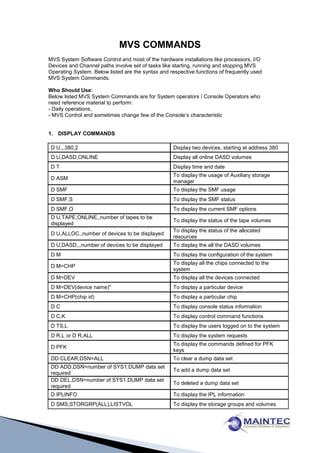
1. DISPLAY COMMANDS

 D U,,,380,2                                        Display two devices, starting at address 380
 D U,DASD,ONLINE                                    Display all online DASD volumes
 DT                                                 Display time and date
                                                    To display the usage of Auxiliary storage
 D ASM
                                                    manager
 D SMF                                              To display the SMF usage
 D SMF,S                                            To display the SMF status
 D SMF,O                                            To display the current SMF options
 D U,TAPE,ONLINE,,number of tapes to be
                                                    To display the status of the tape volumes
 displayed
                                                    To display the status of the allocated
 D U,ALLOC,,number of devices to be displayed
                                                    resources
 D U,DASD,,,number of devices to be displayed       To display the all the DASD volumes
 DM                                                 To display the configuration of the system
                                                    To display all the chips connected to the
 D M=CHP
                                                    system
 D M=DEV                                            To display all the devices connected
 D M=DEV(device name)"                              To display a particular device
 D M=CHP(chip id)                                   To display a particular chip
 DC                                                 To display console status information
 D C,K                                              To display control command functions
 D TS,L                                             To display the users logged on to the system
 D R,L or D R,ALL                                   To display the system requests
                                                    To display the commands defined for PFK
 D PFK
                                                    keys
 DD CLEAR,DSN=ALL                                   To clear a dump data set
 DD ADD,DSN=number of SYS1.DUMP data set
                                                    To add a dump data set
 required
 DD DEL,DSN=number of SYS1.DUMP data set
                                                    To deleted a dump data set
 required
 D IPLINFO                                          To display the IPL information
 D SMS,STORGRP(ALL),LISTVOL                         To display the storage groups and volumes
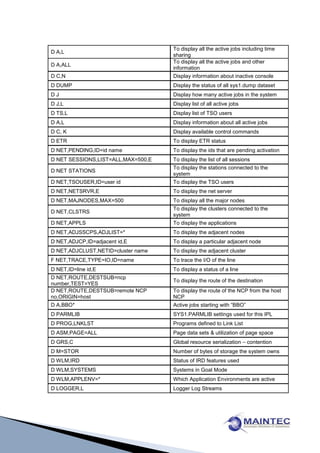
To display all the active jobs including time
D A,L
                                    sharing
                                    To display all the active jobs and other
D A,ALL
                                    information
D C,N                               Display information about inactive console
D DUMP                              Display the status of all sys1.dump dataset
DJ                                  Display how many active jobs in the system
D J,L                               Display list of all active jobs
D TS,L                              Display list of TSO users
D A,L                               Display information about all active jobs
D C, K                              Display available control commands
D ETR                               To display ETR status
D NET,PENDING,ID=id name            To display the ids that are pending activation
D NET SESSIONS,LIST=ALL,MAX=500,E   To display the list of all sessions
                                    To display the stations connected to the
D NET STATIONS
                                    system
D NET,TSOUSER,ID=user id            To display the TSO users
D NET,NETSRVR,E                     To display the net server
D NET,MAJNODES,MAX=500              To display all the major nodes
                                    To display the clusters connected to the
D NET,CLSTRS
                                    system
D NET,APPLS                         To display the applications
D NET,ADJSSCPS,ADJLIST=*            To display the adjacent nodes
D NET,ADJCP,ID=adjacent id,E        To display a particular adjacent node
D NET,ADJCLUST,NETID=cluster name   To display the adjacent cluster
F NET,TRACE,TYPE=IO,ID=name         To trace the I/O of the line
D NET,ID=line id,E                  To display a status of a line
D NET,ROUTE,DESTSUB=ncp
                                    To display the route of the destination
number,TEST=YES
D NET,ROUTE,DESTSUB=remote NCP      To display the route of the NCP from the host
no,ORIGIN=host                      NCP
D A,BBO*                            Active jobs starting with “BBO”
D PARMLIB                           SYS1.PARMLIB settings used for this IPL
D PROG,LNKLST                       Programs defined to Link List
D ASM,PAGE=ALL                      Page data sets & utilization of page space
D GRS,C                             Global resource serialization – contention
D M=STOR                            Number of bytes of storage the system owns
D WLM,IRD                           Status of IRD features used
D WLM,SYSTEMS                       Systems in Goal Mode
D WLM,APPLENV=*                     Which Application Environments are active
D LOGGER,L                          Logger Log Streams
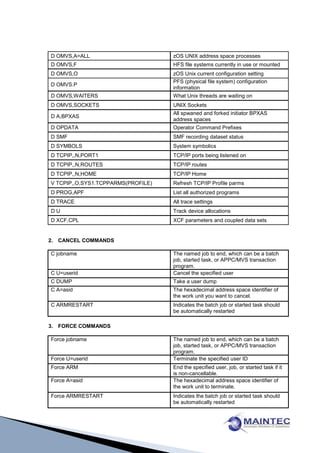
D OMVS,A=ALL                        zOS UNIX address space processes
D OMVS,F                            HFS file systems currently in use or mounted
D OMVS,O                            zOS Unix current configuration setting
                                    PFS (physical file system) configuration
D OMVS.P
                                    information
D OMVS,WAITERS                      What Unix threads are waiting on
D OMVS,SOCKETS                      UNIX Sockets
                                    All spwaned and forked initiator BPXAS
D A,BPXAS
                                    address spaces
D OPDATA                            Operator Command Prefixes
D SMF                               SMF recording dataset status
D SYMBOLS                           System symbolics
D TCPIP,,N,PORT1                    TCP/IP ports being listened on
D TCPIP,,N,ROUTES                   TCP/IP routes
D TCPIP,,N,HOME                     TCP/IP Home
V TCPIP,,O,SYS1.TCPPARMS(PROFILE)   Refresh TCP/IP Profile parms
D PROG,APF                          List all authorized programs
D TRACE                             All trace settings
DU                                  Track device allocations
D XCF,CPL                           XCF parameters and coupled data sets


2. CANCEL COMMANDS

C jobname                           The named job to end, which can be a batch
                                    job, started task, or APPC/MVS transaction
                                    program.
C U=userid                          Cancel the specified user
C DUMP                              Take a user dump
C A=asid                            The hexadecimal address space identifier of
                                    the work unit you want to cancel.
C ARMRESTART                        Indicates the batch job or started task should
                                    be automatically restarted

3. FORCE COMMANDS

Force jobname                       The named job to end, which can be a batch
                                    job, started task, or APPC/MVS transaction
                                    program.
Force U=userid                      Terminate the specified user ID
Force ARM                           End the specified user, job, or started task if it
                                    is non-cancellable.
Force A=asid                        The hexadecimal address space identifier of
                                    the work unit to terminate.
Force ARMRESTART                    Indicates the batch job or started task should
                                    be automatically restarted
4. CONTROL COMMANDS

K E,D                                   Erase bottom display area an console
K A,NONE                                Undefined the display area at bottom of screen
K E,1                                   Delete line 1 (top of screen, usually)
K E,SEG                                 Delete contents of message segment
K N, PFK=(5,CMD='S GTF,580'),CON=N      Define a PFK
K S,REF                                 Display current console mode
K S,DEL=RD                              Set "roll delete" mode (most common mode)
K S,REF                                 Display all specification values
K V,REF                                 Display all vary definitions
                                        Display all message Traffic routed to the
K V,LEVEL=ALL                           console
K V,LEVEL=R                             Display WTORS at the console
K V,LEVEL=IN                            Display informational messages at the console
K Q                                     To clear Buffer Spool
K Q,L=< CONSOLE ID>                     To clear the Buffer Shortage


5. HALT COMMAND

                                        Close the system log, and put it on the print
Z EOD                                   queue.


6. SEND COMMAND

                                        Delete the specified message from the
SE msgno,DELETE                         broadcast data set
SE [msgno,]LIST                         List the requested message or all messages
                                        The message or number of a message in
SE „message‟ or msgno                   SYS1.BRODCAST to be sent.
                                        The message be sent immediately only to all
SE 'message', NOW                       currently logged-on users.
                                        Send the message to all users logged onto all
SE 'message', ROUTE = *ALL              systems participating in the sysplex
                                        Send the message only to users logged onto
SE 'message',ROUTE=systemname           systemname
                                        Send the message to all users logged onto the
SE 'message',ROUTE=groupname            sysplex subset defined by groupname


7. START COMMANDS (START or S)

To start JES2                           S JES2
START the APPC/MVS address space with
                                        S APPC,SUB=MSTR
parmlib member APPCPM00
START the APPC/MVS address space with
                                        S APPC,SUB=MSTR,APPC=01
parmlib member APPCPM01
To starts the SOM subsystem             S SOM
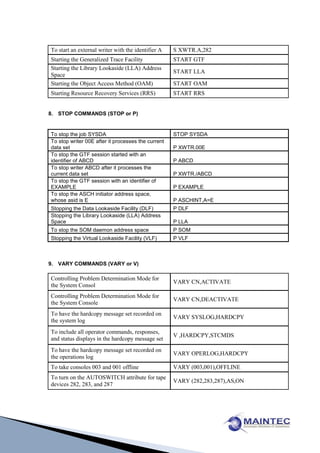
To start an external writer with the identifier A   S XWTR.A,282
Starting the Generalized Trace Facility             START GTF
Starting the Library Lookaside (LLA) Address
                                                    START LLA
Space
Starting the Object Access Method (OAM)             START OAM
Starting Resource Recovery Services (RRS)           START RRS


8. STOP COMMANDS (STOP or P)


To stop the job SYSDA                               STOP SYSDA
To stop writer 00E after it processes the current
data set                                            P XWTR.00E
To stop the GTF session started with an
identifier of ABCD                                  P ABCD
To stop writer ABCD after it processes the
current data set                                    P XWTR./ABCD
To stop the GTF session with an identifier of
EXAMPLE                                             P EXAMPLE
To stop the ASCH initiator address space,
whose asid is E                                     P ASCHINT,A=E
Stopping the Data Lookaside Facility (DLF)          P DLF
Stopping the Library Lookaside (LLA) Address
Space                                               P LLA
To stop the SOM daemon address space                P SOM
Stopping the Virtual Lookaside Facility (VLF)       P VLF


9. VARY COMMANDS (VARY or V)

Controlling Problem Determination Mode for
                                                    VARY CN,ACTIVATE
the System Consol
Controlling Problem Determination Mode for
                                                    VARY CN,DEACTIVATE
the System Console
To have the hardcopy message set recorded on
                                                    VARY SYSLOG,HARDCPY
the system log
To include all operator commands, responses,
                                                    V ,HARDCPY,STCMDS
and status displays in the hardcopy message set
To have the hardcopy message set recorded on
                                                    VARY OPERLOG,HARDCPY
the operations log
To take consoles 003 and 001 offline                VARY (003,001),OFFLINE
To turn on the AUTOSWITCH attribute for tape
                                                    VARY (282,283,287),AS,ON
devices 282, 283, and 287
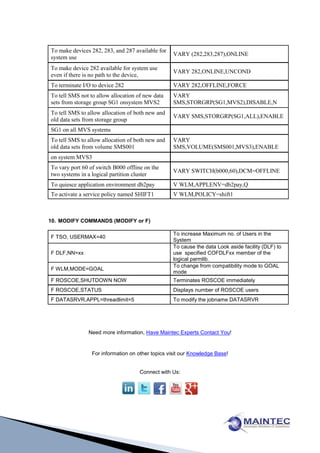
To make devices 282, 283, and 287 available for
                                                   VARY (282,283,287),ONLINE
system use
To make device 282 available for system use
                                                   VARY 282,ONLINE,UNCOND
even if there is no path to the device,
To terminate I/O to device 282                     VARY 282,OFFLINE,FORCE
To tell SMS not to allow allocation of new data    VARY
sets from storage group SG1 onsystem MVS2          SMS,STORGRP(SG1,MVS2),DISABLE,N
To tell SMS to allow allocation of both new and
                                                   VARY SMS,STORGRP(SG1,ALL),ENABLE
old data sets from storage group
SG1 on all MVS systems
To tell SMS to allow allocation of both new and    VARY
old data sets from volume SMS001                   SMS,VOLUME(SMS001,MVS3),ENABLE
on system MVS3
To vary port 60 of switch B000 offline on the
                                                   VARY SWITCH(b000,60),DCM=OFFLINE
two systems in a logical partition cluster
To quiesce application environment db2pay          V WLM,APPLENV=db2pay,Q
To activate a service policy named SHIFT1          V WLM,POLICY=shift1


10. MODIFY COMMANDS (MODIFY or F)

                                                   To increase Maximum no. of Users in the
F TSO, USERMAX=40
                                                   System
                                                   To cause the data Look aside facility (DLF) to
F DLF,NN=xx                                        use specified COFDLFxx member of the
                                                   logical parmlib.
                                                   To change from compatibility mode to GOAL
F WLM,MODE=GOAL
                                                   mode
F ROSCOE,SHUTDOWN NOW                              Terminates ROSCOE immediately
F ROSCOE,STATUS                                    Displays number of ROSCOE users
F DATASRVR,APPL=threadlimit=5                      To modify the jobname DATASRVR


               Need more information, Have Maintec Experts Contact You!


                 For information on other topics visit our Knowledge Base!


                                     Connect with Us:

Mvs commands

  • 1.
    MVS COMMANDS MVS SystemSoftware Control and most of the hardware installations like processors, I/O Devices and Channel paths involve set of tasks like starting, running and stopping MVS Operating System. Below listed are the syntax and respective functions of frequently used MVS System Commands. Who Should Use: Below listed MVS System Commands are for System operators / Console Operators who need reference material to perform: - Daily operations, - MVS Control and sometimes change few of the Console‟s characteristic 1. DISPLAY COMMANDS D U,,,380,2 Display two devices, starting at address 380 D U,DASD,ONLINE Display all online DASD volumes DT Display time and date To display the usage of Auxiliary storage D ASM manager D SMF To display the SMF usage D SMF,S To display the SMF status D SMF,O To display the current SMF options D U,TAPE,ONLINE,,number of tapes to be To display the status of the tape volumes displayed To display the status of the allocated D U,ALLOC,,number of devices to be displayed resources D U,DASD,,,number of devices to be displayed To display the all the DASD volumes DM To display the configuration of the system To display all the chips connected to the D M=CHP system D M=DEV To display all the devices connected D M=DEV(device name)" To display a particular device D M=CHP(chip id) To display a particular chip DC To display console status information D C,K To display control command functions D TS,L To display the users logged on to the system D R,L or D R,ALL To display the system requests To display the commands defined for PFK D PFK keys DD CLEAR,DSN=ALL To clear a dump data set DD ADD,DSN=number of SYS1.DUMP data set To add a dump data set required DD DEL,DSN=number of SYS1.DUMP data set To deleted a dump data set required D IPLINFO To display the IPL information D SMS,STORGRP(ALL),LISTVOL To display the storage groups and volumes
  • 2.
    To display allthe active jobs including time D A,L sharing To display all the active jobs and other D A,ALL information D C,N Display information about inactive console D DUMP Display the status of all sys1.dump dataset DJ Display how many active jobs in the system D J,L Display list of all active jobs D TS,L Display list of TSO users D A,L Display information about all active jobs D C, K Display available control commands D ETR To display ETR status D NET,PENDING,ID=id name To display the ids that are pending activation D NET SESSIONS,LIST=ALL,MAX=500,E To display the list of all sessions To display the stations connected to the D NET STATIONS system D NET,TSOUSER,ID=user id To display the TSO users D NET,NETSRVR,E To display the net server D NET,MAJNODES,MAX=500 To display all the major nodes To display the clusters connected to the D NET,CLSTRS system D NET,APPLS To display the applications D NET,ADJSSCPS,ADJLIST=* To display the adjacent nodes D NET,ADJCP,ID=adjacent id,E To display a particular adjacent node D NET,ADJCLUST,NETID=cluster name To display the adjacent cluster F NET,TRACE,TYPE=IO,ID=name To trace the I/O of the line D NET,ID=line id,E To display a status of a line D NET,ROUTE,DESTSUB=ncp To display the route of the destination number,TEST=YES D NET,ROUTE,DESTSUB=remote NCP To display the route of the NCP from the host no,ORIGIN=host NCP D A,BBO* Active jobs starting with “BBO” D PARMLIB SYS1.PARMLIB settings used for this IPL D PROG,LNKLST Programs defined to Link List D ASM,PAGE=ALL Page data sets & utilization of page space D GRS,C Global resource serialization – contention D M=STOR Number of bytes of storage the system owns D WLM,IRD Status of IRD features used D WLM,SYSTEMS Systems in Goal Mode D WLM,APPLENV=* Which Application Environments are active D LOGGER,L Logger Log Streams
  • 3.
    D OMVS,A=ALL zOS UNIX address space processes D OMVS,F HFS file systems currently in use or mounted D OMVS,O zOS Unix current configuration setting PFS (physical file system) configuration D OMVS.P information D OMVS,WAITERS What Unix threads are waiting on D OMVS,SOCKETS UNIX Sockets All spwaned and forked initiator BPXAS D A,BPXAS address spaces D OPDATA Operator Command Prefixes D SMF SMF recording dataset status D SYMBOLS System symbolics D TCPIP,,N,PORT1 TCP/IP ports being listened on D TCPIP,,N,ROUTES TCP/IP routes D TCPIP,,N,HOME TCP/IP Home V TCPIP,,O,SYS1.TCPPARMS(PROFILE) Refresh TCP/IP Profile parms D PROG,APF List all authorized programs D TRACE All trace settings DU Track device allocations D XCF,CPL XCF parameters and coupled data sets 2. CANCEL COMMANDS C jobname The named job to end, which can be a batch job, started task, or APPC/MVS transaction program. C U=userid Cancel the specified user C DUMP Take a user dump C A=asid The hexadecimal address space identifier of the work unit you want to cancel. C ARMRESTART Indicates the batch job or started task should be automatically restarted 3. FORCE COMMANDS Force jobname The named job to end, which can be a batch job, started task, or APPC/MVS transaction program. Force U=userid Terminate the specified user ID Force ARM End the specified user, job, or started task if it is non-cancellable. Force A=asid The hexadecimal address space identifier of the work unit to terminate. Force ARMRESTART Indicates the batch job or started task should be automatically restarted
  • 4.
    4. CONTROL COMMANDS KE,D Erase bottom display area an console K A,NONE Undefined the display area at bottom of screen K E,1 Delete line 1 (top of screen, usually) K E,SEG Delete contents of message segment K N, PFK=(5,CMD='S GTF,580'),CON=N Define a PFK K S,REF Display current console mode K S,DEL=RD Set "roll delete" mode (most common mode) K S,REF Display all specification values K V,REF Display all vary definitions Display all message Traffic routed to the K V,LEVEL=ALL console K V,LEVEL=R Display WTORS at the console K V,LEVEL=IN Display informational messages at the console K Q To clear Buffer Spool K Q,L=< CONSOLE ID> To clear the Buffer Shortage 5. HALT COMMAND Close the system log, and put it on the print Z EOD queue. 6. SEND COMMAND Delete the specified message from the SE msgno,DELETE broadcast data set SE [msgno,]LIST List the requested message or all messages The message or number of a message in SE „message‟ or msgno SYS1.BRODCAST to be sent. The message be sent immediately only to all SE 'message', NOW currently logged-on users. Send the message to all users logged onto all SE 'message', ROUTE = *ALL systems participating in the sysplex Send the message only to users logged onto SE 'message',ROUTE=systemname systemname Send the message to all users logged onto the SE 'message',ROUTE=groupname sysplex subset defined by groupname 7. START COMMANDS (START or S) To start JES2 S JES2 START the APPC/MVS address space with S APPC,SUB=MSTR parmlib member APPCPM00 START the APPC/MVS address space with S APPC,SUB=MSTR,APPC=01 parmlib member APPCPM01 To starts the SOM subsystem S SOM
  • 5.
    To start anexternal writer with the identifier A S XWTR.A,282 Starting the Generalized Trace Facility START GTF Starting the Library Lookaside (LLA) Address START LLA Space Starting the Object Access Method (OAM) START OAM Starting Resource Recovery Services (RRS) START RRS 8. STOP COMMANDS (STOP or P) To stop the job SYSDA STOP SYSDA To stop writer 00E after it processes the current data set P XWTR.00E To stop the GTF session started with an identifier of ABCD P ABCD To stop writer ABCD after it processes the current data set P XWTR./ABCD To stop the GTF session with an identifier of EXAMPLE P EXAMPLE To stop the ASCH initiator address space, whose asid is E P ASCHINT,A=E Stopping the Data Lookaside Facility (DLF) P DLF Stopping the Library Lookaside (LLA) Address Space P LLA To stop the SOM daemon address space P SOM Stopping the Virtual Lookaside Facility (VLF) P VLF 9. VARY COMMANDS (VARY or V) Controlling Problem Determination Mode for VARY CN,ACTIVATE the System Consol Controlling Problem Determination Mode for VARY CN,DEACTIVATE the System Console To have the hardcopy message set recorded on VARY SYSLOG,HARDCPY the system log To include all operator commands, responses, V ,HARDCPY,STCMDS and status displays in the hardcopy message set To have the hardcopy message set recorded on VARY OPERLOG,HARDCPY the operations log To take consoles 003 and 001 offline VARY (003,001),OFFLINE To turn on the AUTOSWITCH attribute for tape VARY (282,283,287),AS,ON devices 282, 283, and 287
  • 6.
    To make devices282, 283, and 287 available for VARY (282,283,287),ONLINE system use To make device 282 available for system use VARY 282,ONLINE,UNCOND even if there is no path to the device, To terminate I/O to device 282 VARY 282,OFFLINE,FORCE To tell SMS not to allow allocation of new data VARY sets from storage group SG1 onsystem MVS2 SMS,STORGRP(SG1,MVS2),DISABLE,N To tell SMS to allow allocation of both new and VARY SMS,STORGRP(SG1,ALL),ENABLE old data sets from storage group SG1 on all MVS systems To tell SMS to allow allocation of both new and VARY old data sets from volume SMS001 SMS,VOLUME(SMS001,MVS3),ENABLE on system MVS3 To vary port 60 of switch B000 offline on the VARY SWITCH(b000,60),DCM=OFFLINE two systems in a logical partition cluster To quiesce application environment db2pay V WLM,APPLENV=db2pay,Q To activate a service policy named SHIFT1 V WLM,POLICY=shift1 10. MODIFY COMMANDS (MODIFY or F) To increase Maximum no. of Users in the F TSO, USERMAX=40 System To cause the data Look aside facility (DLF) to F DLF,NN=xx use specified COFDLFxx member of the logical parmlib. To change from compatibility mode to GOAL F WLM,MODE=GOAL mode F ROSCOE,SHUTDOWN NOW Terminates ROSCOE immediately F ROSCOE,STATUS Displays number of ROSCOE users F DATASRVR,APPL=threadlimit=5 To modify the jobname DATASRVR Need more information, Have Maintec Experts Contact You! For information on other topics visit our Knowledge Base! Connect with Us: