TECHNOCRATS INSTITUTE OF TECHNOLOGY
(EXELLENCE) 2014-15
SIXTH SENSE TECHNOLOGY
Wear Ur World
TEAM PRESENTATION BY:
PRAKHAR GORE 0191CS121066 CSE2
RAHUL KUMBHKAR 0191CS121068 CSE2
CONTENTS
 INTRODUCTION
 WHAT IS SIXTH SENSE TECHNOLOGY ?
 HISTORY
 COMPONENTS
 DESCRIPTION OF COMPONENTS
 HOW IT ACTUALLY WORKS..!!!
 SOFTWARES
 ADVANCEMENTS
 ADVANTAGES
 CONCLUSION
INTRODUCTION
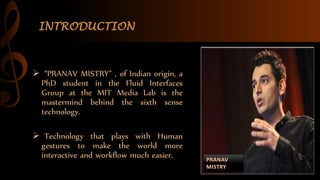
 “PRANAV MISTRY” , of Indian origin, a
PhD student in the Fluid Interfaces
Group at the MIT Media Lab is the
mastermind behind the sixth sense
technology.
 Technology that plays with Human
gestures to make the world more
interactive and workflow much easier.
WHAT IS SIXTH SENSE TECHNOLOGY ?
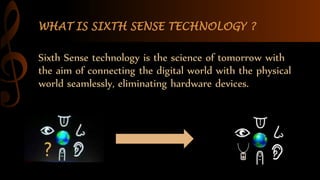
Sixth Sense technology is the science of tomorrow with
the aim of connecting the digital world with the physical
world seamlessly, eliminating hardware devices.
HISTORY
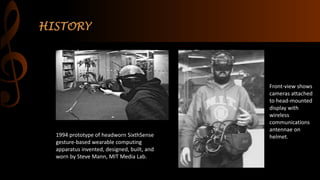
1994 prototype of headworn SixthSense
gesture-based wearable computing
apparatus invented, designed, built, and
worn by Steve Mann, MIT Media Lab.
Front-view shows
cameras attached
to head-mounted
display with
wireless
communications
antennae on
helmet.
COMPONENTS
 Camera
 Projector
 Mirror
 Mobile Component
 Colored Markers
 Microphone
CAMERA
 Captures the scene in front and objects
the user is interacting with
 Captures the scene of projected interface.
 It acts as a digital eyes, connecting you to
the world of digital information.
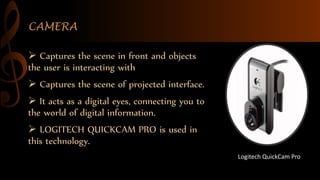
 LOGITECH QUICKCAM PRO is used in
this technology.
Logitech QuickCam Pro
PROJECTOR
 Projects graphical user interface of
the selected application onto
surfaces or walls in front.
 Enlarges the physical objects the
user interacting with by projecting
just-in-time and related information
from the Internet.
 The projector unit used in
prototype runs on a rechargeable
battery.
MIRROR
MIRROR
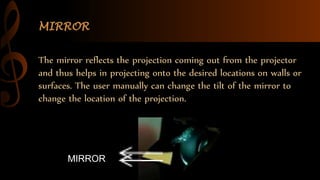
The mirror reflects the projection coming out from the projector
and thus helps in projecting onto the desired locations on walls or
surfaces. The user manually can change the tilt of the mirror to
change the location of the projection.
MOBILE COMPONENT
 A Web-enabled smart phone in the
user’s pocket processes the video data.
 This device can be a mobile phone or
a small laptop computer.
 The mobile computing device is also
connected to the Internet via 3G
network or wireless connection.
COLOURED MARKERS
 It is at the tip of the user’s fingers .
 Marking the user’s fingers with red,
yellow, green, and blue tape helps the
webcam recognize gestures.
The movements and arrangements of
these makers are interpreted into
gestures that act as interaction
instructions for the projected
application interfaces.
HOW IT WORKS ..!!!
WORKING PRINCIPLE
I. The hardware that makes Sixth Sense work is a pendant like mobile
wearable interface
II. It has a camera, a mirror and a projector and is connected wirelessly to
a Bluetooth smart phone that can slip comfortably into one’s pocket
III. The camera recognizes individuals, images, pictures, gestures one
makes with their hands
IV. Information is sent to the Smartphone for processing
V. The downward-facing projector projects the output image on to the
mirror
VI. Mirror reflects image on to the desired surface
VII. Thus, digital information is freed from its limitations and placed in the
physical world.
SOFTWARES
The prototype system runs on windows platform.
WUW v0.1 beta
WUW_v0.1 is the beta version of SixthSense code (WUW stands for Wear
Ur World, a former name of the project). This version runs on Windows.
Microsoft DirectX
Microsoft Visual Studio.
Adobe Flash Player
Microsoft Outlook
ADVANCEMENTS
 MAKE A CALL - You can use the Sixth
Sense to project a keypad onto your hand,
then use that virtual keypad to make a call.
 CALL UP A MAP - With the map
application we can call up the map of
our choice and then use thumbs and
index fingers to navigate the map.
 CHECK THE TIME – Draw a circle on
your wrist to get a virtual watch that gives
you the correct time.
 TAKE PICTURES - If you fashion
your index fingers and thumbs
into a square ("framing"
gesture), the system will snap a
photo.
 CREATE MULTIMEDIA READING
EXPERIENCE - Sixth Sense can be
programmed to project related
videos onto newspaper articles
you are reading.
ADVANTAGES
CONCLUSION
 The potential of becoming the ultimate
"transparent" user interface for accessing
information about everything around us.
 The Sixth Sense prototype implements several
applications that demonstrate the usefulness,
viability and flexibility of the system.
 Sixth Sense recognizes the objects around us,
displaying information automatically and
letting us to access it in any way we need.
Sixth Sense Technology

Sixth Sense Technology

  • 1.
    TECHNOCRATS INSTITUTE OFTECHNOLOGY (EXELLENCE) 2014-15 SIXTH SENSE TECHNOLOGY Wear Ur World TEAM PRESENTATION BY: PRAKHAR GORE 0191CS121066 CSE2 RAHUL KUMBHKAR 0191CS121068 CSE2
  • 2.
    CONTENTS  INTRODUCTION  WHATIS SIXTH SENSE TECHNOLOGY ?  HISTORY  COMPONENTS  DESCRIPTION OF COMPONENTS  HOW IT ACTUALLY WORKS..!!!  SOFTWARES  ADVANCEMENTS  ADVANTAGES  CONCLUSION
  • 3.
    INTRODUCTION  “PRANAV MISTRY”, of Indian origin, a PhD student in the Fluid Interfaces Group at the MIT Media Lab is the mastermind behind the sixth sense technology.  Technology that plays with Human gestures to make the world more interactive and workflow much easier.
  • 4.
    WHAT IS SIXTHSENSE TECHNOLOGY ? Sixth Sense technology is the science of tomorrow with the aim of connecting the digital world with the physical world seamlessly, eliminating hardware devices.
  • 5.
    HISTORY 1994 prototype ofheadworn SixthSense gesture-based wearable computing apparatus invented, designed, built, and worn by Steve Mann, MIT Media Lab. Front-view shows cameras attached to head-mounted display with wireless communications antennae on helmet.
  • 6.
    COMPONENTS  Camera  Projector Mirror  Mobile Component  Colored Markers  Microphone
  • 7.
    CAMERA  Captures thescene in front and objects the user is interacting with  Captures the scene of projected interface.  It acts as a digital eyes, connecting you to the world of digital information.  LOGITECH QUICKCAM PRO is used in this technology. Logitech QuickCam Pro
  • 8.
    PROJECTOR  Projects graphicaluser interface of the selected application onto surfaces or walls in front.  Enlarges the physical objects the user interacting with by projecting just-in-time and related information from the Internet.  The projector unit used in prototype runs on a rechargeable battery.
  • 9.
    MIRROR MIRROR The mirror reflectsthe projection coming out from the projector and thus helps in projecting onto the desired locations on walls or surfaces. The user manually can change the tilt of the mirror to change the location of the projection.
  • 10.
    MOBILE COMPONENT  AWeb-enabled smart phone in the user’s pocket processes the video data.  This device can be a mobile phone or a small laptop computer.  The mobile computing device is also connected to the Internet via 3G network or wireless connection.
  • 11.
    COLOURED MARKERS  Itis at the tip of the user’s fingers .  Marking the user’s fingers with red, yellow, green, and blue tape helps the webcam recognize gestures. The movements and arrangements of these makers are interpreted into gestures that act as interaction instructions for the projected application interfaces.
  • 12.
  • 13.
    WORKING PRINCIPLE I. Thehardware that makes Sixth Sense work is a pendant like mobile wearable interface II. It has a camera, a mirror and a projector and is connected wirelessly to a Bluetooth smart phone that can slip comfortably into one’s pocket III. The camera recognizes individuals, images, pictures, gestures one makes with their hands IV. Information is sent to the Smartphone for processing V. The downward-facing projector projects the output image on to the mirror VI. Mirror reflects image on to the desired surface VII. Thus, digital information is freed from its limitations and placed in the physical world.
  • 14.
    SOFTWARES The prototype systemruns on windows platform. WUW v0.1 beta WUW_v0.1 is the beta version of SixthSense code (WUW stands for Wear Ur World, a former name of the project). This version runs on Windows. Microsoft DirectX Microsoft Visual Studio. Adobe Flash Player Microsoft Outlook
  • 15.
    ADVANCEMENTS  MAKE ACALL - You can use the Sixth Sense to project a keypad onto your hand, then use that virtual keypad to make a call.  CALL UP A MAP - With the map application we can call up the map of our choice and then use thumbs and index fingers to navigate the map.  CHECK THE TIME – Draw a circle on your wrist to get a virtual watch that gives you the correct time.
  • 16.
     TAKE PICTURES- If you fashion your index fingers and thumbs into a square ("framing" gesture), the system will snap a photo.  CREATE MULTIMEDIA READING EXPERIENCE - Sixth Sense can be programmed to project related videos onto newspaper articles you are reading.
  • 17.
  • 18.
    CONCLUSION  The potentialof becoming the ultimate "transparent" user interface for accessing information about everything around us.  The Sixth Sense prototype implements several applications that demonstrate the usefulness, viability and flexibility of the system.  Sixth Sense recognizes the objects around us, displaying information automatically and letting us to access it in any way we need.