The experts
for technology,
pedagogic and 
organisation.
Simplify Moodle
Ralf Hilgenstock – eLeDia – eLearning im Dialog – Berlin | Bonn
The experts
for technology,
pedagogic and 
organisation.
Is there only one way?
The experts
for technology,
pedagogic and 
organisation.
Simplify Moodle
Simplification is about
reducing complexity
Where comes
complexity from?
The experts
for technology,
pedagogic and 
organisation.
Why is Moodle so complex?
Is Moodle really complex?
Is the design of a learning process
simple?
Is your Moodle system configured
individually for your needs? And
what does this mean?
The experts
for technology,
pedagogic and 
organisation.
Could Moodle be as simply as
Facebook?
What does Facebook?
●
Search for friends, confirm
friendships
●
Publish status information, read –
answer to them
●
Confirm 'like'
●
Invite for events
Did this cover your needs
for your LMS?
The experts
for technology,
pedagogic and 
organisation.
Did you try ever this on Facebook?
●
Create fully seperated groups?
●
Uploaded files for a group
●
Create quiz questions
●
Grade students
●
Publish grades individually only
●
Delete advertising
●
Create common texts
The experts
for technology,
pedagogic and 
organisation.
Facebook - Thesis
●
80 % of students and 95% of
teachers never tried
●
to publish files in a structured way on
facebook
●
to create private groups und protect
them against public access
●
to read and understand user policy,
data protection policy, copyright
policy.
If you try this, it will be (very)
complex or impossible.
The experts
for technology,
pedagogic and 
organisation.
Moodle will not be fully simple. Never.
Why?
●
The process of learning und teaching is not
simple
●
What is my learning content, syllabus?
●
What is the context where I'm teaching (situation, learner
group, institutional context, learning pre-experience, size
of group)?
●
How will I teach my topics?
●
Which are my learning process steps?
●
What should be teached onsite, what online? Most
eLearning is integrated in a blended learning scenario.
●
Did I need options for invention during learning process?
Did I need alternative pathways?
●
Which types of feedback I would like to use?
Assignments? Quizzes? Process consultation?
Do you have a clear process and design script
before you start to setup your online course?
The experts
for technology,
pedagogic and 
organisation.
A Learning Management System offers
… every single teacher and
the colleagues teaching the same
topics
or across the topics
the required tools
for not yet defined learning
scenarios
The experts
for technology,
pedagogic and 
organisation.
A Learning Management System offers
… every single teacher and
the colleagues teaching the same
topics
or across the topics
the required tools
for not yet defined learning
scenarios
The experts
for technology,
pedagogic and 
organisation.
Simplicity is possible ...
… if it well defined,
●
whats really needed
●
what is not required
●
what typical learning scenarios
are that should be supported by
default.
The experts
for technology,
pedagogic and 
organisation.
A Learning Management System offers
Knows what s/he need
Have defined common
requirements
Have defined common
requirements
Are well defined
Are defined
… every single teacher and
the colleagues teaching
the same topics
or across the topics
the required tools
for not yet defined learning scenarios
The experts
for technology,
pedagogic and 
organisation.
Coming back to Moodle:
Learning Institutions needs
●
an individual configuration
based on the institutional
requirements, process and
concepts
That means:
●
The learning institution needs
(an) use case(s) and
●
process definition(s)
The experts
for technology,
pedagogic and 
organisation.
Are there Alternatives? Yes !
●
The LMS knows intuitively what a teacher
likes to do. An illusion nobody really wants.
or
●
There are only three features:
●
File upload
●
Create assignments
●
Grade
Is this enough?
●
What teachers ask: 'I need links to URLs', ' Can I use
Comic sans as font in primary school?', 'Can we reuse
the course next year and delete all user data?
The experts
for technology,
pedagogic and 
organisation.
Modularity of Moodle
… is the fundamental start for
individual configurations
Activities, Blocks, Filter, Quiz question
types, Repositories, Course formats, Editor,
User registration, Course enrollements,
Default settings, Advanced features
settings, Roles and Permissions
The experts
for technology,
pedagogic and 
organisation.
User registration - Authentification
Disable self registration as user.
Use external systems if available.
The experts
for technology,
pedagogic and 
organisation.
Start Page after Login
Define MyMoodle as start page after
login
Should user change settings or do
you want to use it for general
announcements?
The experts
for technology,
pedagogic and 
organisation.
Course Enrollment
Activate methods that should be used. No more.
The experts
for technology,
pedagogic and 
organisation.
Course Format | Course Settings
Define Defaults
The experts
for technology,
pedagogic and 
organisation.
Use Default Settings for Activities
The experts
for technology,
pedagogic and 
organisation.
Use Default Settings for Activities
The experts
for technology,
pedagogic and 
organisation.
Use Default Settings for Activities
The experts
for technology,
pedagogic and 
organisation.
Blocks in new Courses :
Reduce to the Minimum
Do you use communication
extensively?
Do you announce any news
during the course?
Do you have course related
events?
Do you change course elements
during course?
Delete one block on
the right side
for each 'no' in your
answers.
The experts
for technology,
pedagogic and 
organisation.
Admin, define a minimum of blocks in
new courses in config.php
// $CFG->defaultblocks_override =
'participants,activity_modules,search_forums,course_list:
news_items,calendar_upcoming,recent_activity';
//
// These variables define the specific settings for
defined course formats.
// They override any settings defined in the formats own
config file.
// $CFG->defaultblocks_site =
'site_main_menu,course_list:course_summary,calendar_month
';
// $CFG->defaultblocks_social =
'participants,search_forums,calendar_month,calendar_upcom
ing,social_activities,recent_activity,course_list';
// $CFG->defaultblocks_topics =
'participants,activity_modules,search_forums,course_list:
news_items,calendar_upcoming,recent_activity';
The experts
for technology,
pedagogic and 
organisation.
Blocks – an endless list
Ask an experienced user
what the features for any
block are?
The experts
for technology,
pedagogic and 
organisation.
Reduce Blocks
The experts
for technology,
pedagogic and 
organisation.
Roles: Are you working
with the default Roles? Why?
The experts
for technology,
pedagogic and 
organisation.
Howto?
Reduce: addinstance Permissions
The experts
for technology,
pedagogic and 
organisation.
Permissions: Backup, Restore, Import
The experts
for technology,
pedagogic and 
organisation.
Permissions: Backup, Restore, Import
The experts
for technology,
pedagogic and 
organisation.
Role assignments
The experts
for technology,
pedagogic and 
organisation.
Role assignments
The experts
for technology,
pedagogic and 
organisation.
Switch between roles
You can see the course view
with they eyes
of an other person
in their role.
The experts
for technology,
pedagogic and 
organisation.
Switch between roles
Define which role can switch to an other role.
Is it really required as teacher?
The experts
for technology,
pedagogic and 
organisation.
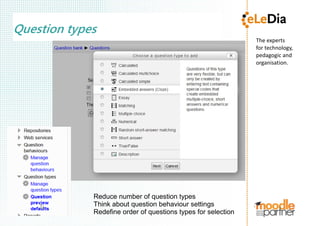
Question types
Reduce number of question types
Think about question behaviour settings
Redefine order of questions types for selection
The experts
for technology,
pedagogic and 
organisation.
Question Types
Reduce number of
question types
Reorder the question
types. Mostly used
on top.
The experts
for technology,
pedagogic and 
organisation.
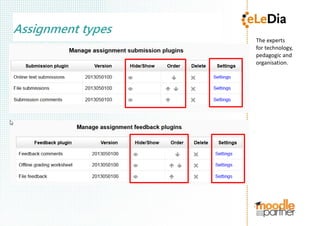
Assignment types
The experts
for technology,
pedagogic and 
organisation.
Repositories
Which repository types are required?
Which role should get access
to which repository?
Did you ever switch between
different views?
The experts
for technology,
pedagogic and 
organisation.
Some very helpfull Filters
Filters are disabled by default in Moodle systems
The experts
for technology,
pedagogic and 
organisation.
Editor
The experts
for technology,
pedagogic and 
organisation.
Editor
The experts
for technology,
pedagogic and 
organisation.
Editor Settings
The experts
for technology,
pedagogic and 
organisation.
Moodle 2.5 - some Highlights
Drag and drop for text from
word processor to course page
- also for URL addresses
The experts
for technology,
pedagogic and 
organisation.
Moodle 2.5 – some Highlights
Quiz settings form
The experts
for technology,
pedagogic and 
organisation.
Moodle 2.5 some Highlights
Create quiz
questions in
a much
simplier
form
The experts
for technology,
pedagogic and 
organisation.
The experts
for technology,
pedagogic and 
organisation.
What's missing?
●
Lets discuss,
what should be simplified in
future?
The experts
for technology,
pedagogic and 
organisation.
Contact
●
eLeDia eLearning im Dialog
Ralf Hilgenstock
German Moodle Partner
phone: 0049 30 5056 1070
mail: info@eledia.de
www.eledia.de
www.moodle.de
●
My Blog: http://dialoge.info

Simplify Moodle