E-learning Training for Academic Staff


Feda Negesse


Department of Linguistics


Addis Ababa University
1
January 29, 2021
Basics of Moodle and Course Management
OUTLINE
Objectives


Success


E-learning


Learning Management System (LMS)


Moodle


Course Management
2
OBJECTIVES
To enhance learning and improve its outcomes with the aid of ICT.


To establish an autonomous learning system to enable students to learn
based on their own paces.


Provide students and teachers with the knowledge and skills needed to
become competent in using e-learning platforms.
3
Objectives
Success
Success of E-learning depends 3 preconditions.


Teachers’ knowledge and skills


Teachers have to know:


1. How to use E-learning tools to enhance learning,


2. How to interact with students and create a comfortable learning environment and


3. How to creatively bring students closer and capture their attention.


(Tham & Werner, 2005; Benta, Bologa & Dzitac, 2014; Oproiu, 2015)
4
Why training ?
Students


Students may feel isolated because of lack of the physical presence of their classmates.


Teachers should know how to establish connections and relationships with them.


They should help students to take responsibility for their own learning.


Students should exhibit a good level of motivation to bene
fi
t from E-learning.


Technology


E-learning tools-computer, internet and LMS-must be available.


(Tham & Werner, 2005; Benta, Bologa & Dzitac, 2014; Oproiu, 2015)
5
E-Learning ?
6
What is e-Learning ?


E-Learning, or electronic learning, is the delivery of learning and
training through digital resources.


It is provided through electronic devices such as computers, tablets and
even cellular phones that are connected to the internet.


This makes it easy for users to learn anytime, anywhere, with few, if any,
restrictions.


(Tham & Werner, 2005; Benta, Bologa & Dzitac, 2014; Oproiu, 2015)
E-learning ?


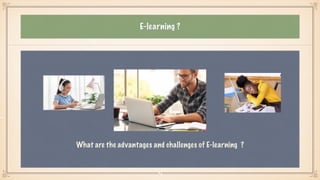
What are the advantages and challenges of E-learning ?
7
Advantages of using e-learning
Some advantages of e-learning


Quick communication with students


Synchronous online discussion


Quick way to resolve misconceptions/misinformation


Student collaboration


(Zare, Sarikhani, Salari & Mansouri, 2016)


8
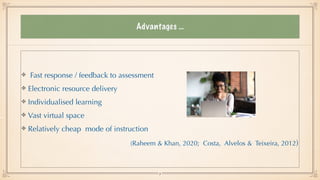
Advantages …
Fast response / feedback to assessment


Electronic resource delivery


Individualised learning


Vast virtual space


Relatively cheap mode of instruction


(Raheem & Khan, 2020; Costa, Alvelos & Teixeira, 2012)
9
Challenges of e-learning
Lack of awareness and ICT capacity


Low institutional support


Lack of skills in content development


Lack of interest/decreased motivation in students


(Costa, Alvelos & Teixeira, 2012; Raheem & Khan, 2020)
Challenges…
Lack of infrastructure, training and support


Inadequate technological con
fi
dence


Copyright and payment issues


Lack of physical human presence


(Vitoria, Mislinawati & Nurmasyitah, 2018)
Learning Management System (LMS)
Learning Management System (LMS) is a software application or Web-based technology used to
plan, implement, and assess a speci
fi
c learning process.


Typically, LMS provides an instructor with a way to create and deliver content, monitor student
participation, and assess student performance.


LMS may also provide students with the ability to use interactive features such as a discussion
forum.


(Coman et al., 2020)


12
Moodle
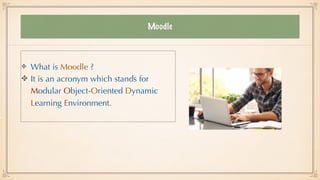
What is Moodle ?


It is an acronym which stands for
Modular Object-Oriented Dynamic
Learning Environment.
Moodle
Moodle is a Learning Management System (LMS) that allows you to store your
learning content and manage assessments online.


Students can retrieve course contents and upload assessments via Moodle.

Moodle supports a range of different resource types that allow you to include
almost any kind of digital contents into your courses.


(Costa, Alvelos & Teixeira, 2012; Ouadoud, Chkouri & Nejjari, 2018)


14
Why Moodle ?
Free


Most popular


Open source application


Interesting features


Easy to learn and customise


(Costa, Alvelos & Teixeira, 2012; Ouadoud, Chkouri & Nejjari, 2018)
15
Questions or comments
16
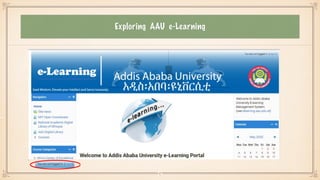
Exploring AAU e-Learning
 

17
Starting AAU e-Learning
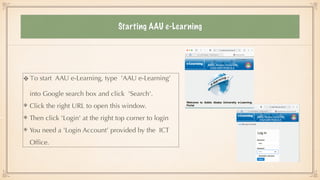
To start AAU e-Learning, type 'AAU e-Learning’
into Google search box and click 'Search'.


Click the right URL to open this window.


Then click 'Login' at the right top corner to login


You need a 'Login Account’ provided by the ICT
Of
fi
ce.
Course Management
What tools are there to create courses in Moodle ?
19
Course Management
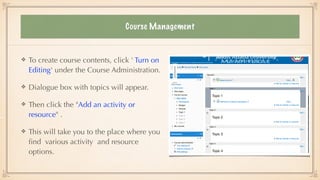
To create course contents, click ' Turn on
Editing' under the Course Administration.


Dialogue box with topics will appear.


Then click the "Add an activity or
resource" .


This will take you to the place where you
fi
nd various activity and resource
options.
Course Management
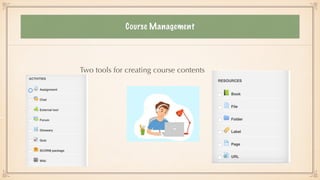
Two tools for creating course contents
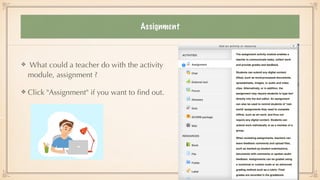
Assignment
What could a teacher do with the activity
module, assignment ?


Click "Assignment" if you want to
fi
nd out.
Course Management
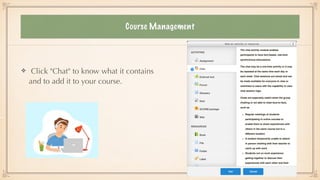
Click "Chat" to know what it contains
and to add it to your course.
Course Management
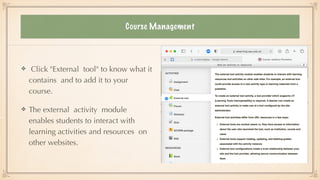
Click "External tool" to know what it
contains and to add it to your
course.


The external activity module
enables students to interact with
learning activities and resources on
other websites.
Course Management
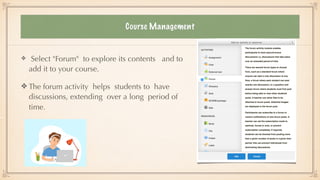
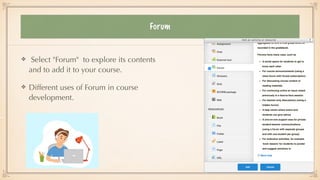
Select "Forum" to explore its contents and to
add it to your course.


The forum activity helps students to have
discussions, extending over a long period of
time.
Forum
Select "Forum" to explore its contents
and to add it to your course.


Different uses of Forum in course
development.
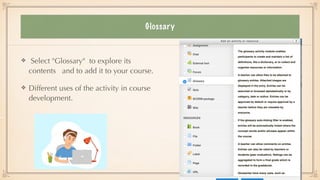
Glossary
Select "Glossary" to explore its
contents and to add it to your course.


Different uses of the activity in course
development.
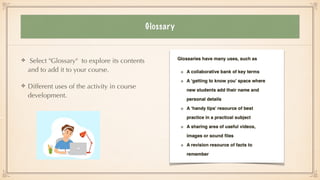
Glossary
Select "Glossary" to explore its contents
and to add it to your course.


Different uses of the activity in course
development.
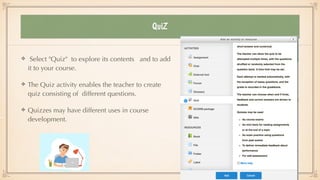
QuiZ
Select "Quiz" to explore its contents and to add
it to your course.


The Quiz activity enables the teacher to create
quiz consisting of different questions.


Quizzes may have different uses in course
development.
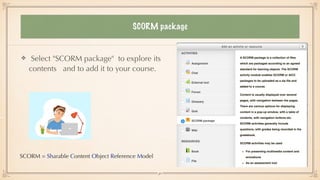
SCORM package
Select "SCORM package" to explore its
contents and to add it to your course.
SCORM = Sharable Content Object Reference Model
30
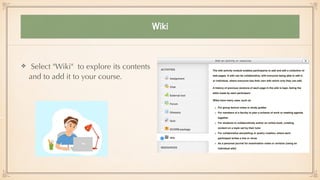
Wiki
Select "Wiki" to explore its contents
and to add it to your course.
Let’s Recap
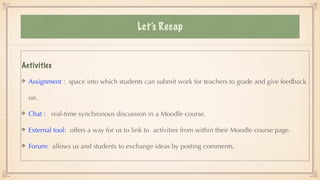
Activities


Assignment : space into which students can submit work for teachers to grade and give feedback
on.


Chat : real-time synchronous discussion in a Moodle course.


External tool: offers a way for us to link to activities from within their Moodle course page.


Forum: allows us and students to exchange ideas by posting comments.
Let’s Recap
Activities


Glossary: helps us to create and maintain a list of de
fi
nitions, like a dictionary.


Quiz: enables us to design and build quizzes with a large variety of questions.


SCORM : a set of speci
fi
cations that enable interoperability, accessibility and
reusability of internet.


Wiki: a set of collaboratively authored web documents.
33
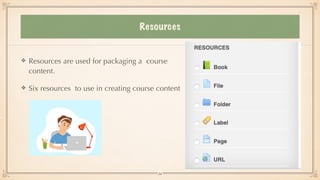
Resources
Resources are used for packaging a course
content.


Six resources to use in creating course content
34
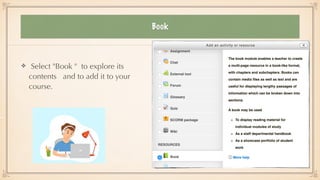
Book
Select "Book " to explore its
contents and to add it to your
course.
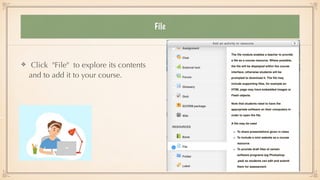
File
Click "File" to explore its contents
and to add it to your course.
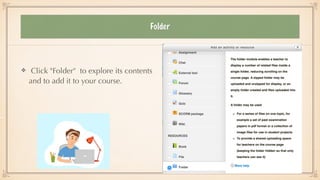
Folder
Click "Folder" to explore its contents
and to add it to your course.
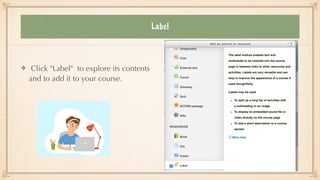
Label
Click "Label" to explore its contents
and to add it to your course.
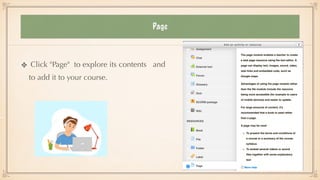
Page
Click "Page" to explore its contents and
to add it to your course.
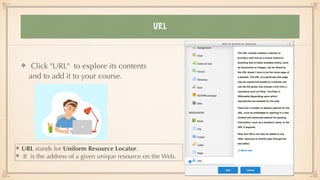
URL
Click "URL" to explore its contents
and to add it to your course.
URL stands for Uniform Resource Locator.


It is the address of a given unique resource on the Web.
Let’s Recap
Resources


Book: to create multi-page resources with a book-like format.


File : to present materials to students such as word-processed documents or slides.


Folder: to display several course resources together.


Label: to serve as a spacer on a Moodle course page.


Page: to create a link to a screen that displays the content made by the teacher.


URL: to create a link on the internet to a website or online
fi
le.
41
End


Thank you
Explore the LMS,
MOODLE, on your own !
42

E-learning

  • 1.
    E-learning Training forAcademic Staff Feda Negesse Department of Linguistics Addis Ababa University 1 January 29, 2021 Basics of Moodle and Course Management
  • 2.
  • 3.
    OBJECTIVES To enhance learningand improve its outcomes with the aid of ICT. To establish an autonomous learning system to enable students to learn based on their own paces. Provide students and teachers with the knowledge and skills needed to become competent in using e-learning platforms. 3 Objectives
  • 4.
    Success Success of E-learningdepends 3 preconditions. Teachers’ knowledge and skills Teachers have to know: 1. How to use E-learning tools to enhance learning, 2. How to interact with students and create a comfortable learning environment and 3. How to creatively bring students closer and capture their attention. (Tham & Werner, 2005; Benta, Bologa & Dzitac, 2014; Oproiu, 2015) 4
  • 5.
    Why training ? Students Studentsmay feel isolated because of lack of the physical presence of their classmates. Teachers should know how to establish connections and relationships with them. They should help students to take responsibility for their own learning. Students should exhibit a good level of motivation to bene fi t from E-learning. Technology E-learning tools-computer, internet and LMS-must be available. (Tham & Werner, 2005; Benta, Bologa & Dzitac, 2014; Oproiu, 2015) 5
  • 6.
    E-Learning ? 6 What ise-Learning ? E-Learning, or electronic learning, is the delivery of learning and training through digital resources. It is provided through electronic devices such as computers, tablets and even cellular phones that are connected to the internet. This makes it easy for users to learn anytime, anywhere, with few, if any, restrictions. (Tham & Werner, 2005; Benta, Bologa & Dzitac, 2014; Oproiu, 2015)
  • 7.
    E-learning ? What arethe advantages and challenges of E-learning ? 7
  • 8.
    Advantages of usinge-learning Some advantages of e-learning Quick communication with students Synchronous online discussion Quick way to resolve misconceptions/misinformation Student collaboration (Zare, Sarikhani, Salari & Mansouri, 2016) 8
  • 9.
    Advantages … Fast response/ feedback to assessment Electronic resource delivery Individualised learning Vast virtual space Relatively cheap mode of instruction (Raheem & Khan, 2020; Costa, Alvelos & Teixeira, 2012) 9
  • 10.
    Challenges of e-learning Lackof awareness and ICT capacity Low institutional support Lack of skills in content development Lack of interest/decreased motivation in students (Costa, Alvelos & Teixeira, 2012; Raheem & Khan, 2020)
  • 11.
    Challenges… Lack of infrastructure,training and support Inadequate technological con fi dence Copyright and payment issues Lack of physical human presence (Vitoria, Mislinawati & Nurmasyitah, 2018)
  • 12.
    Learning Management System(LMS) Learning Management System (LMS) is a software application or Web-based technology used to plan, implement, and assess a speci fi c learning process. Typically, LMS provides an instructor with a way to create and deliver content, monitor student participation, and assess student performance. LMS may also provide students with the ability to use interactive features such as a discussion forum. (Coman et al., 2020) 12
  • 13.
    Moodle What is Moodle? It is an acronym which stands for Modular Object-Oriented Dynamic Learning Environment.
  • 14.
    Moodle Moodle is aLearning Management System (LMS) that allows you to store your learning content and manage assessments online. Students can retrieve course contents and upload assessments via Moodle. Moodle supports a range of different resource types that allow you to include almost any kind of digital contents into your courses. (Costa, Alvelos & Teixeira, 2012; Ouadoud, Chkouri & Nejjari, 2018) 14
  • 15.
    Why Moodle ? Free Mostpopular Open source application Interesting features Easy to learn and customise (Costa, Alvelos & Teixeira, 2012; Ouadoud, Chkouri & Nejjari, 2018) 15
  • 16.
  • 17.
  • 18.
    Starting AAU e-Learning Tostart AAU e-Learning, type 'AAU e-Learning’ into Google search box and click 'Search'. Click the right URL to open this window. Then click 'Login' at the right top corner to login You need a 'Login Account’ provided by the ICT Of fi ce.
  • 19.
    Course Management What toolsare there to create courses in Moodle ? 19
  • 20.
    Course Management To createcourse contents, click ' Turn on Editing' under the Course Administration. Dialogue box with topics will appear. Then click the "Add an activity or resource" . This will take you to the place where you fi nd various activity and resource options.
  • 21.
    Course Management Two toolsfor creating course contents
  • 22.
    Assignment What could ateacher do with the activity module, assignment ? Click "Assignment" if you want to fi nd out.
  • 23.
    Course Management Click "Chat"to know what it contains and to add it to your course.
  • 24.
    Course Management Click "Externaltool" to know what it contains and to add it to your course. The external activity module enables students to interact with learning activities and resources on other websites.
  • 25.
    Course Management Select "Forum"to explore its contents and to add it to your course. The forum activity helps students to have discussions, extending over a long period of time.
  • 26.
    Forum Select "Forum" toexplore its contents and to add it to your course. Different uses of Forum in course development.
  • 27.
    Glossary Select "Glossary" toexplore its contents and to add it to your course. Different uses of the activity in course development.
  • 28.
    Glossary Select "Glossary" toexplore its contents and to add it to your course. Different uses of the activity in course development.
  • 29.
    QuiZ Select "Quiz" toexplore its contents and to add it to your course. The Quiz activity enables the teacher to create quiz consisting of different questions. Quizzes may have different uses in course development.
  • 30.
    SCORM package Select "SCORMpackage" to explore its contents and to add it to your course. SCORM = Sharable Content Object Reference Model 30
  • 31.
    Wiki Select "Wiki" toexplore its contents and to add it to your course.
  • 32.
    Let’s Recap Activities Assignment :space into which students can submit work for teachers to grade and give feedback on. Chat : real-time synchronous discussion in a Moodle course. External tool: offers a way for us to link to activities from within their Moodle course page. Forum: allows us and students to exchange ideas by posting comments.
  • 33.
    Let’s Recap Activities Glossary: helpsus to create and maintain a list of de fi nitions, like a dictionary. Quiz: enables us to design and build quizzes with a large variety of questions. SCORM : a set of speci fi cations that enable interoperability, accessibility and reusability of internet. Wiki: a set of collaboratively authored web documents. 33
  • 34.
    Resources Resources are usedfor packaging a course content. Six resources to use in creating course content 34
  • 35.
    Book Select "Book "to explore its contents and to add it to your course.
  • 36.
    File Click "File" toexplore its contents and to add it to your course.
  • 37.
    Folder Click "Folder" toexplore its contents and to add it to your course.
  • 38.
    Label Click "Label" toexplore its contents and to add it to your course.
  • 39.
    Page Click "Page" toexplore its contents and to add it to your course.
  • 40.
    URL Click "URL" toexplore its contents and to add it to your course. URL stands for Uniform Resource Locator. It is the address of a given unique resource on the Web.
  • 41.
    Let’s Recap Resources Book: tocreate multi-page resources with a book-like format. File : to present materials to students such as word-processed documents or slides. Folder: to display several course resources together. Label: to serve as a spacer on a Moodle course page. Page: to create a link to a screen that displays the content made by the teacher. URL: to create a link on the internet to a website or online fi le. 41
  • 42.
    End Thank you Explore theLMS, MOODLE, on your own ! 42