

Sass
(Syntactically Awesome Style Sheets)
What is it good for…
What is Sass?
“Sass is a meta-language on top of CSS that's used to describe
the style of a document cleanly and structurally, with more
power than flat CSS allows. Sass both provides a simpler, more
elegant syntax for CSS and implements various features that are
useful for creating manageable style sheets.”
- from http://sass-lang.com/
“Sass is an extension of CSS3, adding nested rules, Variables,
mixins, selector inheritance, and more. It’s translated to well-
formatted, standard CSS using the command line tool or a web-
framework plugin.”
- from internet
a little history…..
• Sass was first given life by Hampton Catlin in 2006, later
supported by Natalie weizembaum and chris eppstein
• Sass started life in ruby community
• Sass supports two syntaxes
– Indentation syntax with file ext .sass
– Css compatible syntax with file ext .SCSS
• Sass is free to use, require no license.
Why use it?
• Modularize (@import)
• Variables for maintainability
• Mixins improves reusability
• Reduces redundant rules (keep it DRY)
• Scalable and Maintainable
Make writing style more fun….
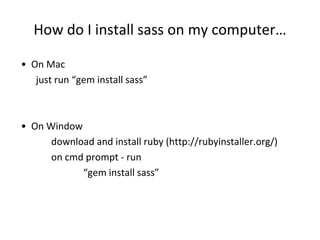
How do I install sass on my computer…
• On Mac
just run “gem install sass”
• On Window
download and install ruby (http://rubyinstaller.org/)
on cmd prompt - run
“gem install sass”
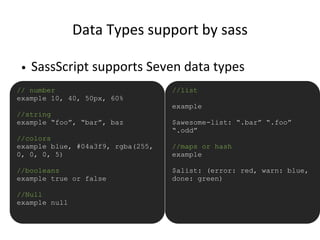
Data Types support by sass
• SassScript supports Seven data types
// number
example 10, 40, 50px, 60%
//string
example “foo”, “bar”, baz
//colors
example blue, #04a3f9, rgba(255,
0, 0, 0, 5)
//booleans
example true or false
//Null
example null
//list
example
$awesome-list: “.bar” “.foo”
“.odd”
//maps or hash
example
$alist: (error: red, warn: blue,
done: green)
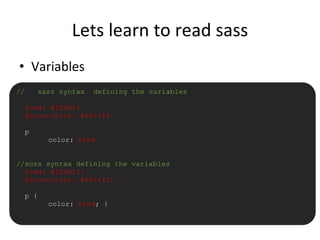
Lets learn to read sass
• Variables
// sass syntax defining the variables
$red: #ff0b13
$blue-color: #091fff
p
color: $red
//scss syntax defining the variables
$red: #ff0b13;
$blue-color: #091fff;
p {
color: $red; }
Lets learn to read sass
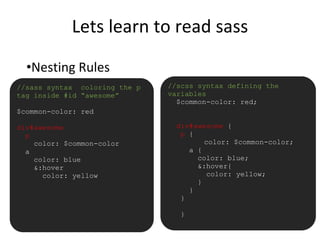
•Nesting Rules
//sass syntax coloring the p
tag inside #id “awesome”
$common-color: red
div#awesome
p
color: $common-color
a
color: blue
&:hover
color: yellow
//scss syntax defining the
variables
$common-color: red;
div#awesome {
p {
color: $common-color;
a {
color: blue;
&:hover{
color: yellow;
}
}
}
}
Lets learn to read sass
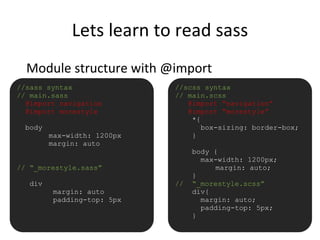
Module structure with @import
//sass syntax
// main.sass
@import navigation
@import morestyle
body
max-width: 1200px
margin: auto
// “_morestyle.sass”
div
margin: auto
padding-top: 5px
//scss syntax
// main.scss
@import “navigation”
@import “morestyle”
*{
box-sizing: border-box;
}
body {
max-width: 1200px;
margin: auto;
}
// “_morestyle.scss”
div{
margin: auto;
padding-top: 5px;
}
Lets learn to read sass
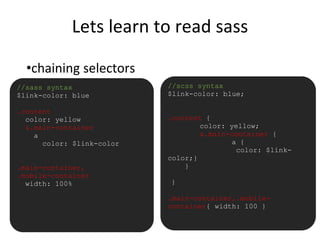
•chaining selectors
//sass syntax
$link-color: blue
.content
color: yellow
&.main-container
a
color: $link-color
.main-container,
.mobile-container
width: 100%
//scss syntax
$link-color: blue;
.content {
color: yellow;
&.main-container {
a {
color: $link-
color;}
}
}
.main-container,.mobile-
container{ width: 100 }
Lets learn to read sass
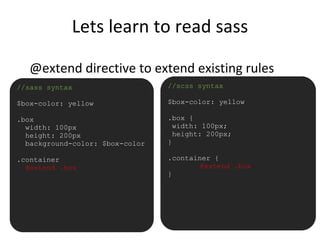
@extend directive to extend existing rules
•//sass syntax
$box-color: yellow
.box
width: 100px
height: 200px
background-color: $box-color
.container
@extend .box
//scss syntax
$box-color: yellow
.box {
width: 100px;
height: 200px;
}
.container {
@extend .box
}
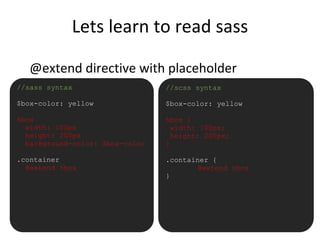
Lets learn to read sass
@extend directive with placeholder
•//sass syntax
$box-color: yellow
%box
width: 100px
height: 200px
background-color: $box-color
.container
@extend %box
//scss syntax
$box-color: yellow
%box {
width: 100px;
height: 200px;
}
.container {
@extend %box
}
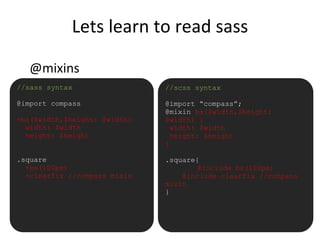
Lets learn to read sass
@mixins
•//sass syntax
@import compass
=bs($width,$height: $width)
width: $width
height: $height
.square
+bs(100px)
+clearfix //compass mixin
//scss syntax
@import “compass”;
@mixin bs($width,$height:
$width) {
width: $width
height: $height
}
.square{
@include bs(100px)
@include clearfix //compass
mixin
}
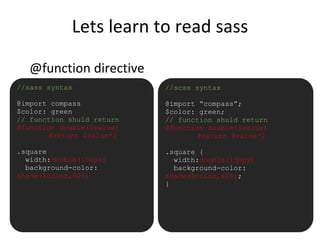
Lets learn to read sass
@function directive
•//sass syntax
@import compass
$color: green
// function shuld return
@function double($value)
@return $value*2
.square
width:double(100px)
background-color:
shade($color,60%)
//scss syntax
@import “compass”;
$color: green;
// function shuld return
@function double($value)
@return $value*2
.square {
width:double(100px)
background-color:
shade($color,60%);
}
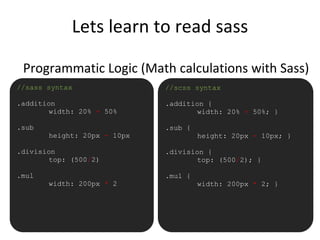
Lets learn to read sass
Programmatic Logic (Math calculations with Sass)
•//sass syntax
.addition
width: 20% + 50%
.sub
height: 20px - 10px
.division
top: (500/2)
.mul
width: 200px * 2
//scss syntax
.addition {
width: 20% + 50%; }
.sub {
height: 20px - 10px; }
.division {
top: (500/2); }
.mul {
width: 200px * 2; }
Lets learn to read sass
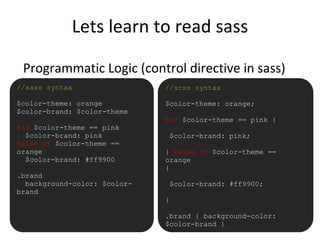
Programmatic Logic (control directive in sass)
•//sass syntax
$color-theme: orange
$color-brand: $color-theme
@if $color-theme == pink
$color-brand: pink
@else if $color-theme ==
orange
$color-brand: #ff9900
.brand
background-color: $color-
brand
//scss syntax
$color-theme: orange;
@if $color-theme == pink {
$color-brand: pink;
} @else if $color-theme ==
orange
{
$color-brand: #ff9900;
}
.brand { background-color:
$color-brand }
Lets learn to read sass
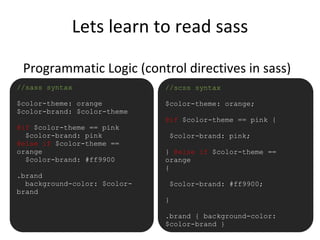
Programmatic Logic (control directives in sass)
•//sass syntax
$color-theme: orange
$color-brand: $color-theme
@if $color-theme == pink
$color-brand: pink
@else if $color-theme ==
orange
$color-brand: #ff9900
.brand
background-color: $color-
brand
//scss syntax
$color-theme: orange;
@if $color-theme == pink {
$color-brand: pink;
} @else if $color-theme ==
orange
{
$color-brand: #ff9900;
}
.brand { background-color:
$color-brand }
Lets learn to read sass
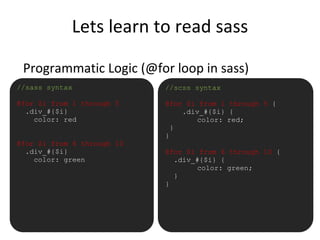
Programmatic Logic (@for loop in sass)
•//sass syntax
@for $i from 1 through 5
.div_#{$i}
color: red
@for $i from 6 through 10
.div_#{$i}
color: green
//scss syntax
@for $i from 1 through 5 {
.div_#{$i} {
color: red;
}
}
@for $i from 6 through 10 {
.div_#{$i} {
color: green;
}
}
Lets learn to read sass
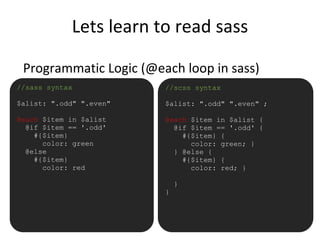
Programmatic Logic (@each loop in sass)
•//sass syntax
$alist: ".odd" ".even"
@each $item in $alist
@if $item == '.odd'
#{$item}
color: green
@else
#{$item}
color: red
//scss syntax
$alist: ".odd" ".even" ;
@each $item in $alist {
@if $item == '.odd' {
#{$item} {
color: green; }
} @else {
#{$item} {
color: red; }
}
}
Lets learn to read sass
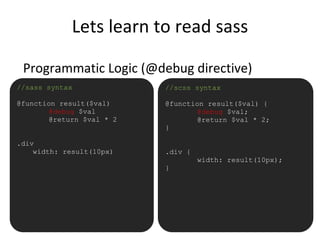
Programmatic Logic (@debug directive)
•//sass syntax
@function result($val)
@debug $val
@return $val * 2
.div
width: result(10px)
//scss syntax
@function result($val) {
@debug $val;
@return $val * 2;
}
.div {
width: result(10px);
}
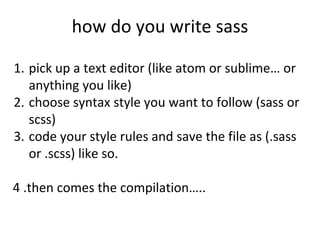
how do you write sass
1. pick up a text editor (like atom or sublime… or
anything you like)
2. choose syntax style you want to follow (sass or
scss)
3. code your style rules and save the file as (.sass
or .scss) like so.
4 .then comes the compilation…..
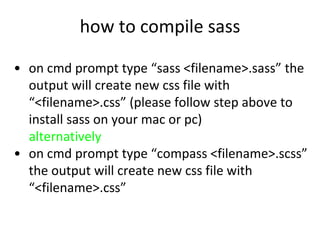
how to compile sass
• on cmd prompt type “sass <filename>.sass” the
output will create new css file with
“<filename>.css” (please follow step above to
install sass on your mac or pc)
alternatively
• on cmd prompt type “compass <filename>.scss”
the output will create new css file with
“<filename>.css”
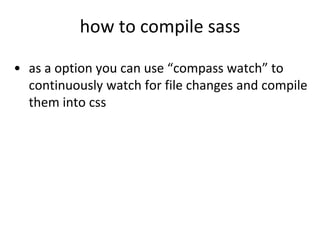
how to compile sass
• as a option you can use “compass watch” to
continuously watch for file changes and compile
them into css
So what next….
awesome you have learn about sass… next steps
• learn more complex topics (using compass)
• pick up a random css file re-code it into sass
• read awesome blogs from frontend
developers who works on sass and
coffeescript
• take same online course (if you can afford it)
– www.codeschool.com
– www.teamtreehouse.com (i like this
better)
Thank you
Lets go out there and write some sass…

Simple introduction Sass

  • 1.
    Sass (Syntactically Awesome StyleSheets) What is it good for…
  • 2.
    What is Sass? “Sassis a meta-language on top of CSS that's used to describe the style of a document cleanly and structurally, with more power than flat CSS allows. Sass both provides a simpler, more elegant syntax for CSS and implements various features that are useful for creating manageable style sheets.” - from http://sass-lang.com/ “Sass is an extension of CSS3, adding nested rules, Variables, mixins, selector inheritance, and more. It’s translated to well- formatted, standard CSS using the command line tool or a web- framework plugin.” - from internet
  • 3.
    a little history….. •Sass was first given life by Hampton Catlin in 2006, later supported by Natalie weizembaum and chris eppstein • Sass started life in ruby community • Sass supports two syntaxes – Indentation syntax with file ext .sass – Css compatible syntax with file ext .SCSS • Sass is free to use, require no license.
  • 4.
    Why use it? •Modularize (@import) • Variables for maintainability • Mixins improves reusability • Reduces redundant rules (keep it DRY) • Scalable and Maintainable Make writing style more fun….
  • 5.
    How do Iinstall sass on my computer… • On Mac just run “gem install sass” • On Window download and install ruby (http://rubyinstaller.org/) on cmd prompt - run “gem install sass”
  • 6.
    Data Types supportby sass • SassScript supports Seven data types // number example 10, 40, 50px, 60% //string example “foo”, “bar”, baz //colors example blue, #04a3f9, rgba(255, 0, 0, 0, 5) //booleans example true or false //Null example null //list example $awesome-list: “.bar” “.foo” “.odd” //maps or hash example $alist: (error: red, warn: blue, done: green)
  • 7.
    Lets learn toread sass • Variables // sass syntax defining the variables $red: #ff0b13 $blue-color: #091fff p color: $red //scss syntax defining the variables $red: #ff0b13; $blue-color: #091fff; p { color: $red; }
  • 8.
    Lets learn toread sass •Nesting Rules //sass syntax coloring the p tag inside #id “awesome” $common-color: red div#awesome p color: $common-color a color: blue &:hover color: yellow //scss syntax defining the variables $common-color: red; div#awesome { p { color: $common-color; a { color: blue; &:hover{ color: yellow; } } } }
  • 9.
    Lets learn toread sass Module structure with @import //sass syntax // main.sass @import navigation @import morestyle body max-width: 1200px margin: auto // “_morestyle.sass” div margin: auto padding-top: 5px //scss syntax // main.scss @import “navigation” @import “morestyle” *{ box-sizing: border-box; } body { max-width: 1200px; margin: auto; } // “_morestyle.scss” div{ margin: auto; padding-top: 5px; }
  • 10.
    Lets learn toread sass •chaining selectors //sass syntax $link-color: blue .content color: yellow &.main-container a color: $link-color .main-container, .mobile-container width: 100% //scss syntax $link-color: blue; .content { color: yellow; &.main-container { a { color: $link- color;} } } .main-container,.mobile- container{ width: 100 }
  • 11.
    Lets learn toread sass @extend directive to extend existing rules •//sass syntax $box-color: yellow .box width: 100px height: 200px background-color: $box-color .container @extend .box //scss syntax $box-color: yellow .box { width: 100px; height: 200px; } .container { @extend .box }
  • 12.
    Lets learn toread sass @extend directive with placeholder •//sass syntax $box-color: yellow %box width: 100px height: 200px background-color: $box-color .container @extend %box //scss syntax $box-color: yellow %box { width: 100px; height: 200px; } .container { @extend %box }
  • 13.
    Lets learn toread sass @mixins •//sass syntax @import compass =bs($width,$height: $width) width: $width height: $height .square +bs(100px) +clearfix //compass mixin //scss syntax @import “compass”; @mixin bs($width,$height: $width) { width: $width height: $height } .square{ @include bs(100px) @include clearfix //compass mixin }
  • 14.
    Lets learn toread sass @function directive •//sass syntax @import compass $color: green // function shuld return @function double($value) @return $value*2 .square width:double(100px) background-color: shade($color,60%) //scss syntax @import “compass”; $color: green; // function shuld return @function double($value) @return $value*2 .square { width:double(100px) background-color: shade($color,60%); }
  • 15.
    Lets learn toread sass Programmatic Logic (Math calculations with Sass) •//sass syntax .addition width: 20% + 50% .sub height: 20px - 10px .division top: (500/2) .mul width: 200px * 2 //scss syntax .addition { width: 20% + 50%; } .sub { height: 20px - 10px; } .division { top: (500/2); } .mul { width: 200px * 2; }
  • 16.
    Lets learn toread sass Programmatic Logic (control directive in sass) •//sass syntax $color-theme: orange $color-brand: $color-theme @if $color-theme == pink $color-brand: pink @else if $color-theme == orange $color-brand: #ff9900 .brand background-color: $color- brand //scss syntax $color-theme: orange; @if $color-theme == pink { $color-brand: pink; } @else if $color-theme == orange { $color-brand: #ff9900; } .brand { background-color: $color-brand }
  • 17.
    Lets learn toread sass Programmatic Logic (control directives in sass) •//sass syntax $color-theme: orange $color-brand: $color-theme @if $color-theme == pink $color-brand: pink @else if $color-theme == orange $color-brand: #ff9900 .brand background-color: $color- brand //scss syntax $color-theme: orange; @if $color-theme == pink { $color-brand: pink; } @else if $color-theme == orange { $color-brand: #ff9900; } .brand { background-color: $color-brand }
  • 18.
    Lets learn toread sass Programmatic Logic (@for loop in sass) •//sass syntax @for $i from 1 through 5 .div_#{$i} color: red @for $i from 6 through 10 .div_#{$i} color: green //scss syntax @for $i from 1 through 5 { .div_#{$i} { color: red; } } @for $i from 6 through 10 { .div_#{$i} { color: green; } }
  • 19.
    Lets learn toread sass Programmatic Logic (@each loop in sass) •//sass syntax $alist: ".odd" ".even" @each $item in $alist @if $item == '.odd' #{$item} color: green @else #{$item} color: red //scss syntax $alist: ".odd" ".even" ; @each $item in $alist { @if $item == '.odd' { #{$item} { color: green; } } @else { #{$item} { color: red; } } }
  • 20.
    Lets learn toread sass Programmatic Logic (@debug directive) •//sass syntax @function result($val) @debug $val @return $val * 2 .div width: result(10px) //scss syntax @function result($val) { @debug $val; @return $val * 2; } .div { width: result(10px); }
  • 21.
    how do youwrite sass 1. pick up a text editor (like atom or sublime… or anything you like) 2. choose syntax style you want to follow (sass or scss) 3. code your style rules and save the file as (.sass or .scss) like so. 4 .then comes the compilation…..
  • 22.
    how to compilesass • on cmd prompt type “sass <filename>.sass” the output will create new css file with “<filename>.css” (please follow step above to install sass on your mac or pc) alternatively • on cmd prompt type “compass <filename>.scss” the output will create new css file with “<filename>.css”
  • 23.
    how to compilesass • as a option you can use “compass watch” to continuously watch for file changes and compile them into css
  • 24.
    So what next…. awesomeyou have learn about sass… next steps • learn more complex topics (using compass) • pick up a random css file re-code it into sass • read awesome blogs from frontend developers who works on sass and coffeescript • take same online course (if you can afford it) – www.codeschool.com – www.teamtreehouse.com (i like this better)
  • 25.
  • 26.
    Lets go outthere and write some sass…