Sass & Compass
    Presented by: Ethan Gardner
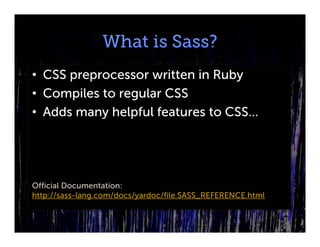
What is Sass?
• CSS preprocessor written in Ruby
• Compiles to regular CSS
• Adds many helpful features to CSS…


Official Documentation:
http://sass-lang.com/docs/yardoc/file.SASS_REFERENCE.html
What is Compass?
• An extension of Sass
• Contains many CSS3 helpers used in
  modern web development.
• Adds many helpful features to CSS…


Official Documentation:
http://compass-style.org/reference/compass/
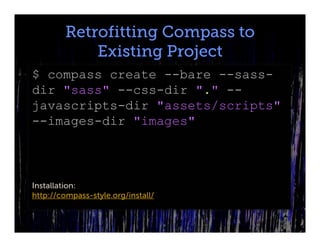
Retrofitting Compass to
            Existing Project
$ compass create --bare --sass-
dir "sass" --css-dir "." --
javascripts-dir "assets/scripts"
--images-dir "images"


Installation:
http://compass-style.org/install/
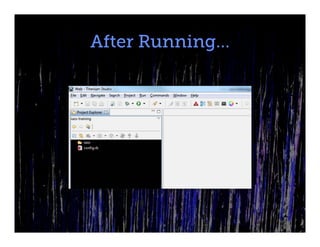
After Running…
Changing Options
To change these options after Compass
has been added to the project, you can
always edit the “config.rb” file
Starting Compass
Navigate to the directory that contains the
“config.rb” file in the command line and
type:

compass watch
Variables
• Common values can assigned to
  variables for use throughout a project.
• One of the best features of Sass
• $variable-name: value;
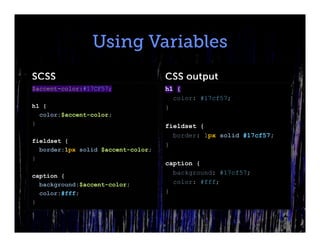
Using Variables
SCSS                                CSS output
$accent-color:#17CF57;              h1 {
                                      color: #17cf57;
h1 {                                }
  color:$accent-color;
}                                   fieldset {
                                      border: 1px solid #17cf57;
fieldset {
                                    }
  border:1px solid $accent-color;
}
                                    caption {
caption {
                                      background: #17cf57;
  background:$accent-color;           color: #fff;
  color:#fff;                       }
}
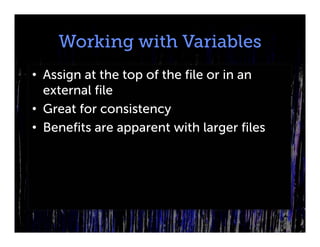
Working with Variables
• Assign at the top of the file or in an
  external file
• Great for consistency
• Benefits are apparent with larger files
Nested Rules
Rules can be nested to add specificity to a
selector.
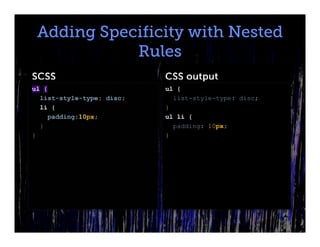
Adding Specificity with Nested
            Rules
SCSS                       CSS output
ul {                       ul {
  list-style-type: disc;     list-style-type: disc;
  li {                     }
    padding:10px;          ul li {
  }                          padding: 10px;
}                          }
Ampersands in Nested Rules
When nested rules are used, an
ampersand adds properties to a child
selector and is useful for pseudo classes
like :hover.
Ampersands in Nested Rules
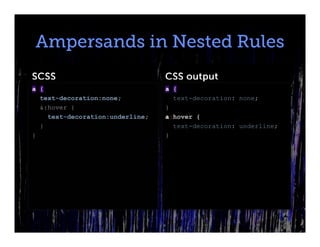
SCSS                             CSS output
a {                              a {
  text-decoration:none;            text-decoration: none;
  &:hover {                      }
    text-decoration:underline;   a:hover {
  }                                text-decoration: underline;
}                                }
Ampersands in Nested Rules
           (cont’d)
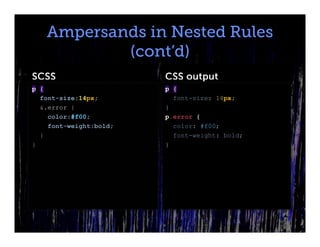
SCSS                    CSS output
p {                     p {
  font-size:14px;         font-size: 14px;
  &.error {             }
    color:#f00;         p.error {
    font-weight:bold;     color: #f00;
  }                       font-weight: bold;
}                       }
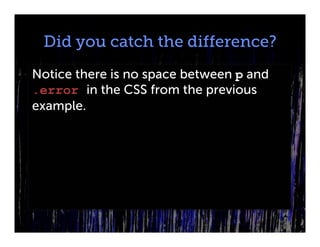
Did you catch the difference?
Notice there is no space between p and
.error in the CSS from the previous
example.
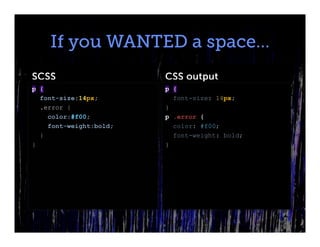
If you WANTED a space…
SCSS                    CSS output
p {                     p {
  font-size:14px;         font-size: 14px;
  .error {              }
    color:#f00;         p .error {
    font-weight:bold;     color: #f00;
  }                       font-weight: bold;
}                       }
Multiple Nesting
You don’t have to stop at one level of
nesting. Multiple levels of nesting can be
VERY powerful.
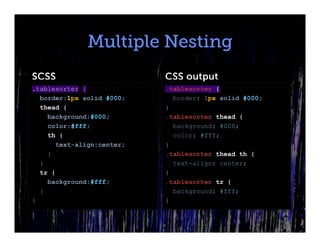
Multiple Nesting
SCSS                        CSS output
.tablesorter {              .tablesorter {
  border:1px solid #000;      border: 1px solid #000;
  thead {                   }
    background:#000;        .tablesorter thead {
    color:#fff;               background: #000;
    th {                      color: #fff;
       text-align:center;   }
    }                       .tablesorter thead th {
  }                           text-align: center;
  tr {                      }
    background:#fff;        .tablesorter tr {
  }                           background: #fff;
}                           }
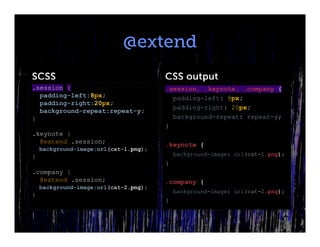
@extend
@extend uses the properties of a selector
as the foundation for another selector
@extend
SCSS                                   CSS output
.session {                             .session, .keynote, .company {
  padding-left:8px;                      padding-left: 8px;
  padding-right:20px;
                                         padding-right: 20px;
  background-repeat:repeat-y;
}                                        background-repeat: repeat-y;
                                       }
.keynote {
  @extend .session;                    .keynote {
    background-image:url(cat-1.png);
}                                          background-image: url(cat-1.png);
                                       }
.company {
  @extend .session;                    .company {
    background-image:url(cat-2.png);
                                           background-image: url(cat-2.png);
}
                                       }
@import
Properties can be imported from other
Sass files.
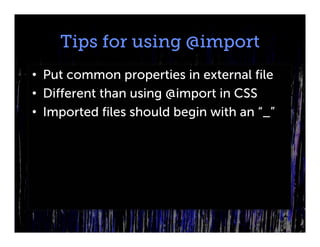
Tips for using @import
• Put common properties in external file
• Different than using @import in CSS
• Imported files should begin with an “_”
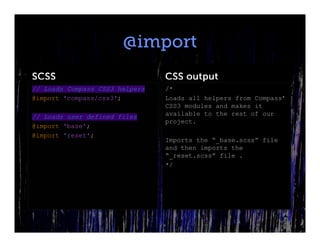
@import
SCSS                            CSS output
// Loads Compass CSS3 helpers   /*
@import 'compass/css3';         Loads all helpers from Compass’
                                CSS3 modules and makes it
// Loads user defined files     available to the rest of our
                                project.
@import 'base';
@import 'reset';
                                Imports the “_base.scss” file
                                and then imports the
                                “_reset.scss” file .
                                */
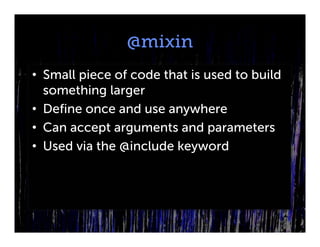
@mixin
• Small piece of code that is used to build
  something larger
• Define once and use anywhere
• Can accept arguments and parameters
• Used via the @include keyword
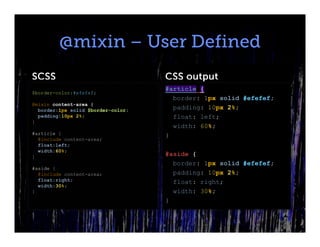
@mixin – User Defined
SCSS                                CSS output
                                    #article {
$border-color:#efefef;
                                      border: 1px solid #efefef;
@mixin content-area {
  border:1px solid $border-color;     padding: 10px 2%;
  padding:10px 2%;                    float: left;
}
                                      width: 60%;
#article {                          }
  @include content-area;
  float:left;
  width:60%;
}                                   #aside {
                                      border: 1px solid #efefef;
#aside {
  @include content-area;              padding: 10px 2%;
  float:right;                        float: right;
  width:30%;
}                                     width: 30%;
                                    }
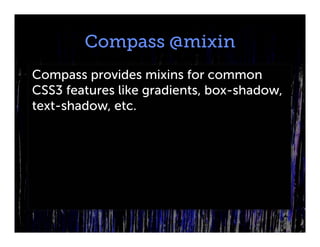
Compass @mixin
Compass provides mixins for common
CSS3 features like gradients, box-shadow,
text-shadow, etc.
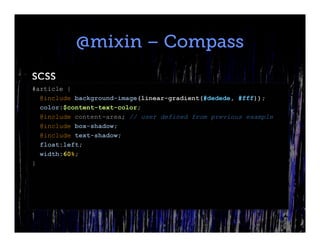
@mixin – Compass
SCSS
#article {
  @include background-image(linear-gradient(#dedede, #fff));
  color:$content-text-color;
  @include content-area; // user defined from previous example
  @include box-shadow;
  @include text-shadow;
  float:left;
  width:60%;
}
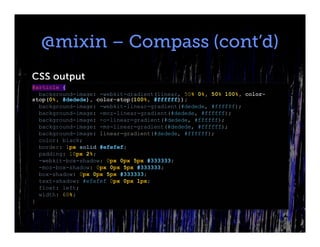
@mixin – Compass (cont’d)
CSS output
#article {
  background-image: -webkit-gradient(linear, 50% 0%, 50% 100%, color-
stop(0%, #dedede), color-stop(100%, #ffffff));
  background-image: -webkit-linear-gradient(#dedede, #ffffff);
  background-image: -moz-linear-gradient(#dedede, #ffffff);
  background-image: -o-linear-gradient(#dedede, #ffffff);
  background-image: -ms-linear-gradient(#dedede, #ffffff);
  background-image: linear-gradient(#dedede, #ffffff);
  color: black;
  border: 1px solid #efefef;
  padding: 10px 2%;
  -webkit-box-shadow: 0px 0px 5px #333333;
  -moz-box-shadow: 0px 0px 5px #333333;
  box-shadow: 0px 0px 5px #333333;
  text-shadow: #efefef 0px 0px 1px;
  float: left;
  width: 60%;
}

Sass and Compass - Getting Started

  • 1.
    Sass & Compass Presented by: Ethan Gardner
  • 2.
    What is Sass? •CSS preprocessor written in Ruby • Compiles to regular CSS • Adds many helpful features to CSS… Official Documentation: http://sass-lang.com/docs/yardoc/file.SASS_REFERENCE.html
  • 3.
    What is Compass? •An extension of Sass • Contains many CSS3 helpers used in modern web development. • Adds many helpful features to CSS… Official Documentation: http://compass-style.org/reference/compass/
  • 4.
    Retrofitting Compass to Existing Project $ compass create --bare --sass- dir "sass" --css-dir "." -- javascripts-dir "assets/scripts" --images-dir "images" Installation: http://compass-style.org/install/
  • 5.
  • 6.
    Changing Options To changethese options after Compass has been added to the project, you can always edit the “config.rb” file
  • 7.
    Starting Compass Navigate tothe directory that contains the “config.rb” file in the command line and type: compass watch
  • 8.
    Variables • Common valuescan assigned to variables for use throughout a project. • One of the best features of Sass • $variable-name: value;
  • 9.
    Using Variables SCSS CSS output $accent-color:#17CF57; h1 { color: #17cf57; h1 { } color:$accent-color; } fieldset { border: 1px solid #17cf57; fieldset { } border:1px solid $accent-color; } caption { caption { background: #17cf57; background:$accent-color; color: #fff; color:#fff; } }
  • 10.
    Working with Variables •Assign at the top of the file or in an external file • Great for consistency • Benefits are apparent with larger files
  • 11.
    Nested Rules Rules canbe nested to add specificity to a selector.
  • 12.
    Adding Specificity withNested Rules SCSS CSS output ul { ul { list-style-type: disc; list-style-type: disc; li { } padding:10px; ul li { } padding: 10px; } }
  • 13.
    Ampersands in NestedRules When nested rules are used, an ampersand adds properties to a child selector and is useful for pseudo classes like :hover.
  • 14.
    Ampersands in NestedRules SCSS CSS output a { a { text-decoration:none; text-decoration: none; &:hover { } text-decoration:underline; a:hover { } text-decoration: underline; } }
  • 15.
    Ampersands in NestedRules (cont’d) SCSS CSS output p { p { font-size:14px; font-size: 14px; &.error { } color:#f00; p.error { font-weight:bold; color: #f00; } font-weight: bold; } }
  • 16.
    Did you catchthe difference? Notice there is no space between p and .error in the CSS from the previous example.
  • 17.
    If you WANTEDa space… SCSS CSS output p { p { font-size:14px; font-size: 14px; .error { } color:#f00; p .error { font-weight:bold; color: #f00; } font-weight: bold; } }
  • 18.
    Multiple Nesting You don’thave to stop at one level of nesting. Multiple levels of nesting can be VERY powerful.
  • 19.
    Multiple Nesting SCSS CSS output .tablesorter { .tablesorter { border:1px solid #000; border: 1px solid #000; thead { } background:#000; .tablesorter thead { color:#fff; background: #000; th { color: #fff; text-align:center; } } .tablesorter thead th { } text-align: center; tr { } background:#fff; .tablesorter tr { } background: #fff; } }
  • 20.
    @extend @extend uses theproperties of a selector as the foundation for another selector
  • 21.
    @extend SCSS CSS output .session { .session, .keynote, .company { padding-left:8px; padding-left: 8px; padding-right:20px; padding-right: 20px; background-repeat:repeat-y; } background-repeat: repeat-y; } .keynote { @extend .session; .keynote { background-image:url(cat-1.png); } background-image: url(cat-1.png); } .company { @extend .session; .company { background-image:url(cat-2.png); background-image: url(cat-2.png); } }
  • 22.
    @import Properties can beimported from other Sass files.
  • 23.
    Tips for using@import • Put common properties in external file • Different than using @import in CSS • Imported files should begin with an “_”
  • 24.
    @import SCSS CSS output // Loads Compass CSS3 helpers /* @import 'compass/css3'; Loads all helpers from Compass’ CSS3 modules and makes it // Loads user defined files available to the rest of our project. @import 'base'; @import 'reset'; Imports the “_base.scss” file and then imports the “_reset.scss” file . */
  • 25.
    @mixin • Small pieceof code that is used to build something larger • Define once and use anywhere • Can accept arguments and parameters • Used via the @include keyword
  • 26.
    @mixin – UserDefined SCSS CSS output #article { $border-color:#efefef; border: 1px solid #efefef; @mixin content-area { border:1px solid $border-color; padding: 10px 2%; padding:10px 2%; float: left; } width: 60%; #article { } @include content-area; float:left; width:60%; } #aside { border: 1px solid #efefef; #aside { @include content-area; padding: 10px 2%; float:right; float: right; width:30%; } width: 30%; }
  • 27.
    Compass @mixin Compass providesmixins for common CSS3 features like gradients, box-shadow, text-shadow, etc.
  • 28.
    @mixin – Compass SCSS #article{ @include background-image(linear-gradient(#dedede, #fff)); color:$content-text-color; @include content-area; // user defined from previous example @include box-shadow; @include text-shadow; float:left; width:60%; }
  • 29.
    @mixin – Compass(cont’d) CSS output #article { background-image: -webkit-gradient(linear, 50% 0%, 50% 100%, color- stop(0%, #dedede), color-stop(100%, #ffffff)); background-image: -webkit-linear-gradient(#dedede, #ffffff); background-image: -moz-linear-gradient(#dedede, #ffffff); background-image: -o-linear-gradient(#dedede, #ffffff); background-image: -ms-linear-gradient(#dedede, #ffffff); background-image: linear-gradient(#dedede, #ffffff); color: black; border: 1px solid #efefef; padding: 10px 2%; -webkit-box-shadow: 0px 0px 5px #333333; -moz-box-shadow: 0px 0px 5px #333333; box-shadow: 0px 0px 5px #333333; text-shadow: #efefef 0px 0px 1px; float: left; width: 60%; }